1
2. AWARD BIOS Setup
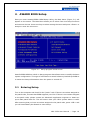
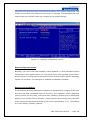
Once you enter Award® BIOS CMOS Setup Utility, the Main Menu (Figure 2-1) will
appear on the screen. The Main Menu allows you to select from nine setup functions
and two exit choices. Use arrow keys to select among the items and press <Enter> to
accept or enter the sub-menu.
Figure 2-1 Setup program initial screen
Award's BIOS ROM has a built-in Setup program that allows users to modify the basic
system configuration. This type of information is stored in battery-backed up CMOS so
it retains the Setup information when the power is turned off.
2.1
Entering Setup
Turn on the computer and check for the "patch” code. If there is a number assigned to
the patch code, it means that BIOS supports your CPU. If there is no number assigned
to the patch code, please contact an Advantech application engineer to obtain an
up-to-date patch code file. This will ensure that your CPU's system status is valid.
After ensuring that you have a number assigned to the patch code, press <DEL> and
you will immediately be allowed to enter Setup.
MIC-3359 User Manual --- Page 16