1
Question
Answer
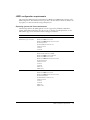
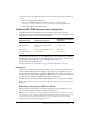
UNIX
Runtime user
Default is nobody (HP-UX must change this value).
For security reasons, it is crucial that you do not use root for
the runtime user.
Start at system startup (Solaris and
RedHat Linux only)
Yes | No
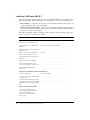
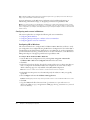
After running the installer, you must complete the installation process by running the
Configuration Wizard. You start the Configuration Wizard by opening the ColdFusion MX
Administrator. You should also plan your answers to the questions asked by the Configuration
Wizard.
Note: If you exit the browser before completing the Configuration Wizard, it continues from where
you stopped the next time the ColdFusion MX Administrator is opened.
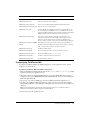
Question
Answer
Comment
Upgrade from ColdFusion MX
When upgrading from ColdFusion MX, the Configuration Wizard updates the ODBC services, but
does not ask any questions.
All other installation types
Enable RDS?
Yes | No
If enabling RDS, RDS password?
________________________
Install example applications and
getting started tutorial application?
Yes | No
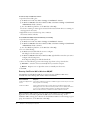
RDS allows the server to interact
with remotely connected
developers. It’s best to disable
RDS for production servers.
Disabling RDS also disables the
directory browsing applets in the
ColdFusion MX Administrator.
ColdFusion MX ships with a
variety of example applications.
Installing the example
applications also installs the
supporting files used by the
Getting Started Building
ColdFusion MX Applications
tutorial lessons. Do not use the
example applications if you are
installing into a production
environment.
Installing ColdFusion MX 6.1
21