1
DESCRIPTION Page
20
|
41
Operating guide for Alarm Receiver DECRYPTA 3
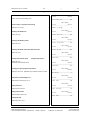
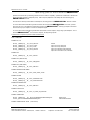
IDLE MODE. BROWSING RECEIVED EVENTS
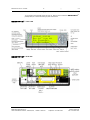
Idle Mode default display
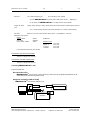
When not in configuration nor receiving signals, DECRYPTA
displays date on first line and time on second line. Press
browse events in the buffer.
or
3
to
......
......
00/12/07
00:12:04
......
......
Idle Mode Display options
• To permanently display Last Event received, set “Display Event”
(see above) to Yes.
• To change the format in which the date is displayed, see the “Date
Format” setting above.
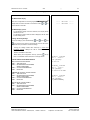
Locking / Unlocking Settings
To lock the settings, press simultaneously
and
, then
and
. You will see a lock symbol in the upper left corner of the screen.
Repeat the same procedure to unlock the settings.
•
•
•
Locking the settings makes them read-only to protect from
accidental changes. Settings can still be examined, but not
modified.
Reset is unavailable in this mode.
When leaving the configuration mode by pressing
at any
time, no confirmation will be asked, and no changes saved.
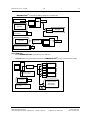
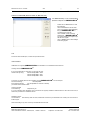
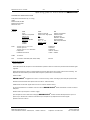
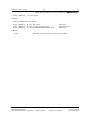
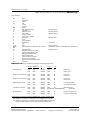
TYPICAL DISPLAYS–INCOMING SIGNALS
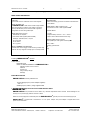
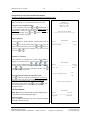
4X2, CALLER ID NATIVE FORMAT
LINE 1: TIME AND DATE
LINE 2: RECEIVER AND LINE NUMBER;
SIGNAL FROM PANEL
LINE 3: CALLER ID INFORMATION
LINE 4 RAW DATA
CONTACT ID, CALLER ID, NATIVE FORMAT
LINE 1: TIME AND DATE
LINE 2: RECEIVER AND LINE NUMBER;
SIGNAL FROM PANEL
LINE 3: CALLER ID INFORMATION
LINE 4 RAW DATA
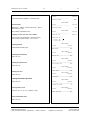
15:30:27__12/07/00
Rec: 1
Line: 2
CID: {4811067}
12 6161 F6
15:30:38__12/07/00
Rec: 1
Line: 2
CID: {4811067}
12 6262 E121 01 000
15:30:47__12/07/00
Rec: 1
Line: 2
CID: {4811067}
12 [#6363INHA000]
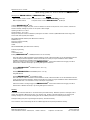
SIA, CALLER ID, NATIVE FORMAT
LINE 1: TIME AND DATE
LINE 2: RECEIVER AND LINE NUMBER;
SIGNAL FROM PANEL
LINE 3: CALLER ID INFORMATION
LINE 4 RAW DATA
MCDI Security Products Inc..
7055 Jean-Bourdon Avenue, Montreal, QC, Canada H4K 1G7
Telephone: +514-481-1067
Internet: mcdi.com
Fax: +514-481-1487