1
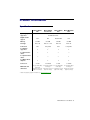
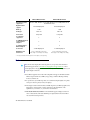
Matrox M9138 LP PCIe Operating Systems supported Matrox M9148 LP PCIe Windows 2000, Windows Server 2003, Windows Server 2008, Windows XP, and Windows Vista Digital monitor support Memory Card type DVI and DisplayPort DVI and DisplayPort 1 GB 1 GB PCIe ×16 PCIe ×16 Form factor Low-profile Low-profile # of displays supported 3 4 # of Mini DisplayPort to DisplayPort adapters 3 4 —* 4 3× Mini DisplayPort 4× Mini DisplayPort 6.6" (L) × 0.75" (W) × 2.712" (H) / 16.8 cm (L) × 1.91 cm (W) × 6.9 cm (H) 6.6" (L) × 0.75" (W) × 2.712" (H) / 16.8 cm (L) × 1.91 cm (W) × 6.9 cm (H) # of DisplayPort to DVI-D adapters Connectors Maximum card dimensions * DVI support available with DisplayPort to DVI adapter (sold separately). Notes Note: For the latest display driver and user guide for your product, check the Matrox Technical Support Web site (www.matrox.com/graphics/en/support/drivers). A more recent display driver may support more features and may offer increased capabilities (such as higher display resolutions). Your Matrox graphics card is 100% VGA compatible and supports all VESA standards: VBE 3.0 (Super VGA modes), DPMS (energy saving), and DDC-2B (Plug-and-Play monitor), and DDC-CI. To get the most of your Matrox product, we recommend using the highest color palette setting (a 32-bit color palette) for all your displays. The display resolutions and refresh rates available depend on your Matrox graphics card, display driver, software monitor settings, and monitor. For information on the capabilities of your monitor, see your monitor documentation. M9120, M9120 Plus LP, and M9125 – The maximum supported display resolution is 1920 × 1200 at 60 Hz (with reduced blanking) for digital (DVI) monitors and 2048 × 1536 at 85 Hz for analog monitors. 40 Matrox M-Series – User Guide