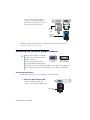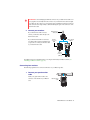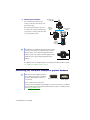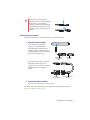
1
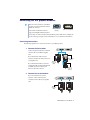
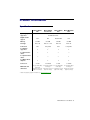
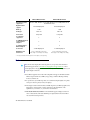
Overview Thank you for purchasing a Matrox M-Series graphics card. This is a high-performance graphics card that supports PCIe (PCI Express) ×1 or ×16 compliant systems and multi-monitor setups. Hardware supplied M9120 PCIe ×16 – Matrox graphics card, 2 DVI to HD-15 adapters. M9120 Plus LP PCIe ×1 or ×16 – Matrox graphics card, 1 dual-monitor cable (LFH-60 to DVI), 2 DVI to HD-15 adapters. M9125 PCIe ×16 – Matrox graphics card, 2 DVI to HD-15 adapters. M9138 LP PCIe ×16 – Matrox graphics card, 3 Mini DisplayPort to DisplayPort adapters. M9140 LP PCIe ×16 – Matrox graphics card, 1 quad-monitor cable (KX20 to DVI), 4 DVI to HD-15 adapters. M9148 LP PCIe ×16 – Matrox graphics card, 4 Mini DisplayPort to DisplayPort adapters, 4 DisplayPort to DVI-D adapters. Software available Matrox PowerDesk – to use your Matrox graphics hardware. Matrox provides 32-bit and 64-bit versions of the display driver. Matrox PowerDesk software supports only Windows 2000, Windows Server 2003, Windows Server 2008, Windows XP , and Windows Vista. Matrox makes new display drivers available on the Matrox Technical Support Web site (www.matrox.com/graphics/en/support/drivers). Minimum system requirements A system with PCI Express (PCIe) support 1 GHz 32-bit (×86) or 64-bit (×64) processor Windows XP – 128 MB of RAM or higher, Service Pack 3 Windows Vista – 512 MB of RAM or higher, Service Pack 1 Matrox M-Series – User Guide 5