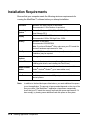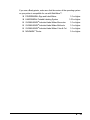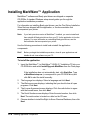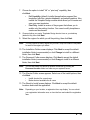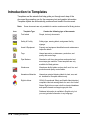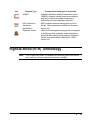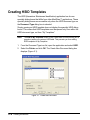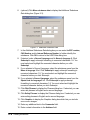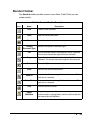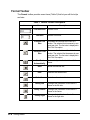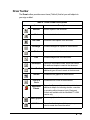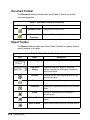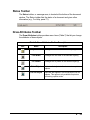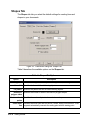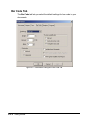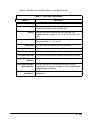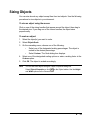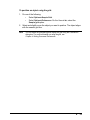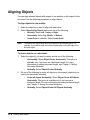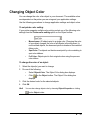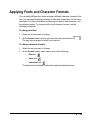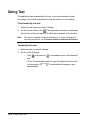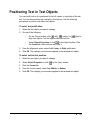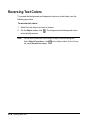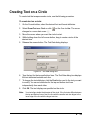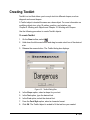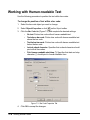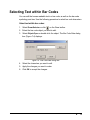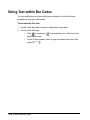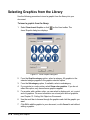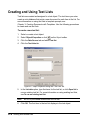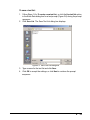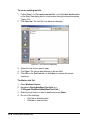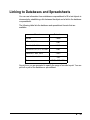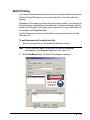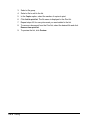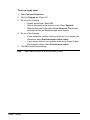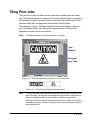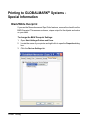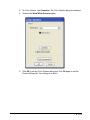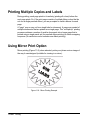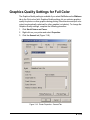
1
User Guide for MarkWare™ and MarkWare™ LEAN English Contents CHAPTER 1 Introduction About MarkWare™............................................................................................. 1-2 Contacting Technical Support ............................................................................ 1-3 CHAPTER 2 Installing Application Components Installation Requirements................................................................................... 2-2 Installing MarkWare™ ........................................................................................ 2-4 Installing Print Drivers ........................................................................................ 2-7 Connecting Brady Printers to a PC .................................................................... 2-9 Installing Brady Printers using USB Connections...................................... 2-10 Installing Printers using Serial Port Connections....................................... 2-11 Installing Printers using Parallel Port Connections .................................... 2-13 Changing the Display Language ...................................................................... 2-14 CHAPTER 3 Creating Documents Introduction to Templates ................................................................................... 3-2 Right-to-Know (RTK) Terminology ..................................................................... 3-3 Creating HSID Templates................................................................................... 3-4 Creating Documents with Templates.................................................................. 3-8 Setting Document Attributes ............................................................................ 3-14 CHAPTER 4 Getting Started Preparing the Printer .......................................................................................... 4-2 Launching the Application .................................................................................. 4-2 About the Application Toolbars........................................................................... 4-4 Standard Toolbar ......................................................................................... 4-5 Format Toolbar ............................................................................................ 4-6 Draw Toolbar ............................................................................................... 4-7 Document Toolbar ....................................................................................... 4-8 Object Toolbar ............................................................................................. 4-8 Status Toolbar.............................................................................................. 4-9 Draw Attributes Toolbar ............................................................................... 4-9 Contents-iii Setting Document Preferences ........................................................................ 4-10 Document Tab............................................................................................ 4-10 Shapes Tab................................................................................................ 4-12 Text Tab ..................................................................................................... 4-13 Bar Code Tab............................................................................................. 4-14 Graphics Tab.............................................................................................. 4-16 Program Tab .............................................................................................. 4-17 CHAPTER 5 Working with Objects Selecting Objects ............................................................................................... 5-2 Sizing Objects .................................................................................................... 5-3 Positioning Objects............................................................................................. 5-4 Aligning Objects ................................................................................................. 5-6 Changing Object Color ....................................................................................... 5-7 Rotating Objects................................................................................................. 5-8 Framing Objects ................................................................................................. 5-9 Moving Objects to the Front or Back .................................................................. 5-9 Grouping and Ungrouping Objects................................................................... 5-10 Cutting, Copying, and Pasting Objects............................................................. 5-11 Deleting Objects ............................................................................................... 5-12 Using the Undo Command ............................................................................... 5-12 For More Information........................................................................................ 5-12 CHAPTER 6 Working with Text Creating Text Boxes ........................................................................................... 6-2 Selecting Text and Text Objects ......................................................................... 6-4 Applying Fonts and Character Formats.............................................................. 6-5 Sizing Text .......................................................................................................... 6-6 Positioning Text in Text Objects.......................................................................... 6-7 Reversing Text Colors ........................................................................................ 6-8 Creating Text on a Circle .................................................................................... 6-9 Creating Vertical Text ....................................................................................... 6-10 Creating TextArt ............................................................................................... 6-11 CHAPTER 7 Working with Bar Codes Creating Bar Codes............................................................................................ 7-2 Setting Bar Code Density and Ratio................................................................... 7-3 Working with Human-readable Text ................................................................... 7-4 Selecting Text within Bar Codes......................................................................... 7-5 Sizing Text within Bar Codes.............................................................................. 7-6 Contents-iv CHAPTER 8 Working with Graphics Selecting Graphics from the Library................................................................... 8-2 Importing Graphics from Outside of the Application........................................... 8-3 CHAPTER 9 Working with Variable Data Creating Sequences........................................................................................... 9-2 Creating and Using Text Lists ............................................................................ 9-4 Linking to Databases and Spreadsheets............................................................ 9-7 Prompting for Data at Print Time...................................................................... 9-10 Creating Date/Time Stamps ............................................................................. 9-11 CHAPTER 10 Working with Shapes Using Equipment Visuals ................................................................................. 10-2 Using Draw Tools and HotShapes ................................................................. 10-12 CHAPTER 11 Printing Previewing Documents .................................................................................... 11-2 Printing a Document Proof ............................................................................... 11-3 Printing Documents.......................................................................................... 11-4 Print ........................................................................................................... 11-4 QuickPrint .................................................................................................. 11-6 Batch Printing ............................................................................................ 11-7 Using Supply Saver.......................................................................................... 11-9 Tiling Print Jobs...............................................................................................11-11 Printing to GLOBALMARK® Systems - Special Information .......................... 11-12 Printing Multiple Copies and Labels............................................................... 11-14 Using Mirror Print Option................................................................................ 11-14 Graphics Quality Settings for Full Color ......................................................... 11-15 CHAPTER 12 Cutting Out Objects or Documents Cutting Out Documents.................................................................................... 12-2 Cutting Out Text ............................................................................................... 12-3 Cutting Out Graphics and Shapes ................................................................... 12-6 Contents-v © 2008 Brady Worldwide, Inc. All Rights Reserved. MarkWareTM (hereafter “MarkWare”) User’s Guide This manual is proprietary to Brady Worldwide, Inc. (hereafter “Brady”), and may be revised from time to time without notice. Brady disclaims any understanding to provide you with such revisions, if any. All brand or product names referenced in this manual are trademarks (TM) or registered trademarks (®) of their respective companies or organizations. Protected by US Patent 5,823,689. Written and designed by Varitronics, a business unit of Brady Worldwide, Inc., 6835 Winnetka Circle, Brooklyn Park, Minnesota 55428, USA. Contents-vi BRADY WORLDWIDE, INC. YOU SHOULD CAREFULLY READ THE FOLLOWING TERMS AND CONDITIONS OF THIS LICENSE AGREEMENT BEFORE OPENING THIS PACKAGE. IF YOU DO NOT AGREE WITH THESE TERMS AND CONDITIONS, PLEASE PROMPTLY RETURN THIS PACKAGE FOR A FULL REFUND. LICENSE AGREEMENT Brady Worldwide, Inc. (hereafter "Brady") hereby grants you a non-exclusive, nontransferable license to use this software and the accompanying documentation according to the following terms: 1. LICENSE GRANT: You may 1) install the software on only one computer at a time, and 2) make one (1) copy of the software in machine readable form solely for backup purposes. 2. LICENSE RESTRICTIONS: You may not: 1) transmit the software over a network without an additional license; 2) modify, adapt, translate, reverse engineer, decompile, disassemble, create derivative works based on, or copy (except for the backup copy) this software or the accompanying documentation; 3) rent, transfer or grant any rights in the software or accompanying documentation without the prior, express written consent of Brady; or 4) remove any proprietary notices, labels, or marks on the software and accompanying documentation. 3. NATURE OF THIS AGREEMENT: This license is not a sale. License fees paid by you, if any, are in consideration of the licenses granted under this Agreement. Title and copyrights to the software, accompanying documentation, and any copy made by you, remain the property of Brady or its suppliers. Unauthorized copying of the software or the accompanying documentation, or failure to comply with the above restrictions, shall automatically terminate this license, without further notice, and terminate your rights to use the software, and Brady shall, in addition to its other legal remedies, be entitled to its reasonable attorney fees. 4. LIMITED WARRANTY: Brady warrants that, for a period of ninety (90) days from the date of delivery to you as evidenced by a copy of your receipt, the software, as furnished, under normal use, will perform without significant errors that make it unusable. Brady's entire liability and your exclusive remedy under this warranty (which is subject to you returning the software to Brady) will be, at the option of Brady, to attempt to correct or help you around errors, to replace the software with functionally equivalent software or diskettes, or to refund the license fee of the software and terminate this Agreement. EXCEPT FOR THE ABOVE EXPRESS LIMITED WARRANTY, BRADY MAKES AND YOU RECEIVE NO WARRANTIES, EXPRESS, IMPLIED, STATUTORY OR IN ANY COMMUNICATION WITH YOU, AND BRADY SPECIFICALLY DISCLAIMS ANY IMPLIED WARRANTY OF MERCHANTABILITY OR FITNESS FOR A PARTICULAR PURPOSE. BRADY DOES NOT WARRANT THAT THE OPERATION OF THE PROGRAM WILL BE UNINTERRUPTED OR ERROR FREE. Some states do not allow the exclusion of implied warranties so the above exclusions may not apply to you. This warranty gives you specific legal rights. You may also have other rights which vary from state to state. Contents-vii 5. LIMITATION OF LIABILITY: IN NO EVENT WILL BRADY BE LIABLE FOR ANY DAMAGES, INCLUDING LOSS OF DATA, WHEN LOADING THIS SOFTWARE OR OTHERWISE, OR LOST PROFITS, COST OF COVER OR OTHER SPECIAL, INCIDENTAL, CONSEQUENTIAL OR INDIRECT DAMAGES ARISING FROM THE USE OF THE PROGRAM OR ACCOMPANYING DOCUMENTATION, HOWEVER CAUSED AND ON ANY THEORY OF LIABILITY. THIS LIMITATION WILL APPLY EVEN IF BRADY HAS BEEN ADVISED OF THE POSSIBILITY OF SUCH DAMAGE. Some states do not allow the limitation or exclusion of liability for incidental, or consequential damages, so the above limitation may not apply to you. 6. viii GENERAL: This Agreement shall be governed by, and interpreted under, the laws of the State of Wisconsin, USA. You acknowledge that U.S. law and regulations may restrict the export/re-export of the software. You agree not to export/re-export the software or portions thereof in any form without the appropriate U.S. and foreign government licenses. This obligation shall survive and continue after this Agreement terminates. This Agreement is the entire agreement between the parties and supersedes any other communications or advertising with respect to the software and accompanying documentation. If any provision of this Agreement is held invalid, the remainder of this Agreement shall continue in full force and effect. 6555 West Good Hope Road, P.O. Box 571, Milwaukee, Wisconsin 53201-0571, USA, tlf. +1 (414) 358-6600 CHAPTER 1 Introduction Thank you for choosing Brady Worldwide MarkWareTM facility identification software. MarkWare is a Windows®-based application used to create a variety of labels, signs, tags, pipe markers, and other industrial identification. This guide provides a brief overview of MarkWare, describes installation procedures, and provides basic instruction on how to start the application and create documents. Topics in this chapter include: About MarkWare™ Contacting Technical Support 1-1 About MarkWare™ The following features make MarkWare™ facility identification software easy-touse, flexible, and powerful: A label creation wizard that guides you through the process of creating the desired output. A Help button that automatically opens the User guide, which contains detailed information about every aspect of the application. A complete stock of pre-designed templates and ready-to-use artwork that simplify the creation of commonly used signs, labels, and other industrial identification. A full range of editing and drawing tools that let you customize designs. A connection to roll-fed printers that lets you use Brady high performance ribbons and tapes. An easily accessible library of international standard graphics containing over 800 industrial graphics and safety graphics. 1-2 Introduction Contacting Technical Support Please contact Brady Worldwide, Inc. with any questions or concerns. The contact support numbers for each region are listed below. Americas www.bradycorp.com United States 800-643-8766 [email protected] Canada 888-262-7576 [email protected] Mexico 0 1-800-112-7239 [email protected] Brazil 55 11 3604-7700 [email protected] Other (Americas) 414-438-6868 [email protected] Europe www.bradyeurope.com Austria +49 6032 8091 800 [email protected] Benelux and other European countries +32 52457 397 (Dutch) +32 52457 393 (French) +32 52457 394 (English) +32 52457 390 (German) [email protected] France Signmark +33 4 72 66 26 80 [email protected] Germany Signmark +49 6032 8091 800 [email protected] Italy +39 029 628 60 14 [email protected] Spain +33 437 245 234 [email protected] Switzerland +49 6032 8091 800 [email protected] United Kingdom +44 1295 228 205 [email protected] Nordic Region +46 (0) 8590 057 33 [email protected] Eastern Europe +36 23 42 85 26 [email protected] Pacific www.bradyaust.com.au Australia 1800 644 834 [email protected] New Zealand 0800 446 269 [email protected] 1 -3 1-4 Introduction CHAPTER 2 Installing Application Components The MarkWare™ installation and print driver CDs provide all the files necessary for installing the application and the print drivers for Brady printers. Topics in this chapter include: Installation Requirements Installing MarkWare™ Application Installing Print Drivers Connecting Brady Printers to a PC Changing the Display Language 2-1 Installation Requirements Be sure that your computer meets the following minimum requirements for running the MarkWare™ software before you attempt installation: Processor Minimum: 400 MHz Pentium or equivalent Recommended: 1 GHz Pentium or equivalent Operating System Microsoft® Windows® 2000 (SP4), XP PRO (SP3), or Vista Ultimate (SP1). Display Minimum: 640 x 480 at 256 colors Recommended: 1024 x 768 High Color, 32 Bit Memory Minimum: 96 MB RAM Recommended: 256 MB RAM Note: If you have Windows® Vista, make sure your PC meets the minimum hardware requirements for Vista. Disk Space Up to 500 MB of available hard disk space (for a complete installation) may be required. Internet Explorer 6.0 or greater Printer Drivers Shipped with select printers or software. (For more information on installing print drivers, see Installing the Print Driver.) Adobe Acrobat Reader 6.0 or greater recommended (To load the latest version of the Adobe® Acrobat® Reader®, go to /www.adobe.com/) Drives CD-ROM Drive Data Ports Available parallel, serial, or USB port, plus data cable for all desired printers Note: 2-2 In addition to the hard disk space listed above, you need additional free space to run the application. The amount of space needed depends on the size of the files you create. If the MarkWare™ application closes down unexpectedly, check that your PC meets the memory and hard disk space requirements. If it does comply, try clearing some additional hard disk space on the system. Installing Application Components If you use a Brady printer, make sure that the version of the operating system on your printer is compatible for use with MarkWare™. POWERMARK® Sign and Label Maker ® HANDIMARK Portable Labeling System ® 1.0 or higher 1.05 or higher GLOBALMARK Industrial Label Maker Monocolor 1.0 or higher GLOBALMARK® Industrial Label Maker Multicolor 1.0 or higher ® GLOBALMARK Industrial Label Maker Color & Cut ™ MINIMARK Printer 1.0 or higher 3.4 or higher 2 -3 Installing MarkWare™ Application MarkWare™ software and Brady print drivers are shipped on separate CD-ROMs. A standard Windows setup wizard guides you through the application installation procedure. For information on installing Brady print drivers, see the Print Driver Installation Sheet that was shipped with the application, or the documentation that accompanied your printer. Note: If you had a previous version of MarkWare™ installed, you must uninstall and then reinstall all Brady print drivers from your PC for the application to function properly. For more information on uninstalling Brady print drivers, see the documentation that accompanied your printer. Use the following procedures to install and uninstall the application components. Hint! Before you begin the installation procedure, close all open applications and disable all anti-virus software on your PC. To install the application: 1. Insert the MarkWare™ (or MarkWare™ LEAN) 3.7 Installation CD into your CD-ROM drive and select Install/Upgrade MarkWare from the Flash page. - or If the installation does not automatically start, click Start>Run. Type x:\MarkWare\setup.exe (x corresponds to your CD-ROM drive) and click OK to start the install manually. 2. The Language box displays. Select a language and click Next. 3. The Welcome screen displays, indicating that you should close all open programs. Click Next. 4. The License Agreement screen displays. Click the radio button to agree with the license terms, then click Next. 5. The Serial Number screen displays. Enter the serial number, then click Next. The serial number is located on a label on the CD case. 6. Choose whether to install the Right-to-Know Chemical Database, then click Next. 2-4 Installing Application Components 7. Choose the option to install “full” or “print only” capability, then click Next. • • Full Capability (default): Installs the application program files, templates, help files, sample databases, and sample graphics. Also installs the Template Design module which allows you to create and save your own templates. Print Only: Installs a version of the program that allows you to enable only the printing function. You cannot modify templates or create new documents. 8. Choose whether you want a Templates Design shortcut icon on your desktop (default is No), then click Next. 9. Select the regions for which you will be printing, then click Next. Note: You may choose as many regions as you want. Setup will install the templates for each of the regions you select. 10. The Installation Folder screen displays. Click Next to accept the default installation folder (recommended) or click Change to install to a different folder, then click Next. 11. The Document Folder screen displays. Click Next to accept the default installation folder (recommended) or click Change to install to a different folder, then click Next. Note: You can also share files across a network connection by pointing the Document Location folder to a folder on your system’s server. 12. The Shortcut Folder screen appears. Select one of the install options, then click Next. • Install shortcut for current user • Make shortcut available for all users 13. The Ready to Install screen displays. Click Next to accept the default locations and install the application. Note: Depending on your location, a registration form may display. You can submit your registration information now, or close the form and submit the registration later. 2 -5 To uninstall the application: Hint! This procedure uninstalls MarkWare™ (or MarkWare™ LEAN) version 3.7 only. To uninstall earlier versions, refer to the documentation that accompanied that software version. 1. On the Windows taskbar, click Start>Settings>Control Panel. 2. On the Control Panel, double-click the Add or Remove Programs. 3. Highlight MarkWare (or MarkWare LEAN) and click Remove. 4. In the MarkWare Uninstaller window, click Next. 5. When prompted, click the option to save or remove your installed templates. If you choose to save your old templates, the folder is renamed “Template Backup” and is not removed. Figure 2-1. Uninstall Templates 6. When the uninstall is complete, click Finish to exit the program. Note: 2-6 This procedure does not remove print drivers. For more information on removing print drivers, see the documentation that accompanied your printer. Installing Application Components Installing Print Drivers If your POWERMARK®, HANDIMARK®, or GLOBALMARK® Brady print drivers are older than version 1.0, you must delete them and install the new print drivers. The MarkWare™ (or MarkWare™ LEAN) application and the Brady print drivers are shipped on 2 separate CD-ROMs. Use the Printer Drivers CD-ROM to add to, or upgrade, your print drivers. To delete old Brady print drivers: 1. Select Start>Settings>Printers or Start>Printers and Faxes. 2. In the Printers and Faxes list, click on the Brady printer you want to delete, then press Delete. 3. Select File>Server Properties and click the Drivers tab. 4. Choose the print driver you want to delete, then click Remove and Yes to confirm the deletion. 5. Repeat Steps 2-4 to delete all Brady print drivers. 6. When all of the print drivers are deleted, reboot your computer. 2 -7 To install new Brady print drivers: A standard Windows setup wizard guides you through the print driver installation procedure. Note: For maximum quality, documents created with MarkWare™ should only be printed to Brady printers or to printers using Brady supplies. 1. Insert the Printer Drivers CD into your CD-ROM drive and double-click the Printer Driver Install.exe icon. 2. Select a language and click Next. 3. On the Printer Setup screen, choose the printer(s) for the drivers you want to install, then click Next. 4. From the Choose Printer Port screen, highlight your printer port (i.e., USB, COM or LPT) and click OK. Note: If you are installing multiple print drivers, repeat Step 4 until a print port has been selected for each printer. 5. On the Ready to Install screen, click Next. The installation will begin. 6. On the Configure screen, click Next. 7. Click Yes to make this your default printer, otherwise click No. 8. When the installation is complete, click Yes to restart your computer, or No to restart your computer at a later time. Note: It is not necessary to restart your computer if this print driver is installed to replace an old print driver. 9. Remove the Printer Drivers CD-ROM from your drive, then click Finish. 10. To connect a Brady printer to a personal computer, see Connecting Brady Printers to a PC. 2-8 Installing Application Components Connecting Brady Printers to a PC Before you can use your personal computer to print to your label printing system or to transfer files, your label printing system must be set up as a new hardware device. Use these instructions to install Brady printers (and print drivers, if needed) for the following labeling systems using any of the available connection options: Printer Connection Options USB POWERMARK® X GLOBALMARK® X HANDIMARK MINIMARK™ Note: ® Serial Parallel X X X X X X Ignore these instructions if you are using Windows®-compatible inkjet or laser printers. 2 -9 Installing Brady Printers using USB Connections Use the following procedure to connect your printer to a computer using a USB connection. GLOBALMARK®, POWERMARK® or MINIMARK® USB Connections Note: If you are using Windows Vista, you must connect your printer via a USB cable. If your computer is running Windows 2000 or XP, we recommend that you connect your printer via a USB cable. 1. Connect the AC adapter from the printer to the power outlet. DO NOT apply power. 2. Turn off the computer, if necessary. 3. Connect the USB cable (E200534) from the printer to the USB port on the computer. 4. Turn on the printer and wait for the Main Menu screen to display. 5. Turn on the computer. The Found New Hardware Wizard dialog box appears. 6. On the computer, click Install the software automatically (Recommended). If the USB driver has been previously downloaded to the hard drive or network drive, select a specific location option (GLOBALMARK®: USB, POWERMARK®: PM3USB or MINIMARK™: USB001): Note: When the MarkWare™ software is installed, the USB driver for a MINIMARK™ printer is installed automatically and the virtual port (USB001) appears when the printer is connected to the PC for the first time. - or Select Search for suitable driver for my device, then click Next. When the Locate Driver Files screen appears, select your CD-ROM drive and click Next. Note: You only need the Print Driver CD-ROM if you did not previously install the print driver for this device. 7. Once installation is complete, the Completing the Found New Hardware Wizard dialog box displays. Click Finish to close the wizard. 8. See the User Guide for your printer to complete any additional setup requirements. 2-10 Installing Application Components Installing Printers using Serial Port Connections Use the following procedures to connect your printer to a computer using a Serial Port connection. Note: To add a USB printer to your system, see Installing Brady Printers using USB Connections. GLOBALMARK® Serial Connection Although it is possible to install a GLOBALMARK® printer using a serial printer on Windows® 2000 computers, Brady recommends a USB connection for a faster, more reliable data transmission. 1. Connect the PC data cable to the printer and to the 9-pin serial port on your computer. Note: If needed, you can order the GLOBALMARK® cable kit (Brady Part No. 76805) from your distributor. 2. Turn on the printer. 3. On the GLOBALMARK® touch screen: a. Click Setup and go to the Online tab. b. Select Serial. c. Click OK to accept the changes. d. Press Online. 2-11 HANDIMARK® or MINIMARK™ Serial Connections 1. Connect the PC data cable to the printer and to the 9-pin serial port on your computer. Note: If needed, you can order the HANDIMARK® cable kit (Brady Part No. 42004) from your distributor. 2. Turn on the printer. 3. Set the printer to online as follows (for a MINIMARK™ printer, go to Step 4): • HANDIMARK®: Press 2nd key. On the HANDIMARK® keypad, press Online/Escape. 4. Insert the Printer Drivers CD-ROM into the drive and follow the on-screen directions: • • • From the Select Printer screen, choose your printer, then click OK. Click OK and complete the installation process. At the Choose Printer Port window, click Configure Port and verify the following setups: HANDIMARK® MINIMARK™ Baud rate 19200 (or 38400) 9600 Stop bits 1 1 None None 8 8 Xon/Xoff Xon/Xoff Parity Data bits Flow control 5. Click OK to accept the changes, then click Yes to reboot your computer. 2-12 Installing Application Components Installing Printers using Parallel Port Connections Use the following procedure to connect your printer to a computer using a Parallel Port connection. Note: If you are using Windows® Vista, you must connect to your POWERMARK® printer with a USB connection. See Installing Brady Printers using USB Connections for installation instructions. POWERMARK® or MINIMARK™ Parallel Connections 1. Connect the PC data cable to the printer and to the 25-pin LPT parallel port on your computer. Note: The printer uses a standard IEEE1284 parallel bi-directional cable. If needed, order Brady Part No. 13509 from your distributor. 2. Turn on the printer. 3. POWERMARK® printer (for a MINIMARK™ printer, go to Step 4. ): a. POWERMARK® keyboard, press Online. b. On your computer, set the parallel port to Standard or Bi-directional mode (ECP or EPP mode cannot be used). Note: If you experience problems, check the BIOS settings on your computer to ensure that the proper mode is selected. 4. Insert the Print Drivers CD-ROM into your CD-ROM drive and follow the onscreen directions: a. From the Select Printer screen, choose POWERMARK® or MINIMARK™, then click OK. b. From the Choose Printer Port screen, choose LPT1, then click OK. c. When the installation process is complete, click Finish, then Yes to reboot your computer. 2-13 Changing the Display Language Once you start using MarkWare™, you can change the language of the screens. For instance, you can switch from English to French. To change display languages: 1. From the Options menu, select Preferences. 2. Select the Program tab and choose the appropriate language. 3. Click OK. The screen(s) will change to the selected language. 2-14 Installing Application Components CHAPTER 3 Creating Documents The signs, labels, and tags you create in the MarkWare™ application are called documents. Documents can be saved as files that can be used again. The application provides pre-designed layouts, called templates, to create a variety of commonly-used industrial sign, tag, and label applications. You can group and save frequently-used templates in one easy-to-find location using the My Templates feature. If you installed the template design capabilities for the application, you can modify and save templates to meet your own needs. Contact Technical Support for more information on using the template design feature. Topics in this chapter include: Introduction to Templates Right-to-Know (RTK) Terminology Creating HSID Templates Creating Documents with Templates Setting Document Attributes 3-1 Introduction to Templates Templates are like wizards that help guide you through each step of the document by prompting you for the necessary text and graphic information. Template objects are automatically positioned and sized in the document. Note: Icon Some documents are only available for certain countries and for Brady printers. Template Type Creates the following type of documents: Text Labels Simple, text-only documents. Safety & Facility Safety signs, warning labels, and general facility signage. Asset & Equipment Property and equipment identification and maintenance inspection labels. Tags Hazard prevention, maintenance, production, and quality and control tags. Pipe Markers Standard or roll-form pipe markers and symbol and arrow-tape pipe markers. These templates are only available for Brady printers. Warehouse Warehouse facility labels such as shelf, rack, bin, and production and quality control labels. Hazardous Materials Hazardous material shipping labels for land, sea, and air. Installed for European markets only. Right-to-Know OSHA (Occupational Safety and Health Administration) compliant chemical warning labels for use in the United States. Right-to-know uses a built-in chemical database and specific hazard and target organ pick lists. Database information is available in English only, but you can type label information in any language. 3-2 Creating Documents Icon Template Type Creates the following type of documents: WHIMIS Workplace Hazardous Materials Information system (WHMIS). Canada’s national hazard communication program for hazardous workplace chemicals of controlled products and hazardous materials. HSID (Hazardous Substances Identification) HSID compliant chemical warning labels for use in Europe. These templates are installed for European regions only. Equipment Visuals Labels that can be applied to gauges and moving parts to visually see when equipment needs maintenance performed without taking actual readings. Equipment Visuals are available with the MarkWare™ LEAN version only. Right-to-Know (RTK) Terminology Note: If you’ve previously used RTK templates and software, please note that the term, reactivity, has been replaced with the term, instability. 3 -3 Creating HSID Templates The HSID (Hazardous Substances Identification) application has its own specialty dialog boxes that differ from other MarkWare™ applications. These specialty dialog boxes are accessible only when the HSID document type on the Document Type dialog box is selected. Simply opening an HSID template does not display the specialty HSID dialog boxes. This means that HSID templates must be opened only from within the HSID document type, not from “My Templates.” Note: The Add to My Templates button on the Create New Document dialog box is greyed out when you create an HSID label. This prevents you from adding HSID templates in My Templates. 1. From the Document Type icon list, open the application and select HSID. 2. Select the Printer and click OK. The Create New Document dialog box displays (Figure 3-1). Figure 3-1. Create New Document 3-4 Creating Documents 3. Select a template from the list and click OK. The HSID Data dialog box displays (Figure 3-2). Figure 3-2. HSID Data 4. In the Name field, enter or select a hazardous substance. Click Subscript to apply subscript formatting to numerical characters 1-9. You must select and highlight the numerical character before you click Subscript. 5. In the Special text field, enter any additional text. Click Subscript to apply subscript formatting to numerical characters 1-9. You must select and highlight the numerical character before you click Subscript. 3 -5 6. (optional) Click More substance data to display the Additional Substance Data dialog box (Figure 3-3). Figure 3-3. Additional Substance Data 7. In the Additional Substance Data dialog box you can enter the EEC number, CAS Number and/or Internal Reference Number to further identify the substance. Click OK to return to the HSID Data dialog box. 8. If desired, enter a Second Language and its Name in language 2. Click Subscript to apply subscript formatting to numerical characters 1-9. You must select and highlight the numerical character before you click Subscript. 9. If you selected a Second Language, select the substance name from the Name in language 2 list. Click Subscript to apply subscript formatting to numerical characters 1-9. You must select and highlight the numerical character before you click Subscript. 10. If you selected a Second Language, select the substance name from the Special text for language 2 list. Click Subscript to apply subscript formatting to numerical characters 1-9. You must select and highlight the numerical character before you click Subscript. 11. Click Risk Phrases to display the Phrases dialog box. If selected, you can enter risk phrases in English and a second language. 12. Click Safety Phrases to display the Phrases dialog box. If selected, you can enter safety phrases in English and a second language. 13. Click Graphics to display the Graphics dialog box which lets you include one or more images. 14. Enter any additional text in the Comments field. 15. Enter contact information in the Address field. 3-6 Creating Documents 16. Click OK to display your HSID label (Figure 3-4). Figure 3-4. Sample HSID Label 17. Click the Print icon or select File>Print to print your HSID label. 3 -7 Creating Documents with Templates This section describes how to create a document in three easy steps using a pre-made template. 1. Select the template you want to use. 2. Enter the prompted information. 3. Print your document. To create a document using a template: 1. From the Document Type dialog box, select Create New Document. Hint! If you have a document open and want to select a document from the current on the Standard toolbar. If you template category, select File>New or click want to select a different template category, select File>Change Document Type or click on the Standard toolbar. 2. Choose a printer. 3. In the Select your document type option, select a template category. Note: 3-8 If you select a Custom template, a blank document automatically displays in the editing window. Creating Documents 4. Click OK to continue. The Create New Document dialog box displays. Hint! Click Back to return to the previous screen, or click Cancel to exit without creating a document. Figure 3-5. Create New Document dialog box 5. Select group and sub-group, where available. 6. Select a template. A preview of the selected template displays on the right of the selected template. 7. Verify the document size. To change the document size, click Change Sizes and select new settings. Note: You can save frequently-used templates by clicking Add to My Templates. The template becomes available in the document type My Templates for easy access. 8. Click OK to continue. 3 -9 9. Prompt screens appear for data that is required to populate the document. Depending on how the template was created, the following prompts may appear: • Text prompt: Lets you type single text objects, create new text list objects, or use existing text list objects. Creating a text list lets you enter a list of text items that are applied to the same text object in multiple documents. The text items you enter create a minidatabase that prints a new document for each item in the list. If you want to create multiple documents from a previously saved text list, you can select the Use text list option in any Text prompt. For example, if you had three text list items, one document would print for each item in the text list. Note: You must press Enter after each item in the list or the items will be treated as one text item. When creating a text list, press ENTER between items Figure 3-6. Enter Data dialog box: Text prompt with text list items 3-10 Creating Documents • Pick list prompt: A pick list differs from a text list in that only one item from the pick list is inserted into the text object. A pick list prompt lets you select from several predetermined text items for insertion in the document. A pick list is developed when the template is created. You can choose from a pick list or enter your own text. If you type your own entries, you can save those entries to the current pick list, however, you cannot delete items from a pick list. Pick lists are arranged in alphabetical order so you can quickly and easily locate the desired text. Type your own pick list item and click “Add to List” to save the entry. Figure 3-7. Enter Data Dialog Box: Pick List Prompt 3-11 • Note: Graphic prompt: The graphic prompt lets you select graphics from the resident library or import graphics from outside the application. Click Browse to locate graphics outside of the graphic library. Only print graphics can be accessed from this prompt. Once the document is displayed in the editing window, you can access print and cut graphics and cutonly graphics using the Insert graphic option. Graphic Preview Figure 3-8. Enter Data Dialog Box: Graphic Prompt 3-12 Creating Documents 10. On the last prompt screen, click Finish to accept the changes. Your document displays in the editing window. Hint! You can change information that you enter in template prompts after the fact by clicking on the Draw toolbar. If you don’t want to enter text for the current prompt, click Next or Finish without entering any information. You can also click Cancel to stop the prompting process for the template. You can then enter information directly into the editing window. 11. To modify document attributes, see Chapter 3: Setting Document Attributes. 12. To name your document and save it for the first time, select File>Save As. The Save Document dialog box displays. Note: If you have previously saved the document, select File>Save to add the additional changes. 13. In the Document name field, type a name for your document. 14. Select an existing file group or type a name to create a new group in the File group option. Note: The default file destination was set up during installation. The current document path is specified in Full path. If you want to save the file to a directory other than the default directory, click Browse and select the appropriate path. 15. Click OK to save the document. 3-13 Setting Document Attributes Use the following procedures to change the size, color, orientation, and boundaries of your document. To change document size: 1. Select Document>Properties or click on the Document toolbar. The Document Properties dialog box displays. Figure 3-9. Document Properties Dialog Box: General Tab 2. From the Available sizes option, select the media size. The installed media in the printer is shown in Currently installed sizes. 3. Do one of the following: • • Hint! 3-14 If you want the document to match the size of the currently installed media, select Match media size. If you want to set a specific width for your document, select Set custom width, and then choose the appropriate width. To override a document size setting and match the installed media, select Document>Match media size. Creating Documents 4. Do one of the following if you want the application to: • Automatically scale the length of your document proportionally when you change the width: select Resize length proportionally when width changes (objects do not scale). • Determine document length based on the objects on the document: select Auto calculate length. • Let you set a custom length for your document: select Set length, and then choose the appropriate measurement. 5. Click OK to accept the changes. To change document color: 1. Do one of the following: • On the Object toolbar, click . The Document Color dialog box displays. Select the desired color and click OK. . The Document Select Document>Properties or click Properties dialog box (Figure 3-9) displays. 2. Click the Select color button. The Document Color dialog box displays. • 3. Select the color and click OK. 4. On the Document Properties dialog box, click OK to accept the changes. To change document orientation: 1. Select Document>Properties or click box (Figure 3-9) displays. . The Document Properties dialog 2. Click the Orientation tab. 3. Choose one of the following: • Document is taller than it is wide: Portrait • Document is wider than it is tall: Landscape 4. To accept the changes, click OK. 3-15 To apply a border to the document: 1. Select Document>Properties or click box (Figure 3-9) displays. . The Document Properties dialog 2. Click the Frame tab. Figure 3-10. Document Properties Dialog Box: Frame Tab 3. From the Shape option, select the a shape for the frame. If you don’t want a frame around your document, select None. 4. To change the color of the frame, click Select color and choose the appropriate color. Click OK to accept the changes. 5. To change the weight of the document frame, select a width from the Line width option. 6. To print the frame around the document, select Print frame. 7. To cut out the frame around the document (printer with a plotter cutter only), select Cut out frame. 8. Click OK to accept the changes. 3-16 Creating Documents CHAPTER 4 Getting Started For the application to work properly, you need to complete the tasks described in this chapter to set up the printer and application settings. This chapter also describes the setup of the application toolbars and how each toolbar is used. Topics in this chapter include: Preparing the Printer Launching the Application About the Application Toolbars Setting Document Preferences 4-1 Preparing the Printer Before you begin working in the application, you should check the following to be sure that the printer is ready for use: The printer is online and communicating The desired tape and ribbon are installed in the printer Note: If the printer is online and communicating with your PC, the application automatically detects the installed tape size, tape color, and ribbon color. Launching the Application Use the following procedure to launch the application. To launch the application: 1. On the Windows taskbar, click Start>Programs>MarkWare>MarkWare. The Document Type dialog box displays. Hint! 4-2 You can also start the application by double-clicking the MarkWare™ if it is displayed on your desktop. Getting Started icon The Document Type dialog box (Figure 4-1) shows the available document types and provides access to your saved documents in the application. Figure 4-1. Document Type Dialog Box: Create New Document Table 1 describes the options in the Document Type dialog box. Table 1. Document Type Options Option Description Create New Document Lets you create a new document using either the custom feature or one of the pre-defined templates. Open Saved Document Lets you open a previously-saved document. Print Saved Document Lets you print a saved document without opening it. Select your document type Lets you select the document type you want to use. Selected Displays the currently selected document type. Select the printer your want for your documents Lets you select the printer you want to use. Displays all printers defined in your system. You are now ready to begin creating documents in the application. For more information on creating documents from pre-designed templates, see Chapter 3: Creating Documents with Templates. 4 -3 About the Application Toolbars The MarkWare™ application has the following toolbars to assist you in creating your signs and labels. • Standard • Format • Document • Draw • Object • Status • Draw Attributes You may turn application toolbars off and on from the View menu, by selecting a toolbar to display. If the toolbar is on, a check mark displays next to the toolbar name. 4-4 Getting Started Standard Toolbar The Standard toolbar provides common menu items (Table 2) that you can access quickly. Table 2. Standard Toolbar Descriptions Icon Name Description New Creates a new document. Open Opens an existing document. Save Saves the active document. Change Document Type Selects a new printer or document type. Cut Cuts the selected object or text and puts it on the Clipboard. This function removes the original from the document. Copy Copies the selected object or text and puts it on the Clipboard. This function leaves the original in the document. Paste Places the Clipboard contents into the document. Undo Removes the last action performed. Zoom In Increases the document magnification on the screen 10% each time it is selected. Zoom Out Decreases the document magnification on the screen 10% each time it is selected. Print About MarkWare Prints the active document. Displays the application About window, which provides version numbers, copyright dates, and the serial number that was entered during installation. 4 -5 Format Toolbar The Format toolbar provides menu items (Table 3) that let you edit font style and size. Table 3. Format Toolbar Descriptions Icon Name Font Selection Font Size Getting Started Selects a font. Selects a font size. Increase Font Size Increases the font size at the click of a button. The selected font increases by one point per click. The font size is displayed in the Font Size option. Decrease Font Size Decreases the font size at the click of a button. The selected font decreases by one point per click. The font size is displayed in the Font Size option. Size Font Automatically Automatically sizes the font to best fit the frame. Bold Bolds the selected text. Italic Italicizes the selected text. Underline 4-6 Description Underlines the selected text. Justify Left Changes the justification of text within a frame to the left side. Justify Center Changes the justification of text within a frame to the center. Justify Right Changes the justification of text within a frame to the right side. Draw Toolbar The Draw toolbar provides menu items (Table 4) that let you add objects to your sign or label. Table 4. Draw Toolbar Descriptions Icon Name Selector Text Description Selects objects in the document. Creates text in the document. Bar Code Places bar code objects in the document. Rectangle Creates rectangles or squares in the document. Circle Line Creates circles in the document. Creates straight lines in the document. HotShapes Opens the HotShapes toolbar, which has buttons for additional shapes to create in the document. Lines Toolbar Opens the Lines toolbar, which has buttons for additional types of lines to create in the document. Text Art Text on a Circle Equipment Visuals Insert graphic Edit Data Creates text art graphics in the document. Creates text on a circle in the document. Opens the Equipment Visuals toolbar, which has additional shapes for indicating whether a machine is operating within tolerance levels. Equipment Visuals are available with the MarkWare™ LEAN version only. Inserts a graphic in the document. Opens the first dialog box of the prompt sequence used to create the current document. 4 -7 Document Toolbar The Document toolbar provides menu items (Table 5) that let you modify document properties. Table 5. Document Toolbar Descriptions Icon Name Document Color Document Properties Description Changes the document color. Displays the Document Properties dialog box. Object Toolbar The Object toolbar provides menu items (Table 6) that let you quickly change specific settings of an object. Table 6. Object Toolbar Descriptions Icon Name Symbology Selects the symbology for bar codes. Color Print Setting Selects the color print setting for multi-color printers. Changing the setting here changes the setting in the driver. Reverse Reverses the text and background colors for the selected text object. Rotate Properties Group 4-8 Getting Started Description Rotates the selected object. Displays the Properties dialog box for the selected object. Groups the selected objects or ungroups a selected group. Move to Front Moves selected object to the front of any layered objects. Move to Back Moves selected object behind any layered objects. Status Toolbar The Status toolbar, or message area, is located at the bottom of the document window. The Status toolbar lists the status of a document and gives other information (e.g., For Help, press F1). Draw Attributes Toolbar The Draw Attributes toolbar provides menu items (Table 7) that let you change the attributes of draw objects. Table 7. Draw Attributes Toolbar Descriptions Icon Name Object Color Description Changes the color of the selected object(s). Line Width Changes the line width of the selected object(s). Fill Pattern Changes the fill pattern of the selected object(s). Print Object Indicates that objects in the document are print objects. Cut Out Object Indicates that objects in the document are cut out objects. This option is only available for printers containing a plotter cutter. 4 -9 Setting Document Preferences You can set standard preferences in the Preferences dialog box. The preferences become your defaults for all of the documents you work with in the application. You can access the Preferences dialog box by selecting Options>Preferences. The following sections describe the available selections on each of the Preference tabs. Document Tab The Document tab displays the rulers and sets the unit of measure for your document.You can also adjust and display grid and center lines for assistance in positioning objects. Figure 4-2. Preferences Dialog Box: Document Tab 4-10 Getting Started Table 8 describes the available options on the Document tab: Table 8. Document Tab Options Option Description Snap to grid Indicates that new or repositioned objects should “snap” into alignment with the nearest grid lines. (This option has no effect on objects already placed in the document.) For the selected document, you can override this setting by selecting Options>Snap to Grid. Dots Dotted lines Horizontal grid spacing Vertical grid spacing Unit of measure Grid Center lines Rulers Displays the grid as a series of dots representing the intersections of the grid lines. You only see this if you also select the Grid option. Displays the grid as a set of dashed lines. You only see this if you also select the Grid option. Specifies the desired horizontal interval for the grid. Specifies the desired vertical interval for the grid. Specifies whether the unit of measure is displayed in inches or millimeters. Displays the grid in the application window. You can override this setting by selecting View>Grid. Displays the center lines in the application window. You can override this setting by selecting View>Center Lines. Displays the rulers in the application window. You can override this setting by selecting View>Rulers. 4-11 Shapes Tab The Shapes tab lets you select the default settings for creating lines and shapes in your documents. Figure 4-3. Preferences Dialog Box: Shapes Tab Table 9 describes the available options on the Shapes tab: Table 9. Shapes Tab Options Option Drawing color Indicates drawing color for all objects in the application, including text. Line width Specifies the line width for all drawing objects. Fill pattern Specifies the pattern that fills all closed drawing objects. Number of polygon sides Number of seal points Close multiline 4-12 Description Specifies the number of sides to be used for polygon shapes. Specifies the number of points to be sealed on a shape. Indicates that multi-lines and arcs will be “closed” when you draw them. A line segment automatically connects the ending point with the starting point. Getting Started Text Tab The Text tab lets you select the default settings for text in your documents. Figure 4-4. Preferences Dialog Box: Text Tab Table 10 describes the available options on the Text tab: Table 10. Text Tab Options Option Automatically size font Show frame Description Indicates that the application selects a font size that best fits a text object with boundaries. This setting is ignored for free-form text objects. Indicates that a frame outline of the text object prints. Line width Specifies the width of the frame to be printed around text objects. This option is available only when the you select the Show frame option. Reverse text colors Indicates that the text displays in the background color, and the background (inside the text box) displays in the foreground color. Vertical text Unit of measure Indicates that the text letters appear vertically (one below the other). Specifies whether the unit of measure is displayed in points, inches, or millimeters. 4-13 Bar Code Tab The Bar Code tab lets you select the default settings for bar codes in your documents. Figure 4-5. Preferences Dialog Box: Bar Code Tab 4-14 Getting Started Table 11 describes the available options on the Bar Code tab: Table 11. Bar Code Tab Options Option Description Symbology Height Specifies the default bar code symbology. Specifies the height of the bar code. The height does not include the size of the human-readable data. Density Specifies the width of a narrow bar in the bar code. The available selections include 10, 20, 30, 40, 50, 60, 80 and 100 mils. Ratio Specifies the ratio of a wide bar to a narrow bar. The available selections include 2:1, 2.5:1 and 3:1. Orientation No text Specifies vertical or horizontal bar code orientation. Prints a bar code without human-readable text. Text above bar code Prints a bar code with human-readable text above the bar code. Text below bar code Prints a bar code with human-readable text below the bar code. Include check character Specifies that a check character should print with all bar codes. Print human-readable check character Specifies that the check character should print in humanreadable form. This option is available only if the Include check character option is selected. Print human-readable start/stop (*) Specifies that start and stop character (*) should print in humanreadable form. 4-15 Graphics Tab The Graphics tab lets you select the default settings for graphics in your documents. Figure 4-6. Preferences Dialog Box: Graphics Tab Table 12 describes the available options on the Graphics tab: Table 12. Graphics Tab Options Option Allow nonproportional sizing Description Specifies that width and height of a graphic can be changed independently using either the side or corner handles. Dragging the corner handles scales the object proportionally. Dragging the side handles only scales the dimension of the side you select. Always size proportionally 4-16 Getting Started Specifies that a graphic will always be sized proportionately. This option displays only the corner handles. Program Tab The Program tab lets you select the default settings for the default directory, supply saver, and template set options. Figure 4-7. Preferences Dialog Box: Program Tab 4-17 Table 13 describes the available options on the Program tab: Table 13. Program Tab Options Option Description Default document directory Indicates the default directory where you save documents. Use the Browse button to select a different directory. Off Turns off supply saver printing. For more information on supply saver printing, see Chapter 11: Using Supply Saver. Standard Turns on the basic supply saver printing features, which arranges same-size documents in columns on the print media. For more information on supply-saver printing, see Chapter 11: Using Supply Saver. Recalibrate columns during cutting Applies only when cutting out multiple labels using the supplysaver option. When the option is selected, the GLOBALMARK® printer rewinds the tape to the leading edge after every column of labels is cut out. This makes the cut output more accurate, but takes longer to cut out the entire set of labels. Initial default is not selected. The setting is greyed out unless supply saver is set to Standard. It is also greyed out if the selected printer does not support XY cutting (i.e., if the printer is not a GLOBALMARK® Color & Cut system). Advanced 4-18 Turns on the advanced supply-saver printing features, which arranges varying size documents on the print media. This option prints slower than the Standard option. For more information on supply-saver printing, see Chapter 11: Using Supply Saver. Template set Sets the language the program runs in. Also sets the language of the template names and template prompts. Some templates are only available in certain languages. Print document outline Indicates that you want the application to print a dashed document outline when the document size does not match the media size. Enable document outline cutting Indicates that you want the application to cut out the document boundary when the document size does not match the media size. Displays only when a printer with a plotter cutter is selected. Enable printing NYC RS 6-1 MEA tagline Turns on the New York City compliance tagline for glow-in-thedark media. Getting Started CHAPTER 5 Working with Objects In the application, objects are defined as text boxes, shapes, bar codes, or graphics. This chapter describes the basic procedures for all objects. Topics in this chapter include: Selecting Objects Sizing Objects Positioning Objects Aligning Objects Changing Object Color Rotating Objects Framing Objects Moving Objects to the Front or Back Grouping and Ungrouping Objects Cutting, Copying, and Pasting Objects Deleting Objects Using the Undo Command For More Information 5-1 Selecting Objects Before you can work with an object, you need to select it. Use the following procedures to select objects within your document. To select one or multiple objects: 1. Choose Draw>Selector or click on the Draw toolbar. 2. Use one of these methods: • • Click the desired object. Handles surround the object, indicating that the object is selected. To select additional objects, hold down the Shift key while clicking each of the objects you want to select. Click and hold down the left mouse button. Drag the cursor until the dotted outline encloses the objects you want to select. An object need only be partially within the dotted outline to be selected. To select all objects: Select all objects in your document by selecting Edit>Select All. 5-2 Working with Objects Sizing Objects You can size almost any object except free-form text objects. Use the following procedures to size objects in your document. To size an object using the mouse: Click on one of the sizing handles that appear around the object, then drag to the desired size. If you drag one of the corner handles, the object sizes proportionally. To scale an object: 1. Select the object(s) you want to scale. 2. Select Object>Scale. 3. On the cascading menu, choose one of the following: • Select one of the designated scaling percentages. The object is scaled to the desired percentage. • Select Custom. The Scale dialog box displays. 4. Select one of the designated scaling options or enter a scaling factor in the Custom option. 5. Click OK. The object is scaled accordingly. Hint! You can also size objects using the Object Properties dialog box. Select Object>Properties or click on the Object toolbar. Use the Height and Width options on the General tab. 5 -3 Positioning Objects In your document, you can specify the location coordinates for an object, position an object using your mouse or keyboard, or snap objects to the grid. Use the following procedures to position objects. To position an object using a mouse or keyboard: 1. Select the object you want to move. 2. Do one of the following: • • Position the cursor over the selected object. The move cursor ( ) displays. Click and drag the desired object to a new position. As you drag an object, a dotted outline displays so you can identify the object edges for accurate positioning. Press any of the arrow keys to move the object by one screen pixel, or hold down the Shift key while pressing an arrow key to move the object by ten screen pixels. To position an object precisely on the document: 1. Select the object you want to position. 2. Select Object>Properties or click on the Object toolbar. 3. Click the General tab and do one of the following: • If the object is not a line, type new location values in the Left and Top options. • If the object is a straight or diagonal line, type new location values for any of the fields: Point 1/Horizontal (x), Point 1/Vertical (y), Point 2/Horizontal (x) or Point 2/Vertical (y). 4. Click OK. The object is repositioned according to the new values. Note: 5-4 The coordinates of the upper left corner of the printable area are 0,0. On the editing window, the outer edge of the label is displayed in grey and the label you are creating is displayed in white. Working with Objects To position an object using the grid: 1. Do one of the following: • • Select Options>Snap to Grid. Select Options>Preferences. On the General tab, select the Snap to grid option. 2. Select and slightly move the object you want to position. The object aligns with the nearest grid line. Hint! You can adjust the grid spacing and display the grid using the Preferences dialog box. For more information on using the grid, see Chapter 4: Setting Document Preferences. 5 -5 Aligning Objects You can align selected objects with respect to one another or with respect to the document. Use the following procedures to align objects. To align objects to one another: 1. Select the objects you want to align with each other. 2. Select Object>Align Objects and select one of the following: • • • Note: Vertically: Select Left, Center, or Right. Horizontally: Select Top, Middle, or Bottom. Center Point of selection: Select Center Point. The objects are aligned with each other based on the selected option. For example, if you choose Left, the selected objects align on the left edge of the left-most object. To center objects on a document: 1. Select the object(s) you want to center and do one of the following: • Horizontally: Select Object>Center Horizontally. This option is available only if you have set a document length. For more information on setting document length, see Chapter 3: Setting Document Attributes. • Vertically: Select Object>Center Vertically. 2. Do one of the following to center all objects on a document (objects do not need to be individually selected): • • 5-6 Center all objects Horizontally: Select Object>Center All Objects Horizontally. This option is available only if you have set a document length. For more information on setting document length, see Chapter 3: Setting Document Attributes. Vertically: Select Object>Center All Objects Vertically. Working with Objects Changing Object Color You can change the color of an object in your document. The available colors are dependent on the printer you are using and your application settings. Use the following procedures to change application settings and object colors. To set printer color setting: If your printer supports multiple color printing, select one of the following color settings from the Printer color setting option on the Object toolbar: • Monochrome: All objects print in a single color. Changing the color • of one object changes the color of all objects in the document. In multi-colored objects, the document prints in shades of the installed ribbon color. Spot Color: The objects on the document print by color matching to spot color ribbons. Full Color: Objects print in their original colors using the process color ribbon. • To change the color of an object: 1. Select the object(s) you want to change. 2. Do one of the following: • Select Object>Color. The Object Color dialog box displays. • Click on the Object toolbar. The Object Color dialog box displays. 3. Click the desired color for the selected objects. 4. Click OK. Hint! You can also change object color by choosing Object>Properties or clicking on the Object toolbar. 5 -7 Rotating Objects You can rotate objects to a precise angle or manually rotate an object using your mouse. Use the following procedures to rotate objects in your document. To rotate objects with the mouse: 1. Select one or more objects to rotate. The rotation handle displays to the right of the rectangle formed by the sizing handles. 2. Move the mouse pointer over the rotation handle. The cursor changes to the Rotate cursor: 3. Click and drag the Rotate cursor without releasing the mouse button. The current degree of rotation displays in the status bar. 4. Release the mouse button when the object is rotated to the desired degree. To rotate objects using the object menu or toolbar: 1. Select one or more objects to rotate. 2. Do one of the following: • Select Object>Rotate. From the cascading menu, select one of the designated degrees of rotation, or use Custom to set another rotation angle. The object is automatically rotated. Click on the Object toolbar. The Rotate dialog box displays. Click on a pre-set value or set your own rotation angle. 3. Click OK. The object rotates to the new degree of rotation. • Hint! 5-8 You can also rotate objects by choosing Object>Properties or clicking the Object toolbar. Working with Objects on Framing Objects Use the following procedure to place a frame around an object. To frame an object using the object toolbar: 1. Select the object you want to frame. 2. On the Object toolbar, click . 3. Select an appropriate line width. A frame displays around the selected object in the selected line weight. Hint! You can also frame objects by choosing Object>Properties or clicking on the Object toolbar. Moving Objects to the Front or Back When objects overlap, you can position them so they are either in front of, or behind, other objects. Use the following procedure to move an object to the front or back of other objects. To move an object to the front or back: 1. Select the object you want to send to the front or back. 2. Do one of the following: • on the Object toolbar. The Select Object>Move to Front or click selected object is brought to the front so it is completely visible. • on the Object toolbar. The Select Object>Move to Back or click selected object is obscured where it overlaps the other objects. 5 -9 Grouping and Ungrouping Objects You can group objects within a document to make them a single element. Any modifications you make to a grouped object uniformly change all objects within the group. Use the following procedures to group and ungroup objects in your document. To group objects: 1. Select the objects you want to combine into a group. 2. Do one of the following: Hint! • Select Object>Group. A check mark displays next to the command. • On the Object toolbar, click . The selected objects are grouped. Grouped objects become a single object, with its own set of properties. To change the attributes for a single object inside the group, you must first ungroup the collection. To ungroup objects: 1. Select the object group you want to ungroup. 2. Do one of the following: 5-10 • Select Object>Group. The check mark is removed from the menu. • On the Object toolbar, click ungrouped. Working with Objects . The selected objects are Cutting, Copying, and Pasting Objects To remove an object from one area to another area, use the Cut option. The original object is removed and placed on your Windows™ clipboard. To create a duplicate of an object, use the Copy option. The object remains in its original location, but is also copied to your Windows™ clipboard. Both options let you paste the copy of the object into another location. Use the following procedures to cut, copy, and paste objects. To cut an object: 1. Select the object you want to remove. on the Standard toolbar. The selected object is 2. Select Edit>Cut or click removed and placed on your Windows clipboard. To copy an object: 1. Select the object you want to copy. on the Standard toolbar. The selected object is 2. Select Edit>Copy or click copied to your Windows clipboard, leaving the original object in the document. To paste an object: 1. Cut or copy the desired object. on the Standard toolbar. The contents of the 2. Select Edit>Paste or click Clipboard are inserted in one of these locations: • • If pasting text within a text object, the pasted text is inserted in the object at the cursor position. If pasting other objects, the pasted objects appear slightly offset from the original object you cut or copied. 5-11 Deleting Objects You can remove objects that you no longer want in your document by using the following procedure. To delete an object: 1. Select the object you want to delete. 2. Select Edit>Delete or press the Delete key. The selected object is deleted. CAUTION! A deleted object is not placed on the Clipboard, so you cannot paste the object elsewhere. Use the Edit>Cut command to place a deleted object on the Clipboard. For more information on using the cut command, see the previous section. Using the Undo Command If you perform an action that you do not want, such as moving or resizing an object, use the Undo command to reverse the action. Use the following procedure to undo an action. To undo actions: Select Edit>Undo or press Ctrl + Z on your keyboard. This feature reverses the previous action. You can undo multiple actions by repeating this process. This feature becomes unavailable when you cannot undo any additional changes. For More Information For more information on working with specific objects, see the following chapters: Chapter 6: Working with Text Chapter 7: Working with Bar Codes Chapter 8: Working with Graphics Chapter 9: Working with Variable Data Chapter 10: Working with Shapes 5-12 Working with Objects CHAPTER 6 Working with Text To include text in your document, you need to create a text object. This chapter explains how to create text objects, such as text boxes, text on a circle, vertical text, and TextArt. Topics in this chapter include: Creating Text Boxes Selecting Text and Text Objects Applying Fonts and Character Formats Sizing Text Positioning Text in Text Objects Reversing Text Colors Creating Text on a Circle Creating Vertical Text Creating TextArt 6-1 Creating Text Boxes You can create fixed-size or free-form text boxes as described below. You can also convert existing text boxes from one type to another. • • Fixed size: A fixed text box restricts text you type to the parameters of the boundaries you set. Free-form: A free-form text box expands as you type. To create fixed or free-form text objects, use the following procedure. To create a fixed or free-form text box: 1. On the Format toolbar, select the desired font and character formats. For more information on selecting font styles and character formats, see Applying Fonts and Character Formats. 2. Select Draw>Text or click cross-hair cursor ( ). on the Draw toolbar. The cursor changes to a 3. Move the cursor where you want the text to start. 4. Do one of the following: • • Create a fixed text box: hold down and drag the left mouse button to create a text box of the desired size. Release the mouse button. The text cursor displays in the box. Create a free-form text box: click the left mouse button and release without dragging. The text cursor displays. 5. Type the desired text. It displays with the text attributes shown on the Format toolbar. 6. Click anywhere outside the text object to accept your changes. 6-2 Working with Text To convert a fixed or free-form text object: 1. Select the text object you want to convert. 2. On the Object toolbar, select Object>Properties or click Object Properties dialog box displays. . The Text Figure 6-1. Text Object Properties Dialog Box 3. Click the Format tab. In the Object boundary option, the current text box type is indicated. 4. Do one of the following to convert a text object: • • Fixed text object to a free-form text object: select the Free form text object option. Free-form text object to a fixed text object: select the Text object with boundaries option. 5. Click OK to accept the changes. 6 -3 Selecting Text and Text Objects To apply text editing changes to individual text characters or entire text objects, use the following procedure. To select an entire text box: 1. On the Draw toolbar, select Draw>Selector or click . 2. Click once on the text box you want to edit. 3. Complete the text format changes. To select individual characters: 1. On the Draw toolbar, select Draw>Selector or click . 2. Select the text box you want to edit. 3. Select Object>Open or double-click the object. Based on the selected object, one of the following happens: • Text boxes and vertical text: the cursor displays within the object. • Text in a circle object: the Text Data dialog box displays. • TextArt object: the TextArt dialog box displays. 4. Do one of the following: • Select individual characters: Place the cursor over the starting point of the text you want to select. Click and hold the left mouse button, and drag the cursor across the desired characters. • Select an entire word: Place the cursor over any part of the word and double-click the left mouse button. 5. Complete your changes. 6. Click outside of the text box to accept the changes, or click OK in the Text Data or TextArt dialog boxes. 6-4 Working with Text Applying Fonts and Character Formats You can select different font styles and apply different character formats to that font. You can apply formatting changes to individual characters or to the entire text object. For more information on selecting text objects and characters, see the previous section. To change text font and character formats, use the following procedures. To change text font: 1. Select the text you want to change. 2. On the Format toolbar, select a type style from the font selection The type style changes to reflect your selection. . To change character formats: 1. Select the text you want to change. 2. On the Format toolbar, select one or more of the following: • Bold text: • Italics text: • Underlined text: The selected text changes to reflect the selected character format. 6 -5 Sizing Text The application can automatically size text, or you can manually size text according to the specific requirements of the document you are creating. To automatically size text: 1. Select the text object you want to change. 2. On the Format toolbar, click . The application increases or decreases the font size of the text object to fit within the boundaries of the text box. Note: This option is available for fixed text objects only. For more information on converting text objects, see To convert a fixed or free-form text object:. To manually size text: 1. Select the text you want to change. 2. Do one of the following: • • Click to increase or to decrease the size of the selected text. On the Format toolbar, select or type the desired font size in the font size option specifications. 6-6 Working with Text . The selected text changes to your Positioning Text in Text Objects You can justify text so it is positioned to the left, center, or right side of the text box. You can also position text vertically in the text box. Use the following procedures to position text within text objects. To select text justification: 1. Select the text object you want to change. 2. Do one of the following: • On the Format toolbar, click (left), (center), or align text objects. The text aligns within the text box. (right) to • Select Object>Properties or click on the Object toolbar. Click the Format tab, then continue with Step 3. 3. From the Alignment option, select Left, Center, or Right justification. 4. Click OK. The settings you chose are applied to the selected text object. To select vertical text position: 1. Select the text object you want to change. 2. Select Object>Properties or click on the Object toolbar. 3. Click the Format tab. 4. From the Position option, select Top, Middle, or Bottom. 5. Click OK. The settings you chose are applied to the selected text object. 6 -7 Reversing Text Colors To reverse the background and foreground colors on a text object, use the following procedure. To reverse text colors: 1. Select the text object you want to reverse. 2. On the Object toolbar, click automatically reverse. Hint! . The foreground and background colors You can also reverse text colors using the Object Properties dialog box. Select Object>Properties or click tab, select Reverse text colors. 6-8 Working with Text on the Object toolbar. On the Format Creating Text on a Circle To create text that wraps around a circle, use the following procedure. To create text on a circle: 1. On the Format toolbar, select the desired font and format attributes. 2. Select Draw>Text on a Circle or click changes to a cross-hair cursor ( ). on the Draw toolbar. The cursor 3. Move the cursor where you want the circle to start. 4. While holding down the left mouse button, drag to create a circle of the desired size. 5. Release the mouse button. The Text Data dialog displays. Figure 6-2. Text Data Dialog Box 6. Type the text for the top and bottom lines. The Text Data dialog box displays the text attributes beneath each line. 7. To change the text attributes, click the Font button next to the text you want to modify. You can set attributes for the top and bottom text lines independently from each other. 8. Click OK. The text displays as specified on the circle. Note: Your text aligns inside the diameter of the circle. If the font size differs between the top and bottom lines of text, the line with the smaller text size aligns to the inner edge of the line with the larger text size. 6 -9 Creating Vertical Text Vertical text objects stack the letters on top of one another to create a vertical line of text. To move and modify vertical text in the same manner as horizontal text objects, use the following procedure. To create vertical text: 1. Create a new text object or select an existing one. 2. Select Object>Properties or click on the Object toolbar. 3. Click the Format tab. 4. Select the Vertical text option. 5. Click OK. The application vertically formats the text object. Hint! 6-10 Manual line breaks (returns) are treated as character spaces when making a text object into vertical text. If you want more than one line of vertical text, create separate text objects. Working with Text Creating TextArt TextArt is a tool that allows you to morph text into different shapes, such as diagonal and curved shapes. A TextArt object is treated the same as a draw object. For more information on modifying object size, color, fill pattern, position, and rotation, see Chapter 5: Working with Objects and Chapter 10: Working with Shapes. Use the following procedure to create TextArt objects. To create TextArt: 1. On the Draw toolbar, select . 2. Hold down the left mouse button and drag to create a text box of the desired size. 3. Release the mouse button. The TextArt dialog box displays. Figure 6-3. TextArt Dialog Box 4. In the Shape option, select a shape for your text. 5. In the Text option, type the desired text. 6. In the Font option, select the desired font. 7. From the Font Style option, select a character format. 8. Click OK. The TextArt object is scaled to fit the text box you created. 6-11 6-12 Working with Text CHAPTER 7 Working with Bar Codes You can add bar code data to any document, including documents you create from a template. The application supports a variety of bar code symbologies and allows you to modify bar code attributes, such as density, ratio, and humanreadable positioning. Topics in this chapter include: Creating Bar Codes Setting Bar Code Density and Ratio Working with Human-readable Text Selecting Text within Bar Codes Sizing Text within Bar Codes 7-1 Creating Bar Codes Use the following procedure to add bar codes to any document. To insert a bar code: 1. On the Object toolbar, select the desired bar code symbology 2. Select Draw>Bar Code or click to a cross-hair cursor ( ). on the Draw toolbar. The cursor changes 3. Place the cursor where you want the bar code to start. Then, holding down the left mouse button, drag the mouse to create a place holder for the bar code. The Bar Code Data dialog box displays. Figure 7-1. Bar Code Data Dialog Box 4. Type the data you want to appear in the bar code. 5. In the Bar Code Data dialog box, click OK to finish. The typed information displays as bar code data. 7-2 Working with Bar Codes . Setting Bar Code Density and Ratio Use the following procedure to position the text within bar codes. To change bar code density and ratio: 1. Select the bar code object you want to change. 2. Select Object>Properties or click on the Object toolbar. 3. Click the Bar Code tab and enter a value for the following settings: • • Density: Specifies the width of a narrow bar in the bar code. The available selections include 10, 20, 30, 40, 50, 60, 80, and 100 mils. Ratio: Specifies the ratio of a wide bar to a narrow bar. The available selections include 2:1, 2.5:1, and 3:1. Figure 7-2. Object Properties Dialog Box: Bar Code Tab 4. Click OK to accept the changes. 7 -3 Working with Human-readable Text Use the following procedure to position the text within bar codes. To change the position of text within a bar code: 1. Select the bar code object you want to change. 2. Select Object>Properties or click on the Object toolbar. 3. Click the Bar Code tab (Figure 7-3) and complete the desired settings: • • • • • No text: Prints a bar code without human-readable text. Text above bar code: Prints a bar code with human-readable text above the bar code. Text below bar code: Prints a bar code with human-readable text below the bar code. Include check character: Specifies that a check character should print with all bar codes. Print human-readable start/stop (*): Specifies that start and stop character (*) should print in human-readable form. Figure 7-3. Bar Code Properties Tab 4. Click OK to accept the changes. 7-4 Working with Bar Codes Selecting Text within Bar Codes You can edit the human readable text in a bar code, as well as the bar code symbology and size. Use the following procedure to select bar code characters. Select text within bar codes: 1. Select Draw>Selector or click on the Draw toolbar. 2. Select the bar code object you want to edit. 3. Select Object>Open or double-click the object. The Bar Code Data dialog box (Figure 7-4) displays. Figure 7-4. Bar Code Data Dialog Box 4. Select the characters you want to edit. 5. Apply the changes you want to make. 6. Click OK to accept the changes. 7 -5 Sizing Text within Bar Codes You can modify the size of text within bar code objects. Use the following procedure to size text in bar codes. To increase the font size: 1. Create a new bar code or select an existing bar code object. 2. Do one of the following: • • Click to increase or to decrease the size of the text in the selected bar code. On the Format toolbar, select or type the desired font size in size option 7-6 Working with Bar Codes . CHAPTER 8 Working with Graphics The application provides a wide range of safety symbols and industrial pictograms in the built-in graphics library. The library includes over 800 graphics. For easy retrieval, they are organized by category, such as Arrows, Mandatory, Prohibition, and so on. In addition, graphics are classified by monochrome and multi-color. You can also import graphics from outside the application, including pictures, logos, and clip art. Topics in this chapter include: Selecting Graphics from the Library Importing Graphics from Outside of the Application 8-1 Selecting Graphics from the Library Use the following procedure to insert a graphic from the library into your document. To insert a graphic from the library: 1. Select Draw>Insert Graphic or click Insert Graphic dialog box displays. on the Draw toolbar. The Figure 8-1. Insert Graphic Dialog Box 2. From the Graphic category option, select a category. All graphics in the selected category appear in the graphic selection option. 3. From the Subcategory option, if available, select a subcategory. 4. If your printer is a color printer, select Show color graphics. If you do not select this option, only monochrome graphics appear. 5. For a printer with a plotter cutter, you can select to display print, cut, or print and cut graphics. For more information on cut and print and cut graphics, see Chapter 12: Cutting Out Objects or Documents. 6. Use the scroll bar to browse through the graphics and click the graphic you want. 7. Click OK to add the graphic to your document, or click Cancel to exit without adding a graphic. 8-2 Working with Graphics Importing Graphics from Outside of the Application The application lets you import graphics from outside the application. You can use graphics from paint programs, graphic programs, web sources, and so on. You can import pictures in any of the following file formats: Format ® Windows MetaFile TIFF Hint! Extension *.WMF *.TIF Bitmap *.BMP, *.DIB JPEG *.JPG Portable Network Graphics *.PNG PCX *.PCX Macintosh® PICT *.PCT SunRaster *.RAS Encapsulated PostScript *.EPS The application does not support all versions of the graphic formats listed above. If you have difficulty importing a graphic, try saving the graphic as a different format in your graphic editor. 8 -3 To import a graphic: 1. On the Draw toolbar, select Draw>Insert Graphic or click . The Insert Graphic dialog box (Figure 8-1. Insert Graphic Dialog Box) displays. 2. Click the Browse button. The Get Graphic dialog box displays. Figure 8-2. Get Graphic Dialog Box 3. Navigate to the file folder where your graphic is stored. 4. In the Files of type option, select the file format of the graphic you want to import. 5. In the File name option, select the graphic you want to import from the directory. 6. Click Preview to view a thumbnail of the selected graphic. 7. Click Open to insert the graphic into the document, or click Cancel to exit without importing a graphic. 8-4 Working with Graphics CHAPTER 9 Working with Variable Data Variable data refers to data in your documents that is changing or is not constant. The following types of variable data are available: • • • • • Sequences (serial numbers) Date/time stamps Prompts for data at print time Query a database or spreadsheet Text lists Topics in this chapter include: Creating Sequences Creating and Using Text Lists Linking to Databases and Spreadsheets Prompting for Data at Print Time Creating Date/Time Stamps 9-1 Creating Sequences To create documents that contain number sequences or letters that print as multiple documents at print time, use the following procedure. To create a sequence: 1. Select or create text or bar code object. 2. Select Object>Properties or click on the Object toolbar. 3. Click the Data Source tab. 4. Select Sequence. 5. Click the Sequence tab. Figure 9-1. Object Properties Dialog Box: Sequence Tab 9-2 Working with Variable Data 6. In the Starting value field, enter the sequence starting point. You can enter numbers or single alphabetic character. 7. In the Change by field, enter an amount to increase or decrease the sequence. 8. To determine the number of documents in the sequence, click one of the following: • Ending value and enter the ending point (numeral or alphabetic character). The total number of documents is calculated and displayed in the Number of documents field. • Number of documents and enter the total number of documents in the sequence. The ending value is calculated and displayed in the Ending value field. • Unlimited. The application uses another document object, such as a database query object, to determine the number of documents. 9. To enter constant text to precede or follow the sequence, type the prefix or suffix in the Before sequence and After sequence fields. 10. Click OK to accept the sequence. The first sequence number displays in the text or bar code object you created. 9 -3 Creating and Using Text Lists Text lists are created and assigned to a text object. The text items you enter create a mini-database that prints a new document for each item in the list. For more information on using text lists in template prompts, see Chapter 3: Creating Documents with Templates. Use the following procedures to create and use text lists. To create a new text list: 1. Select or create a text object. 2. Select Object>Properties or click on the Object toolbar. 3. Click the Data Source tab and select Text list. 4. Click the Text Lists tab. Figure 9-2. Object Properties Dialog Box: Text Lists Tab 5. In the List data option, type the items for the text list, or click Open list to use an existing text list. For more information on using existing text lists, see To use an existing text list:. Hint! Be sure to press Enter between each text list item. 6. Click OK. The first item in the text list displays in the text object. 9-4 Working with Variable Data To save a text list: 1. Follow Steps 1-6 in To create a new text list:, or click the Use text list option in the Enter Data dialog box for a text prompt (Figure 3-6) during the prompt sequence. 2. Click Save List. The Save Text List dialog box displays. Figure 9-3. Save Text List Dialog Box 3. Type a name for the text list and click Save. 4. Click OK to accept the settings, or click Next to continue the prompt sequence. 9 -5 To use an existing text list: 1. Follow Steps 1-6 in To create a new text list:, or click the Use text list option in the Enter Data dialog box for a text prompt during the prompt sequence (Figure 3-6). 2. Click Open list. The Get Text List dialog box displays. Figure 9-4. Get Text List Dialog Box 3. Select the text list you want to open. 4. Click Open. The text list data displays in the text field. 5. Click OK on the Text Lists tab, or click Next to continue the prompt sequence. To delete a text list: 1. Open Windows Explorer. 2. Navigate to Brady>MarkWare>Text Lists (e.g., C:\Program Files\Brady\MarkWare\Text Lists.) 3. Select the text list(s) you want to delete and press Delete. 4. Do one of the following: • • 9-6 Click Yes to delete the files. Click No to retain the files. Working with Variable Data Linking to Databases and Spreadsheets You can use information from a database or spreadsheet to fill in text objects in documents by establishing a link between the object and a field in the database or spreadsheet. The following table lists the database and spreadsheet formats that are available: Format Extension Access *.MDB dBase III, IV, 5.x, *.DBF Excel 4.0, 97 & 5.0, *.XLS Fox Pro 2.0, 2.5, 2.6, 3.0, DBC *.DBF Lotus WK1, WK3, WK4 *.WKS Paradox 3.x, 4.x, 5.x Text *.DB *.TXT, *.CSP, *.CSV At print time, you are prompted to specify the range of records to print. You can print all or part of the database or spreadsheet. 9 -7 Use the following procedure to query a database or spreadsheet at print time. To query a database or spreadsheet at print time: 1. Create a new text or bar code object. 2. Select Object>Properties or click on the Object toolbar. 3. Click the Data Source tab. 4. Click Query database at print time. 5. Click the Database tab. Figure 9-5. Object Properties Dialog Box: Database Tab 9-8 Working with Variable Data 6. Click Connect to select the database or spreadsheet from which to pull data. The Get Database dialog box displays. Figure 9-6. Get Database Dialog Box 7. Navigate to the spreadsheet or database you want to use. 8. Click Open. The database filename displays in the Data source field. 9. From the Table and Field options, select the desired table and field. This is where the application obtains the data at print time. 10. Click OK. Field data for the first record displays in the variable data object. Note: To select a different database, you must break the connection with the current database. Click Disconnect in the Database tab and follow this process to connect to a new database. Hint! To see data for other records, go to the Print Preview feature and use the Next Page and Prev Page options. For additional information on using the Print Preview feature, see Chapter 11: Previewing Documents. 9 -9 Prompting for Data at Print Time Instead of creating a basic text or graphic object, you can define an object that prompts you to enter data at print time. When you send the document to the printer, you can input multiple entries which creates a series of labels. Use the following procedure to create a document that prompts for data at print time. To prompt for data at print time: 1. Select or create a text or graphic object. 2. Select Object>Properties or click on the Object toolbar. 3. Click the Data Source tab. 4. Click Prompt user at print time. 5. Click the Prompt tab. The type of object you are working with determines the prompts that appear. Figure 9-7. Object Properties Dialog Box: Prompt Tab 9-10 Working with Variable Data 6. In the Prompt text option, type the instructions you want to display for the person printing this document (e.g., type “Part number”) 7. If you want a default value displayed, type the default response you want the person printing this document to see (e.g., type “12345”) Note: Data entry in the Data entry required, Message if no entry, and Order in prompt sequence options is not necessary. These settings have no effect on the prompt sequence. 8. Click OK to accept the settings. Creating Date/Time Stamps You can include date and/or time stamps that can be applied to both text and bar code objects. You can stamp the document with the document creation date and time or with the date and time at print time. Use the following procedure to apply a date and/or time stamp to a text or bar code object. To create a date/time stamp: 1. Select the text or bar code object to which you want a date/time stamp applied. 2. Select Object>Properties or click on the Object toolbar. 3. Click the Data Source tab. 4. Select Date/Time. 9-11 9-12 Working with Variable Data Working with Shapes CHAPTER 10 The application provides you with an assortment of drawing tools that makes it easy for you to create shapes, such as stars, arrows, crosses, diamonds, and so on. Topics in this chapter include: Using Equipment Visuals • • • Note: Equipment Visuals Properties Create Equipment Visuals Modify Equipment Visuals Equipment Visuals are available with the MarkWare™ LEAN version only. Using Draw Tools and HotShapes • • Change Object Line Widths Apply Object Fill Patterns 10-1 Using Equipment Visuals You can use the Equipment Visuals toolbar to create labels for use on machinery to easily identify whether the machine is operating within tolerance levels. Changes to the unique properties of an equipment visuals object are reflected the next time the property page for that object is opened. Changing the general properties of a control does not affect the properties of a different control. Note: Equipment Visuals are available with the MarkWare™ LEAN version only Equipment Visuals Properties All Equipment Visuals have “general” attributes such as object location, line width, color or rotation that can be changed by clicking the General tab on the Properties sheet. Table 1 describes the available attributes. Table 1. Equipment Visuals General Property Options Attribute Location: Top and Left Coordinates Description Changes settings to position the object so the upper left corner is at the user-specified coordinates. Available for all equipment visuals objects. Dimensions: Width and Changes settings to adjust the width and height of the object. Height Available for all equipment visuals objects. Options: Line Width Changes setting to adjust the line weight of the object outline. Available for all equipment visuals objects. Options: Draw Black Draws a black outline on the object. Line width is the width selected Outline above. If deselected, the black outline is removed and will not be printed. Not available for rotational or angled arrows. Options: Print object Prints the objects on the label with the colored print parts shown. If deselected, the object appears on the label with none of the colored print parts showing and the object will not print when the label is printed. Available for all equipment visuals objects. Options: Cut out object Cuts the object on the label. When selected, the object appears with yellow and black dashed outlines. If deselected, the object will not be cut out. Available for all equipment visuals objects. Options: Out of range Changes the color indicator of an out-of-range area. Not available for color rotational or angled arrows. Options: In range color Changes the color indicator of an in-range area. Not available for rotational or angled arrows. Options: Caution color Changes the color indicator of the caution, in-range, and out-ofrange options. Not available for rotational or angled arrows. 10-2 Working with Shapes Create Equipment Visuals Use the following procedures to create equipment visuals in your document. To draw equipment visuals: Note: You can also select an equipment visual by choosing Create New Document and selecting the Equipment Visuals document type. 1. Select Draw>Equipment Visuals or click Equipment Visuals toolbar displays. on the Draw toolbar. The Figure 10-1. Equipment Visuals Toolbar 2. On the Equipment Visuals toolbar, click the desired shape. The cursor changes to a cross-hair cursor ( ). Note: If you select the Magnehelic® shape, rotational arrow or angled arrow, the shape is automatically placed on the document. You can change the properties of these shapes from the Properties sheet. 3. Click where you want the Equipment Visuals object to start and drag the cursor in the opposite direction. A dotted line outlines the shape as you draw it. 4. Release the mouse button when the shape is the desired size. Sizing handles appear around the perimeter of the shape. To include a text element: 1. Create a text object on the visual label using standard methods for creating text objects. 2. Move the text object to position it in relation to the related equipment visuals object, using any of the standard methods for moving/positioning objects in the application. 10-3 Modify Equipment Visuals Use the following procedures to modify equipment visuals. To edit a circle gauge object: 1. Click once on the circle gauge object. Sizing handles appear around the perimeter of the shape. 2. Drag the sizing handles: • Outer bounding handles adjust the size of the entire object. A dashed outline of the object appears on the label when dragging. • In-range area handle changes the sweep of the arc within the object (how much of the circle is “in range”). Note: The caution area retains its size and moves as the in-range area is changed. 3. Open the Circle Gauge property sheet: Right click to open the objectspecific property sheet and make desired changes: Note: For each in-range area, the length to be covered by the in-range area is the distance on the physical gauge, not the in-range area on the finished label. a. Gauge diameter: Enter the diameter of the gauge on which the label will be placed. Note: This is not the diameter of the finished label. b. In-range area length: Enter the length of In-Range Area 1, then click Apply. The correct angle is computed and the in-range area displays. c. Distance between in range areas: Enter the distance between In-Range Area 1 and In-Range Area 2. d. Offset from 0: Enter a distance from the 0 degree mark (top of circle) to the start of In-Range area 1. Positive values start to the right of 0. Negative values start to the left of 0. If no value is entered, the default starts In-Range Area 1 at 0. e. Show caution area before: Enter the distance from one end of the caution area to the other. The caution area appears to the left of the inrange area. If not selected, the caution area is greyed out. f. Show caution area after: Enter the distance from one end of the caution area to the other. The caution area appears to the right of the in-range area. If not selected, the caution area is greyed out. g. Cut out center circle: Selected by default. Enter the diameter of the cutout circle (in inches or millimeters), or deselect the cut-out option. 4. Apply the changes. Once changes are applied, they will not be undone if you cancel out of the property sheet. 10-4 Working with Shapes To edit a Magnehelic® object: 1. Click once on the Magnehelic® object. Sizing handles appear around the perimeter of the shape. 2. Drag the sizing handles: a. Dragging one of the handles adjusts the size of the entire object. A dashed outline of the object appears on the label during dragging. Note: Dragging a Magnehelic® object is restricted to a maximum of 180 degrees with the ends pointing down the screen. A straight line is not permitted. 3. Open the property sheet: Right click to open the property sheet and make desired changes: a. Change first and last gauge values: Enter value to change the first and last gauge values (can be negative or positive). These values are the basis for the in-range area(s) and caution area(s). b. Change the in-range areas: Enter starting and ending values for the inrange areas on the gauge (must be within the range of values for the entire gauge). If In-Range Area 2 is not selected, all settings for the second in-range area option are greyed out. Note: Changing the starting / ending values for the in-range area, adjusts the area on the arc of the Magnehelic® gauge on the label, based on the overall first and last value for the gauge. c. Caution areas: For each in-range area, choose whether to display a caution area before and/or after the in range area. If not selected, all settings for the caution area(s) are greyed out. - Caution area before in-range area: Starting value for caution area (must be less than the in-range start value). The end of this caution area is the value already selected for the start of the in-range area. - Caution area after in-range area: Ending value for caution (must be greater than the in-range end value). The start of this caution area is the value already selected for the end of the in-range area. d. Set gauge thickness: Set the dimension in inches or millimeters, depending on the settings in the application preferences. 4. Apply the changes. Once changes are applied, they will not be undone if you cancel out of the property sheet. 10-5 To edit a gradient scale object: 1. Click once on the gradient-scale object. Sizing handles appear around the perimeter of the shape and on either side of the in-range area, if the range indicator is selected. 2. Drag the sizing handles: a. Drag outer bounding box handles to adjust the size of the entire object. A dashed outline appears around the object during dragging. b. Drag the in-range area handles to adjust size of the in-range area. A dashed line perpendicular to the orientation of the gradient scale appears during dragging. 3. Gradient Scale property sheet: Right click to open the property sheet and make the desired changes: a. Scale Settings: - Starting value: Enter the start value for the scale. - Interval: Click to show tick marks at a specific distance, in inches or millimeters. If not selected, the option is greyed out. - Ending value: Enter the end value for the scale. b. Tick Marks: Set tick marks a specific distance apart, or set tick marks based a total number to include. Note: c. 10-6 - Height: Choose an option to display tick mark heights. - Tick mark width: Choose a width for the tick marks. Length of tick marks is proportional to the narrow dimension of the ruler. The wider the ruler, the longer the tick marks. Numbering: - Print Numbers: Choose to print numbers on the gradient scale. If not selected, only tick marks will appear. - Font Size: Choose to let the application automatically set the font size, or choose a custom size. Working with Shapes 4. Range Indicator property sheet: Right click to open the property sheet and make the desired changes: d. Include range indicator: Click the box to include the in-range and outof-range areas. If not selected, all settings are greyed out. e. Range indicator area: Enter a percentage for the area of the label you want covered by the range indicator. f. Set in-range area (A & B): Select the distance for the start and end of the in-range area. 5. Apply the changes. Once changes are applied, they will not be undone if you cancel out of the property sheet. 10-7 To edit the rectangular gauge: 1. Click once on the rectangular object. Handles appear around the perimeter of the object and on the left and right edges of the in-range area. 2. Drag the sizing handles: a. Adjust object size: Drag the outer bounding box handles to adjust the size of the entire object on the label. A dashed outline of the object appears during dragging. • Gauge orientation will not change from horizontal to vertical even if the width vs. height ratio changes. • Distance from left or top edge of gauge to start of in-range area does not change with stretching or moving. • Distance of end of in-range area to the end of the gauge will not change when moving or stretching unless the total width of the gauge is less than the total width of the in range area. b. Adjust in-range area: Drag the in-range area handle to adjust the size of the in-range area within the object. 3. Open the property sheet. The object-specific property page displays. Right click to open the property sheet and make desired changes: a. Set the in-range angle: Change the angle for the in-range area by dragging the slider: • 0 degrees: Edges perpendicular to edge of gauge. • Negative degrees: Edges from top left to bottom right (horizontal gauge) and from bottom left to top right (vertical gauge). • Positive degrees: Edges from bottom left to top right (horizontal gauge) and from top left to bottom right (vertical gauge). b. Set in-range area: Enter the distance and length of the in-range area. • • Start value: Distance from left edge to midpoint of start of the inrange area (horizontal gauge) or distance from the top edge to the midpoint of the start of the in-range area (vertical gauge). Length value: is the distance from the start value of the in-range area to the midpoint of the end of the in-range area. 4. Apply the changes. Once changes are applied, they will not be undone if you cancel out of the property sheet. 10-8 Working with Shapes To edit a striped gauge: 1. Click once on the striped gauge object. Sizing handles appear around the perimeter of the shape. Two secondary hands appear on either side of the in-range area. 2. Drag the sizing handles: a. Adjust object size: Drag the outer bounding box handles to adjust the size of the entire object on the label. A dashed outline of the object appears during dragging. • Gauge orientation will not change from horizontal to vertical even if the width vs. height ratio changes. • Distance from left or top edge of gauge to start of in-range area does not change with stretching or moving. • Distance of end of in-range area to the end of the gauge will not change when moving or stretching unless the total width of the gauge is less than the total width of the in range area. b. Adjust in-range area: Drag the in-range area handle to adjust the size of the in-range area within the object. 3. Open the property sheet. The object-specific property page displays. Right click to open the property sheet and make desired changes: a. Set the stripes angle: Change the stripes angle by dragging the slider: • 0 degrees: Edges perpendicular to edge of gauge. Stripes appear as solid blocks due because there is no spacing between stripes. • Negative degrees: Edges from top left to bottom right (horizontal gauge) and from bottom left to top right (vertical gauge). • Positive degrees: Edges from bottom left to top right (horizontal gauge) and from top left to bottom right (vertical gauge). b. Set stripes width and length: Changes to the stripe width may cause changes to the right edges of the in-range area. • • Start value: Distance from the start of the gauge where the in-range area starts (horizontal gauge); or distance from the top edge to midpoint of the start of the in-range area (vertical gauge). Length value: Distance from the start value of the in-range area to the midpoint of the end of the in-range area. 4. Apply the changes. Once changes are applied, they will not be undone if you cancel out of the property sheet. 10-9 To edit an angled arrow: 1. Click once on the angled arrow object. Sizing handles appear around the perimeter of the shape and in the lower right corner for adjusting the curvature of the angle. 2. Drag the handles: Note: a. b. The bounding box handles adjust the overall width and height of the arrow stem. The width of the stem does not change, nor does the size of the arrow head. A dashed outline of the object appears on the label during dragging. Adjust object size: Drag the bounds handles to adjust the overall width and height of the arrow stem. Adjust curvature: Drag the curvature handle to adjust the radius of the curve of the right-angle corner of the arrow stem. Note: Dragging the curvature handle has no effect unless the option to use a rounded corner is selected on the property sheet. 3. Open the property sheet. The object-specific property page displays. Right click to open the property sheet and make desired changes: - Arrow head length: Distance from the base of the arrow head to the tip (point) of the arrow ahead. - Arrow head width: Distance from where the arrow head intersects the stem of the arrow to the side point on the same side. - Stem width: Adjust the width of both the vertical and horizontal parts of the arrow stem. - Arrow head: Select whether the arrow head is included on the object. If not selected, the object is simply an angled shape on the label with a rectangular end in place of the arrow head. Curvature of the corner can still be adjusted. - Rounded corner: If checked, the roundness handle is used to set the curvature of the rounding. The default is a square corner. 4. Apply the changes. Once changes are applied, they will not be undone if you cancel out of the property sheet. 10-10 Working with Shapes To edit a rotational arrow: 1. Click once on the rotational arrow object. Sizing handles appear around the perimeter of the shape plus two additional handles at the intersection of the arrowheads and the arrow stem. These handles adjust the degree of arc included in the rotational arrow object. 2. Drag the handles: Note: a. b. Drag bounds handles at the corners of the box to adjust the object size. The width of the stem does not change, nor does the size of the arrow head(s). A dashed outline of the object appears on the label during dragging. Adjust object size: Drag the bounds handles to adjust the overall width and height of the arrow stem. Adjust arc: Drag the additional handles to adjust the sweep of the arc of the rotational arrow. 3. Open the property sheet. The object-specific property page displays. Right click to open the property sheet and make desired changes: - Arrow head length: Distance from the base of the arrow head to the tip (point) of the arrow ahead. If arrow heads are included on both ends of the arrow stem, both arrow heads are updated. - Arrow head width: Distance from where the arrow head intersects the stem of the arrow to the side point on the same side. If arrow heads are included on both ends of the arrow stem, both arrow heads are updated. - Stem width: Adjust the width of both the vertical and horizontal parts of the arrow stem. - Arrow head: Select whether the arrow head is included on the object on one or both sides. If not selected, the object uses a squared-off end instead of the arrow head on that end. 4. Apply the changes. Once changes are applied, they will not be undone if you cancel out of the property sheet. 10-11 Using Draw Tools and HotShapes You can use the drawing tools and HotShapes to create straight lines, diagonal lines, rectangles, squares, circles, and numerous other shapes. Use the following procedures to create lines and shapes in your document. To draw lines: 1. Select Draw>Line or click cross-hair cursor ( ). on the Draw toolbar. The cursor changes to a 2. Click where you want the line to start and drag the cursor in the opposite direction. A dotted line displays while you draw. 3. Release the mouse button when the line is the desired length and direction. Sizing handles display at the line's endpoints. To draw shapes: 1. Select Draw>HotShapes or click toolbar displays (Figure 10-2). on the Draw toolbar. The HotShapes Figure 10-2. HotShapes Toolbar Note: The (circle) and (rectangle) are included as buttons on the Object toolbar for quick access. 2. Click the desired shape on the HotShapes toolbar. The cursor changes to a cross-hair cursor ( ). 3. Click where you want the HotShape object to start and drag the cursor in the opposite direction. A dotted line outlines the shape as you draw it. 4. Release the mouse button when the shape is the desired size. Sizing handles appear around the perimeter of the shape. 10-12 Working with Shapes To create a free-hand drawing: 1. Select Draw>Lines or click on the Draw toolbar. 2. On the Lines toolbar, select . 3. Select the starting point of your object and click and hold the left mouse button. 4. Drag the mouse button to create a free-hand object. 5. Double-click the mouse button to complete the drawing. To create multi-line drawing: 1. Select Draw>Lines or click on the Draw toolbar. 2. On the Lines toolbar, select . 3. Select the starting point of your object and click the left mouse button once. 4. Move the cursor to the next point and click the left mouse button once. A connective line from the starting point to the next point of your object displays. 5. Again, move the cursor to the next point on your screen and click once. 6. Continue this process until you have the desired shape, and then click twice to end the process. To create an arc: 1. Select Draw>Lines or click on the Draw toolbar. 2. On the Lines toolbar, select . 3. Select the starting point of your object and click and hold the left mouse button. 4. Drag the mouse until the arc is the desired size. 5. Release the mouse button. 10-13 To create a closed shape: Note: You can close shapes on multi-line, freehand, and arc drawings. 1. Select or create a multi-line drawing. 2. Select Object>Properties or click on the Object toolbar. 3. From the General tab, select Close shape. The multi-line object automatically closes. Figure 10-3 illustrates an open and closed multi-line shape. Open Closed Figure 10-3. Multi-line Drawing: Close Shape 10-14 Working with Shapes Change Object Line Widths To change the line width of a line or shape, use the following procedure. To change line width: 1. Select the object you want to change. 2. Do one of the following: • Click on the Draw Attributes toolbar and select an appropriate line width. The line width of the selected object changes. on the Object toolbar. In the Select Object>Properties or click General tab, select the line width in points. 3. Click OK to accept the changes. The line width of the selected object changes. • Apply Object Fill Patterns To fill a shape with a fill pattern in your document, use the following procedure. To apply an object fill pattern: 1. Select the object you want to change. 2. Do one of the following: • Click on the Draw Attributes toolbar and select an appropriate line width. The fill pattern of the selected object changes. • Select Object>Properties or click on the Object toolbar. In the General tab, select the appropriate fill pattern. 3. Click OK to accept the changes. The fill pattern of the selected object changes. 10-15 10-16 Working with Shapes CHAPTER 11 Printing The MarkWare™ application provides several options for printing. It is important to understand each option before you begin printing documents so that you can print efficiently using the least amount of ribbon and tape supply. Topics in this chapter include: Previewing Documents Printing a Document Proof Printing Documents Using Supply Saver Tiling Print Jobs Printing to GLOBALMARK® Systems - Special Information Printing Multiple Copies and Labels Using Mirror Print Option Graphics Quality Settings for Full Color 11-1 Previewing Documents You can use the Print Preview option to view your document as it will print, including any supply saver printing or tiling situations. For more information on supply saver and tile printing, see Using Supply Saver and Tiling Print Jobs. When using Brady roll-fed printers, the Print Preview function shows the background color and media size of the currently-installed supply. If no supply is installed, or if your printer is not communicating properly, the default settings on your printer driver are used. To preview documents: 1. With a document open, select File>Print Preview. An image of the current document displays in the Preview window. 2. Click any of the following buttons: Button Print Printing Prints the document. Prev Page Lets you view the previous document in a multiple document print job. Next Page Lets you view the next document in a multiple document print job. Zoom In Repeatedly to increases the magnification of the displayed document. Zoom Out Repeatedly to decreases the magnification of the displayed document. Close 11-2 Description Closes the Preview window and returns to the normal application window. Printing a Document Proof For documents that you print on a Brady roll-fed printer, you can use the Proof Print feature to print a scaled version on a laser or inkjet printer to use as a proof. Use the following procedure to print a proof of your document. To print a proof of the current document: 1. Create or open the document for which you want to create a proof print. 2. Select File>Proof Print. The Proof Print dialog box displays a list of printers on which you can print a scaled representation of the current document. All printers installed on your system appear in this list. Figure 11-1. Proof Print Dialog Box 3. Select a printer. 4. Click OK. The document prints to the selected printer. The scaling factor used and the document name are also printed. 11-3 Printing Documents You can print documents using one of the following commands: • • Print: Prints single documents QuickPrint List: Prints multiple documents without first saving the • documents Batch Print: Prints multiple saved documents. Print The Print command prints the open document to the printer you selected when you started the application. Use this procedure to print your documents. Note: You can print documents from the Document Type dialog box (Figure 4-1) by clicking Print saved documents. The available folders appear. To print a document: 1. With the document displayed in the main window, select File>Print or click on the Standard toolbar. The Print dialog box displays. Displays only when a sequence or database object displays on the document Figure 11-2. Print Dialog Box 11-4 Printing 2. In the Copies field, choose the number of copies to print. Note: Steps 3-7 apply only if you print multiple documents using a sequence, database or text list object. 3. If the document contains a sequence, database or text list object, verify that the print range in the Number of documents option is correct. 4. If you want to change the number of documents, click Change Range. The Print Range dialog box displays. Figure 11-3. Print Range Dialog Box 5. Select Labels generated by the sequence and/or database. 6. In the from option, enter a starting point. 7. In the to option, enter an ending point. 8. In the Print Range dialog box, click OK. 9. In the Print dialog box, click OK. The currently open document begins printing. 11-5 QuickPrint The QuickPrint command lets you add documents to a temporary print list, allowing you to batch a number of files together for printing without first saving the files. Note: When you close the application or clear the QuickPrint list, the documents you created are no longer available. Be sure to save any documents that you want to reuse. Use the following procedure to print items from QuickPrint. To print a document from QuickPrint: 1. Create or open your document. 2. Select File>QuickPrint List. 3. Do one or more of the following: Option 11-6 Printing Description Add to List Adds the current document to the print list. Print List Prints one copy of every file in the print list. Preview List Displays the Print Preview window for the files in the print list. Clear List Clears the current print list, deleting all the temporary files. Clearing the print list lets you start a different QuickPrint list. Batch Printing You can print several saved documents in a batch using the Batch Print feature. Unlike the QuickPrint feature, you must save all files in the batch job before printing. Regardless of the media you chose during document creation, your batch job is printed using the installed ribbon and tape size. If a document is larger than the media size in the printer, the system tiles the print job. For more information on tiled printing, see Tiling Print Jobs. Use the following procedures to add and remove saved documents from the batch print list. To add documents to the batch print list: 1. Open a document that you want added to the batch print job. Note: You can access the Batch Print dialog box by selecting Print saved documents from the Document Type dialog box (Figure 4-1). 2. Select File>Batch Print. The Batch Print dialog box displays. Figure 11-4. Batch Print Dialog Box 11-7 3. Select a file group. 4. Select a file to add to the list. 5. In the Copies option, select the number of copies to print. 6. Click Add to print list. The file name is displayed in the Print list. 7. Repeat steps 4-5 for every document you want added to the list. 8. To remove a document from the Print list, select the desired file and click Remove from print list. 9. To preview the list, click Preview. 11-8 Printing Using Supply Saver Supply saver printing is the process of automatically combining smaller documents on a page and arranging them for the best use of the target media supply. A page refers to the length of the panel, if using paneled ribbon, or the maximum print length, if using monochrome colored ribbon. Each supply saver page consists of a number of documents printed together, either as a result of being combined by you in the batch print process, or because they are generated from a sequence, database, text list, or prompt at print time object. The following are the two types of supply saver printing: Standard Documents are printed in the order they appear in the print queue. If the document size of the next document is larger than the previous document, it prints to a new page. Advanced The application looks at all the documents in the print queue and arranges them to use the least amount of media. This feature takes more time to print than the Standard feature. End of Page Figure 11-5. Standard Supply Saver Use the following procedure to set up the supply saver feature. 11-9 To set up supply saver 1. Select Options>Preferences. 2. Click the Program tab (Figure 4-7). 3. Do one of the following: • • • Disable supply saver: Select Off. Print all documents in the queue in order: Select Standard. Make the best use of the media: Select Advanced. This process prints slower than the Standard supply saver feature. 4. Do one of the following: • If your printer has a plotter cutter and you want to cut around your documents, select Enable document outline cutting. • If your printer does not have a plotter cutter and you want to print the document outline, select Print document outline. 5. Click OK to select these settings. Note: 11-10 Printing These settings will affect all of the documents you print. Tiling Print Jobs Tiling occurs in a print job when the document size is greater than the media size. The document prints in a series of two or more sections that you assemble after printing. Any time a document does not fit within the printable area of the selected media size, the application automatically tiles the output. The example in Figure 11-6 shows how the main window displays a tiled print job. If the printer holds 2-inch tape and the document size is 4 inches, the application tiles the job into two sections. Note: The maximum length for a paneled print job is 4 panels. Tape Margins Document to be Tiled Figure 11-6. Tiled Printing Example: Tape Size vs. Document Size Figure 11-7. Tiled Printing Example: Resulting Output Hint! To ensure accurate media feeding, Brady printers do not print all the way to the edge of the tape. For tiling jobs, we recommend a printer with a plotter cutter. A printer with a plotter cutter can automatically cut the document outline to eliminate the unusable margin. If a printer does not have a plotter cutter, tiling is still supported and you can print a cutting line as a guide in manually cutting off the unusuable area. 11-11 Printing to GLOBALMARK® Systems Special Information Black/White Overprint If you use the Monochrome and Spot Color features, remove the check from the B&W Overprint. This ensures a cleaner, crisper output for the objects and colors on your label. To change the B&W Overprint Settings: 1. Open Start>Settings>Printers and Faxes. 2. Locate the name of your printer and right-click to open the Properties dialog box. 3. Click the Devices Settings tab. 11-12 Printing 4. On Color Options, click Properties. The Color Options dialog box displays. 5. Uncheck the Black/White Overprint option. 6. Click OK to exit the Color Options dialog box. Click OK again to exit the Device Settings tab. Your change is in effect. 11-13 Printing Multiple Copies and Labels During printing, each page prints in its entirety (printing all colors) before the next page prints. So, if the print page consists of multiple ribbon colors that do not use a single paneled ribbon, you are prompted to switch ribbons for each page. A “page” may or may not be a single label or document. A page may consist of multiple documents that are printed as a single page. This “multiple-up” printing process combines a number of smaller documents into a larger page that is printed using a single panel set (for paneled ribbon printing) or ribbon swapping sequence (for continuous color monochrome ribbon printing). Using Mirror Print Option Mirror printing (Figure 11-8), when selected, prints your job as a mirror image of the way it was designed (suitable for viewing in a mirror). Figure 11-8. Mirror Printing Example 11-14 Printing Graphics Quality Settings for Full Color The Graphics Quality setting is available if you select Full Color on the Ribbons tab in the Print colors field. Graphics Quality settings let you optimize graphics quality for photos or other graphics during printing. Monochrome and spot color output is automatically optimized for other graphics (not photos). To change the Graphics Quality settings, complete the following procedure. 1. Click Start>Printers and Faxes. 2. Right-click on your printer and select Properties. 3. Click the General tab (Figure 11-9). Figure 11-9. Printer Properties - General Tab 11-15 4. From the General tab, click Printing Preferences, then click Advanced. 5. On the Color Setting: menu, select Full Color. Click both OK buttons to return to the Properties dialog box. Figure 11-10. Printer Properties - General Tab - Advanced Dialog Box 11-16 Printing 6. From the Properties dialog box, click the Advanced tab and then click the Printing Defaults. 7. On the Layout menu, click Advanced button. 8. On the Color Setting: menu, select Full Color. Click both OK buttons to return to the Properties dialog box. (This is identical to Step 4.) 9. From the Properties dialog box, click the Device Settings tab. 10. Click the Color Options Properties button. 11. You can select up to three special colors and choose the appropriate Graphics Quality (Best for other graphics or Best for photos). Click OK twice to apply the settings and exit the Properties dialog box. 11-17 11-18 Printing CHAPTER 12 Cutting Out Objects or Documents In addition to the regular shearing mechanism used to cut a document after it is printed, the GLOBALMARK® Industrial Label Maker Color & Cut printer system includes a plotter cutter. This lets you cut out objects in a document, and cut out the entire document when it does not fill the full width of the tape. Objects you can cut out are: text boxes, graphics, and shapes. Topics in this chapter include: Cutting Out Documents Cutting Out Text Cutting Out Graphics and Shapes 12-1 Cutting Out Documents You can cut out entire documents or document frames. Use the following procedure to cut out your documents. To cut out a frame around a document: 1. Open the document you want to cut out. 2. Select Document>Properties or click on the Document toolbar. 3. Click the Frame tab (Figure 3-10). 4. From the Shape option, select a frame shape. 5. Select the option Cut out frame. 6. Click OK. The printer cuts out the document frame at print time. Hint! 12-2 You can set the document cut outline by using the Preference dialog. Select Options>Preferences and click the Program tab. Select Enable document outline cutting. Cutting Out Objects or Documents Cutting Out Text You can cut out text boxes, vertical text, and text on a circle. For text boxes and vertical text, you can cut out around individual characters and lines, as well as around the bounding box of the object. For text on a circle, you can only cut around the circle. The following sections explain how to specify text as cut out. Note: Text in text boxes can be either cut or print, but they cannot be cut and print. You can print text in the text on a circle object and cut the outline, but you cannot cut and print the outline of the circle. To cut out text: 1. Select the text object you want to cut out. 2. Do one of the following: • On the Draw Attributes toolbar, click . A cut outline displays around the individual text characters and lines (Figure 12-2). Select Object>Properties or click Cut out object. 3. Click OK to accept the changes. • on the Object toolbar. Select 12-3 Cutting around Individual Characters You can cut around individual text characters to facilitate the removal of excess tape. This process is referred to as weeding (see Examples of Weeding Options). In addition to cutting around the text characters, the application can cut around text lines or the entire text object. To assign weeding and offset options to cut out text: 1. Select the text object you want to cut out. 2. Select Object>Properties or click on the Object toolbar. 3. Click the General tab. 4. Select the option Cut out object. 5. If you are creating a text object and want to cut out individual text characters, select one of the following Weeding options: • None • By line • Object. 6. Click OK. The object is designated as a cut-out object. 12-4 Cutting Out Objects or Documents Examples of Weeding Options Example 1: None In this example, the weeding option is set to None. The application places the cut outline around each individual letter. Figure 12-1. Cut Out Text: Weeding Set to None Example 2: By line In this example, the weeding option is set to By line. The application places the cut outline around each individual letter and around each line of text. Figure 12-2. Cut Out Text: Weeding Set to By Line Example 3: Object In this example, the weeding option is set to Object. The application places the cut outline around each individual letter and around the entire text object. Figure 12-3. Cut Out Text: Weeding Set to Object 12-5 Cutting Out Graphics and Shapes You can select pre-cut graphics from the library, or you can apply a cut around imported graphics and draw objects. The following sections explain how to cut out graphics from both the library and imported sources, as well as cut out shapes in your document. Selecting Pre-cut Graphics from the Library The library contains the following three types of graphics. • • • Print only: Displays the graphics that are set to print but not cut. You still cut out a print only object by placing a frame around print graphics and assigning the cutting feature to the frame. Cut only: Displays the graphics that are set up to be cut but not print. Print and Cut: Displays the graphics that can be both print and cut. If the graphic contains a safety shape, such as a circle or diamond, the application cuts around the safety shape. If it does not contain a safety shape, the application cuts around the bounding box. For more information on selecting cut graphics from the library, see Chapter 8. Selecting Graphics from the Library. 12-6 Cutting Out Objects or Documents Cutting Out Imported Graphics You can import objects from outside the application and then cut around the bounding box of the graphic. When you designate an imported graphic as cut out, a cut outline is placed around the graphic. Figure 12-4. Imported Graphic Displaying Cut Outline To cut out imported graphics: 1. Insert an imported graphic into your document. For more information on importing graphics, see Chapter 8. Importing Graphics from Outside of the Application. 2. Select the imported graphic. 3. On the Draw Attributes toolbar, click graphic, as shown in Figure 12-4. Note: . A cut outline displays around the You can also cut out objects using the Object Properties dialog box. Select Object>Properties or click on the Object toolbar, then select the Cut out object option from the General tab. 12-7 Cutting Out Lines and Shapes You can cut out all lines and shapes that you create in your document. You can also use the Offset feature to extend the cut line while printing the shape. Figure 12-5. Rectangle with Cut Offset and Print Object Use the following procedures to cut out shapes and lines. To cut out shapes and lines using the toolbar: 1. Select the object you want to cut out. 2. On the Draw Attributes toolbar, click shape. . A cut outline displays around the To assign offset options to cut out shapes: 1. Create or select the shape you want to cut out. 2. Select Object>Properties or click on the Object toolbar. 3. Click the General tab. 4. Select the Print object option. 5. Select the Cut out object option. 6. If you want the cut outline to appear beyond the print outline, specify a distance from the print outline to the cut outline in the Offset option. This can be a positive (outside the print line) or negative (inside the print line) number. 7. Click OK. The object is designated as a cut out object. 12-8 Cutting Out Objects or Documents Copyright 2008 Brady Worldwide, Inc. Y874902 All Rights Reserved BRADY WORLDWIDE, INC. 6835 Winnetka Circle, Brooklyn Park, MN 55428