1
Cutting Out Graphics and Shapes
You can select pre-cut graphics from the library, or you can apply a cut around
imported graphics and draw objects. The following sections explain how to cut
out graphics from both the library and imported sources, as well as cut out
shapes in your document.
Selecting Pre-cut Graphics from the Library
The library contains the following three types of graphics.
•
•
•
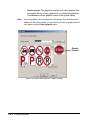
Print only: Displays the graphics that are set to print but not cut.
You still cut out a print only object by placing a frame around print
graphics and assigning the cutting feature to the frame.
Cut only: Displays the graphics that are set up to be cut but not
print.
Print and Cut: Displays the graphics that can be both print and cut.
If the graphic contains a safety shape, such as a circle or diamond,
the application cuts around the safety shape. If it does not contain a
safety shape, the application cuts around the bounding box.
For more information on selecting cut graphics from the library,
see Chapter 8. Selecting Graphics from the Library.
12-6
Cutting Out Objects or Documents