1
Changing the Display Language
Once you start using MarkWare™, you can change the language of the
screens. For instance, you can switch from English to French.
To change display languages:
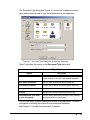
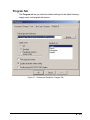
1. From the Options menu, select Preferences.
2. Select the Program tab and choose the appropriate language.
3. Click OK. The screen(s) will change to the selected language.
2-14
Installing Application Components