1
Part two: prepare the Windows Vista/2008 installation images
Essential items & software for this part:
Windows Automated Installation Kit (WAIK)
Windows Vista and/or Server 2008 and or Windows 7 installation media for whichever editions you
wish to install
GImageX - GUI for ImageX, not essential but highly recommended
Special thanks to chon_ from the msfn.org forum for the original instructions from which I derived
this part of the guide.
Now that you have your USB drive ready for use, it's time to prepare your Windows installation
source. This is done via the ImageX tool, which is part of the Windows Automated Installation Kit, or
WAIK. ImageX can export individual images from the install.wim found on the standard Windows
Vista and Server 2008 media. If you do not wish to change the images in your install.wim then you
can simply extract your installation media to a folder on your hard disk, and move on to the next
part.
Part 2.1 - Extract the images from each install media
Firstly, decide which images you want to incorporate into your multi install media. Keep in mind that
the more images you want to include, the larger the source will become. To give you some idea of
how large, every edition of Longhorn (that is, Server 2008 and Vista) comes to 5.5GB, and if you
want to include Windows 7 that goes up to 8.5GB - too big too burn to a dual layer DVD but still
useful if you have a 16GB+ drive. In this example, I will use Windows Vista Ultimate x86 & x64 and
Server 2008 Enterprise x86 & x64 - probably the most commonly used versions.
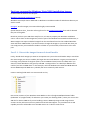
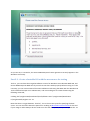
Create a working folder with a structure similar to this;
Extract the contents of your Windows Vista x86 disc to the E:\LonghornAIO\Distribution folder
(Substitute "E:\LonghornAIO\" for wherever you create your working folder. ) Note: you can use the
x86 disc for Server 2008 too if you are building a Server 2008 only image. Avoid using the x64
versions as they will not work on any machine that lacks x64 support - any machine with an x64
capable processor will be able to use the x86 version so it's best to stick to that.