1
Managing System Boot Parameters
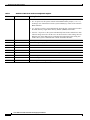
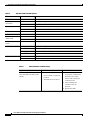
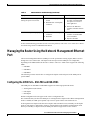
Table 3
Definition of Bits in the Software Configuration Register
Bit No.
Hex Value
Meaning/Function
00 to 03
0x0000 to 0x000F
Defines the source of a default Cisco IOS software image required to run the router:
•
00—At power-on, the system remains at the ROM monitor prompt (rommon>),
awaiting a user command to boot the system manually by means of the rommon
boot command.
•
01—At power-on, the system automatically boots the first system image found in
the Flash memory single inline memory module (SIMM) on the PRE.
•
02 to 0F—At power-on, the system automatically boots from a default Cisco IOS
software image stored on a TFTP server in the network. For this setting, the Fast
Ethernet port on the PRE must be configured and operational. This setting also
enables boot system commands that override the default filename.
06
0x0040
Causes system software to ignore the contents of NVRAM.
07
0x0080
Enable the original equipment manufacturer (OEM) bit.
08
0x0100
The Break function is disabled after 30 seconds.
09
0x0200
Not used.
10
0x0400
Broadcast based on 0.0.0.0 IP address.
11 and 12
0x0800 to 0x1000
Defines the console baud rate (the default setting is 9600 baud).
13
0x2000
Boots an image from the Flash SIMM.
14
0x4000
Broadcast using the subnet broadcast address.
15
0x8000
Enables diagnostic messages and ignores the contents of NVRAM.
Cisco 10000 Series Router Performance Routing Engine Installation
24
OL-3971-03