1
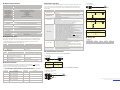
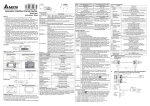
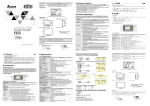
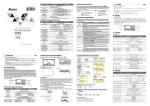
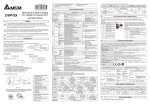
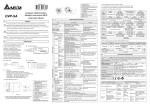
Z Electrical Specifications ] Hardware Operation When the user wants to startup TP02 series, a 24VDC power is needed. After applying 24VDC power to TP02 Specifications TP02G-AS1 Display Effective Display Area Display Resolution LCD Contrast Adjustment LCD Backlight Type Function / Numeric Keys External Input Power Memory Capacity CPU RAM of System Communication Interface Waterproof Class of Front Panel Operating Temperature for Hardware Storage Temperature for Hardware Monochromatic STN LCD (W) x (H) = 72 x 22 (unit: mm) 160×32: ASCII: 5×8, 8×8, 8×12, 8×16 Shock Radiated Emission Electrostatic Discharge Immunity Radiated Immunity Electrical Fast Transient Weight / Dimensions Cooling Method series, it will enter into the startup display and then enter the user-designed program. Pressing Esc key and holding on for 5 seconds can return to system menu. There are five selections in the system menu and are SELECTIONS Download Program Upload Program IP65 / NEMA4 Copy Program 0 ~ 50°C; 20 ~ 90﹪RH (non-condensing) -20 ~ 60°C 5Hz≦f<9Hz = Continuous: 1.75mm / Occasional: 3.5mm 9Hz≦f≦150Hz = Continuous: 0.5g / Occasional: 1.0g 15g peak, 11ms duration, half-sine, three shocks in each direction per axis, on 3 mutually perpendicular axes (total of 18 shocks) CISPR11, Class A EN61000-4-2 TP02 Settings EN61000-4-3 EN61000-4-4 0.24kg; 147×97×35.5mm (Width(W) × Height(H) × Deep(D)) Natural Air Cooling [ Program Copy Card TP02 series provides Program Copy Card Function to copy user program, system function and passwords that is different from the copy program. It is used to copy the whole HMI environment settings and application programs to another HMI rapidly. Using Program Copy Card saves time and manpower. The operation is as follows. Definition: Program Copy Card → PCC, TP Series → TP PLC Connection (TP→PCC) Step 1 Step 2 Step 3 Step 4 (PCC→TP) Turn the switch on the PCC to TP ÆPCC Insert the PCC into the extension slot of TP Input the power to TP It will display “remove PCC” on the screen and power on again. Turn the switch on the PCC to PCCÆTP Insert the PCC into the extension slot of TP Input the power to TP It will display “remove PCC” on the screen and power on again. HMI Display Message Step 1 Step 2 Step 3 (TP→PCC) (PCC→TP) If the TP model type does not correspond with the model type of program of PCC, TP will display “TP series and PCC is different. Press Enter to Confirm TP series→PCC. Press Esc to Exit”. TP will display “TP→PCC series Please wait!” during transmission. TP will display “Please Remove the PCC and Reboot” when transmission is completed. If there is no program in PCC, TP will display “The PCC is Empty. PCC→TP series is illegal”. Execution ^ F1 F2 F3 F4 MINI DIN TERMINAL 9 PIN D-SUB PC / TP CO M Port 25 PIN D-SUB female 2 Tx Rx 3 GND 7 4 5 6 8 20 PLC COM1 Port 8 PIN MINI DIN 4 Rx 2 5 Tx 4 5 8 GND 8 1,2 5V 7 PC / TP COM Port 9 PIN D-SUB female PLC COM1 Port 8 PIN MINI DIN Tx Rx GND 3 2 5 7 8 1 4 6 4 5 8 1,2 Rx Tx GND 5V 8 3 6 1 2 5 1 4 7 3 6 The Pin definition of 9 PIN D-SUB TP02 / 04G COM Port RS-232 9 PIN D-SUB male 3 2 5 _ Tx Rx GND Battery Life Battery Life Temperature (°C) -20 0 20 60 Life (Year) 1.972 2.466 2.712 2.835 TO TP02 / 04G 9 5 1 6 6 1 5 9 9 PIN D-SUB 9 PIN D-SUB PC COM Port 9 PIN D-SUB female Rx Tx GND Function Key Use Method F5 It just can be used to be constant 5. F6 It just can be used to be constant 6. F7 It just can be used to be constant 7. It just can be used to be constant 8. F9 It just can be used to be constant 9. 3 2 5 Tx Rx GND 1. DVPACAB215 / DVPACAB230 TO PC or TP02 / 04G 13 F8 2 3 5 TP02 / 04G COM Port 9 PIN D-SUB female TP02G may connect to a DVP-PLC by using connection cable DVPACAB215 / DVPACAB230 / DVPACAB2A30 The password can be the alphabet from A to Z or the number from 0 to 9. But it must use the function keys F0 ~ F9 to input the password characters. Please refer to the following table. scrolls in a loop as follows 0→A→B→C→D→E→F→0 scrolls in a loop as follows 1→G→H→I→J→K→1 scrolls in a loop as follows 2→L→M→N→O→P→2 scrolls in a loop as follows 3→Q→R→S→T→U→ V→3 scrolls in a loop as follows 4→W→X→Y→Z→4 EXPLANAION Use the connection cable (DVPACAB530) to connect the TP02 serial communication port RS-232 to a PC. Then use the TPEdit software to download an application program to TP02. Use the connection cable (DVPACAB530) to connect the TP02 serial communication port RS-232 to a PC. Then use the TPEdit software to upload an application program from TP02. Transfer a program between two TP02 units. 1: transmit programs 2: receive programs When transmit programs and data between two TP02 units. Set one TP02 to “Receive Program” mode and the other TP02 to “Transmit Program” mode. Please use twisted pair wires to connect the two units via the RS-485 ports. There are 8 items that used to modify TP02 system settings: 1. Communication protocol: Setting the address of TP02, the control port of PLC, and the communication string for either RS-232 or RS-485. 2. Contrast: Adjust the contrast of LCM display screen. 3. Back-light: adjust the automatic turn off time of LCM. Setting range is 00 ~ 99 minutes. If set to 00, the LCM Back-light will not turn off. 4. Buzzer: Used to set the buzzer sound, normal mode or quiet mode. 5. Language Setting: Used to set the displayed language. English, Traditional Chinese, Simplified Chinese or user defined language. 6. Password setting: Used to set, enable, and disable the password function. If the password function is enabled, it will require the user to input a password before entering any system menu. The factory password is 1234. 7. Startup display: Used to select the TP02 startup display. User can select “user defined” to use the file that designed by TPEdit and download to TP02. 8. Comm. indicator: The user can determine if the RS-232 and RS-485 LEDs will blink or not during communication. There are two methods to connect to PLC: 1. Using TP02 serial communication port (COM1) RS-232: set 8-pin DIP switch to RS-485 mode and connect the cable (DVPACAB215 or DVPACAB230) to program communication I/O RS-232C of PLC. 2. Using extension communication port (COM2) RS-485: set 8-pin DIP switch to RS-485 mode and connect 5-pin removal terminal of extension communication port to RS-485 of PLC with twisted pair. Execute the internal program that download from TPEdit or transmitted from other TP02 units. When program is in execution, the user can return to system menu by pressing Escape / Exit (Esc) key for 5 seconds. TO PC (RS-232) TP will display “PCC→TP series Please wait!” during transmission. TP will display “Please Remove the PCC and Reboot” when transmission is completed. settings by using this code also. Please pay close attention when using it. F0 1 TP02G may connect to a PC by using connection able DVPACAB515 code will clear the password and all TP02 series internal programs. The TP02 series will be reset to the factory Use Method 6 TO PLC Communication Connection If the user forgot the password, the password can be cleared by using the following code: 8888. This universal Function Key 5 PC or TP02 / 04G \ Password Function TO PC or TP02 / 04G 9 described below. Set by Software, adjust the contrast by the press button in the function table LED Backlight: Automatic Turn-off Setting F0 / 0 ~ F9 / 9, ESC, ENTER and Arrow Keys 24V (3W Max.) 256K Byte Hitachi HD64F3064F 32K Byte COM1: RS-232 COM2: RS-485 Vibration 2. DVPACAB2A30 14 1 9 5 6 1 25 PIN D-SUB TO PLC MINI DIN TERMINAL 9 PIN D-SUB The content of this instruction sheet may be revised without prior notice. Please consult our distributors or download the most updated version at http://www.delta.com.tw/industrialautomation