1
Quick Start
Thanks for purchasing the DLO TransDock micro. We will get you up and running
in four easy steps. For more detailed instructions, please read Using Your DLO
TransDock micro [pg 6].
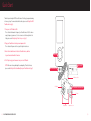
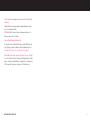
1. Tune your car’s FM radio to 88.5.
This is the default broadcast frequency for TransDock micro. If 88.5 is not an
empty frequency in your area (i.e. there is music or talk already on that station), please read Finding Empty Radio Frequencies [pg 8].
2. Plug your TransDock micro into your auto power outlet.
This is labeled 12v power outlet or cigarette lighter in older cars.
3. Attach the included Connector Cable to TransDock micro, and then
to your Sansa’s bottom Dock Connector.
Click PLAY
4
4. Click Play to enjoy your Sansa music over your car’s FM radio.
NOTE: For more info on optimizing the sound quality of TransDock micro,
please read Getting the Best Sound Quality on your TransDock micro [pg 9].
1
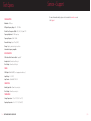
Attach Connector Cable
Tune to 88.5 FM
3
USB Connector Dock
LCD Display
2
Plug TransDock micro into Power Outlet
Fit Collar
Tuning Buttons
4 | DLO TRANSDOCK MICRO USER GUIDE
Adjustment Screw
| 5