1
Product Manager Messages
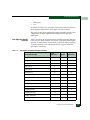
A
Message
Description
Action
Message
Description
Action
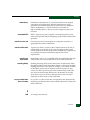
Firmware file I/O error.
Firmware file input/output error occurred.
Contact support personnel.
Firmware file not found.
Firmware file deleted from the EFC Server.
Add firmware to library.
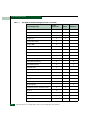
I
Message
Description
Action
Message
Description
Action
Message
Description
Action
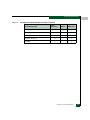
A-18
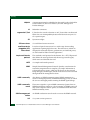
Incorrect product type.
When configuring a new product through the New Product dialog
box, an incorrect product was selected for the network address.
Select the correct product type for the product with the network
address.
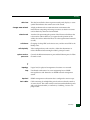
Installing this feature key, while online, will cause an IPL
operation on the switch and a momentary loss of LAN connection.
This operation is non-disruptive to the Fibre Channel traffic. Do
you wish to continue installing this feature key?
If the director is online, installing the new feature key will cause an
internal program load (IPL). The LAN connection to the EFC server
will be lost momentarily, but Fibre Channel traffic will not be
affected.
Select Yes to install the feature key or No to not install.
Internal file transfer error received from director.
Director detected an internal file transfer error.
Contact support personnel.
McDATA Sphereon™ 4500 Fabric Switch Product Manager User Manual