1
C-12 Motorola RF Switch System Reference Guide
• If you have enabled AP Scan, ensure that at least a single radio is active. AP scan does not send a scan
request to an inactive or unavailable radio.
• Just enabling detectorscan will not send any detectorscan request to any adopted AP. User should also
configure at least a single radio as a detectorAP. This can be done using the set detectorap command in
rogueap context.
C.5 Troubleshooting Firewall Configuration Issues
Motorola recommends adhereing to the following guidelines when dealing with problems related to
RFS7000 Firewall configuration:
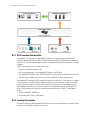
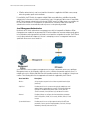
• A Wired Host (Host-1) or Wireless Host (Host-2) on the untrusted side is not able to connect to the Wired
Host (Host-3) on the trusted side
• A wired Host (Host-1) on the trusted side is not able to connect to a Wireless Host (Host-2) or Wired Host
(Host-3) on the untrusted side
C.5.1 A Wired Host (Host-1) or Wireless Host (Host-2) on the untrusted side is not
able to connect to the Wired Host (Host-3) on the trusted side
1. Check that IP Ping from Host1/Host2 to the Interface on the Trusted Side of the Motorola RF Series Switch
works.
CLI (from any context) - ping <host/ip_address>
2. If it works then there is no problem in connectivity.
3. Check whether Host-1/Host-2 and Host-3 are on the same IP subnet.
If not, add proper NAT entries for configured LANs under FireWall context.
4. After last step, check again, that IP Ping from Host1 to the Interface on the Trusted Side of the Motorola
RF Series Switch works.
If it works then problem is solved.
C.5.2 A wired Host (Host-1) on the trusted side is not able to connect to a Wireless
Host (Host-2) or Wired Host (Host-3) on the untrusted side
1. Check that IP Ping from Host1 to the Interface on the Untrusted Side of the switch works.
2. If it works then there is no problem in connectivity.
3. Now check whether Host-1 and Host-2/Host-3 are on the same IP subnet.
If not, add proper NAT entries for configured LANs under FireWall context.
4. Once step 3 is completed, check again, that IP Ping from Host1 to the Interface on the Untrusted Side of
the switch works.
If it works then problem is solved.
C.5.2.1 Disabling of telnet, ftp and web traffic from hosts on the untrusted side does not work.
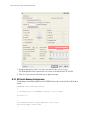
1. Check the configuration for the desired LAN under FW context (which is under configure context).
CLI - configure fw <LAN_Name>
2. Check whether ftp, telnet and web are in the denied list. In this case, web is https traffic and not http.