1
Using Your Calling Features
Call Return
When you’ve just missed a call, Call Return tells you the number of your last incoming call and lets you
automatically call the person back. Call Return will not work with long-distance, international or blocked
numbers.
To Use Call Return
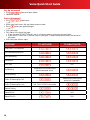
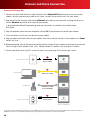
1.Lift the receiver, listen for the dial tone and press
.
2.You will hear the number of your last incoming call.
3.If you wish to call the party back, press
.
4.If the line is available, your call will be connected.
5.If the line is busy, Call Return will attempt to reach the party for 30 minutes.
6.When the caller’s line is available, your phone will ring.
7. When you pick up your phone, the caller’s phone will ring and your call will be connected.
8.If you do not wish to wait the full 30 minutes, you can cancel the feature.
To Cancel Call Return
1.Lift the receiver and listen for the dial tone.
2.Press
.
3-Way Calling
3-Way Calling is a great way to stay connected with friends, family and colleagues. It lets you talk with two other
people — on one call!
To Initiate a 3-Way Call
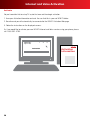
1.Once you are connected to the first party, simply press and release the switchhook or flash button.
2.The first party is now on hold and you will hear a second dial tone.
3.Dial the number of the second party that you would like to add to the conference call.
4.When the second party answers, you can speak privately before you connect to the first party. When you are
ready to connect all parties, press and release the switchhook or flash button.
If the second party’s line is busy or there is no answer, you can disconnect the second party by pressing and
releasing the switchhook or flash button twice. The first party will still be on the line.
Repeat Dialing
Repeat Dialing redials a busy number until the line becomes available. While Repeat Dialing attempts to reach
the called party, you can still use your home phone to place and receive other calls. Repeat Dialing will not work
with long-distance or international numbers.
To Start Repeat Dialing
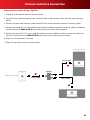
1.Hang up the receiver after you receive a busy signal.
2.Lift the receiver and listen for the dial tone.
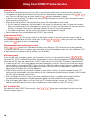
3.Press
, then hang up the receiver.
4.Repeat Dialing will attempt to reach the called party for 30 minutes.
5.When the called party’s phone is available, your phone will ring.
6.When you pick up your phone, the called party’s phone will ring and your call will be connected.
7. If you do not wish to wait the full 30 minutes, you can cancel the feature sooner.
To Cancel Repeat Dialing
1.Lift the receiver and listen for the dial tone.
2.Press
.
Local Calling Area
If you’re a Local with More® customer, visit comcast.com/callingarea to view the cities and phone numbers
within your Local Calling Area.
21