1
5.
Configuring the RV-SMB
5.1
Overview
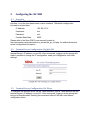
The RV-SMB’s SENA PS410 terminal server can be configured via the network
interface, or via the front panel serial console interface. The default configuration
information is listed here:
IP Address:
192.168.161.5
Username:
root
Password:
root
Console Baud Rate:
9600
Please refer to the Sena PS410 user manual, located at
http://www.sena.com/products/device_servers/hd_ps_x10.php, for additional terminal
server configuration information.
5.2
Terminal Server Configuration Via Web GUI
To configure the terminal server via the web GUI, use a web browser to connect to the
terminal server’s IP address, on port 80. Once connected, logging in at the prompt will
make it possible to change the IP configuration, serial port configuration, and other
settings.
5.3
Terminal Server Configuration Via Telnet
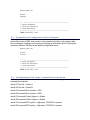
To configure the terminal server via the Telnet interface, open a Telnet session with the
terminal server’s IP address, on port 23. Once connected, logging in at the prompt will
bring up a BusyBox shell. Entering the command ‘editconf’ will start a text-based
configuration menu.