1
Red Hat Cloud Infrast ruct ure 5 Q uick St art for Red Hat Ent erprise Linux O penSt ack Plat form and Red Hat Clo
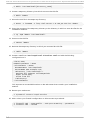
Domain: 'mydomain.example.com'
Foreman URL: 'https://host.mydomain.example.com'
NTP sync host: '0.rhel.pool.ntp.org'
Timezone: 'America/New_York'
Configure networking on this machine: ✓
Configure firewall on this machine: ✓
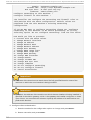
The installer can configure the networking and firewall rules on
this machine with the above configuration. Default values are
populated from the this machine's existing networking
configuration.
If you DO NOT want to configure networking please set 'Configure
networking on this machine' to No before proceeding. Do this by
selecting option 'Do not configure networking' from the list below.
How would you like to proceed?:
1. Proceed with the above values
2. Change Network interface
3. Change IP address
4. Change Network mask
5. Change Network address
6. Change Host Gateway
7. Change DHCP range start
8. Change DHCP range end
9. Change DHCP Gateway
10. Change DNS forwarder
11. Change Domain
12. Change Foreman URL
13. Change NTP sync host
14. Change Timezone
15. Do not configure networking
16. Do not configure firewall
17. Cancel Installation
Important
The name of the domain must match that of the fully qualified domain name of the
machine on which the user interface is being installed.
Important
By default, the address of the machine on which the user interface is being installed is
specified as the D HCP gateway, which is the gateway the installer configures on hosts
it provisions. You must edit this value and specify the address of a machine that can
perform this function.
5. Configure client authentication:
a. Enter the number for the configuration option to change, and press Enter.
b. Enter a new value, and press Enter.
16