1
Satellite Receiver
Remote Control
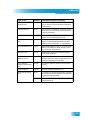
Remote Control Buttons
SAT Mode
Input
Press once for Input
Press and hold for Recover
Receiver Menu
Access receiver
features and settings
Power & TV Power
Top button turns the receiver on/off,
Bottom button turns the TV on/off
(programming required)
Page Buttons
Page up/down in menus
Program Guide
Display current and future
satellite program listings
Themes
Search for programs using Themes
Browse
See what is on other channels
while watching TV
Recall
Arrows/Select Buttons
Return to last channel viewed
Channel up/down, navigate
through menus/guides and
select a desired option
Info
Get info on programs
Search
Search for a program
Digital Video Recorder
(DVR) Buttons
Record and play
programming
Requires External Hard
Drive and authorization
Format
Format the picture to the
desired width to match
the program you are viewing
Picture-In-Picture
(PIP) Buttons
Watch two separate
programs at once
(Feature not supported
at this time)
Cancel
Return to previous menu or
to watching a program
View Satellite Programming
Exit out of any menu/guide and
return to viewing live TV
Shortcut Keys
(for future use)
Number Buttons
Enter a desired channel number,
or navigate through menus
System Wizard
Press and hold to fix remote
control issues and sync data
DishHOME
Explore interactive TV features
11