1
An MP3 file stores audio data compressed using MPEG1,
the audio layer-3 file-coding scheme.
In this manual, we refer to what are called “folder” and “file”
in PC terminology as “album” and “track”.
Notes on playing MP3
• An MP3 track must be recorded on a disc in the format
compliant with ISO 9660. Note, however, that the unit
may not play tracks in the order they were recorded.
• The maximum allowable number of tracks and albums
in a disc are as follows:
- number of tracks : 300
- number of albums : 127
• The maximum allowable depth of nested albums is 2,
including the root album (directory).
• If a disc contains audio tracks and MP3 tracks, the unit
cannot play.
• As for a multi-session disc, the unit play only the first
session.
• The unit can play only MP3 tracks which were converted
with a sampling frequency of 44.1 kHz and a fixed bit
rate of 128 kbps.
• The unit may not play MP3 tracks recorded using a packet
writing utility.
• The unit can play only MP3 tracks having a file extension
“.mp3”.
• It may take 30 seconds or more before the unit can start
play of MP3 tracks, depending on the number of recorded
tracks and the complexity of the album tree.
• If you play a non-MP3 track that has the “.mp3” file
extension, you may hear some noise.
• The unit does not output digital signals while playing MP3
tracks.
• Only the following function buttons works while playing
MP3 tracks:
- PLAY c, STOP s, PAUSE a, Forward SKIP t,
Reverse SKIP r, ON SCREEN DISPLAY ON/OFF,
numbered buttons, OPEN/CLOSE.
Notes on display indications during play
• The elapsed playing time may not be displayed correctly
for MP3 tracks.
• Any names of albums and tracks are not displayed.
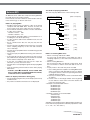
The order of playing back MP3
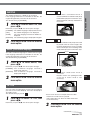
The unit only plays MP3 tracks in the following order.
Root Directory(Album)
[Order of Playback]
INTRODUCTION
Notes on MP3
Album 1
Track 1
Track 2
Track 3
[1]
[2]
[3]
Track 20
[ 20 ]
Track 1
Track 2
[ 21 ]
[ 22 ]
Track 12
[ 32 ]
Track 1
[ 291 ]
Track 9
Track 10
[ 299 ]
[ 300 ]
Album 2
Album 127
Notes on creating MP3 discs
• When converting audio data to MP3
To enjoy high sound quality, create MP3 files with a
sampling frequency of 44.1 kHz and a fixed bit rate of
128 kbps.
• When creating MP3 discs
Do not store more than 127 albums in a disc. Also, keep
the total number of albums and tracks 300 or less in a
disc.
• To play tracks in the order they were recorded
1. Use a writing software capable of recording MP3 tracks
(files) in numerical and alphabetical order. For details
on using the software, refer to the operating instructions
supplied with the software.
2. Use only one album. (Do not create a sub-album within
an album.)
3. Include a two or three-digit number at the beginning
of each album or track name so that the albums and
tracks are played in order.
<example of recommended names>
01XXXXX.mp3
02XXXXX.mp3
03XXXXX.mp3
04XXXXX.mp3
05XXXXX.mp3
<example of names not recommended>
1XXXXX.mp3
5XXXXX.mp3
10XXXXX.mp3
15XXXXX.mp3
20XXXXX.mp3
(Numbers at the beginning have different digit number. The
tracks will not be played in this order but played in the order
of “1”, “10”, “15”, “20” and “5”.)
CONTINUE
ENGLISH
5
En