1
Front Panel Security Lockout (Executive Mode)
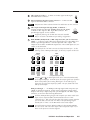
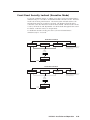
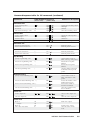
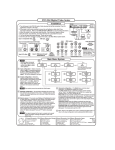
To prevent accidental changes to settings, press the Col/Tnt and Center buttons
simultaneously for 2 seconds to enable the DVS 204’s Executive mode. Executive
mode locks all front panel functions. The menu system will still return to the
Default menu when 10 seconds have elapsed. The IR 901 will still be able to
control the scaler after Executive mode has been enabled. When Executive mode
is active, all functions and adjustments can still be made through RS-232 control.
For details on RS-232 control, see chapter three.
To disable the Executive mode, press the Col/Tnt and Center buttons
simultaneously for 2 seconds.
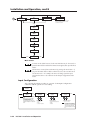
Enable Executive Mode
2 sec.
EXTRON
DVS204D
2 sec.
852 x
480 @60
2 sec.
INPUT 1
CMPOSITE
2 sec.
2 sec.
NO
SIGNAL
* The No Signal default menu only occurs if
there is no signal present at the currently
selected input connector.
Press for
2 seconds*
COL/TNT
CENTER
EXE MODE
ENABLED
10 sec.
timeout
Disable Executive Mode
2 sec.
EXTRON
DVS204D
2 sec.
852 x
480 @60
2 sec.
INPUT 1
CMPOSITE
2 sec.
2 sec.
NO
SIGNAL
* The No Signal default menu only occurs if
there is no signal present at the currently
selected input connector.
Press for
2 seconds*
COL/TNT
CENTER
EXE MODE
DISABLED
10 sec.
timeout
DVS 204 • Installation and Operation
2-19