1
Uninstalling Drivers and Software
Uninstalling
Bluetooth
Software
In Windows XP
and Windows 2000
In Windows Me
and Windows
98 SE
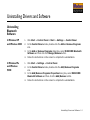
→ Control Panel or Start → Settings → Control Panel.
1.
Click Start
2.
In the Control Panel window, double-click the Add or Remove Programs
icon.
3.
In the Add or Remove Programs dialog box, select WIDCOMM Bluetooth
Software and then click the Change/Remove button.
4.
Follow the instructions on the screen to complete the uninstallation.
1.
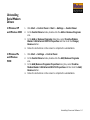
Click Start
2.
In the Control Panel window, double-click the Add/Remove Programs
icon.
3.
In the Add/Remove Programs Properties dialog box, select WIDCOMM
Bluetooth Software and then click the Add/Remove button.
4.
Follow the instructions on the screen to complete the uninstallation.
→ Settings → Control Panel.
Uninstalling Drivers and Software 5-1