1
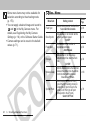
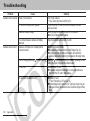
Problem
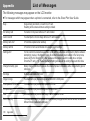
Cannot play back
Cause
Solution
You attempted to play back images shot with
Computer images that cannot be played back will play back if they
another camera or images edited on a computer. are added to the camera using the bundled software program
ZoomBrowser EX or ImageBrowser. See the ZoomBrowser EX/
ImageBrowser Software User Guide (PDF).
File name was changed with a computer or file Set the file name or location to the file format/structure of the
location was changed.
camera.
See About File and Folder Numbers (p. 160)
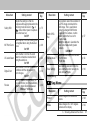
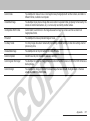
Lens will not retract
CF card slot / battery cover opened with camera Close the CF card slot / battery cover, then turn off the camera.
on.
CF card slot cover or battery cover opened while Close the CF card slot / battery cover, then turn off the camera.
camera was recording to CF card (warning signal).
Switched to Playback mode from Shooting
The lens does not retract in this case. To make the lens retract,
mode.
close the lens cover.
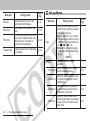
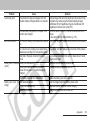
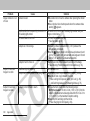
Battery pack consumed Battery terminals are dirty.
Wipe them well with a dry cloth before use.
quickly
Battery pack capacity reduced because of
Replace the battery pack with a new one.
disuse for one year or more after being fully
charged.
The Battery have lost their effectiveness.
Replace the battery pack with a new one.
Battery pack does not Poor electrical contact.
Insert the charger plug firmly into the power outlet.
charge
Battery terminals are dirty.
Wipe them well with a dry cloth before charging.
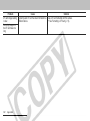
Battery life exceeded.
Replace the battery pack with a new one.
Appendix
139