1
ShoreTel Configuration
This section describes the ShoreTel system configuration to
support the IP 8000. The section is divided into general
system settings and individual user configuration needed to
support the conference phone.
Note: If you have upgraded from a previous version of
ShoreTel and you had the IP 8000 conference phone
already configured in a SIP Trunk environment, follow these
next steps, otherwise go on to the “ShoreTel System
Settings – General” section:
• Using ShoreWare Director, navigate to “Administration”,
then “Trunks…”, followed by “Individual Trunks”.
already been configured on the system, skip this section and
go on to the “Creating User Extension for SIP device”
section of this document.
Call Control Settings
The Call Control Options within ShoreWare Director may
need to be reconfigured. To configure these settings for the
ShoreTel system, log into ShoreWare Director and select
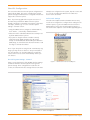
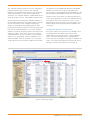
Administration, Call Control and then Options (Figure 1).
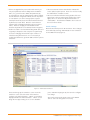
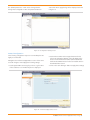
The “Call Control / Options” screen will then appear (Figure 2).
• Delete ALL of the individual trunks that are currently in use
by the IP 8000 conference phone.
• If you plan on using the extension number currently
assigned to the IP 8000, navigate to the SIP “Trunk
Group” for the IP 8000 and edit the Off System Extension
(OSE) range, to either delete the extension number or edit
the range to exclude the number.
Note: If you don’t plan on using the SIP “Trunk Group” any
longer you may choose to delete it. Keep in mind that if
any “User Groups” are currently utilizing it, you will first
need to remove access to the “Trunk Group” before you
can delete it.
ShoreTel System Settings - General
If this is a new deployment of the IP 8000, the first settings
to address within the ShoreTel system are the general
system settings. These configurations include the call
control, the switch and the site settings. If these items have
Figure 1 – Administration Call Control/Options
Figure 2 – Call Control/Options
IP 8000 Conference Phone Application Note—Page 2