1
V~
Quick Reference User's Guide
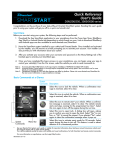
Directed SmartStart DSM100
Congratulations on the purchase of your state-of-the-art SmartStart system. Reading this user's guide prior to
using your system will get you off to a quick and smooth start.
Start Here
Before you can start using your system, the following steps must be performed:
8
CD
o
o
Download the free SmartStart application to your iPhone or iPod touch from Apple's App Store.
Have the SmartStart system installed by your authorized Directed dealer. Once installed and activated by the installer, you will receive an email and secure password prompting you to set up your
account. Your installer can also provide a printout of your account information.
Using your iPhone, enter your username and password to set up your account.
Once your account has been set up, launch the application. Your system is now ready for use.
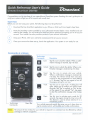
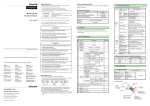
Commands at a Glance
Touchscreen
Commands
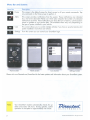
Lock
Description
Tap this icon to lock the vehicle. When a confirmation message is received, tap it to clear.
Unlock Tap this icon to unlock the vehicle. When a confirmation message is received, tap it to clear.
Touchscreen
Commands
Note:
Menu Bar
Smart
Start
Tap this icon to remote start your vehicle.
When a confirmation message is received, tap
it to clear. The vehicle remote starts and stays
running for the programmed run time (default
is 12 minutes). Tap this icon again to turn off
the engine during the run time.
Trunk
Tap this icon to open trunk. A dialog box will
open, asking you to confirm you want to open
the trunk. Tap "Yes" to confirm, or "No " to cancel the request. If you selected "Yes", tap again
to clear the confirmation message when it pops
up.
Panic
Tap this icon to activate panic mode for 30
seconds. Tap again during this time to turn off.
This feature is used to attract attention if in a
threatened position.
Your vehicle responds exactly the same way as it does when using the remote control, with audible and visible confirmations.
The amount of time it takes for your vehicle to respond to a command can be affected by cellular
coverage or network congestion.
QRGDSM 100 2009-1 1