1
English
Please read and keep this Owner's Guide and
take the time to carefully read and follow the
Important Safety Instructions, Warranty and
Contact information.
For additional information about your headphones or
for replacement accessories, refer to:
• http://globai.Bose.com
• U.S. only: http://Owners.Bose.com/QC20i
Charging
Allow up to 2 hours for a full charge before first use.
Use the supplied USB cable to connect the headphones
to a powered USB port on your computer or an agency
approved wall charger (not supplied). When fully charged,
headphones will have about 16 hours of battery life.
Note: Before charging, be sure the headset is at room
temperature, between 41°F (5°C) and 104°F (40°C).
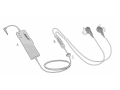
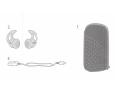
Components
A.
B.
C.
D.
E.
F.
Control module
lnline microphone and 3-button remote
Clothing clip
StayHea~ +tips: Small {white); Medium,
installed (grey); Large (black)
USB charging cable
Carry case
Powering on
O Slide the power switch on the control module
to On. The headphones will tum on in Noise
Cancelling, which reduces most sounds
around you.
Note: When the power is off, the headphones will
still provide un-powered audio. For best quality
audio, tum the power on.
Press the Mode button on the
side of the remote to switch to
Aware mode, which lets you
hear some sounds around you,
such as traffic noise.
Mode
button
J'