1
Web Server Commands
Command Description
Admin
get web Returns the root iBootBar’s current web server settings
Yes
set web enable <yes/no> Enable or disable the root iBootBar’s web server
Yes
Yes
Yes
80
Enable or disable the root iBootBars web server’s SSL capabilities.
Yes
No
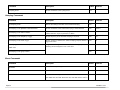
Command Description
Admin
Fact Def
get telnet Returns the current settings of the root iBootBar’s telnet server.
Yes
set telnet enable <yes/no> Enable or disable the root iBootBar’s telnet server
Yes
Yes
Yes
23
Fact Def
set web port <1‐65535> Fact Def
Set the root iBootBar’s web server’s port. Web standard port is 80.
If changed, access the iBootBar using http://xxx.xxx.xxx.xxx:<port>
Dataprobe recommends changing the web port on all iBootBars that
are accessible from the internet.
set web ssl <yes/no> Telnet Commands
Set the port of the root iBootBar’s telnet server.
set telnet port <1‐65535> Dataprobe recommends changing the telnet port on all iBootBars
that are accessible from the internet.
Syslog Commands
Command Description
Admin
get syslog Returns the current settings of the syslog setup
Yes
set syslog usesyslog <yes/no> Enable or disable the syslog reporting agent
Yes
iBootBar V1.5x
No
Page 21