1
Event Paging Scheme
Dialog Buttons
Dialog Buttons
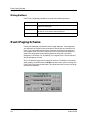
Each Event Log dialog provides all or some of the following buttons.
OK
Sets your new filter parameters and closes the dialog.
Reset
Resets the filter selections to the default parameters, and
leaves the dialog open.
Clear
Clears all filters, and leaves the dialog open. If you click OK,
all alarms in the network will be displayed.
Cancel
Closes the dialog without any changes in the filter settings.
Event Paging Scheme
Events are separated into date and time ranged segments. These segments
are referred to as “Pages” and are the basis of how events are viewed in the
Event Log. Each page consists of only the events that have occurred within
that range of time. The Event Page Time Panel in the mian view shows the
event time range (starting and ending date and time) that is currently
displayed in the Event List. By default, this range of time is 30 minutes and
can be changed by the user.
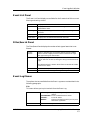
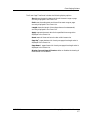
Only a single event page can be viewed at one time. The ability to view other
event pages is provided under the View drop-down menu pick or through the
Event Page Time Panel shown below. This panel sets the start, end, and range
of events to request for.
Managing Events with the Event Log
2-6
Event Log
User’s Guide