1
q
ENGLISH
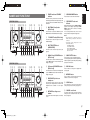
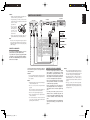
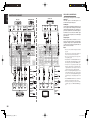
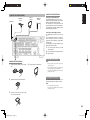
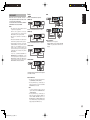
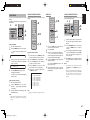
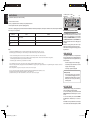
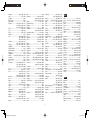
REAR PANEL (SR4002)
w
!1
q
t
r
!3
INPUT
1
VIDEO
!6
HDMI Ver 1.1
INPUT
3
COMPONENT
VIDEO
MONITOR
OUT
S-VIDEO
FM (75
75))
GND
AM
ANTENNA
TV
L
SL
C
DVD
VCR IN
VCR OUT
DSS
MONITOR OUT
INPUT
2
CB/PB
Y
CR/PR
CB/PB
Y
INPUT 3
OUTPUT
4
1
R
SR
SW
7.1CH INPUT
INPUT 2
IN
3
R
(AUX2
AUX2))
INPUT 1
CR/PR
SBL
L
SBR
IN
TV
DVD
IN
OUT
VCR
DSS
OUT
TAPE
SL
C
FLASHER
IN
OPT
OUT
DIGITAL OUT REMOTE CONT.
DIGITAL IN
w
L
R
FRONT
R
SR
SW
L
R
SURROUND BACK
S. SPEAKER B
SBR
L
SURROUND
CENTER
SWITCHED
1.25A 150W
SPEAKER SYSTEMS : 6-8 OHMS
120V
y !0
!4
MODEL NO. SR4002
AM antenna and ground terminals
AC OUTLETS
PRE OUT
o
!5
60Hz
i
u
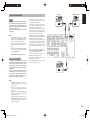
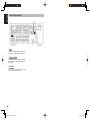
REAR PANEL (SR5002)
!1
w
!2
q
t
r
FM (75)
75)
S-VIDEO
GND
TV
SL
C
MONITOR
OUT 2
1
AM
ANTENNA
L
DVD
VCR IN
VCR OUT
DSS
MONITOR OUT
INPUT
2
CB/PB
Y
CR/PR
CB/PB
Y
4
L
1
SR
SW
7.1CH INPUT
CR/PR
Y
SBL
R
R
(AUX2
AUX2))
SBR
MULTI.
OUT
IN
TV
DVD
OUT
VCR
IN
DSS
OUT
TAPE
HDMI Ver 1.1
COMPONENT
VIDEO
IN
OUT
CD/CDR
CB/PB
INPUT 1
CR/PR
IN
INPUT 2
INPUT 3
OUTPUT
XM
5
2
3
DIGITAL IN
OPT
OUT
DIGITAL OUT REMOTE CONT.
FLASHER
DC
IN
TRIGGER
AUDIO
RS-232C
L
SL
SPEAKER C
OFF ON
C
AC IN
SBL
R
L
FRONT B
R
SR
SW
SBR
FRONT A OR B.CENTER.
FRONT A + B : 8 OHMS
R
L
FRONT A
R
SURROUND BACK
SPEAKER C/MULTI SPEAKER
y !0 !9
R
L
SURROUND
SURR.SURR BACK : 6-8 OHMS
PRE OUT
e
L
CENTER
SPEAKER
SYSTEMS
SWITCHED
1.25A 150W
120V
o
MODEL NO. SR5002
AC OUTLETS
60Hz
!4 !5 i !3
u!7 !8 @0
MONITOR OUT
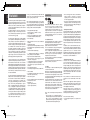
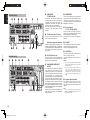
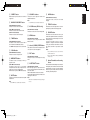
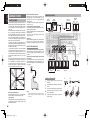
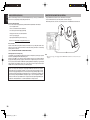
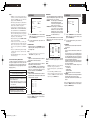
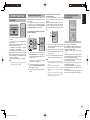
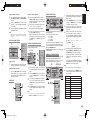
This is a monitor output and each one includes both
composite video and S-video configurations. When
connecting two video monitors or televisions, be
aware that the OSD interface can be used with both
MONITOR OUT connections.
y
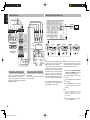
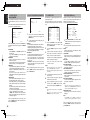
Preamp Outputs
(L, R, SL, SR, SBL, SBR, C)
Jacks for L(front left), R (front right), C (Center), SL
(surround left), SR (surround right), SBL (surround
back left) and SBR (surround back right).
Use these jacks for connection to external power
amplifiers.
u
AC INLET
Plug the supplied power cable into this AC INLET
and then into the power outlet on the wall.
This unit can be powered by 230V AC only.
e
Connect the AC power cable of component such as
a DVD or CD player to this outlet.
This outlet provides power only when this unit is
turned on.
r
INPUT
3
t
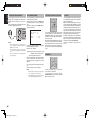
Connect the supplied AM loop antenna. Use the
terminals marked “AM” and “GND”. The supplied AM
loop antenna will provide good AM reception in most
areas. Position the loop antenna until you hear the
best reception.
RS-232C (SR5002 only)
The RS-232C port is to be used in conjunction with
an external controller to control the operation of the
SR5002 by using an external device.
!6
INPUT
1
VIDEO
FM antenna terminal (75 ohms)
Connect an external FM antenna with a coaxial
cable, or a cable network FM source.
AC IN
SBL
R
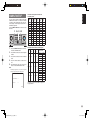
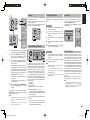
These are the video inputs and outputs. There
are 4 video inputs and 2 video outputs and each
one includes both composite video and S-video
configurations. Connect VCRs, DVD players, and
other video components to the video inputs.
The 2 video output channels can be used to be
connected to video tape recorders for making
recordings.
2
IN
OUT
CD/CDR
AUDIO
L
VIDEO IN/OUT
(TV, DVD, VCR, DSS)
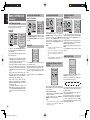
COMPONENT VIDEO INPUT/
OUTPUT
If your DVD player or other device has component
video connectors, be sure to connect them to these
component video connectors on the unit. This unit
has two component video input connectors to obtain
the color information (Y, CB, CR) directly from the
recorded DVD signal or other video component and
one component video output connector to output it
directly into the matrix decoder of the display device.
By sending the pure DVD component video signal
directly, the DVD signal forgoes the extra processing
that normally would degrade the image. The result is
vastly increased image quality, with incredibly life like
colors and crisp detail.
When the video convert function is enabled, video and
S-video images can be output to the COMPONENT
MOINTOR OUT jack.
i
AC OUTLETS
Caution:
• In order to avoid potential turn-off thumps, anything
plugged into this outlet should be powered up before
this unit is turned on.
• The capacity of this AC outlet is 150W. Do not
connect devices that consume electricity more
than the capacity of this outlet. If the total power
consumption of the connected devices exceeds the
capacity, the protection circuit shuts down the power
supply.
o
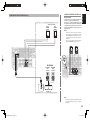
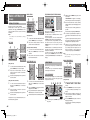
Speaker outputs terminals
Seven terminals are provided for the front left,
front right, front center, surround left, surround
right, surround back left and surround back right
speakers.
Note:
You can use surround back speaker terminals as M
(Multiroom) SPEAKER B terminals, when you use
no surround back speaker.
8
SR4002-5002U DFU_01_E1_2.indd 8
07.7.9 2:46:47 PM