1
2.
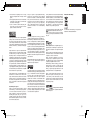
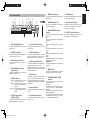
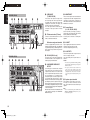
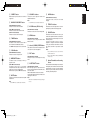
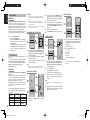
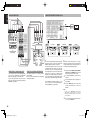
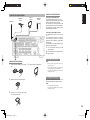
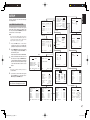
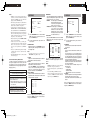
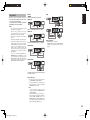
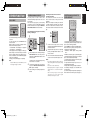
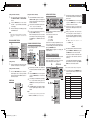
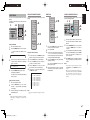
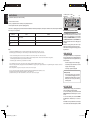
When you press the INFO button, the following
information will be displayed.
N A M E / T I T L E
VIDEO
AUDIO
P i n k
F l o i d
F l o i d
/
/
This XM information can also be displayed on a TV
monitor connected to the SR5002.
VOLUME
M-SPKR
MENU
2.
ENTER
T.TONE
/SET UP
EXIT
REC
T.DISP
PTY
F.DIRECT
DISC+
ANGLE
SUB TITLE
CH-SEL
V-OFF
ATT.
BASS
AUDIO
3.
2.
DVD
VCR
DSS
CD
CDR
MD
TAPE
AUX1
AUX2
AMP
VOLUME
MULTI
SPEAKER
SURROUND
MODE
PURE
DIRECT
Press the AMP button on the remote
controller.
DISPLAY
HT-EQ
MENU
EXIT
BAND
T-MODE
DIGITAL
PHONES
AUX 1 INPUT
S-VIDEO
VIDEO
L
AUDIO
R
VOLUME
MULTI
SPEAKER
MULTI
SURROUND
MODE
PURE
DIRECT
SIMPLE
SETUP
DISPLAY
STANDBY
UP
SEND
CLEAR
ATT
ENTER
AUTO
POWER ON/STANDBY
MEMORY
MUTE
SETUP MIC
HT-EQ
MENU
EXIT
BAND
T-MODE
DIGITAL
PHONES
AUX 1 INPUT
S-VIDEO
VIDEO
L
AUDIO
SOURCE
R
SET
OFF
ON
DISPLAY
P.DIRECT
SURROUND
l/
SLEEP
SET
OFF
ON
DISPLAY
P.DIRECT
SURROUND
dts
LIP SYNC/
INPUT
l/
:040
:DeepTracks
:Pink Floid
:Money
:Rock
SLEEP
AUTO
1
CS
4
2
3
BAND
EX/ES
VIRTUAL
T.MODE
5
6
M-CH ST
STEREO
NIGHT
7
8
9
REC
T.DISP
PTY
2.
2
3
BAND
EX/ES
VIRTUAL
T.MODE
4
5
6
REC
T.DISP
PTY
-
P.SCAN
PRESET
+
-
EXIT
-
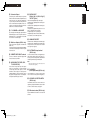
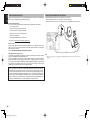
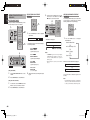
Press the INFO button again. The information
display will go out.
PRESET
DISC+
+
ANGLE
CH-SEL
V-OFF
-
TUNING
SUB TITLE
TUNING
ANGLE
SUB TITLE
CH-SEL
V-OFF
ATT.
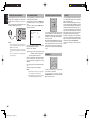
Note:
If the information contains a character that cannot be
recognized by that unit, the character will be displayed
with “ ”(space).
3.
3.
TREBLE
TV
DVD
VCR
TUNER
CD
CDR
DSS
MD
TAPE
AUX1
AUX2
AMP
1.
REMOTE CONTROLLER
RC5001SR
ATT.
BASS
+
AUDIO
+
AUDIO
2.
F.DIRECT
DISC+
BASS
F.DIRECT
LIP SYNC/
INPUT
dts
1
CS
SOURCE
4.
ATT
ENTER
SETUP MIC
AUTO
RETURN
UP
CLEAR
AV SURROUND RECEIVER SR5002
INPUT SELECTOR
XM INFORMATION
XM
CHAN
NAME
TITLE
CAT
MEMORY
MUTE
AUTO
TREBLE
TV
DVD
VCR
TUNER
CD
CDR
DSS
MD
TAPE
AUX1
AUX2
AMP
1.
REMOTE CONTROLLER
RC5001SR
(Using the SR5002)
(Using the SR5002)
1.
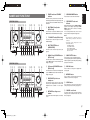
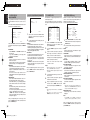
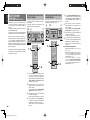
Turn the INPUT SELECTOR knob to select
“TUNER”.
2.
3.
Press the BAND button to select XM band.
Press the 1 or 2 cursor button on the front
panel to select the desired preset station.
1.
Turn the INPUT SELECTOR knob to select
“TUNER”.
2.
3.
Press the BAND button to select XM band.
(Using the remote controller)
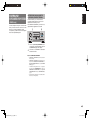
Press the 3 or 4 cursor button on the front
panel to select the desired station.
1.
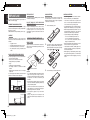
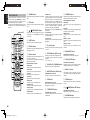
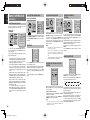
To select tuner, Press the TUNER button twice
within two seconds on the remote controller.
2.
3.
Press the BAND button to select XM band.
(Using the remote controller)
1.
SIMPLE
SETUP
STANDBY
POWER ON/STANDBY
TREBLE
TV
TUNER
REMOTE CONTROLLER
RC5001SR
1.
1.
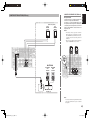
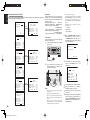
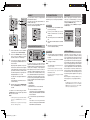
When this display appears, press the INFO
button again. XM information like the following
will appear.
MAIN
MULTI/ CAT
AV SURROUND RECEIVER SR5002
INPUT SELECTOR
SIGNAL:MARGINAL
Note:
To change the display content from XM information to
SR5002 functions, do so with the DISPLAY button.
2.
LEARN
3.
C A T : R o c k
INFO
3.
DOWN
DOWN
When the channel category is displayed:
MUTE
1.
MULTI
MAIN VOLUME
-------------------MAIN
RETURN
EXIT
Note:
The front Panel display can indicate up to 13
alphanumeric characters at once. If the information
contains more then 13 characters, the information
scrolls from right to left.
SPKR A/B
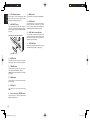
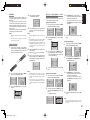
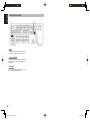
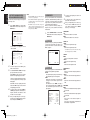
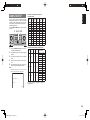
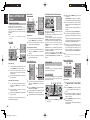
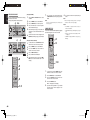
You can search for the channel you want to listen to
using one of three search modes. You can also enter
the number directly to select the desired channel.
ALL CHANNEL SEARCH MODE
SURR-MODE:AUTO
MULTIROOM:ON
MULTISPKR:OFF
M o n e y
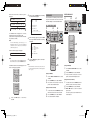
The “NAME/TITLE” is displayed for 2 seconds,
followed by the artist’s name and song title.
(If artist’s name or song title is more than 13 characters
long, the text is scrolled.)
CH/ CAT
:DVD
:XM
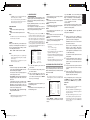
PRESET SEARCH MODE
SEARCH MODE
ENGLISH
When the channel Ar tist name/Song title is
displayed:
1.
To select tuner, Press the TUNER button twice
within two seconds on the remote controller.
2.
3.
Press the BAND button to select XM band.
S or T button to tune in the desired
preset station.
Or enter the preset station number with the
numeric buttons.
Press and hold the 5 or 6 button.
45
SR4002-5002U DFU_01_E2_2.indd 45
07.7.9 2:47:42 PM