1
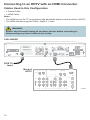
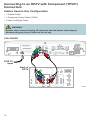
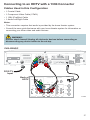
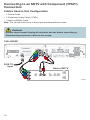
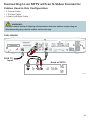
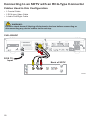
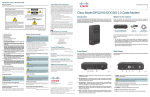
Connecting to an HDTV with a DVI Connector
Cables Used in this Configuration
• 1 Coaxial Cable
• 1 HDMI-to-DVI Cable or 1 HDMI Cable and 1 HDMI-to-DVI Adapter
• 1 Audio Left/Right Cable
Notes:
• The DVI port on the TV must support high-bandwidth digital content protection (HDCP).
• When you connect the HDMI connector to the DVI connector on your HDTV, you need an
HDMI-to-DVI adapter and a separate audio connection.
WARNING:
Electric shock hazard! Unplug all electronic devices before connecting or
disconnecting any device cables to the set-top.
CHS 435HDC
Video
STB SN: XXXXXXXXX
Y
Digital
Audio
CableCARD
Optical
Audio
120 V ~
60Hz 4.2A
500W
MCARD SN: XXXXXXXXX
CAUTION
RISK OF ELECTRIC SHOCK
DO NOT OPEN
L
STB RF MAC: XXXXXXXXXXXX
Pb
MCARD MAC: XXXXXXXXXXXX
L
L
IR Remote
Input
CUIDADO: RIESGO DE DESCARGA ELÉCTRICA
NO ABRIR
CATV Converter
Made in Mexico
FIOS TV In
This device is intended to be attached to
a receiver that is not used to receive
over-the-air broadcast signals.
Connections of thisdevice in any other
fashion may cause harmful interference
to radio communications and is in
violation of the FCC rules, part 15.
Audio
R
Audio
Audio
Pr
SD
120V~
60Hz 40W
R
R
S-Video
HDTV
HDTV
RF TV Out
USB
SATA Drive
1394
Firewire
Ethernet
LISTED 36MW
VIDEO PRODUCT
FiOS TV
Input
Back of
HDTV
AUDIO CENTER
CHANNEL IN
R
S-VIDEO
ON
DVI/HDCP
IN
AUDIO IN
DVI/HDCP
L
ANT (75 )
OFF
VIDEO
Y
Y
ANT-1
VIDEO
L/
MONO
AUDIO
Pb
L
Pr
AUDIO
L/
MONO
PB
L
R
PR
AUDIO
OUT
R
R
R
HD 2
IN
HD 2
IN
OUT
IN
ANT-2
T14397
15