1
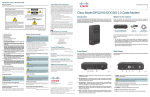
Connections for a VCR or DVD Recorder
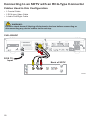
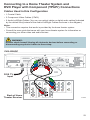
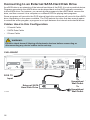
When using the set-top with a VCR or DVD recorder, you must make one of the
following connections to view content.
Although all connections provide you with quality service, we list the connections in our
recommended order.
Notes:
• The labeling on your set-top, VCR, or DVD recorder may vary slightly from the
illustrations shown below.
• Some cables shown in the connection diagrams may not be included with this set-top.
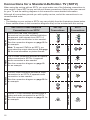
S-Video
See the connection diagram on page 25
for an example.
L
R
SD
Video
Video
R
Audio
Audio
For VCRs or DVD recorders with Video
In and Left and Right audio connectors,
use the SD Video and the SD Audio
connectors (Left and Right) on the set-top.
S-VIDEO
IN
L
VIDEO
IN
L
Audio
R
SD
Audio
VCR/DVD Recorder
For VCRs or DVD recorders with
S-Video In and Left and Right audio
connectors, use the S-Video and the SD
Audio Left and Right connectors on the
set-top.
VCR/DVD Recorder
Connections
Video
Use One of These Optional Connections
Set-Top
to a VCR or DVD Recorder
Connections
L
R
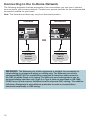
Connecting an Over-the-Air Converter Box
You can connect an over-the-air converter box directly to your TV to receive certain local
channels, but do not connect the over-the-air converter box directly to your set-top.
13