1
CONTENTS
INTRODUCTION................................................................................................................................................................. 2
ACCESSORIES .................................................................................................................................................................. 2
INSTALLATION AND SAFETY ........................................................................................................................................... 3
DVD REGION CODE .......................................................................................................................................................... 3
PATENT INFORMATION .................................................................................................................................................... 3
SETTING UP YOUR SYSTEM............................................................................................................................................ 4
REAR PANEL CONNECTIONS .......................................................................................................................................... 4
Power ............................................................................................................................................................................. 4
Video Outputs................................................................................................................................................................. 4
Audio Outputs................................................................................................................................................................. 5
Control inputs/outputs etc............................................................................................................................................... 6
OPERATING YOUR SYSTEM ............................................................................................................................................ 7
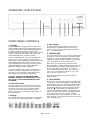
FRONT PANEL CONTROLS .............................................................................................................................................. 7
SYSTEM OPERATION WITH SMART MY-LINK ................................................................................................................ 8
REMOTE CONTROL OPERATION .................................................................................................................................... 9
1.
ESSENTIAL SETUP ........................................................................................................................................... 10
3.
PLAYING A CD................................................................................................................................................... 15
4.
PLAYING AN SACD ........................................................................................................................................... 15
5.
PLAYING AN MP3/WMA/ DivX/XviD/JPEG (PICTURE CD)............................................................................... 16
6.
SETUP MENUS .................................................................................................................................................. 17
USE OF MX-700 REMOTE (as supplied with MXD4000/7000 etc.).................................................................................. 22
CARE AND HANDLING OF DISCS .................................................................................................................................. 22
TROUBLE-SHOOTING ..................................................................................................................................................... 23
APPENDIX 1
Table of Alternative Languages............................................................................................................. 24
APPENDIX 2
Glossary ................................................................................................................................................ 26
SPECIFICATIONS ............................................................................................................................................................ 27
TECHNICAL DATA ........................................................................................................................................................... 27
INTRODUCTION
The Myryad MXV4000 DVD Player has been designed
to offer a combination of high quality sound and video
reproduction together with elegant styling in keeping with
other Myryad MX products. It is a full-function remotecontrolled DVD player that will play a wide variety of
silver disc types. Playback formats accepted include:
DVD-Video, VCD, SVCD, DVD-R/-RW, DVD+R/+RW,
CD, CD-R, CD-RW, HDCD, MP3, WMA, SACD multichannel, SACD stereo, JPEG (picture CD), JPEG with
MP3, Xvid and DivX.
The MXV4000 has composite, s-video and component
analogue video outputs, plus an HDMI digital video
output with upscaling available to 720p or 1080i formats
using a Faroudja DCDi de-interlacer/upscaler. It has
fixed-level low-impedance audio outputs – both 5.1
channel and a separate stereo downmix which is always
present and can be used to feed sound to a second
room/zone if desired. The composite and s-video outputs
are also permanently present so they too can be used
for a second room/zone. Built-in Dolby Digital and DTS
decoding is provided, together with Dolby Pro Logic II
and Virtual Surround options.
The MXV4000 has coaxial and optical digital audio
outputs to feed a surround processor or receiver. In
addition it has a Smart My-Link® control input and output
and an RS232 control port.
The MXV4000 offers a range of expansion possibilities:
•
The Smart My-Link® input can be connected to a
Myryad surround preamp-processor or integrated
amplifier or so that the MXV4000 will automatically
be switched on or off when the amplifier is switched
on or off.
•
The Smart My-Link® input/output can be coupled to
other Myryad products that can then be remotecontrolled via the MXV4000 's infra-red receiver - or
vice-versa.
•
The MXV4000 can be controlled from a remote
room via its Smart My-Link® input.
•
•
When linked via the Smart My-Link® to a
compatible Myryad surround preamp-processor or
integrated amplifier a number of extra features
become available which make the system as a
whole easier and quicker to operate.
The RS232 port can be used for control of the
MXV4000 in a home automation system.
ACCESSORIES
Your MXV4000 is supplied complete with the following
accessories:
•
Separate mains power cord to suit country of sale.
•
My-Link interconnect (0.5m RCA-RCA)
•
Myryad MSR2 System Remote Control handset.
•
Two AAA batteries for handset (not in some
countries)
•
Myryad MSR2 System Remote Control Owner’s
Manual
page 2 of 28