1
Power Source
1
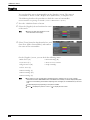
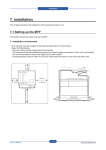
Press the power switch to the [ | ] position to switch
the power on.
If the machine does not power on, check the
following:
Reset Button
- The power cord is plugged in.
- The main power is switched on.
- The <RESET> button is set on and is in the
depressed position.
Switching the Power Off
The following describes how to switch the power off.
1
Before switching the power off, make sure that the machine has completed all copy or print
jobs. Then, make sure that the <Data> indicator is not blinking.
Note
• Do not switch the power off in the following situations. If the power is switched off, the data being
processed may be erased.
- While data is being received
- While a job is being printed
- While a job is being copied
- While a job is being scanned
• When switching the power off, wait 5 seconds after outputs have been delivered.
2
Press the power switch to the [
Note
] position.
• Power off processing is performed internally on the machine for a while after the power is switched
off. Therefore, do not switch the main power off immediately after switching the power off.
• When powering the machine on after it has been switched off, wait 10 seconds after the touch screen
has gone dark.
35