1
SSIM-H2-02
Fast Ethernet - Translational Switch
SmartStack Interface Module
Installation
and
User Guide
i
Notice
Cabletron Systems reserves the right to make changes in specifications and other
information contained in this document without prior notice. The reader should in all
cases consult Cabletron Systems to determine whether any such changes have been made.
The hardware, firmware, or software described in this manual is subject to change
without notice.
IN NO EVENT SHALL CABLETRON SYSTEMS BE LIABLE FOR ANY
INCIDENTAL, INDIRECT, SPECIAL, OR CONSEQUENTIAL DAMAGES
WHATSOEVER (INCLUDING BUT NOT LIMITED TO LOST PROFITS) ARISING
OUT OF OR RELATED TO THIS MANUAL OR THE INFORMATION CONTAINED
IN IT, EVEN IF CABLETRON SYSTEMS HAS BEEN ADVISED OF, KNOWN, OR
SHOULD HAVE KNOWN, THE POSSIBILITY OF SUCH DAMAGES.
© October 1999 by:
Cabletron Systems, Inc.
35 Industrial Way
Rochester, NH 03867
All Rights Reserved.
Order Number: 9032962-01
(OC-7063 v. 1.1, 710001816)
SmartStack is a trademark of Cabletron Systems, Inc.
CompuServe is a registered trademark of CompuServe, Inc.
i960 microprocessor is a registered trademark of Intel Corp.
Ethernet is a trademark of Xerox Corporation.
Notice
ii
FCC Notice
This device complies with Part 15 of the FCC rules. Operation is subject to the following
two conditions: (1) this device may not cause harmful interference, and (2) this device
must accept any interference received, including interference that may cause undesired
operation.
NOTE: This equipment has been tested and found to comply with the limits for a Class A
digital device, pursuant to Part 15 of the FCC rules. These limits are designed to provide
reasonable protection against harmful interference when the equipment is operated in a
commercial environment. This equipment uses, generates, and can radiate radio
frequency energy and if not installed in accordance with the operator’s manual, may
cause harmful interference to radio communications. Operation of this equipment in a
residential area is likely to cause interference in which case the user will be required to
correct the interference at his own expense.
WARNING: Changes or modifications made to this device which are not expressly
approved by the party responsible for compliance could void the user’s authority to
operate the equipment.
VCCI Notice
This is a Class A product based on the standard of the Voluntary Control Council for
Interference by Information Technology Equipment (VCCI). If this equipment is used in
a domestic environment, radio disturbance may arise. When such trouble occurs, the user
may be required to take corrective actions.
Industry Canada Notice
This digital apparatus does not exceed the Class A limits for radio noise emissions from
digital apparatus set out in the Radio Interference Regulations of the Canadian
Department of Communications.
Le présent appareil numérique n'émet pas de bruits radioélectriques dépassant les limites
applicables aux appareils numériques de la class A prescrites dans le Règlement sur le
brouillage radioélectrique édicté par le ministère des Communications du Canada.
Notice
iii
Declaration of Conformity
Addendum
Application of Council Directive(s): 89/336/EEC
73/23/EEC
Manufacturer’s Name: Cabletron Systems, Inc.
Manufacturer’s Address: 35 Industrial Way
PO Box 5005
Rochester, NH 03867
European Representative Name: Mr. J. Solari
European Representative Address: Cabletron Systems Limited
Nexus House,
Newbury Business Park
London Road, Newbury
Berkshire RG13 2PZ, England
Conformance to Directive(s)/Product Standards: EC Directive 89/336/EEC
EC Directive 73/23/EEC
EN 55022
EN 50082-1
EN 60950
Equipment Type/Environment: Networking Equipment, for use
in a Commercial or Light
Industrial Environment.
We the undersigned, hereby declare, under our sole responsibility, that the equipment
packaged with this notice conforms to the above directives.
Manufacturer
Legal Representative in Europe
Mr. Ronald Fotino
Full Name
Mr. J. Solari
Full Name
Principal Compliance Engineer
Title
Managing Director - E.M.E.A.
Title
Rochester, NH, USA
Location
Newbury, Berkshire, England
Location
Notice
iv
Notice
v
Table of Contents
1. Introduction
1
MIB Support . . . . . . . . . . . . . . . . . . . . . . . . . . . . 4
2. Installation
Package Contents . . . .
Installation Procedure . .
Physical Installation . . .
Software Installation . . .
TFTP Download . . .
Serial Download . . .
Cabling . . . . . . . . . .
LEDs . . . . . . . . . . .
Power-On Self Test . . .
Configuration . . . . . . .
Default Configuration .
5
.
.
.
.
.
.
.
.
.
.
.
.
.
.
.
.
.
.
.
.
.
.
.
.
.
.
.
.
.
.
.
.
.
.
.
.
.
.
.
.
.
.
.
.
.
.
.
.
.
.
.
.
.
.
.
.
.
.
.
.
.
.
.
.
.
.
.
.
.
.
.
.
.
.
.
.
.
.
.
.
.
.
.
.
.
.
.
.
.
.
.
.
.
.
.
.
.
.
.
.
.
.
.
.
.
.
.
.
.
.
.
.
.
.
.
.
.
.
.
.
.
.
.
.
.
.
.
.
.
.
.
.
.
.
.
.
.
.
.
.
.
.
.
.
.
.
.
.
.
.
.
.
.
.
.
.
.
.
.
.
.
.
.
.
.
.
.
.
.
.
.
.
.
.
.
.
.
.
.
.
.
.
.
.
.
.
.
.
.
.
.
.
.
.
.
.
.
.
.
.
.
.
.
.
.
.
.
.
.
.
.
.
.
.
.
.
.
.
.
.
3. Configuration
Introduction . . . . . . . . . . . . . . . . . . . . . . .
Ports, Port Groups and VLANs. . . . . . . . . . .
TS Virtual Ports and VLAN Tagging . . . . . . . .
Virtual Port Restriction . . . . . . . . . . . . . . .
Ring Number Restriction . . . . . . . . . . . . . .
Bridging Modes . . . . . . . . . . . . . . . . . . . . .
Source Routed Switching (SRS) Operation Mode .
Source Routed Transparent Bridging (SRT) Mode.
Source Routed Bridging (SRB) Mode . . . . . . .
Redundant Connections to Fast Ethernet Network . .
Network Scenarios . . . . . . . . . . . . . . . . .
Spanning Tree Configuration. . . . . . . . . . . .
Technical Background . . . . . . . . . . . . . . .
General Guidelines . . . . . . . . . . . . . . . . . . .
Navigating Within the Menus . . . . . . . . . . . .
Configuration Overview . . . . . . . . . . . . . . . .
VLAN Configuration . . . . . . . . . . . . . . . . . .
BRF Configuration . . . . . . . . . . . . . . . . .
Local VLAN Port Configuration. . . . . . . . . . .
Port Configuration - TS Ports. . . . . . . . . . . . . .
Virtual Port Configuration. . . . . . . . . . . . . .
SSIM-H2-02 Fast Ethernet - Translational Switch SmartStack Interface Module Installation and User Guide
. 5
. 6
. 7
. 8
. 8
. 9
10
10
11
12
12
13
.
.
.
.
.
.
.
.
.
.
.
.
.
.
.
.
.
.
.
.
.
.
.
.
.
.
.
.
.
.
.
.
.
.
.
.
.
.
.
.
.
.
.
.
.
.
.
.
.
.
.
.
.
.
.
.
.
.
.
.
.
.
.
.
.
.
.
.
.
.
.
.
.
.
.
.
.
.
.
.
.
.
.
.
.
.
.
.
.
.
.
.
.
.
.
.
.
.
.
.
.
.
.
.
.
14
14
15
15
15
16
16
16
17
19
19
21
24
26
27
27
28
28
28
28
29
vi
Frame Conversion Configuration . . . . . . . . . . . . . . .
TCP/IP Conversion Status. . . . . . . . . . . . . . . . .
TCP/IP Conversion Parameters Change . . . . . . . . .
Novell Conversion Status . . . . . . . . . . . . . . . . .
Novell Conversion Parameters Change . . . . . . . . . .
NetBios Conversion Status . . . . . . . . . . . . . . . .
NetBios Conversion Parameters Change . . . . . . . . .
SNA Conversion Status . . . . . . . . . . . . . . . . . .
SNA Conversion Parameters Change . . . . . . . . . . .
Other Frames w/SNAP Conversion Status . . . . . . . .
Other Frames w/SNAP Conversion Parameters Change .
Other Frames w/o SNAP Conversion Status . . . . . . .
Other Frames w/o SNAP Conversion Parameters Change
Dual Home FEP Addresses Configuration . . . . . . . .
.
.
.
.
.
.
.
.
.
.
.
.
.
.
. 32
. 32
. 32
. 34
. 34
. 36
. 36
. 38
. 38
. 40
. 40
. 42
. 42
. 43
.
.
.
.
.
.
.
.
.
.
. 46
. 47
. 48
. 48
. 49
. 51
. 51
. 51
. 53
. 53
4. Statistics
Statistics Menu. . . . . . . . . .
Port Status . . . . . . . . . .
Port Statistics . . . . . . . .
General Statistics . . . . . .
Discarded Frames . . . . . .
802.3 Statistics . . . . . . .
Traffic Counters . . . . . . .
Error Counters . . . . . . . .
Virtual Port Statistics. . . . .
Discarded Frames Statistics .
45
.
.
.
.
.
.
.
.
.
.
.
.
.
.
.
.
.
.
.
.
.
.
.
.
.
.
.
.
.
.
.
.
.
.
.
.
.
.
.
.
.
.
.
.
.
.
.
.
.
.
.
.
.
.
.
.
.
.
.
.
.
.
.
.
.
.
.
.
.
.
.
.
.
.
.
.
.
.
.
.
.
.
.
.
.
.
.
.
.
.
.
.
.
.
.
.
.
.
.
.
.
.
.
.
.
.
.
.
.
.
.
.
.
.
.
.
.
.
.
.
.
.
.
.
.
.
.
.
.
.
.
.
.
.
.
.
.
.
.
.
.
.
.
.
.
.
.
.
.
.
5. Getting in Touch with Technical Support
57
Appendix A. Abbreviations
59
SSIM-H2-02 Fast Ethernet - Translational Switch SmartStack Interface Module Installation and User Guide
vii
List of Figures
Figure 1. SSIM-H2-02 Switch SmartStack Interface Module . . . . .
Figure 2. Removing the Expansion Slot Cover . . . . . . . . . . . .
Figure 3. Installing the SSIM-H2-02 . . . . . . . . . . . . . . . . . .
Figure 4. Ethernet CRF in SRT Bridging Mode . . . . . . . . . . . .
Figure 5. Ethernet CRF in SRB Bridging Mode . . . . . . . . . . . .
Figure 6. Frame Duplication . . . . . . . . . . . . . . . . . . . . . .
Figure 7. Frame Looping . . . . . . . . . . . . . . . . . . . . . . . .
Figure 8. Broken Ethernet Cloud . . . . . . . . . . . . . . . . . . .
Figure 9. Redundant Connections to Fast Ethernet Network . . . . .
Figure 10. Load Sharing in Redundant Connections to Fast Ethernet
Network . . . . . . . . . . . . . . . . . . . . . . . . . . .
Figure 11. STP Cost Modification . . . . . . . . . . . . . . . . . . .
Figure 12. Main Switch Menu . . . . . . . . . . . . . . . . . . . . .
SSIM-H2-02 Fast Ethernet - Translational Switch SmartStack Interface Module Installation and User Guide
1
7
8
16
17
18
19
20
21
22
24
26
viii
List of Tables
Table 1. Features and Benefits
. . . . . . . . . . . . . . . . .
Table 2. LEDs at the Left on the Front Panel . . . . . . . . . .
Table 3. LEDs at the Right of Every Port
. . . . . . . . . . . .
Table 4. Translational Switch Physical Port Status . . . . . . .
Table 5. Translational Switch Virtual Port Status
. . . . . . . .
Table 6. Translational Switch Configured and Actual Frame SIze
Table 7. IP: Token Ring Format . . . . . . . . . . . . . . . . .
Table 8. IP: Ethernet Format . . . . . . . . . . . . . . . . . . .
Table 9. IP: Source Routing . . . . . . . . . . . . . . . . . . .
Table 10. IP: Explorer Frames Type . . . . . . . . . . . . . . .
Table 11. IP: Explorer Frames Type . . . . . . . . . . . . . . .
Table 12. NOVELL: Token Ring Format . . . . . . . . . . . . .
Table 13. NOVELL: Ethernet Format
. . . . . . . . . . . . . .
Table 14. NOVELL: Source Routing . . . . . . . . . . . . . . .
Table 15. Novell: Explorer Frames Type . . . . . . . . . . . . .
Table 16. NetBios: Token Ring Format . . . . . . . . . . . . .
Table 17. NetBios: Ethernet Format . . . . . . . . . . . . . . .
Table 18. NetBios: Source Routing . . . . . . . . . . . . . . .
Table 19. NetBios: Explorer Frames Type . . . . . . . . . . . .
Table 20. SNA: Token Ring Format . . . . . . . . . . . . . . .
Table 21. SNA: Ethernet Format . . . . . . . . . . . . . . . . .
Table 22. SNA: Source Routing . . . . . . . . . . . . . . . . .
Table 23. SNA: Explorer Frames Type
. . . . . . . . . . . . .
Table 24. Other Frames w/SNAP: Token Ring Format . . . . .
Table 25. Other Frames w/SNAP: Ethernet Format . . . . . . .
Table 26. Other Frames w/SNAP: Source Routing . . . . . . .
Table 27. Other Frames w/SNAP: Explorer Frames Type . . . .
Table 28. Other Frames w/o SNAP: Token Ring Format . . . .
Table 29. Other Frames w/o SNAP: Ethernet Format . . . . . .
Table 30. Other Frames w/o SNAP: Source Routing . . . . . .
Table 31. Other Frames w/o SNAP: Explorer Frames Type . . .
SSIM-H2-02 Fast Ethernet - Translational Switch SmartStack Interface Module Installation and User Guide
.
.
.
.
.
.
.
.
.
.
.
.
.
.
.
.
.
.
.
.
.
.
.
.
.
.
.
.
.
.
.
.
.
.
.
.
.
.
.
.
.
.
.
.
.
.
.
.
.
.
.
.
.
.
.
.
.
.
.
.
.
.
. 2
. 10
. 10
. 29
. 30
. 30
. 32
. 33
. 33
. 34
. 34
. 35
. 35
. 36
. 36
. 37
. 37
. 37
. 38
. 38
. 39
. 39
. 40
. 40
. 41
. 41
. 41
. 42
. 42
. 43
. 43
1
1. Introduction
The Cabletron Systems SmartStack SSIM-H2-02 2-port Translational Switch
SSIM (SmartStack SSIM-H2-02) provides connectivity to 10/100 Mbps Fast
Ethernet for the SmartStack STS16-20RM Token Ring Switch. Designed for high
performance and low latency, the SmartStack SSIM-H2-02 seamlessly integrates
legacy Token Ring networks and Fast Ethernet backbones.
➽
Note: References to SmartStack STS16-20RM are also applicable to SmartStack
STS16-20FRM.
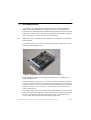
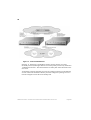
The module mounts in one of the two front panel expansion module slots on the
SmartStack STS16-20RM switch.
Figure 1. SSIM-H2-02 Switch SmartStack Interface Module
The SSIM-H2-02 conforms to the IEEE standard 802.3U for 100 Mbps Fast
Ethernet 100BASE-TX.
A Translational Switch (TS) port can connect to a standard Fast Ethernet adapter or
it can act as a trunk port and carry traffic from all of the 63 VLANs it is possible to
configure in the switch. This is achieved using standard IEEE 802.1Q VLAN frame
tagging. For each VLAN, a virtual port is created which behaves much like an
ordinary Ethernet port.
The module supports all of the switching modes implemented in the switch. Eight
LEDs on the front panel indicate the overall operational state of the module and the
two ports. Configuration and detailed status information is available from the
switch console or from the graphical management application.
SSIM-H2-02 Fast Ethernet - Translational Switch SmartStack Interface Module Installation and User Guide
Introduction
2
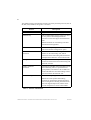
The module supports translational switching for all key network protocols (such as
IP, IPX, SNA, NetBios) and generic conversion:
Feature
Description
SRT and SRB
Support for SRT and SRB bridging.
IEEE 802.1Q
This standard frame-tagging protocol is used
to carry frames that belong to different
VLANs over the same physical Fast Ethernet
link.
Benefit: Enables VLAN trunking with other
standards based equipment.
IEEE 802.1D
IEEE 802.1D Spanning Tree on the Ethernet
side with a manual configuration option.
IP multicasts address
translation
IP multicasts translated to a single functional
address on the Token-Ring side, and IP
multicasts on the Token-Ring side translated to
multiple MAC addresses on the Ethernet side.
IP fragmentation
IP fragmentation makes it possible to easily
connect IP networks between Token-Ring and
Ethernet networks.
NetBios addresses
translation
Translation of NetBios functional address from
the Token-Ring side to a specific Ethernet
group address, and frames with an additional
functional addresses from Token-Ring side are
not forwarded on the Ethernet side.
Source-Routing
Source-Routing is supported.
Benefit: Provides optimal Token-Ring
connectivity and ensures smooth integration
into existing Source-Routing based networks.
For each supported protocol, frames can be
sent as transparent or source-routed traffic.
Table 1. Features and Benefits
SSIM-H2-02 Fast Ethernet - Translational Switch SmartStack Interface Module Installation and User Guide
Introduction
3
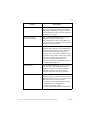
Feature
Description
SNMP
SNMP is supported via the host processor (the
processor on the SmartStack STS16-20RM).
This makes it possible to configure the device
in a standards-based way and as an integrated
part of the LAN switch.
Can serve multiple
switches in one stack
The SmartStack SSIM-H2-02 can serve as
uplink for multiple LAN switches
interconnected by a stacker. This reduces the
cost of connecting a number of LAN switches
to an Fast Ethernet backbone.
Dual home FEP
A Token-Ring network using SRB can support
duplicate MAC addresses. This capability has
been exploited by SNA gateways, which can
provide a redundant host connection: two
gateways have the same MAC address but are
on different rings and due to the source routing
discovery process the SNA sessions are
randomly distributed between the two
gateways. Sessions are established between
configured MAC addresses.
Protocol filters
The SmartStack SSIM-H2-02 offers the same
protocol filters as the SmartStack STS1620RM. This makes for consistent protocol
filtering and thereby reduces the risk of
network congestion and security breaches.
Broadcast Suppression
On output, the Translational Switch SSIM
must keep the rate of broadcast frames sent to
Ethernet within the limit set by the Maximum
Broadcast Frame Count per Second
configuration parameter. Broadcasts include:
- ARE, STE source routed frames
- unknown destination frames
- frames with the MAC header broadcast bit set
Table 1. Features and Benefits
SSIM-H2-02 Fast Ethernet - Translational Switch SmartStack Interface Module Installation and User Guide
Introduction
4
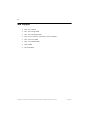
MIB Support
•
•
•
•
•
•
•
•
RFC 1213: MIB II
RFC 1493: Bridge MIB
RFC 1525: SR Bridge MIB
RFC 1573: Evaluation of Interfaces Group of MIB II
RFC 1650: Dot3 MIB
RFC 1757: RMON MIB
STS16 MIB
FEUplink MIB
SSIM-H2-02 Fast Ethernet - Translational Switch SmartStack Interface Module Installation and User Guide
Introduction
5
2. Installation
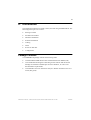
This chapter describes how to install, connect, and start using the SSIM-H2-02. The
following main topics are covered:
•
•
•
•
•
•
•
•
Package Contents
Installation Procedure
Hardware Installation
Software Installation
Cabling
LEDs
Power-On Self Test
Configuration
Package Contents
Your SSIM-H2-02 package contains the following items:
•
•
One SmartStack SSIM-H2-02 2-Port Translational Switch SSIM (UTP).
•
One SSIM-H2-02 Switch SmartStack Interface Module Installation and User
Guide (this guide).
One CD-ROM containing the Token Ring switch software and the Switch
Manager for Windows and HP Open View for Windows, as well as user
documentation in pdf format.
SSIM-H2-02 Fast Ethernet - Translational Switch SmartStack Interface Module Installation and User Guide
Installation
6
Installation Procedure
The SSIM-H2-02 is packaged with the software for both the module itself and the
SmartStack STS16-20RM Token Ring Switch. The switch is also supplied with
both software images. To ensure compatibility between the module and the switch,
the latest of the two software revisions should be installed.
The switch and SSIM-H2-02 software is also available via Cabletron Systems's
online services, including the Cabletron Systems Web site.
Install the module as follows:
1. Install the software in the switch. See the switch manual for instructions on
downloading the software.
2. Optionally, clear the NVRAM in the base switch. This will erase all
configuration in the switch.
3. Reset the switch to activate the new software.
4. If the NVRAM was cleared in step 2, re-establish the switch configuration.
Verify that the switch is operating correctly.
5. Turn off the switch.
➽
Warning: Be sure to install a version of the base switch software that supports the
SSIM-H2-02 (version 3.10 or later) before physically inserting the module.
Otherwise, the switch will not recognize it and will cease functioning.
6. Physically install the module in one of the two expansion slots. See the
“Hardware Installation” on page 7 for detailed instructions.
7. Turn on the switch.
8. Download the software for the module. See the “Software Installation” on
page 8 for detailed instructions.
9. If you plan to use the graphical SmartStack Manager application, install it now
on your PC.
10. If necessary, configure the module. For details, see chapter 3, “Configuration”.
SSIM-H2-02 Fast Ethernet - Translational Switch SmartStack Interface Module Installation and User Guide
Installation
7
Hardware Installation
➽
Warning: Expansion modules are not hot-swappable. If you install or remove
expansion modules while the power to the switch is on, damage may occur to the
switch and to the module.
➽
Warning: Be sure to install a version of the base switch software that supports the
SSIM-H2-02 (version 3.10 or later) before physically inserting the module.
Otherwise, the switch will not recognize it and this may in some cases corrupt the
configuration.
Use the following steps to install the module in a SmartStack STS16-20RM Token
Ring Switch:
1. Power off the base switch by unplugging the power cord from the power outlet.
If the switch uses the optional SmartStack STS-PSU Redundant Power Unit,
unplug the connector from the base switch as well.
2. Select an empty expansion module slot in which to install the module. You can
install the module in either or both of the slots.
3. Remove the cover from the expansion slot on the front of the switch by
loosening the two retaining thumb screws (see Figure 2). Keep the plate for use
in the cases when the expansion module is removed.
Figure 2. Removing the Expansion Slot Cover
SSIM-H2-02 Fast Ethernet - Translational Switch SmartStack Interface Module Installation and User Guide
Installation
8
4. Carefully insert the module into the rails on each side of the expansion slot,
sliding it back until the connector on the module is seated into the connector at
the back of the slot. See Figure 3. When the module is fully seated, the module
faceplate will be flush with the front of the base switch.
Figure 3. Installing the SSIM-H2-02
5. Secure the module with the two attached thumb screws.
6. Re-apply power to the switch.
Software Installation
Before you can use your SSIM-H2-02, you have to install the module software
image. The software image can be downloaded to the module via TFTP or via a
serial line. Search the disks supplied with the module for a file named FEyyzz.BIN.
The letters yyzz in the file name represent the version number of the software. For
example, FE0310.BIN is version 3.10 of the software image.
TFTP Download
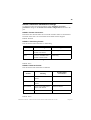
1. Copy the software image to a suitable directory on the TFTP server.
2. Set-up VLAN IP configuration on the VLAN which will be used to download.
3. From the main menu in the console, select Download→
→Upload.
4. Select TFTP Download→
→Upload.
5. Set the IP address of the TFTP server. Also, set the download VLAN (the BRF
which will be used to perform the download).
6. Select TS Firmware Download.
7. Select TS Firmware Download Filename and type the file name of the
software image to download.
8. Select Execute TS Image Network Download to start the download.
SSIM-H2-02 Fast Ethernet - Translational Switch SmartStack Interface Module Installation and User Guide
Installation
9
The console will display the download activity while the software is transferred
over the network by counting received blocks. When the software has been
transferred, you will see the following messages:
Network download complete. Now transferring to TS
Module(s), please wait...
Download of TS firmware complete - TS module(s) being
reinitialized...
➽
Warning: If you use Telnet as a manager console, download activity will not be
displayed.
The software image is then programmed into the FLASH memory on the module.
The software image remains in memory until it is replaced. When the software
installation is complete, the module is started for normal operation, and the
following message is displayed:
Press <RETURN> to continue...
➽
Note: Remember that new module software is active immediately after it is
downloaded, but to activate the module’s software you must restart the switch.
Serial Download
1. From the main menu, select Download→
→Upload.
2. Select Serial Link Download.
3. Select TS Firmware Download.
4. Using your terminal software, transfer the software image to the SSIM-H2-02
with the X-Modem protocol. The transfer may take several minutes, depending
on your terminal emulator baud.
The software image is then programmed into the FLASH memory of the module,
and will remain there until it is replaced. When the software installation is
complete, the module is started for normal operation and the following message is
displayed:
Press <RETURN> to continue...
SSIM-H2-02 Fast Ethernet - Translational Switch SmartStack Interface Module Installation and User Guide
Installation
10
Cabling
The module uses standard or crossed-over UTP-5 copper cables. The maximum
cable length is 100 m (328 feet).
1. Insert the modular RJ-45 jack from either end of a standard or crossed-over
UTP-5 cable into one of the connectors on the SSIM-H2-02 front panel.
2. Connect the other end of the cable to:
— another TS port (using the crossed-over UTP-5 cable)
— 100/10 MB Ethernet adapter (using the crossed-over UTP-5 cable)
— 100/10 MB Ethernet switch or hub port (using the standard UTP-5 cable)
LEDs
There are eight LEDs on the front panel of the SSIM-H2-02. During normal
operation, the two LEDs on the left side of the front panel indicate the module
status:
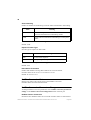
LED
DIAG (green)
ERR (yellow)
Position
Top
Bottom
State
Meaning
On
Diagnostics are in process.
Off
No diagnostics are in process.
On
A module failure has occurred.
Off
The module is working
correctly.
Table 2. LEDs at the Left on the Front Panel
The three LEDs on the right of every port indicate the port status:
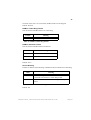
LED
ACTIVITY
(green)
Position
Top
State
Meaning
Flashing
The port is receiving or
transmitting frames.
Off
Currently no traffic on the port.
Table 3. LEDs at the Right of Every Port
SSIM-H2-02 Fast Ethernet - Translational Switch SmartStack Interface Module Installation and User Guide
Installation
11
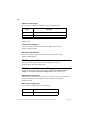
100 (green)
LINK (green)
Middle
Bottom
On
The port is in 100 Mbps mode.
Off
The port is in 10 Mbps mode.
On
The port is active.
Off
The port is disabled or not
inserted.
Table 3. LEDs at the Right of Every Port
Power-On Self Test
When you start the switch, it will run a power-on self-test to ensure that all the
devices are working correctly. During this test, the switch will detect and start any
module found in an expansion slot.
The module will then perform an internal power-on self test. During the entire test,
the DIAG and ERR LEDs will be lit while the other LEDs may turn on and off.
The test lasts a few minutes. If no problems are found, the DIAG and ERR LEDs
turn off and the module enters its normal operational state. If a problem is found,
the DIAG LED will turn off and the ERR LED will remain on. Messages in the
message log or on the console will indicate what the problem is.
➽
Note: Switch Console message:
Press RETURN key to activate console...
means that the console is available, but it takes more time to activate the module.
You can check if they are up in the Configuration→
→Module Information menu.
SSIM-H2-02 Fast Ethernet - Translational Switch SmartStack Interface Module Installation and User Guide
Installation
12
Configuration
The SSIM-H2-02 can be configured in two ways:
•
From the switch console, directly with a VT100 terminal emulator on the RS232 port or via Telnet.
•
By a SNMP based graphical management application.
Console configuration is described in chapter 3, “Configuration”. The management
application is described in the online help.
All configuration parameters are stored by the switch and not in the module. This
means that the modules can be exchanged without reconfiguring the switch. Note,
however, that the module software image is stored on the SSIM-H2-02 itself and
will follow the module when it is moved to another switch.
Default Configuration
When a SSIM-H2-02 is inserted into an expansion slot for the first time, the switch
will generate a default configuration:
•
•
Both TS ports are enabled.
Both TS ports have a single virtual port in the default CRF.
This configuration is suitable for connecting both TS adapters and other TS ports
to the default CRF. If more advanced configurations are required, refer to
chapter 3, “Configuration” for details.
❏
SSIM-H2-02 Fast Ethernet - Translational Switch SmartStack Interface Module Installation and User Guide
Installation
13
3. Configuration
This chapter explains how to view and edit the configuration of the SSIM-H2-02
using a VT100 terminal emulator attached directly to the SmartStack STS16-20RM
Token Ring switch. The SSIM-H2-02 configuration can also be modified from a
remote VT100 console via a Telnet session. (The manual supplied with the
SmartStack STS16-20RM Token Ring Switch describes how to connect a network
management console).
This chapter is divided into the following sections:
•
•
•
•
•
•
•
•
Introduction
Bridging Modes
Redundant Connections to Fast Ethernet Network
General Guidelines
Configuration Overview
VLAN Configuration
Port Configuration - TS Ports
Frame Conversion Configuration
For more information on configuration, see the SmartStack STS16-20RM/STS1620FRM Token Ring Switch Installation and User Guide.
SSIM-H2-02 Fast Ethernet - Translational Switch SmartStack Interface Module Installation and User Guide
Configuration
14
Introduction
Each SSIM-H2-02 has two 100 Mbps Fast Ethernet ports. In the console
configuration, port numbers are used to refer to ports, with ordinary Token Ring
ports numbered 1 to 20. If a module is inserted into the left expansion slot, the TS
ports are numbered 21 and 22. If a module is inserted into the right expansion slot,
the TS ports are numbered 25 and 26. The number of modules in a stack is limited
only by the number of available slots in the stack.
The TS ports are configured much like ordinary Token Ring ports, and generally
appear in all tables where ordinary Token Ring ports appear.
Ports, Port Groups and VLANs
This section briefly describes the VLAN concept and switching modes of the
SmartStack STS16-20RM Switch. For more detailed information about these
subjects, see the SmartStack STS16-20RM/STS16-20FRM Token Ring Switch
Installation and User Guide.
The switch supports up to 63 VLANs. A VLAN forms a single bridged domain and
the visibility of MAC addresses, bridge and ring numbers as well as the scope of
broadcast frames are limited to the VLAN in which they originate. Frames must be
routed to move between VLANs.
A VLAN consists of a number of port groups called CRFs (Concentrator Relay
Functions). A CRF is conceptually equal to a ring. If a VLAN contains two or more
CRFs they are conceptually connected by a multiport bridge called a BRF (Bridge
Relay Function).
The BRF performs either source-route bridging (SRB) or source-route transparent
switching (SRT) between CRFs depending on the CRF configuration. CRFs
configured for SRT switching form an SRT domain in which source-routed frames
are source routed and non-source-routed frames are transparently switched.
Each ordinary Token Ring port is assigned to a specific CRF, which also
determines to which VLAN it belongs.
In the default configuration, all ordinary Token Ring ports are assigned to the
trcrf- default CRF, which belongs to the trbrf-default BRF. The only limitations to
this are that the names cannot be changed, the parent BRF of the default CRF
cannot be changed and other CRFs cannot be assigned to the trbrf-default BRF.
SSIM-H2-02 Fast Ethernet - Translational Switch SmartStack Interface Module Installation and User Guide
Configuration
15
TS Virtual Ports and VLAN Tagging
Unlike ordinary Token Ring ports, Translational Switch (TS) ports can function as
trunk ports, which means they can carry traffic belonging to all of the 63 VLANs it
is possible to configure in the switch over the same physical cable connection.
Frames from different VLANs are distinguished by means of standard IEEE
802.1Q frame tags. A frame tag consists of a 2-byte Ethernet Frame Type of value
0x8100 (as described by standard P802.3ac) followed by a 2-byte Tag Control
Information (TCI) field. It is inserted into the Ethernet frame after the frame header
before transmission on the TS, and subsequently recognized and removed when the
frame is received.
To identify the VLAN to which the frame belongs, the TCI field makes use of a 12bit VLAN identifier that uniquely identifies the BRF. It also contains a 3 bit priority
field (described in “FC Modification” on page 31).
Each TS port can be assigned to several CRFs, but there can be only one TS port
per BRF/VLAN. A virtual port is created for each CRF to which the TS port is
assigned. All virtual ports but one must be tagged (that is a single virtual port can
be left untagged).
Note that a TS port with a single untagged virtual port is functionally equivalent to
an ordinary Token Ring port. This is also the default configuration, with the virtual
port in trcrf-default.
Virtual Port Restriction
A TS port can have only one virtual port in each VLAN. Otherwise it would not be
possible to distinguish frames from two virtual ports in the same VLAN, since they
would have the same VLAN identifier.
Ring Number Restriction
All CRFs in which a TS port has virtual ports must have the same ring number. The
ring number is a per-port parameter and not a per-virtual-port parameter. If this
were not the case, the meaning of the RIF would be ambiguous and would depend
on the VLAN to which the frame was sent. It would thus be incomprehensible to
equipment that does not interpret VLAN tags.
SSIM-H2-02 Fast Ethernet - Translational Switch SmartStack Interface Module Installation and User Guide
Configuration
16
Bridging Modes
Source Routed Switching (SRS) Operation Mode
SRS is the default mode of operation. This mode is also restored after NVRAM
reset of the SmartStack STS16-20RM switch. In this mode, all ports of the switch
are in the same CRF (including SmartStack SSIM-H2-02 switch ports). Frames are
switched between ports based only on MAC addresses. In this mode, by default the
spanning tree algorithm is disabled. If more than one translational link is used to
connect to the Ethernet cloud, IEEE spanning tree on the CRF should be enabled.
Source Routed Transparent Bridging (SRT) Mode
➽
Note: SRT is the suggested mode of operation.
If multiple CRFs are used on a switch, all translational links to the same Ethernet
cloud should be grouped into one CRF. If spanning tree is to be used, enable STP
on the CRF and BRF. The CRF’s STP should be set to IEEE; the BRFs’ STP should
be set to Based on Bridging mode or IEEE. (For more information, see the
SmartStack STS16-20RM/STS16-20FRM Token Ring Switch Installation and User
Guide.)
Note that this translational CRF is used only on the Token Ring side and is used
toroute source-routed Token Ring frames toward the Ethernet cloud.
Figure 4. Ethernet CRF in SRT Bridging Mode
SSIM-H2-02 Fast Ethernet - Translational Switch SmartStack Interface Module Installation and User Guide
Configuration
17
Source Routed Bridging (SRB) Mode
➽
Note: SRT is the suggested mode of operation.
If multiple CRFs are used on a switch, all translational links to the same Ethernet
cloud should be grouped into one CRF. If a CRF is created in SRB Bridging mode
and spanning tree is to be used, IEEE STP must be manually configured on the BRF
and CRF.
Note that this translational CRF is used only on the Token Ring side and is used to
route source-routed Token Ring frames toward the Ethernet cloud.
Figure 5. Ethernet CRF in SRB Bridging Mode
➽
Note: In this mode IEEE STP works on all SRT and SRB CRFs. For more
information, see the SmartStack STS16-20RM/STS16-20FRM Token Ring Switch
Installation and User Guide.
SSIM-H2-02 Fast Ethernet - Translational Switch SmartStack Interface Module Installation and User Guide
Configuration
18
Redundant Connections to Fast Ethernet Network
A connection to the Ethernet cloud can be made using several translational links
from multiple switches. Translational links connected from one switch to the same
Ethernet cloud should be grouped into one common CRF with an assigned LAN
segment number. From each switch, one CRF can be connected to the same
Ethernet cloud.
Redundant connections between source routed and transparent networks may cause
ARE frame duplication and infinite ARE frame loops as a result of discarding
source routing information during translation from Token Ring to Ethernet format.
There are, however, solutions to both problems:
•
Infinite frame loops are eliminated by using a common LAN segment number
for the entire Ethernet cloud or by proper spanning tree configuration. The
recommended CRF number is 4095.
•
Frame duplication is eliminated by a proper STP configuration allowing only
one link between the Token Ring cloud and the Ethernet to be forwarding.
Network Scenarios
Preventing Frame Duplication
The ARE duplication problem can occur only in a configuration with redundant
translational links in different switches (see Figure 6).
It is assumed that the network consists of a physically connected Ethernet cloud and
a physically connected Token Ring cloud. The two clouds are then connected by a
number of links that implement translational bridging.
Figure 6. Frame Duplication
SSIM-H2-02 Fast Ethernet - Translational Switch SmartStack Interface Module Installation and User Guide
Configuration
19
In a pure Token Ring network, an All Routes Explorer (ARE) frame generated from
Station A traverses all rings only one time based on a Routing Information Field
(RIF) expanded by each source-routed bridge. In this example, both translational
links are in the forwarding state. An ARE frame originating in Ring1 may go
through the Ethernet cloud and come back to Ring2. Because the RIF is lost when
passing through the Ethernet cloud, LAN segment 1 is no longer included in the
new RIF and the frame will be forwarded by Bridge1 from Ring2 back to Ring1.
This results in frame duplication – after visiting Ring1 again, the frame will be
discarded by the switch connected to Ring1.
This issue can be resolved by making sure that only one translational link can be in
the forwarding state.
Preventing Frame Looping
The network presented in Figure 6 was free of the ARE looping issue because the
entire the Ethernet cloud had the same LAN Segment number – each switch had the
same number for its Ethernet ports.
In Figure 7, the switches have different LAN segment numbers for Ethernet ports
(3 and 4). In this configuration, an infinite loop is created in addition to the frame
duplication issue.
Station A sends an ARE frame to Ring1, for example IP ARP with destination
MAC being Broadcast. This frame is converted to a transparent broadcast and sent
on Ethernet link 1. The frame is then received by the switch on link 2 and sent as
an ARE frame to Ring 2 – note that the RIF does not contain LAN Segment 4. The
ARE frame is then forwarded by Bridge 1 and switch link 1 back to the Ethernet,
and so on.
Figure 7. Frame Looping
SSIM-H2-02 Fast Ethernet - Translational Switch SmartStack Interface Module Installation and User Guide
Configuration
20
This loop can be resolved by making sure that only one translational link is in the
forwarding state or by using the same LAN segment number for all translational
links.
Using two different LAN segment numbers has some interesting advantages. If the
Ethernet cloud becomes physically separated into two parts (see below), both parts
can still communicate via the Token Ring cloud. If the Ethernet cloud is not split
and the root of the spanning tree is on the Token Ring side, there might be a loss of
connectivity between Ethernet stations depending on the CRF numbers configured.
To avoid such hazardous situations, follow the recommendations for the spanning
tree parameter (described below).
Figure 8. Broken Ethernet Cloud
Spanning Tree Configuration
Running the IEEE Spanning Tree Protocol (STP) will create a single spanning tree
covering the entire network. Depending on the topology and configured path costs,
there will be one or more forwarding links between the two clouds.
If there are multiple translational links in multiple switches, the path costs on these
links should be selected so that only one forwards. This will prevent ARE
duplication and the looping problem.
Normally this can be achieved by assigning very large path costs on both sides of
the translational links so that at most one can be forwarding. The SmartStack
SSIM-H2-02 provides support for STP cost manipulation which does not require
cost configuration on both sides of the link.
SSIM-H2-02 Fast Ethernet - Translational Switch SmartStack Interface Module Installation and User Guide
Configuration
21
For each CRF of translational links connected to the same Ethernet cloud, a
connection attribute can be assigned:
— Primary connection – for a main connection to the Ethernet cloud (default
value for each CRF). This connection is always forwarding if active.
— Secondary 1 – for a backup connection to the Ethernet cloud. This
connection is always blocking if the Primary is active.
— Secondary 2 – for a second backup connection to the Ethernet cloud. This
connection is always blocking if the Primary or the Secondary 1 are active.
Each CRF of translational links connected to the same Ethernet cloud must have a
different connection attribute set.
Figure 9. Redundant Connections to Fast Ethernet Network
The described spanning tree configuration results in exactly one forwarding link
between Ethernet and Token Ring clouds, additional links becoming stand-by. To
migrate from Token Ring to Ethernet you should, over time, physically split the
Token Ring cloud into disjoint networks to increase bandwidth between Token
Ring and Ethernet.
SSIM-H2-02 Fast Ethernet - Translational Switch SmartStack Interface Module Installation and User Guide
Configuration
22
Figure 10 illustrates a network with two physically disjoint Ethernet clouds. Each
SmartStack STS16-20RM switch in the configuration has one primary connection
to one of the two Ethernet clouds and one secondary connection to the other cloud.
This way redundancy for both Ethernet clouds is provided, while at the same time
the traffic load between the Token Ring and Ethernet clouds is split between the
two switches.
Figure 10. Load Sharing in Redundant Connections to Fast Ethernet
Network
➽
Note: The CRF connection attribute can be set from the console.
SSIM-H2-02 Fast Ethernet - Translational Switch SmartStack Interface Module Installation and User Guide
Configuration
23
Technical Background
For each CRF with a translational link, spanning tree should be enabled. For SRT
CRF, the default STP algorithm is IEEE 802.1D. Only this spanning tree algorithm
can be used for translational links.
A translational link has its own LAN segment number and recognizes source
routing. However, the translational link is an element of a transparent network and
frames are passed through only in the forwarding state. This restriction applies to
all frames, including ARE and specifically-routed frames.
Only one link of a CRF at a time may become forwarding. To achieve this, the
spanning tree costs of the internal BRF-to-CRF link will be modified according to
the CRF connection attribute. The BRF-to-CRF link is a virtual internal link and
exists only for spanning tree purposes. The spanning tree cost of each primary
connection remains unmodified.
Note that in the Secondary 1 and Secondary 2 connections, different values are
added to the cost of the internal BRF-to-CRF link to ensure that, when the Primary
fails, the Secondary 1 will become forwarding the Secondary 2.
Cost modification of BRF-to-CRF link:
•
For the Secondary 1 connection, the cost of the internal BRF-to-CRF link is
increased by 20,000.
•
For the Secondary 2 connection, the cost of the internal BRF-to-CRF link is
increased by 40,000.
In Figure 11, the SmartStack TR Switch 2 and Ethernet switch 2 know that the root
path cost seen from the secondary link is 20,000 higher than the root path cost of
the primary link seen by the TR.
With TR switch 1 and Ethernet switch 1. The secondary link will be blocked on the
internal CRF-to-BRF link.
To configure spanning-tree costs for a backup connection to Ethernet manually, set
each connection attribute to Primary and then change spanning-tree costs on each
side of the backup link.
SSIM-H2-02 Fast Ethernet - Translational Switch SmartStack Interface Module Installation and User Guide
Configuration
24
Figure 11. STP Cost Modification
In Figure 11, TR Switch 2 and Ethernet Switch 2 know that the cost of the
Secondary link is 20,000 higher than the cost of the primary link seen by TR Switch
1 and Ethernet Switch 1. This means that the secondary link will be blocked on one
of its ends.
To manually configure spanning-tree costs for a backup connection to the Ethernet,
set each connection attribute to Primary and then change the spanning-tree costs
must be changed on each side of the backup link.
SSIM-H2-02 Fast Ethernet - Translational Switch SmartStack Interface Module Installation and User Guide
Configuration
25
General Guidelines
This section describes guidelines for work within the console menus.
•
•
To select a menu item, use the arrow keys to highlight it, then press ENTER.
If you need to specify additional information for any item (for example,
selecting Yes or No or supplying a value), a prompt appears on the screen. If
you want to exit the prompt without changing the value, press ESC.
•
•
In most cases, new values are saved when you select Return.
•
Selecting More and pressing ENTER displays the next screen of information.
If the screen is a one-screen display, selecting More will update the screen.
•
Item Port refers to the number of a specific port on a SmartStack STS1620RM.
•
•
Item Index refers to the numerical order of a list.
•
•
To refresh the console panel at any time, press CTRL-L.
•
If you are administering switches in a stack, many of the console screens will
prompt for a box number. To continue, enter the number of the box you want
to administer. The box that you are connected to is highlighted.
•
The console automatically returns to the greeting screen after a default time of
five minutes of inactivity. The time can be changed at the Console
Configuration screen. The Console Configuration screen opens from the
Configuration menu that is accessed from the main menu.
•
For protection against inadvertent or unauthorized access to the configuration
screens, you can establish a password to be entered at the greeting screen. If no
password is configured, just press ENTER and the main menu is presented.
Item More means there is more information than what is displayed on that
screen.
To return to the main menu from any screen within the menus, press CTRL-P.
Note that any changes made to the screen are not saved. To return to the
greeting screen, press CTRL-B from any screen.
To clear all queued messages, press CTRL-D. The messages will still be in the
message log.
SSIM-H2-02 Fast Ethernet - Translational Switch SmartStack Interface Module Installation and User Guide
Configuration
26
Navigating Within the Menus
Use the arrow keys (cursor keys) to highlight a selection. If the selection is a menu,
pressing the ENTER key displays a new screen of information; if the selection is a
command, such as Reset, pressing the ENTER key initiates that function.
A heading with an ellipsis (three dots) after it means that when that heading is
selected, a submenu or screen is displayed.
Unless specified differently, all the screens or menus are accessed in the same way.
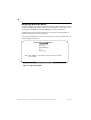
See the example in Figure 12:
Figure 12. Main Switch Menu
SSIM-H2-02 Fast Ethernet - Translational Switch SmartStack Interface Module Installation and User Guide
Configuration
27
Configuration Overview
Execute the following general steps to configure a SSIM-H2-02:
•
•
•
•
Determine which VLANs the TS ports should connect.
•
Assign CRFs to the TS port, thereby creating one virtual port in each VLAN.
Optional: create new CRFs to make sure that the CRFs do not have conflicting
ring numbers, as discussed in the “Ring Number Restriction” on page 15.
•
Configure the virtual ports, in particular the tagging mode. The relevant
configuration menus are described in detail in the following sections.
•
•
Configure the translational bridging parameters for each Virtual Port.
Determine which VLAN, if any, should be untagged.
Configure the TS VLAN ID for all the BRFs that should be tagged.
Make sure that each TS VLAN ID matches that of the TS equipment at the
other end.
Assign CRFs to the TS port, thereby creating one virtual port in each VLAN.
You may want to create new CRFs to ensure that the CRFs do not have
conflicting ring numbers (see “Ring Number Restriction” on page 15).
Remember that each CRF ring number must be set manually if automatic ring
number learning is impossible.
SSIM-H2-02 Fast Ethernet - Translational Switch SmartStack Interface Module Installation and User Guide
Configuration
28
VLAN Configuration
For general information about the configuration of VLANs, refer to the SmartStack
STS16-20RM/STS16-20FRM Token Ring Switch Installation and User Guide. Only
issues relating to the configuration of TS ports are described here.
BRF Configuration
Additional parameter 802.1Q VLAN ID has been added to the BRF configuration:
The 802.1Q VLAN ID is the value that is inserted in the IEEE 802.1Q frame tags.
It is entered as a decimal value between 1 and 4094.
The 802.1Q VLAN ID should not be confused with the existing VLAN ID, which
is a number chosen by the user and used by the Token Ring switch to index CRFs
and BRFs. By default, the 802.1Q VLAN ID is set to the same value as the VLAN
ID.
Local VLAN Port Configuration
The TS ports will appear as trunk ports in the Local VLAN Port Configuration.
This means that more than one CRF can be assigned to the TS ports. Note, however,
the virtual port restriction described on page 15.
Port Configuration - TS Ports
To configure a TS port on the SSIM-H2-02, select Port Configuration from the
Configuration menu and enter the port number of the TS port (21, 22, 25 or 26).
Enabled
Sets the administrative state of the port, possible values are Yes and No. When the
port is disabled, the LINK LED is off.
Default: Yes
SSIM-H2-02 Fast Ethernet - Translational Switch SmartStack Interface Module Installation and User Guide
Configuration
29
Status
Display only. Shows the current status of the port.
Value
Meaning
Down
The port is down.
Going Up
The port is enabled a protocol connection is being autonegotiated.
Up
The port is up.
Table 4. Translational Switch Physical Port Status
Address Demand Aging Level
Sets the threshold on the number of entries in the address table on which entries are
aged faster. Possible values are 50, 60, 70, 80, and 90 percent and Disabled.
Default: 90 percent
Trace Mask
Sets a bit mask for which messages are logged in the message log. Used mainly by
Cabletron Systems support for debugging purposes.
Virtual Port Configuration
To configure a virtual port on a TS port, select Virtual Port Configuration on the
Port Configuration menu of the TS port. If the TS port has more than one virtual
port, a list of the corresponding CRFs appears from which the virtual port must be
selected. The following menu options are available:
Enabled
Sets the administrative state of the virtual port to Yes or No.
Default: Yes
SSIM-H2-02 Fast Ethernet - Translational Switch SmartStack Interface Module Installation and User Guide
Configuration
30
Status
Display only. Shows the current status of the virtual port.
Value
Meaning
Admin down
The port or virtual port is disabled.
Waiting for port up
The virtual port is waiting for the port to
come up.
Up
The virtual port is up but not
forwarding.
Forwarding
The virtual port is up and forwarding.
Temporary down
The virtual port is currently down,
because the port is temporarily down.
Table 5. Translational Switch Virtual Port Status
MTU
You can use only one value as MTU.
MTU configured
1500
Actual TS frame size
1558
LF bits
001
Table 6. Translational Switch Configured and Actual Frame SIze
Default: 1500
Max Broadcast Rate (frames/sec)
Sets the maximum broadcast frame rate; possible values are 0 to 5000 frames/sec
or Disabled. If enabled, this will limit the amount of broadcast frames being
forwarded from the TS side of the virtual port to the switch.
Default: Disabled
SSIM-H2-02 Fast Ethernet - Translational Switch SmartStack Interface Module Installation and User Guide
Configuration
31
VLAN Tagging Mode
Sets the VLAN tagging mode of the virtual port; possible values are Tagged and
Untagged. As explained previously, only one virtual port on each TS port can be
untagged. All other virtual ports must be tagged and the 802.1Q VLAN ID must be
the same in both ends.
Because VLAN tagging mode imposes a small overhead, the VLAN that is
expected to have the largest amount of traffic should be untagged.
Default: Untagged for the first virtual port and Tagged for the subsequent ports.
FC Modification
Enabled FC modification preserves frame priority during translation between
Ethernet and Token Ring (both directions). Possible values are Enabled and
Disabled. As discussed earlier, a VLAN frame tag also contains a 3-bit priority
field. If FC modification is enabled, the Token Ring frame priority in the FC byte
is set to the frame tag priority. If FC modification is disabled, the FC priority is set
to 0, and the frame tag priority is discarded.
When the SSIM-H2-02 inserts a frame tag in a frame, and FC modification is
enabled, the SmartStack SSIM-H2-02 module uses the FC priority from the Token
Ring frame. Otherwise the frame tag priority is set to 0 and the FC priority is
discarded.
Default: Disabled
Address Aging Time
Sets the aging time for addresses and RIFs learned on an TS port. Possible value
are 1 to 9999 minutes or 0 to disable aging. When there has been no activity on an
address it is deleted from the address table.
For an address using the RIF entry, when no frames with the RIF have been
received for the specified period of time, the RIF and address entry is deleted. Only
for address entries known from the host is the status of the address changed to RIF
unknown.
Default: 5 minutes
RIF Not Learn Interval
Sets the learning blocked interval for RIF entries. Possible values are 0 to 900
seconds. A new RIF cannot be learned unless a specified period of time has passed
since the activity on current RIF entry was seen.
Default: 20 seconds
SSIM-H2-02 Fast Ethernet - Translational Switch SmartStack Interface Module Installation and User Guide
Configuration
32
Explorer RIF Aging Time
On output, the Translational Switch UEM quickly deletes addresses known only
from forwarded explorer frames. The session starts with an explorer frame
followed by a specifically routed frame. The explorer frame’s RIF aging time
makes it possible to limit the number of known address and RIF entries to
established sessions. Possible values are 0 to 900 seconds. A RIF with an address
is removed after this time if a specifically routed frame does not follow the
explorer.
Default: 10 seconds
Frame Conversion Configuration
To configure frame conversion on a TS port, select Frame Conversion
Configuration on the Virtual Port Configuration menu of the TS port.
The following menu options are listed:
— IP Conversion Status
— IP conversion parameters change
IP Conversion Status
Display only. Shows the current status of the IP Conversion.
Possible values are Enabled and Disabled.
IP Conversion Parameters Change
To change IP conversion parameters select IP conversion parameters change on
the Frame Conversion Configuration menu of the TS port.
IP Frames Conversion
Sets the state of the IP frames Conversion. Possible values are Enabled and
Disabled. If the state is set to Disabled IP, the traffic will be dropped.
Default: Enabled
IP: Token Ring Format
Sets the format of IP frames on Token Ring.
Format
802.5 SNAP
Meaning
Frame in the IEEE 802.5 format with SNAP
Table 7. IP: Token Ring Format
SSIM-H2-02 Fast Ethernet - Translational Switch SmartStack Interface Module Installation and User Guide
Configuration
33
IP: Ethernet Format
Sets the format of IP frames on Ethernet.
Format
Meaning
802.3 SNAP
Frame in the IEEE 802.3 format with SNAP
Ethernet II
Frame in Ethernet II format
Table 8. IP: Ethernet Format
Default: Ethernet II
Source Routing
Enables or disables Source Routing in IP frames transmitted to Token Ring.
Value
Meaning
SR
Source Routing information will be added to frames
converted from Ethernet to Token Ring format.
noSR
Frame will be transmitted to Token Ring as a transparent
frame.
Table 9. IP: Source Routing
Default: SR
SSIM-H2-02 Fast Ethernet - Translational Switch SmartStack Interface Module Installation and User Guide
Configuration
34
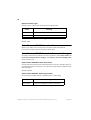
Explorer Frames Type
Sets the type of explorer that should be used for ARP/RARP traffic. From the set
of IP protocols explorer frame type can be chosen only for ARP/RARP frames.
Other IP protocols can generate only STE explorer.
Value
Meaning
ARE
The All Routes Explorer should be used.
STE
Spanning Tree Explorer should be used.
Table 10. IP: Explorer Frames Type
Value
Meaning
ARE
Use All Routes Explorer.
STE
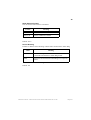
Use Spanning Tree Explorer.
Table 11. IP: Explorer Frames Type
Default: STE (change to ARE for typical Token Ring behavior for ARP frames)
Enable IP Fragmentation
Enables or disables fragmentation of IP frames received from Token Ring and
transmitted to Ethernet. The possible values are Enabled and Disabled.
Default: Enabled
TR MAC Address for IP Multicasts
Allows entering the IP multicast address. The address is entered in the MAC
address format.
Default: C00000:040000
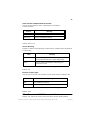
Novell Conversion Status
Display only. Shows the current status of the Novell Conversion.
Possible values are Enabled and Disabled.
SSIM-H2-02 Fast Ethernet - Translational Switch SmartStack Interface Module Installation and User Guide
Configuration
35
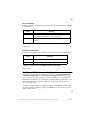
Novell Conversion Parameters Change
To change Novell conversion parameters select NOVELL conversion
parameters change on the Frame Conversion Configuration menu of the TS
port.
NOVELL Frames Conversion
Determines how Novell frames are converted. Possible values are Enabled and
Disabled. If the state is set to Disabled Novell traffic will be dropped.
Default: Enabled
NOVELL: Token Ring Format
Sets the format of Novell frames on Token Ring.
Format
Meaning
Novell Naming Conventions
802.5 SNAP
Frame in the IEEE 802.5
format with SNAP
Token Ring SNAP
802.5
Frame in the IEEE 802.5
format without SNAP
Token Ring
Table 12. NOVELL: Token Ring Format
Default: 802.5
NOVELL: Ethernet Format
Sets the format of Novell frames on Ethernet.
Format
Novell Naming
Conventions
Meaning
802.3
Frame in the IEEE 802.2
format.
802.2
Novell 802.3
Frame in the IEEE 802.3
format.
Normal 802.3
802.3 SNAP
Frame in the IEEE 802.3
format with SNAP.
Ethernet SNAP
Ethernet II
Frame in Ethernet II format.
Ethernet II
Table 13. NOVELL: Ethernet Format
Default: 802.3
SSIM-H2-02 Fast Ethernet - Translational Switch SmartStack Interface Module Installation and User Guide
Configuration
36
Source Routing
Enables or disables Source Routing in Novell frames transmitted to Token Ring.
Value
Meaning
SR
Source Routing information will be added to frames
converted from Ethernet to Token Ring format.
noSR
Frame will be transmitted to Token Ring as a transparent
frame.
Table 14. NOVELL: Source Routing
Default: noSR
Explorer Frames Type
Sets the type of explorer for IPX traffic.
Value
Meaning
ARE
Use All Routes Explorer.
STE
Use Spanning Tree Explorer.
Table 15. Novell: Explorer Frames Type
Default: STE
IPX Address Translation
Enables and disables reversing MAC address bits in Novell frames.
Possible values are do not bit reverse and bit reversed.
Default: do not bit reverse
NetBios Conversion Status
Display only. Shows the current status of the NetBios Conversion.
Possible values are Enabled and Disabled.
NetBios Conversion Parameters Change
To change NetBios conversion parameters select NetBios conversion parameters
change on the Frame Conversion Configuration menu of the TS port.
NetBios Frames Conversion
Determines how NetBios frames are converted. Possible values are Enabled and
SSIM-H2-02 Fast Ethernet - Translational Switch SmartStack Interface Module Installation and User Guide
Configuration
37
Disabled. If the state is set to Disabled, NetBios traffic will be dropped.
Default: Enabled
NetBios: Token Ring Format
Sets the format of NetBios frames on Token Ring.
Format
802.5
Meaning
Frame in the IEEE 802.5 format.
Table 16. NetBios: Token Ring Format
NetBios: Ethernet Format
Sets the format of NetBios frames on Ethernet.
Format
Meaning
802.3
Frame in the IEEE 802.3 format.
Ethernet II
Frame in Ethernet II format.
Table 17. NetBios: Ethernet Format
Default: 802.3
Source Routing
Enables or disables Source Routing in NetBios frames transmitted to Token Ring.
Value
Meaning
SR
Source Routing information will be added to frames
converted from Ethernet to Token Ring format.
noSR
Frame will be transmitted to Token Ring as a transparent
frame.
Table 18. NetBios: Source Routing
Default: SR
SSIM-H2-02 Fast Ethernet - Translational Switch SmartStack Interface Module Installation and User Guide
Configuration
38
Explorer Frames Type
Sets the type of explorer that should be used for NetBios traffic.
Value
Meaning
ARE
Use All Routes Explorer.
STE
Use Spanning Tree Explorer.
Table 19. NetBios: Explorer Frames Type
Default: STE
TR Functional Address
The TR Functional Address is entered in the MAC address format.
Default: C00000:000080
Ethernet Group Address
The Ethernet Group Address is entered in the MAC address format.
Default: 030000:000001
SNA Conversion Status
Display only. Shows the current status of the SNA Conversion.
Possible values: Enabled and Disabled.
SNA Conversion Parameters Change
To change SNA conversion parameters select SNA conversion parameters
change on the Frame Conversion Configuration menu of the TS port.
SNA Frames Conversion
Sets the state of the SNA Frames Conversion. Possible values are Enabled and
Disabled. If the state is set to Disabled, SNA traffic will be dropped.
Default: Enabled
SNA: Token Ring Format
Sets the format of SNA frames on Token Ring.
Format
802.5
Meaning
Frame in the IEEE 802.5 format.
Table 20. SNA: Token Ring Format
SSIM-H2-02 Fast Ethernet - Translational Switch SmartStack Interface Module Installation and User Guide
Configuration
39
SNA: Ethernet Format
Sets the format of SNA frames on Ethernet.
Format
Meaning
802.3
Frame in the IEEE 802.3 format.
Ethernet II
Frame in Ethernet II format.
Table 21. SNA: Ethernet Format
Default: 802.3
Source Routing
Enables or disables Source Routing in SNA frames transmitted to Token Ring.
Value
Meaning
SR
Source Routing information will be added to frames
converted from Ethernet to Token Ring format.
noSR
Frame will be transmitted to Token Ring as a transparent
frame.
Table 22. SNA: Source Routing
Default: SR
SSIM-H2-02 Fast Ethernet - Translational Switch SmartStack Interface Module Installation and User Guide
Configuration
40
Explorer Frames Type
Sets the type of explorer that should be used for SNA traffic.
Value
Meaning
ARE
Use All Routes Explorer.
STE
Use Spanning Tree Explorer.
Table 23. SNA: Explorer Frames Type
Default: ARE
Other Frames w/SNAP Conversion Status
Display only. Shows the current status of the Other Frames With SNAP
Conversion. Possible values are Enabled and Disabled.
Other Frames w/SNAP Conversion Parameters Change
To change Other Frames w/SNAP conversion parameters select Other Frames w/
SNAP conversion parameters change on the Frame Conversion Configuration
menu of the TS port.
Other Frames w/SNAP Frames Conversion
Sets the state of the Other Frames w/SNAP Frames Conversion. Possible values are
Enabled and Disabled. If the state is set to Disabled, Other Frames w/SNAP traffic
will be dropped.
Default: Enabled
Other Frames w/SNAP: Token Ring Format
Sets the format of Other Frames w/SNAP frames on Token Ring.
Format
802.5 SNAP
Meaning
Frame in the IEEE 802.5 format with SNAP
Table 24. Other Frames w/SNAP: Token Ring Format
SSIM-H2-02 Fast Ethernet - Translational Switch SmartStack Interface Module Installation and User Guide
Configuration
41
Other Frames w/SNAP: Ethernet Format
Sets the format of Other Frames w/SNAP frames on Ethernet.
Formats available:
Format
Meaning
802.3 SNAP
Frame in the IEEE 802.3 format with SNAP
Ethernet II
Frame in Ethernet II format
Table 25. Other Frames w/SNAP: Ethernet Format
Default: Ethernet II
Source Routing
Enables or disables Source Routing in Other Frames w/SNAP frames transmitted
to Token Ring.
Value
Meaning
SR
Source Routing information will be added to frames
converted from Ethernet to Token Ring format.
noSR
Frame will be transmitted to Token Ring as a
transparent frame.
Table 26. Other Frames w/SNAP: Source Routing
Default: SR
Explorer Frames Type
Sets the type of explorer that should be used for Other Frames w/SNAP traffic.
Value
Meaning
ARE
Use All Routes Explorer.
STE
Use Spanning Tree Explorer.
Table 27. Other Frames w/SNAP: Explorer Frames Type
Default: ARE
Other Frames w/o SNAP Conversion Status
Display only. Shows the current status of the Other Frames Without SNAP
SSIM-H2-02 Fast Ethernet - Translational Switch SmartStack Interface Module Installation and User Guide
Configuration
42
Conversion. Possible values are Enabled and Disabled.
Other Frames w/o SNAP Conversion Parameters Change
To change Other Frames w/o SNAP conversion parameters select Other Frames
w/o SNAP conversion parameters change on the Frame Conversion
Configuration menu of the TS port. The following menu options are listed:
Other Frames w/o SNAP Frames Conversion
Sets the state of the Other Frames w/o SNAP frames Conversion. Possible values
are Enabled and Disabled. If the state is set to Disabled, Other Frames w/o SNAP
traffic will be dropped.
Default: Enabled
Other Frames w/o SNAP: Token Ring Format
Sets the format of Other Frames w/o SNAP frames on Token Ring.
Format
802.5
Meaning
Frame in the IEEE 802.5 format.
Table 28. Other Frames w/o SNAP: Token Ring Format
Other Frames w/o SNAP: Ethernet Format
Sets the format of Other Frames w/o SNAP frames on Ethernet.
Format
802.3
Meaning
Frame in the IEEE 802.3 format.
Table 29. Other Frames w/o SNAP: Ethernet Format
SSIM-H2-02 Fast Ethernet - Translational Switch SmartStack Interface Module Installation and User Guide
Configuration
43
Source Routing
Enables or disables Source Routing in Other Frames w/o SNAP frames transmitted
to Token Ring.
Value
Meaning
SR
Source Routing information will be added to frames
converted from Ethernet to Token Ring format.
noSR
Frame will be transmitted to Token Ring as a transparent
frame.
Table 30. Other Frames w/o SNAP: Source Routing
Default: SR
Explorer Frames Type
Sets the type of explorer that should be used for Other Frames w/o SNAP traffic.
Value
Meaning
ARE
Use All Routes Explorer.
STE
Use Spanning Tree Explorer.
Table 31. Other Frames w/o SNAP: Explorer Frames Type
Default: STE
Dual Home FEP Addresses Configuration
To configure Dual Home FEP Addresses on a TS port, select Dual Home FEP
Addresses Configuration on the Virtual Port Configuration menu of the TS
port. For each Virtual Port (on each TS port), 10 addresses can be configured as
Dual Home FEP addresses. A constant list of 10 MAC addresses numbered 1-10 is
shown when this menu is opened. Addresses which consist entirely of zeros
represent empty entries.
To add or change an address, highlight the address, press ENTER, and then either
enter the new MAC address or simply press ENTER once more to enter a NULL
address (empty entry).
❏
SSIM-H2-02 Fast Ethernet - Translational Switch SmartStack Interface Module Installation and User Guide
Configuration
44
SSIM-H2-02 Fast Ethernet - Translational Switch SmartStack Interface Module Installation and User Guide
Configuration
45
4. Statistics
A wide range of statistics is available for the SmartStack Token-Ring Switch. The
following topics are discussed in this chapter:
•
•
•
•
•
•
•
•
•
Port Status
Port Statistics
General Statistics
Discarded Frames
802.3 Statistics
Traffic Counters
Error Counters
Virtual Port Statistics
Discarded Frames Statistics
SSIM-H2-02 Fast Ethernet - Translational Switch SmartStack Interface Module Installation and User Guide
Statistics
46
Statistics Menu
When Statistics is selected from the main menu, the following options are listed:
— Switch Statistics
— Power Supply Information
— Port Status
— Port Statistics
— Address Tables
— Current Spanning Tree Information
— VLAN Statistics
— Diagnostic Test Results
— Message Log Information
— Display Summary
The menu items in the Statistics menu are all described in the guide for the
SmartStack Token Ring Switches. For general information about these menu items,
refer to that guide.
However, some of the menu items contain additional information that is specific for
the SSIM-H2-02:
•
•
•
•
Port Status - The module virtual ports are included in the port overview.
Port Statistics - contains additional counters for TS ports.
Address Tables - also contains addresses learned from TS ports.
Message Log Information - also contains messages generated by the module.
SSIM-H2-02 Fast Ethernet - Translational Switch SmartStack Interface Module Installation and User Guide
Statistics
47
Port Status
Besides the ordinary Token-Ring ports, the table contains an entry for each TS
virtual port, along with its current status.
When Port Status is selected on the Statistics menu, the following items are
displayed:
Port
The TS port for which the virtual port is defined. Possible values are: 21, 22, 25,
and 26.
TrCRF
The name of the CRF in which the virtual port is defined.
TrBRF
The name of the BRF in which the virtual port is defined.
Enabled/Ins
For ordinary Token Ring ports, this is the enabled and inserted status. This does not
apply to virtual ports on a TS port. Instead, the current state of the virtual port is
displayed. For details, refer to the description of virtual port configuration.
Spd
The connect speed in Mbps, which is displayed as 10 or 100 for TS module virtual
ports. Note that 100 Mbps full-duplex is the total bandwidth available on a TS port
and is shared by all the virtual ports on that port. The actual bandwidth on a
particular virtual port depends on the amount of traffic on other virtual ports.
Oper Mode
The operation mode is for TS virtual ports may be displayed as HDX (Half DupleX)
or FDX (Full DupleX).
Fwd Mode
The forwarding mode is always displayed as Store-Fwd, since the SSIM-H2-02
always operates in the store-and-forward switching mode.
SSIM-H2-02 Fast Ethernet - Translational Switch SmartStack Interface Module Installation and User Guide
Statistics
48
Port Statistics
When Port Statistics is selected and the port number of a TS port is entered, the
following options are listed:
— General Statistics
— 802.3 Statistics
— Virtual Port Statistics
The available information is discussed in the following sections.
General Statistics
When General Statistics is selected on the Port Statistics, the screen shows the
number of frames and bytes received, forwarded and transmitted on the TS port.
These numbers include traffic for all virtual ports. The screen is automatically
updated every five seconds.
Frame and Byte Counters
The following frame and byte counters are defined:
Received
Frames received from TS, but not necessarily forwarded.
Forwarded
Frames received from TS and forwarded to other ports in the switch.
Transmitted
Frames transmitted to TS.
Frames
The number of frames received, forwarded or transmitted. The number is
subdivided into the NSR, SRF, STE and ARE frames, as explained on page 49. For
received frames it is also subdivided into unicast, broadcast and multicast frames,
explained on page 49.
Bytes
The total number of bytes in frames. The byte count includes all bytes from AC up
to and including the FCS field. Note that the forwarded byte count can be lower
than the received byte count even though all frames are forwarded. This is because
the VLAN frame tag is removed before a frame is forwarded.
NSR Frames
Number of Non-Source Routed frames.
SSIM-H2-02 Fast Ethernet - Translational Switch SmartStack Interface Module Installation and User Guide
Statistics
49
SRF Frames
Number of Specifically Routed Frames.
STE Frames
Number of Spanning Tree Explorers.
ARE Frames
Number of All-Routes Explorers.
Unicast Frames
Number of frames with a unicast MAC address as destination.
Broadcast Frames
Number of frames with a Token-Ring broadcast address as destination.
Multicast Frames
Number of frames with a Token-Ring functional or group address as destination.
Reset
When you choose Reset, the counters for frames, bytes and discarded frames are
reset. The time since last reset is shown on the screen.
Discarded Frames
When Discarded Frames is chosen on the general statistics display, the screen
shows the number of frames discarded on the TS port in both inbound (from TS)
and outbound (to TS) directions. The discard reasons are described below.
Discarded Inbound Frames
The following discard reasons are defined for inbound frames:
Invalid VLAN
A frame was received on an unknown VLAN. This is either a VLAN tagged frame
containing an unknown VLAN ID, or an untagged frame when no untagged virtual
ports are defined. Make sure that the 802.1Q VLAN ID and virtual port tagging
mode is set to the same value on both sides of the connection.
Table Invalid VLAN Tag CFI
A VLAN tagged frame with an invalid Canonical Format Indicator (CFI) was
received. The CFI is a bit in the Tag Control Information field of a VLAN tag. This
bit indicates the bit order of any MAC addresses in the information field. It is 0 for
Ethernet format and 1 for Token-Ring format. It should always be 1 in received
frames.
SSIM-H2-02 Fast Ethernet - Translational Switch SmartStack Interface Module Installation and User Guide
Statistics
50
Table Filtered by Address Filter
The frame by discarded because of a MAC address filter.
Table Filtered by DSAP Filter
The frame by discarded because of a protocol (DSAP or protocol type) filter.
Locally Filtered
The frame is destined to the local (connect to the Ethernet segment) station.
Table Blocked Virtual Port
The frame is discarded because the virtual port is currently not in forwarding state.
Unrecognized SNA
Number of unrecognized SNA frames.
Discarded Outbound Frames
The following discard reasons are defined for outbound frames:
Table Invalid Frame Header Tag
A frame could not be transmitted because it has an invalid internal frame header tag
(note that this internal frame header tag is not the same thing as the VLAN tag).
Table Blocked Virtual Port
The frame is not transmitted because the virtual port is currently not in forwarding
state.
Table Filtered by DSAP Filter
The frame is not transmitted because of a protocol (DSAP or protocol type) filter.
Table Frame Too Large
The frame is larger than the maximum frame size, which has been configured for
the virtual port. Refer to the “Virtual Port Configuration” on page 29.
Broadcast Overflow
Number of broadcast frames dropped because the ring number was exceeded.
Learning Fails
(TS ports only.) Incremented if address learning from received Token Ring frames
fails. Possible reasons:
•
Translational Switch received frame with damaged RIF
(wrong length, bad ring).
SSIM-H2-02 Fast Ethernet - Translational Switch SmartStack Interface Module Installation and User Guide
Statistics
51
•
Translational Switch received frame with RIF but, for this protocol, the noSR
flag is used during conversions. If you have the default configuration this can
happen for IPX frames (clear and set flag useSR for Novell conversion
parameters to see if this is the reason).
•
For the CRF in which the Translational Switch port exists, the ring number is
set to Auto but it is impossible to learn the proper ring number.
802.3 Statistics
From a port popup menu select TS Port Statistics | 802.3 Statistics to access this
dialog box. The dialog box displays IEEE 802.3 traffic and error counters for the
selected port. All counters are retrieved from a physical layer of the uplink and
automatically updated every 5 seconds.
Traffic Counters
Bytes Received
Number of bytes received on this port.
Bytes Transmitted
Number of bytes transmitted by this port.
Frames Received
Number of frames received on this port.
Frames Transmitted
Number of frames transmitted by this port.
Multicast Bytes Received
Number of bytes in multicast frames received on this port.
Multicast Frames Received
Number of multicast frames received on this port without errors.
Frames Transmitted, Deferred
Number of frames transmitted by this port but initially deferred. (The 21143 FE
transceiver had to defer while ready to transmit a frame because the carrier was
asserted).
SSIM-H2-02 Fast Ethernet - Translational Switch SmartStack Interface Module Installation and User Guide
Statistics
52
Error Counters
Single Collisions
Number of frames transmitted by this port after single collision.
Multiple Collisions
Number of frames transmitted by this port after multiple collision.
Excessive Collisions
Number of frames dropped because of excessive collisions.
Carrier Check Failures
Number of frames dropped because of late collision and loss of carrier.
Short Circuits
Number of frames dropped because of short circuits.
Open Circuits
Number of frames dropped because of open circuits.
Remote Failures
Number of frames dropped because of remote failures.
CRC Errors
Number of frames received on this port with CRC error.
Framing Errors
Number of frames dropped because of framing error.
Frames Too Long
Number of received frames longer than the maximum length receivable.
Data Overrun
Number of frames dropped because of data overrun.
System Buffers Unavailable
Number of frames dropped because of lack of system received buffers.
User Buffers Unavailable
Number of tries of buffer allocation.
Frames Congested
Number of frames congested, due to a lack of space in Tx queue.
SSIM-H2-02 Fast Ethernet - Translational Switch SmartStack Interface Module Installation and User Guide
Statistics
53
Virtual Port Statistics
When Virtual Port Statistics is selected from the Port Statistics menu for a TS
port, counters for the virtual port are displayed. If more than one virtual port is
defined for the TS port, the requested virtual port must first be selected from a list
of CRFs.
The following items are displayed:
Virtual Port State
This is the current state of the virtual port. Refer to the “Virtual Port Configuration”
on page 33 for details.
Frames Forwarded
The number of frames received and forwarded on this virtual port.
Frames Transmitted
The number of frame transmitted on this virtual port.
Frames Received
The number of frames received but not necessarily forwarded on this virtual port.
Reset
The time since these counters were last restarted. Select Reset to reset the counters
on this screen.
Discarded Frames Statistics
When Disc Frames (in) or Disc Frames (out) is selected from the Virtual Port
Statistics menu, counters of discarded frames are displayed. Depending on which
option was chosen (in or out), inbound or outbound statistics are displayed.
Inbound (No Translation)
TCP/IP
Number of frames dropped because TCP/IP translation is disabled or inbound
frames are received from Ethernet in a format different than that specified in the TS
configuration dialog.
IPX
Number of frames dropped because IPX translation is disabled or inbound frames
are received from Ethernet in a format different than that specified in the TS
configuration dialog.
SSIM-H2-02 Fast Ethernet - Translational Switch SmartStack Interface Module Installation and User Guide
Statistics
54
NetBios
Number of frames dropped because NetBios translation is disabled or inbound
frames are received from Ethernet in a format different than that specified in the TS
configuration dialog.
SNA
Number of frames dropped because SNA translation is disabled or inbound frames
are received from Ethernet in a format different than that specified in the TS
configuration dialog.
Other w/SNAP
Number of frames dropped because this translation is disabled or inbound frames
are received from Ethernet in a format different than that specified in the TS
configuration dialog.
Other w/o SNAP
Number of frames dropped because this translation is disabled.
Inbound Translation errors
TCP/IP
Number of frames dropped because of TCP/IP translation errors.
IPX
Number of frames dropped because of IPX translation errors.
NetBios
Number of frames dropped because of NetBios translation errors.
SNA
Number of frames dropped because of SNA translation errors.
Other w/SNAP
Number of frames dropped because of translation errors for other frames with
SNAP.
Other w/o SNAP
Number of frames dropped because of translation errors for other frames without
SNAP.
SSIM-H2-02 Fast Ethernet - Translational Switch SmartStack Interface Module Installation and User Guide
Statistics
55
Outbound (No Translation)
TCP/IP
Number of frames dropped because TCP/IP translation is disabled.
IPX
Number of frames dropped because IPX translation is disabled or outbound frames
received from Token Ring in format different than specified in TS configuration
dialog.
NetBios
Number of frames dropped because NetBios translation is disabled.
SNA
Number of frames dropped because SNA translation is disabled.
Other w/SNAP
Number of frames dropped because translation is disabled for other frames with
SNAP.
Other w/o SNAP
Number of frames dropped because translation is disabled for other frames without
SNAP.
Outbound Translation Errors
TCP/IP
Number of frames dropped because of TCP/IP translation errors.
IPX
Number of frames dropped because of IPX translation errors.
NetBios
Number of frames dropped because of NetBios translation errors.
SNA
Number of frames dropped because of SNA translation errors.
Other w/SNAP
Number of frames dropped because of translation errors for other frames with
SNAP.
SSIM-H2-02 Fast Ethernet - Translational Switch SmartStack Interface Module Installation and User Guide
Statistics
56
Generic w/o SNAP
Number of frames dropped because of translation errors for generic frames without
SNAP.
Fragmentation Error
(TCP/IP only.) Number of frames dropped because IP fragmentation finished with
an error or an IP frame was received with the Don't Fragment bit set.
❏
SSIM-H2-02 Fast Ethernet - Translational Switch SmartStack Interface Module Installation and User Guide
Statistics
57
5. Getting in Touch with Technical
Support
For additional support related to this device or document, contact Cabletron
Systems using one of the following methods:
World Wide Web
http://www.cabletron.com/
Phone
(603) 332-9400
Internet mail
[email protected]
FTP
ftp://ftp.cabletron.com/
anonymous
your email address
Login
Password
To send comments or suggestions concerning this document, contact the
Cabletron Systems Technical Writing Department via the following
email address: [email protected]
Make sure to include the document Part Number in the email message.
Before calling Cabletron Systems, have the following information ready:
•
•
•
Your Cabletron Systems service contract number
•
The serial and revision numbers of all involved Cabletron Systems products in
the network
•
•
•
A description of your network environment (layout, cable type, etc.)
•
Any previous Return Material Authorization (RMA) numbers
A description of the failure
A description of any action(s) already taken to resolve the problem (e.g.,
changing mode switches, rebooting the unit, etc.)
Network load and frame size at the time of trouble (if known)
The device history (i.e., have you returned the device before, is this a recurring
problem, etc.)
SSIM-H2-02 Fast Ethernet - Translational Switch SmartStack Interface Module Installation and User Guide Getting in Touch with Technical Support
58
SSIM-H2-02 Fast Ethernet - Translational Switch SmartStack Interface Module Installation and User Guide Getting in Touch with Technical Support
59
Appendix A. Abbreviations
AC
Access Control
ARE
All-Routes Explorer
ATM
Asynchronous Transfer Mode
BRF
Bridge Relay Function
CFI
Canonical Format Indicator
CRC
Cyclic Redundancy Check
CRF
Concentrator Relay Function
DA
Destination Address
DSAP
Destination SAP
DTR
Dedicated Token-Ring
ECO
Engineering Check Order
FC
Frame Control
FCS
Frame Check Sequence
FDX
Full Duplex
HDX
Half Duplex
HSTR
High-Speed Token-Ring
IP
Internet Protocol
LAN
Local Area Network
LED
Light Emitting Diode
LLC
Logical Link Control
MAC
Media Access Control
Mbps
MegaBit Per Second
MMF
Multi Mode Fiber
MTU
Maximum Transmission Unit
NSR
Non-Source Routed
NVRAM
Non-Volatile RAM
RAM
Random Access Memory
SSIM-H2-02 Fast Ethernet - Translational Switch SmartStack Interface Module Installation and User Guide
Abbreviations
60
RIF
Route Information Field
RX
Receive Data
SA
Source Address
SAP
Service Access Point
SNA
Systems Network Architecture
SNAP
Sub-Network Access Protocol
SNMP
Simple Network Management Protocol
SR
Source Routing
SRB
Source Route Bridging
SRF
Specifically Routed Frame
SRS
Source Route Switching
SRT
Source Route Transparent
SSAP
Source SAP
SSIM
SmartStack Interface Module
STE
Spanning Tree Explorer
TS
Translational Switch
TCI
Tag Control Information
TFTP
Trivial File Transfer Protocol
TR
Token-Ring
TX
Transmit Data
TXI
Transmit Immediate
UTP
Unshielded Twisted Pair
VLAN
Virtual LAN
❏
SSIM-H2-02 Fast Ethernet - Translational Switch SmartStack Interface Module Installation and User Guide
Abbreviations
index-1
Index
A
I
abbreviations 59
Installation
software 8
installation
physical 7
procedure 6
introduction 1
B
Bridging Modes 16
Source Routed Bridging (SRB) 17
Source Routed Switching (SRC) 16
Source Routed Transparent Bridging (SRT) 16
L
C
LEDs 10
cabling 10
configuration 12
default 12
console configuration 13
configuration overview 27
general guidelines 25
introduction 14
navigating within the menus 26
ports, port groups and VLANs 14
ring number restriction 15
TS virtual ports and VLAN tagging 15
virtual port restriction 15
CrossFire 8660 module
configuration 27
connection 1
installation 7
software installation 8
N
F
S
frame conversion configuration 32
dual home FEP addresses configuration 43
NetBios conversion parameters change 36
NetBios conversion status 36
Novell conversion parameters change 35
Novell Conversion Status 34
other frames w/o SNAP conversion parameters
change 42
other frames w/o SNAP conversion status 41
other frames w/SNAP conversion parameters
change 40
other frames w/SNAP conversion status 40
SNA conversion parameters change 38
SNA conversion status 38
TCP/IP conversion parameters change 32
TCP/IP conversion status 32
frame duplication 18
frame looping 19
service 57
software installation 8
software download 9
TFTP download 8
Source Routed Switching (SRS) 16
Source Routed Transparent Bridging (SRB) 17
Source Routed Transparent Bridging (SRT) 16
Spanning Tree configuration 20
statistics 45
discarded frames 53
general statistics 48
menus 46
port statistics 48
port status 47
virtual port statistics 53
Index
network scenarios
frame duplication 18
frame looping 19
P
package contents 5
port configuration - TS ports 28
power-on self test 11
R
redundant connections to Fast Ethernet network 18
redundant connections to fast ethernet network
technical background 23
SSIM-H2-02 Fast Ethernet - Translational Switch SmartStack Interface Module Installation and User Guide
index-2
V
VLAN configuration 28
BRF configuration 28
local VLAN port configuration 28
SSIM-H2-02 Fast Ethernet - Translational Switch SmartStack Interface Module Installation and User Guide
Index
* 710001816*