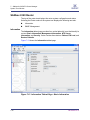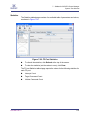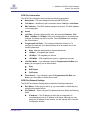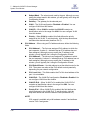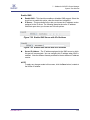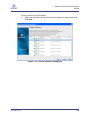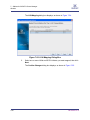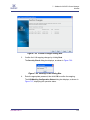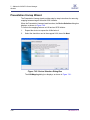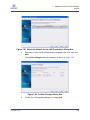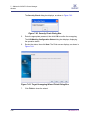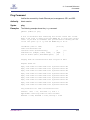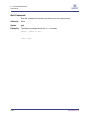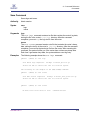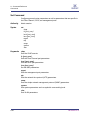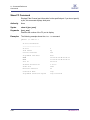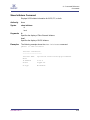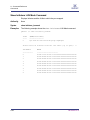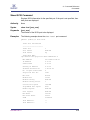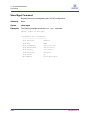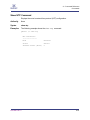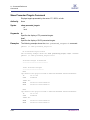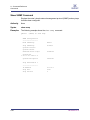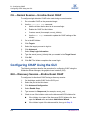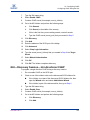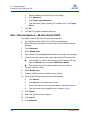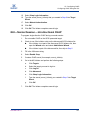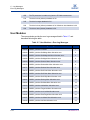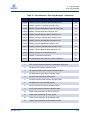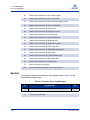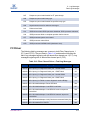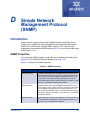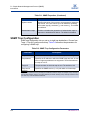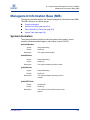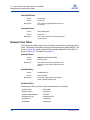
1
SANbox 6140 Intelligent Storage Router User’s Guide FI0154601-00 C S SANbox 6140 Intelligent Storage Router User’s Guide Information furnished in this manual is believed to be accurate and reliable. However, QLogic Corporation assumes no responsibility for its use, nor for any infringements of patents or other rights of third parties which may result from its use. QLogic Corporation reserves the right to change product specifications at any time without notice. Applications described in this document for any of these products are for illustrative purposes only. QLogic Corporation makes no representation nor warranty that such applications are suitable for the specified use without further testing or modification. QLogic Corporation assumes no responsibility for any errors that may appear in this document. This SANbox switch is covered by one or more of the following patents: 6697359; other patents pending. QLogic and SANbox are trademarks or registered trademarks of QLogic Corporation. AMCC is a registered trademark of Applied Micro Circuits Corporation Brocade is a registered trademark of Brocade Communications Systems, Inc. Cisco is a registered trademark of Cisco Technology, Inc. Gnome is a trademark of the GNOME Foundation Corporation. Java and Solaris are registered trademarks of Sun Microsystems, Inc. Pentium is a registered trademark of Intel Corporation. IBM and PowerPC are registered trademarks of the International Business Machines Corporation. Linux is a registered trademark of Linus Torvalds. MacOS X and Safari are registered trademarks of Apple Computer, Inc. McDATA is a registered trademark of McDATA Corporation. Microsoft, Windows XP, Windows 2003, and Internet Explorer are registered trademarks of Microsoft Corporation. Netscape Navigator and Mozilla are trademarks or registered trademarks of Netscape Communications Corporation. Red Hat is a registered trademark of Red Hat Software Inc. SANmark is a trademark of the Fibre Channel Industry Association. SUSE is a trademark of Novell, Inc. All other brand and product names are trademarks or registered trademarks of their respective owners. Document Revision History Revision C, May 2008 Changes Sections Affected Edited and updated format to new QLogic style Entire Book Added five Internet Protocol, Version 6 (IPv6) references Section 1 Corrected information about Heartbeat vs System Fault LEDs Section 2 Clarified instructions for pressing the maintenance button Section 2 © 2008 QLogic Corporation. All Rights Reserved Worldwide. Published: May 2008 QLogic Corporation, 26650 Aliso Viejo Parkway, Aliso Viejo, CA 92656, (800) 662-4471 or (949) 389-6000 Page ii FI0154601-00 C S SANbox 6140 Intelligent Storage Router User’s Guide Removed reference to SANsurfer application installation from a CD; replaced CD installation procedures with steps for downloading software from the QLogic website Section 4 Corrected information on LED diagnostics to identify the blink patterns that display on the System Fault LED, not the Heartbeat LED Section 5 Updated screens and descriptions regarding IP addresses to include IPv6 options in SANsurfer iSCSI/FC Router Manager Section 7 Added icons and text descriptions Section 7 Added note to identify that an MTU size greater than 1500 should only be used when the router is connected to a 1000 Mbps Ethernet network for Jumbo Frames Sections 3 and 7 Added traceroute command and replaced screen examples to show IPv6 support Appendix A FI0154601-00 C Page iii SANbox 6140 Intelligent Storage Router User’s Guide S Notes Page iv FI0154601-00 C A SANbox 6140 Intelligent Storage Router User’s Guide Table of Contents 1 Introduction Intended Audience . . . . . . . . . . . . . . . . . . . . . . . . . . . . . . . . . . . . . . . . . . . . Related Materials . . . . . . . . . . . . . . . . . . . . . . . . . . . . . . . . . . . . . . . . . . . . . Safety . . . . . . . . . . . . . . . . . . . . . . . . . . . . . . . . . . . . . . . . . . . . . . . . . . . . . . Communications Statements . . . . . . . . . . . . . . . . . . . . . . . . . . . . . . . . . . . . Federal Communications Commission (FCC) Class A Statement . . . Canadian Department of Communications Class A Compliance Statement . . . . . . . . . . . . . . . . . . . . . . . . . . . . . . . . . . . . . . . . . . . . . CE Statement . . . . . . . . . . . . . . . . . . . . . . . . . . . . . . . . . . . . . . . . . . . VCCI Class A Statement . . . . . . . . . . . . . . . . . . . . . . . . . . . . . . . . . . . Laser Safety Information . . . . . . . . . . . . . . . . . . . . . . . . . . . . . . . . . . . . . . . Electrostatic Discharge Sensitivity (ESDS) Precautions . . . . . . . . . . . . . . . Accessible Parts. . . . . . . . . . . . . . . . . . . . . . . . . . . . . . . . . . . . . . . . . . . . . . General Public License . . . . . . . . . . . . . . . . . . . . . . . . . . . . . . . . . . . . . . . . Preamble . . . . . . . . . . . . . . . . . . . . . . . . . . . . . . . . . . . . . . . . . . . . . . . Terms And Conditions For Copying, Distribution and Modification . . . How to Apply These Terms to Your New Programs . . . . . . . . . . . . . . Technical Support. . . . . . . . . . . . . . . . . . . . . . . . . . . . . . . . . . . . . . . . . . . . . Availability . . . . . . . . . . . . . . . . . . . . . . . . . . . . . . . . . . . . . . . . . . . . . . Training . . . . . . . . . . . . . . . . . . . . . . . . . . . . . . . . . . . . . . . . . . . . . . . . Contact Information . . . . . . . . . . . . . . . . . . . . . . . . . . . . . . . . . . . . . . . 2 1-1 1-1 1-2 1-2 1-3 1-3 1-3 1-4 1-4 1-5 1-5 1-5 1-6 1-6 1-12 1-13 1-13 1-13 1-14 General Description Chassis LEDs. . . . . . . . . . . . . . . . . . . . . . . . . . . . . . . . . . . . . . . . . . . . . . . . Heartbeat LED (Green) . . . . . . . . . . . . . . . . . . . . . . . . . . . . . . . . . . . . Input Power LED (Green) . . . . . . . . . . . . . . . . . . . . . . . . . . . . . . . . . . System Fault LED (Amber) . . . . . . . . . . . . . . . . . . . . . . . . . . . . . . . . . Chassis Controls . . . . . . . . . . . . . . . . . . . . . . . . . . . . . . . . . . . . . . . . . . . . . Maintenance Button. . . . . . . . . . . . . . . . . . . . . . . . . . . . . . . . . . . . . . . Reset a Router . . . . . . . . . . . . . . . . . . . . . . . . . . . . . . . . . . . . . . Reset and Select Boot Image . . . . . . . . . . . . . . . . . . . . . . . . . . . Reset IP Address . . . . . . . . . . . . . . . . . . . . . . . . . . . . . . . . . . . . Enable DHCP . . . . . . . . . . . . . . . . . . . . . . . . . . . . . . . . . . . . . . . Restore Factory Defaults . . . . . . . . . . . . . . . . . . . . . . . . . . . . . . FI0154601-00 C 2-2 2-2 2-2 2-2 2-3 2-3 2-3 2-4 2-4 2-4 2-4 Page v SANbox 6140 Intelligent Storage Router User’s Guide S Fibre Channel Ports . . . . . . . . . . . . . . . . . . . . . . . . . . . . . . . . . . . . . . . . . . . Fibre Channel Port LEDs. . . . . . . . . . . . . . . . . . . . . . . . . . . . . . . . . . . Fibre Channel Transceivers . . . . . . . . . . . . . . . . . . . . . . . . . . . . . . . . . . . . . Gigabit Ethernet Port LEDs . . . . . . . . . . . . . . . . . . . . . . . . . . . . . . . . . . . . . Ethernet Port—Management . . . . . . . . . . . . . . . . . . . . . . . . . . . . . . . . . . . . Serial Port. . . . . . . . . . . . . . . . . . . . . . . . . . . . . . . . . . . . . . . . . . . . . . . . . . . 3 Planning Devices. . . . . . . . . . . . . . . . . . . . . . . . . . . . . . . . . . . . . . . . . . . . . . . . . . . . . Device Access . . . . . . . . . . . . . . . . . . . . . . . . . . . . . . . . . . . . . . . . . . . . . . . Fibre Channel . . . . . . . . . . . . . . . . . . . . . . . . . . . . . . . . . . . . . . . . . . . iSCSI . . . . . . . . . . . . . . . . . . . . . . . . . . . . . . . . . . . . . . . . . . . . . . . . . . FC Performance . . . . . . . . . . . . . . . . . . . . . . . . . . . . . . . . . . . . . . . . . . . . . . Distance. . . . . . . . . . . . . . . . . . . . . . . . . . . . . . . . . . . . . . . . . . . . . . . . Bandwidth . . . . . . . . . . . . . . . . . . . . . . . . . . . . . . . . . . . . . . . . . . . . . . Latency . . . . . . . . . . . . . . . . . . . . . . . . . . . . . . . . . . . . . . . . . . . . . . . . iSCSI Performance. . . . . . . . . . . . . . . . . . . . . . . . . . . . . . . . . . . . . . . . . . . . Distance. . . . . . . . . . . . . . . . . . . . . . . . . . . . . . . . . . . . . . . . . . . . . . . . Bandwidth . . . . . . . . . . . . . . . . . . . . . . . . . . . . . . . . . . . . . . . . . . . . . . Latency . . . . . . . . . . . . . . . . . . . . . . . . . . . . . . . . . . . . . . . . . . . . . . . . Performance Tuning . . . . . . . . . . . . . . . . . . . . . . . . . . . . . . . . . . . . . . . . . . . Multiple Routers . . . . . . . . . . . . . . . . . . . . . . . . . . . . . . . . . . . . . . . . . . . . . . Management . . . . . . . . . . . . . . . . . . . . . . . . . . . . . . . . . . . . . . . . . . . . . . . . Recovery . . . . . . . . . . . . . . . . . . . . . . . . . . . . . . . . . . . . . . . . . . . . . . . . . . . Services . . . . . . . . . . . . . . . . . . . . . . . . . . . . . . . . . . . . . . . . . . . . . . . . . . . . Security . . . . . . . . . . . . . . . . . . . . . . . . . . . . . . . . . . . . . . . . . . . . . . . . . . . . 4 3-1 3-2 3-2 3-2 3-2 3-2 3-3 3-3 3-3 3-3 3-3 3-3 3-4 3-7 3-7 3-8 3-8 3-9 Installation Site Requirements . . . . . . . . . . . . . . . . . . . . . . . . . . . . . . . . . . . . . . . . . . . . Management Workstation . . . . . . . . . . . . . . . . . . . . . . . . . . . . . . . . . . Power Requirements . . . . . . . . . . . . . . . . . . . . . . . . . . . . . . . . . . . . . . Environmental Conditions . . . . . . . . . . . . . . . . . . . . . . . . . . . . . . . . . . Installing the SANbox 6140 Router . . . . . . . . . . . . . . . . . . . . . . . . . . . . . . . Pre-installation Check List . . . . . . . . . . . . . . . . . . . . . . . . . . . . . . . . . . Mount the Router. . . . . . . . . . . . . . . . . . . . . . . . . . . . . . . . . . . . . . . . . Install the Transceivers . . . . . . . . . . . . . . . . . . . . . . . . . . . . . . . . . . . . Connect the Management Workstation to the Router . . . . . . . . . . . . . Configure the Management Workstation . . . . . . . . . . . . . . . . . . . . . . . Setting the Workstation IP Address . . . . . . . . . . . . . . . . . . . . . . Configuring the Workstation Serial Port . . . . . . . . . . . . . . . . . . . Page vi 2-5 2-5 2-6 2-7 2-7 2-8 4-1 4-1 4-2 4-2 4-3 4-4 4-4 4-4 4-5 4-5 4-6 4-6 FI0154601-00 C A SANbox 6140 Intelligent Storage Router User’s Guide Install SANsurfer iSCSI/FC Router Manager. . . . . . . . . . . . . . . . . . . . Windows Installation . . . . . . . . . . . . . . . . . . . . . . . . . . . . . . . . . . Linux Installation . . . . . . . . . . . . . . . . . . . . . . . . . . . . . . . . . . . . . Start SANsurfer iSCSI/FC Router Manager. . . . . . . . . . . . . . . . . . . . . Connect the Router to AC Power . . . . . . . . . . . . . . . . . . . . . . . . . . . . Configure the Router . . . . . . . . . . . . . . . . . . . . . . . . . . . . . . . . . . . . . . Cable Devices to the Router . . . . . . . . . . . . . . . . . . . . . . . . . . . . . . . . Firmware Installation . . . . . . . . . . . . . . . . . . . . . . . . . . . . . . . . . . . . . . . . . . Using SANsurfer iSCSI/FC Router Manager to Install Firmware . . . . Using the CLI to Install Firmware . . . . . . . . . . . . . . . . . . . . . . . . . . . . 5 Diagnostics and Troubleshooting Chassis Diagnostics . . . . . . . . . . . . . . . . . . . . . . . . . . . . . . . . . . . . . . . . . . . Input Power LED is Off . . . . . . . . . . . . . . . . . . . . . . . . . . . . . . . . . . . . System Fault LED is On . . . . . . . . . . . . . . . . . . . . . . . . . . . . . . . . . . . Power-On Self-Test Diagnostics. . . . . . . . . . . . . . . . . . . . . . . . . . . . . . . . . . LED Blink Patterns . . . . . . . . . . . . . . . . . . . . . . . . . . . . . . . . . . . . . . . . . . . . Heartbeat Blink Pattern . . . . . . . . . . . . . . . . . . . . . . . . . . . . . . . . . . . . System Error Blink Pattern . . . . . . . . . . . . . . . . . . . . . . . . . . . . . . . . . Management Port IP Address Conflict Blink Pattern . . . . . . . . . . . . . . Over-Temperature Blink Pattern . . . . . . . . . . . . . . . . . . . . . . . . . . . . . Recovering a Router . . . . . . . . . . . . . . . . . . . . . . . . . . . . . . . . . . . . . . . . . . 6 5-1 5-2 5-2 5-2 5-3 5-3 5-3 5-4 5-4 5-5 Removal/Replacement SFP Transceiver Removal and Replacement . . . . . . . . . . . . . . . . . . . . . . . Router Removal and Replacement . . . . . . . . . . . . . . . . . . . . . . . . . . . . . . . Removal . . . . . . . . . . . . . . . . . . . . . . . . . . . . . . . . . . . . . . . . . . . . . . . Replacement . . . . . . . . . . . . . . . . . . . . . . . . . . . . . . . . . . . . . . . . . . . . 7 4-7 4-7 4-8 4-8 4-9 4-9 4-10 4-11 4-11 4-11 6-1 6-2 6-2 6-2 SANsurfer iSCSI/FC Router Manager Introduction. . . . . . . . . . . . . . . . . . . . . . . . . . . . . . . . . . . . . . . . . . . . . . . . . . Menu Bar . . . . . . . . . . . . . . . . . . . . . . . . . . . . . . . . . . . . . . . . . . . . . . . . . . . File Menu. . . . . . . . . . . . . . . . . . . . . . . . . . . . . . . . . . . . . . . . . . . . . . . View Menu. . . . . . . . . . . . . . . . . . . . . . . . . . . . . . . . . . . . . . . . . . . . . . Settings Menu . . . . . . . . . . . . . . . . . . . . . . . . . . . . . . . . . . . . . . . . . . . Wizards Menu . . . . . . . . . . . . . . . . . . . . . . . . . . . . . . . . . . . . . . . . . . . Help Menu . . . . . . . . . . . . . . . . . . . . . . . . . . . . . . . . . . . . . . . . . . . . . . Tool Bar . . . . . . . . . . . . . . . . . . . . . . . . . . . . . . . . . . . . . . . . . . . . . . . . . . . . Action Menu . . . . . . . . . . . . . . . . . . . . . . . . . . . . . . . . . . . . . . . . . . . . . . . . . System Tree Window . . . . . . . . . . . . . . . . . . . . . . . . . . . . . . . . . . . . . . . . . . FI0154601-00 C 7-1 7-2 7-3 7-3 7-3 7-4 7-5 7-6 7-6 7-8 Page vii SANbox 6140 Intelligent Storage Router User’s Guide S Status Icons and Text . . . . . . . . . . . . . . . . . . . . . . . . . . . . . . . . . . . . . Router . . . . . . . . . . . . . . . . . . . . . . . . . . . . . . . . . . . . . . . . . . . . . FC and iSCSI Ports . . . . . . . . . . . . . . . . . . . . . . . . . . . . . . . . . . Discovered iSCSI Initiators . . . . . . . . . . . . . . . . . . . . . . . . . . . . . FC Discovered Targets . . . . . . . . . . . . . . . . . . . . . . . . . . . . . . . . iSCSI Presented Targets . . . . . . . . . . . . . . . . . . . . . . . . . . . . . . SANbox 6140 Router. . . . . . . . . . . . . . . . . . . . . . . . . . . . . . . . . . . . . . Information . . . . . . . . . . . . . . . . . . . . . . . . . . . . . . . . . . . . . . . . . SNMP Management . . . . . . . . . . . . . . . . . . . . . . . . . . . . . . . . . . FC Ports . . . . . . . . . . . . . . . . . . . . . . . . . . . . . . . . . . . . . . . . . . . . . . . Information . . . . . . . . . . . . . . . . . . . . . . . . . . . . . . . . . . . . . . . . . Advanced Configuration . . . . . . . . . . . . . . . . . . . . . . . . . . . . . . . Statistics . . . . . . . . . . . . . . . . . . . . . . . . . . . . . . . . . . . . . . . . . . . iSCSI Ports . . . . . . . . . . . . . . . . . . . . . . . . . . . . . . . . . . . . . . . . . . . . . Information . . . . . . . . . . . . . . . . . . . . . . . . . . . . . . . . . . . . . . . . . Advanced Configuration . . . . . . . . . . . . . . . . . . . . . . . . . . . . . . . Statistics . . . . . . . . . . . . . . . . . . . . . . . . . . . . . . . . . . . . . . . . . . . Discovered iSCSI Initiators . . . . . . . . . . . . . . . . . . . . . . . . . . . . . . . . . Information . . . . . . . . . . . . . . . . . . . . . . . . . . . . . . . . . . . . . . . . . LUN List . . . . . . . . . . . . . . . . . . . . . . . . . . . . . . . . . . . . . . . . . . . FC Discovered Targets . . . . . . . . . . . . . . . . . . . . . . . . . . . . . . . . . . . . Information . . . . . . . . . . . . . . . . . . . . . . . . . . . . . . . . . . . . . . . . . LUN List . . . . . . . . . . . . . . . . . . . . . . . . . . . . . . . . . . . . . . . . . . . iSCSI Presented Target List Tabbed Page . . . . . . . . . . . . . . . . . Discovered LUN Information Tabbed Page . . . . . . . . . . . . . . . . LUN Presentation Information: 1 and 2 Tabbed Pages . . . . . . . iSCSI Presented Targets . . . . . . . . . . . . . . . . . . . . . . . . . . . . . . . . . . . Information Tabbed Page . . . . . . . . . . . . . . . . . . . . . . . . . . . . . . LUN Presentation Information Tabbed Page . . . . . . . . . . . . . . . Discovered LUN Information . . . . . . . . . . . . . . . . . . . . . . . . . . . Wizards . . . . . . . . . . . . . . . . . . . . . . . . . . . . . . . . . . . . . . . . . . . . . . . . . . . . Configuration Wizard . . . . . . . . . . . . . . . . . . . . . . . . . . . . . . . . . . . . . . Add Initiator Wizard . . . . . . . . . . . . . . . . . . . . . . . . . . . . . . . . . . . . . . . FW Update Wizard . . . . . . . . . . . . . . . . . . . . . . . . . . . . . . . . . . . . . . . Presentation Wizard . . . . . . . . . . . . . . . . . . . . . . . . . . . . . . . . . . . . . . Presentation Unmap Wizard . . . . . . . . . . . . . . . . . . . . . . . . . . . . . . . . Page viii 7-9 7-10 7-10 7-10 7-11 7-11 7-12 7-12 7-18 7-20 7-20 7-21 7-23 7-24 7-24 7-28 7-30 7-30 7-31 7-33 7-34 7-34 7-35 7-36 7-37 7-39 7-40 7-41 7-42 7-43 7-44 7-45 7-52 7-54 7-58 7-64 FI0154601-00 C A SANbox 6140 Intelligent Storage Router User’s Guide A Command Reference Logging on to a SAN Router . . . . . . . . . . . . . . . . . . . . . . . . . . . . . . . . . . . . Guest Account . . . . . . . . . . . . . . . . . . . . . . . . . . . . . . . . . . . . . . . . . . . . . . . Working with SAN Router Configurations . . . . . . . . . . . . . . . . . . . . . . . . . . Modifying a Configuration . . . . . . . . . . . . . . . . . . . . . . . . . . . . . . . . . . Saving and Restoring Router Configurations . . . . . . . . . . . . . . . . . . . Save Router Configuration and Persistence . . . . . . . . . . . . . . . Restore Router Configuration and Persistence . . . . . . . . . . . . . Commands . . . . . . . . . . . . . . . . . . . . . . . . . . . . . . . . . . . . . . . . . . . . . . . . . . Admin Command. . . . . . . . . . . . . . . . . . . . . . . . . . . . . . . . . . . . . . . . . Beacon Command. . . . . . . . . . . . . . . . . . . . . . . . . . . . . . . . . . . . . . . . Clear Command . . . . . . . . . . . . . . . . . . . . . . . . . . . . . . . . . . . . . . . . . Date Command . . . . . . . . . . . . . . . . . . . . . . . . . . . . . . . . . . . . . . . . . . FRU Command . . . . . . . . . . . . . . . . . . . . . . . . . . . . . . . . . . . . . . . . . . Help Command . . . . . . . . . . . . . . . . . . . . . . . . . . . . . . . . . . . . . . . . . . History . . . . . . . . . . . . . . . . . . . . . . . . . . . . . . . . . . . . . . . . . . . . . . . . . Image Command . . . . . . . . . . . . . . . . . . . . . . . . . . . . . . . . . . . . . . . . . Initiator Command . . . . . . . . . . . . . . . . . . . . . . . . . . . . . . . . . . . . . . . . Logout Command . . . . . . . . . . . . . . . . . . . . . . . . . . . . . . . . . . . . . . . . Lunmask Command . . . . . . . . . . . . . . . . . . . . . . . . . . . . . . . . . . . . . . Password Command . . . . . . . . . . . . . . . . . . . . . . . . . . . . . . . . . . . . . . Ping Command . . . . . . . . . . . . . . . . . . . . . . . . . . . . . . . . . . . . . . . . . . Quit Command . . . . . . . . . . . . . . . . . . . . . . . . . . . . . . . . . . . . . . . . . . Reboot Command . . . . . . . . . . . . . . . . . . . . . . . . . . . . . . . . . . . . . . . . Reset Factory Command. . . . . . . . . . . . . . . . . . . . . . . . . . . . . . . . . . . Save Command. . . . . . . . . . . . . . . . . . . . . . . . . . . . . . . . . . . . . . . . . . Set Command . . . . . . . . . . . . . . . . . . . . . . . . . . . . . . . . . . . . . . . . . . . Set CHAP Command. . . . . . . . . . . . . . . . . . . . . . . . . . . . . . . . . . . . . . Set FC Command . . . . . . . . . . . . . . . . . . . . . . . . . . . . . . . . . . . . . . . . Set iSCSI Command . . . . . . . . . . . . . . . . . . . . . . . . . . . . . . . . . . . . . . Set iSNS Command . . . . . . . . . . . . . . . . . . . . . . . . . . . . . . . . . . . . . . Set Mgmt Command . . . . . . . . . . . . . . . . . . . . . . . . . . . . . . . . . . . . . . Set NTP Command . . . . . . . . . . . . . . . . . . . . . . . . . . . . . . . . . . . . . . . Set SNMP Command . . . . . . . . . . . . . . . . . . . . . . . . . . . . . . . . . . . . . Set System Command. . . . . . . . . . . . . . . . . . . . . . . . . . . . . . . . . . . . . Set VLAN Command . . . . . . . . . . . . . . . . . . . . . . . . . . . . . . . . . . . . . . Show Command . . . . . . . . . . . . . . . . . . . . . . . . . . . . . . . . . . . . . . . . . Show CHAP Command . . . . . . . . . . . . . . . . . . . . . . . . . . . . . . . . . . . . Show FC Command . . . . . . . . . . . . . . . . . . . . . . . . . . . . . . . . . . . . . . FI0154601-00 C A-1 A-2 A-2 A-2 A-2 A-3 A-4 A-5 A-6 A-7 A-8 A-9 A-10 A-11 A-13 A-14 A-15 A-17 A-18 A-20 A-21 A-22 A-23 A-24 A-25 A-26 A-27 A-28 A-30 A-32 A-33 A-34 A-35 A-37 A-38 A-39 A-41 A-42 Page ix SANbox 6140 Intelligent Storage Router User’s Guide S Show Initiators Command . . . . . . . . . . . . . . . . . . . . . . . . . . . . . . . . . . Show Initiators LUN Mask Command . . . . . . . . . . . . . . . . . . . . . . . . . Show iSCSI Command . . . . . . . . . . . . . . . . . . . . . . . . . . . . . . . . . . . . Show iSNS Command. . . . . . . . . . . . . . . . . . . . . . . . . . . . . . . . . . . . . Show Logs Command . . . . . . . . . . . . . . . . . . . . . . . . . . . . . . . . . . . . . Show Luninfo Command . . . . . . . . . . . . . . . . . . . . . . . . . . . . . . . . . . . Show LUNs Command . . . . . . . . . . . . . . . . . . . . . . . . . . . . . . . . . . . . Show Lunmask Command . . . . . . . . . . . . . . . . . . . . . . . . . . . . . . . . . Show Mgmt Command . . . . . . . . . . . . . . . . . . . . . . . . . . . . . . . . . . . . Show NTP Command . . . . . . . . . . . . . . . . . . . . . . . . . . . . . . . . . . . . . Show Presented Targets Command . . . . . . . . . . . . . . . . . . . . . . . . . . Show SNMP Command. . . . . . . . . . . . . . . . . . . . . . . . . . . . . . . . . . . . Show Stats Command . . . . . . . . . . . . . . . . . . . . . . . . . . . . . . . . . . . . . Show System Command . . . . . . . . . . . . . . . . . . . . . . . . . . . . . . . . . . . Show Targets Command . . . . . . . . . . . . . . . . . . . . . . . . . . . . . . . . . . . Show VLAN Command . . . . . . . . . . . . . . . . . . . . . . . . . . . . . . . . . . . . Target Command . . . . . . . . . . . . . . . . . . . . . . . . . . . . . . . . . . . . . . . . . TargetMap Command . . . . . . . . . . . . . . . . . . . . . . . . . . . . . . . . . . . . . Traceroute Command . . . . . . . . . . . . . . . . . . . . . . . . . . . . . . . . . . . . . B Configuring CHAP CHAP Definition . . . . . . . . . . . . . . . . . . . . . . . . . . . . . . . . . . . . . . . . . . . . . . Configuring CHAP Using CLI . . . . . . . . . . . . . . . . . . . . . . . . . . . . . . . . . . . . CLI—Discovery Session—Bi-directional CHAP . . . . . . . . . . . . . . . . . CLI—Discovery Session—Uni-directional CHAP . . . . . . . . . . . . . . . . CLI—Normal Session—Bi-directional CHAP . . . . . . . . . . . . . . . . . . . CLI—Normal Session—Uni-directional CHAP . . . . . . . . . . . . . . . . . . Configuring CHAP Using the GUI . . . . . . . . . . . . . . . . . . . . . . . . . . . . . . . . GUI—Discovery Session—Bi-directional CHAP . . . . . . . . . . . . . . . . GUI—Discovery Session—Uni-directional CHAP . . . . . . . . . . . . . . . GUI—Normal Session—Bi-directional CHAP. . . . . . . . . . . . . . . . . . . GUI—Normal Session—Uni-directional CHAP. . . . . . . . . . . . . . . . . . C B-1 B-1 B-1 B-2 B-3 B-4 B-4 B-4 B-5 B-6 B-7 Log Messages Log Data. . . . . . . . . . . . . . . . . . . . . . . . . . . . . . . . . . . . . . . . . . . . . . . . . . . . Informational Log Messages . . . . . . . . . . . . . . . . . . . . . . . . . . . . . . . . . . . . Application Modules . . . . . . . . . . . . . . . . . . . . . . . . . . . . . . . . . . . . . . iSCSI Driver. . . . . . . . . . . . . . . . . . . . . . . . . . . . . . . . . . . . . . . . . . . . . Fibre Channel Driver . . . . . . . . . . . . . . . . . . . . . . . . . . . . . . . . . . . . . . Error Log Messages . . . . . . . . . . . . . . . . . . . . . . . . . . . . . . . . . . . . . . . . . . . Page x A-43 A-44 A-45 A-47 A-48 A-49 A-50 A-51 A-52 A-53 A-54 A-56 A-57 A-61 A-62 A-64 A-65 A-66 A-68 C-1 C-1 C-1 C-2 C-3 C-4 FI0154601-00 C A SANbox 6140 Intelligent Storage Router User’s Guide Application Modules . . . . . . . . . . . . . . . . . . . . . . . . . . . . . . . . . . . . . . iSCSI Driver. . . . . . . . . . . . . . . . . . . . . . . . . . . . . . . . . . . . . . . . . . . . . Fibre Channel Driver . . . . . . . . . . . . . . . . . . . . . . . . . . . . . . . . . . . . . . User Modules . . . . . . . . . . . . . . . . . . . . . . . . . . . . . . . . . . . . . . . . . . . System. . . . . . . . . . . . . . . . . . . . . . . . . . . . . . . . . . . . . . . . . . . . . . . . . Fatal Log Messages . . . . . . . . . . . . . . . . . . . . . . . . . . . . . . . . . . . . . . . . . . . iSCSI Driver. . . . . . . . . . . . . . . . . . . . . . . . . . . . . . . . . . . . . . . . . . . . . FC Driver . . . . . . . . . . . . . . . . . . . . . . . . . . . . . . . . . . . . . . . . . . . . . . . System. . . . . . . . . . . . . . . . . . . . . . . . . . . . . . . . . . . . . . . . . . . . . . . . . D C-4 C-9 C-10 C-12 C-14 C-15 C-15 C-17 C-19 Simple Network Management Protocol (SNMP) Introduction. . . . . . . . . . . . . . . . . . . . . . . . . . . . . . . . . . . . . . . . . . . . . . . . . . SNMP Properties. . . . . . . . . . . . . . . . . . . . . . . . . . . . . . . . . . . . . . . . . SNMP Trap Configuration . . . . . . . . . . . . . . . . . . . . . . . . . . . . . . . . . . Management Information Base (MIB) . . . . . . . . . . . . . . . . . . . . . . . . . . . . . System Information . . . . . . . . . . . . . . . . . . . . . . . . . . . . . . . . . . . . . . . Network Port Table . . . . . . . . . . . . . . . . . . . . . . . . . . . . . . . . . . . . . . . Fibre Channel Port Table. . . . . . . . . . . . . . . . . . . . . . . . . . . . . . . . . . . Sensor Table . . . . . . . . . . . . . . . . . . . . . . . . . . . . . . . . . . . . . . . . . . . . Notifications . . . . . . . . . . . . . . . . . . . . . . . . . . . . . . . . . . . . . . . . . . . . . . . . . Notification Objects . . . . . . . . . . . . . . . . . . . . . . . . . . . . . . . . . . . . . . . Agent Start Up Notification . . . . . . . . . . . . . . . . . . . . . . . . . . . . . . . . . Agent Shut Down Notification . . . . . . . . . . . . . . . . . . . . . . . . . . . . . . . Network Port Down Notification. . . . . . . . . . . . . . . . . . . . . . . . . . . . . . Fibre Channel Port Down Notification . . . . . . . . . . . . . . . . . . . . . . . . . Sensor Notification . . . . . . . . . . . . . . . . . . . . . . . . . . . . . . . . . . . . . . . Generic Notification . . . . . . . . . . . . . . . . . . . . . . . . . . . . . . . . . . . . . . . D-1 D-1 D-2 D-3 D-3 D-4 D-6 D-8 D-11 D-11 D-12 D-12 D-12 D-12 D-13 D-13 List of Figures 2-1 2-2 2-3 2-4 2-5 2-6 2-7 4-1 5-1 7-1 7-2 7-3 SANbox 6140 Router . . . . . . . . . . . . . . . . . . . . . . . . . . . . . . . . . . . . . . . . . . . . . . . . Chassis LEDs. . . . . . . . . . . . . . . . . . . . . . . . . . . . . . . . . . . . . . . . . . . . . . . . . . . . . . Chassis Controls . . . . . . . . . . . . . . . . . . . . . . . . . . . . . . . . . . . . . . . . . . . . . . . . . . . Fibre Channel LEDs. . . . . . . . . . . . . . . . . . . . . . . . . . . . . . . . . . . . . . . . . . . . . . . . . Gigabit Ethernet Ports . . . . . . . . . . . . . . . . . . . . . . . . . . . . . . . . . . . . . . . . . . . . . . . Ethernet Management Port . . . . . . . . . . . . . . . . . . . . . . . . . . . . . . . . . . . . . . . . . . . Serial Port . . . . . . . . . . . . . . . . . . . . . . . . . . . . . . . . . . . . . . . . . . . . . . . . . . . . . . . . SANbox 6140 Router and Accessories . . . . . . . . . . . . . . . . . . . . . . . . . . . . . . . . . . Chassis Diagnostic LEDs. . . . . . . . . . . . . . . . . . . . . . . . . . . . . . . . . . . . . . . . . . . . . SANsurfer Router Manager Main Window . . . . . . . . . . . . . . . . . . . . . . . . . . . . . . . . Menu Bar . . . . . . . . . . . . . . . . . . . . . . . . . . . . . . . . . . . . . . . . . . . . . . . . . . . . . . . . . File Menu . . . . . . . . . . . . . . . . . . . . . . . . . . . . . . . . . . . . . . . . . . . . . . . . . . . . . . . . . FI0154601-00 C 2-1 2-2 2-3 2-5 2-7 2-7 2-8 4-3 5-1 7-1 7-2 7-3 Page xi SANbox 6140 Intelligent Storage Router User’s Guide 7-4 7-5 7-6 7-7 7-8 7-9 7-10 7-11 7-12 7-13 7-14 7-15 7-16 7-17 7-18 7-19 7-20 7-21 7-22 7-23 7-24 7-25 7-26 7-27 7-28 7-29 7-30 7-31 7-32 7-33 7-34 7-35 7-36 7-37 7-38 7-39 7-40 7-41 7-42 7-43 7-44 7-45 7-46 7-47 7-48 Page xii S View Menu . . . . . . . . . . . . . . . . . . . . . . . . . . . . . . . . . . . . . . . . . . . . . . . . . . . . . . . . Settings Menu . . . . . . . . . . . . . . . . . . . . . . . . . . . . . . . . . . . . . . . . . . . . . . . . . . . . . Broadcast Settings Menu . . . . . . . . . . . . . . . . . . . . . . . . . . . . . . . . . . . . . . . . . . . . . Wizards Menu . . . . . . . . . . . . . . . . . . . . . . . . . . . . . . . . . . . . . . . . . . . . . . . . . . . . . Help Menu . . . . . . . . . . . . . . . . . . . . . . . . . . . . . . . . . . . . . . . . . . . . . . . . . . . . . . . . Tool Bar . . . . . . . . . . . . . . . . . . . . . . . . . . . . . . . . . . . . . . . . . . . . . . . . . . . . . . . . . . Action Menu . . . . . . . . . . . . . . . . . . . . . . . . . . . . . . . . . . . . . . . . . . . . . . . . . . . . . . . System Tree Window . . . . . . . . . . . . . . . . . . . . . . . . . . . . . . . . . . . . . . . . . . . . . . . . Component Information . . . . . . . . . . . . . . . . . . . . . . . . . . . . . . . . . . . . . . . . . . . . . . Information Tabbed Page - Basic Information . . . . . . . . . . . . . . . . . . . . . . . . . . . . . Information Tabbed Page - Management Information . . . . . . . . . . . . . . . . . . . . . . . Information Tabbed Page - NTP Server Information . . . . . . . . . . . . . . . . . . . . . . . . Information Tabbed Page - Security Information . . . . . . . . . . . . . . . . . . . . . . . . . . . SNMP Management Tabbed Page. . . . . . . . . . . . . . . . . . . . . . . . . . . . . . . . . . . . . . FC Port Information Tabbed Page . . . . . . . . . . . . . . . . . . . . . . . . . . . . . . . . . . . . . . FC Port Advanced Configuration Tabbed Page . . . . . . . . . . . . . . . . . . . . . . . . . . . . FC Port Statistics . . . . . . . . . . . . . . . . . . . . . . . . . . . . . . . . . . . . . . . . . . . . . . . . . . . iSCSI Port Tabbed Pages . . . . . . . . . . . . . . . . . . . . . . . . . . . . . . . . . . . . . . . . . . . . Enable iSNS Server with IPv4 Address . . . . . . . . . . . . . . . . . . . . . . . . . . . . . . . . . . Enable iSNS Server with IPv6 Address . . . . . . . . . . . . . . . . . . . . . . . . . . . . . . . . . . Advanced Configuration Tabbed Page. . . . . . . . . . . . . . . . . . . . . . . . . . . . . . . . . . . Discovered iSCSI Initiator Tabbed Pages . . . . . . . . . . . . . . . . . . . . . . . . . . . . . . . . LUN List Tabbed Page . . . . . . . . . . . . . . . . . . . . . . . . . . . . . . . . . . . . . . . . . . . . . . . FC Discovered Targets - Information Tabbed Page . . . . . . . . . . . . . . . . . . . . . . . . . LUN List Tabbed Page . . . . . . . . . . . . . . . . . . . . . . . . . . . . . . . . . . . . . . . . . . . . . . . iSCSI Presented Target List Tabbed Page. . . . . . . . . . . . . . . . . . . . . . . . . . . . . . . . Discovered LUN Information Tabbed Page . . . . . . . . . . . . . . . . . . . . . . . . . . . . . . . LUN Presentation Information: 1 Tabbed Page . . . . . . . . . . . . . . . . . . . . . . . . . . . . iSCSI Presented Targets Tabbed Pages . . . . . . . . . . . . . . . . . . . . . . . . . . . . . . . . . LUN Presentation Information Tabbed Page . . . . . . . . . . . . . . . . . . . . . . . . . . . . . . Discovered LUN Information Tabbed Page . . . . . . . . . . . . . . . . . . . . . . . . . . . . . . . Wizards Menu . . . . . . . . . . . . . . . . . . . . . . . . . . . . . . . . . . . . . . . . . . . . . . . . . . . . . iSCSI Port Selection Dialog Box . . . . . . . . . . . . . . . . . . . . . . . . . . . . . . . . . . . . . . . iSCSI Port Connection Settings Panel Dialog Box. . . . . . . . . . . . . . . . . . . . . . . . . . iSCSI Port IPv6 Settings Panel . . . . . . . . . . . . . . . . . . . . . . . . . . . . . . . . . . . . . . . . Confirm Changes Dialog Box. . . . . . . . . . . . . . . . . . . . . . . . . . . . . . . . . . . . . . . . . . Confirm Changes - Warning Message . . . . . . . . . . . . . . . . . . . . . . . . . . . . . . . . . . . Security Check Dialog Box. . . . . . . . . . . . . . . . . . . . . . . . . . . . . . . . . . . . . . . . . . . . iSCSI Port Configuration Status . . . . . . . . . . . . . . . . . . . . . . . . . . . . . . . . . . . . . . . . Configuration Wizard Finish Dialog Box. . . . . . . . . . . . . . . . . . . . . . . . . . . . . . . . . . Create an Initiator Dialog Box . . . . . . . . . . . . . . . . . . . . . . . . . . . . . . . . . . . . . . . . . Security Check Dialog Box. . . . . . . . . . . . . . . . . . . . . . . . . . . . . . . . . . . . . . . . . . . . System Tree with New iSCSI Initiator . . . . . . . . . . . . . . . . . . . . . . . . . . . . . . . . . . . Router Selection Dialog Box . . . . . . . . . . . . . . . . . . . . . . . . . . . . . . . . . . . . . . . . . . Firmware File Selection Dialog Box . . . . . . . . . . . . . . . . . . . . . . . . . . . . . . . . . . . . . 7-3 7-3 7-4 7-4 7-5 7-6 7-6 7-8 7-9 7-12 7-14 7-16 7-17 7-18 7-20 7-21 7-23 7-24 7-27 7-27 7-28 7-31 7-33 7-34 7-35 7-36 7-37 7-39 7-40 7-42 7-43 7-44 7-45 7-46 7-47 7-48 7-49 7-49 7-50 7-51 7-52 7-53 7-53 7-54 7-55 FI0154601-00 C A 7-49 7-50 7-51 7-52 7-53 7-54 7-55 7-56 7-57 7-58 7-59 7-60 7-61 7-62 7-63 7-64 SANbox 6140 Intelligent Storage Router User’s Guide Confirm Changes Dialog Box. . . . . . . . . . . . . . . . . . . . . . . . . . . . . . . . . . . . . . . . . . Security Check Dialog Box. . . . . . . . . . . . . . . . . . . . . . . . . . . . . . . . . . . . . . . . . . . . Firmware Update Status Dialog Box—Progress . . . . . . . . . . . . . . . . . . . . . . . . . . . Finish Dialog Box (Successful Firmware Update) . . . . . . . . . . . . . . . . . . . . . . . . . . Device Selection Dialog Box . . . . . . . . . . . . . . . . . . . . . . . . . . . . . . . . . . . . . . . . . . LUN Mapping Dialog Box. . . . . . . . . . . . . . . . . . . . . . . . . . . . . . . . . . . . . . . . . . . . . Confirm Changes Dialog Box. . . . . . . . . . . . . . . . . . . . . . . . . . . . . . . . . . . . . . . . . . Security Check Dialog Box. . . . . . . . . . . . . . . . . . . . . . . . . . . . . . . . . . . . . . . . . . . . LUN Masking Configuration Status Dialog Box . . . . . . . . . . . . . . . . . . . . . . . . . . . . Target Configuration Status Dialog Box . . . . . . . . . . . . . . . . . . . . . . . . . . . . . . . . . . Finish Dialog Box . . . . . . . . . . . . . . . . . . . . . . . . . . . . . . . . . . . . . . . . . . . . . . . . . . . Device Selection Dialog Box . . . . . . . . . . . . . . . . . . . . . . . . . . . . . . . . . . . . . . . . . . Select the Initiator for the LUN Presentation Dialog Box . . . . . . . . . . . . . . . . . . . . . Confirm Changes Dialog Box. . . . . . . . . . . . . . . . . . . . . . . . . . . . . . . . . . . . . . . . . . Security Check Dialog Box. . . . . . . . . . . . . . . . . . . . . . . . . . . . . . . . . . . . . . . . . . . . Target Unmapping Wizard Finish Dialog Box. . . . . . . . . . . . . . . . . . . . . . . . . . . . . . 7-56 7-56 7-57 7-57 7-59 7-60 7-61 7-61 7-62 7-62 7-63 7-64 7-65 7-65 7-66 7-66 List of Tables 2-1 2-2 2-3 3-1 3-2 3-3 3-4 3-5 3-6 4-1 4-2 5-1 7-1 A-1 C-1 C-2 C-3 C-4 C-5 C-6 C-7 C-8 C-9 C-10 C-11 D-1 D-2 System Fault LED Blink Patterns . . . . . . . . . . . . . . . . . . . . . . . . . . . . . . . . . . . . . . . Port LEDs. . . . . . . . . . . . . . . . . . . . . . . . . . . . . . . . . . . . . . . . . . . . . . . . . . . . . . . . . Serial Port Pin Identification . . . . . . . . . . . . . . . . . . . . . . . . . . . . . . . . . . . . . . . . . . . T1 / DS-1: 1.554 Mbits/Sec . . . . . . . . . . . . . . . . . . . . . . . . . . . . . . . . . . . . . . . . . . . T3 / DS-3: 45 Mbits/Sec . . . . . . . . . . . . . . . . . . . . . . . . . . . . . . . . . . . . . . . . . . . . . . 400 Mbits/Sec . . . . . . . . . . . . . . . . . . . . . . . . . . . . . . . . . . . . . . . . . . . . . . . . . . . . . OC-1: 50 Mbits/Sec . . . . . . . . . . . . . . . . . . . . . . . . . . . . . . . . . . . . . . . . . . . . . . . . . OC-3: 150 Mbits/Sec . . . . . . . . . . . . . . . . . . . . . . . . . . . . . . . . . . . . . . . . . . . . . . . . OC-12 and Above: 621 Mbits/Sec . . . . . . . . . . . . . . . . . . . . . . . . . . . . . . . . . . . . . . Management Workstation Requirements . . . . . . . . . . . . . . . . . . . . . . . . . . . . . . . . . Pre-installation Checklist . . . . . . . . . . . . . . . . . . . . . . . . . . . . . . . . . . . . . . . . . . . . . System Fault LED Blink Patterns . . . . . . . . . . . . . . . . . . . . . . . . . . . . . . . . . . . . . . . SANsurfer Router Manager Main Window Sections . . . . . . . . . . . . . . . . . . . . . . . . Command Line Completion . . . . . . . . . . . . . . . . . . . . . . . . . . . . . . . . . . . . . . . . . . . Application Modules—Informational Log Messages . . . . . . . . . . . . . . . . . . . . . . . . SCSI Driver—Informational Log Messages. . . . . . . . . . . . . . . . . . . . . . . . . . . . . . . Fibre Channel Driver—Informational Log Messages. . . . . . . . . . . . . . . . . . . . . . . . Application Module—Error Log Messages . . . . . . . . . . . . . . . . . . . . . . . . . . . . . . . iSCSI Driver—Error Log Messages. . . . . . . . . . . . . . . . . . . . . . . . . . . . . . . . . . . . . Fibre Channel Driver—Error Log Messages . . . . . . . . . . . . . . . . . . . . . . . . . . . . . . User Modules—Error Log Messages . . . . . . . . . . . . . . . . . . . . . . . . . . . . . . . . . . . System—Error Log Messages. . . . . . . . . . . . . . . . . . . . . . . . . . . . . . . . . . . . . . . . . iSCSI Driver—Fatal Log Messages. . . . . . . . . . . . . . . . . . . . . . . . . . . . . . . . . . . . . Fibre Channel Driver—Fatal Log Messages . . . . . . . . . . . . . . . . . . . . . . . . . . . . . . System—Fatal Log Messages. . . . . . . . . . . . . . . . . . . . . . . . . . . . . . . . . . . . . . . . . SNMP Properties . . . . . . . . . . . . . . . . . . . . . . . . . . . . . . . . . . . . . . . . . . . . . . . . . . . SNMP Trap Configuration Parameters. . . . . . . . . . . . . . . . . . . . . . . . . . . . . . . . . . . FI0154601-00 C 2-2 2-5 2-8 3-4 3-4 3-5 3-5 3-6 3-7 4-1 4-4 5-3 7-2 A-5 C-1 C-2 C-3 C-4 C-9 C-10 C-12 C-14 C-15 C-17 C-19 D-1 D-2 Page xiii SANbox 6140 Intelligent Storage Router User’s Guide S Notes Page xiv FI0154601-00 C 1 Introduction This manual describes the features and installation of the QLogic SANbox 6140 Intelligent Storage Router (iSR-6140), also referred to as the SANbox 6140 router or simply router. Intended Audience This guide is for users who are responsible for installing, managing, and servicing the SANbox 6140 router and the storage area network (SAN) equipment to which it is attached. Related Materials Internet Protocol, Version 6 (IPv6) Specification., RFC2460. Neighbor Discovery for IP Version 6 (IPv6), RFC2461. IPv6 Stateless Address Autoconfiguration, RFC2462. Internet Control Message Protocol (ICMPv6) for the Internet Protocol Version 6 (IPv6) Specification, RFC2463. Transmission of IPv6 Packets over Ethernet Networks, RFC2464. iSCSI draft standard deaft-ietf-ips-iSCSI-20 Internet engineering task force (IETF): iSCSI Requirements and Design Considerations, iSCSI Naming and Discovery, Internet Protocol Specification (IPv4), RFC793 Transmission Control Protocol (TCP) Specification, RFC1122, Requirements for Internet Hosts-Communication Layers TCP Extensions for High Performance, RFC1323 TCP Congestion Control, RFC2581 ANSI SCSI: SCSI-3 Architecture Model (SAM), X3T10/994D/Rev 18, SCSI-3 Controller Command Set, X3T10/Project 1047D/Rev 6c. IEEE: 802.1Q Virtual LAN (VLAN), 802.1p Priority of Service, 802.3x Flow Control, 802.3ad Link Aggregation SCSI-3 Fibre Channel Protocol (SCSI-FCP), X3.269:1996 FI0154601-00 C 1-1 S 1 – Introduction Safety Fibre Channel Physical and Signaling Interface (FC-PH), X3.230:199 Fibre Channel 2nd Generation (FC-PH-2), X3.297:1997 Third Generation Fibre Channel Physical and Signaling Interface (FC-PH-3), X3.303:1998, Fibre Channel-Arbitrated Loop (FC-AL-2), working draft, revision 6.4, August 28, 1998 Fibre Channel Fabric Loop Attachment Technical Report (FC-FLA) NCITS/TR-20:1998, Fibre Channel-Private Loop Direct Attach Technical Report (FC-PLDA) SCSI Fibre Channel Protocol-2 (FCP-2) working draft, revision 3, October1, 1999 ANSI Information Technology-SCSI 3 Architecture Model, revision 18, November 27, 1995 Safety WARNING!! A Warning notice indicates the presence of a hazard that has the potential of causing personal injury. CAUTION! A Caution notice indicates the presence of a hazard that has the potential of causing damage to the equipment. Communications Statements The following communications statements apply to the SANbox 6140 router. Statements for products intended for use with the SANbox 6140 router appear in their accompanying manuals. 1-2 FI0154601-00 C A 1 – Introduction Communications Statements Federal Communications Commission (FCC) Class A Statement This equipment has been tested and found to comply with the limits for a Class A digital device, pursuant to Part 15 of the FCC Rules. These limits are designed to provide reasonable protection against harmful interference when the equipment is operated in a commercial environment. This equipment generates, uses, and can radiate radio frequency energy, and, if not installed and used in accordance with the instruction manual, may cause harmful interference to radio communications. Operation of this equipment in a residential area may cause unacceptable interference, in which case the user will be required to correct the interference at their own expense. Neither the provider nor the manufacturer is responsible for any radio or television interference caused by unauthorized changes or modifications to this equipment. Unauthorized changes or modifications could void the user’s authority to operate the equipment. This device complies with Part 15 of the FCC Rules. Operation is subject to the following two conditions: This device may not cause harmful interference, and This device must accept any interference received, including interference that may cause undesired operation. Canadian Department of Communications Class A Compliance Statement This equipment does not exceed Class A limits for radio emissions for digital apparatus, set out in Radio Interference Regulation for the Canadian Department of Communications. Operation in a residential area may cause unacceptable interference to radio and TV reception requiring the owner or operator to take any necessary steps to correct interference. CE Statement The CE symbol on the equipment indicates that this system complies with the EMC (Electromagnetic Compatibility) directive of the European Community (89/336/EEC) and to the Low Voltage (Safety) Directive (73/23/EEC). Such marking indicates that this system meets or exceeds the following technical standards: EN60950:2000 - "Safety of Information Technology Equipment" EN60825-1/A2:2001 - "Safety of Laser Products, Part 1" EN55022:1998 - "Limits and Methods of Measurement of Radio Interference Characteristics of Information Technology Equipment" EN55024:11998 - "Electromagnetic compatibility - Generic immunity standard Part 1: Residential commercial, and light industry" FI0154601-00 C 1-3 S 1 – Introduction Laser Safety Information IEC1000-4-2:1995 - "Electrostatic Discharge Immunity Test" IEC1000-4-3:1995 - "Radiated, Radio-frequency, Electromagnetic Field Immunity Test" IEC1000-4-4:1995 - "Electrical Fast Transient/Burst Immunity Test" IEC1000-4-5:1995 - "Surge Immunity Test" IEC1000-4-6:1996 - "Immunity To Conducted Disturbances, Induced By Radio-Frequency Fields" IEC1000-4-8:1993 - "Power Frequency Magnetic Field Immunity Test" IEC1000-4-11:1994 - "Voltage Dips, Short Interruptions and Voltage Variations Immunity Tests" EN61000-3-2:1995 - "Limits For Harmonic Current Emissions (Equipment Input Current Less Than/Equal to 16 A Per Phase)" Class A EN610000-3-3:1995 - "Limitation Of Voltage Fluctuations And Flicker In Low-Voltage Supply Systems For Equipment With Rated Current Less Than Or Equal To 16 A" VCCI Class A Statement This is a Class A product based on the standard of the Voluntary Control Council For Inference by Information Technology Equipment (VCCI). If this equipment is used in a domestic environment, radio disturbance may arise. When such trouble occurs, the user may be required to take corrective actions. Laser Safety Information This product uses Class 1 laser optical transceivers to communicate over the fiber optic conductors. The U.S. Department of Health and Human Services (DHHS) does not consider Class 1 lasers to be hazardous. The International Electrotechnical Commission (IEC) 825 Laser Safety Standard requires labeling in English, German, Finnish, and French stating that the product uses Class 1 lasers. Because it is impractical to label the transceivers, this manual provides the following label, which applies to XPAK optical transceivers: WARNING!! LASER RADIATION DO NOT VIEW DIRECTLY WITH OPTICAL INSTRUMENTS CLASS 1M LASER PRODUCT 1-4 FI0154601-00 C A 1 – Introduction Electrostatic Discharge Sensitivity (ESDS) Precautions Electrostatic Discharge Sensitivity (ESDS) Precautions The assemblies used in the router chassis are ESD sensitive. Observe ESD handling procedures when handling any assembly used in the router chassis. Accessible Parts The following field replaceable units (FRUs) are supported by the SANbox 6140 router: Small form-factor pluggable (SFP) optical transceivers General Public License QLogic SANbox routers are powered by the Linux operating system. A machine-readable copy of the Linux source code is available upon written request to the following address. A nominal fee will be charged for reproduction, shipping, and handling costs in accordance with the General Public License. QLogic Corporation 26600 Aliso Viejo Parkway Aliso Viejo, CA 92656 Attention: Technical Support – Source Request CAUTION! Installation of software or files not authorized by QLogic will immediately and irrevocably void all warranty and service contracts on the affected units. The following General Public License has been reproduced with permission from: GNU General Public License Version 2, June 1991 Copyright 1989, 1991 Free Software Foundation, Inc. 59 Temple Place – Suite 330, Boston, MA 02111-1307, USA FI0154601-00 C 1-5 S 1 – Introduction General Public License Preamble The licenses for most software are designed to take away your freedom to share and change it. By contrast, the GNU General Public License is intended to guarantee your freedom to share and change free software - to make sure the software is free for all its users. This General Public License applies to most of the Free Software Foundation’s software and to any other program whose authors commit to using it. (Some Free Software Foundation software is covered by the GNU Library General Public License instead). You can apply it to your programs, too. When we speak of free software, we are referring to freedom, not price. Our General Public Licenses are designed to make sure that you have the freedom to distribute copies of free software (and charge for this service if you wish), that you receive source code or can get it if you want it, that you can change the software or use pieces of it in new programs; and that you know you can do these things. To protect your rights, we need to make restrictions that forbid anyone to deny you these rights or to ask you to surrender the rights. These restrictions translate to certain responsibilities for you if you distribute copies of the software, or if you modify it. For example, if you distribute copies of such a program, whether gratis or for a fee, you must give the recipients all the rights that you have. You must make sure that they, too, receive or can get the source code. And you must show them these terms so they know their rights. We protect your rights with two steps: (1) copyright the software, and (2) offer you this license which gives you legal permission to copy, distribute and/or modify the software. Also, for each author’s protection and ours, we want to make certain that everyone understands that there is no warranty for this free software. If the software is modified by someone else and passed on, we want its recipients to know that what they have is not the original, so that any problems introduced by others will not reflect on the original authors’ reputation. Finally, any free program is threatened constantly by software patents. We wish to avoid the danger that redistributors of a free program will individually obtain patent licenses, in effect making the program propriety. To prevent this, we have made it clear that any patent must be licensed for everyone’s free use or not licensed at all. The precise terms and conditions for copying, distribution and modification follow. Terms And Conditions For Copying, Distribution and Modification 1. 1-6 This license applies to any program or other work which contains a notice placed by the copyright holder saying it may be distributed under the terms FI0154601-00 C A 1 – Introduction General Public License of this General Public License. The "Program", below, refers to any such program or work, and a "work based on the Program" means either the Program or any derivative work under copyright law: that is to say, a work containing the Program or a portion of it, either verbatim or with modifications and/or translated into another language. (Hereinafter, translation is included without limitation in the term "modification".) Each licensee is addressed as "you". Activities other than copying, distribution and modification are not covered by this License: they are outside its scope. The act of running the Program is not restricted, and the output from the Program is covered only if its contents constitute a work based on the Program (independent of having been made by running the Program). Whether that is true depends on what the Program does. 2. You may copy and distribute verbatim copies of the Program’s source code as you receive it, in any medium, provided that you conspicuously and appropriately place on each copy an appropriate copyright notice and disclaimer of warranty; keep intact all the notices that refer to this License and to the absence of any warranty; and give any other recipients of the Program a copy of this License along with the Program. 3. You may modify your copy or copies of the Program or any portion of it, thus forming a work based on the Program, and copy and distribute such modifications or work under the terms of Section 1 above, provided that you also meet all of these conditions: FI0154601-00 C a. You must cause the modified files to carry prominent notices stating that you changed the files and the date of any change. b. You must cause any work that you distribute or publish, that in whole or in part contains or is derived from the Program or any part thereof, to be licensed as a whole at no charge to all third parties under the terms of this License. c. If the modified program normally reads commands interactively when run, you must cause it, when started running for such interactive use in the most ordinary way, to print or display an announcement including an appropriate copyright notice and a notice that there is no warranty (or else, saying that you provide a warranty) and that users may redistribute the program under these conditions, and telling the user how to view a copy of this License. (Exception: if the Program itself is interactive but does not normally print such an announcement, your work based on the Program is not required to print an announcement.) 1-7 1 – Introduction General Public License S These requirements apply to the modified work as a whole. If identifiable sections of that work are not derived from the Program, and can be reasonably considered independent and separate works in themselves, then this License, and its terms, do not apply to those sections when you distribute them as separate works. But when you distribute the same sections as part of the whole must be on the terms of this License, whose permissions for other Licensees extend to the entire whole, and thus to each and every part regardless of who wrote it. Thus, it is not the intent of this section to claim rights or contest your rights to work written entirely by you; rather, the intent is to exercise the right to control the distribution of derivative or collective works based on the Program. In addition, mere aggregation of another work not based on the Program with the Program (or with a work based on the Program) on a volume of a storage distribution medium does not bring the other work under the scope of this License. 4. You may copy and distribute the Program (or a work based on it, under Section 2) in object code or executable form under the terms of 1 and 2 above provided that you also do one of the following: a. Accompany it with the complete corresponding machine-readable source code, which must be distributed under the terms of 1 and 2 above on a medium customarily used for software interchange: or, b. Accompany it with a written offer, valid for at least three years, to give any third party, for a charge no more than your cost of physically performing source distribution, a complete machine-readable copy of the corresponding source code, to be distributed under the terms of 1 and 2 above on a medium customarily used for software interchange; or, c. Accompany it with the information you received as to the offer to distribute corresponding source code. (This alternative is allowed only for noncommercial distribution and only if you received the program in object code or executable form with such an offer, in accord with paragraph b.) The source code for a work means the preferred form of the work for making modifications to it. For an executable work, complete source code means all the source code for all modules it contains, plus any associated interface definition files, plus the scripts used to control compilation and installation of the executable. However, as a special exception, the source code distributed need not include anything that is normally distributed (in either source or binary form) with the major components (compiler, kernel, and so on) of the operating system on which the executable runs, unless that component itself accompanies the executable. 1-8 FI0154601-00 C A 1 – Introduction General Public License If distribution of executable or object code is made by offering access to copy from a designated place, then offering equivalent access to copy the source code from the same place counts as distribution of the source code, even though third parties are not compelled to copy the source along with the object code. 5. You may not copy, modify, sublicense, or distribute the Program except as expressly provided under this License. Any attempt otherwise to copy, modify, sublicense or distribute the Program is void, and will automatically terminate your rights under this License. However, parties who have received copies, or rights, from you under this License will not have their licenses terminated so long as such parties remain in full compliance. 6. You are not required to accept this License, since you have not signed it. However, nothing else grants you permission to modify or distribute the Program or its derivative works. These actions are prohibited by law if you do not accept this License. Therefore, by modifying or distributing the Program (or any work based on the Program), you indicate your acceptance of this License to do so, and all its terms and conditions for copying, distributing or modifying the Program or works based on it. 7. Each time you redistribute the Program (or any work based on the Program), the recipient automatically receives a license from the original Licensor to copy, distribute or modify the Program subject to these terms and conditions. You may not impose any further restrictions on the recipients’ exercise of the rights granted herein. You are not responsible for enforcing compliance by third parties of this License. 8. If, as a consequence of a court judgement or allegation of patent infringement or for any other reason (not limited to patent issues), conditions are imposed on you (whether by court order, agreement or otherwise) that contradict the conditions of this License, they do not excuse you from the conditions of this License. If you cannot distribute so as to satisfy simultaneously your obligations under this License and any other pertinent obligations, then as a consequence you may not distribute the Program at all. For example, if a patent license would not permit royalty-free redistribution of the Program by all those who receive copies directly or indirectly through you, then the only way you could satisfy both it and this License would be to refrain entirely from distribution of the Program. If any portion of this section is held invalid or unenforceable under any particular circumstance, the balance of the section is intended to apply and the section as a whole is intended to apply in other circumstances. FI0154601-00 C 1-9 1 – Introduction General Public License S It is not the purpose of this section to induce you to infringe any patents or other property right claims or to contest validity of any such claims; this section has the sole purpose of protecting the integrity of the free software distribution system, which is implemented by public license practices. Many people have made generous contributions to the wide range of software distributed through that system in reliance on consistent application of that system; it is up to the author/donor to decide if he or she is willing to distribute software through any other system and a licensee cannot impose that choice. This section is intended to make thoroughly clear what is believed to be a consequence of the rest of this License. 9. If the distribution and/or use of the Program is restricted in certain countries either by patents or by copyright interfaces, the original copyright holder who places the Program under this License may add an explicit geographical distribution limitation excluding those countries, so that distribution is permitted only in or among countries not thus excluded. In such case, this License incorporates the limitation as if written in the body of this License. 10. The Free Software Foundation may publish revised and/or new versions of the General Public License from time to time. Such new versions will be similar in spirit to the present version, but may differ in detail to address new problems or concerns. 11. Each version is given a distinguishing version number. If the Program specifies a version number of this License which applies to it and "any later version", you have the option of following the terms and conditions either of that version or of any later version published by the Free Software Foundation. If the Program does not specify a version number of this License, you may choose any version ever published by the Free Software Foundation. 12. If you wish to incorporate parts of the Program into other free programs whose distribution conditions are different, write to the author to ask for permission. For software which is copyrighted by the Free Software Foundation, write to the Free Software Foundation; we sometimes make exceptions for this. Our decision will be guided by the two goals of preserving the free status of all derivatives of our free software and of promoting the sharing and reuse of the software generally. NO WARRANTY 13. 1-10 BECAUSE THE PROGRAM IS LICENSED FREE OF CHARGE, THERE IS NO WARRANTY FOR THE PROGRAM, TO THE EXTENT PERMITTED BY APPLICABLE LAW. EXCEPT WHEN OTHERWISE STATED IN WRITING THE COPYRIGHT HOLDERS AND/OR OTHER PARTIES PROVIDE THE PROGRAM "AS IS" WITHOUT WARRANTY OF ANY KIND, EITHER EXPRESSED OR IMPLIED, INCLUDING BUT NOT LIMITED TO, THE FI0154601-00 C A 1 – Introduction General Public License IMPLIED WARRANTIES OF MERCHANTABILITY AND FITNESS FOR A PARTICULAR PURPOSE. THE ENTIRE RISK AS TO THE QUALITY AND PERFORMANCE OF THE PROGRAM IS WITH YOU. SHOULD THE PROGRAM PROVE DEFECTIVE, YOU ASSUME THE COST OF ALL NECESSARY SERVICING, REPAIR OR CORRECTION. 14. IN NO EVENT UNLESS REQUIRED BY APPLICABLE LAW OR AGREED TO IN WRITING WILL ANY COPYRIGHT HOLDER, OR ANY OTHER PARTY WHO MAY MODIFY AND/OR REDISTRIBUTE THE PROGRAM AS PERMITTED ABOVE, BE LIABLE TO YOU FOR DAMAGES, INCLUDING ANY GENERAL, SPECIAL, INCIDENTAL OR CONSEQUENTIAL DAMAGES ARISING OUT OF USE OR INABILITY TO USE THE PROGRAM (INCLUDING BUT NOT LIMITED TO LOSS OF DATA OR DATA BEING RENDERED INACCURATE OR LOSSES SUSTAINED BY YOU OR ANY OTHER PROGRAMS), EVEN IF SUCH HOLDER OR OTHER PARTY HAS BEEN ADVISED OF THE POSSIBILITY OF SUCH DAMAGES. END OF TERMS AND CONDITIONS FI0154601-00 C 1-11 S 1 – Introduction General Public License How to Apply These Terms to Your New Programs If you develop a new program, and you want it to be of the greatest possible use to the public, the best way to achieve this is to make it free software which everyone can redistribute and change under these terms. To do so, attach the following notices to the program. It is safest to attach them to the start of each source file to most effectively convey the exclusion of warranty; each file should have at least the "copyright" line and a pointer to where the full notice is found. One line to give the program’s name and an idea of what it does. Copyright (C) yyyy name of author This program is free software; you can redistribute it and/or modify it under the terms of the GNU General Public License as published by the Free Software Foundation; either version 2 of the License, or (at your option) any later version. You should have received a copy of the GNU General Public License along with this program; if not write to the Free Software Foundation, Inc., 59 Temple Place Suite 330, Boston, MA 02111-1307, USA. Also information on how to contact you by electronic and paper mail. If the program is interactive, make it output a short notice like this when it starts in an interactive mode: Gnomovision version 69, Copyright (C) year name of author Gnomovision comes with ABSOLUTELY NO WARRANTY; for details type ’show w’. This is free software, and you are welcome to redistribute it under certain conditions; type ’show c’ for details. The hypothetical commands ’show w’ and ’show c’ show the appropriate parts of the General Public License. Of course, the commands you use may be called something other than ’show w’ and ’show c’; they could even be mouse-clicks or menu items—whatever suits your program. You should also get your employer (if you work as a programmer) or your school, if any, to sign a "copyright disclaimer" for the program, if necessary. Here is a sample; alter the names: Yoyodyne, Inc., hereby disclaims all copyright interest in the program ’Gnomovision’ (which makes passes at compilers) written by James Hacker. signature of Ty Coon, 1 April 1989 Ty Coon, President of Vice 1-12 FI0154601-00 C A 1 – Introduction Technical Support This General Public License does not permit incorporating your program into proprietary programs. If your program is a subroutine library, you may consider it more useful to permit linking proprietary applications with the library. If this is what you want to do, use the GNU Library General Public License instead of this License. Technical Support Customers should contact their authorized maintenance provider for technical support of their QLogic switch products. QLogic-direct customers may contact QLogic Technical Support; others will be redirected to their authorized maintenance provider. Visit the QLogic support Web site listed in Contact Information for the latest firmware and software updates. Availability QLogic Technical Support for products under warranty is available during local standard working hours excluding QLogic Observed Holidays. Training QLogic offers certification training for the technical professional for SANbox routers. From the training link at www.qlogic.com, you can choose Electronic-Based Training or schedule intensive hands-on Certification course. Technical Certification courses include installation, maintenance and troubleshooting QLogic SAN products. Upon demonstrating knowledge using live equipment, QLogic awards a certificate identifying the student as a Certified Professional. The training professionals at QLogic may be reached by email at [email protected]. FI0154601-00 C 1-13 S 1 – Introduction Technical Support Contact Information Please feel free to contact your QLogic approved reseller or QLogic Technical Support at any phase of integration for assistance. QLogic Technical Support can be reached by the following methods: Web http://support.qlogic.com North America Contact Information Email [email protected] Phone (952) 932-4040 Support contact information for other regions of the world is available at the QLogic website: http://support.qlogic.com The QLogic knowledge database contains troubleshooting information for the QLogic HBAs. Access the data base from the QLogic web site, www.qlogic.com. Click the Support tab, Use the search engine at the top of the page to look for specific troubleshooting information. 1-14 FI0154601-00 C 2 General Description This section describes the following features and capabilities of the SANbox 6140 router: Chassis LEDs (see page 2-2) Chassis Controls (see page 2-3) Fibre Channel Ports (see page 2-5) Fibre Channel Transceivers (see page 2-6) Gigabit Ethernet Port LEDs (see page 2-7) Ethernet Port—Management (see page 2-7) Serial Port (see page 2-8) Figure 2-1 illustrates many of these features. Figure 2-1 SANbox 6140 Router FI0154601-00 C 2-1 S 2 – General Description Chassis LEDs Chassis LEDs The chassis LEDs shown in Figure 2-2 provide information about the router’s operational status. These LEDs include the input power LED, heartbeat LED, and the system fault LED. To apply power to the router, plug the power cord into the router AC power receptacle and into a 100-240 VAC power source. Figure 2-2 Chassis LEDs Heartbeat LED (Green) The heartbeat LED blinks once a second as long the router firmware is operational. Input Power LED (Green) The power LED shows the voltage status at the router logic circuit board. During normal operation, this LED lights up to show that the router logic circuit board is receiving the DC voltage from the power supply. System Fault LED (Amber) The system fault LED lights up to show that a fault exists in the router firmware or hardware. Fault conditions include POST errors and over-temperature conditions. The LED shows a blink code for POST errors and the over temperature condition. See Figure 2-2 and Table 2-1. Table 2-1. System Fault LED Blink Patterns System Fault LED 2-2 Condition OFF OK (operational) 3 Blinks System error 4 Blinks Management port IP address conflict 5 Blinks Over temperature 1 Blink Beacon - synchronized with the heartbeat LED FI0154601-00 C A 2 – General Description Chassis Controls Chassis Controls The maintenance button shown in Figure 2-3 is the only chassis control. Press this button to reset the router or to recover the router if it becomes disabled. Figure 2-3 Chassis Controls Maintenance Button The maintenance button is a multifunction momentary switch on the front panel. It has the following functions: Reset a Router (see page 2-3) Reset and Select Boot Image (see page 2-4) Reset IP Address (see section page 2-4) Enable DHCP (see section page 2-4) Restore Factory Defaults (see page 2-4) Reset a Router To reset the router, use a pointed, nonmetallic tool to momentarily press and release (less than two seconds) the maintenance button. The router responds as follows: 1. All the chassis LEDs illuminate. 2. After about 2 seconds, the POST begins, turning off the heartbeat and system fault LEDs. 3. When the POST is complete, the power LED is on and the heartbeat LED flashes once per second. FI0154601-00 C 2-3 S 2 – General Description Chassis Controls Reset and Select Boot Image You can reset the router using either the primary or secondary boot image: Primary Image – To reset the router and select the primary boot image, use a pointed, nonmetallic tool to press and hold the maintenance button until the heartbeat LED flashes once, then release the button. The router will boot from the primary boot image. The boot time is less than one minute. Secondary Image – To reset the router and select the secondary boot image, use a pointed, nonmetallic tool to press and hold the maintenance button until the heartbeat LED flashes twice, then release the button. The heartbeat LED flashes twice. The router boots from secondary boot image. The boot time is less than one minute. Reset IP Address To reset the router and restore the maintenance port IP address to the default (10.0.0.1), use a pointed, nonmetallic tool to press and hold the maintenance button until the heartbeat LED flashes six times, then release the button. The router boots and sets the maintenance port to IP address 10.0.0.1. The boot time is less than one minute. The IP address set by this method is not persistent; to make the change persistent, use the command line interface (CLI) or SANsurfer Router Manager to set the IP address. For more information, see page 7-14 and page A-30. Enable DHCP To reset the router and configure the maintenance port to use DHCP to acquire its IP address, use a pointed, nonmetallic tool to press and hold the maintenance button until the heartbeat LED flashes seven times, then release the button. The router boots and configures the maintenance port for DHCP. The boot time is less than one minute. Enabling DHCP by this method is not persistent; to make the change persistent, use the command line interface (CLI) or SANsurfer Router Manager to enable DHCP. For details, see page 7-14 and page A-33. Restore Factory Defaults To reset the router and restore it to the factory default configuration, use a pointed, nonmetallic tool to press the maintenance button and hold it until the heartbeat LED flashes 20 times, then release the button. The router boots and is restored to the factory defaults. The boot time is less than one minute. The router does the following when restored to the factory defaults: 2-4 Resets all passwords. Resets the maintenance port IP address to 10.0.0.1. Disables the iSCSI ports and sets the IP address to 0.0.0.0. FI0154601-00 C A 2 – General Description Fibre Channel Ports Erases all presentations. Erases all discovered initiators and targets. Fibre Channel Ports The SANbox 6140 router has two Fibre Channel 1-Gbps/2-Gbps ports. The ports are labeled FC1 and FC2, as shown in Figure 2-4. Figure 2-4 Fibre Channel LEDs Each port is served by a small form-factor pluggable (SFP) optical transceiver and is capable of 1-Gbps or 2-Gbps transmission. SFPs are hot-pluggable. User ports can self-discover both the port type and transmission speed when connected to public devices or switches. The port LEDs are located to the right of their respective ports and provide status and activity information. Fibre Channel Port LEDs Each port has three LEDs: The amber LED (top) shows activity (data is passing through the port). The green LED (middle) shows the logged-in or initialization status of the connected devices. This LED flashes off to show the link rate, once for 1-Gbps speed, and twice for 2-Gbps speed. The yellow (bottom) LED shows an alert (port fault) condition. Table 2-2 describes the LED blink patterns and their meanings. Table 2-2. Port LEDs Activity FI0154601-00 C Amber LED Green LED Yellow LED Power OFF OFF OFF OFF Power ON (before firmware initialization) ON ON ON 2-5 S 2 – General Description Fibre Channel Transceivers Table 2-2. Port LEDs (Continued) Activity Amber LED Green LED Yellow LED Online Link established at 1Gbit OFF 3 seconds ON Flashes OFF once OFF Activity at 1 Gbps ON 3 seconds ON Flashes OFF once OFF Online Link established at 2 Gbps OFF 3 seconds ON Flashes OFF twice OFF Activity at 2 Gbps ON 3 seconds ON Flashes OFF twice OFF Power ON (after firmware initialization and/or loss of synchronization) OFF ON ON Firmware error OFF OFF ON Fibre Channel Transceivers The SANbox 6140 router supports SFP optical transceivers for the Fibre Channel ports. A transceiver converts electrical signals to and from optical laser signals to transmit and receive data. Duplex fibre optic cables plug into the transceivers, which then connect to the devices. A 1-Gbps/2-Gbps Fibre Channel port can transmit at 1-Gbps or 2-Gbps; however, the transceiver must also be capable of delivering these rates. The SFP transceivers are hot pluggable. You can remove or install a transceiver while the router is operating without harming the router or the transceiver. However, this interrupts communication with the connected device. See page 4-4 for information about installing and removing SFP optical transceivers. 2-6 FI0154601-00 C A 2 – General Description Gigabit Ethernet Port LEDs Gigabit Ethernet Port LEDs The Gigabit Ethernet ports shown in Figure 2-5 are RJ-45 connectors that provide connection to an Ethernet SAN through a 10/100/1000 Base-T Ethernet cable. The ports are labeled GE1 and GE2. Each of these ports supports connections that run the iSCSI high-level TCP protocol. Figure 2-5 Gigabit Ethernet Ports These ports each have two LEDs: The activity LED (green) lights up when the port transmits or receives data over the Ethernet connection. The link status LED (green) lights up continuously when the port establishes an Ethernet connection. Ethernet Port—Management The management Ethernet port shown in Figure 2-6 is an RJ-45 connector that provides a connection to a management workstation through a 10/100 Base-T Ethernet cable. The port is labeled MGMT. Figure 2-6 Ethernet Management Port A management workstation can be a Windows®, Solaris™, or a Linux™ workstation that configures and manages the router. You can manage the router over an Ethernet connection using SANsurfer Router Manager, CLI, or simple network management protocol (SNMP). FI0154601-00 C 2-7 S 2 – General Description Serial Port The management Ethernet port has two LEDs: The link status LED (green) lights up continuously when the port establishes an Ethernet connection. The activity LED (green) lights up when the port transmits or receives data over the Ethernet connection. Serial Port The SANbox 6140 router is equipped with an RS-232 serial port for maintenance purposes. Figure 2-7 shows the serial port location, which is labeled IOIOI. You can manage the router through the serial port using CLI. Figure 2-7 Serial Port The serial port connection requires a standard eight-wire Ethernet cable and the supplied dongle to convert the Ethernet RJ45 connector to a female DB9 connector. Table 2-3 defines the serial port pins for both the router’s RJ45 connector and the dongle DB9 connector. Table 2-3. Serial Port Pin Identification 2-8 Dongle DB9 Pin Number Router RJ45 Pin Number 1 5 Data carrier detect (DCD) 2 6 Receive data (RxD) 3 3 Transmit data (TxD) 4 2&7 5 4 Signal ground (GND) 6 5 Data set ready (DSR) 7 1 Request to send (RTS) 8 8 Clear to send (CTS) 9 NC Description Data terminal ready (DTR) Ring indicator (RI) FI0154601-00 C 3 Planning This section describes how to plan for the SANbox 6140 router. Consider the following when planning to use the SANbox 6140 router: Devices (see page 3-1) Device Access (see page 3-2) FC Performance (see page 3-2) iSCSI Performance (see page 3-3) Performance Tuning (see page 3-4) Multiple Routers (see page 3-7) Management (see page 3-7) Recovery (see page 3-8) Services (see page 3-8) Security (see page 3-8) Devices When planning to use the router, consider the number of devices and the anticipated demand. This determines the number of ports required and in turn the number of routers. The router uses SFP transceivers in the 1-Gbps/2-Gbps Fibre Channel (FC) ports, but some FC devices may not use the same transceivers. Consider whether the FC device you want to connect the router to uses SFP or gigabit interface converters (GBIC) transceivers, and choose fibre optic cables accordingly. Use LC-type cable connectors for SFP transceivers and SC-type cable connectors for GBIC transceivers. Also consider the transmission speed compatibility of your devices, host bus adapters (HBAs), switches, and SFPs. FI0154601-00 C 3-1 S 3 – Planning Device Access Device Access Consider device access needs within the FC and iSCSI SANs. Controlling access to FC device LUNs requires mapping FC device LUNs to specific iSCSI initiators. You may map LUNs to more than one initiator. Giving multiple initiators access to a LUN requires access management. Fibre Channel The Fibre Channel ports automatically discover all FC target devices, whether connected directly (loop) or by fabric (switch). iSCSI The iSCSI ports automatically present targets discovered on the Fibre Channel ports. If the FC target’s LUN 0 is a controller LUN, it becomes accessible (mapped) to all iSCSI initiators. All data LUNs are inaccessible until mapped. The exception to this is if LUN 0 is a controller LUN, then it is mapped automatically to allow for management of the FC target controller. When an iSCSI initiator logs on, the router records the initiator’s iSCSI name and IP address. The management interface [command line interface (CLI) and SANsurfer Router Manager] uses the initiator information to simplify the mapping process. FC Performance The SANbox 6140 router supports Fibre Channel service at transmission rates of 1 Gbps or 2 Gbps with a maximum frame size of 2148 bytes. Related performance characteristics include the following: Distance (see page 3-2) Bandwidth (see page 3-3) Latency (see page 3-3) Distance Consider the physical distance between Fibre Channel devices. Choose SFP transceivers that are compatible with the cable type and distance. Each Fibre Channel port is supported by a data buffer with a three-credit capacity; that is, three maximum sized frames. For fibre optic cables, this enables full bandwidth over the following approximate distances: 3-2 5 kilometers at 1 Gbps (0.6 credits/Km) 2.5 kilometers at 2 Gbps (1.2 credits/Km) FI0154601-00 C A 3 – Planning iSCSI Performance Beyond these distances, however, the connection loses some efficiency because the transmitting port must wait for an acknowledgement before sending the next frame. Bandwidth Bandwidth is a measure of the volume of data that can be transmitted at a given transmission rate. A 1-Gbps/2-Gbps FC port can transmit or receive at nominal rates of 1- or 2-Gbps, depending on the device to which it is connected. This corresponds to actual bandwidth values of 106 MB and 212 MB, respectively. Latency Latency is a measure of how fast a transaction travels through the router. iSCSI Performance The SANbox 6140 router supports Ethernet service at transmission rates of 1000-, 100- or 10-Mbps with an MTU size of 1500 or 9000 (jumbo frames). NOTE: An MTU size greater than 1500 should only be used when the router is connected to a 1000 Mbps Ethernet network. Related performance characteristics include the following: Latency Bandwidth Latency Distance Consider the physical distance between routers.This is usually measured in round-trip delay. Round trip delays ranges anywhere from less than 1 millisecond to as great as 250 milliseconds. Bandwidth Bandwidth is a measure of the volume of data that can be transmitted at a given transmission rate. WAN data rates range from 1.5 megabits per second (T1) to greater than 600 megabits per second (OC-12). Latency Latency is a measure of how fast a transaction travels through the router and LAN/WAN. FI0154601-00 C 3-3 S 3 – Planning Performance Tuning Performance Tuning Proper configuration maximizes the router’s performance. Knowing the round trip delay (distance between the router and iSCSI initiators) and WAN effective data rate (connection type) allows you to tune the router for optimal performance. The following tables provide TCP Window Size settings for specific WAN environments. The TCP Window Size is configured as two parameters: Window Size and Scaling Factor. See page 7-28 and page A-33 for configuring the TCP window size. Table 3-1. T1 / DS-1: 1.554 Mbits/Sec SANbox 6140 SANbox 6140 Scaling Window Size Factor Round Trip Delay (ms) TCP Window Size (bytes) 250 64 K 32K 1 100 32 K 32K 0 50 32 K 32K 0 25 32 K 32K 0 20 32 K 32K 0 15 32 K 32K 0 10 32 K 32K 0 5 32 K 32K 0 2.5 32 K 32K 0 1 or less 32 K 32K 0 Table 3-2. T3 / DS-3: 45 Mbits/Sec 3-4 SANbox 6140 SANbox 6140 Scaling Window Size Factor Round Trip Delay (ms) TCP Window Size (bytes) 250 1 MB 32K 5 100 512 K 32K 4 50 256 K 32K 3 25 128 K 32K 2 20 128 K 32K 2 FI0154601-00 C A 3 – Planning Performance Tuning Table 3-2. T3 / DS-3: 45 Mbits/Sec (Continued) Round Trip Delay (ms) TCP Window Size (bytes) SANbox 6140 Window Size SANbox 6140 Scaling Factor 15 64-128 K 32K 1 or 2 10 64 K 32K 1 5 32 K 32K 0 2.5 32 K 32K 0 1 or less 32 K 32K 0 Table 3-3. 400 Mbits/Sec Round Trip Delay (ms) TCP Window Size (bytes) SANbox 6140 Window Size SANbox 6140 Scaling Factor 250 1 MB 32K 5 100 1 MB 32K 5 50 1 MB 32K 5 25 1 MB 32K 5 20 1 MB 32K 5 15 1 MB 32K 5 10 512 K 32K 4 5 256 K 32K 3 2.5 128 K 32K 2 1 or less 64 K 32K 1 Table 3-4. OC-1: 50 Mbits/Sec FI0154601-00 C Round Trip Delay (ms) TCP Window Size (bytes) SANbox 6140 Window Size SANbox 6140 Scaling Factor 250 1 MB 32K 5 100 512 K 32K 4 3-5 S 3 – Planning Performance Tuning Table 3-4. OC-1: 50 Mbits/Sec (Continued) Round Trip Delay (ms) TCP Window Size (bytes) SANbox 6140 Window Size SANbox 6140 Scaling Factor 50 256 K 32K 3 25 128 K 32K 2 20 128 K 32K 2 15 64-128 K 32K 1 or 2 10 64 K 32K 1 5 32 K 32K 0 2.5 32 K 32K 0 1 or less 32 K 32K 0 Table 3-5. OC-3: 150 Mbits/Sec 3-6 Round Trip Delay (ms) TCP Window Size (bytes) SANbox 6140 Window Size SANbox 6140 Scaling Factor 250 1 MB 32K 5 100 1 MB 32K 5 50 1 MB 32K 5 25 512 K 32K 4 20 512 K 32K 4 15 256 K 32K 3 10 256 K 32K 3 5 128 K 32K 2 2.5 64 K 32K 1 1 or less 32 K 32K 0 FI0154601-00 C A 3 – Planning Multiple Routers Table 3-6. OC-12 and Above: 621 Mbits/Sec Round Trip Delay (ms) TCP Window Size (bytes) SANbox 6140 Window Size SANbox 6140 Scaling Factor 250 1 MB 32K 5 100 1 MB 32K 5 50 1 MB 32K 5 25 1 MB 32K 5 20 1 MB 32K 5 15 1 MB 32K 5 10 1 MB 32K 5 5 512 K 32K 4 2.5 256 K 32K 3 1 or less 64 K 32K 1 Multiple Routers By connecting two routers between your Fibre Channel SAN and iSCSI SAN, you can eliminate the router as a single point of failure. Management The SANsurfer Router Manager application and CLI run on a management workstation used to configure, control, and maintain the router. Support platforms include Windows, Solaris, and Linux. The SANsurfer Router Manager application is installed and executed on the workstation. The router supports the following management interfaces: SANsurfer Router Manager – Graphical user interface application, which runs on a management workstation (see Section 7). CLI – Command line interface, which runs on the router; users can access the CLI via telnet or the serial port (see Appendix A). SNMP – Provides router status, traps, and alerts (see Appendix D). FI0154601-00 C 3-7 S 3 – Planning Recovery Recovery It is prudent to have a process in place to recover from a possible router failure. Consider the following when developing a recovery process for the router: Save all firmware image files (updates) in a safe, well-known place, because you may: Want to revert to a previous firmware version Need the firmware image when replacing a router Need the firmware image when adding a router to your site Save the router’s configuration (as a new file) after every configuration change, because you may: Want to revert to a previous configuration Need to configure a replacement router Save the router’s LUN mappings (as a new file) after every mapping change, because you may: Want to revert to a previous LUN mapping Need to LUN-map a replacement router Want to duplicate the LUN mapping on a second router (for redundancy) Services You can configure your router to suit the demands of your environment using a variety of router services. Familiarize yourself with the following router services and determine which ones you need: 3-8 Telnet – Enables you to manage the router over a telnet connection. Router management – Provides for out-of-band management of the router with the SANsurfer Router Manager. Simple network management protocol (SNMP) – Enables you to monitor the router using third-party applications that use SNMP. Network time protocol (NTP) – Enables you to synchronize the router and the workstation dates and times with an NTP server. NTP is disabled (not configured) by default. File transfer protocol (FTP) – Enables you to transfer files rapidly between the workstation and router using FTP. FI0154601-00 C A 3 – Planning Security Security Passwords provide router security. The SANsurfer Router Manager requires a password each time a user logs into the application. Once connected, the SANsurfer Router Manager prompts for an administrative password before it accepts configuration changes. The CLI also requires the user to enter a user ID and password to start. CLI must be in an admin session to perform any set operations. An admin session requires a password. The default password for both these management tools is “password” for the default user ID of “guest.” The default administrative password is “config.” Once logged on, you can change the password using the application’s security features. FI0154601-00 C 3-9 S 3 – Planning Security Notes 3-10 FI0154601-00 C 4 Installation This section describes how to install, configure, and recover a disabled SANbox 6140 router. It also provides firmware installation instructions. Site Requirements The following sections describe the requirements for installing a SANbox 6140 router: Management Workstation (see page 4-1) Power Requirements (see page 4-2) Environmental Conditions (see page 4-2) Management Workstation The management workstation running the SANsurfer iSCSI/FC Router Manager must meet the requirements listed in Table 4-1. Table 4-1. Management Workstation Requirements Item Operating system Description One of the following: Windows® 2000/2003/XP Solaris 8/9/10 Linux® Red Hat EL 3.x SuSE® Linux 9.0 Enterprise Mac OS® X 10.3 FI0154601-00 C Memory 256 MB or more Disk space 150 MB per installation Processor 500 MHz or faster Hardware CD-ROM drive, RJ-45 Ethernet port, RS-232 serial port (optional) 4-1 S 4 – Installation Site Requirements Table 4-1. Management Workstation Requirements (Continued) Item Internet browser Description One of the following: Microsoft Internet Explorer 5.0 and later Netscape Navigator® 4.72 and later Mozilla® 1.02 and later Safari™ Java 2 runtime environment to support the web applet Power Requirements Power requirements for the SANbox 6140 router are 0.5 Amp at 100 VAC or 0.25 A at 240 VAC. Environmental Conditions Consider the factors that affect the climate in your facility, such as equipment heat dissipation and ventilation. The router requires the following operating conditions: 4-2 Operating temperature range: 5–40°C (41–104°F) Relative humidity: 15–80 percent, non-condensing FI0154601-00 C A 4 – Installation Installing the SANbox 6140 Router Installing the SANbox 6140 Router Unpack the router and accessories. The SANbox 6140 router is shipped with the following components, shown in Figure 4-1. Power cord Dongle for connecting the router’s serial port to a workstation used for configuring and managing the router. A standard Cat5 Ethernet cable is required (not supplied) to connect the dongle to the router. The dongle connects directly to the workstation’s serial (COM) port. Figure 4-1 SANbox 6140 Router and Accessories To install the SANbox 6140 router: 1. Complete the pre-installation checklist (see page 4-4). 2. Mount the router (see page 4-4). 3. Install the transceivers (see page 4-4). 4. Connect the management workstation to the router (see page 4-5). 5. Configure the management workstation (see page 4-5). 6. Install the management application (see page 4-7). 7. Start the management application (see page 4-8). 8. Connect the router to AC power (see page 4-9). 9. Configure the router (see page 4-9). 10. Cable devices to the router (FC and iSCSI) (see page 4-10). FI0154601-00 C 4-3 S 4 – Installation Installing the SANbox 6140 Router Pre-installation Check List During the initial configuration process, the system prompts you to enter the parameters listed in Table 4-2. Fill out the table before installation to expedite the configuration process. Table 4-2. Pre-installation Checklist Symbolic name of this router Management port IP address (if not using DHCP) Management port subnet mask (if not using DHCP) Management port gateway IP address (if not using DHCP) iSCSI Port 1 (GE-1) IP address iSCSI Port 1 (GE-1) subnet mask iSCSI Port 1 (GE-1) gateway IP address iSCSI Port 1 (GE-1) iSNS IP address iSCSI Port 2 (GE-2) IP address iSCSI Port 2 (GE-2) subnet mask iSCSI Port 2 (GE-2) gateway IP address iSCSI Port 2 (GE-2) iSNS IP address Mount the Router You can either place the router on a flat surface or mount it in a 19-inch Electronic Industries Association (EIA) rack. See the product specification for weight and dimensions. Rack mounting requires a QLogic rack mounting kit; contact QLogic for more information. If you mount the router in a closed or multi-unit rack assembly, make sure the operating temperature inside the rack enclosure does not exceed the maximum rated ambient temperature. Install the Transceivers The router supports a variety of SFP transceivers. 4-4 To install a transceiver, insert the transceiver into the port and gently press until it snaps in place. To remove a transceiver, gently press the transceiver into the port to release tension, then pull the release tab or lever and remove the transceiver. Different transceiver manufacturers have different release mechanisms. Consult the documentation for your transceiver. FI0154601-00 C A 4 – Installation Installing the SANbox 6140 Router NOTE: The transceiver fits only one way. If the transceiver does not install under gentle pressure, flip it over and try again. Connect the Management Workstation to the Router You can manage the router using the SANsurfer iSCSI/FC Router Manager or the command line interface (CLI). SANsurfer iSCSI/FC Router Manager requires an Ethernet connection to the router. CLI can use an Ethernet connection or a serial connection. Choose the router management method, then connect the management workstation to the router in one of the following ways: Indirect Ethernet connection from the management workstation to the router RJ-45 connector through an Ethernet switch or hub. This requires a 10/100 Base-T straight cable. Direct Ethernet connection from the management workstation to the router RJ-45 Ethernet connector. This requires a 10/100 Base-T crossover cable. Serial port connection from the management workstation to the router RS-232 serial port connector. This requires a 10/100 Base-T straight cable and a dongle. Configure the Management Workstation The router comes from the factory with a default IP address (10.0.0.1). Prior to product installation, follow the procedures based on your configuration method: If you plan to configure the router through the management Ethernet port (using the SANsurfer Router Manager or CLI via telnet), you must initially configure the workstation as described in Setting the Workstation IP Address on page 4-6. If you plan to configure the router using the management COM port, configure the workstation as described in Configuring the Workstation Serial Port on page 4-6. FI0154601-00 C 4-5 S 4 – Installation Installing the SANbox 6140 Router Setting the Workstation IP Address The IP address of a new router is 10.0.0.1. To ensure that your workstation is configured to communicate with the 10.0.0 subnet, refer to the following instructions for your workstation: Steps for different versions of Windows vary. For a Windows 2000 workstation, do the following: a. From the Windows Start menu, select Settings>Control Panel>Network and Dial-up Connections. b. Click Make New Connection. c. Click Connect to a private network through the Internet, then click Next. d. Enter 10.0.0.253 for the IP address. For different versions of Windows, consult the Windows Help files. For Linux or Solaris workstation, open a command window and enter the following command, where <interface> is your interface name: ifconfig <interface> ipaddress 10.0.0.253 netmask 255.255.255.0 up Configuring the Workstation Serial Port To configure the workstation serial port: 1. Connect the cable with RJ45 to DB9F adapter from a COM port on the management workstation to the serial port on the router. 2. Configure the workstation serial port according to your platform. These steps may vary according to the version of Windows you use: 4-6 For Windows: a. Open the HyperTerminal application. From the Windows Start menu, select Programs> Accessories>HyperTerminal>HyperTerminal. b. Enter a name for the router connection, choose an icon in the Connection Description window, then click OK. c. Enter the following COM Port settings in the COM Properties window and click OK. Bits per second – 115200 Data Bits – 8 Parity – None Stop Bits – 1 Flow Control – None FI0154601-00 C A 4 – Installation Installing the SANbox 6140 Router For Linux: a. Set up minicom to use the serial port. Create or modify the /etc/minirs.dfl file with the following content: pr portdev/ttyS0 pu minit pu mreset pu mhangup pr portdev/ttyS0 specifies port 0 on the workstation. Choose the pr setting to match the workstation port to which you connected the router. b. Verify that all users have permission to run minicom. Review the /etc/minicom.users file and confirm that the line ALL exists or that there are specific user entries. For Solaris – Modify the /etc/remote file to include the following lines. /dev/term/a refers to serial port a. Choose the “dv” setting to match the workstation port to which you connected the router. SANbox: \:dv=/dev/term/a:br#115200:el=^C^S^Q^U^D:ie=%$:oe=^ D: 3. Connect the router to the power (see page 4-9). Install SANsurfer iSCSI/FC Router Manager You can manage the router using the SANsurfer iSCSI/FC Router Manager application. The following sections describe how to install the application on either a Windows or Linux workstation. See Section 7 for information on how to use SANsurfer iSCSI/FC Router Manager. Windows Installation Perform the following steps to install the SANsurfer iSCSI/FC Router Manager application from the QLogic website to a PC workstation: 1. Close all programs currently running. 2. Go to the QLogic download site: http://support.qlogic.com/support/drivers_software.aspx 3. Select the Intelligent Storage Routers icon. 4. Select SANbox 6140 in the product selection window and click Go. 5. Under the product name column, select the link to the SANsurfer Router Manager for your operating system. 6. Read the license agreement and click Agree. 7. Follow the system prompts to uncompress and install the application. FI0154601-00 C 4-7 4 – Installation Installing the SANbox 6140 Router S Linux Installation Perform the following steps to install the SANsurfer iSCSI/FC Router Manager application from the QLogic website to a Linux workstation: 1. Go to the QLogic download site: http://support.qlogic.com/support/drivers_software.aspx 2. Select the Intelligent Storage Routers icon. 3. Select SANbox 6140 in the product selection window and click Go. 4. Under the product name column, select the link to the SANsurfer Router Manager for your operating system. 5. Read the license agreement and click Agree. 6. Save the file to your local system. 7. Uncompress the downloaded file and execute the Linux_x.xx.bin install program. 8. Follow the installation instructions. Start SANsurfer iSCSI/FC Router Manager For Windows, double-click the SANsurfer iSCSI/FC Router Manager shortcut, or select SANsurfer iSCSI/FC Router Manager from the Start menu, depending on how you installed the SANsurfer iSCSI/FC Router Manager application. From a command line, you can enter the following command: <install_directory>SANsurfer_Router_Manager.exe For Linux, enter the following command: <install_directory>./SANsurfer_Router_Manager 4-8 FI0154601-00 C A 4 – Installation Installing the SANbox 6140 Router Connect the Router to AC Power WARNING!! This product is supplied with a 3-wire power cable and plug for the user’s safety. Use this power cable in conjunction with a properly grounded outlet to avoid electrical shock. An electrical outlet that is not correctly wired could place hazardous voltage on metal parts of the router chassis. The customer must make sure the outlet is correctly wired and grounded to prevent electrical shock. You may require a different power cable in some countries because the plug on the cable supplied with the equipment will not fit your electrical outlet. In this case, you must supply your own power cable. The cable must meet the following requirements: For 125 Volt electrical service: the cable must be rated at 10 Amps and be approved by UL and CSA. For 250 Volt electrical service: the cable must be rated at 10 Amps, meet requirements of H05VV-F, and be approved by VDE, SEMKO, and DEMKO. To power up the router, connect the power cord to the power receptacle on the router chassis and to a grounded AC outlet. The router responds in the following sequence: 1. The chassis LEDs (input power, heartbeat, system fault) light up, followed by all port LEDs. 2. After a couple of seconds, the heartbeat and system fault LEDs turn off, while the input power LED remains on. The router is executing the POST. 3. After approximately 45 seconds, the POST completes and the heartbeat LED starts flashing at a one second rate. If an error has occurred, the system fault LED will blink a pattern that indicates the fault reason. For more information about error blink patterns, see page 5-3. Configure the Router You can configure the router using the SANsurfer iSCSI/FC Router Manager application or the command line interface (CLI). The SANsurfer Router Manager provides a Configuration Wizard you can use to configure the GE ports. If either of the router’s GE ports have not been configured (IP address is 0.0.0.0), the Configuration Wizard starts automatically when the SANsurfer first connects with the router. The system uses the information collected in Table 4-2. FI0154601-00 C 4-9 S 4 – Installation Installing the SANbox 6140 Router To configure the router using the command line interface: 1. Open a command window according to the type of workstation and connection: Ethernet (all platforms): Open a telnet session with the default router IP address and log in to the router with the default account name and password (guest/password): telnet 10.0.0.1 username: guest password: ******** Serial – Windows: Open the HyperTerminal application on a Windows platform: a. From the Windows Start menu, select Programs > Accessories, HyperTerminal > HyperTerminal. b. Select the connection you created earlier and click OK. Serial – Linux: Open a command window and enter the following command: minicom 2. Open an admin session and enter the commands to setup both iSCSI ports and the management interface. See Appendix A for command descriptions. QRouter #> admin start Password : ****** QRouter (admin) #> set mgmt ……………………… QRouter (admin) #> set iscsi 1 ……………………… QRouter (admin) #> set iscsi 2 ……………………… Cable Devices to the Router Connect cables to the SFP transceivers and their corresponding devices. Devices can have SFP (or SFF) transceivers or gigabit interface converters (GBIC). LC-type duplex fiber optic cable connectors are designed for SFP transceivers, while SC-type connectors are designed for GBICs. Choose the fiber optic cable with the connector combination that matches the device being connected to the router. 4-10 FI0154601-00 C A 4 – Installation Firmware Installation Firmware Installation The router comes with current firmware installed. You can upgrade the firmware from the management workstation as new firmware becomes available. You can use the SANsurfer iSCSI/FC Router Manager application or the CLI to install new firmware. WARNING!! Installing new firmware disrupts the router connectivity since you must reboot the router to activate the new firmware. The reboot may result in the transfer of incorrect data between devices connected to the router. QLogic recommends that you suspend activity on the interfaces before activating the new firmware. Using SANsurfer iSCSI/FC Router Manager to Install Firmware To install firmware using the SANsurfer iSCSI/FC Router Manager: 1. Double-click the desired router in the topology display. 2. In the Firmware Upload window, click Select to navigate to and select the firmware to upload it. 3. Click Start to begin the firmware load process. A message warns you that the router will be reset to activate the firmware. 4. Click OK to continue firmware installation or click Cancel to cancel the firmware installation. Using the CLI to Install Firmware To use CLI to install the firmware, transfer the firmware image file from a workstation to the router. Then use the CLI image unpack command to install the new firmware image: 1. At the workstation prompt, use the ftp command to go to the location on the router where you want to transfer the firmware image. For example: C:\fwImage>ftp 172.17.137.190 Connected to 172.17.137.190. 220 (none) FTP server (GNU inetutils 1.4.2) ready. 2. Enter your username and password. For example: User (172.17.137.190:(none)): ftp 331 Guest login ok, type your name as password. Password: ftp 230 Guest login ok, access restrictions apply. FI0154601-00 C 4-11 S 4 – Installation Firmware Installation 3. At the ftp prompt, type bin to set binary mode. For example: ftp> bin 200 Type set to I. 4. Use the put command to transfer the firmware image file from the workstation to the router. For example: ftp> put isr-6140-2_0_6_3.bin 200 PORT command successful. 150 Opening BINARY mode data connection for 'isr-6140-2_0_6_3.bin'. 226 Transfer complete. ftp: 4822816 bytes sent in 0.41Seconds 11878.86Kbytes/sec. 5. Enter quit. The firmware image has been transferred to the router. 6. Log on to the router as an administrator. 7. Enter the following command from the router, where x stands for the firmware image name: image unpack isr-6140-x_x_x_x.bin The following message displays: Unpack Completed. Please reboot the system for FW to take effect. 8. Enter reboot. The following message displays: Are you sure you want to reboot the System (y/n): 9. 4-12 Type y to reboot the system. FI0154601-00 C 5 Diagnostics and Troubleshooting Diagnostic information about the router is available through the chassis LEDs and the port LEDs. Diagnostic information is also available through the SANsurfer iSCSI/FC Router Manager and Command Line Interface (CLI) event logs and error displays. This section describes the following types of diagnostics: Chassis Diagnostics Power-On Self-Test Diagnostics (see page 5-2) LED Blink Patterns (see page 5-3) This section also describes how to use maintenance mode to recover a disabled router (see page 5-5). Chassis Diagnostics Figure 5-1 shows the chassis diagnostic LEDs. Figure 5-1 Chassis Diagnostic LEDs This section describes the following conditions: Input Power LED is Off (see page 5-2) System Fault LED is On (see page 5-2) FI0154601-00 C 5-1 5 – Diagnostics and Troubleshooting Power-On Self-Test Diagnostics S Input Power LED is Off The input power LED lights up to show that the router logic circuitry is receiving proper voltages. If the input power LED is off, do the following: Inspect power cord and connectors. Is the cord unplugged? Is the cord or connector damaged? Yes – Make necessary corrections or repairs. If the condition remains, continue. No – Continue. Inspect AC power source. Is the power source delivering the proper voltage? Yes – Continue. No – Make the necessary repairs. If the condition remains, continue. Replace the router. System Fault LED is On The System fault LED will blink a specific pattern to indicate the problem. If the system fault LED lights up, take necessary actions (see page 5-3). Power-On Self-Test Diagnostics The router performs a series of tests as part of its power-on procedure. The POST diagnostic program performs the following tests: 5-2 Memory FLASH validation PCI device discovery Management Ethernet port FI0154601-00 C A 5 – Diagnostics and Troubleshooting LED Blink Patterns LED Blink Patterns The heartbeat and system fault LEDs show the operational status of the router. When the POST completes with no errors, these LEDs blink at a steady rate of once per second. When the router is in maintenance mode, the heartbeat and system fault LEDs are on continuously. All other system fault blink patterns show critical errors. The heartbeat LED shows an error blink pattern for the conditions listed in Table 5-1. Table 5-1. System Fault LED Blink Patterns System Fault LED Condition OFF OK - Operational 3 Blinks, followed by pause System error 4 Blinks, followed by pause Management port IP address conflict 5 Blinks, followed by pause Over temperature Heartbeat Blink Pattern A blink pattern on the heartbeat LED of one second ON followed by one second OFF means that the router is operating normally. The heartbeat LED shows this pattern when the router firmware is operational. System Error Blink Pattern The system fault LED generates a three-blink pattern (once per second) followed by a two second pause to indicate a system error. FI0154601-00 C 5-3 5 – Diagnostics and Troubleshooting LED Blink Patterns S Management Port IP Address Conflict Blink Pattern The system fault LED generates a four-blink pattern (once per second) followed by a two second pause when the router detects an IP address conflict on the management Ethernet port. You can clear the IP address conflict blinking using the CLI or SANsurfer Router Manager. Use the beacon OFF function. Over-Temperature Blink Pattern The system fault LED generates a five-blink pattern (once per second) followed by a two second pause when the router is in an over-temperature condition. That is, the air temperature inside the router is over the failure temperature of 70°C (158°F). If the system fault LED shows the over temperature blink pattern, do the following: 5-4 Inspect the chassis air vents. Are the intake and exhaust vents clear? Yes – Continue No – Remove any debris from the fan intake and exhaust if necessary. If the condition remains, continue. Consider the ambient air temperature near the router and clearance around the router. Make necessary corrections. If the condition remains, open a command line window and log on to the router. Enter the shutdown command, then power down the router. Contact your authorized maintenance provider. FI0154601-00 C A 5 – Diagnostics and Troubleshooting Recovering a Router Recovering a Router You may have to recover a router for one of the following reasons: The password was changed and has been forgotten. The router’s management IP address is unknown. To recover the router’s password, reset the password to the default by using the maintenance button (see page 2-3). You can recover the router’s IP address using either of the following methods: Connect to the serial console port (see page 2-8), then use the CLI set mgmt command reconfigure the management port (see page A-33). Use the maintenance button to reset the management port’s IP to the factory default of 10.0.0.1 (see page 2-3). FI0154601-00 C 5-5 5 – Diagnostics and Troubleshooting Recovering a Router S Notes 5-6 FI0154601-00 C 6 Removal/Replacement This section describes how to remove and replace the following field replaceable units (FRU): SFP transceivers Router SFP Transceiver Removal and Replacement You can remove and replace the SFP transceivers while the router is operating without damaging the router or the transceiver. However, this interrupts transmission on the affected port until you install the transceiver. To remove a transceiver, gently press the transceiver into the port to release the tension, then pull the release tab or lever and remove the transceiver. Different transceiver manufacturers have different release mechanisms. Consult the documentation for your transceiver. To install a transceiver, insert it into the port and gently press until it snaps in place. NOTE: The SFP transceiver fits only one way. If the SFP does not install under gentle pressure, flip it over and try again. FI0154601-00 C 6-1 6 – Removal/Replacement Router Removal and Replacement S Router Removal and Replacement The router removal and replacement procedure requires the router powered down, which means that all of the Fibre Channel and iSCSI connections will be lost. Removal To remove and replace a router, follow the applicable steps: 1. Make sure that all traffic (I/O operations to the router) is quiescent at the iSCSI initiator systems. 2. Save the configuration data of the router using the CLI fru command (see page A-10). 3. Power down the router. 4. Label all the cables so you can later connect them to the same ports on the replacement router. 5. Remove all the Fibre Channel and Ethernet cables. 6. Remove the router from the enclosure where it is mounted. Replacement Before replacing a router, you must first remove it (as described on page 6-2). To install a replacement router: 1. Mount the router in the enclosure. 2. Reconnect the Fibre Channel and Ethernet cables to the ports where they were previously connected. 3. Connect the power to the router. 4. Using a management station, configure the management port IP address, as described on page 4-6. 5. Using a management workstation, restore the saved configuration or reconfigure the router as desired (see page A-2). The replacement router should now be operational. 6-2 FI0154601-00 C 7 SANsurfer iSCSI/FC Router Manager Introduction The SANsurfer iSCSI/FC Router Manager provides a graphical user interface (GUI) that enables you to manage the SANbox 6140 from a workstation. This lets you monitor, configure, and modify information using GUI components, including a menu bar, a tool bar, a system tree, as well as information, status, and data windows and tabs, as illustrated in Figure 7-1 and described in Table 7-1. Figure 7-1 SANsurfer Router Manager Main Window FI0154601-00 C 7-1 S 7 – SANsurfer iSCSI/FC Router Manager Menu Bar Table 7-1. SANsurfer Router Manager Main Window Sections Item Description Menu Bar The menu bar provides access to system functions and Wizards. Tool Bar The tool bar buttons provide quick access to the common application functions—Connect, View Logs, and Refresh. Action Menu Right-click anywhere inside the system tree window to open the action menu. This menu provides a shortcut to actions available elsewhere in the SANsurfer Router Manager. The Remove Initiator and Remove Offline Target selections are active when an initiator or target in the system tree is selected (highlighted). Window Tabs The window tabbed page determines what is displayed in the window. System Tree The system tree is on the left side of the display, and shows the connected systems and their components. An entry handle located to the left of an entry in the tree indicates that the entry can be expanded. Click an entry handle or double-click the entry to expand or collapse a system tree entry. To re-size the window, click and drag the window border. Information, Configuration, and Status Windows These windows present the corresponding information, configuration, or status for the selected tab. Some windows contain a scroll bar you can use to browse the window contents. To re-size the window, click and drag the window border. Menu Bar Figure 7-2 shows the menu bar options. The following sections describe these menus. Figure 7-2 Menu Bar 7-2 FI0154601-00 C A 7 – SANsurfer iSCSI/FC Router Manager Menu Bar File Menu Figure 7-3 shows the File drop-down menu. Figure 7-3 File Menu The File menu provides the following options: Save FRU – Saves the router’s configuration and persistent data to a file. Restore FRU – Restores the router’s configuration and persistent data from a file. Exit – Exits the SANsurfer iSCSI/FC Router Manager. View Menu Figure 7-4 shows the View drop-down menu. Figure 7-4 View Menu The View menu provides the following option: View Logs – Opens the window displaying the system logs. Settings Menu Figure 7-5 shows the Settings drop-down menu. Figure 7-5 Settings Menu FI0154601-00 C 7-3 7 – SANsurfer iSCSI/FC Router Manager Menu Bar S The Settings menu provides the following option: Broadcast – Opens the Broadcast Settings window, which allows you to configure the broadcast options. The workstation sends Broadcast messages to locate routers within the same IP subnet as the workstation running the SANsurfer Router Manager application. Figure 7-6 shows the Broadcast Settings dialog box. Figure 7-6 Broadcast Settings Menu The following paragraphs describe its options. Enable Broadcast – Enables broadcast messages sent to locate routers in the IP subnet. Enable Auto Connect – Enables the SANsurfer Router Manager to automatically connect with routers discovered by the broadcast. Broadcast Interval – Sets the time interval at which the SANsurfer Router Manager sends broadcast messages to locate routers within the same IP subnet as the workstation. Wizards Menu Figure 7-7 shows the Wizards drop-down menu. Figure 7-7 Wizards Menu The Wizards menu provides the following options: 7-4 Configuration Wizard – Launches the iSCSI Port Configuration wizard, which allows you to configure the IP address and other parameters for an iSCSI port (see page 7-45). FI0154601-00 C A 7 – SANsurfer iSCSI/FC Router Manager Menu Bar Add Initiator Wizard – Launches the iSCSI Add Initiator wizard, which allows you to configure the IP address and other parameters for an iSCSI initiator (see page 7-52). FW Update Wizard – Launches the Firmware Update wizard, which allows you to update the SANbox 6140 router’s firmware image. You can select the firmware image from a dialog box that allows browsing (see page 7-54). Presentation Wizard – Launches the Presentation wizard (see page 7-58). Presentation Unmap Wizard – Launches the presentation unmap wizard (see page 7-64). Help Menu Figure 7-8 shows the Help drop-down menu. Figure 7-8 Help Menu The Help menu provides the following options: Set Browser location – Allows you to specify the browser that launches when you view the online help for the SANsurfer iSCSI/FC Router Manager. Browse Contents – Launches the online help for the SANsurfer iSCSI/FC Router Manager. About – Displays the application version information. FI0154601-00 C 7-5 S 7 – SANsurfer iSCSI/FC Router Manager Tool Bar Tool Bar Figure 7-9 shows the tool bar. The following paragraphs describe it. Figure 7-9 Tool Bar The tool bar consists of a row of graphical buttons that allow you to perform common functions: connect, view log files, and refresh the current display. You can relocate the tool bar on the screen by clicking and dragging the handle at the left edge of the tool bar. Connect button – Adds a SANbox 6140 router to the system tree. View Logs button – Opens a window to display the system log data. Refresh button – Updates the display with current information. Action Menu The action menu provides short cuts to actions and wizards available elsewhere in the SANsurfer iSCSI/FC Router Manager. To open this menu, right-click anywhere within the router’s node in the system tree window. Figure 7-10 shows the action menu. Figure 7-10 Action Menu The action menu provides the following options: 7-6 Connect – Adds a SANbox 6140 router to the system tree. Refresh – Updates the display with current information. FI0154601-00 C A 7 – SANsurfer iSCSI/FC Router Manager Action Menu Disconnect – Disconnects from a SANbox 6140 router, removing it from the system tree. Reboot – Reboots the SANbox 6140 router. View Logs – Opens the view logs window. Presentation Wizard – Launches a wizard for presenting (mapping) LUNs to iSCSI initiators (see page 7-64). Presentation Unmap Wizard – Launches a wizard for unmapping LUNs from iSCSI initiators (see page 7-64). Ping – Initiates a ping from the specified port (management, GE1, or GE2) to a specified IP address. FW Update Wizard – Launches a wizard for updating the router’s firmware (see page 7-54). Add Initiator Wizard – Launches a wizard for entering an iSCSI initiator into the system database (see page 7-52). Remove Initiator – Removes the selected iSCSI initiator. This option is available only when an initiator is selected (highlighted) in the system tree. Remove Offline Target – Removes the selected offline Fibre Channel target. This option is available only when an offline FC target is selected (highlighted) in the system tree. Beacon ON – Turns on the SANbox 6140 router beacon to quickly locate the router. Beacon OFF – Turns off the SANbox 6140 router beacon. FI0154601-00 C 7-7 7 – SANsurfer iSCSI/FC Router Manager System Tree Window S System Tree Window Figure 7-11 shows the system tree. Figure 7-11 System Tree Window The system tree appears in the left-most window pane and contains the connected SANbox 6140 routers and the following components for each router: 7-8 SANbox 6140 Router (see page 7-12) FC Ports (see page 7-20) iSCSI Ports (see page 7-24) Discovered iSCSI Initiators (see page 7-30) FC Discovered Targets (see page 7-34) iSCSI Presented Targets (see page 7-40) FI0154601-00 C A 7 – SANsurfer iSCSI/FC Router Manager System Tree Window Select a component in the system tree to see component data in the tabbed pages to the right of the tree (see Figure 7-12). Figure 7-12 Component Information Component information for the selected router includes router information, configuration details, router status, and lists of connected or discovered devices. Status Icons and Text The system tree uses icons with nodes you can select to obtain the status of each router and their ports, initiators, and targets. The following topics identify these status icons and text: Router (see page 7-10) FC and iSCSI Ports (see page 7-10) Discovered iSCSI Initiators (see page 7-10) FC Discovered Targets (see page 7-11) FI0154601-00 C 7-9 S 7 – SANsurfer iSCSI/FC Router Manager System Tree Window Router Located at the root folder within the system tree, each router node shows: Router status icon – Live (blinking heart beat). Router name – Router name or IP address. Example: Router iSR-6140:10.3.13.90 Router icons Online router - The blinking heart on the router icon indicates that the connection between the SANsurfer Router Manager and the agent is active for this router. FC and iSCSI Ports Nested beneath the Router node, port nodes show: FC Port n – Fibre Channel port number; the router can support up to 2 FC ports. iSCSI Port n – iSCSI port number; the router can support up to 2 iSCSI ports. Port icons FC Port n – Port connection 1 or 2. To determine the port status, select the port node in the system tree. On the port's Information tabbed page, the Link Status field identifies the status as either Link Up or Link Down. SCSI Port n – Port connection 1 or 2. To determine the port status, select the port node in the system tree. On the port's Information tabbed page, look under iSCSI Port Network Settings. The Link Status field identifies the status as either Link Up or Link Down. Discovered iSCSI Initiators Nested beneath the Router node, Discovered iSCSI Initiator nodes identify the initiators logged into the router. Example: iqn.1991-05.com:microsoft:winhaz14 7-10 FI0154601-00 C A 7 – SANsurfer iSCSI/FC Router Manager System Tree Window Initiator icons iqn.nnnn-nn.com.xxxxx:xxxnnnn - Initiator connection. To determine the connection status, select the initiator node in the system tree. On the initiator's Information tabbed page, the Status field identifies the status as either Logged In or Logged Out. FC Discovered Targets Nested beneath the Router node, FC Discovered Targets nodes identify one type of target: Discovered (targets that the router logged in) Example: 22000-00-11-C6-2E-4B-BA FC discovered target icons Target ID – The router is logged into the FC discovered target. Target ID – The FC target is offline from the router. LUN icons Nested beneath each FC target, the LUN nodes identify each LUN number. Example: LUN (0) LUN icons LUN online LUN attached to offline targets iSCSI Presented Targets Nested beneath the Router node, iSCSI Presented Targets nodes identify one type of target: Presented (targets that the router present to the hosts) Example: 22000-00-11-C6-2E-4B-BA FC discovered target icons Target ID – The iSCSI presented target is online. Target ID – The iSCSI presented target is offline from the router. FI0154601-00 C 7-11 S 7 – SANsurfer iSCSI/FC Router Manager System Tree Window SANbox 6140 Router The top of the router tree displays the router system configuration and status. Selecting the Router node on the system tree displays the following two tabs: Information SNMP Management Information The Information tabbed page provides four vertical tabs with icons that identify its content: Basic Information, Management Information, NTP Server Information, and Security. It also contains three buttons: Reboot, FW Load, and Restore Defaults. Figure 7-13 shows the Information tabbed page. Figure 7-13 Information Tabbed Page - Basic Information 7-12 FI0154601-00 C A 7 – SANsurfer iSCSI/FC Router Manager System Tree Window Basic Information The Basic Information tabbed page provides the following parameters: Product Name – Model iSR6140. Symbolic Name – Displays a symbolic name for the router that you can create. Serial Number – Displays the router’s serial number. IQN uses Symbolic Name – Lets you enable or disable the use of the symbolic name in the router’s iSCSI name. Hardware Version – Identifies the router hardware version number. Starting with version 6, the hardware supports IPv6. Software Version – Identifies the version of firmware loaded on the router. IPv6 requires software version 2.4.0.0 or later. Operation Mode – Displays the only mode available: iSCSI Server Connectivity. LUN Mask – Lets you enable or disable the LUN mask, which allows or disallows access to a LUN. iSCSI Port Count – Displays the number of iSCSI ports (2). Fibre Channel Port Count – Displays the number of Fibre Channel ports (2). FI0154601-00 C 7-13 S 7 – SANsurfer iSCSI/FC Router Manager System Tree Window Management Information Select the second vertical tab on the router’s Information tabbed page to display the Management Information tabbed page. Figure 7-14 Information Tabbed Page - Management Information The Management Information tabbed page provides the following parameters: MAC Address – Displays the management port’s MAC address. Link Status – Displays the management port link status: Link UP or Link Down. IPv4 Management Info – Select this check box to use IPv4 (Internet Protocol version 4, 32-bit addressing), then use the radio buttons to identify whether to use either a dynamic or static IP address. IP Address – Displays the management port’s IP address. 7-14 If you selected the Obtain an IP address automatically (DHCP) radio button, the system obtains the IP address automatically through DHCP. FI0154601-00 C A 7 – SANsurfer iSCSI/FC Router Manager System Tree Window If you selected the Use the following IP address radio button, you can configure the IP address. Subnet Mask – Displays the management port’s subnet mask. If you selected the Obtain an IP address automatically (DHCP), the system obtains the subnet mask automatically through DHCP. If you selected the Use the following IP address radio button, you can configure the subnet mask. Gateway – Displays the IP address of the server acting as a gateway to your Internet connection. If you selected the Obtain an IP address automatically (DHCP), the system obtains the gateway address automatically through DHCP. If you selected the Use the following IP address radio button, you can specify the gateway address. IPv6 Management Info – Select this check box to use IPv6 (Internet Protocol version 6, 128-bit addressing), then use the radio buttons to identify whether to use either a dynamic or static IP address. IPv6 Address1 – The first user-assigned IPv6 address to which the port responds. A value of :: indicates that an IPv6 address has not been assigned. Although you may modify the IP address in this window, you will typically set it using the Configuration Wizard. IPv6 Address2 – The second user-assigned IPv6 address to which the port responds. A value of :: indicates that an IPv6 address has not been assigned. Although you may modify the IP address in this window, you will typically set it using the Configuration Wizard. IPv6 Default Router – Use this address to set the default router for the IPv6. The system can also set the IPv6 default router dynamically depending on your network configuration. IPv6 Local Link – This field contains the IPv6 link local address of the port. It is not editable. NOTE: IPv6 support is available only with hardware version 6 and greater and software version 2.4.0.0 and greater. FI0154601-00 C Set IP Address – After making any IP address changes, click this button to save your changes. 7-15 S 7 – SANsurfer iSCSI/FC Router Manager System Tree Window NTP Server Information Select the third vertical tab on the router’s Information tabbed page to display the NTP Server Information tabbed page. Figure 7-15 Information Tabbed Page - NTP Server Information The NTP Server Information tabbed page provides the following parameters: 7-16 NTP Server Radio Buttons – Use these buttons to disable or enable the use of NTP servers to set the router’s date and time. NTP Server 1 – Displays the IP address of the first NTP server to be queried by the router when setting its time and date. If your hardware supports IPv6, you may choose the appropriate IP protocol of the NTP server, either IPv4 or IPv6, then enter the IP address using the appropriate notation. NTP Server 2 – Displays the IP address of the second NTP server to be queried by the router when setting its time and date. This server is used only if the first NTP server did not respond. If your hardware supports IPv6, you may choose the appropriate IP protocol of the NTP server, either IPv4 or IPv6, then enter the IP address using the appropriate notation. FI0154601-00 C A 7 – SANsurfer iSCSI/FC Router Manager System Tree Window NTP Server 3 – Displays the IP address of the third NTP server to be queried by the router when setting its time and date. This server is used only if the first and second NTP servers did not respond. If your hardware supports IPv6, you may choose the appropriate IP protocol of the NTP server, either IPv4 or IPv6, then enter the IP address using the appropriate notation. NTP Server 4 – Displays the IP address of the fourth NTP server to be queried by the router when setting its time and date. This server is used only if the first, second, and third NTP servers did not respond. If your hardware supports IPv6, you may choose the appropriate IP protocol of the NTP server, either IPv4 or IPv6, then enter the IP address using the appropriate notation. Set NTP Address – After enabling NTP Servers and setting their IP addresses, click this button to save any changes made to the NTP server IP addresses. Security Information Select the fourth vertical tab on the router’s Information tabbed page to display the Security tabbed page. Figure 7-16 Information Tabbed Page - Security Information The Security Information tabbed page enables you to set the router’s password. The Security tabbed page provides the following parameters: Current Password – You must enter the current password before changing it. New Password – Enter the new router password. Verify New Password – Verify the password entered in the New Password field. Apply – Click this button to save the password changes. Clear Fields – Click this button to clear the Current Password, New Password, and Verify Password fields. FI0154601-00 C 7-17 S 7 – SANsurfer iSCSI/FC Router Manager System Tree Window SNMP Management The SNMP Management tabbed page consists of two sections: SNMP Configuration and SNMP Trap Receivers. Click the Save button to save any SNMP management changes. For more information, see Appendix D. Figure 7-17 shows the SNMP Management tabbed page. Figure 7-17 SNMP Management Tabbed Page The SNMP Management tabbed page provides the following options: SNMP Configuration 7-18 System OID – Displays the vendor’s system object identifier. System Description – Displays the product description of the router (QLogic iSR-6140). FI0154601-00 C A 7 – SANsurfer iSCSI/FC Router Manager System Tree Window SNMP Settings Read Community – Enter a password that authorizes an SNMP management server to read information from the router. This is a write-only field. The value on the router and the SNMP management server must be the same. The read community password can be up to 32 characters excluding #, semicolon (;), and comma (,). The default is public. Trap Community – Enter a password that authorizes an SNMP management server to receive traps. This is a write-only field. The value on the router and the SNMP management server must be the same. The trap community password can be up to 32 characters excluding the number sign (#), semicolon (;), and comma (,). The default is private. System Location – Specifies the name of the router location. The name can be up to 64 characters excluding the number sign (#), semicolon (;), and comma (,). System Contact – Specifies the name of the person to be contacted to respond to trap events. The name can be up to 64 characters excluding the number sign (#), semicolon (;), and comma (,). Authentication Traps – Enables or disables the generation of authentication traps in response to authentication failures. SNMP Trap Receivers FI0154601-00 C Enabled SNMP Trap Receivers – Select this check box to enable the trap receiver fields you can use to specify each IP address, trap port, and trap version. The router can support up to eight trap addresses. For each entry, set the following fields: IP Protocol – Select the IP protocol version from the drop-down list box: IPv6 Address or IPv4 Address. The corresponding IP Address field changes to accept the appropriate format. IP Address – Specifies the IP address to which the SNMP traps are sent. Trap Port – Identifies the port number on which the trap is sent. The default is 162. Trap Version – Specifies the SNMP version (1 or 2) with which to format traps. 7-19 S 7 – SANsurfer iSCSI/FC Router Manager System Tree Window FC Ports When you select an FC port in the system tree, the Information tabbed page displays, as shown in Figure 7-18. Figure 7-18 FC Port Information Tabbed Page The FC port display consists of the following tabs: Information Advanced Configuration (see page 7-21) Statistics (see page 7-23) Information The FC port display provides an Information tabbed page that contains details about the selected port, including the following details: 7-20 Node Name – World-wide node name (WWNN) assigned to the FC port. Port Name – World-wide port name (WWPN) assigned to the FC port. Port Status – Drop-down menu lets you set the port status: Enabled or Disabled. Link Status – Port status, either Link Up or Link Down. Port ID – The port ID assigned by the FC fabric or AL_PA when connected on a private loop. Actual Connection Mode – The port's connection mode, either Point-to-Point or Loop. FI0154601-00 C A 7 – SANsurfer iSCSI/FC Router Manager System Tree Window Actual Data Rate – The data rate at which the port operates when on-line. This value can be one of the following: 1 Gbps - one gigabits per second 2 Gbps - two gigabits per second Save – If you change the Port Status, click this button to save your changes. A warning message opens, asking you to verify that you want to change this status. Click Yes to proceed or click No to cancel changing the status. Advanced Configuration The FC port display provides an Advanced Configuration tabbed page with editable configuration parameters for the selected port, as shown in Figure 7-19. Figure 7-19 FC Port Advanced Configuration Tabbed Page To update the advanced port configuration: 1. FI0154601-00 C Select the desired value from the drop-down list box next to the parameter you want to change: Connection Options – Select the connection options from the drop-down list box: 0 - Loop Only, 1 - Point to Point Only, or 2 - Loop Preferred, Otherwise Point to Point. Data Rate – Select the data rate from the drop-down list box: Auto, 1Gbps, or 2Gbps. 7-21 S 7 – SANsurfer iSCSI/FC Router Manager System Tree Window 2. Frame Size – Select the frame size from the drop-down list box: 512, 1024, or 2048. Execution Throttle – Select the execution throttle from the drop-down list box: 16, 32, 64, 128, or 256. Click Save. A Warning screen displays the following message: Changing the following port settings might cause a loss of connection to one or more ports. Do you want to proceed with the save operation? NOTE: To abort this process, click No. 3. Click Yes to continue saving the changes. The Security Check dialog box opens, prompting you to enter the system password. 4. Enter the system password and click OK. The FC Port Settings window displays the message: Save FC Port Settings Complete. 5. 7-22 Click OK to close the message box. FI0154601-00 C A 7 – SANsurfer iSCSI/FC Router Manager System Tree Window Statistics The Statistics tabbed page consists of a scrollable table of parameters and values, as shown in Figure 7-20. Figure 7-20 FC Port Statistics To refresh the statistics, click Refresh at the top of the screen. To clear the statistics (set the values to zero), click Clear. The FC port Statistics tabbed page reports the values for the following statistics for each FC port: Interrupt Count Target Command Count Initiator Command Count FI0154601-00 C 7-23 7 – SANsurfer iSCSI/FC Router Manager System Tree Window S iSCSI Ports When you select an iSCSI port in the system tree, the Information, Advanced Configuration, and Statistics tabbed pages display to the right of the tree, as shown in Figure 7-21. The following sections describe these pages. Figure 7-21 iSCSI Port Tabbed Pages The iSCSI port display consists of three tabs: Information Advanced Configuration (see page 7-28) Statistics (see page 7-30) Information The Information tabbed page consists of three sections: iSCSI Port Information, iSCSI Port Network Settings, and iSNS. 7-24 FI0154601-00 C A 7 – SANsurfer iSCSI/FC Router Manager System Tree Window iSCSI Port Information The iSCSI Port Information area provides the following parameters: Base Name – Full name assigned to the selected iSCSI port. Link Status – Identifies the port connection status: Link Up or Link Down. MAC Address – The MAC address assigned to the port. The MAC address is not changeable. Actual Link Rate – Displays the actual link rate, which can be Unknown, 1000 Mbps, 100 Mbps, or 10 Mbps. If the port's configuration or connection has changed, the status may not be current. Click the Refresh icon to display the current status. Programmed Link Rate – The configured data rate for the port. To configure the data rate, click the drop-down arrow and select one of the following data rates: Auto - data rate determined by network attachment 10 Mbps - 10 megabits per second 100 Mbps - 100 megabits per second 1000 Mbps - 1000 megabits per second (1 gigabit per second) Link Rate Mode – If you selected a specific Programmed Link Rate (not Auto), you can specify one of these modes: Auto Half Duplex Full Duplex Flow Control – If you selected a specific Programmed Link Rate (not Auto), you can enable or disable flow control. iSCSI Port Network Settings The iSCSI Port Network Settings area provides the following parameters: Port Status – When the port link is up, you can enable or disable the port using this drop-down list box. IPv4 Address – When using an IPv4 address scheme, define the following fields: FI0154601-00 C IP Address – The IP address to which the port responds. An un-initialized port has an IP address of all zeros. Although you may modify the IP address in this window, you will typically set it using the Configuration Wizard. 7-25 7 – SANsurfer iSCSI/FC Router Manager System Tree Window S Subnet Mask – The subnet mask used by the port. Although you may modify the subnet mask in this window, you will typically set it using the Configuration Wizard. Gateway – The gateway for the selected port. VLAN – The VLAN configuration: Disabled or Enabled. You can configure VLAN from this window. VLAN ID – When VLAN is enabled the VLAN ID contains an identification value in the range 0 to 4094. You can configure VLAN from this window. Priority – When VLAN is enabled, this field defines the priority assigned to this VLAN. To set the priority, click the drop-down arrow and select the desired value (between 0 to 7). IPv6 Address – When using an IPv6 address scheme, define the following fields: IPv6 Address1 – The first user-assigned IPv6 address to which the port responds. A value of :: indicates that an IPv6 address has not been assigned. Although you may modify the IP address in this window, you will typically set it using the Configuration Wizard. IPv6 Address2 – The second user-assigned IPv6 address to which the port responds. A value of :: indicates that an IPv6 address has not been assigned. Although you may modify the IP address in this window, you will typically set it using the Configuration Wizard. IPv6 Default Router – Use this address to set the default router for the IPv6. The system can also set the IPv6 default router dynamically depending on your network configuration. IPv6 Local Link – This field contains the IPv6 link local address of the port. It is not editable. VLAN IPv6 – The VLAN IPv6 configuration: Disabled or Enabled. You can configure VLAN from this window. VLAN ID IPv6 – When VLAN IPv6 is enabled the VLAN ID IPv6 contains an identification value in the range 0 to 4094. You can configure VLAN from this window. Priority IPv6 – When VLAN IPv6 is enabled, this field defines the priority assigned to this VLAN IPv6. To set the priority, click the drop-down arrow and select the desired value (between 0 to 7). NOTE: IPv6 support is available only with hardware version 6 and software version 2.4.0.0 and greater. 7-26 FI0154601-00 C A 7 – SANsurfer iSCSI/FC Router Manager System Tree Window Enable iSNS Enable iSNS – This check box enables or disables iSNS support. Select the check box to enable this option; clear the check box to disable it. IP Server – This drop-down list box lets you choose the IP address version assigned to the IP server. The following examples show the IP address fields that open when you choose one of these options. Figure 7-22 Enable iSNS Server with IPv4 Address Figure 7-23 Enable iSNS Server with IPv6 Address Server IP Address – The IP address assigned to the iSNS server to which this port will communicate. You can configure this IP address when iSNS is enabled. Note the different formats provided for the two different IP address version. NOTE: To apply any changes made to this screen, click the Save button, located at the bottom of window. FI0154601-00 C 7-27 7 – SANsurfer iSCSI/FC Router Manager System Tree Window S Advanced Configuration The Advanced Configuration tabbed page allows you to configure the router’s port parameters, security settings, and CHAP settings. Figure 7-24 shows the information displayed in these sections. Figure 7-24 Advanced Configuration Tabbed Page The Advanced Configuration tabbed page consists of three sections: Port, Security, and CHAP settings. Advanced iSCSI Port Parameters The Advanced iSCSI Port Parameters section provides the following identifying information: 7-28 iSCSI Port Number – Identifies the iSCSI port (1 or 2). TCP Max Window Size – Enables you to set the TCP maximum window size. To change the setting, click the drop-down arrow and select one of the options: 8192, 16384, or 32768. FI0154601-00 C A 7 – SANsurfer iSCSI/FC Router Manager System Tree Window Target TCP Port Number – Identifies the TCP port number the iSR-6140 uses to receive iSCSI target commands. The iSCSI community uses TCP port number 3260 by default. Any change to this TCP port number requires a corresponding change in all iSCSI initiators connecting to this iSCSI target port. Jumbo Frame – Enables or disables iSR-6140 jumbo frame size as the maximum transfer unit (MTU). Disabling this option sets the port to support 1500 byte MTU. Enabling this option sets the port to support 9000 bytes MTU. To change this setting, select Enabled or Disabled from the drop-down list box. NOTE: An MTU size greater than 1500 should only be used when the router is connected to a 1000 Mbps Ethernet network. Max Burst Length – Displays the iSCSI maximum burst length, which may range between 512 to 262144 bytes, depending on iSCSI port configuration. Max First Burst Length – Displays the iSCSI maximum first burst length, which may range between 512 to 262144 bytes, depending on the iSCSI port configuration. Security Settings – This section provides the following parameters: Enable Header Digest – Enables or disables support for iSCSI header digest. Header digest is an ISCSI feature where a validity check field is added to iSCSI PDU headers to verify no corruption has occurred during the transmission of the PDU header. The iSR-6140 supports digest in hardware to maximize performance. Select the check box to enable this option; clear the check box to disable it. Enable Data Digest – Enables or disables support for iSCSI data digest. Data digest is an ISCSI feature where a validity check field is added to iSCSI data to verify no corruption has occurred during the transmission of the data. The iSR-6140 supports digest in hardware to maximize performance. Select the check box to enable this option; clear the check box to disable it. CHAP Settings – The CHAP Settings section provides the following parameters: FI0154601-00 C Enable CHAP – Enables or disables CHAP (Challenge Handshake Authentication Protocol) support. Select the check box to enable this option; clear the check box to disable it. 7-29 7 – SANsurfer iSCSI/FC Router Manager System Tree Window S CHAP Secret – Lets you define the CHAP secret used for authenticating an iSCSI client. The field is available only when the CHAP check box is checked. NOTE: To apply any changes made to this screen, click the Save button, located at the bottom of window. Statistics The Statistics tabbed page consists of a scrollable table of parameters and values. The table is divided into two sections: the first section contains statistics that are port specific, and the second section contains shared statistics (common to both iSCSI ports). To refresh the statistics, click Refresh at the top of the scrollable window. To clear the statistics (set the values to zero), click Clear. Discovered iSCSI Initiators Selecting the Discovered iSCSI Initiators branch on the system tree does not provide any information in the right window. Select a discovered iSCSI initiator in the system tree to display the Information and LUN List tabbed pages to the right of the system tree, which are shown in Figure 7-25 and described in the following sections. 7-30 FI0154601-00 C A 7 – SANsurfer iSCSI/FC Router Manager System Tree Window Figure 7-25 Discovered iSCSI Initiator Tabbed Pages Information The Information tabbed page consists of two sections: Initiator Information and CHAP Settings. Initiator Information The Initiator Information section provides the following parameters: iSCSI IP Address – Displays the IP address of the discovered iSCSI initiator. iSCSI Alias – Displays the iSCSI initiators alias, which the initiator provides when it logs into the iSR-6140. iSCSI IPv6 IP Address – Displays the IPv6 IP address of the discovered iSCSI initiator. NOTE: IPv6 support is available only with hardware version 6 and software version 2.4.0.0 and greater. FI0154601-00 C 7-31 7 – SANsurfer iSCSI/FC Router Manager System Tree Window S OS Type Selection – Provides a drop-down list box you can use to select the OS type for the discovered initiator. The iSR-6140 uses the OS type to enable OS-specific commands. The menu options include: Other, MS Windows, Linux, HPUX, Mac, Solaris, VMware, and OpenVMS. Status – Displays activity status for the selected initiator. CHAP Settings The CHAP Settings section provides the following parameters: Enable CHAP – Enables or disables CHAP (Challenge Handshake Authentication Protocol) support. Select the check box to enable this option; clear the check box to disable it. CHAP Secret – Lets you define the CHAP secret used for authenticating an iSCSI client. The field is available only when the Enable CHAP check box is checked. NOTE: To apply any changes, click the Save button, located at the bottom of window. 7-32 FI0154601-00 C A 7 – SANsurfer iSCSI/FC Router Manager System Tree Window LUN List The LUN List tabbed page consists of a scrollable list of LUNs mapped to the iSCSI initiator, as shown in Figure 7-26. Figure 7-26 LUN List Tabbed Page The LUN List tabbed page provides the following options: Device Info – Displays information provided by the target LUN as a result of issuing a SCSI Inquiry command. Name – Displays the target name. For FC targets, the name is the WWPN. LUN – Displays the logical unit number. WWULN – Displays the world wide unique LUN name (WWULN), also provided on page 83 of a SCSI Inquiry command. FI0154601-00 C 7-33 S 7 – SANsurfer iSCSI/FC Router Manager System Tree Window FC Discovered Targets Selecting an FC discovered target in the system tree does not provide any information in the right window. Select a discovered FC target to display the Information, LUN List, and iSCSI Presented Target List tabbed pages to the right of the system tree, as shown in Figure 7-27. Figure 7-27 FC Discovered Targets - Information Tabbed Page Select a LUN on a discovered FC target to display the Discovered LUN Information, LUN Presentation Information: 1, and LUN Presentation Information: 2 tabbed pages to the right of the system tree. Information The Information tabbed page provides the following information about the selected FC target: 7-34 Product Vendor – Displays the product vendor as reported by the SCSI Inquiry command. Product ID – Displays the product ID as reported by the SCSI Inquiry command. Product Revision – Displays the product revision as reported by the SCSI Inquiry command. Node Name – Displays the world-wide node name of the target device. FI0154601-00 C A 7 – SANsurfer iSCSI/FC Router Manager System Tree Window Port Name – Displays the world-wide port name of the target device. Port ID – Displays the target device’s port ID. LUN List The LUN List tabbed page provides detailed target information and a scrollable list of LUNs, as shown in Figure 7-28. Figure 7-28 LUN List Tabbed Page The LUN List tabbed page provides the following options: Device Product Vendor – Displays the vendor name of the target device as reported by the SCSI Inquiry command. Device Product ID – Displays the product ID of the target device as reported by the SCSI Inquiry command. Device Product Rev – Displays the product revision of the target device as reported by the SCSI Inquiry command. Device Node Name – Displays the world-wide node name of the target device. Device Port Name – Displays the world-wide port name of the target device. Device Port ID – Displays the target device’s port ID. LUN – Displays the logical unit number. FI0154601-00 C 7-35 7 – SANsurfer iSCSI/FC Router Manager System Tree Window S Vendor – Displays the vendor name of the LUN as reported by the SCSI Inquiry command. Product ID – Displays the product ID of the LUN as reported by the SCSI Inquiry command. Product Rev – Displays the product revision of the LUN as reported by the SCSI Inquiry command. iSCSI Presented Target List Tabbed Page The iSCSI Presented Target List tabbed page provides detailed FC target information and a scrollable list of the iSCSI presentations of the target, as shown in Figure 7-29. Figure 7-29 iSCSI Presented Target List Tabbed Page The iSCSI Presented Target List tabbed page provides the following options: 7-36 Device Product Vendor – Displays the vendor name of the target device as reported by the SCSI Inquiry command. Device Product ID – Displays the product ID name of the target device as reported by the SCSI Inquiry command. Device Product Rev – Displays the product revision of the target device as reported by the SCSI Inquiry command. Device Node Name – Displays the world-wide node name of the target device. FI0154601-00 C A 7 – SANsurfer iSCSI/FC Router Manager System Tree Window Device Port Name – Displays the world-wide port name of the target device. Device Port ID – Displays the target device’s port ID. Presented Port – Displays the iSCSI port number where the target is presented (1 or 2). IP Address – Displays the IP address on which the target is presented. Alias – Displays the iSCSI alias of the presented target. iSCSI Name – Displays the presented target’s iSCSI name. Discovered LUN Information Tabbed Page Select a LUN on a discovered FC target to display the Discovered LUN Information, LUN Presentation Information: 1, and LUN Presentation Information: 2 tabbed pages to the right of the system tree. These tabbed pages provide details on the selected FC target LUN. Figure 7-30 shows the Discovered LUN Information tabbed page. Figure 7-30 Discovered LUN Information Tabbed Page The Discovered LUN Information tabbed page provides the following options: Device Product ID – Displays the product ID of the target device as reported by the SCSI Inquiry command. Device Product Vendor – Displays the vendor name of the target device as reported by the SCSI Inquiry command. FI0154601-00 C 7-37 7 – SANsurfer iSCSI/FC Router Manager System Tree Window 7-38 S Device Product Rev – Displays the product revision of the target device as reported by the SCSI Inquiry command. Device Node Name – Displays the world-wide node name of the target device. Device Port Name – Displays the world-wide port name of the target device. Device Port ID – Displays the target device’s port ID. Product Vendor – Displays the vendor name of the LUN as reported by the SCSI Inquiry command. Product ID – Displays the product ID of the LUN as reported by the SCSI Inquiry command. Product Revision – Displays the product revision of the LUN as reported by the SCSI Inquiry command. LUN – Displays the logical unit number. Size – Displays the capacity (in gigabytes) of the LUN as reported by the SCSI Capacity command. WWULN – Displays the World Wide Unique Name of the LUN as reported on page 83 of the SCSI Inquiry command. FI0154601-00 C A 7 – SANsurfer iSCSI/FC Router Manager System Tree Window LUN Presentation Information: 1 and 2 Tabbed Pages The LUN Presentation Information: 1 and LUN Presentation Information: 2 tabbed pages display information for the selected LUN. These pages include a list of iSCSI initiators that have been mapped to the selected (highlighted) LUN. Figure 7-31 shows the LUN Presentation Information: 1 tabbed page. Figure 7-31 LUN Presentation Information: 1 Tabbed Page The LUN Presentation Information: 1 tabbed page provides the following options: Device Product Vendor – Displays the vendor name of the target device as reported by the SCSI Inquiry command. Device Product ID – Displays the product ID of the target device as reported by the SCSI Inquiry command. Device Product Rev – Displays the product revision of the target device as reported by the SCSI Inquiry command. Device IP Address – Displays the presented target LUN IP address. Device iSCSI Alias – Displays the presented target LUN iSCSI alias. Device iSCSI Name – Displays the presented target LUN iSCSI name. Port – Displays the iSCSI port where the target LUN is presented. Product Vendor – Displays the vendor name of the LUN as reported by the SCSI Inquiry command. FI0154601-00 C 7-39 7 – SANsurfer iSCSI/FC Router Manager System Tree Window S Product ID – Displays the product ID of the LUN as reported by the SCSI Inquiry command. Product Revision – Displays the product revision of the LUN as reported by the SCSI Inquiry command. LUN – Displays the logical unit number. Mapped Initiator List—Address – Displays a list of IP addresses for the iSCSI initiators mapped to this LUN. Mapped Initiator List—Name – Displays a list of initiator names for the iSCSI initiators mapped to this LUN. iSCSI Presented Targets The iSCSI Presented Targets branch on the system tree does not provide any information in the right window. Select a presented target to display the Information and LUN List tabbed pages to the right of the system tree. Select a LUN on a presented target to display the LUN Presentation Information and Discovered LUN Information tabbed pages. Figure 7-32 shows the iSCSI presented targets tabbed pages. The following sections describe these pages. Figure 7-32 iSCSI Presented Targets Tabbed Pages 7-40 FI0154601-00 C A 7 – SANsurfer iSCSI/FC Router Manager System Tree Window Information Tabbed Page The Information tabbed page consists of two sections: General Information and CHAP Settings, which are described in the following paragraphs. General Information Product Vendor – Displays the product vendor as reported by the SCSI Inquiry command. Product ID – Displays the product ID as reported by the SCSI Inquiry command. Product Revision – Displays the product revision as reported by the SCSI Inquiry command. IP Address – Displays the IP address of the presented iSCSI target. iSCSI Alias – Displays the presented iSCSI target’s alias. iSCSI Name – Displays the presented iSCSI target’s name. Port – Displays the iSCSI port where the target LUN is presented. CHAP Settings Enable CHAP – Enables or disables CHAP (Challenge Handshake Authentication Protocol) support. Select the check box to enable this option; clear the check box to disable it. CHAP Secret – Lets you define the CHAP secret used for authenticating an iSCSI client. The field is available only when the Enable CHAP check box is checked. NOTE: To apply any changes made to this screen, click the Save button, located at the bottom of window. FI0154601-00 C 7-41 S 7 – SANsurfer iSCSI/FC Router Manager System Tree Window LUN Presentation Information Tabbed Page The LUN Presentation Information tabbed page provides presentation information for the selected LUN, as shown in Figure 7-33. This page includes a list of iSCSI initiators that have been mapped to the selected (highlighted) LUN. Figure 7-33 LUN Presentation Information Tabbed Page The LUN Presentation Information tabbed page provides the following options: 7-42 Device Product Vendor – Displays the vendor name of the target device as reported in response to a SCSI Inquiry command. Device Product ID – Displays the product ID of the target device as reported in response to a SCSI Inquiry command. Device Product Rev – Displays the product revision of the target device as reported in response to a SCSI Inquiry command. Device IP Address – Displays the presented target LUN IP address. Device iSCSI Alias – Displays the presented target LUN iSCSI alias. Device iSCSI Name – Displays the presented target LUN iSCSI name. Port – Displays the iSCSI port where the target LUN is presented. LUN – Displays the logical unit number. Vendor – Displays the vendor name of the LUN as reported by the SCSI Inquiry command. FI0154601-00 C A 7 – SANsurfer iSCSI/FC Router Manager System Tree Window Product ID – Displays the product ID of the LUN as reported by the SCSI Inquiry command. Product Rev – Displays the product revision of the LUN as reported by the SCSI Inquiry command. Discovered LUN Information Figure 7-34 shows the Discovered LUN Information tabbed page, which provides information for the selected LUN. Figure 7-34 Discovered LUN Information Tabbed Page The Discovered LUN Information tabbed page provides the following options: Device Product Vendor – Displays the vendor name of the target device as reported by the SCSI Inquiry command. Device Product ID – Displays the product ID of the target device as reported by the SCSI Inquiry command. Device Product Rev – Displays the product revision of the target device as reported by the SCSI Inquiry command. Device Node Name – Displays the world-wide node name of the target device. Device Port Name – Displays the world-wide port name of the target device. FI0154601-00 C 7-43 S 7 – SANsurfer iSCSI/FC Router Manager Wizards Device Port ID – Displays the target device’s port ID. Port: the FC port where the target device was discovered. Product Vendor – Displays the vendor name of the LUN as reported by the SCSI Inquiry command. Product ID – Displays the product ID of the LUN as reported by the SCSI Inquiry command. Product Revision – Displays the product revision of the LUN as reported by the SCSI Inquiry command. LUN – Displays the logical unit number. Size – Displays the capacity (in megabytes) of the LUN as reported by the SCSI Capacity command. World Wide Unique LUN Name – Displays the WWULN of the LUN as reported on page 83 of the SCSI Inquiry command. Wizards The Wizards menu provides options that start step-by-step programs. These wizards help you configure and manage the SANbox 6140 router (see Figure 7-35). Figure 7-35 Wizards Menu From the Wizards menu, you can start any of the following programs: 7-44 Configuration Wizard – Use this wizard to configure the iSCSI ports. This wizard starts automatically when a connection is made to a system that has unconfigured iSCSI ports. For more information, see page 7-45. Add Initiator Wizard – Use this wizard to enter an iSCSI initiator into the system database. iSCSI initiators are normally discovered (the router captures their names and addresses) the first time they log in to the SANbox 6140 router. This wizard allows you to enter the initiator information before the log, which allows you to map the LUNs to the initiator before they first log in to the router. For more information, see page 7-52. FI0154601-00 C A 7 – SANsurfer iSCSI/FC Router Manager Wizards FW Update Wizard – Use this wizard to update the SANbox 6140 router firmware. For more information, see page 7-54. Presentation Wizard – Launches the Presentation wizard. For more information, see page 7-58. Presentation Unmap Wizard – Launches the Presentation Unmap wizard. For more information, see page 7-64. Configuration Wizard The Configuration Wizard provides a set of dialog boxes that walk you through the procedures required for configuring the iSCSI ports. This wizard starts automatically when SANsurfer Router Manager connects to a router that has any un-configured iSCSI ports. You can also start this wizard at any time by selecting Configuration Wizard from the Wizards menu. Click the Help button to display the help topic related to the current screen. To close this wizard without configuring a port, click Cancel. When the wizard launches, the iSCSI Port Selection dialog box displays, as shown in Figure 7-36. Figure 7-36 iSCSI Port Selection Dialog Box FI0154601-00 C 7-45 S 7 – SANsurfer iSCSI/FC Router Manager Wizards To configure the iSCSI ports using this wizard: 1. Select the radio button next to the iSCSI port you want to configure, then click Next. The iSCSI Port Connection Settings Panel dialog box displays, as shown in Figure 7-37. Figure 7-37 iSCSI Port Connection Settings Panel Dialog Box 2. 3. 7-46 Enter the information in the following fields, then click Next. IP Address Subnet Mask Gateway Click Next. FI0154601-00 C A 7 – SANsurfer iSCSI/FC Router Manager Wizards The iSCSI Port IPv6 Settings Panel appears, as shown in Figure 7-38. Figure 7-38 iSCSI Port IPv6 Settings Panel 4. To configure the iSCSI port IPv6 connection using this dialog box, follow these steps: a. Select Enable IPv6 Address to make the fields editable. b. Specify the iSCSI port IPv6 network settings: Enter the IPv6 Address 0. Enter the IPv6 Address 1. Enter the IPv6 Default Router. Enter the IPv6 Link Local. c. If desired, configure the IP address of the iSNS server with which the router registers the selected iSCSI port: Select the Enable iSNS check box to make the Server IP address field editable. Enter the IP address of the iSNS server in the Server IP address field. 5. Click Next. FI0154601-00 C 7-47 7 – SANsurfer iSCSI/FC Router Manager Wizards S The Confirm Changes dialog box displays, as shown in Figure 7-39. Figure 7-39 Confirm Changes Dialog Box 6. 7-48 Review the configuration changes displayed on the screen, then click Next to confirm your changes. FI0154601-00 C A 7 – SANsurfer iSCSI/FC Router Manager Wizards The wizard displays a Warning message, as shown in Figure 7-40. Figure 7-40 Confirm Changes - Warning Message 7. Click Yes to confirm these changes. A Security dialog box prompts you to enter an administrative password. Figure 7-41 Security Check Dialog Box 8. FI0154601-00 C Enter the password, then click OK. 7-49 S 7 – SANsurfer iSCSI/FC Router Manager Wizards The system displays the iSCSI Port Configuration Status dialog box, as shown in Figure 7-42. Figure 7-42 iSCSI Port Configuration Status 9. Read the information about the status changes, then click Next. The system displays the Refresh dialog box. 10. 7-50 Read the information. If you would like to see the new configuration, click Yes; otherwise, click No. FI0154601-00 C A 7 – SANsurfer iSCSI/FC Router Manager Wizards The system displays the Finish dialog box, as shown in Figure 7-43. Figure 7-43 Configuration Wizard Finish Dialog Box 11. Read the information, then click Finish. FI0154601-00 C 7-51 7 – SANsurfer iSCSI/FC Router Manager Wizards S Add Initiator Wizard The Add Initiator wizard provides a dialog box used to enter an iSCSI initiator into the system database. iSCSI initiators are normally discovered (the router captures their names and addresses) the first time they log in to the SANbox 6140 router. This wizard allows you to enter the initiator information before the log in, thus allowing you to map LUNs to the initiator before they log into the SANbox 6140 router. When the wizard launches, the Create an initiator dialog box displays, as shown in Figure 7-44. Figure 7-44 Create an Initiator Dialog Box To add an iSCSI initiator to the SANbox 6140 router: 1. 7-52 Do the following: a. Enter a name in the Initiator name box. b. Enter an alias in the Initiator alias (iSCSI) box. c. Select the OS from the OS Type Selection drop-down list box. d. If you want to enable CHAP for this initiator, select the CHAP Enabled check box. If you want a CHAP secret, enter the name in the Initiator’s CHAP Secret box. e. Click Finish. FI0154601-00 C A 7 – SANsurfer iSCSI/FC Router Manager Wizards The Security Check dialog box displays, as shown in Figure 7-45. Figure 7-45 Security Check Dialog Box 2. Enter the appropriate password, then click OK. The new iSCSI initiator appears in the discovered iSCSI initiators section of the system tree, as shown in Figure 7-46. Figure 7-46 System Tree with New iSCSI Initiator FI0154601-00 C 7-53 7 – SANsurfer iSCSI/FC Router Manager Wizards S FW Update Wizard The FW Update Wizard provides a set of dialog boxes that walk you through the steps required for updating the SANbox 6140 router firmware. You can start this wizard at any time by selecting FW Update Wizard from the Wizards Menu or from the Action Menu. Figure 7-47 Router Selection Dialog Box 7-54 FI0154601-00 C A 7 – SANsurfer iSCSI/FC Router Manager Wizards To update the firmware, follow these steps: 1. Select the check box next to the routers whose firmware you want to update, then click Next. The Open dialog box displays. Figure 7-48 Firmware File Selection Dialog Box 2. Enter in the path to the firmware file, or click Browse to locate the firmware file. 3. When the firmware file is displayed in the Firmware Image File field, click Next on the Firmware File Selection screen. FI0154601-00 C 7-55 7 – SANsurfer iSCSI/FC Router Manager Wizards S The Confirm Changes dialog box displays, as shown in Figure 7-49. Figure 7-49 Confirm Changes Dialog Box 4. Read the information, then do the following: a. If you want to save a copy of this firmware configuration, click Save Configuration to File. Browse to the desired directory, type a file name, then click Save. b. Click Next. The Security Check dialog box requests the Admin password, as shown in Figure 7-50. Figure 7-50 Security Check Dialog Box c. Type the appropriate password, then click OK to start the firmware update. 5. The Firmware Update Status dialog box shows the progress of the update in the message section, as shown in Figure 7-51. 7-56 FI0154601-00 C A 7 – SANsurfer iSCSI/FC Router Manager Wizards Figure 7-51 Firmware Update Status Dialog Box—Progress When the firmware has loaded successfully, the system displays the Finish dialog box, along with the Update success dialog box, as shown in Figure 7-52. Figure 7-52 Finish Dialog Box (Successful Firmware Update) FI0154601-00 C 7-57 7 – SANsurfer iSCSI/FC Router Manager Wizards S NOTE: The new firmware will not take effect until the system is rebooted. 6. Complete the wizard: a. If you want to reboot the system now, click Yes. Otherwise, click No. b. Click Finish. Presentation Wizard The Presentation wizard provides step-by-step instructions for mapping target LUNs to iSCSI initiators. NOTE: Initially, when Fibre Channel targets are presented as iSCSI targets, the target’s LUNs are not accessible by iSCSI initiators. The LUNs must be mapped to individual iSCSI initiators. Mapping protects the LUN’s data by not allowing unauthorized access. When the Presentation wizard launches, the Device Selection dialog box displays, as shown in Figure 7-53. 7-58 FI0154601-00 C A 7 – SANsurfer iSCSI/FC Router Manager Wizards To map a LUN to an iSCSI initiator: 1. Select the check box next to the LUN on the target you want to map, then click Next. Figure 7-53 Device Selection Dialog Box FI0154601-00 C 7-59 S 7 – SANsurfer iSCSI/FC Router Manager Wizards The LUN Mapping dialog box displays, as shown in Figure 7-54. Figure 7-54 LUN Mapping Dialog Box 2. Select one or more LUNs and iSCSI initiators you want mapped, then click Next. The Confirm Changes dialog box displays, as shown in Figure 7-55. 7-60 FI0154601-00 C A 7 – SANsurfer iSCSI/FC Router Manager Wizards Figure 7-55 Confirm Changes Dialog Box 3. Confirm the LUN mapping changes by clicking Next. The Security Check dialog box displays, as shown in Figure 7-56. Figure 7-56 Security Check Dialog Box 4. Enter the appropriate password, then click OK to confirm the mapping. The LUN Masking Configuration Status dialog box displays, as shown in Figure 7-57, displaying the operation status. FI0154601-00 C 7-61 S 7 – SANsurfer iSCSI/FC Router Manager Wizards Figure 7-57 LUN Masking Configuration Status Dialog Box 5. Review the status, then click Next. The Target Configuration Status dialog box displays, as shown in Figure 7-58. Figure 7-58 Target Configuration Status Dialog Box The Finish dialog box displays, as shown in Figure 7-59. 7-62 FI0154601-00 C A 7 – SANsurfer iSCSI/FC Router Manager Wizards Figure 7-59 Finish Dialog Box 6. FI0154601-00 C Click Finish to complete the Presentation wizard. 7-63 S 7 – SANsurfer iSCSI/FC Router Manager Wizards Presentation Unmap Wizard The Presentation Unmap wizard provides step-by-step instructions for removing mapping between target LUNs and iSCSI initiators. When the Presentation Unmap wizard launches, the Device Selection dialog box displays, as shown in Figure 7-60. To remove the mapping between a LUN and an iSCSI initiator: 1. Expand the device to expose the LUNs below it. 2. Select the check box next to the mapped LUN, then click Next. Figure 7-60 Device Selection Dialog Box The LUN Mapping dialog box displays, as shown in Figure 7-61. 7-64 FI0154601-00 C A 7 – SANsurfer iSCSI/FC Router Manager Wizards Figure 7-61 Select the Initiator for the LUN Presentation Dialog Box 3. Select one or more iSCSI initiators that are mapped to the LUN, then click Next. The Confirm Changes dialog box displays, as shown in Figure 7-62. Figure 7-62 Confirm Changes Dialog Box 4. FI0154601-00 C Confirm the LUN mapping changes by clicking Next. 7-65 S 7 – SANsurfer iSCSI/FC Router Manager Wizards The Security Check dialog box displays, as shown in Figure 7-63. Figure 7-63 Security Check Dialog Box 5. Enter the appropriate password, then click OK to confirm the unmapping. The LUN Masking Configuration Status dialog box displays, displaying the operation status. 6. Review the status, then click Next. The Finish screen displays, as shown in Figure 7-64. Figure 7-64 Target Unmapping Wizard Finish Dialog Box 7. 7-66 Click Finish to close the wizard. FI0154601-00 C A Command Reference The command line interface (CLI) enables you to perform a variety of router management tasks through an Ethernet or serial port connection. This section describes the following: Logging on to a SAN Router Guest Account (see page A-2) Working with SAN Router Configurations (see page A-2) Commands (see page A-5) Logging on to a SAN Router To log on to a router using Telnet, open a command line window on the workstation and enter the telnet command followed by the router IP address: # telnet <ip_address> A Telnet window opens prompting you to log in. Enter an account name and password. To log on to a switch through the serial port, configure the workstation port with the following settings: 115200 baud 8-bit character 1 stop bit No parity Enter an account name and password when prompted. FI0154601-00 C A-1 S A – Command Reference Guest Account Guest Account Routers come from the factory with the following account already defined: Account name: Password: guest password This guest account provides access to the router and its configuration. After planning your router management needs, consider changing the password for this account. The guest account is automatically closed after 15 minutes of inactivity. See the password command (page A-20) for information about changing passwords. Working with SAN Router Configurations Successfully managing routers with the command line interface depends on the effectively using router configurations. Key router management tasks include modifying configurations, backing up configurations, and restoring configurations. Modifying a Configuration The router has three major areas of configuration: Management port configuration, which uses the following commands: set mgmt (see page A-33) show mgmt (see page A-52) ISCSI port configuration, which uses the following commands: set iscsi (see page A-30) show iscsi (see page A-45) LUN Mapping, which uses the following command: lunmask add (see page A-18) Saving and Restoring Router Configurations Saving and restoring a configuration helps protect your work. You can also use a saved configuration as a template for configuring other routers. A-2 FI0154601-00 C A A – Command Reference Working with SAN Router Configurations Save Router Configuration and Persistence Perform the following steps to save the router’s configuration and persistent data. Persistent data consists of LUN mappings, discovered FC targets, and discovered iSCSI initiators. 1. Execute the fru save CLI command to generate a file (iSR-6140_FRU.bin) containing the saved data (see page A-10). This stores the file locally on the router in an FTP directory. 2. Transfer the saved data from the router to a workstation by executing an FTP utility on a workstation. The following example shows an FTP transfer to get the saved router configuration data: c:\>ftp 172.17.137.102 Connected to 172.17.137.102. 220 (none) FTP server (GNU inetutils 1.4.2) ready. User (172.17.137.102:(none)): ftp 331 Guest login ok, type your name as password. Password: ftp 230 Guest login ok, access restrictions apply. ftp> bin 200 Type set to I. ftp> get iSR-6140_FRU.bin 200 PORT command successful. 150 Opening BINARY mode data connection for 'iSR-6140_FRU.bin' (6168 bytes). 226 Transfer complete. ftp: 6168 bytes received in 0.00Seconds 6168000.00Kbytes/sec. ftp> quit 221 Goodbye. FI0154601-00 C A-3 S A – Command Reference Working with SAN Router Configurations Restore Router Configuration and Persistence To restore the router’s configuration and persistent data: 1. Transfer the saved data from a workstation to the router by executing an FTP utility on the workstation. The following example shows an FTP transfer to put previously saved router configuration data on the router: c:\>ftp 172.17.137.102 Connected to 172.17.137.102. 220 (none) FTP server (GNU inetutils 1.4.2) ready. User (172.17.137.102:(none)): ftp 331 Guest login ok, type your name as password. Password: ftp 230 Guest login ok, access restrictions apply. ftp> bin 200 Type set to I. ftp> put iSR-6140_FRU.bin 200 PORT command successful. 150 Opening BINARY mode data connection for 'iSR-6140_FRU.bin'. 226 Transfer complete. ftp: 6168 bytes sent in 0.00Seconds 6168000.00Kbytes/sec. ftp> quit 221 Goodbye. 2. A-4 Execute the fru restore CLI command to update the router with the saved configuration data (see page A-10). The fru restore command has the following two options: Full restore – Restores all router configuration parameters, including IP addresses, subnet masks, gateways, LUN mappings, and all other persistent data. Partial restore – Restores only the LUN mappings and persistent data, such as discovered FC targets and iSCSI initiators. FI0154601-00 C A A – Command Reference Commands Commands The CLI command syntax is as follows: command keyword keyword [value] keyword [value1] [value2] The command is followed by one or more keywords. Consider the following rules and conventions: Commands and keywords are case insensitive. Required keyword values appear in standard font: [value]. Optional values are shown in italics: [value]. Underlined portions of the keyword in the command format indicate the abbreviated form that can be used. For example, the Delete keyword can be abbreviated Del. The command-line completion feature makes entering and repeating commands easier. Table A-1 describes the command-line completion keystrokes. Table A-1. Command Line Completion Keystroke Effect Tab Completes the command line. Enter at least one character and press the tab key to complete the command line. If more than one possibility exists, press Tab key again to display all possibilities. Up Arrow Scrolls backward through the list of previously entered commands. Down Arrow Scrolls forward through the list of previously entered commands Control-A Moves the cursor to the beginning of the command line. Control-E Moves the cursor to the end of the command line. The set command performs monitoring and configuration tasks. Commands related to monitoring tasks are available to all account names. Commands related to configuration tasks are available only within an Admin session. An account must have admin authority to enter the admin start command, which opens an admin session. Refer to the Admin Command on page A-6. FI0154601-00 C A-5 S A – Command Reference Commands Admin Command Opens and closes an administrator session. Any command that changes the router configuration requires that the user be in an Admin session. Only one Admin session can be open on the router at any time. An inactive Admin session will time out after a period of 15 minutes. Authority Admin session Syntax admin start (or begin) end (or stop) cancel Keywords start (or begin) Opens the Admin session. end (or stop) Closes the Admin session. The logout, shutdown, and reset commands also end an Admin session. cancel Terminates an Admin session opened by another user. Use this keyword with care, because it terminates the Admin session without warning the other user and without saving pending changes. Notes Closing a Telnet window during an Admin session does not release the session. In this case, you must either wait for the Admin session to time out, or use the Admin cancel command. Examples The following example shows how to open and close an Admin session: QRouter #> admin start Password : ****** QRouter(admin) #> . . . QRouter(admin) #> admin end QRouter #> A-6 FI0154601-00 C A A – Command Reference Commands Beacon Command Enables or disables flashing the LEDs. Authority None Syntax beacon on off Keywords on Turns on the router beacon. off Turns off the router becon. Examples The following example shows the beacon command: QRouter #> beacon on FI0154601-00 C A-7 S A – Command Reference Commands Clear Command Removes all entries from the router’s log file or resets the Fibre Channel and iSCSI statistic counters. Authority Admin session Syntax clear [logs or stats] Keywords logs Clears all entries from router’s log file. stats Resets the statistic counters. Examples A-8 The following example shows the clear command: QRouter (admin) #> clear logs QRouter (admin) #> clear stats FI0154601-00 C A A – Command Reference Commands Date Command Displays or sets the date and time. To set the date and time, you must enter the information in this format: MMDDhhmmCCYY. The new date and time takes effect immediately. Authority Admin session to set the date and time. No authority required to display the current date and time Syntax date [MMDDhhmmCCYY] Keywords [MMDDhhmmCCYY] Specifies the date—this requires an Admin session. If you omit [MMDDhhmmCCYY], the command displays the current date, which does not require an admin session. Notes You must disable the network time protocol (NTP) to set the time with the date command. Refer to the set ntp command on page A-34 for information about NTP. Examples The following example shows the date command: QRouter (admin) #> date 010314282008 Tue Jan 1 14:28:00 2008 QRouter (admin) #> date Tue Jan 1 14:28:14 2008 FI0154601-00 C A-9 S A – Command Reference Commands FRU Command Saves and restores the router’s configuration. Authority Admin session to restore Syntax fru restore save Keywords restore The fru restore command requires that you first ftp the tar file containing the desired configuration to the router. When you issue this command, the system prompts you to enter the restore level. You can fully restore the router’s configuration (all configuration parameters and LUN mappings) or restore only the LUN mappings. The restored configuration does not take effect until the router is rebooted. save The fru save command creates a tar file containing the router’s persistent data, configuration, and LUN mappings. The file is stored in the router’s /var/ftp directory. You must then ftp the tar file from the router. Examples The following example shows the fru restore command: QRouter (admin) #> fru restore A list of attributes with formatting and current values will follow. Enter a new value or simply press the ENTER key to accept the current value. If you wish to terminate this process before reaching the end of the list press 'q' or 'Q' and the ENTER key to do so. Type of restore (0=full, 1=mappings only) [full] FRU restore completed. Please reboot the system for configuration to take affect. The following example shows the fru save command: QRouter (admin) #> fru save FRU save completed. Configuration File is QLogic_Router_FRU.bin Please use FTP to extract the file out from the System. A-10 FI0154601-00 C A A – Command Reference Commands Help Command Displays a list of the commands and their syntax. Authority None Syntax help Examples The following example shows the help command: QRouter (admin) #> help admin [ cancel | start | end ] beacon [ on | off ] date [ <MMDDhhmmCCYY> ] clear [ logs | stats ] fru [ restore | save ] history image [ cleanup | unpack ] image cleanup image unpack [ <filename> ] initiator [ add | mod | rm ] logout lunmask [ add | rm ] passwd ping quit reboot reset factory save [ logs | traces ] set [chap | fc | iscsi | isns | mgmt | ntp | snmp | system | vlan ] set chap set fc [ <PORT_NUM> ] set iscsi [ <PORT_NUM> ] set isns [ <PORT_NUM> ] set mgmt set ntp set snmp [trap_destinations [ <DEST_NUM> ]] set system set vlan [ <PORT_NUM> ] show [ chap iscsi FI0154601-00 C | fc | isns | initiators | logs | initiators_lunmask | luninfo A-11 S A – Command Reference Commands luns | lunmask | memory ntp | presented_targets | snmp system | targets | vlan | mgmt | stats ] show chap show fc [ <PORT_NUM> ] show initiators [ fc | iscsi ] show initiators_lunmask show iscsi [ <PORT_NUM> ] show isns [ <PORT_NUM> ] show logs [ <ENTRIES> ] show luninfo show luns show lunmask show memory show mgmt show ntp show presented_targets [ fc | iscsi ] show snmp show stats show system show targets [ fc | iscsi ] show vlan [ <PORT_NUM> ] security target [ add | rm ] targetmap [ add | rm ] A-12 FI0154601-00 C A A – Command Reference Commands History Displays a numbered list of the previously entered commands. Authority None Syntax history Examples The following example shows the history command: QRouter (admin) #> history 1: admin start 2: help 3: history QRouter FI0154601-00 C (admin) #> A-13 S A – Command Reference Commands Image Command Updates the router’s firmware image and cleans up (removes) the image files in the router’s /var/ftp directory. Authority Admin session Syntax image cleanup unpack [file] Keywords cleanup Removes all firmware image files in the router’s /var/ftp directory. These are files transferred by the user when updating the router’s firmware image. unpack [file] Unpacks the firmware image file specified in the [file] parameter and installs the firmware image on the router. Prior to using this command, you must first transfer the firmware image file to the router’s /var/ftp directory using FTP. To activate the new firmware, you must reboot the router. Examples The following example shows the image cleanup command: QRouter (admin) #> image cleanup The following example shows the image unpack command: QRouter (admin) #> image unpack iSR-6140-2_0_0_1.bin Unpack Completed. QRouter Please reboot the system for FW to take effect. (admin) #> reboot Are you sure you want to reboot the System (y/n): y System will now be rebooted... A-14 FI0154601-00 C A A – Command Reference Commands Initiator Command Adds, modifies, and removes an initiator in the router’s database. Authority Admin session Syntax initiator add mod remove Keywords add Adds an initiator the router’s database. mod Modifies the settings of an initiator. remove Removes an initiator. Examples The following example shows the initiator add command: QRouter (admin) #> initiator add A list of attributes with formatting and current values will follow. Enter a new value or simply press the ENTER key to accept the current value. If you wish to terminate this process before reaching the end of the list press 'q' or 'Q' and the ENTER key to do so. Only valid iSCSI name characters will be accepted. Valid characters include lower-case alphabetical (a-z), numerical (0-9), colon, hyphen, and period. iSCSI Initiator Name (Max = 223 characters) iqn.1991-05.com.microsoft:qlogic-09sd5i4l [ ] OS Type (0=MS Windows, 1=Linux, 2=Other) [MS Windows ] All attribute values for that have been changed will now be saved. The following example shows the initiator mod (modify) command: QRouter (admin) #> initiator mod Index (WWNN,WWPN/iSCSI Name) ----- ---------------------- 0 iqn.1991-05.com.microsoft:qlogic-09sd5i4l FI0154601-00 C A-15 S A – Command Reference Commands Please select an Initiator from the list above ('q' to quit): 0 A list of attributes with formatting and current values will follow. Enter a new value or simply press the ENTER key to accept the current value. If you wish to terminate this process before reaching the end of the list press 'q' or 'Q' and the ENTER key to do so. OS Type (0=MS Windows, 1=Linux, 2=Other) [MS Windows ] All attribute values for that have been changed will now be saved. The following example shows the initiator remove command: QRouter (admin) #> initiator rm Index Status (WWNN,WWPN/iSCSI Name) ----- ------ ---------------------- LoggedOut test 0 1 LoggedOut iqn.1991-05.com.microsoft:qlogic-09sd5i4l Please select a 'LoggedOut' Initiator from the list above ('q' to quit): 0 All attribute values for that have been changed will now be saved. A-16 FI0154601-00 C A A – Command Reference Commands Logout Command Exits the command line interface and returns you to the login prompt. Authority None Syntax logout Examples The following example shows the logout command: QRouter (admin) #> logout (none) login: FI0154601-00 C A-17 S A – Command Reference Commands Lunmask Command Maps a target LUN to an initiator, and also removes mappings. It prompts you to pick from a list of targets, LUNs, and initiators. Authority Admin session Syntax lunmask add remove Keywords add Maps a LUN to an initiator. First, you are prompted to select an initiator from a list of initiators. Then you are promoted select a target from a list of targets. Lastly, you are prompted to select the LUN to be mapped from a list of LUNs for the selected target. remove Removes the mapping of a LUN from an initiator. First, you are prompted to select a target from a list of targets. Then you are promoted to select the LUN from a list of LUNs for the selected target. Lastly, you are prompted to select the initiator to be unmapped from a list of initiators. Examples The following example shows the lunmask add command: QRouter (admin) #> lunmask add Index (WWNN/iSCSI Name) ----- ----------------- 0 iqn.1991-05.com.microsoft:qlogic-09sd5i4l Please select an Initiator from the list above ('q' to quit): Index (WWNN,WWPN/iSCSI Name) ----- ---------------------- 0 20:00:00:20:37:fd:8b:ab,22:00:00:20:37:fd:8b:ab 1 20:00:00:20:37:fd:8a:b0,22:00:00:20:37:fd:8a:b0 2 20:00:00:20:37:fd:9c:f7,22:00:00:20:37:fd:9c:f7 3 20:00:00:20:37:fd:8d:00,22:00:00:20:37:fd:8d:00 Please select a Target from the list above ('q' to quit): A-18 0 0 LUN WWULN Vendor ---- ---------- -------- FI0154601-00 C A A – Command Reference Commands 0 20:00:00:20:37:fd:8b:ab:00:00:00:00:fc:b7:3f:fa SEAGATE Please select a LUN to present to the initiator ('q' to quit): 0 All attribute values for that have been changed will now be saved. The following example shows the lunmask remove command: lunmask rm Index (WWNN,WWPN/iSCSI Name) ----- ---------------------- 0 20:00:00:20:37:fd:8b:ab,22:00:00:20:37:fd:8b:ab 1 20:00:00:20:37:fd:8a:b0,22:00:00:20:37:fd:8a:b0 2 20:00:00:20:37:fd:9c:f7,22:00:00:20:37:fd:9c:f7 3 20:00:00:20:37:fd:8d:00,22:00:00:20:37:fd:8d:00 Please select a Target from the list above ('q' to quit): 0 LUN WWULN Vendor ---- ---------- -------- 0 20:00:00:20:37:fd:8b:ab:00:00:00:00:fc:b6:1f:fa SEAGATE Please select a LUN from the list above ('q' to quit): Index Initiator ----- ----------------- 0 iqn.1991-05.com.microsoft:qlogic-09sd5i4l 0 Please select an Initiator to remove ('a' to remove all, 'q' to quit): 0 All attribute values for that have been changed will now be saved. FI0154601-00 C A-19 S A – Command Reference Commands Password Command Changes the guest and administrator passwords. Authority Admin session Syntax passwd Examples The following example shows the passwd command: QRouter (admin) #> passwd Press 'q' and the ENTER key to abort this command. Select password to change (0=guest, 1=admin) : 1 account OLD password : ****** account NEW password (6-128 chars) : ****** please confirm account NEW password : ****** Password has been changed. A-20 FI0154601-00 C A A – Command Reference Commands Ping Command Verifies the connectivity of each Ethernet port, management, GE1, and GE2. Authority Admin session Syntax ping Examples The following example shows the ping command: QRouter (admin) #> ping A list of attributes with formatting and current values will follow. Enter a new value or simply press the ENTER key to accept the current value. If you wish to terminate this process before reaching the end of the list press 'q' or 'Q' and the ENTER key to do so. IP Address (IPv4 or IPv6) fe80::217:a4ff:fe99:c279 [0.0.0.0] Iteration Count (0=Continuously) [0 ] 10 Outbound Port (0=Mgmt, 1=GE1, 2=GE2, ...) [Mgmt ] Size Of Packet (Min=1, Max=65486 Bytes) ] [56 Pinging fe80::217:a4ff:fe99:c279 with 56 bytes of data: Request timed out. Reply from fe80::217:a4ff:fe99:c279: bytes=64 time=0.4ms Reply from fe80::217:a4ff:fe99:c279: bytes=64 time=0.3ms Reply from fe80::217:a4ff:fe99:c279: bytes=64 time=0.3ms Reply from fe80::217:a4ff:fe99:c279: bytes=64 time=0.2ms Reply from fe80::217:a4ff:fe99:c279: bytes=64 time=0.3ms Reply from fe80::217:a4ff:fe99:c279: bytes=64 time=0.3ms Reply from fe80::217:a4ff:fe99:c279: bytes=64 time=0.7ms Reply from fe80::217:a4ff:fe99:c279: bytes=64 time=0.2ms Reply from fe80::217:a4ff:fe99:c279: bytes=64 time=0.2ms Ping Statistics for fe80::217:a4ff:fe99:c279: Packets: Sent = 10, Received = 9, Lost = 1 Approximate round trip times in milli-seconds: Minimum = 0.2ms, Maximum = 0.7ms, Average = 0.3ms FI0154601-00 C A-21 S A – Command Reference Commands Quit Command Exits the command line interface and returns you to the login prompt. Authority None Syntax quit Examples The following example shows the quit command: QRouter (admin) #> quit (none) login: A-22 FI0154601-00 C A A – Command Reference Commands Reboot Command Restarts the router firmware. Authority Admin session Syntax reboot Examples The following example shows the reboot command: QRouter (admin) #> reboot Are you sure you want to reboot the System (y/n): y System will now be rebooted... FI0154601-00 C A-23 S A – Command Reference Commands Reset Factory Command Restores the router configuration parameters to the factory default values. It deletes all LUN mappings, as well as all persistent data regarding targets, LUNs, and initiators. This command also restores the factory default IP addresses. Authority Admin session Syntax reset factory Keywords factory Restores the router to factory default configuration. Examples The following example shows the reset command: QRouter (admin) #> reset factory Are you sure you want to restore to factory default settings (y/n): y Please reboot the System for the settings to take affect. A-24 FI0154601-00 C A A – Command Reference Commands Save Command Saves logs and traces. Authority Admin session Syntax save logs traces Keywords logs The save logs command creates a tar file that contains the router’s log data, storing the file in the router’s /var/ftp directory. After the command completes, you must ftp the log’s tar file from the router. traces The save traces command creates a tar file that contains the router’s dump data, storing the tar file in the router’s /var/ftp directory. After the command completes, you must ftp the trace’s tar file from the router. After executing this command, the system notifies you if the router does not have any dump data. Each time it generates dump data, the system adds an event log entry. Examples The following example shows the save logs command: QRouter (admin) #> save logs Save Event Logs completed. Package is Router_Evl.tar.gz Please use FTP to extract the file out from the System. The following are two example of the save traces command: QRouter (admin) #> save traces Save ASIC Traces completed. Package is Router_Asic_Trace.tar.gz Please use FTP to extract the file out from the System. QRouter (admin) #> save traces No ASIC trace files exist to save. FI0154601-00 C Command aborted. A-25 S A – Command Reference Commands Set Command Configures general router parameters as well as parameters that are specific to the Fibre Channel, iSCSI, and management ports. Authority Admin session Syntax set chap fc [port_num] iscsi [port_num] isns [port_num] mgmt ntp snmp system vlan Keywords chap Sets the CHAP secrets. fc [port_num] Sets the Fibre Channel port parameters. iscsi [port_num] Sets the iSCSI port parameters. isns [port_num] Set the iSNS parameters. mgmt Sets the management port parameters. ntp Sets the network time protocol (NTP) parameters. snmp Sets the simple network management protocol (SNMP) parameters. system Sets system parameters such as symbolic name and log level. vlan Sets VLAN parameters. A-26 FI0154601-00 C A A – Command Reference Commands Set CHAP Command Configures general router parameters. Authority Admin session Syntax set chap Examples The following example shows the set chap command: QRouter (admin) #> set chap A list of attributes with formatting and current values will follow. Enter a new value or simply press the ENTER key to accept the current value. If you wish to terminate this process before reaching the end of the list press 'q' or 'Q' and the ENTER key to do so. Index iSCSI Name ----- ---------- 0 iqn.2004-08.com.qlogic:isr-6140:test.0 1 iqn.2004-08.com.qlogic:isr-6140:test.1 2 iqn.1991-05.com.microsoft:qlogic-09sd5i4l 3 iqn.2004-08.com.qlogic:isr-6140:test.0.20000014c3449afa.22000014c3449 afa Please select a presented target from the list above ('q' to quit): 2 A list of attributes with formatting and current values will follow. Enter a new value or simply press the ENTER key to accept the current value. If you wish to terminate this process before reaching the end of the list press 'q' or 'Q' and the ENTER key to do so. CHAP (0=Enable, 1=Disable) [Disabled] 0 CHAP Secret (Max = 100 characters) [ ] **** All attribute values for that have been changed will now be saved. FI0154601-00 C A-27 S A – Command Reference Commands Set FC Command Configures a Fibre Channel port. Authority Admin session Syntax set fc [port_num] Keywords [port_num] The number of the FC port to be configured. Examples The following example shows the set fc command: QRouter (admin) #> set fc A list of attributes with formatting and current values will follow. Enter a new value or simply press the ENTER key to accept the current value. If you wish to terminate this process before reaching the end of the list press 'q' or 'Q' and the ENTER key to do so. WARNING: The following command might cause a loss of connections to both ports. Configuring FC Port: 1 ------------------------Link Rate (0=Auto, 1=1Gb, 2=2Gb) [Auto ] Frame Size [2048 ] [64 ] (0=512B, 1=1024B, 2=2048B) Execution Throttle (Min=16, Max=256) Programmed Connection Option: (0=Loop Only, 1=P2P Only, 2=Loop Pref) [Loop Pref ] All attribute values for Port 1 that have been changed will now be saved. Configuring FC Port: 2 ------------------------Link Rate (0=Auto, 1=1Gb, 2=2Gb) [Auto ] Frame Size [2048 ] [64 ] (0=512B, 1=1024B, 2=2048B) Execution Throttle (Min=16, Max=256) Programmed Connection Option: (0=Loop Only, 1=P2P Only, 2=Loop Pref) A-28 [Loop Pref ] FI0154601-00 C A A – Command Reference Commands All attribute values for Port 2 that have been changed will now be saved. FI0154601-00 C A-29 S A – Command Reference Commands Set iSCSI Command Configures an iSCSI port. Authority Admin session Syntax set iscsi [port_num] Keywords [port_num] The number of the iSCSI port to be configured. Examples The following example shows the set iscsi command: QRouter (admin) #> set iscsi 1 A list of attributes with formatting and current values will follow. Enter a new value or simply press the ENTER key to accept the current value. If you wish to terminate this process before reaching the end of the list press 'q' or 'Q' and the ENTER key to do so. WARNING: The following command might cause a loss of connections to both ports. Configuring iSCSI Port: 1 --------------------------Port Status (0=Enable, 1=Disable) [Enabled ] IP Address [0.0.0.0 ] Subnet Mask [0.0.0.0 ] Gateway IP Address [0.0.0.0 ] Target TCP Port No. (Min=1024, Max=65535) [3260 ] MTU Size (0=Normal, 1=Jumbo, 2=Other) [Normal ] Window Size (0=8KB, 1=16KB, 2=32KB) [32768 ] Window Scaling (0=Enable, 1=Disable) [Enabled ] Window Scaling Factor (Min=0, Max=5) [1 ] Port Speed (0=Auto, 1=100Mb, 2=1Gb) [Auto ] Header Digests (0=Enable, 1=Disable) [Enabled ] Data Digests (0=Enable, 1=Disable) [Enabled ] VLAN (0=Enable, 1=Disable) [Disabled ] IPv6 Address 1 2001::1234 [:: ] IPv6 Address 2 [:: ] IPv6 Default Router [:: ] IPv6 Tgt TCP Port No. (Min=1024, Max=65535) [3260 A-30 ] FI0154601-00 C A A – Command Reference Commands IPv6 Window Scaling (0=Enable, 1=Disable) [Enabled ] IPv6 Window Scaling Factor (Min=0, Max=5) [1 ] IPv6 VLAN (0=Enable, 1=Disable) [Disabled ] All attribute values for Port 1 that have been changed will now be saved. FI0154601-00 C A-31 S A – Command Reference Commands Set iSNS Command Configures iSNS parameters for an iSCSI port. Authority Admin session Syntax set isns [port_num] Keywords [port_num] The number of the iSCSI port to be configured for iSNS. Examples The following example shows the set isns command: QRouter (admin) #> set isns 1 A list of attributes with formatting and current values will follow. Enter a new value or simply press the ENTER key to accept the current value. If you wish to terminate this process before reaching the end of the list press 'q' or 'Q' and the ENTER key to do so. Configuring iSNS iSCSI Port: 1 -------------------------------iSNS (0=Enable, 1=Disable) [Disabled ] 0 iSNS Address (IPv4 or IPv6) fe80::21b:21ff:fe06:d517 [0.0.0.0 ] TCP Port No. [3205 ] All attribute values for Port 1 that have been changed will now be saved. A-32 FI0154601-00 C A A – Command Reference Commands Set Mgmt Command Configures the router’s management port (10/100). Authority Admin session Syntax set mgmt Examples The following example shows the set mgmt command: QRouter (admin) #> set mgmt A list of attributes with formatting and current values will follow. Enter a new value or simply press the ENTER key to accept the current value. If you wish to terminate this process before reaching the end of the list press 'q' or 'Q' and the ENTER key to do so. WARNING: The following command might cause a loss of connections to the MGMT port. IPv4 Interface (0=Enable, 1=Disable)[Enabled ] IPv4 Mode (0=Static, 1=DHCP, 2=Bootp, 3=Rarp)[Dhcp ] IPv6 Interface (0=Enable, 1=Disable)[Enabled ] IPv6 Mode (0=Manual, 1=AutoConfigure)[Manual ] 1 All attribute values that have been changed will now be saved. FI0154601-00 C A-33 S A – Command Reference Commands Set NTP Command Configures the NTP parameters. Authority Admin session Syntax set ntp Examples The following example shows the set ntp command: QRouter (admin) #> set ntp A list of attributes with formatting and current values will follow. Enter a new value or simply press the ENTER key to accept the current value. If you wish to terminate this process before reaching the end of the list press 'q' or 'Q' and the ENTER key to do so. NTP (0=Enable, 1=Disable) [Enabled ] TimeZone Offset from GMT (Min=-12hrs,Max=12hrs) [-8 ] IP Address [0] 207.126.97.57 [0.0.0.0 ] IP Address [1] [0.0.0.0 ] IP Address [2] [0.0.0.0 ] All attribute values that have been changed will now be saved. A-34 FI0154601-00 C A A – Command Reference Commands Set SNMP Command Configures the general simple network management protocol (SNMP) properties, as well as configuring eight trap destinations. Authority Admin session Syntax set snmp trap_destinations Keywords trap_destinations Specifies the setting of the trap destinations. Examples The following example shows the set snmp command for setting the general properties: QRouter (admin) #> set snmp A list of attributes with formatting and current values will follow. Enter a new value or simply press the ENTER key to accept the current value. If you wish to terminate this process before reaching the end of the list press 'q' or 'Q' and the ENTER key to do so. Configuring SNMP : ----------------Read Community [ ] Public Trap Community [ ] Private System Location [ ] System Contact [ ] Authentication Traps (0=Enable, 1=Disable) [Disabled ] All attribute values that have been changed will now be saved. The following example shows configuring an SNMP trap destination: QRouter (admin) #> set snmp trap_destinations A list of attributes with formatting and current values will follow. Enter a new value or simply press the ENTER key to accept the current value. If you wish to terminate this process before reaching the end of the list press 'q' or 'Q' and the ENTER key to do so. Configuring SNMP Trap Destination 1 : ------------------------------------- FI0154601-00 C A-35 S A – Command Reference Commands Destination enabled (0=Enable, 1=Disable) IP Address [Disabled [0.0.0.0 ] 0 ] 10.0.0.5 Destination Port [0 ] 1024 Trap Version [0 ] 2 [Disabled ] [Disabled ] [Disabled ] [Disabled ] [Disabled ] [Disabled ] [Disabled ] Configuring SNMP Trap Destination 2 : ------------------------------------Destination enabled (0=Enable, 1=Disable) Configuring SNMP Trap Destination 3 : ------------------------------------Destination enabled (0=Enable, 1=Disable) Configuring SNMP Trap Destination 4 : ------------------------------------Destination enabled (0=Enable, 1=Disable) Configuring SNMP Trap Destination 5 : ------------------------------------Destination enabled (0=Enable, 1=Disable) Configuring SNMP Trap Destination 6 : ------------------------------------Destination enabled (0=Enable, 1=Disable) Configuring SNMP Trap Destination 7 : ------------------------------------Destination enabled (0=Enable, 1=Disable) Configuring SNMP Trap Destination 8 : ------------------------------------Destination enabled (0=Enable, 1=Disable) All attribute values that have been changed will now be saved. A-36 FI0154601-00 C A A – Command Reference Commands Set System Command Configures the general router parameters. Authority Admin session Syntax set system Examples The following example shows the set system command: QRouter (admin) #> set system A list of attributes with formatting and current values will follow. Enter a new value or simply press the ENTER key to accept the current value. If you wish to terminate this process before reaching the end of the list press 'q' or 'Q' and the ENTER key to do so. WARNING: If enabled by operator, the Symbolic Name can be embedded as part of the Only valid iSCSI name characters will be accepted. Valid characters include alphabetical (a-z, A-Z), numerical (0-9), colon, hyphen, and period. Changes to the Settings below will be effective after a reboot. System Symbolic Name (Max = 64 characters) [alpha1 ] Embed Symbolic Name [Disabled ] (0=Enable,1=Disable) Target Presentation Mode (0=Auto, 1=Manual) [Auto ] Lun Mapping (0=Enable, 1=Disable) [Enabled ] System Log Level (Min = 0, Max = 3) [0 ] All attribute values that have been changed will now be saved. FI0154601-00 C A-37 S A – Command Reference Commands Set VLAN Command Configures the router’s VLAN parameters. Authority Admin session Syntax set vlan Examples The following example shows the set vlan command: QRouter (admin) #> set vlan A list of attributes with formatting and current values will follow. Enter a new value or simply press the ENTER key to accept the current value. If you wish to terminate this process before reaching the end of the list press 'q' or 'Q' and the ENTER key to do so. Configuring VLAN iSCSI Port: 1 -------------------------------VLAN (0=Enable, 1=Disable) [Disabled ] 0 Priority (Min=0, Max=7) [0 ] VLAN ID (Min=1, Max=4094) [0 ] 4 All attribute values for Port 1 that have been changed will now be saved. Configuring VLAN iSCSI Port: 2 -------------------------------VLAN (0=Enable, 1=Disable) [Disabled ] All attribute values for Port 2 that have been changed will now be saved. A-38 FI0154601-00 C A A – Command Reference Commands Show Command Displays router operational information. Authority None Syntax show chap fc [port_num] initiators [fc or iscsi] initiator_lunmask iscsi [port_num] isns [port_num] logs [entries] luninfo luns lunmask mgmt ntp presented_targets [fc or iscsi] snmp stats targets [fc or iscsi] system vlan [port_no] Keywords chap Displays configured chap iSCSI nodes. fc [port_num] Displays Fibre Channel port information. initiators [fc or iscsi] Displays SCSI initiator information: iSCSI or FC. initiators_lunmask Displays initiators and the LUNs to which they are mapped. iscsi [port_num] Displays iSCSI port information and configuration. isns [port_num] Displays the router’s iSCSI name server (iSNS) configuration. logs Displays the router’s logging information. FI0154601-00 C A-39 S A – Command Reference Commands luninfo Displays complete LUN information for a specified target and LUN. luns Displays LUN information and their targets. lunmask Displays LUN mappings. mgmt Displays the router’s management port (10/100) configuration. ntp Displays the router’s network time protocol (NTP) configuration. presented_targets [fc or iscsi] Displays targets presented by the router: FC, iSCSI, or both. snmp Displays the router’s simple network management protocol (SNMP) properties and trap configurations. stats Displays the router statistics, both FC and iSCSI. system Displays router product information including serial number, software version, hardware version, configuration, and temperature. targets [fc or iscsi] Displays targets discovered by the router: FC, iSCSI, or both. vlan [port_num] Displays the router’s VLAN configuration. A-40 FI0154601-00 C A A – Command Reference Commands Show CHAP Command Displays CHAP configuration for iSCSI nodes. Authority None Syntax show chap Examples The following example shows the show fc command: QRouter (admin) #> show chap The following is a list of iSCSI nodes that have been configured with CHAP 'ENABLED': Type iSCSI Node -------- ------------ Init iqn.1991-05.com.microsoft:qlogic-09sd5i4l FI0154601-00 C A-41 S A – Command Reference Commands Show FC Command Displays Fibre Channel port information for the specified port. If you do not specify a port, this command displays both ports. Authority None Syntax show fc [port_num] Keywords [port_num] Identifies the number of the FC port to display. Examples The following example shows the show fc command: QRouter #> show fc 2 FC Port Information --------------------- A-42 FC Port 2 Link Status Up Current Link Rate 2Gb Programmed Link Rate Auto WWNN 20:00:00:c0:dd:0c:8b:ef WWPN 21:00:00:c0:dd:0c:8b:ef Port ID 00-00-ef Firmware Revision No. 3.03.07 Frame Size 2048 Execution Throttle 64 Connection Mode Loop Programmed Connection Option Loop Preferred FI0154601-00 C A A – Command Reference Commands Show Initiators Command Displays SCSI initiator information for iSCSI, FC, or both. Authority None Syntax show initiators fc iscsi Keywords fc Specifies the display of Fibre Channel initiators. iscsi Specifies the display of iSCSI initiators. Examples The following example shows the show initiators command: QRouter #> show initiators Initiator Information ----------------------Initiator Name iqn.1991-05.com.microsoft:qlogic-09sd5i4l Alias FI0154601-00 C IP Address 0.0.0.0 Status Logged Out OS Type MS Windows A-43 S A – Command Reference Commands Show Initiators LUN Mask Command Displays initiators and the LUNs to which they are mapped. Authority None Syntax show initiators_lunmask Examples The following example shows the show initiators LUN Mask command: QRouter #> show initiators_lunmask Index (WWNN/iSCSI Name) ----- ----------------- 0 iqn.1991-05.com.microsoft:qlogic-8qdaqlxt Please select an Initiator from the list above ('q' to quit): A-44 0 LUN Number WWULN ------------ ------------------------- 0 50:00:1f:e1:50:01:11:50:00:00:00:00:00:00:00:00 1 60:05:08:b4:00:01:1f:60:00:1d:40:00:00:9a:00:00 2 60:05:08:b4:00:01:1f:60:00:1d:40:00:00:9f:00:00 3 60:05:08:b4:00:01:1f:60:00:1d:40:00:00:a2:00:00 4 60:05:08:b4:00:01:1f:60:00:1d:40:00:00:a5:00:00 5 60:05:08:b4:00:01:1f:60:00:1d:40:00:00:a8:00:00 6 60:05:08:b4:00:01:1f:60:00:1d:40:00:00:ab:00:00 7 60:05:08:b4:00:01:1f:60:00:1d:40:00:00:ae:00:00 8 60:05:08:b4:00:01:1f:60:00:1d:40:00:00:bb:00:00 FI0154601-00 C A A – Command Reference Commands Show iSCSI Command Displays iSCSI information for the specified port. If the port is not specified, then both ports are displayed. Authority None Syntax show iscsi [port_num] Keywords [port_num] The number of the iSCSI port to be displayed. Examples The following example shows the show iscsi port command: QRouter (admin) #> show iscsi iSCSI Port Information -----------------------iSCSI Port 1 Port Status Enabled Link Status Up iSCSI Base Name iqn.2004-08.com.qlogic:isr-6140.0608a00471.0 FI0154601-00 C MAC Address 00-c0-dd-0c-8b-e2 IP Address 0.0.0.0 Subnet Mask 0.0.0.0 Gateway IP Address 0.0.0.0 Firmware Revision No. 3.00.02.44 No. of Open Connections 0 Target TCP Port No. 3260 MTU Size Normal Window Size 32768 Window Scaling Enabled Window Scaling Factor 1 Current Port Speed 1Gb/FDX Programmed Port Speed Auto Header Digests Enabled Data Digests Enabled Max Burst 262144 Max First Burst 65536 VLAN Disabled IPv6 Address 1 :: IPv6 Address 2 :: A-45 S A – Command Reference Commands IPv6 Link Local fe80::2c0:ddff:fe0c:8be2 IPv6 Default Router :: IPv6 Target TCP Port No. 3260 IPv6 Window Scaling Enabled IPv6 Window Scaling Factor 1 IPv6 VLAN Disabled iSCSI Port 2 Port Status Enabled Link Status Up iSCSI Base Name iqn.2004-08.com.qlogic:isr-6140.0608a00471.1 MAC Address 00-c0-dd-0c-8b-e3 IP Address 0.0.0.0 Subnet Mask 0.0.0.0 Gateway IP Address 0.0.0.0 Firmware Revision No. 3.00.02.44 No. of Open Connections 0 Target TCP Port No. 3260 MTU Size Normal Window Size 32768 Window Scaling Enabled Window Scaling Factor 1 Current Port Speed 1Gb/FDX Programmed Port Speed Auto Header Digests Enabled Data Digests Enabled Max Burst 262144 Max First Burst 65536 VLAN Disabled IPv6 Address 1 :: IPv6 Address 2 :: IPv6 Link Local fe80::2c0:ddff:fe0c:8be3 IPv6 Default Router :: IPv6 Target TCP Port No. 3260 IPv6 Window Scaling Enabled IPv6 Window Scaling Factor 1 IPv6 VLAN A-46 Disabled FI0154601-00 C A A – Command Reference Commands Show iSNS Command Displays iSNS configuration information for the specified iSCSI port. If you do not specify the port, this command displays the iSNS configuration information for both iSCSI ports. Authority None Syntax show isns [port_num] Keywords [port_num] The iSCSI port number whose iSNS configuration is to be displayed. Examples The following example shows the show isns command: QRouter (admin) #> show isns iSNS Information ------------------ FI0154601-00 C iSCSI Port 1 iSNS Enabled IPv6 Address fe80::21b:21ff:fe06:d517 TCP Port No. 3205 iSCSI Port 2 iSNS Disabled IP Address 0.0.0.0 TCP Port No. 3205 A-47 S A – Command Reference Commands Show Logs Command Displays the router event log. Authority None Syntax show logs Examples The following example shows the show logs command: QRouter A-48 #> show logs 01/01/2008 00:00:13 System 3 Tuesday 01 January 12:13 AM 01/01/2008 00:00:21 QL4022 3 #0: QLIsrDecodeMailbox: Link up 01/01/2008 00:00:13 System 3 Tuesday 01 January 01/01/2008 00:00:22 QL4022 3 #0: QLIsrDecodeMailbox: Link up 12:13 AM FI0154601-00 C A A – Command Reference Commands Show Luninfo Command Displays complete information for a specified LUN and target. Authority None Syntax show luninfo Examples The following example shows the show luninfo command: QRouter (admin) #> show luninfo Index (WWNN,WWPN/iSCSI Name) ----- ---------------------- 0 20:00:00:11:c6:17:0e:ec,21:00:00:11:c6:17:0e:ec 1 20:00:00:11:c6:17:0f:0f,21:00:00:11:c6:17:0f:0f 2 20:00:00:11:c6:17:18:3e,21:00:00:11:c6:17:18:3e 3 20:00:00:11:c6:17:0e:d9,21:00:00:11:c6:17:0e:d9 4 20:00:00:11:c6:17:0f:07,21:00:00:11:c6:17:0f:07 5 20:00:00:11:c6:17:0f:11,21:00:00:11:c6:17:0f:11 6 20:00:00:11:c6:17:0f:02,21:00:00:11:c6:17:0f:02 7 20:00:00:11:c6:17:12:77,21:00:00:11:c6:17:12:77 Please select a Target from the list above ('q' to quit): LUN Vendor ---- -------- 0 SEAGATE Please select a LUN from the list above ('q' to quit): 0 0 LUN Information ----------------- FI0154601-00 C WWULN 20:00:00:11:c6:17:0e:ec LUN Number 0 VendorId SEAGATE ProductId ST336754FC ProdRevLevel XR21 Portal 0 Lun Size 35003 MB Lun State Online A-49 S A – Command Reference Commands Show LUNs Command Displays LUN information for each target. Authority None Syntax show luns Examples The following example shows the show luns command: QRouter #> show luns Lun Information ----------------Target 20:00:00:11:c6:17:0e:ec,21:00:00:11:c6:17:0e:ec ---------------------------------------------------------LUN Number 0 VendorId SEAGATE ProductId ST336754FC ProdRevLevel XR21 Portal 0 Lun State Online Target 20:00:00:11:c6:17:0f:0f,21:00:00:11:c6:17:0f:0f ---------------------------------------------------------LUN Number 0 VendorId SEAGATE ProductId ST336754FC ProdRevLevel XR21 Portal 0 Lun State Online Target 20:00:00:11:c6:17:18:3e,21:00:00:11:c6:17:18:3e ---------------------------------------------------------- A-50 LUN Number 0 VendorId SEAGATE ProductId ST336754FC ProdRevLevel XR21 Portal 0 Lun State Online FI0154601-00 C A A – Command Reference Commands Show Lunmask Command Displays LUN mappings. Authority None Syntax show lunmask Examples The following example shows the show lunmask command: QRouter #> show lunmask Index (WWNN,WWPN/iSCSI Name) ----- ---------------------- 0 50:00:1f:e1:50:01:11:50,50:00:1f:e1:50:01:11:58 1 50:00:1f:e1:50:06:9d:20,50:00:1f:e1:50:06:9d:2c Please select a Target from the list above ('q' to quit): LUN WWULN Vendor ---- ---------- -------- 0 50:00:1f:e1:50:01:11:50:00:00:00:00:00:00:00:00 COMPAQ 1 60:05:08:b4:00:01:1f:60:00:1d:40:00:00:9a:00:00 COMPAQ 2 60:05:08:b4:00:01:1f:60:00:1d:40:00:00:9f:00:00 COMPAQ 3 60:05:08:b4:00:01:1f:60:00:1d:40:00:00:a2:00:00 COMPAQ 4 60:05:08:b4:00:01:1f:60:00:1d:40:00:00:a5:00:00 COMPAQ 5 60:05:08:b4:00:01:1f:60:00:1d:40:00:00:a8:00:00 COMPAQ 6 60:05:08:b4:00:01:1f:60:00:1d:40:00:00:ab:00:00 COMPAQ 7 60:05:08:b4:00:01:1f:60:00:1d:40:00:00:ae:00:00 COMPAQ 8 60:05:08:b4:00:01:1f:60:00:1d:40:00:00:bb:00:00 COMPAQ Please select a LUN from the list above ('q' to quit): FI0154601-00 C 0 Target 50:00:1f:e1:50:01:11:50,50:00:1f:e1:50:01:11:58 LUN Initiator --- ----------------- 1 iqn.1991-05.com.microsoft:qlogic-8qdaqlxt 1 A-51 S A – Command Reference Commands Show Mgmt Command Displays the router’s management port (10/100) configuration. Authority None Syntax show mgmt Examples The following example shows the show mgmt command: QRouter (admin) #> show mgmt Management Port Information ----------------------------- A-52 IPv4 Interface Enabled IPv4 Mode Dhcp IPv4 IP Address 172.17.137.129 IPv4 Subnet Mask 255.255.254.0 IPv4 Gateway 172.17.136.1 IPv6 Interface Disabled Link Status Up MAC Address 00-c0-dd-0c-8b-e1 FI0154601-00 C A A – Command Reference Commands Show NTP Command Displays the router’s network time protocol (NTP) configuration. Authority None Syntax show ntp Examples The following example shows the show ntp command: QRouter #> show ntp NTP Information ----------------- FI0154601-00 C Mode Disabled Status Offline TimeZone Offset (Hours) 0 A-53 S A – Command Reference Commands Show Presented Targets Command Displays targets presented by the router: FC, iSCSI, or both. Authority None Syntax show presented_targets fc iscsi Keywords fc Specifies the display of FC presented targets. iscsi Specifies the display of iSCSI presented targets. Examples The following example shows the show presented_targets fc command: QRouter #> show presented_targets fc No Presented Targets found. The following example shows the show presented_targets iscsi command: QRouter #> show presented_targets iscsi Presented Target Information -----------------------------iSCSI Presented Targets ------------------------Name iqn.2000-04.com.qlogic:isr6140:0.50001fe150069d20.50001fe150069d2c IP 10.3.5.66 CHAP Disabled <MAPS TO> WWNN 50:00:1f:e1:50:06:9d:20 WWPN 50:00:1f:e1:50:06:9d:2c Name iqn.2000-04.com.qlogic:isr6140:1.50001fe150069d20.50001fe150069d2c IP 10.3.5.67 CHAP Disabled <MAPS TO> A-54 WWNN 50:00:1f:e1:50:06:9d:20 WWPN 50:00:1f:e1:50:06:9d:2c FI0154601-00 C A A – Command Reference Commands Name iqn.2000-04.com.qlogic:isr6140:0.50001fe150011150.50001fe150011158 IP 10.3.5.66 CHAP Disabled <MAPS TO> WWNN 50:00:1f:e1:50:01:11:50 WWPN 50:00:1f:e1:50:01:11:58 Name iqn.2000-04.com.qlogic:isr6140:1.50001fe150011150.50001fe150011158 IP 10.3.5.67 CHAP Disabled <MAPS TO> FI0154601-00 C WWNN 50:00:1f:e1:50:01:11:50 WWPN 50:00:1f:e1:50:01:11:58 A-55 S A – Command Reference Commands Show SNMP Command Displays the router’s simple network management protocol (SNMP) and any traps that have been configured. Authority None Syntax show snmp Examples The following example shows the show snmp command: QRouter (admin) #> show snmp SNMP Configuration -----------------Read Community Public Trap Community Private System Location System Contact Authentication traps Disabled System OID 1.3.6.1.4.1.3873.1.5 System Description iSR-6140 Trap Destination 1 ------------------ A-56 IP Address 10.0.0.5 Trap Port 1024 Trap Version 2 FI0154601-00 C A A – Command Reference Commands Show Stats Command Displays the router statistics: FC and iSCSI. Authority None Syntax show stats Examples The following example shows the show stats command: QRouter #> show stats FC Port Statistics -------------------FC Port 1 Interrupt Count 23 Target Command Count 0 Initiator Command Count 0 FC Port 2 Interrupt Count 1717443350 Target Command Count 0 Initiator Command Count 1815115822 iSCSI Port Statistics ----------------------- FI0154601-00 C iSCSI Port 1 Interrupt Count 3108358287 Target Command Count 1815115673 Initiator Command Count 0 MAC Xmit Frames 54392137663 MAC Xmit Byte Count 61199467593726 MAC Xmit Multicast Frames 0 MAC Xmit Broadcast Frames 0 MAC Xmit Pause Frames 0 MAC Xmit Control Frames 0 MAC Xmit Deferrals 0 MAC Xmit Late Collisions 0 MAC Xmit Aborted 0 MAC Xmit Single Collisions 0 MAC Xmit Multiple Collisions 0 MAC Xmit Collisions 0 A-57 S A – Command Reference Commands A-58 MAC Xmit Dropped Frames 0 MAC Xmit Jumbo Frames 0 MAC Rcvd Frames 42061498217 MAC Rcvd Byte Count 60362392962831 MAC Rcvd Unknown Control Frames 0 MAC Rcvd Pause Frames 0 MAC Rcvd Control Frames 0 MAC Rcvd Dribbles 0 MAC Rcvd Frame Length Errors 0 MAC Rcvd Jabbers 0 MAC Rcvd Carrier Sense Errors 0 MAC Rcvd Dropped Frames 0 MAC Rcvd CRC Errors 0 MAC Rcvd Encoding Errors 0 MAC Rcvd Length Errors Large 1 MAC Rcvd Small Errors Small 0 MAC Rcvd Multicast Frames 34394 MAC Rcvd Broadcast Frames 33144 iSCSI Port 2 Interrupt Count 51604 Target Command Count 0 Initiator Command Count 0 MAC Xmit Frames 0 MAC Xmit Byte Count 0 MAC Xmit Multicast Frames 0 MAC Xmit Broadcast Frames 0 MAC Xmit Pause Frames 0 MAC Xmit Control Frames 0 MAC Xmit Deferrals 0 MAC Xmit Late Collisions 0 MAC Xmit Aborted 0 MAC Xmit Single Collisions 0 MAC Xmit Multiple Collisions 0 MAC Xmit Collisions 0 MAC Xmit Dropped Frames 0 MAC Xmit Jumbo Frames 0 MAC Rcvd Frames 186 MAC Rcvd Byte Count 39260 FI0154601-00 C A A – Command Reference Commands MAC Rcvd Unknown Control Frames 0 MAC Rcvd Pause Frames 0 MAC Rcvd Control Frames 0 MAC Rcvd Dribbles 0 MAC Rcvd Frame Length Errors 0 MAC Rcvd Jabbers 0 MAC Rcvd Carrier Sense Errors 0 MAC Rcvd Dropped Frames 0 MAC Rcvd CRC Errors 0 MAC Rcvd Encoding Errors 0 MAC Rcvd Length Errors Large 0 MAC Rcvd Small Errors Small 0 MAC Rcvd Multicast Frames 94 MAC Rcvd Broadcast Frames 91 iSCSI Shared Statistics ----------------------- FI0154601-00 C PDUs Xmited 2729500577 Data Bytes Xmited 55036896842234 PDUs Rcvd 2655246170 Data Bytes Rcvd 0 I/O Completed 1815115669 Unexpected I/O Rcvd 0 iSCSI Format Errors 0 Header Digest Errors 0 Data Digest Errors 0 Sequence Errors 0 PDU Xmit Count 2729500577 PDU Xmit Count 2729500577 PDU Xmit Count 2729500577 IP Xmit Packets 54392134283 IP Xmit Byte Count 59132566295008 IP Xmit Fragments 0 IP Rcvd Packets 42061430681 IP Rcvd Byte Count 58764046068744 IP Rcvd Fragments 0 IP Datagram Reassembly Count 0 IP Error Packets 0 IP Fragment Rcvd Overlap 0 A-59 S A – Command Reference Commands A-60 IP Fragment Rcvd Out of Order 0 IP Datagram Reassembly Timeouts 0 TCP Xmit Segment Count 54392134284 TCP Xmit Byte Count 57389353022514 TCP Rcvd Segment Count 42061430681 TCP Rcvd Byte Count 57418079800284 TCP Persist Timer Expirations 0 TCP Rxmit Timer Expired 116 TCP Rcvd Duplicate Acks 986657165 TCP Rcvd Pure Acks 816265831 TCP Xmit Delayed Acks 3584507 TCP Rcvd Pure Acks 177811024 TCP Rcvd Segment Errors 0 TCP Rcvd Segment Out of Order 1 TCP Rcvd Window Probes 0 TCP Rcvd Window Updates 18500272 TCP ECC Error Corections 0 FI0154601-00 C A A – Command Reference Commands Show System Command Displays router product information including the serial number, software version, hardware version, configuration, and temperature. Authority None Syntax show system Examples The following example shows the show system command: QRouter #> show system System Information -------------------Product Name iSR-6140 Symbolic Name FI0154601-00 C Serial Number 0608A00471 HW Version 5 (IPv6 Supported) SW Version 2.4.2.0rc2 No. of FC Ports 2 No. of iSCSI Ports 2 Temperature (C) 31 A-61 S A – Command Reference Commands Show Targets Command Displays targets discovered by the router: FC, iSCSI, or both. Authority None Syntax show targets fc scsi Keywords fc Specifies the display of FC targets. iscsi Specifies the display of iSCSI targets. Examples The following example shows the show targets fc command: QRouter #> show targets fc Target Information -------------------- A-62 WWNN 20:00:00:14:c3:3d:d2:bf WWPN 22:00:00:14:c3:3d:d2:bf Port ID 01-02-31 State Online WWNN 20:00:00:14:c3:44:9b:86 WWPN 22:00:00:14:c3:44:9b:86 Port ID 01-02-32 State Online WWNN 20:00:00:14:c3:44:9b:9d WWPN 22:00:00:14:c3:44:9b:9d Port ID 01-02-33 State Online WWNN 20:00:00:14:c3:44:9a:fa WWPN 22:00:00:14:c3:44:9a:fa Port ID 01-02-34 State Online FI0154601-00 C A A – Command Reference Commands The following example shows the show targets iscsi command: QRouter #> show targets iscsi No Targets found. FI0154601-00 C A-63 S A – Command Reference Commands Show VLAN Command Displays the router’s VLAN configuration. Authority None Syntax show vlan [port_num] Keywords [port_num] Examples The iSCSI port number whose VLAN configuration is to be displayed. The following example shows the show vlan command: QRouter #> show vlan VLAN Information -----------------Port 1 VLAN Disabled ID 0 Priority 0 Port 2 VLAN Disabled ID 0 Priority 0 QRouter #> show vlan 1 VLAN Information ------------------ A-64 Port 1 VLAN Disabled ID 0 Priority 0 FI0154601-00 C A A – Command Reference Commands Target Command Removes targets from the router’s database. This command is typically used to remove targets from the database that are no longer connected to the router. The target add command is not currently supported. Authority Admin session Syntax target add rm Keywords add Not supported rm Remove a target from the router’s target database. Examples The following example shows the target add command: QRouter (admin) #> target add Command 'target add' is currently not supported. The following example shows the target rm (remove) command: QRouter (admin) #> target rm Index State (WWNN,WWPN/iSCSI Name) ----- ----- ---------------------- 0 Offline 20:00:00:14:c3:3d:d2:bf,22:00:00:14:c3:3d:d2:bf 1 Online 20:00:00:14:c3:44:9b:86,22:00:00:14:c3:44:9b:86 2 Online 20:00:00:14:c3:44:9b:9d,22:00:00:14:c3:44:9b:9d 3 Online 20:00:00:14:c3:44:9a:fa,22:00:00:14:c3:44:9a:fa Please select an OFFLINE Target from the list above ('q' to quit): 0 All attribute values for that have been changed will now be saved. FI0154601-00 C A-65 S A – Command Reference Commands TargetMap Command The targetmap command is not currently supported. Targets are automatically presented. Authority Admin session Syntax targetmap add rm Keywords add Not supported rm Not supported Examples The following example shows the targetmap add command: QRouter (admin) #> targetmap add Index (WWNN,WWPN/iSCSI Name) ----- ---------------------- 0 20:00:00:20:37:fd:8b:ab,22:00:00:20:37:fd:8b:ab 1 20:00:00:20:37:fd:8a:b0,22:00:00:20:37:fd:8a:b0 2 20:00:00:20:37:fd:9c:f7,22:00:00:20:37:fd:9c:f7 3 20:00:00:20:37:fd:8d:00,22:00:00:20:37:fd:8d:00 Please select a target from the list above ('q' to quit): Index (IP/WWNN) (MAC/WWPN) ----- ----------- ------------ 0 0.0.0.0 00-c0-dd-07-42-4e 1 0.0.0.0 00-c0-dd-07-42-4f 2 20:00:00:c0:dd:07:42:4e 21:00:00:c0:dd:07:42:4e 3 20:00:00:c0:dd:07:42:4f 21:00:00:c0:dd:07:42:4f Please select a portal from the list above ('q' to quit): 0 0 Command currently not supported by the firmware. A-66 FI0154601-00 C A A – Command Reference Commands The following example shows the targetmap rm (remove) command: QRouter (admin) #> targetmap rm Index (WWNN,WWPN/iSCSI Name) ----- ---------------------- 0 20:00:00:20:37:fd:8b:ab,22:00:00:20:37:fd:8b:ab 1 20:00:00:20:37:fd:8a:b0,22:00:00:20:37:fd:8a:b0 2 20:00:00:20:37:fd:9c:f7,22:00:00:20:37:fd:9c:f7 3 20:00:00:20:37:fd:8d:00,22:00:00:20:37:fd:8d:00 Please select a target from the list above ('q' to quit): 0 Failed saving Mapping Information. FI0154601-00 C A-67 S A – Command Reference Commands Traceroute Command Prints the route a network packet takes to the reach the destination specified by the user. Authority Admin session Syntax traceroute Examples Traceroute command example: A list of attributes with formatting and current values will follow. Enter a new value or simply press the ENTER key to accept the current value. If you wish to terminate this process before reaching the end of the list press 'q' or 'Q' and the ENTER key to do so. IP Address (IPv4 or IPv6) [0.0.0.0] 172.17.136.18 Outbound Port (0=Mgmt, 1=GE1, 2=GE2, ...) [Mgmt ] Tracing route to 172.17.136.18 over a maximum of 30 hops: 1 172.17.136.18 2.3ms 0.2ms 0.2ms Traceroute completed in 1 hops. A-68 FI0154601-00 C B Configuring CHAP CHAP Definition In challenge handshake authentication protocol (CHAP), the authentication agent sends the client program a random value that is used only once and an ID value. Both the sender and peer share a predefined secret. The peer concatenates the random value, the ID, and the secret; it calculates a one-way hash using MD5 (Message-Digest algorithm 5). It sends the hash value to the authenticator, which in turn builds that same string on its side, calculates the MD5 checksum, and compares the result with the value received from the peer. If the values match, the peer is authenticated. By transmitting only the hash, the secret cannot be reverse-engineered. The algorithm increases the ID value with each CHAP dialogue to protect against replay attacks. Configuring CHAP Using CLI The following sections describe the procedure for configuring CHAP from the command line interface (CLI). CLI—Discovery Session—Bi-directional CHAP To configure a bi-directional CHAP used during a discovery session: 1. FI0154601-00 C On the router: a. Enable CHAP on the port. b. Create a secret (for example, secret_port). c. Using the set chap command, choose the iSCSI node that represented the GE port. d. Use the show iscsi command to find the iSCSI node name of the GE port. B-1 S B – Configuring CHAP Configuring CHAP Using CLI 2. 3. Use the initiator add command to add the initiator that is about to do discovery: a. Enable the CHAP for this initiator. b. Create a secret (for example, secret_initiator). c. Use the set chap command to update the CHAP settings of the initiator. Go to the Microsoft iSCSI (MS) Initiator and perform the following steps: a. Click General. b. Click Secret (in the middle of the screen). If this is the first time you are setting secrets, reset all secrets. c. Type the secret (secret_port) that you created in Step 1. 4. Click Discovery. 5. Click Add. 6. Type the address of the iSCSI port of the router. 7. Click Advanced. 8. Select Chap Login Information. 9. Type the secret (secret_initiator) you created in Step 2 into Target Secret. 10. Select Mutual Authentication. 11. Click OK. 12. Click OK. The initiator completes the discovery. CLI—Discovery Session—Uni-directional CHAP To configure a single-direction CHAP used during a discovery session: B-2 1. Do not enable CHAP on the ISCSI port. 2. Use Initiator add: a. Add the initiator that is about to perform the discovery. b. Enable the CHAP for this initiator. c. Create a secret (for example, secret_initiator). d. Use Set Chap to update the initiator’s CHAP settings. 3. Go to the MS Initiator. 4. Click Discovery. 5. Click Add. FI0154601-00 C A B – Configuring CHAP Configuring CHAP Using CLI 6. Type the address of the iSCSI port of the router. 7. Click Advanced. 8. Select Chap Login Information. 9. In Target Secret, type the secret (secret_initiator) you created in Step 2. 10. Click OK. 11. Click OK. The initiator should complete discovery. CLI—Normal Session—Bi-directional CHAP To configure a bi-directional CHAP used during a normal session: 1. 2. 3. On the router a. Enable CHAP on the presented target to which the initiator will login. b. Create a secret (for example, secret_target). c. Use Set CHAP. Use the initiator add command to add the initiator that is about to do a normal login: a. Enable the CHAP for this initiator. b. Create a secret (for example, secret_initiator). c. Use the set chap command to update the CHAP settings of the initiator. Go to the MS Initiator and perform the following steps: a. Click General. b. Click Secret (in the middle of the screen). c. If this is the first time you are setting secrets, reset all the secrets. d. Type the secret (secret_target) that you created in Step 1. 4. Click Targets. 5. Select the target you want to login to. 6. Click Advanced. 7. Select Chap Login Information. 8. Type the secret (secret_initiator) that you created in Step 2 into Target Secret. 9. Select Mutual Authentication. 10. Click OK. 11. Click OK. The initiator completes the normal login. FI0154601-00 C B-3 B – Configuring CHAP Configuring CHAP Using the GUI S CLI—Normal Session—Uni-directional CHAP To configure single-direction CHAP to be used during a normal session: 1. Do not enable CHAP on the presented target. 2. Use the initiator add command: a. Add the initiator that is about to do a normal login. b. Enable the CHAP for this initiator. c. Create a secret (for example, secret_initiator). d. Use the set chap command to update the CHAP settings of the initiator. 3. Go to the MS Initiator. 4. Click Targets. 5. Select the target you want to login to. 6. Click Advanced. 7. Select Chap Login Information. 8. Type the secret (secret_initiator) that you created in into Target Secret. 9. Click OK. 10. Click OK. The initiator completes the normal login. Configuring CHAP Using the GUI The following sections describe the procedure for configuring CHAP using the SANsurfer Router Manager, the graphical user interface (GUI). GUI—Discovery Session—Bi-directional CHAP To configure a bi-directional CHAP during a discovery session: B-4 1. On the bridge, enable CHAP for the iSCSI port. 2. Select the port in the left column. 3. Click Advanced Configuration. 4. Select Enable Chap. 5. Type a secret in Chap secret (for example, secret_port). 6. Check to see if the initiator exists on the discovered iSCSI initiators list: If the initiator is not part of the discovered iSCSI initiators list, then open the Wizard menu and select Add Initiator Wizard. If the initiator is part of the discovered list, then go to Step 10. FI0154601-00 C A B – Configuring CHAP Configuring CHAP Using the GUI 7. Type the IQN name string. 8. Select Enable CHAP. 9. Create a CHAP secret (for example, secret_initiator). 10. Go to the MS Initiator and perform the following steps: a. Click General. b. Click Secret (in the middle of the screen). c. If this is the first time you are setting secrets, reset all secrets. d. Type the CHAP secret (secret_port) that you created in Step 5. 11. Click Discovery. 12. Click Add. 13. Enter the address of the iSCSI port of the bridge. 14. Click Advanced. 15. Select Chap Login Information. 16. Type the secret (secret_initiator) that you created in Step 9 into Target Secret. 17. Select Mutual Authentication. 18. Click OK. 19. Click OK. The initiator completes discovery. GUI—Discovery Session—Uni-directional CHAP To program a single-direction CHAP during a discovery session: 1. Do not enable CHAP on the iSCSI port. 2. Check to see if the initiator exists on the discovered iSCSI initiators list: If the initiator is not part of the discovered iSCSI initiators list, then open the Wizard menu and select Add Initiator Wizard. If the initiator is part of the discovered list, then go to Step 6. 3. Type the IQN name string. 4. Select Enable Chap. 5. Create a CHAP secret (for example, secret_initiator). 6. Go to the MS Initiator and perform the following steps: FI0154601-00 C a. Click Discovery. b. Click Add. B-5 S B – Configuring CHAP Configuring CHAP Using the GUI c. Enter the address of the iSCSI port of the bridge. d. Click Advanced. e. Click Chap Login Information. f. Type the secret (secret_initiator) you created in Step 5 into Target Secret. 7. Click OK. 8. Click OK. The initiator completes discovery. GUI—Normal Session—Bi-directional CHAP To program bi-directional CHAP during a normal session: B-6 1. On the bridge, enable CHAP for the iSCSI presented target. 2. Select the presented target on the left column of the SANsurfer Router Manager. 3. Click Information. 4. Select Enable Chap. 5. Type a secret in the Chap secret dialog box (for example, secret_target). 6. Check to see if the initiator exists on the discovered iSCSI initiators list: If the initiator is not part of the discovered iSCSI initiators list, then open the Wizard menu and select Add Initiator Wizard. If the initiator is part of the discovered list, then go to Step 10. 7. Fill in the IQN name string. 8. Select Enable Chap. 9. Create a CHAP secret (for example, secret_initiator). 10. Go to the MS Initiator and perform the following steps: a. Click General. b. Click Secret (in the middle of the screen). c. If this is the first time you are setting secrets, reset all the secrets. d. Type the secret (secret_target) that you created in Step 5. 11. Click Targets. 12. Select the target you want to login to. 13. Click Log On. 14. Click Advanced. FI0154601-00 C A B – Configuring CHAP Configuring CHAP Using the GUI 15. Select Chap Login Information. 16. Type the secret (secret_initiator) that you created in Step 9 into Target Secret. 17. Select Mutual Authentication. 18. Click OK. 19. Click OK. The initiator completes normal login. GUI—Normal Session—Uni-directional CHAP To program single-direction CHAP during a normal session: 1. Do not enable CHAP on the iSCSI presented target. 2. Check to see if the initiator exists on the discovered iSCSI initiators list: If the initiator is not part of the discovered iSCSI initiators list, then open the Wizard menu and select Add Initiator Wizard. If the initiator is part of the discovered list, then skip to Step 6. 3. Fill in the IQN name string. 4. Select Enable Chap. 5. Create a CHAP secret (for example, secret_initiator). 6. Go to the MS Initiator and perform the following steps: 7. FI0154601-00 C a. Click Targets. b. Select the target you want to login to. c. Click Log On. d. Click Advanced. e. Click Chap Login Information. f. Type the secret (secret_initiator) you created in Step 5 into Target Secret, g. Click OK. Click OK. The initiator completes normal login. B-7 B – Configuring CHAP Configuring CHAP Using the GUI S Notes B-8 FI0154601-00 C C Log Messages Log Data The router maintains a message log you can display and retrieve either through the command line interface (CLI) or the SANsurfer Router Manager. The message log is persistent in that it is maintained across router power cycles and reboots. The three log message categories are: Informational Error Fatal The following sections describe the log message categories. Informational Log Messages The following sections list and describe the informational log messages by reporting module. Application Modules The application modules provide the informational log messages listed in Table C-1 and described following the table. Table C-1. Application Modules—Informational Log Messages ID FI0154601-00 C Log Message No. 54274 QLFC_Login: Origin 0x%x, VP Index 0x%x, Id 0x%x 1026 54275 QLFC_Login: Port ID %.2x%.2x%.2x 1027 54276 QLFC_Login: Node Name %.2x%.2x%.2x%.2x%.2x%.2x%.2x%.2x 1028 54277 QLFC_Login: Port Name %.2x%.2x%.2x%.2x%.2x%.2x%.2x%.2x 1029 54359 QLFC_HandleTeb: FC Login. VP 0x%x 1111 54938 QLIS_HandleTeb: UTM_EC_OPEN_CONNECTION 1690 C-1 S C – Log Messages Informational Log Messages Table C-1. Application Modules—Informational Log Messages (Continued) ID Log Message No. 54939 QLIS_HandleTeb: UTM_EC_CLOSE_CONNECTION or UTM_EC_CONNECTION_CLOSED 1691 54940 QLIS_HandleTeb: UTM_EC_CONNECTION_OPENED 1692 54941 QLIS_HandleTeb:iSNS Server Open Connection succeeded 1693 54943 QLIS_HandleTeb: UTM_EC_ISNS_SCN 1695 54945 QLIS_HandleTeb: UTM_EC_ISNS_CLIENT_DISCOVERED 1697 1026 FC login occurred, origin xx (1 = HBA, 2 = target, 3 = initiator), VP (virtual port) xx, ID (loop ID) xx 1027 FC login occurred with port ID xx.xx.xx 1028 FC login occurred with WWNN xx.xx.xx.xx.xx.xx.xx.xx 1029 FC login occurred with WWPN xx.xx.xx.xx.xx.xx.xx.xx 1111 FC login event notification, VP (virtual port) xx 1690 Event notification; iSCSI open connection request. 1691 Event notification; iSCSI close connection request or connection closed. 1692 Event notification; iSCSI connection opened. 1693 Event notification; connection opened with iSNS server. 1695 Event notification; iSNS SCN received. 1697 Event notification; iSNS client discovered. iSCSI Driver The following log messages are common to both iSCSI ports: 1 (GE1) and 2 (GE2). The messages are listed in Table C-2 and described following the table. Log messages beginning with #0 denote iSCSI port 1 (GE1) and log messages beginning with #1 denote iSCSI port 2 (GE2). Table C-2. SCSI Driver—Informational Log Messages ID C-2 Log Message No. 86347 #%d: QLDisable: Restart RISC 331 86349 #%d: QLEnable: Restart RISC to update EEPROM 333 FI0154601-00 C A C – Log Messages Informational Log Messages Table C-2. SCSI Driver—Informational Log Messages ID Log Message 86874 #%d: QLIsrDecodeMailbox: Link up 331 Restart iSCSI processor (RISC) 333 EEPROM updated, restart iSCSI processor (RISC) 858 Link up reported by iSCSI processor for GE1 or GE 2 No. 858 Fibre Channel Driver The following log messages are common to both Fibre Channel ports: 1 (FC1) and 2 (FC2). The messages are listed in Table C-3 and described following the table. Log messages beginning with #0 denote fibre channel port 1 (FC1). Log messages beginning with #1 denote fibre channel port 2 (FC2). Table C-3. Fibre Channel Driver—Informational Log Messages ID FI0154601-00 C Log Message No. 118882 #%d: QLIoctlDisable: Reset adapter 98 119088 #%d: QLIsrEventHandler: LIP occurred (%x): mailbox1 = %x 304 119089 #%d: QLIsrEventHandler: LIP reset occurred (%x): mailbox1 = %x 305 119090 #%d: QLIsrEventHandler: Link up (%x) mailbox1 = %x 306 119092 #%d: QLIsrEventHandler: Link mode up (%x): RunTimeMode=%x 308 119093 #%d: QLIsrEventHandler: RSCN update (%x) rscnInfo: %x 309 119097 #%d: QLIsrEventHandler: Port update (%x) mb1-3 %x %x %x 313 98 Request to reset the FC processor (adapter) received from IOCTL interface. 304 Fibre Channel loop initialization procedure (LIP) occurred. The LIP type is reported, as is the contents of the FC processor’s mailbox 1 register. 305 Fibre Channel LIP reset occurred. The LIP reset type is reported, as is the contents of the FC processor’s mailbox 1 register. 306 Fibre Channel link up occurred. Event status is reported, as is the contents of the FC processor’s mailbox 1 register. C-3 S C – Log Messages Error Log Messages 308 Fibre Channel link up occurred. Event status is reported, as is the RunTimeMode (0 = loop, 1 = point-to-point). 309 A RSCN was received. Event status is reported, as is the RSCN information. 313 Fibre Channel port update. Event status is reported, as is the contents of the FC processor’s mailbox 1, 2, and 3 registers. Error Log Messages The following sections list and describe the error log messages by reporting module. Application Modules The application modules provide the error log messages listed in Table C-4 and described following the table. . Table C-4. Application Module—Error Log Messages ID C-4 Log Message No. 40967 QLBA_NullDoorbell: driver unloaded, port disabled 7 40996 QLBA_ProcessTrb: Processing unsupported ordered tag command 36 41004 QLBA_ProcessTrb: Processing unsupported head of queue tag command 44 41058 QLBA_CreateTargetDeviceObject: Too many devices 98 41060 QLBA_CreateTargetNodeObject: Too many devices 100 41067 QLBA_CreateLunObject: LunObject memory unavailable 107 41077 QLBA_CreateInitiatorObject: Too many initiators 117 41096 QLBA_DisplayTargetOperationStatus: PCI Error, Status 0x%.2x 136 41106 QLBA_DisplayInitiatorOperationStatus: DMA Error, Status 0x%.2x 146 41107 QLBA_DisplayInitiatorOperationStatus: Transport Error, Status 0x%.2x 147 41111 QLBA_DisplayInitiatorOperationStatus: Data Overrun, Status 0x%.2x 151 41508 QLBI_SetPortInfo: QLUT_AllocatePortalObject failed (PortType 0x%x, PortId 0x%x) 548 FI0154601-00 C A C – Log Messages Error Log Messages Table C-4. Application Module—Error Log Messages (Continued) ID FI0154601-00 C Log Message No. 41768 QLBI_GetLunList: REPORT LUNS command failed 808 41769 QLBI_GetLunList: REPORT LUNS command failed with CHECK CONDITION, SCSI STATUS 0x%02X 809 41771 QLBI_GetLunList: Lun allocation failed for LunId %d 811 41626 QLBI_GetLunInfo: INQUIRY failed, TPB status 0x%x 666 41629 QLBI_GetLunInfo: QLBI_PassthruCommand failed for INQUIRY (page code 0x83) 669 41635 QLBI_GetLunInfo: QLBI_PassthruCommand failed for READ CAPACITY 675 41636 QLBI_GetLunInfo: READ CAPACITY failed, TPB status 0x%x 676 41696 QLBI_PassthruCommandCompletion: Passthru command aborted 736 41700 QLBI_Passthru: Invalid CDB length %d bytes 740 41701 QLBI_Passthru: Invalid data length %d bytes 741 41717 QLBI_PassthruCommand: command interrupted or timed out 757 41750 QLBI_Ioctl: ERROR: Operation (0x%x) not supported in this mode 790 41994 QLFC_Login: VpIndex (%d) out of range 1034 41995 QLFC_Login: VP Index 0x%x not configured 1035 42002 QLFC_Login: Can't open connection 1042 42024 QLFC_Logout: No active path to device. WWPN: %.2X%.2X%.2X%.2X%.2X%.2X%.2X%.2X 1064 42027 QLFC_Logout: VP Index 0x%x not configured 1067 42068 QLFC_HandleTeb: System Error 1108 42069 QLFC_HandleTeb: Driver Fatal Error 1109 42072 QLFC_HandleTeb: FC Logout 1112 42242 QLIS_AllocateSessionObject: Out of session resources 1282 42252 QLIS_EnqueueiScsiPdu: Duplicate PDU, CmdSN %d (0x%x), dropping it 1292 42258 QLIS_InstantiateSession: Can't add Initiator to the database 1298 C-5 S C – Log Messages Error Log Messages Table C-4. Application Module—Error Log Messages (Continued) ID C-6 Log Message No. 42404 QLIS_ProcessStartTrb: [%d] CmdSN %ld is out of range (%ld - %ld), Cdb[0] 0x%02X, DataXferLen 0x%x. 1444 41234 QLIS_LoginPduContinue: Operation failed. Initiator 0x%x, TPB status 0x%x 274 41238 QLKV_ValidateLoginTransitCsgNsgVersion failed (status 0x%x) 278 41257 QLIS_LoginPduContinue: Invalid initiator name. Initiator: 297 41265 QLIS_LoginPduContinue: Target not configured for Portal 305 41267 QLIS_LoginPduContinue: Target not found. Target name: 307 41268 QLIS_LoginPduContinue: Missing target name 308 41270 QLIS_LoginPduContinue: TSIH is 0 but InitiatorName key/value not provided 310 41272 QLIS_LoginPduContinue: CONN_STATE_IN_LOGIN, Unknown InitTaskTag 312 41283 QLIS_LoginPduContinue: TSIH 0x%x out of range 323 41284 QLIS_LoginPduContinue: Session does not exist, invalid TSIH 0x%x 324 42648 QLIS_HandleTeb: Driver Fatal Error 1688 42649 QLIS_HandleTeb: Unload Driver 1689 42654 QLIS_HandleTeb: iSNS Connection Failed 1694 7 NULL doorbell routine for unloaded drivers. When a driver is unloaded, the doorbell routine is redirected to this NULL routine. 36 Processing unsupported ordered tag task management command 44 Processing unsupported head-of-queue task management command 98 Unable to create an object for the target device; exceeded the maximum number of target devices 100 Unable to create an object for the target node; exceeded the maximum number of target devices 107 Memory unavailable for LUN object 117 Unable to create an object for initiator object; exceeded the maximum number of initiators FI0154601-00 C A C – Log Messages Error Log Messages 136 Process control block status indicates that a PCI error occurred during a target operation 146 Process control block status indicates that a DMA error occurred during an initiator operation 147 Process control block status indicates that a transport error (protocol) occurred during an initiator operation 151 Process control block status indicates that a data overrun error occurred during an initiator operation 548 Failed to allocate an object for Set Port Info IOCTL processing PortType: 0 = FC, 1 = iSCSI PortId: 0 = FC1 or iSCSI1(GE1), 1 = FC2 or iSCSI2 (GE2) FI0154601-00 C 808 Report LUNs command failed. The Report LUNs command was issued by the router as part of its discovery process. 809 Report LUNs command failed with check condition status. The Report LUNs command was issued by the router as part of its discovery process. 811 Failed to allocate LUN object; out of resources 666 Inquiry command failed. The Inquiry command was issued by the router as part of its discovery process. 669 Pass-Through command for Inquiry command for page 83 failed. The Inquiry command was issued by the router as part of its discovery process. 675 Pass-Through command for Read Capacity command failed. The Read Capacity command was issued by the router as part of its discovery process. 676 Read Capacity command failed. The Read Capacity command was issued by the router as part of its discovery process. 736 Pass-Through command issued by management application (such as GUI) was aborted. 740 Pass-Through command issued by management application (such as GUI) failed due to invalid CDB length. 741 Pass-Through command issued by management application (such as GUI) failed due to invalid data length. 757 Pass-Through command issued by management application (such as GUI) was interrupted or timed out. 790 IOCTL operation unsupported. Operation code provided in log message. 1034 Login attempted using Fibre Channel virtual port (VP) index that is out-of-range (range = 0–31). Index reported in log message. C-7 S C – Log Messages Error Log Messages C-8 1035 Login attempted using Fibre Channel VP index that has not been configured. Operation attempted on an unconfigured VP. 1042 Attempting login but Fibre Channel connection cannot be opened. 1064 Attempting logout of device for which there is no active path (WWPN not found). 1067 Logout attempted using Fibre Channel VP index that has not been configured. Operation attempted on an unconfigured VP. 1108 Event notification; Fibre Channel processor encountered a system error (unrecoverable firmware error). 1109 Event notification; Fibre Channel driver encountered a fatal error. 1112 Event notification; Fibre Channel port logged out. 1282 Failed to allocate object for iSCSI session; out of session resources. 1292 Received iSCSI PDU with duplicate command sequence number (CmdSN). Command PDU will be dropped. 1298 Unable to allocate iSCSI initiator object while instantiating session. 1444 Failed to execute iSCSI Command PDU because its CmdSN is out-of-range. Log message contains the incorrect CmdSN, the valid CmdSN range, the first byte of the CDB, and the data length. 274 iSCSI login failed between receipt of PDU and request for the data segment. 278 iSCSI login failed due to unsupported version number in received login PDU. 297 iSCSI Login PDU contains invalid initiator name. The format and character set used to form the initiator name is invalid. 305 iSCSI target login was attempted to a portal (iSCSI1 or iSCSI2) on which the target is not presented. 307 iSCSI Login PDU received for a target with a target name unknown to the router. 308 iSCSI Login PDU received without a target name for a normal session. 310 iSCSI Login PDU received without an initiator name key/value. 312 iSCSI Login PDU received with an incorrect initiator task tag for a session which is partially logged in. This would occur if a login PDU other than the initial login PDU used an initiator task tag which was different than the initiator task tag provided in the initial login PDU. 323 iSCSI Login PDU was received with a TSIH out of range. This would occur if the iSCSI initiator attempting the login failed to used the TSIH value provided in the Target Login Response PDU (router is target) in subsequent login PDUs. FI0154601-00 C A C – Log Messages Error Log Messages 324 iSCSI Login PDU was received with an invalid TSIH value. The TSIH is invalid because there is no session with that TSIH value. This would occur if the iSCSI initiator attempting the login failed to used the TSIH value provided in the target login response PDU (router is target) in subsequent login PDUs. 1688 Event notification; iSCSI driver encountered a fatal error. 1689 Event notification; an IOCTL request was received to unload the iSCSI driver. 1694 Event notification; attempt to connect to the iSNS server failed. iSCSI Driver The following error log messages are common to both iSCSI ports, 1 (GE1) and 2 (GE2). They are listed in Table C-5 and described following the table. Log messages beginning with #0 denote iSCSI port 1 (GE1). Log messages beginning with #1 denote iSCSI port 2 (GE2). . Table C-5. iSCSI Driver—Error Log Messages ID FI0154601-00 C Log Message No. 73990 #%d: QLUtmIoctlEnable: Initialize FW failed 262 74056 #%d: QLRunDiag: MBOX Diag test internal loopback failed %x %x 328 74057 #%d: QLRunDiag: MBOX Diag test external loopback failed %x %x 329 74241 #%d: QLiSNSEnableCallback: iSNS Server TCP Connect failed 513 74577 #%d: QLIsrDecodeMailbox: NVRAM invalid 849 74587 #%d: QLIsrDecodeMailbox: Link down 859 74656 #%d: QLReadyTimer: Adapter missed heartbeat for %d seconds. Time left %d 928 74661 #%d: QLTimer: Abort pTpb=%p, Type %x, Timeout 0x%x DrvCount 0x%x, DdbIndex 0x%x 933 74663 #%d: QLReadyTimer: MBOX_CMD %04x %04x %04x %04x %04x %04x %04x %04x timed out 935 74665 #%d: QLReadyTimer: QLiSNSReenable failed. 937 74784 #%d: QLUpdateInitiatorData: No more room in Initiator Database. 1056 74800 #%d: QLSetTargetData: No more room in Target Database. 1072 C-9 S C – Log Messages Error Log Messages 262 The iSCSI processor failed firmware initialization. 328 The iSCSI processor failed the internal loopback test. 329 The iSCSI processor failed the external loopback test. 513 The iSCSI processor could not connect with the iSCSI name server (iSNS). 849 The iSCSI processor reported that the iSCSI port NVRAM contains invalid data (checksum error). 859 The iSCSI processor reported a link down condition. 928 The driver failed to receive a heartbeat from the iSCSI processor for the specified number of seconds. 933 The driver timed out an iSCSI processor operation and is aborting the operation. 935 The driver timed out an iSCSI processor mailbox command. 937 The driver timed out while attempting to reconnect with the iSNS. 1056 The driver’s initiator database is full. The driver is capable of storing 1024 iSCSI initiators in its database. Use the CLI or GUI to remove unwanted/unused iSCSI initiators. 1072 The driver’s target database is full. Use the CLI or GUI to remove unwanted/unused iSCSI targets. Fibre Channel Driver The following error log messages are common to both Fibre Channel ports, 1 (FC1) and 2 (FC2). They are listed in Table C-6 and described in this section. Log messages beginning with #0 denote fibre channel port 1 (FC1) and log messages beginning with #1 denote fibre channel port 2 (FC2). Table C-6. Fibre Channel Driver—Error Log Messages C-10 ID Log Messages No. 106583 #%d: QLUtmReceiveIo: Path invalid/FW No resource count %x 87 106589 #%d: QLIoctlEnable: Adapter disabled 93 106590 #%d: QLIoctlEnable: Initialize FW error 94 106592 #%d: QLIoctlRunDiag: Diagnostic loopback command failed %x % %x %x 96 106593 #%d: QLIoctlDisable: Re-initialize adapter failed 97 106803 #%d: QLIsrEventHandler: Link down (%x) 307 FI0154601-00 C A C – Log Messages Error Log Messages Table C-6. Fibre Channel Driver—Error Log Messages (Continued) ID FI0154601-00 C Log Messages No. 106813 #%d: QLIsrEventHandler: Unexpected async event (%x), MB1=%x, MB2=%x, MB3=%x, MB4=%x, MB5=%x, MB6=%x, MB7=%x 317 106853 #%d: QLTimer: Link error count (0x%x) exceeded, link down 357 106912 #%d: QLReserveLoopId: out of loop Ids 416 106928 #%d: QLMarkDeviceOffline: Device Id: %x marked offline, cLinkDownTimeout = %x, cPortDownRetryCount=%x 432 106948 #%d: QLSnsGetAllNext: Name server login FAILED %x 452 107029 #%d: QLUpdateDeviceData: out of slots in host database 533 107030 #%d: QLUpdateDeviceData: out of slots in target database 534 107041 #%d: QLUpdateDeviceDatabase 0x%x: GET_ID failed %x 545 107056 #%d: QLUpdateDeviceDatabase 0x%x: out of slots in host database 560 107078 #%d: QLUpdatePort 0x%x: out of slots in host database 582 87 The FC processor received a SCSI command for an unknown target path or has run out of resources to execute additional commands. 93 The FC processor was disabled by an IOCTL request to the driver. 94 The FC processor firmware failed initialization. The request to initialize was received by the driver in an IOCTL request. 96 The FC processor failed the external loopback test. 97 The FC processor failed to re-initialize in response to an IOCTL disable request. 307 The FC processor reported a link down condition. 317 The FC processor reported an unexpected asynchronous event. The mailbox registers provide status, event code, and data related to the event. 357 The driver has determined that the FC link is unreliable and unusable due to the number of errors encountered. The link has been taken down. 416 The FC processor was unable to obtain the number of loop IDs required. This failure occurs only when the FC processor is running multi-ID firmware. 432 The driver was unable to re-establish connection to the target within the timeout and retry counts, and is therefore marking it offline. C-11 S C – Log Messages Error Log Messages 452 The FC processor is unable to log into the FC fabric name server. 533 The driver’s host (initiator) database is full. 545 The driver’s target database is full. 560 The driver’s host (initiator) database is full. Maximum host database is 64. 582 The drivers host (initiator) database is full. User Modules The user modules provide the error log messages listed in Table C-7 and described following the table. Table C-7. User Modules—Error Log Messages ID C-12 Log Message No. 139265 QBRPC_Initialize: Entered 1 139266 QBRPC_Initialize:GetBridge Mem Allocation error 2 139267 QBRPC_Initialize:GetBridgeAdv Mem Allocation error 3 139268 QBRPC_Initialize:GetMgmt Mem Allocation error 4 139269 QBRPC_Initialize:GetIscsi Mem Allocation error 5 139270 QBRPC_Initialize:GetIscsiAdv Mem Allocation error 6 139271 QBRPC_Initialize:GetIsns Mem Allocation error 7 139272 QBRPC_Initialize:GetFcIntfc Mem Allocation error 8 139273 QBRPC_Initialize:GetFcAdv Mem Allocation error 9 139280 QBRPC_Initialize:GetFcSfp Mem Allocation error 16 139281 QBRPC_Initialize:GetLog Mem Allocation error 17 139282 QBRPC_Initialize:GetStats Mem Allocation error 18 139283 QBRPC_Initialize:InitListMem Allocation error 19 139284 QBRPC_Initialize:TargetList Mem Allocation error 20 139285 QBRPC_Initialize:LunList MemAllocation error 21 139286 QBRPC_Initialize:PresTarget Mem Allocation error 22 139287 QBRPC_Initialize:LunMask Mem Allocation error 23 139288 QBRPC_Initialize:Init Mem Allocation error 24 FI0154601-00 C A C – Log Messages Error Log Messages Table C-7. User Modules—Error Log Messages (Continued) ID FI0154601-00 C Log Message No. 139289 QBRPC_Initialize:TgtDevice Mem Allocation error 25 139296 QBRPC_Initialize:FcTgt Mem Allocation error 32 139297 QBRPC_Initialize:BridgeStatus Mem Allocation error 33 139298 QBRPC_Initialize:Diag Mem Allocation error 34 139299 QBRPC_Initialize:DiagLog Mem Allocation error 35 139300 QBRPC_Initialize:FruImage Mem Allocation error 36 139301 QBRPC_Initialize:OemMfg Mem Allocation error 37 139302 QBRPC_Initialize:Status Mem Allocation error 38 139303 QBRPC_Initialize:TcpIpStats Mem Allocation error 39 139304 QBRPC_Initialize:NtpStats Mem Allocation error 40 139305 QBRPC_Initialize:LunList MemAlloc error 41 139315 QBRPC_FreeResources:Entered 51 139553 checkDuplicateIp: Detected Error %08x %08x%04x 289 1 RPC (remote procedure call) server initialization entry point. 2 Get System API memory allocation failed. 3 Get System Advanced API memory allocation failed. 4 Get Management API memory allocation failed. 5 Get iSCSI API memory allocation failed. 6 Get iSCSI advanced API memory allocation failed. 7 Get iSNS API memory allocation failed. 8 Get FC Interface API memory allocation failed. 9 Get FC Advanced API memory allocation failed. 16 Failed memory allocation for Get FC SFP API. 17 Failed memory allocation for Get Log API. 18 Failed memory allocation for Get Statistics API. 19 Failed memory allocation for Get Initiator List API. C-13 S C – Log Messages Error Log Messages 20 Failed memory allocation for Get Target List API. 21 Failed memory allocation for Get LUN List API. 22 Failed memory allocation for Get Presented Targets List API. 23 Failed memory allocation for Get LUN Mask API. 24 Failed memory allocation for Initiator API. 25 Failed memory allocation for Target Device API. 32 Failed memory allocation for FC Target API. 33 Failed memory allocation for System Status API. 34 Failed memory allocation for Diagnostic API. 35 Failed memory allocation for Diagnostic Log API. 36 Failed memory allocation for FRU Image API. 37 Failed memory allocation for OEM Manufacturing API. 38 Failed memory allocation for Status API. 39 Failed memory allocation for TCP/IP Statistics API. 40 Failed memory allocation for NTP Status API. 41 Failed memory allocation for LUN List API. 51 RPC free resources entry point. 289 Detected duplicate IP address for management port. System The system modules provide the error log messages listed in Table C-8 and described following the table. Table C-8. System—Error Log Messages ID 237572 4 C-14 Log Message "Failed to kill sys killer %d\n" No. 4 Failed to kill system task. FI0154601-00 C A C – Log Messages Fatal Log Messages Fatal Log Messages The following sections list and describe the fatal log messages by reporting module. iSCSI Driver The following fatal log messages are common to both iSCSI ports, 1 (GE1) and 2 (GE2). They are listed in Table C-9 and described following the table. Log messages beginning with #0 denote iSCSI port 1 (GE1). Log messages beginning with #1 denote iSCSI port 2 (GE2). Table C-9. iSCSI Driver—Fatal Log Messages ID FI0154601-00 C Log Message No. 69652 #%d: qlutm_init: Diagnostic failed, invalid SRAM 20 69653 #%d: qlutm_init: Diagnostic failed, fail reboot 21 69654 #%d: qlutm_init: Diagnostic failed, invalid NVRAM 22 69655 #%d: qlutm_init: Diagnostic failed, invalid DRAM 23 69656 #%d: qlutm_init: Failed to return diagnostic result to Bridge 24 69941 #%d: QLUtmProcessResponseQueue: Invalid handle %x EntryType %x 309 69951 #%d: QLSetNvram: QLRebootTimer failed AF %x RS %x Time %d 319 69964 #%d: QLDisable: QLRebootTimer failed AF %x RS %x Time %d 332 69966 #%d: QLEnable: QLRebootTimer failed AF %x RS %x Time %d 334 70224 #%d: QLProcSrblessiSNSResponse: Invalid handle %x 592 70400 #%d: QLInitializeDevice: QLStartAdapter failed 768 70417 #%d: QLInitializeAdapter: QLInitializeFW failed 785 70432 #%d: QLDoInterruptServiceRoutine: PortFatal interrupt. PortFatalErrorStatus %08x CSR %08x AS %x AF %x 800 70448 #%d: QLStartAdapter: QLRebootTimer failed AF %x RS %x Time %d 816 70489 #%d: QLIsrDecodeMailbox: System Error 8002 MB[1-7] %04x %04x %04x %04x %04x %04x %04x 857 70499 #%d: QLProcessResponseQueue: Invalid handle for ET_PASSTHROUGH_STATUS 867 C-15 S C – Log Messages Fatal Log Messages Table C-9. iSCSI Driver—Fatal Log Messages (Continued) C-16 ID Log Message No. 70501 #%d: QLProcessResponseQueue: Invalid entry type in response queue %x 869 70502 #%d: QLProcessResponseQueue: Invalid handle %x EntryType %x 870 70524 #%d: QLProcessAen: Invalid event %x 892 70544 #%d: QLRebootTimer: Reboot failed! 912 70563 #%d: QLReadyTimer: Adapter missed heartbeat for 0x%x seconds. Rebooting 931 70564 #%d: QLReadyTimer: Abort pTpb=%p failed, DrvCount 0x%x 932 70609 #%d: QLProcessSystemError: Restart RISC 977 70610 #%d: QLProcessSystemError: RebootHba failed 978 70784 #%d: QLConfigChip: invalid NVRAM 1152 20 iSCSI processor SRAM test failed. 21 iSCSI processor failed diagnostic reboot. 22 iSCSI processor failed NVRAM diagnostic. 23 iSCSI processor failed DRAM diagnostic. 24 iSCSI processor failed to return diagnostic results. 309 Response queue entry contains an invalid handle. 319 Set NVRAM reboot timer failed. 332 Port disable reboot timer failed. 334 Port enable reboot timer failed. 592 iSNS response contains an invalid handle. 768 Start iSCSI processor failed. 785 iSCSI processor firmware initialization failed. 800 iSCSI processor port fatal error. 816 Start iSCSI processor reboot timer failed. 857 iSCSI processor fatal system error. FI0154601-00 C A C – Log Messages Fatal Log Messages 867 Response queue invalid handle for ET pass-through. 869 Response queue invalid entry type. 870 Response queue invalid handle for specified entry type. 892 Asynchronous event for unknown event type. 912 Reboot timer failed. 931 iSCSI driver missed iSCSI processor heartbeat. iSCSI processor rebooted. 932 iSCSI processor failed to complete operation before timeout. 977 iSCSI processor system error restart. 978 iSCSI processor reboot failed. 1152 iSCSI processor NVRAM invalid (checksum error). FC Driver The following fatal log messages are common to both Fibre Channel ports, 1 (FC1) and 2 (FC2). They are listed in Table C-10 and described following the table. Log messages beginning with #0 denote fibre channel port 1 (FC1). Log messages beginning with #1 denote fibre channel port 2 (FC2). Table C-10. Fibre Channel Driver—Fatal Log Messages ID FI0154601-00 C Log Message No. 102419 #%d: qlutm_init: Diagnostic failed, port 1 invalid SRAM 19 102420 #%d: qlutm_init: Diagnostic failed, port 1 POST failed 20 102421 #%d: qlutm_init: Diagnostic failed, port 2 invalid SRAM 21 102422 #%d: qlutm_init: Diagnostic failed, port 2 POST failed 22 102423 #%d: qlutm_init: Failed to return diagnostic result to Bridge 23 102656 #%d: QLInitializeAdapter: Reset ISP failed 256 102657 #%d: QLInitializeAdapter: Load RISC code failed 257 102658 #%d: QLInitializeAdapter: Load ISP2322 receive sequencer code failed 258 102659 #%d: QLInitializeAdapter: Load ISP2322 transmit sequencer code failed 259 102662 #%d: QLInitializeAdapter: Verify Checksum command failed (%x) 262 102680 #%d: QLInitializeFW: FAILED 280 C-17 S C – Log Messages Fatal Log Messages Table C-10. Fibre Channel Driver—Fatal Log Messages (Continued) C-18 ID Log Message No. 102688 #%d: QLInterruptServiceRoutine: Risc pause %x with parity error hccr %x, Disable adapter 288 102689 #%d: QLInterruptServiceRoutine: Invalid interrupt status: %x 289 102716 #%d: QLIsrEventHandler: System error event (%x), MB1=%x, MB2=%x, MB3=%x, MB4=%x, MB5=%x, MB6=%x, MB7=%x 316 102746 #%d: QLProcessResponseQueue: Invalid handle %x, type %x 346 102752 #%d: QLTimer: Ext Ram parity error exceed limit cnt 0x%x, limit 0x%x, Disabled adapter 352 102755 #%d: QLTimer: Heartbeat failed 355 102800 #%d: QLRestartRisc: restart RISC 400 19 FC1 processor SRAM test failed. 20 FC1 processor power-on self-test (POST) failed. 21 FC2 processor SRAM test failed. 22 FC2 processor POST failed. 23 FC processor failed to return diagnostic results. 256 FC processor failed reset. 257 FC processor firmware load failed. 258 FC processor receive sequencer code load failed. 259 FC processor transmit sequencer code load failed. 262 FC processor firmware checksum failed. 280 FC processor firmware initialization failed. 288 FC processor paused due to internal parity error. 289 FC processor returned an invalid interrupt status. 316 FC processor system error. 346 Response queue entry contains an invalid handle. 352 FC processor external SRAM parity error count exceeded limit; FC port disabled. 355 FC processor heartbeat failed. FI0154601-00 C A C – Log Messages Fatal Log Messages 400 FC processor being restarted. System The system modules provide the error log messages listed in Table C-11 and described following the table. Table C-11. System—Fatal Log Messages FI0154601-00 C ID Log Message No. 233473 "memory monitor: Detected Uncorrectable Ecc %08lx system is rebooting in 5 secs\n" 1 233474 "Failed to register interrupt handler!\n" 2 233475 "%s class_simple_create failed\n" 3 1 Uncorrectable memory error detected at address provided in log message. 2 Attempt to register the interrupt handler failed. 3 Failed class_simple_create system call from memory monitor initialization routine. C-19 C – Log Messages Fatal Log Messages S Notes C-20 FI0154601-00 C D Simple Network Management Protocol (SNMP) Introduction Simple network management protocol (SNMP) provides monitoring and trap functions for managing the router through third-party applications that support SNMP. The router firmware supports SNMP versions 1 and 2 and a QLogic management information base (MIB) (see page D-3). You may format traps using SNMP version 1 or 2. SNMP Properties You can set the SNMP properties using either the command line interface (see page A-35) or the SANsurfer Router Manager (see page 7-18). Table D-1 describes the SNMP properties. Table D-1. SNMP Properties Parameter FI0154601-00 C Description Read community A password that authorizes an SNMP management server to read information from the router. This is a write-only field. The value on the router and the SNMP management server must be the same. The read community password can be up to 32 characters excluding the number sign (#), semicolon (;), and comma (,). The default is password is private. Trap community A password that authorizes an SNMP management server to receive traps. This is a write-only field. The value on the router and the SNMP management server must be the same. The trap community password can be up to 32 characters excluding the number sign (#), semicolon (;), and comma (,). The default password is private. System location Specifies the name of the router location. The name can be up to 64 characters excluding the number sign (#), semicolon (;), and comma (,). The default is undefined. D-1 S D – Simple Network Management Protocol (SNMP) Introduction Table D-1. SNMP Properties (Continued) Parameter Description System contact Specifies the name of the person to be contacted to respond to trap events. The name can be up to 64 characters excluding the number sign (#), semicolon (;), and comma (,). The default is undefined. Authentication traps Enables or disables the generation of authentication traps in response to authentication failures. The default is disabled. SNMP Trap Configuration SNMP trap configuration lets you set up to eight trap destinations. Choose from Traps 1–Trap 8 to configure each trap. Table D-2 describes the parameters for configuring a SNMP trap. Table D-2. SNMP Trap Configuration Parameters Parameter Description Trap n enabled Enables or disables trap n. If disabled, the trap is not configured. Trap address* Specifies the IP address to which the SNMP traps are sent. A maximum of eight trap addresses are supported. The default address for traps is 0.0.0.0. Trap port* The port number on which the trap is sent. The default is 162. Trap version Specifies the SNMP version (1 or 2) with which to format traps. Table Notes * Trap address (other than 0.0.0.) and trap port combinations must be unique. For example, if trap 1 and trap 2 have the same address, then they must have different port values. Similarly, if trap 1 and trap 2 have the same port value, they must have different addresses. D-2 FI0154601-00 C A D – Simple Network Management Protocol (SNMP) Management Information Base (MIB) Management Information Base (MIB) The following sections describe the QLogic management information base (MIB). The MIB consists of four object groups: System Information Network Port Table (see page D-4) Fibre Channel Port Table (see page D-6) Sensor Table (see page D-8) System Information The system information objects provide the system serial number, version numbers (hardware/software/agent), and number of ports (FC/GE). qsrSerialNumber Syntax SnmpAdminString Access Read only Description The system serial number. qsrHwVersion Syntax SnmpAdminString Access Read only Description The system hardware version number. qsrSwVersion Syntax SnmpAdminString Access Read only Description The system software (firmware) version number. qsrNoOfFcPorts Syntax Unsigned32 Access Read only Description FI0154601-00 C The number of Fibre Channel ports on the system. D-3 S D – Simple Network Management Protocol (SNMP) Management Information Base (MIB) qsrNoOfGbEPorts Syntax Unsigned32 Access Read-only Description The number of gigabit Ethernet ports on the system. qsrAgentVersion Syntax SnmpAdminString Access Read only Description The version number of the agent software on the system. Network Port Table The network port table contains a list of network ports that are operational on the router. The entries in this table include the management port (labeled MGMT), as shown in Figure 2-6, and the Gigabit Ethernet ports (labeled GE1 and GE2), as shown in Figure 2-5. For details, see page 2-7. qsrNwPortTable Syntax Sequence of QsrNwPortEntry Access Not accessible Description The entries in this table include the management port, and the iSCSI ports on the router. qsrNwPortEntry Syntax QsrNwPortEntry Access Not accessible Description Each entry (row) contains information about a specific network port. QsrNwPortEntry A network port entry consists of the following sequence of objects: D-4 qsrNwPortRole QsrPortRole qsrNwPortIndex unsigned32 qsrNwPortAddressMode INTEGER qsrIPAddressType InetAddressType qsrIPAddress InetAddress qsrNetMask InetAddress FI0154601-00 C A D – Simple Network Management Protocol (SNMP) Management Information Base (MIB) qsrGateway InetAddress qsrMacAddress MacAddress qsrNwLinkStatus QsrLinkStatus qsrNwLinkRate QsrLinkRate qsrNwPortRole Syntax QsrPortRole Access Not accessible Description The operational role of this port: management port or iSCSI port. qsrNwPortIndex Syntax Unsigned32 Access Not accessible Description A positive integer indexing each network port in a given role. qsrNwPortAddressMode Syntax INTEGER 1 = Static 2 = DHCP 3 = Bootp 4 = RARP Access Read only Description The method by which the port gets its IP address. qsrIPAddressType Syntax InetAddressType Access Read only Description The IP address type: ipv4 or ipv6. qsrIPAddress Syntax InetAddress Access Read only Description FI0154601-00 C The IP address of the port. D-5 D – Simple Network Management Protocol (SNMP) Management Information Base (MIB) S qsrNetMask Syntax InetAddress Access Read only Description The subnet mask for this port. qsrGateway Syntax InetAddress Access Read only Description The gateway for this port. qsrMacAddress Syntax IMacAddress Access Read only Description The MAC address for this port. qstNwLinkStatus Syntax QsrLinkStatus Access Read only Description The operational link status for this port. qsrNwLinkRate Syntax QsrLinkRate Access Read only Description The operational link rate for this port. Fibre Channel Port Table This table contains a list of the Fibre Channel (FC) ports on the router. There are as many entries in this table as there are FC ports on the router. qsrFcPortTable Syntax Sequence of QsrFcPortEntry Access Not accessible Description D-6 A list of the FC ports on the router.There are as many entries in this table as there are FC ports on the router. FI0154601-00 C A D – Simple Network Management Protocol (SNMP) Management Information Base (MIB) qsrFcPortEntry Syntax QsrFcPortEntry Access Not accessible Description Each entry (row) contains information about a specific FC port. QsrFcPortEntry A fibre channel port entry consists of the following sequence of objects: qsrFcPortRole QsrPortRole qsrFcPortIndex Unsigned32 qsrFcPortNodeWwn PhysAddress qsrFcPortWwn PhysAddress qsrFcPortId PhysAddress qsrFcPortType Unsigned32 qsrFcLinkStatus QsrLinkStatus qsrFcLinkRate QsrLinkRate qsrFcPortRole Syntax QsrPortRole Access Not accessible Description The operational role of this port: FCP mode or frame shuttle mode. qsrFcPortIndex Syntax Unsigned32 Access Not accessible Description A positive integer indexing each FC port in a given role. qsrFcPortNodeWwn Syntax PhysAddress Access Read only Description FI0154601-00 C The world wide name of the node that contains this port. D-7 D – Simple Network Management Protocol (SNMP) Management Information Base (MIB) S qsrFcPortWwn Syntax PhysAddress Access Read only Description The world wide name for this port. qsrFcPortId Syntax PhysAddress Access Read only Description The interface's 24-bit FC address identifier. qsrFcPortType Syntax Unsigned32 Access Read only Description The type of FC port, as indicated by the use of the appropriate value assigned by IANA. The IANA-maintained registry for FC port types can be found at: www.iana.org/assignments/fc-port-types qsrFcLinkStatus Syntax QsrLinkStatus Access Read only Description The current link status for this port. qsrFcLinkRate Syntax QsrLinkRate Access Read only Description The current link rate for this port. Sensor Table This table contains a list of all the sensors on the router. There are as many entries (rows) in this table as there are sensors. qsrSensorTable Syntax Sequence of QsrSensorEntry Access Not accessible Description D-8 A list of all the sensors on the router. There are as many entries (rows) in this table as there are sensors. FI0154601-00 C A D – Simple Network Management Protocol (SNMP) Management Information Base (MIB) qsrSensorEntry Syntax QsrSensorEntry Access Not accessible Description Each entry (row) corresponds to a single sensor. QsrSensorEntry A sensor entry consists of the following sequence of objects: qsrSensorType INTEGER qsrSensorIndex Unsigned32 qsrSensorUnits INTEGER qsrSensorValue Integer32 qsrUpperThreshold Integer32 qsrLowerThreshold Integer32 qsrSensorState INTEGER qsrSensorType Syntax INTEGER Temperature = 1 Access Not accessible Description The type of data being measured by this sensor. qsrSensorIndex Syntax Unsigned32 Access Not accessible Description A positive integer identifying each sensor of a given type. qsrSensorUnits Syntax INTEGER Celsius = 1 Access Read only Description FI0154601-00 C The unit of measurement for the sensor. D-9 D – Simple Network Management Protocol (SNMP) Management Information Base (MIB) S qsrSensorValue Syntax Integer32 Access Read only Description The current value of the sensor. qsrUpperThreshold Syntax Integer32 Access Read only Description The upper-level threshold for this sensor. qsrLowerThreshold Syntax Integer32 Access Read only Description The lower-level threshold for this sensor. qsrSensorState Syntax INTEGER Access Read only Description D-10 The state of this sensor, indicating the health of the system. Unknown. The sensor value/thresholds cannot be determined. Normal. The sensor value is within normal operational limits. Warning. The sensor value is approaching a threshold. Critical. The sensor value has crossed a threshold. FI0154601-00 C A D – Simple Network Management Protocol (SNMP) Notifications Notifications The router provides the following six notification types: Agent Start Up Notification (see page D-12) Agent Shut Down Notification (see page D-12) Network Port Down Notification (see page D-12) Fibre Channel Port Down Notification (see page D-12) Sensor Notification (see page D-13) Generic Notification (see page D-13) The following sections describe these notifications and objects they use. Notification Objects This section defines the objects used in notifications. qsrEventSeverity Syntax INTEGER Access Accessible for notify Description This notification indicates the severity of the event. The value clear specifies that a condition that caused an earlier trap is no longer present. qsrEventDescription Syntax SnmpAdminString Access Accessible for notify Description A textual description of the event that occurred. qsrEventTimeStamp Syntax DateAndTime Access Accessible for notify Description FI0154601-00 C This notification indicates when the event occurred. D-11 D – Simple Network Management Protocol (SNMP) Notifications S Agent Start Up Notification The agent startup notification indicates that the agent on the router has started running. qsrAgentStartup uses the following object: qsrEventTimeStamp Agent Shut Down Notification The agent shut down notification indicates that the agent on the router is shutting down. qsrAgentShutdown uses the following object: qsrEventTimeStamp Network Port Down Notification The network port down notification indicates that the specified network port is down. The next time the port comes up, this event is sent with the qsrEventSeverity object set to clear. qsrNwPortDown uses the following objects: qsrNwLinkStatus qsrEventTimeStamp qsrEventSeverity Fibre Channel Port Down Notification The Fibre Channel port down notification indicates that the specified Fibre Channel port is down. The next time the port comes up, this event is sent with the qsrEventSeverity object set to clear. qsrFcPortDown uses the following objects: D-12 qsrFcLinkStatus qsrEventTimeStamp qsrEventSeverity FI0154601-00 C A D – Simple Network Management Protocol (SNMP) Notifications Sensor Notification The sensor notification indicates that the state for the specified sensor is not normal. When the sensor returns to the normal state, this event is sent with the qsrEventSeverity object set to clear. qsrSensorNotification uses the following objects: qsrSensorValue qsrSensorState qsrEventTimeStamp qsrEventSeverity Generic Notification The generic notification reports events other than the defined event types. It provides a description object that identifies the event in clear text. qsrGenericEvent uses the following objects: qsrEventTimeStamp qsrEventSeverity qsrEventDescription FI0154601-00 C D-13 D – Simple Network Management Protocol (SNMP) Notifications S Notes D-14 FI0154601-00 C Index A AC power 4-9 Account, guest A-2 Action menu 7-6 Admin command A-6 Advanced configuration FC port 7-21 iSCSI port 7-28 Agent notification D-12 Application module log messages C-1, C-4 Audience 1-1 Auto connect, enable 7-4 B Base name, iSCSI port 7-25 Beacon 7-7 Beacon command A-7 Bi-directional CHAP configuration B-1, B-3, B-4, B-6 Blink patterns heartbeat 5-3 IP address conflict 5-4 LED 5-3 over-temperature 5-4 system error 5-3 Boot image, selecting 2-4 Broadcast enable 7-4 interval 7-4 Browser location, setting 7-5, 7-6, 7-18 Browsers, requirements 4-2 Burst length 7-29 Button, maintenance 2-3 FI0154601-00 C C CE statement 1-3 CHAP configuration B-1 set CHAP command A-27 setting iSCSI port 7-29 Chassis controls 2-3 diagnostics 5-1 LEDs 2-2 Checklist installation 4-3 pre-installation 4-4 Clear command A-8 CLI configuring CHAP B-1, B-2, B-3, B-4 installing firmware 4-11 Command syntax A-5 Index-1 S SANbox 6140 Intelligent Storage Router User’s Guide Commands admin A-6 beacon A-7 clear A-8 data A-9 FRU A-10 help A-11 history A-13 image A-14 initiator A-15 logout A-17 lunmask A-18 password A-20 ping A-21 quit A-22 reboot A-23 reset factory A-24 save A-25 set A-26 set CHAP A-27 set FC A-28 set iSCSI A-30 set iSNS A-32 set mgmt A-33 set NTP A-34 set SNMP A-35 set system A-37 set VLAN A-38 show A-39 show FC A-41, A-42 show initiators A-43 show initiators LUN mask A-44 show iSCSI A-45 show iSNS A-47 show logs A-48 show luninfo A-49 show lunmask A-51 show LUNs A-50 show mgmt A-52 show NTP A-53 show presented targets A-54 show SNMP A-56 show stats A-57 show system A-61 Index-2 show targets A-62 show VLA A-64 target A-65 traceroute A-68 Communications statements 1-2 Community read and trap D-1 Compliance statement, Canadian 1-3 Conditions, environmental 4-2 Configuration management workstation 4-5 restore router A-4 router 4-9 saving router A-3 SNMP trap D-2 Connect button 7-6 Connecting router to AC power 4-9 SANbox 6140 router 7-6 workstation to router 4-5 Contact QLogic 1-13 Controls, chassis 2-3 D Data command A-9 digest 7-29 log C-1 Description, general 2-1 Device access to router 3-2 DHCP, enabling 2-4 Diagnostics 5-1 chassis 5-1 POST 5-2 Disconnect from SANbox 6140 router 7-7 E Environmental conditions 4-2 ESDS precautions 1-5 Ethernet port, management 2-7 FI0154601-00 C A Ethernet, iSCSI/gigabit Ethernet port LEDs 2-7 F Factory resetting factory command A-24 restoring defaults 2-4 Failure, recover from 3-8 Fatal log messages, system errors C-15 FCC Class A statement 1-3 Fibre Channel devices, distance between 3-2, 3-3 driver messages C-3, C-10, C-17 MIB port table D-6 port count 7-13 port information 7-20 port LEDs 2-5 set FC command A-28 show FC command A-41, A-42 targets, discovered 7-34 File menu 7-3 Firmware, installing 4-11 FRU command A-10 FRUs 1-5 FTP 3-8 FW Update Wizard 7-54 G General public license 1-5 Gigabit/Ethernet port LEDs 2-7 GUI, configuring CHAP B-4, B-5, B-6, B-7 SANbox 6140 Intelligent Storage Router User’s Guide Help menu 7-5 History command A-13 I Icons port 7-10 router 7-10 tool bar 7-6 Image command A-14 Information tabbed page 7-20 Initiator Add Initiator Wizard 7-52 command A-15 remove 7-7 show initiators command A-43 show initiators LUN mask command A-44 Installation 4-1 checklist 4-3 Linux 4-8 Windows 4-7 IP address conflict 5-4 resetting 2-4 workstation 4-6 IPv4 address, iSCSI port 7-25 management 7-14 IPv6 address 7-15 address, iSCSI port 7-26 default router 7-15 local link 7-15 management 7-15 IQN, symbolic name 7-13 H Hardware version 7-13 Header digest 7-29 Heartbeat blink pattern 5-3 LED 2-2 Help command A-11 FI0154601-00 C Index-3 S SANbox 6140 Intelligent Storage Router User’s Guide iSCSI driver messages C-2, C-9, C-15 initiators, adding 7-52 initiators, discovered 7-30 port count 7-13 port information 7-24 port LED 2-7 ports, configuring 7-45 presented targets 7-40 set iSCSI command A-30 targets, presented 7-36 iSCSI port advanced configuration 7-28 IPv4 address 7-25 IPv6 address 7-26 network settings 7-25 statistics 7-30 iSNS enabling 7-27 set iSNS command A-32 show iSNS command A-47 J Jumbo frame 7-29 L Laser safety information 1-4 LEDs blink patterns 5-3 chassis 2-2 Fibre Channel port 2-5 heartbeat 2-2 input power 5-2 iSCSI/gigabit Ethernet port 2-7 power 2-2 system fault 2-2, 5-2 Link rate, iSCSI port 7-25 Linux, installing router manager 4-8 Log messages C-1 Logout command A-17 Index-4 Logs show logs command A-48 viewing 7-7 LUN discovered LUN information 7-37, 7-43 information 7-33, 7-35 list 7-33 lunmask command A-18 mask 7-13 presentation information 7-39, 7-42 show initiators LUN mask command A-44 show luninfo command A-49 show lunmask command A-51 show LUNs command A-50 M MAC address 7-14 iSCSI port 7-25 Maintenance button 2-3 Management IPv4 7-14 IPv6 7-15 set mgmt command A-33 SNMP 7-18 Materials, related 1-1 Menu bar 7-2 Menus action 7-6 File 7-3 Help 7-5 Settings 7-3 View 7-3 Wizards 7-4 FI0154601-00 C A Messages application module C-1, C-4 error log C-4 fatal C-15 Fibre Channel driver C-3, C-10, C-17 informational C-1 iSCSI driver C-2, C-9, C-15 log C-1 system C-14, C-19 user modules C-12 MIB D-3 network port D-4 port table D-8 system information D-3 Modes, operation 7-13 Mounting the router 4-4 N Network port, MIB D-4 settings, iSCSI port 7-25 Notification agent shut down D-12 agent start up D-12 generic D-13 sensor D-13 SNMP D-11 NTP 3-8 server information 7-16 set NTP command A-34 show NTP command A-53 O Objects, notification D-11 Online help, viewing 7-5 Operation mode 7-13 FI0154601-00 C SANbox 6140 Intelligent Storage Router User’s Guide P Password command A-20 read community 7-19 trap community 7-19 Persistent data restoring A-4 saving A-3 Ping 7-7 command A-21 Planning 3-1 Ports Ethernet management 2-7 icons 7-10 iSCSI 7-24 serial 2-8 POST diagnostics 5-2 Power requirements 4-2 Presentation wizard 7-58 Properties, SNMP D-1 Q Quit command A-22 R Read community password 7-19 SNMP properties D-1 Reboot command A-23 SANbox 6140 router 7-7 Recovering a router 5-5 Recovery 3-8 Refresh button 7-6 Related materials 1-1 Removing the router 6-2 Replacing the router 6-2 Index-5 SANbox 6140 Intelligent Storage Router User’s Guide Requirements browser 4-2 power 4-2 site 4-1 workstation 4-1 Reset factory command A-24 Restoring factory defaults 2-4 router configuration and persistent data A-4 Router configuring 4-9 icons 7-10 mounting 4-4 recovering 5-5 removing 6-2 replacing 6-2 resetting 2-3 Router management 3-8 S Safety 1-2 SANbox 6140 router connect to 7-6 device access to 3-2 devices attached to 3-1 disconnect from 7-7 hardware version 7-13 illustration 2-1 installing 4-3 IQN uses symbolic name 7-13 reboot 7-7 removing and replacing 6-2 serial number 7-13 services for 3-8 software 3-7 software version 7-13 symbolic name 7-13 SANsurfer iSCSI/FC Router Manager 7-1 installing 4-7 starting 4-8 Index-6 S Save command A-25 router configuration and persistent data A-3 Security 3-9 settings 7-29 Serial number 7-13 port 2-8 workstation port 4-6 Set CHAP command A-27 command A-26 FC command A-28 iSCSI command A-30 iSNS command A-32 mgmt command A-33 NTP command A-34 SNMP command A-35 system command A-37 VLAN command A-38 Settings menu 7-3 SFP optical transceivers 1-5, 2-6, 6-1 Show A-57 command A-39 FC command A-41, A-42 initiators command A-43 initiators LUN mask command A-44 iSCSI command A-45 iSNS command A-47 logs command A-48 luninfo command A-49 lunmask command A-51 LUNs command A-50 mgmt command A-52 NTP command A-53 presented targets command A-54 SNMP command A-56 system command A-61 targets command A-62 VLAN command A-64 Site requirements 4-1 FI0154601-00 C A SNMP 3-8, D-1 configuration 7-18 management 7-18 notifications D-11 properties D-1 set SNMP command A-35 show SNMP command A-56 trap configuration D-2 trap receivers 7-19 Software router 3-7 version 7-13 Statements, communication 1-2 Statistics iSCSI port 7-30 show stats command A-57 Stats command A-57 Status icons 7-9 Symbolic name 7-13 System error blink patterns 5-3 fault LED 2-2 messages C-14, C-19 MIB D-3 OID 7-18 set system command A-37 tree 7-8 tree window 7-8 T Target command A-65 iSCSI presented targets 7-36, 7-40 remove offline 7-7 show presented targets command A-54 show targets command A-62 TCP max window size 7-28 target port number 7-29 Technical support 1-13 Telnet 3-8, A-1 Text, status 7-9 FI0154601-00 C SANbox 6140 Intelligent Storage Router User’s Guide Tool bar 7-6 Traceroute command A-68 Training 1-13 Transceivers 1-5, 2-6 installing 4-4 removing and replacing 6-1 Trap community D-1 community password 7-19 receivers 7-19 SNMP configuration D-2 Troubleshooting 5-1 U Uni-directional CHAP configuration B-2, B-4, B-5, B-7 User module error messages C-12 V VCCI Class A statement 1-4 View Logs button 7-6 View menu 7-3 VLAN set VLAN command A-38 show VLAN command A-64 W Windows installation 4-7 installing router manager 4-7 main 7-1 system tree 7-8 Wizards 7-44 Add Initiator 7-52 Configuration 7-45 menu 7-4 Presentation 7-58 Index-7 SANbox 6140 Intelligent Storage Router User’s Guide S Workstation configuring 4-5 connecting to router 4-5 IP address 4-6 requirements 4-1 serial port 4-6 Index-8 FI0154601-00 C