1
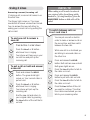
3-Way Conference Calls
H
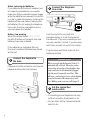
You can hold a conference call with two
other callers on separate lines.
3-Way Conference Calls will not work on
the loudspeaker.
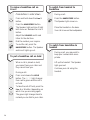
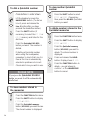
To end one call only
old
Line 1
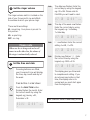
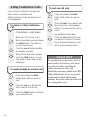
To make a 3-Way Conference
Call
Line 2
Press buttons in order shown
Make your first call on Line 1.
When connected, press and release
the HOLD button. The caller on
Line 1 is put on hold.
Line 2
Press the Line 2 button and dial
the number you want.
nference
Co
When the second caller answers
press the CONF button. You can
now speak to both callers at the
same time.
H
old
H
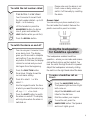
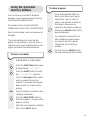
To speak privately to one line only
old
Press and release the HOLD
button. Both callers are put on
hold.
Line 1
Line 2
nference
Co
12
Press the Line 1 or 2 button to
talk to the call on that line.
Press the CONF button to resume
your conference call.
Press and release the HOLD
button. Both callers are put on
hold.
Press the Line 1 if you want to end
the call on Line 1 or the Line 2
button if you want end the call on
Line 2 .
Say goodbye to that caller.
Line 1
Press the Line button of the call
you want to continue. The other
line is disconnected and you can
talk to your remaining caller.
PLEASE NOTE
It is possible that you may notice a loss of
sound quality on Conference calls, due to
your Converse 2-Line regulating the
audible variations of 3-way calls.
Should this reach unacceptable levels, BT’s
3-Way Calling Select Service can provide
an alternative method without sound
problems. You need to subscribe to this and
it is a chargeable service.