1
Setting Up the Multi PJ Camera System
Configuring Display Language, Date, and Time Settings
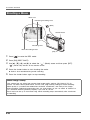
[ON/OFF] (Power)
[]
[]
[]
[]
[SET]
[BS]
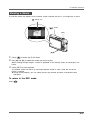
The settings on this page are required the first time you turn on the camera after purchasing it.
1.
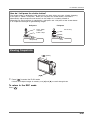
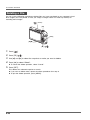
Press [ON/OFF] to turn on the camera.
2.
Use [S], [T], [W], and [X] to select the language you want and then press [SET].
3.
4.
5.
6.
Use [S], [T], [W], and [X] to select the area where you will use the camera and then
press [SET].
Use [S] and [T] to select the city where you will use the camera and then press [SET].
Use [S] and [T] to select the summer time (DST) setting you want and then press
[SET].
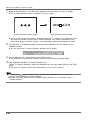
Use [S] and [T] to select the date format and then press [SET].
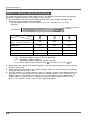
Example: December 19, 2007
7.
To display the date like this:
Select this option:
07/12/19
YY/MM/DD
19/12/07
DD/MM/YY
12/19/07
MM/DD/YY
Set the date and the time.
Use [W] and [X] to select the setting you want (year, month, day, hour, minute) and then use
[S] and [T] to change the setting.
To switch between 12-hour and 24-hour format, press [BS].
8.
When all the settings are the way you want, press [SET].
9.
Press [ON/OFF] to turn off the camera.
z After finishing this procedure, advance to the procedure on the next page.
E-21