1
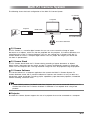
PJ Camera Overview
The PJ Camera can also be used as a stand-alone digital camera. This section provides an
overview of PJ Camera operations. See the Camera User’s Guide on the CASIO CD-ROM for
details about PJ Camera operations.
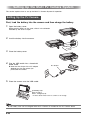
z Before using the PJ Camera for the first time, be sure to read “Setting Up the PJ Camera”
(page E-20). Also you will need to charge the PJ Camera’s battery and configure certain
settings before using the PJ Camera.
Using a Memory Card
Loading a Memory Card into the Camera
When a memory card is loaded, the camera stores images you shoot on the card.
z Though the camera has built-in memory, using a memory card provides additional capacity you
can use to store more images, high-quality and large-size images, and longer movies.
z The camera will store images in its built-in memory if there is no memory card loaded. If you
prefer to use built-in memory, skip this procedure and go to “Shooting a Snapshot” on page E44.
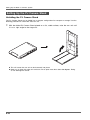
1.
If the camera bracket is attached to the camera,
remove it before mounting the camera onto the
cradle.
z Store the camera bracket in the carrying bag to
ensure that it does not become soiled with dirt,
dust, etc.
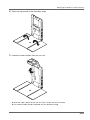
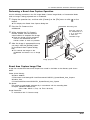
2.
Open the battery cover.
While pressing lightly on the cover, slide it in the direction
indicated by the arrow to open.
3.
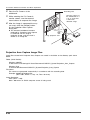
Load a memory card into the
camera.
With the front of the memory card
facing upwards (towards the monitor
screen side of the camera), slide it
into the card slot and press until it
clicks securely into place.
4.
Close the battery cover.
E-42
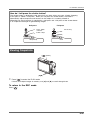
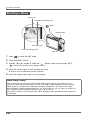
Front
Back