1
Contents
Contents
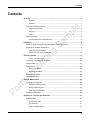
Overview ............................................................................................................................. 1
Benefits ................................................................................................................... 1
Features ................................................................................................................. 1
How Check Scanning Works ........................................................................................ 2
High Level Workflow ............................................................................................... 2
Check 21 ................................................................................................................ 3
OCR ........................................................................................................................ 3
Before you Begin........................................................................................................... 3
Confirm Workstation Requirements ....................................................................... 4
Installation .......................................................................................................................... 6
Scanners Supported by Property Management Payment Service ............................... 6
Installing the Scanner and Drivers ................................................................................ 6
RDM EC7000i Installation ...................................................................................... 7
Panini VX1 and VX50 Installation ......................................................................... 12
Scanning Checks ............................................................................................................. 17
Scans Tab Check List........................................................................................... 20
Reviewing and Editing Check Details ......................................................................... 20
Send to Batch.............................................................................................................. 24
Exceptions ................................................................................................................... 24
What is the MICR? ............................................................................................... 24
Repairing the MICR .............................................................................................. 25
Submitting the Batch ................................................................................................... 26
Searching Batches ...................................................................................................... 27
Scanner Maintenance ...................................................................................................... 29
Cleaning your Scanner ............................................................................................... 29
Using the Cleaning Cards .................................................................................... 29
Using Compressed Air.......................................................................................... 29
Removing Ink Smudges ....................................................................................... 30
Additional Information ................................................................................................. 30
Appendix A – Scanner Specifications ........................................................................... 31
RDM EC7000i ............................................................................................................. 31
Product Overview ................................................................................................. 31
Key Features ........................................................................................................ 31
Product Specifications .......................................................................................... 31
iii