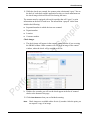
1
Check Scanning Overview The scanning feature in Property Management Payment Service Community portal converts paper checks into electronic transactions, with support for Check 21 items. Every payment made is fully integrated with your existing accounting system for reconciliation and reporting. Also, all transactions are fully compliant with state and federal laws. By scanning a check, you are capturing bank account information and an electronic image of the check. The system will take information captured from the check and process it as an electronic payment. Funds will be electronically withdrawn from the resident’s bank account on the following business day and deposited. The scanning feature supports ACH and Check 21 transactions. ACH regulations only allow you to scan and process consumer checks. Other types of paper checks (business checks, third-party checks, money orders, etc.) may be scanned and processed as Check 21 transactions. Benefits ▀ Provides a simple, efficient way to handle paper checks. ▀ Eliminates trips to the financial institution to deposit checks. ▀ Offers a single, integrated view of all payments across the portfolio. ▀ Verifies that all payments are fully compliant. ▀ Improves cash management with next day funding. Features ▀ Simple, easy to use user interface ▀ Supports single check handling or bulk processing of items Supports multiple scanners with same interface Designed specifically for the multifamily industry Residents are “remembered” if they’ve already had a check scanned Integrated offering Resident drop down list for quick processing Enforces Do Not Accept functionality (when passed by client) Displays outstanding balance (when passed by client) Checks integrated with all other payment types 1