1
02-Printing
7/16/99 6:30 PM
Page 5
Installing Printer Driver
Windows 95/98/NT4.0 Installation
1. Turn on the computer and start Windows.
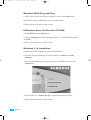
If Windows 95/98 recognizes the new printer,go to the section
ÒWindows 95/98 Plug and PlayÓ on page 16.
2.Insert the setup CD-ROM into your CD-ROM drive.
If Windows does not automatically run the CD-ROM,go to the
sectionÓIf Windows Does Not Run the CD-ROMÓ on page 16.
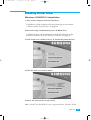
3.Click on the icon ÒPrinter Set-upÓ to install the printer drivers.
4.Click the Item you want to install.
5.Follow the instructions on the screen.
Note : WinNT and WinNTRCP item is supported under Windows NT4.0.
Set Up
15