1
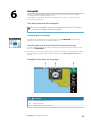
NSS evo2
Operator Manual
ENGLISH
simrad-yachting.com
Preface
Disclaimer
As Navico is continuously improving this product, we retain the right to make changes to the
product at any time which may not be reflected in this version of the manual. Please contact
your nearest distributor if you require any further assistance.
It is the owner’s sole responsibility to install and use the instrument and transducers in a
manner that will not cause accidents, personal injury or property damage. The user of this
product is solely responsible for observing safe boating practices.
NAVICO HOLDING AS AND ITS SUBSIDIARIES, BRANCHES AND AFFILIATES DISCLAIM ALL
LIABILITY FOR ANY USE OF THIS PRODUCT IN A WAY THAT MAY CAUSE ACCIDENTS, DAMAGE
OR THAT MAY VIOLATE THE LAW.
Governing Language: This statement, any instruction manuals, user guides and other
information relating to the product (Documentation) may be translated to, or has been
translated from, another language (Translation). In the event of any conflict between any
Translation of the Documentation, the English language version of the Documentation will
be the official version of the Documentation.
This manual represents the product as at the time of printing. Navico Holding AS and its
subsidiaries, branches and affiliates reserve the right to make changes to specifications
without notice.
Trademarks
Lowrance® and Navico® are registered trademarks of Navico.
Fishing Hot Spots® is a registered trademark of Fishing Hot Spots Inc. Copyright© 2012
Fishing Hot Spots.
Navionics® is a registered trademark of Navionics, Inc.
NMEA 2000® is a registered trademark of the National Marine Electronics Association.
Additional mapping data: Copyright© 2012 NSI, Inc.: Copyright© 2012 by Richardson’s
Maptech.
Copyright
Copyright © 2014 Navico Holding AS.
Warranty
The warranty card is supplied as a separate document.
In case of any queries, refer to the brand website of your display or system:
www.simrad-yachting.com
Regulatory statements
This equipment is intended for use in international waters as well as coastal sea areas
administered by countries of the E.U. and E.E.A.
The NSS evo2 complies with:
• CE under R&TTE directive 1999/5/EC
• The requirements of level 2 devices of the Radiocommunications (Electromagnetic
Compatibility) standard 2008.
The relevant Declaration of conformity is available in the NSS evo2 section on the following
website: www.simrad-yachting.com.
Preface | NSS evo2 Operator Manual
3
About this manual
This manual is a reference guide for operating the Simrad NSS evo2 systems. It assumes that
all equipment is installed and configured, and that the system is ready to use.
The manual assumes that the user has basic knowledge of navigation, nautical terminology
and practices.
Important text that requires special attention from the reader is emphasized as follows:
Ú Note: Used to draw the reader’s attention to a comment or some important information.
Warning: Used when it is necessary to warn personnel that they should
proceed carefully to prevent risk of injury and/or damage to equipment/
personnel.
Viewing the manual on the NSS evo2 screen
The pdf viewer included in the NSS evo2 makes it possible to read the manuals and other pdf
files on the unit. Manuals can be downloaded from www.simrad-yachting.com.
The manuals can be read from an inserted Micro-SD card or copied to the unit’s internal
memory.
Use the keys and on-screen buttons to maneuver in the pdf file as below:
Search, Goto page, Page
Up and Page Down
Tap the relevant button
Scroll pages
Turn the rotary knob
Panning on the page
Drag finger on the screen in any direction
Zoom In/Out
Use pinch or spread gestures
Exit the pdf viewer
Press the X key or the X in the upper right corner of the panel.
The software
This manual is written for the NSS evo2 Release to Market 1 (RTM1).
The manual will be continuously updated to match new software releases. The latest
available manual version can be downloaded from www.simrad-yachting.com.
4
Preface | NSS evo2 Operator Manual
Contents
9
Introduction
9
10
11
12
13
13
The front panel and keys
The Home page
Application pages
Integration of 3rd party devices
GoFreeTM wireless
OP40 Remote controller
14 Basic operation
14
14
14
15
16
16
17
17
17
18
18
19
19
Turning the unit on and off
Display illumination
Locking the touch screen
Touch screen operation
Using menus and dialogs
Selecting pages and panels
Adjusting panel size
Adding new favorite pages
Edit favorite pages
Customizing the Home page background
Setting the appearance of the Instrument bar
Positioning a Man Over Board mark
Screen capture
20 Charts
20
21
21
21
21
21
22
22
23
23
23
23
24
24
24
25
25
26
28
The Chart panel
Showing dual chart types
Vessel symbol
Chart scale
Panning the chart
Positioning the vessel on the chart panel
Displaying information about chart items
Using the cursor on the chart panel
Saving waypoints
Creating routes
Measuring distance
Find objects on chart panels
3D charts
Chart overlay
Insight specific chart options
Insight view options
Navionics specific chart options
Navionics view options
Chart settings
29 Waypoints, routes and tracks
29
30
31
32
Waypoints
Routes
Tracks
Waypoints, routes and tracks dialogs
33 Navigating
33
34
34
35
35
Navigation panels
Navigate to cursor position
Navigate a route
Navigating with the autopilot
Navigation settings
Contents | NSS evo2 Operator Manual
5
37 Autopilot
37
37
37
37
38
39
40
40
40
40
41
41
42
43
44
45
46
46
Safe operation with the autopilot
Activating the autopilot
Switching from automatic mode to manual steering
Autopilot indication on the pages
The Autopilot panel
Mode overview
Standby mode
Non-Follow Up (NFU, Power steering)
Follow-up steering (FU)
AUTO mode (auto compass)
NoDrift mode
NAV mode
WIND mode
WIND Nav mode
Turn pattern steering
Using the NSS evo2 in an AP24/AP28 system
Using the autopilot in an EVC system
Autopilot settings
49 Radar
49
49
50
50
50
50
51
52
52
53
54
55
56
56
The radar panel
Radar overlay
Radar operational modes
Radar Range
Using the cursor on a radar panel
Saving waypoints
Adjusting the radar image
Advanced radar options
Radar view options
EBL/VRM markers
Setting a guard zone around your vessel
MARPA targets
Recording radar data
Radar settings
58 Echosounder
58
59
59
60
60
60
61
61
62
63
The Echosounder image
Zooming an Echosounder image
Using the cursor on the echosounder panel
Saving waypoints
Viewing sounder history
Setting up the Echosounder image
Advanced Echosounder options
Recording echosounder data
Echosounder view options
Echosounder settings
65 StructureScan™
65
65
66
66
66
67
67
68
6
The StructureScan™ image
Zooming the StructureScan image
Using the cursor on the StructureScan™ panel
Saving waypoints
Viewing StructureScan™ history
Setting up the StructureScan image
Recording StructureScan data
Advanced StructureScan settings
Contents | NSS evo2 Operator Manual
69 StructureMap
69
69
69
70
70
70
71
The StructureMap image
Activating Structure overlay
StructureMap sources
StructureMap tips
Recording StructureScan data
Using StructureMap with mapping cards
Structure options
72 AIS
72
73
74
75
75
AIS target symbols
Viewing information about AIS targets
AIS SART
Vessel alarms
Vessel settings
78 Instrument panels
78
78
Dashboards
Customizing the Instrument panel
79 Audio
79
80
81
82
82
82
Enabling audio
The Audio panel
Setting up the audio system
Operating the audio system
Favourite channels
Using Sirius radio (North America only)
83 Weather
83
84
GRIB weather
SiriusXM™ weather
89 Video
89
89
89
The Video panel
Setting up the video panel
FLIR camera control
91 Time plots
91
91
The Time plot panel
Selecting data
92 Alarms
92
92
92
92
93
93
Alarm system
Type of messages
Single alarms
Multiple alarms
Acknowledging a message
Alarms dialog
94 Tools
94
94
94
94
94
94
94
Waypoints/routes/tracks
Tides
Alarms
Settings
Vessels
Sun/moon
Trip calculator
Contents | NSS evo2 Operator Manual
7
94
94
Files
Find
95 Simulator
95
95
95
96
About the simulator
Demo mode
Selecting simulator source files
Advanced simulator settings
97 Maintenance
97
97
97
97
97
97
98
98
8
Preventive maintenance
Cleaning the display unit
Cleaning the media port door
Checking the keys
Checking the connectors
NMEA 0183 Data logging
Software upgrades
Backing up your system data
Contents | NSS evo2 Operator Manual
1
Introduction
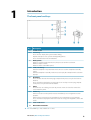
The front panel and keys
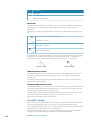
Key
Description
1
Touch screen
2
Power key
Press once to display the System control dialog.
Repeat short presses to cycle the backlight brightness.
Press and hold to turn the unit ON/OFF.
3
Rotary knob
Rotate to scroll through menu items, then press to confirm a selection.
Rotate to adjust a value.
Rotate to zoom a zoomable panel.
4
STBY / AUTO key
With the autopilot in any automatic mode: Press to set the autopilot to Standby
mode.
With the autopilot in Standby mode: Press to display the autopilot mode selection
pop-up.
5
Home key
Press once to activate the Home page. Repeat short presses to cycle the favorite
buttons.
Press and hold to display the Favorite panel as an overlay on active page. Repeat
short presses to cycle the favorite buttons.
6
X key
Press once to exit a dialog, to return to previous menu level and to remove the
cursor from the panel.
7
MARK key
With cursor active on the panel: Press to immediately save a waypoint at cursor
position.
With no active cursor: Press to immediately save a waypoint at vessel position.
Press and hold to display the Plot menu used for saving new waypoints, routes and
tracks.
8
Card reader door
9
Micro-SD Card readers
Ú Note: The MARK key is not available on 7" units.
Introduction | NSS evo2 Operator Manual
9
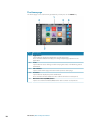
The Home page
The Home page is accessed from any operation by a short press on the Home key.
Key
10
Description
1
Applications
Tap a button to display the application as a full page panel.
Press and hold a button to display pre-configured split page options for the
application.
2
Tools
Tap a button to access dialogs used for carrying out a task, or for browsing stored
information.
3
Close button
Tap to exit the Home page and return to the previous active page.
4
Favorites
Tap a button to display the panel combination.
Press and hold a favorite button to enter edit mode for the Favorites panel.
5
Mand Over Board (MOB) button
Tap to save a Man Over Board (MOB) marker at the current vessel position.
Introduction | NSS evo2 Operator Manual
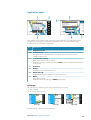
Application pages
Each application connected to the system is presented on panels. The application can be
presented as a full page, or incombination with other panels in a multiple panel page.
All pages are accessed from the Home page.
Key
Description
1
Application panel
2
Instrument bar
Navigation and sensor information. The bar can be tuned off and it can be
configured by the user.
3
System Control dialog
Quick access to basic system settings.
Display the dialog by a short press on the Power key or by swiping down from top
of the screen.
4
Status bar
5
Dialog
Information to or input from the user.
6
Alarm message
Displayed if dangerous situations or system faults occur.
7
Menu
Panel specific menu.
Display the menu by tapping the MENU panel button.
Split pages
(optional).
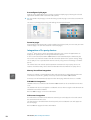
here
concept
your
of
description
short
a
Enter
You can have several panels on one page depending on screen size:
• 7" units: 2 panels
• 9", 12" and 16" units: 4 panels
2 panels page
3 panels page
4 panels page
All panel sizes in a split page can be adjusted.
Introduction | NSS evo2 Operator Manual
11
Pre-configured split pages
(optional).
here
concept
your
of
description
short
a
Enter
Each full screen applications have several pre-configured split pages, featuring the selected
application combined with each of the other panels.
Ú Note: The number of split pages can not be changed, and the pages can not be customized or
deleted.
You access a split page by pressing and holding the main panel button.
Favourite pages
(optional).
here
concept
your
of
description
short
a
Enter
All preconfigured favourite pages can be modified and deleted, and you can create your own
favourite pages. You can have a total of 12 favourite pages.
(optional).
here
concept
your
of
description
short
a
Enter
Integration of 3rd party devices
Several 3rd party devices can be connected to the NSS evo2 system. The applications are
displayed on separate panels or integrated with other panels.
A device connected to the NMEA 2000 network should automatically be identified by the
NSS evo2. If not, enable the feature from the advanced option in the System settings dialog.
The 3rd party device is operated from the NSS evo2 by using menus and dialogs as on other
panels.
This manual does not include specific operation instructions for any 3rd party device. For
features and functionality, refer to the documentation included with the 3rd party device.
(optional).
here
concept
your
of
description
short
a
Enter
Mercury VesselView integration
Mercury VesselView 7 SmartCraft data display and interaction are enabled through the NSS
evo2 when a VesselView 7 gateway device is present on the NMEA 2000 network.
A Mercury icon will automatically appear on the Home page when the device is available.
FUSION-Link integration
(optional).
here
concept
your
of
description
short
a
Enter
FUSION-Link devices connected to the NMEA 2000 network can be controlled from the NSS
evo2.
The FUSION-Link devices will appear as additional sources when using the audio function. No
additional icons will be available.
Refer to "Audio" on page 79 for more information.
FLIR camera integration
(optional).
here
concept
your
of
description
short
a
Enter
If a FLIR camera is available on the Ethernet network, you can display the video and control
the camera from the NSS evo2.
The FLIR camera is controlled from the Video panel, and no additional icons will appear on
the Home page.
Refer to "Video" on page 89 for more information.
12
Introduction | NSS evo2 Operator Manual
BEP CZone integration
The NSS evo2 system integrate with BEP’s CZone system used for controlling and monitoring
a distributed power system on your vessel.
The CZone icon will be available in the Tools panel on the Home page when a CZone system
is available on the network.
A separate manual is provided with your CZone system. Refer to this documentation and to
the NSS evo2 Installation manual for how to install and configure the CZone system.
CZone dashboard
When the CZone is installed and configured, an additional CZone dashboard will be added
to the Instrument panels.
Vessel dashboard
Navigation dashboard
Angler dashboard
CZone dashboard
You switch between a panel’s dashboards by tapping the left and right arrow symbols or by
selecting the dashboard from the menu.
Editing a CZone dashboard
You can customize a CZone dashboard by changing the data for each of the gauges.
Available editing options depend on the type of gauge and which data sources that are
connected to your system.
For more information refer to the "Instrument panels" on page 78 section.
GoFreeTM wireless
With a WIFI-1 unit connected to the NSS evo2 system you can use a wireless device to
remotely control the unit. The NSS evo2 is controlled from the wireless device by Apps
downloaded from their relevant Application store.
Ú Note: For security reasons Autopilot and CZone control are currently not supported for control
from a wireless device.
Installation and wiring for the WIFI-1 unit are described in the separate WIFI-1 Installation
Guide. Configuration and setup are described in the NSS evo2 Installation manual.
Operating the NSS evo2 with a wireless device
When remote control is accepted, the NSS evo2 page will be mirrored to the wireless device.
The NSS evo2 image includes softkeys. Tapping these keys works as operating the similar
hard keys on the NSS evo2.
OP40 Remote controller
You can connect an OP40 to the network and remotely control the NSS.
A separate manual is included with the OP40 unit.
Introduction | NSS evo2 Operator Manual
13
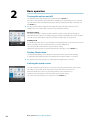
Turning the unit on and off
(optional).
here
concept
your
of
description
short
a
You turn the unit on and off by pressing and holding the Power key.
If the key is released before the shut-down is completed, the power off process is cancelled.
You can also turn the unit off from the System controls dialog, activated by a short press on
the Power key.
Enter
2
Basic operation
Ú Note: The System Controls dialog will not display the power off option when the unit is
configured as slave. Refer details in the NSS evo2 Installation manual.
First time startup
The first time the unit is started and after a master reset the system will run through an
automatic start-up sequence, including language setup and automatic data source selection.
You can select to interrupt this sequence and later configure the system yourself.
Standby mode
In Standby mode the sonar is set to standby, and the backlight for screen and keys are turned
off to save power. The system will continue to run in the background.
You select Standby mode from the System Controls dialog.
Switch from Standby mode to normal operation by a short press on the Power key.
Display illumination
(optional).
here
concept
your
of
description
short
a
Enter
The display backlighting can be adjusted at any time from the System control dialog.
A night mode which optimizes the color palette for low light conditions, is included.
Ú Note: Details on the chart may be less visible when the Night mode is selected!
(optional).
here
concept
your
of
description
short
a
Enter
Locking the touch screen
You can temporarily lock the touch screen to prevent accidental operation of the system.
This feature is also useful when cleaning the screen while the unit is turned on.
When the touch lock is active you can only operate the units from the keys.
The touch screen operation is locked from the System control dialog.
You remove the lock function by a short press on the Power key.
14
Basic operation | NSS evo2 Operator Manual
Touch screen operation
Basic touch screen operation on the different panels is shown in the table below.
The panel sections later in this manual have more information about panel specific touch
screen operation.
Icon
Description
Tap to:
• Activate a panel on a multi-panel display
• Position the cursor on a panel
• Select a menu and a dialog item
• Toggle a checkbox option on or off
• Show basic information for a selected item
Press and hold:
• On any panel with a cursor to activate the cursor assist feature
• On a panel button to see available split screen options
• On a favorite button to enter edit mode
Scroll through a list of available options without activating any option.
Flick to quickly scroll through e.g. the waypoint list. You need to tap
the screen to stop the scrolling.
Pan to position a chart or an echo image on the panel.
Pinch to zoom out on the chart or on an image.
Spread to zoom in on the chart or on an image
Basic operation | NSS evo2 Operator Manual
15
Using menus and dialogs
Menus
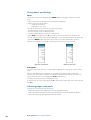
You display a page menu by tapping the MENU button in the upper right corner of the
page.
• Select a menu item and toggle on/off a checkbox by tapping it
• Adjust a slide bar value by either:
• dragging the slide bar
• tapping the + or - icons
You can also operate the menus by using the rotary knob.
• Turn the knob to scroll through menu items
• Press the knob to select a highlighted item
• Turn the knob to adjust the value of a selected item
Tap the Back menu option or the X key to return to previous menu level, and then exit.
You can make the menu slide away by tapping the screen outside the menu area. When you
re-press the MENU button, the menu opens in the same status it had before it closed.
Different menu options are available depending on if the cursor is active or not.
Chart menu - cursor not active
Chart menu - active cursor
Dialog boxes
You select entry fields and keys in a dialog box by tapping the screen or by using the rotary
knob.
Numeric and alphanumeric keyboards are automatically displayed when required for
entering user information in dialogs. You operate the keyboard by tapping the virtual keys,
and you confirm your entry by tapping the Enter keyboard key.
A dialog is closed by saving or cancelling the entry.
A dialog can also be closed by tapping the X in the dialog's upper right corner or by pressing
the X key.
Selecting pages and panels
(optional).
here
concept
your
of
description
short
a
Enter
All pages are selected from the Home page.
• Select a full page panel by tapping the relevant application button
• Select a predefined split panel by pressing and holding the relevant application button
• Select a favourite page by tapping the favourite button
16
Basic operation | NSS evo2 Operator Manual
Adjusting panel size
(optional).
here
task
your
of
description
short
a
Enter
You can change the panel size for an active split page. The panel size can be adjusted for
both favorite pages and for predefined split pages.
1. Activate the System control dialog by pressing the Power key or by dragging your finger
from the top of the screen
2. Select the adjust splits option in the dialog
3. Drag the adjustment icon to resize the panel
4. Confirm your changes by tapping on of the panels or by pressing the rotary knob
The changes are saved to the the active favorite or split page.
(optional).
here
task
your
of
description
short
a
Enter
Adding new favorite pages
1. Tap the New icon in the favorite panel on the Home page to open the page editor dialog
2. Drag and drop page icons to set up a new page
3. Save the page layout
The display will return to the Home page, and the new page will be included in list of favorite
pages.
(optional).
here
task
your
of
description
short
a
Enter
Edit favorite pages
1. Tap the edit icon or press and hold a favorite icon to enter edit mode
- Tap the cancel icon to remove a page
- Tap the tools icon to display the page editor dialog
2. Add or remove panels in the page editor dialog, then save your changes
3. Press the X key to leave the favorite edit mode
Basic operation | NSS evo2 Operator Manual
17
Customizing the Home page background
(optional).
here
concept
your
of
description
short
a
Enter
The Home page's background can be customized. You can select one of the pictures
included with the system, or you can used your own picture in .jpg or .png format.
The images can be available on any location that can be seen in the files browser. When a
picture is chosen as the wallpaper, it is automatically copied to the Wallpaper folder.
Setting the appearance of the Instrument bar
Data sources connected to the system can be viewed in the Instrument bar.
You can configure the Instrument bar to display either one or two bars, or set it to alternate
the bars automatically.
You can turn the Instrument bar off from the System control dialog.
Ú Note: This only turns the Instrument bar off for the current page.
Turning the Instrument bar on/off
1. Activate the System control dialog by pressing the Power key or by dragging your finger
from the top of the screen
2. Toggle on/off the instrument bar from the System control dialog.
Edit the content of the Instrument bar
1. Tap the Instrument bar to make it active
2. Tap the MENU button to edit the content
3. Select the content you want to display
Ú Note: You can configure Bar 1 for active page or for all pages except those that have a local
configuration. Bar 2 can only be configured for active page.
4. Define the time period if you want the two bars to alter automatically
5. Select the edit option to change any of the instrument fields, followed by the field you want
to change
6. Save your changes by selecting the finish edit option in the menu.
18
Basic operation | NSS evo2 Operator Manual
Positioning a Man Over Board mark
If an emergency situation should occur, you can position a Man Over Board mark at the
vessel’s current position by pressing the Home key followed by the MOB button on the
Home page.
When you activate the MOB function the following actions are automatically performed:
• a MOB mark is positioned at the vessel’s position
• the display switches to a zoomed chart panel, centered on vessel position
• the system displays navigation information back to the MOB mark
Multiple MOB marks are positioned by repeated presses on the MOB button. The vessel will
continue to show navigation information to the initial MOB mark. Navigation to subsequent
MOB marks will need to be done manually.
Cancel navigation
The system will continue to display navigating towards the MOB mark until you select to
cancel the navigation from the menu.
(optional).
here
task
your
of
description
short
a
Enter
Delete a MOB mark
1. Tap the MOB mark to activate it
2. Tap the MOB mark's pop-up to display the MOB mark dialog
3. Select the delete option in the dialog
A MOB mark can also be deleted from the menu when it is activated. See also the "WaypointsRoutes-Tracks" on page 29 section.
Screen capture
Simultaneously press the Home and Power keys to take a screenshot. By default, screen
captures are saved to internal memory.
Refer to the "Tools" on page 94 section for how to view and manage files.
Basic operation | NSS evo2 Operator Manual
19
3
Charts
The chart function displays your vessel’s position relative to land and other chart objects. On
the chart panel you can plan and navigate routes, place waypoints and display AIS targets.
You can overlay a radar image, a StructureScan image or weather information.
The NSS evo2 is delivered with different cartography depending on region. All units will
support Navionics Platinum Plus, TurboView and C-Map (by Jeppesen) via micro-SD card or
via the Ethernet network.
Charts can be shared over the Ethernet network, so only one chart card per boat is required.
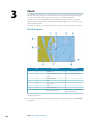
The Chart panel
Key
Description
Comment
1
Waypoint
*
2
Vessel with extension line
Extension line is optional
3
Route
*
4
North indicator
5
Grid
*
6
Range rings
*
7
Track
*
8
Chart range scale
9
Range rings interval
Only displayed when Range
rings are turned on
* Optional chart items
Ú Note: You turn the optional images on/off individually. For more information, see "Chart settings"
on page 28.
20
Charts | NSS evo2 Operator Manual
Showing dual chart types
(optional).
here
concept
your
of
description
short
a
Enter
If you have different chart types available - embedded, in the card slot or on the Ethernet you can show two different chart types simulatanously on a page with two chart panels.
You can select a dual chart panel by pressing and holding the Chart application button on
the Home page, or by creating a Favorite page with two chart panels.
Selecting chart type
Chart type is set individually for each chart panel.
Tap one of the chart panels, and select one of the available chart types from the chart
options menu. Repeat the process for the second chart panel, and select an alternative chart
type for this panel.
Ú Note: To show charts from other than Navionics, Insight chart type must be selected.
If you have identical charts available - built in, in the card slot or on the Ethernet network the system will automatically select the chart with most chart details for your displayed
region.
Vessel symbol
When a GPS and a suitable heading sensor are connected to the system, the vessel symbol
indicates vessel position and heading.
Without a heading sensor fitted, the vessel icon will orientate itself using COG (Course over
Ground). If no GPS is available the vessel symbol will include a question mark.
Chart scale
You zoom in and out on the chart by using the zoom panel icons, the rotary knob, or by
using 2 fingers to pinch (zoom out) and spread (zoom in).
Chart range scale and range rings interval (when turned on) will be shown in the lower right
corner of the chart panel.
Panning the chart
You can move the chart in any direction by dragging your finger in the desired direction.
Press the X key or tap the Clear cursor menu option to remove the cursor and cursor
window from the panel. This will also center the chart to vessel position.
heading
empty
an
is
This
Positioning the vessel on the chart panel
Chart orientation
Several options are available for how the chart is rotated in the panel. The chart orientation
symbol in the panel’s upper right corner indicates the north direction.
North up
Charts | NSS evo2 Operator Manual
Heading up
Course up
21
North up
Displays the chart with the north direction upward. Corresponds to the usual orientation of
nautical charts.
Heading up
Displays the chart with the vessel’s heading directly up on the chart image. Heading
information is received from a compass. If heading is not available, then the COG from the
GPS will be used.
Course up
Rotates the chart in the direction of the next waypoint when navigating a route or navigating
to a waypoint. If not navigating the heading up orientation will be used until navigation is
started.
Look ahead
Centres the chart slightly forward of your vessel so that you can maximize your view ahead.
Displaying information about chart items
When you tap a chart item, a waypoint, a route or a target, basic information for the selected
item will be displayed. By tapping a chart item's pop-up, all available information for that
item will be shown.
Ú Note: Popup information has to be enabled in chart settings to see basic item information.
Available information for a selected chart item can also be displayed by using the menu.
Using the cursor on the chart panel
The cursor is by default not shown on the chart panel.
When you tap the screen, the cursor will become visible and the cursor position window will
be activated. When the cursor is active, the chart will not pan or rotate to follow the vessel.
Press the X key or tap the Clear cursor menu option to remove the cursor and cursor
window from the panel. This will also center the chart to vessel position.
Tap the Restore cursor menu option to display the cursor in its previous location. The Clear
cursor/Restore cursor are useful features for toggling between the vessel's current location
and the cursor position.
GoTo cursor
(optional).
here
concept
your
of
description
short
a
Enter
You start navigating to a selected position on the image by tapping the screen, then using
the go to cursor option in the menu.
22
Charts | NSS evo2 Operator Manual
The Cursor assist function
(optional).
here
concept
your
of
description
short
a
Enter
The cursor assist function allows for fine tuning and precision placement of the cursor
without covering details with your finger.
Press and hold your finger on the screen to switch the cursor symbol to a selection circle,
appearing above your finger.
Without removing the finger from the screen, drag the selection circle over the desired item
to display item information.
When you remove your finger from the screen the cursor reverts to normal cursor operation.
Saving waypoints
(optional).
here
concept
your
of
description
short
a
Enter
You can save a waypoint at a selected position by tapping the panel, then selecting the new
waypoint option in the menu.
• If your unit has a MARK key, you can press this key to immediately save a waypoint. If the
cursor is active the waypoint will be saved at cursor position. If the cursor is not active the
waypoint will be saved at your vessel's position.
Creating routes
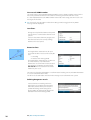
You can create routes by tapping the chart panel.
1. Tap the screen to activate the cursor
2. Select New followed by New route in the menu
3. Tap the screen to position the first routepoint, and then continue tapping the screen to
place the remaining routepoints
4. Save the route by selecting the save option in the menu
Ú Note: See the Waypoints, routes and tracks section for more information.
Measuring distance
The cursor can be used to measure the distance between your vessel and a selected position,
or between 2 points on the chart panel.
1. Tap the screen on the place to where you want to measure the distance from the vessel
2. Start the measure function from the menu
- The measuring icons will appear with a line drawn from the vessel center to the cursor
position, and the distance will be listed in the Cursor Information window
3. Reposition the measuring points by dragging either icon.
Ú Note: The bearing will always be measured from the grey icon to the blue icon.
You can also start the measuring function without an active cursor. Both measuring icons will
then initially be located at the vessel position. The grey icon will follow the vessel as the
vessels moves, while the blue icon will remain at the position given when you activated the
function.
You terminate the measuring function by tapping Finish measuring or by pressing the X
key.
(optional).
here
concept
your
of
description
short
a
Enter
Find objects on chart panels
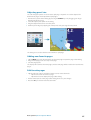
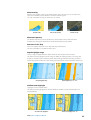
You can search for other vessels or various
chart items from a chart panel.
Tap the desired location on the panel to
search from the cursor position. If the cursor
is not active the system will search for items
from the vessel's position.
Charts | NSS evo2 Operator Manual
23
Ú Note: You must have a SIRIUS data package subscription to search for fueling stations and an
AIS receiver connected to search for vessels.
3D charts
(optional).
here
concept
your
of
description
short
a
Enter
The 3D option provides a three dimensional graphical view of land and sea contours.
Ú Note: All chart types work in 3D mode, but without 3D cartography for the appropriate area
the chart will appear flat.
Panning the 3D chart
You can move the chart in any direction by tapping the Pan icon and then dragging your
finger in the desired direction.
Press the X key or tap the Return to vessel menu option to stop panning, and center the
chart to vessel position.
Controlling the view angle
You can control the view angle by tapping the rotate icon and then dragging on the screen.
• To change the direction you are viewing, drag horizontally
• To change the tilt angle of the view, drag vertically
Ú Note: When centered on the vessel position, only the tilt angle can be adjusted. The view
direction is controlled by the chart orientation setting. See "Positioning the vessel on the chart panel" on
page 21.
Zooming a 3D chart
You zoom in and out on a 3D chart by using the zoom panel icons or the rotary knob.
Chart overlay
Radar, Structure, AIS and weather information can be displayed as overlay on your chart
panel.
When an overlay is selected, the chart menu will be expanded to include basic function for
the selected overlay.
Radar, Structure, AIS and weather functions are described in separate sections in this manual.
(optional).
here
concept
your
of
description
short
a
Enter
Insight specific chart options
Orientation, Look ahead, 3D and Change to Navionics/Change to Insight are common
for all chart types. These features are described previously in this section.
Chart imagery style
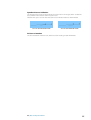
The charts can be displayed in two different imagery styles, either as 2D basic mapping style,
or with shaded relief presenting chart including terrain imaging.
Insight 2D mapping style
24
Charts | NSS evo2 Operator Manual
Insight Shaded relief
(optional).
here
concept
your
of
description
short
a
Enter
Insight view options
(optional).
here
concept
your
of
description
short
a
Enter
Insight Chart Details
Low
Basic level of information that cannot be removed, and includes information
that is required in all geographic areas. It is not intended to be sufficient for
safe navigation
Medium
Minimum information sufficient for navigation
Full
All available information for the chart in use
Insight chart categories
Insight charts includes several categories and sub-categories that you can turn on/off
individually depending on which information you want to see on your display.
Land Exaggeration and Water Exaggeration
Graphical settings available in 3D mode only. Exaggeration is a multiplier applied to the
drawn height of hills on land, and troughs in water to make them look taller or deeper.
(optional).
here
concept
your
of
description
short
a
Enter
Navionics specific chart options
Orientation, Look ahead, 3D and Change to Navionics/Change to Insight are common
for all chart types. These features are therefore described previously in this section.
Community edits
Toggles on the chart layer including Navionics edits. These are user information or edits
uploaded to Navionics Community by users, and made available in Navionics charts.
For more information refer to Navionics information included with your chart, or to Navionics
website: www.navionics.com.
(optional).
here
concept
your
of
description
short
a
Enter
Navionics chart settings
Colored Seabed Areas
Used for displaying different depth areas in different shades of blue.
Presentation type
Provides marine charting information such as symbols, colors of the navigation chart and
wording for either International or US presentation types.
Annotation
Determines what area information, such as names of locations and notes of areas, is available
on display.
Chart details
Provides you with different levels of geographical layer information.
Safety depth
The Navionics charts use different shades of blue to distinguish between shallow and deep
water.
The safety depth sets the limit for which depths that shall be drawn without blue shading.
Ú Note: The built in Navionics database features data down to 20 m, after which it is all white.
Contours depth
Determines which contours you see on the chart down to the selected safety depth value.
Charts | NSS evo2 Operator Manual
25
Rock filter level
Hides rock identification on the chart beneath a given depth.
This helps you to declutter charts in areas where there are many rocks located at depths well
below your vessel draught.
Navionics view options
Chart shading
Shading adds terrain information to the chart.
Dynamic tide and current icons
Shows tides and currents with a gauge and an arrow instead of the diamond icons used for
static tides and current information.
The tide and current data available in Navionics charts are related to a specific date and time.
The NSS evo2 animates the arrows and/or gauges to show the tides and currents evolution
over time.
Dynamic tide information
Dynamic current information
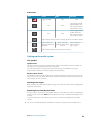
The following icons and symbology are used:
Icons
Description
Current speed.
The arrow length depend on the rate, and the symbol is rotated
according to flow direction. Flow rate is shown inside the arrow symbol.
Red symbol used when current speed is increasing,- blue symbol when
current speed is decreasing.
Tide height.
The gauge have 8 labels and is set according to absolute max/min value
of the evaluated day.
Red arrow used when tide is rising,- blue arrow when tide is falling.
Ú Note: All numeric values are shown in the relevant system units (unit of measurement) set by
user.
Easy View
Magnifying feature increasing the size of chart items and text.
Ú Note: There is no indication on the chart showing that this feature is active.
26
Charts | NSS evo2 Operator Manual
Photo overlay
Photo overlay enables you to view satellite photo images of an area as an overlay on the
chart. The availability of such photos is limited to certain regions.
You can view photo overlays in either 2D or 3D modes.
No Photo overlay
Photo overlay, land only
Full Photo overlay
Photo transparency
The Photo transparency sets the opaqueness of the photo overlay. With minimum
transparency settings the chart details will be almost hidden by the photo.
Navionics Fish’n Chip
NSS evo2 supports Navionics Fish’n Chip (US only) chart feature.
For more information, see www.navionics.com.
Depth highlight range
Select a range of depths between which Navionics will fill with a different color.
This allows you to highlight a specific range of depths for fishing purposes. The range will
only be as accurate as the underlying chart data, meaning that if the chart only contains 5
meter intervals for contour lines, the shading will round to the nearest available contour line.
No Depth highlight range
Depth highlight range: 6 m - 12 m
Shallow water highlight
Highlights areas of shallow water.
This allows you to highlight areas of water between 0 and the selected depth (up to 10
meters/30 feet).
No shallow water highlighted
Charts | NSS evo2 Operator Manual
Shallow water highlight: 0 m - 3 m
27
Chart settings
Settings and display options made in the Chart settings page are common for all chart
panels.
3D boat selection
Determines which icon to use on 3D charts.
Range Rings
The range rings can be used to present the distance from your vessel to other chart objects.
The range scale is set automatically by the system to suit the chart scale.
Vessels’ extension lines
Sets the length of the extension lines for your vessel and for other vessels shown as AIS
targets.
• A: Heading
• B: Course Over Ground (COG)
The length of the extension lines are either
set as a fixed distance, or to indicate the
distance the vessel will move in the selected
time period. If no options are ticked on for
This vessel then no extension lines will be
shown for your vessel.
Own vessel heading is based on information
from the active heading sensor and COG
from active GPS sensor.
For other vessels COG data is included in the
message received from the AIS system.
Synchronize 2D/3D chart
Links the position shown on one chart with the position shown on the other chart when a
2D and a 3D chart are shown side by side.
Pop-up information
Selects whether basic information for chart items shall be displayed when you tap the item.
Grid lines
Turns on/off viewing of longitude and latitude grid lines on the chart.
Waypoints, Routes, Tracks
Turns on/off displaying of these items on chart panels.
28
Charts | NSS evo2 Operator Manual
Waypoints
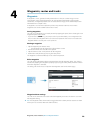
A waypoint is a user generated mark positioned on a chart, on a radar image or on an
echosounder image. Each waypoint has an exact position with latitude and longitude
coordinates. A waypoint positioned on an echosounder image, will in addition to position
information have a depth value.
A waypoint is used to mark a position you later may want to return to. Two or more
waypoints can also be combined to create a route.
Saving waypoints
(optional).
here
concept
your
of
description
short
a
Enter
You can save a waypoint at a selected position by tapping the panel, then selecting the new
waypoint option in the menu.
• If your unit has a MARK key, you can press this key to immediately save a waypoint. If the
cursor is active the waypoint will be saved at cursor position. If the cursor is not active the
waypoint will be saved at your vessel's position.
(optional).
here
task
your
of
description
short
a
Moving a waypoint
Enter
4
Waypoints, routes and tracks
1. Tap the waypoint you want to move
- The waypoint icon will expand to indicate that it is active
2. Activate the menu and select the move option
3. Tap the chart to select a new position for the waypoint
4. Confirm the new position py pressing the rotary knob
The waypoint is now automatically saved at the new position.
Edit a waypoint
You can edit all information about a waypoint from the Edit waypoint dialog. This dialog is
activated by tapping the waypoint's pop-up, by pressing the rotary knob, or from the menu
when the waypoint is activated.
The dialog can also be accessed by from the Waypoints tool on the Home page.
Waypoint alarm settings
You can set an alarm radius for each individual waypoint you create. The alarm is set in the
Edit waypoint dialog.
Ú Note: The waypoint radius alarm must be toggled ON in the alarm panel to activate an alarm
when your vessel comes within the defined radius.
Waypoints, routes and tracks | NSS evo2 Operator Manual
29
Routes
A route consists of a series of routepoints entered in the order that you want to navigate
them.
When you tap a route on the chart panel it will turn green, and the route name will be
displayed.
Creating a new route on the chart panel
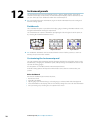
1.
2.
3.
4.
5.
Tap the screen to activate the cursor
Select the new route option from the menu
Tap the chart panel to position the first waypoint
Continue tapping the chart panel until all routepoints are positioned
Save the route by pressing the save option in the menu.
Creating routes using existing waypoints
(optional).
here
topic
your
of
description
short
a
Enter
You can create a new route by combining existing waypoint from the Routes dialog. The
dialog is activated by using the Routes tool on the Home page.
(optional).
here
topic
your
of
description
short
a
Enter
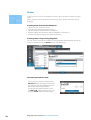
Converting a track to a route
You can convert a track to a route from the
Edit Track dialog. The dialog is activated by
activating the track, then tapping the track's
pop-up, pressing the rotary knob or
selecting the info options from the menu.
The Edit Track dialog can also be access by
using the Tracks tool on the Home page.
30
Waypoints, routes and tracks | NSS evo2 Operator Manual
Edit a route from the chart panel
1. Tap the route to make it active
2. Select the route edit option in the menu
3. Tap the panel to add a new routepoint
- If you tap on a leg a new point will be added between existing routepoints
- If you tap outside the route the new routepoint will be added after the last point in the
route
4. Drag a routepoint to move it to a new position
5. Save the route by selecting the save option in the menu.
Ú Note: The menu will change depending on the selected edit option. All edits are confirmed or
cancelled from the menu.
The Edit Route dialog
You can add and remove routepoints from the Edit Route dialog. This dialog is activated by
tapping an active route's pop-up, by pressing the rotary knob, or from the menu.
The dialog can also be accessed by using the Routes tool on the Home page.
Tracks
A track is a graphical presentation of the historical path of the vessel, allowing you to retrace
where you have travelled. A track can be converted to a route from the Edit Tracks dialog.
From the factory, the system is set to automatically track and draw the vessel's movement on
the chart panel. The system will continue to record the track until the track length reaches
the maximum track points, and will then automatically begin overwriting the oldest track
points.
The automatic tracking function can be turned off from the Tracks dialog.
Creating a new track
You can start a new track from the Tracks dialog, activated by using the Tracks tool on the
Home page.
Waypoints, routes and tracks | NSS evo2 Operator Manual
31
Track settings
The track is made up of a series of track points connected by line segments whose length
depends on the frequency of track recording.
You can select to position track points based on time settings, distance, or by letting the NSS
evo2 system position a waypoint automatically when a course change is registered.
Ú Note: The Tracks option must also be turned ON in the chart settings to be visible.
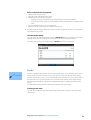
Waypoints, routes and tracks dialogs
(optional).
here
concept
your
of
description
short
a
Enter
The waypoints, routes and tracks dialogs give access to advanced edit functions and settings
for these items.
The dialogs are accessed from the tools panel on the Home page.
32
Waypoints, routes and tracks | NSS evo2 Operator Manual
5
Navigating
The navigation function included in the NSS evo2 allows you to navigate towards the cursor
position, towards a waypoint or along a predefined route.
If autopilot functionality is included in your system, the autopilot can be set to automatically
navigate the vessel.
For information about positioning waypoints and creating routes, refer to "Waypoints-RoutesTracks" on page 29.
Navigation panels
The Nav and Position panels can be used to display information when you are navigating.
The Nav panel
The Nav panel is activated from the Home page, either as a full page panel or as part of a
multiple panel page.
Key
Description
1
Name of destination point
2
Vessel heading
3
Bearing to waypoint
4
Destination point
5
Bearing line with allowed off course limit
When travelling on a route the bearing line shows the intended course from one
waypoint towards the next. When navigating towards a waypoint (cursor position,
MOB or an entered lat/lon position), the bearing line will show the intended course
from the point at which navigation was started towards the waypoint.
6
Vessel symbol
Indicates distance and bearing relative to the intended course.
If the XTE (Cross Track Error) exceeds the defined XTE limit, this will be indicated
with a red arrow including the distance from the track line. Refer to "XTE limit" on
page 36
Navigating | NSS evo2 Operator Manual
33
Data Fields
(optional).
here
concept
your
of
description
short
a
Enter
The Steer panel offers the following information:
DTD
Distance to destination
BTW
Bearing to waypoint
SOG
Speed over ground
COG
Course over ground
TTD
Time to destination
ETA
Estimated time of arrival at next waypoint
VMG
Velocity Made Good towards next waypoint.
STEER
Course to steer towards next waypoint
Position panels
You can switch between displaying the Nav panel or the Position panel. The Position panel is
activated from the menu.
By default, there is one position panel available showing GPS position.
If Loran is enabled, there will be two position panels. This is indicated with arrow symbols on
left and right side of the panel.
You toggle between the panels by tapping the left or right side of the panel.
GPS position info
Loran position info
Data fields
Position in lat. and lon. (GPS) or as Loran GRI and station values
Time and date
SOG
Speed over ground
COG
Course over ground
DTD
Distance to destination
TTD
Time to destination
Navigate to cursor position
You can start navigating towards cursor position on any chart, radar or echosounder
application panel.
Tap the selected destination on the panel, and select the go to cursor option in the menu.
Navigate a route
You can start navigating a route from the chart panel or from the Route dialog.
When route navigation is started, the menu will expand showing options for canceling the
navigation, for skipping a waypoint, and for restarting the route from current vessel position.
34
Navigating | NSS evo2 Operator Manual
Starting a route from the chart panel
Tap a route on the panel, and then select the route navigation option from the menu.
You can tap a routepoint to start navigating from a selected position.
Start navigating a route from the Route dialog
You can start navigating from the Route dialog, activated by:
• Selecting the Route tool from the Home page
• Selecting the route details from the menu
Cancel navigation
When you are navigating a route the menu will include an option for cancelling the route.
Navigating with the autopilot
When you start navigation on a system with autopilot functionality, you will be prompted to
set the autopilot to navigation mode.
If you choose not to engage the autopilot, the autopilot can later on still be set to navigation
mode from the pilot menu.
For more information about autopilot functionality, refer to "Autopilot" on page 37.
Navigation settings
Navigating | NSS evo2 Operator Manual
35
Navigation method
(optional).
here
concept
your
of
description
short
a
Enter
Different methods are available for calculating the distance and bearing between any two
points on a chart.
The Great circle route is the shortest path between two points. However, if you are to travel
along such a route, it would be difficult to steer manually as the heading would constantly
be changing (except in the case of due north, south, or along the equator).
Rhumb lines are tracks of constant bearing. It is possible to travel between two locations
using Rhumb line computation, but the distance would usually be greater than if Great circle
is used.
Phantom Loran
Enables use of Phantom Loran positioning system.
Loran settings
Defines Loran chains (GRI) and preferred station for waypoint entry, cursor position and
position panel.
The graphic example shows cursor position window with Loran position information.
For more information refer to your Loran system documentation.
Arrival radius
Sets an invisible circle around the destination waypoint.
The vessel is considered arrived at the waypoint when it is within this radius.
XTE limit
(optional).
here
concept
your
of
description
short
a
Enter
This parameter defines the vessel’s accepted offset distance from the leg. If the vessel goes
beyond this limit, an alarm will be activated.
Arrival alarm
(optional).
here
concept
your
of
description
short
a
Enter
When the arrival alarm is enabled, an alarm will be activated when the vessel reaches the
waypoint or when its within the specified arrival radius.
Magnetic variation
Magnetic variation is the difference between true bearings and magnetic bearings, caused
by different location of the Geographic and the Magnetic north poles. Any local anomalies
such as iron deposits might also affect the magnetic bearings.
When set to Auto, the system automatically converts magnetic north to true north. Select
manual mode if you need to enter your own local magnetic variation.
Datum
Most paper charts are made in the WGS84 format, which also is used by the NSS evo2
system.
If your paper charts are in a different format, you can change the datum settings accordingly
to match your paper charts.
Coordinate system
Several coordinate systems can be used to control the format for lat./lon coordinates
displayed on the chart panel.
36
Navigating | NSS evo2 Operator Manual
If an AC12N, AC42N or SG05 autopilot computer is connected to the system, autopilot
functionality will be available in the NSS evo2.
An Autopilot is designed to maintain an accurate course in various sea conditions with
minimal helm movements.
Safe operation with the autopilot
Warning: An autopilot is a useful navigational aid, but DOES NOT under
any circumstances replace a human navigator.
Activating the autopilot
You activate the autopilot from any panel by pressing the STBY/AUTO key, followed by
tapping the selected mode in the autopilot pop-up.
Switching from automatic mode to manual steering
You can switch the autopilot to STBY mode from any automatic operation mode by a short
press on the STBY/AUTO key.
Ú Note: If the NSS evo2 is connected to an EVC system via the SG05, you can take manual control
of the steering irrespective of the autopilot mode. Refer to "Using the autopilot in an EVC system" on
page 46.
(optional).
here
concept
your
of
description
short
a
Autopilot indication on the pages
Enter
6
Autopilot
Key
Description
1
Autopilot indication in Status bar
2
Autopilot pop-up
3
Autopilot tile in Instrument bar
Autopilot | NSS evo2 Operator Manual
37
Autopilot mode indication in the Status bar
The Status bar will show autopilot information as long as an autopilot computer is connected
to the network.
Icons will be included if the autopilot is passive or locked by another autopilot control unit.
Autopilot pop up
You control the autopilot from the pop-up.
The pop-up has a fixed position on the page, and it is available for all pages except when an
Autopilot panel is active.
As long as the autopilot pop-up is active, you cannot operate the background panel or its
menu.
You remove the pop-up from a page by tapping the X in the upper right corner, or by
pressing the X key. You turn it on again by pressing and holding the STBY/AUTO key, or by
tapping the autopilot tile in the instrument bar.
The following pop-ups are available:
Autopilot controller, showing active mode,
heading, rudder and various steering
information depending on active autopilot
mode.
Manual adjustments to the set heading can
only be made when the port and starboard
arrow indicators are illuminated red and
green.
Mode selection, including access to turn
pattern selection
Turn pattern selection
(optional).
here
concept
your
of
description
short
a
Enter
Autopilot tile in Instrument bar
You can select to show the autopilot tile in the Instrument bar.
If the autopilot pop-up is turned off you can turn it on by tapping the tile.
The Autopilot panel
The autopilot panel are used to display navigation data. It can be shown as a full screen
panel, or in a multi-panel page.
The number of data fields included in the autopilot panel is dependant on available panel
size.
38
Autopilot | NSS evo2 Operator Manual
Data fields
The following abbreviations are used in the autopilot panel:
CTS
Course to steer
DTD
Distance to destination
SOG
Speed over ground
COG
Course over ground
DTW
Distance to next waypoint
XTE
Cross track error (L: left or R: right)
Mode overview
The autopilot has several steering modes. Number of modes and features within the mode
depend on boat type and available inputs, as shown in table.
Mode
Feature
Description
Standby
Standby mode used when manually steering at the helm.
Compass and rudder angle will be shown on the display
NFU
Non-Follow Up steering where the rudder movement is
controlled by using the Port and Starboard keys in the Pilot
pop-up, or by another NFU unit
FU
Follow-up steering where the rudder angle is set by the
rotary knob or by another FU unit
AUTO
Automatic steering where the set heading is maintained.
Heading capture
Turn patterns
Tacking
Aborts the turn and uses the instantaneous compass
reading as set heading
Moves the vessel automatically in pre-defined turn steering
patterns
Only available if the boat type is set to Sail.
Tacking with a fixed angle.
Automatic steering, keeping the vessel on a straight bearing
line by compensating for drift
NoDrift
Dodging
Returns to NoDrift mode after a heading change
NAV
Navigation steering. Steers the vessel to a specific waypoint
or through a route
WIND
Only available if the boat type is set to Sail.
Automatic steering where the vessel heading is changed to
maintain a set wind angle
Tacking/Gybing
WIND
Nav
Only available if the boat type is set to Sail.
Tacking/Gybing with apparent or true wing angle as
reference.
Automatic steering, using both wind and GPS data to steer
the vessel to a specific waypoint or through a route
Autopilot | NSS evo2 Operator Manual
39
Standby mode
Standby (STBD) mode is used when you steer the boat at the helm.
• Switch the autopilot to STBY mode from any operation by a short press on the STBY/AUTO
key.
Non-Follow Up (NFU, Power steering)
In NFU mode you use the port and starboard arrow buttons in the autopilot pop-up to
control the rudder. The rudder will move as long as the button is pressed.
• Select NFU mode by tapping the port or starboard arrow button in the pop-up when the
autopilot is in STBY or FU mode.
You return to STBY mode by a short press on the STBY/AUTO key.
Follow-up steering (FU)
In FU mode you use the rotary knob to set the rudder angle. The rudder will move to the
commanded angle and then stop.
• You select FU mode from the autopilot menu
Warning: While in Follow-up mode you cannot take manual control of
the wheel. You return to STBY mode by a short press on the STBY/AUTO
key.
AUTO mode (auto compass)
In AUTO mode the autopilot issues rudder commands required to steer the vessel
automatically on a set heading.
• You select AUTO mode from the autopilot menu. When the mode is activated, the autopilot
selects the current boat heading as the set heading.
Changing set heading in AUTO mode
You adjust the set heading by using the rotary knob or the Port/Starboard arrow buttons in
the autopilot pop-up.
An immediate heading change will take place. The new heading will be maintained until a
new heading is set.
Heading capture
When the vessel is turning in AUTO mode, an instant reset of the mode activates the heading
capture function. This will automatically cancel the turn, and the vessel will continue on the
heading read from the compass the very moment you re-activated the mode.
(optional).
here
concept
your
of
description
short
a
Enter
Tacking in AUTO mode
Ú Note: The tack function is only available when the system is set up for SAIL boat type.
Tacking should only be performed into the wind and must be tried out in calm sea
conditions with light wind to find out how it works on your boat. Due to a wide range of
boat characteristics (from cruising to racing boats) the performance of the tack function may
vary from boat to boat.
Tacking in AUTO mode is different from tacking in WIND mode. In AUTO mode the tack
angle is fixed and as defined by the user. For more details, see "Tacking - WIND mode" on page
43.
You initiate the tack function from AUTO mode.
When tacking direction is selected the autopilot changes the current set course according to
the set fixed tacking angle.
40
Autopilot | NSS evo2 Operator Manual
You can interrupt the tack operation as long as the tack dialog is open by selecting the
opposite tacking direction. When interrupted the boat will return to the previous set
heading.
NoDrift mode
(optional).
here
task
your
of
description
short
a
Enter
NoDrift mode combines the autopilot and the positioning information from the GPS.
In NoDrift mode the vessel is steered along a calculated track line in a direction set by the
user. If the vessel's heading is drifting away from the original heading due to current and/or
wind, the vessel will follow the line with a crab angle.
1. Turn the vessel to the desired heading
2. Activate the NoDrift mode. The autopilot will draw an invisible bearing line based on current
heading from the boat’s position
Unlike in AUTO (compass) mode the autopilot will now use the position information to
calculate the cross track error, and automatically keep your track straight.
You use the port/starboard arrow panel buttons in the autopilot pop-up or the rotary knob
to reset the bearing line while in NoDrift mode.
Dodging
If you need to avoid an obstacle when using NoDrift mode, you can set the autopilot to STBY
and power steer or use the helm until the obstacle is passed.
If you return to NoDrift mode within 60 seconds you can select to continue on previous set
bearing line.
If you don’t respond the dialog will disappear and the autopilot will go to NoDrift mode with
current heading as set bearing line.
NAV mode
Warning: NAV mode should only be used in open waters.
You can use the autopilot to automatically steer the boat to a specific waypoint location, or
along a pre-defined route. The position information from the GPS will be used to change the
course to steer to keep the boat on the track line and to the destination waypoint.
Ú Note: To obtain satisfactory navigation steering, the NSS evo2 must have valid position input.
Autosteering must be tested and determined satisfactory prior to entering the NAV mode.
Start automatic navigating
When you start navigating a route or to a waypoint from the chart panel, you will be
prompted to set the autopilot to NAV mode. If you reject this request, you can start NAV
mode from the autopilot mode menu.
When NAV mode is initiated, the autopilot will automatically keep the vessel on the leg.
When the vessel reaches the arrival circle for a routepoint, the autopilot will give an audible
warning and display a dialog with the new course information. If the required course change
to the next waypoint is less than the Navigation change limit, the autopilot will automatically
change the course. If the required course change to next waypoint in a route is more than
the set limit, you are prompted to verify that the upcoming course change is acceptable.
Ú Note: For information about navigation settings, refer to "Navigation settings" on page 35.
Autopilot | NSS evo2 Operator Manual
41
Waypoint arrival circle
The Arrival radius defines the point at which a turn is initiated when you are navigating a
route.
The arrival circle should be adjusted according to boat speed. The higher the speed, the
wider the circle. The intention is to make the autopilot start the heading change in due time
to make a smooth turn onto the next leg.
The figure below may be used to select the appropriate waypoint circle when creating the
route.
Example: With the speed of 20 knots you should use a waypoint circle with radius 0.09 nm.
Ú Note: The distance between any waypoints in a route must not be smaller than the radius of
the waypoint arrival circle when using automatic waypoint shift.
WIND mode
Ú Note: The WIND mode is only available if the system has been set up for sailboat in the
Autopilot Installation menu.
Before the WIND mode is started it must be verified that valid input from wind transducer is
available.
Initiate wind steering as follows;
1. Switch the Autopilot to AUTO mode
2. Adjust the boat heading until wind angle is according to the angle you want to maintain
3. Tap the mode indication in the autopilot controller to activate the autopilot menu, and
select WIND mode
The set course to steer (CTS) and set wind angle are entered from the compass heading and
the wind transducer at the moment the WIND mode is selected. From that point the
autopilot will change the course to maintain the wind angle as the wind direction may
change.
42
Autopilot | NSS evo2 Operator Manual
Tacking in WIND mode
Ú Note: The tack function is only available when the system is set up for SAIL boat type.
Tacking should only be performed into the wind and must be tried out in calm sea
conditions with light wind to find out how it works on your boat. Due to a wide range of
boat characteristics (from cruising to racing boats) the performance of the tack function may
vary from boat to boat.
Tacking in WIND mode as compared to AUTO mode is performed when sailing with
apparent or true wind as the reference. The true wind angle should be less than 90 degrees.
The rate of turn during the tack will be given by the Tack time defined in the sailing
parameter setup. The tack time is also controlled by the speed of the boat to prevent loss of
speed during a tack.
You can initiate the tack function from WIND mode.
When you initiate the tacking, the autopilot will immediately mirror the set wind angle to the
opposite side of the bow.
You can interrupt the tack operation as long as the tack dialog is open by selecting the
opposite tacking direction. When interrupted the boat will return to the previous set
heading.
Gybing
Gybing is possible when the true wind angle is larger than 120°.
The time to make a gybe is determined by the speed of the boat to make it as quick as
possible within control.
Tack and gybe prevent
You should use the autopilot with care when beating and running.
If the sails are unbalanced when beating, yaw forces from the sails can drive the boat into the
wind. If the boat is driven beyond the set minimum wind angle, the thrust from the sails will
suddenly disappear and reduces the boat speed. The boat will then be more difficult to steer
as the rudder will become less effective.
The tack prevent function in WIND mode has been implemented to avoid such situations. It
will react immediately when the apparent wind angle becomes 5° less than the set minimum
wind angle, and more rudder will be commanded.
When running, it is difficult to steer the boat with waves coming sideways or from behind.
The waves may yaw the boat into an unwanted gybe; this can be hazardous for both the
crew and the mast.
The gybe prevent function will be activated when the actual apparent wind angle becomes
greater than 175° or gets opposite to the set wind angle. More rudder will be commanded to
prevent an unwanted gybe.
The tack and gybe prevent functions are not a guarantee against getting into a hazardous
situation. If the effect of the rudder and/or drive unit is not adequate, a dangerous situation
may occur. Pay particular attention in such situations.
WIND Nav mode
In WIND Nav mode the autopilot steers the boat given both wind and position data.
In this mode the autopilot calculates the initial course change needed to navigate towards
the active waypoint, but the pilot will also utilize the current wind direction in the calculation.
Autopilot | NSS evo2 Operator Manual
43
Turn pattern steering
The autopilot includes a number of automatic turn steering features for power boats when
the pilot is in AUTO mode.
Ú Note: The turn steering option will not be available if the boat type is set to sailboat - instead
the tack/gybe feature is implemented.
Initiating a turn
You start the turn by tapping the relevant turn icon, followed by tapping the port or
startboard options in the turn dialog to select the turn direction.
Stopping the turn
You can stop the turn from within the turn dialog.
You can also at any time during a turn pressing the STBD/AUTO key to return to standby
mode and manual steering.
Turn variables
All turn steering options, except the C-turn, have settings that you may adjust before you
start a turn and at any time when the boat is in a turn.
U-turn
(optional).
here
concept
your
of
description
short
a
Enter
U-Turn changes the current set heading to be 180° in the opposite direction.
The turn rate is identical to Rate limit settings. This cannot be changed during the turn.
Ú Note: Refer to the separate NSS evo2Installation manual for information about Rate limit
settings.
C-turn
(optional).
here
concept
your
of
description
short
a
Enter
C-turn makes the boat turn in a circle.
You can adjust the Rate of turn from the turn dialog before the turn is initiated and during
the turn. Increasing the turn rate makes the boat turn a smaller circle.
Spiral turn
(optional).
here
concept
your
of
description
short
a
Enter
Spiral-turn makes the boat turn in a spiral with a decreasing or increasing radius. This feature
may be used for circling fish or when searching an object.
You set the initial radius before the turn is initiated, and the change per turn during the turn.
If the change per turn is set to zero, the boat will turn in a circle. Negative values indicate
decreasing radius while positive values indicate increasing radius.
Zigzag turns
(optional).
here
concept
your
of
description
short
a
Enter
For navigating in a zigzag pattern, you set the initial heading change before the turn is
started.
During the turn you can alter the main heading, the heading change and the leg distance.
Square turn
(optional).
here
concept
your
of
description
short
a
Enter
Square-turn makes the boat automatically turn 90° after having travelled a defined leg
distance.
You can at any time during the turn change the main heading and the distance of the leg
until the boat makes a new 90° turn.
44
Autopilot | NSS evo2 Operator Manual
Lazy S-turn
(optional).
here
concept
your
of
description
short
a
Enter
In the lazy-s turn the boat will yaw around the main heading.
You set the selected heading change before the turn is started.
During the turn you can alter the main heading, the heading change and the turn radius
from within the turn dialog.
Depth contour tracking, DCTTM
(optional).
here
task
your
of
description
short
a
Enter
If the system has input from an echosounder, the autopilot can be set to follow a depth
contour.
Warning: Do not use this feature unless the seabed is suitable. Do not use
it in rocky waters where the depth is varying significantly over a small area.
Use the following process to initiate DCT steering;
1. Ensure that you have depth reading on the NSS evo2or on a separate depth instrument
2. Steer the boat to the depth you want to track, and in the direction of the depth contour
3. Activate AUTO mode, select depth contour steering and monitor the depth reading
4. Select the port or starboard option in the turn dialog to initiate the depth contour steering
to follow the bottom sloping to starboard or to port
The following parameters are available for depth contour tracking:
Depth gain
This parameter determines the ratio between commanded rudder and the deviation from
the selected depth contour. The higher depth gain value the more rudder is applied.
If the value is too small it will take a long time to compensate for drifting off the set depth
contour, and the autopilot will fail to keep the boat on the selected depth.
If the value is set too high the overshoot will increase and the steering will be unstable.
Controur Cross Angle CCA
The CCA is an angle that is added to or subtracted from the set course.
With this parameter you can make the boat yaw around the reference depth with lazy-s
movements.
The larger the CCA the bigger yawing will be allowed. If you the CCA set to zero there is no Sing.
Using the NSS evo2 in an AP24/AP28 system
Command transfer
If your NSS evo2 unit is connected to an autopilot system including an AP24 or AP28 control
unit, only one control unit can be active at the same time. An inactive NSS evo2 unit is
indicated with a square with a cross symbol in autopilot controller pop-up.
You can take command from an inactive NSS evo2 unit by pressing the STBY/AUTO key to
bring up the mode selection menu, and then confirming active mode.
Autopilot | NSS evo2 Operator Manual
45
Locking remote stations
The AP24/AP28 includes a Remote Lock function that will disable autopilot control from
other units. A locked NSS evo2 unit is indicated with a key symbol in autopilot controller popup.
When the remote lock function is enabled on an AP24/AP28 control unit, only the active
control unit stays in command. No transfer of command to NSS evo2 or other autopilot
control units on the system can take place,
You can only unlock the remote stations from the AP24/AP28 unit in command.
Using the autopilot in an EVC system
When the NSS evo2 is connected to an EVC system via the SG05, you can take manual
control of the steering irrespective of the autopilot mode.
The mode indicator on the pilot pop-up will be replaced by a dash to indicate EVC override.
The system will return to NSS evo2 control in standby mode if no rudder command is given
from the EVC system within a predefined period.
Autopilot settings
Chart compass
You can select to show a compass symbol around your boat on the chart panel. The
compass symbol will be off when the cursor is active on the panel.
Locking autopilot use for other units
If two NSS evo2 units are included in the system, the non-active NSS evo2 unit can be locked
to prevent unauthorized operation of the autopilot.
When the unit is locked this is indicated with a lock symbol and with text in the pop up.
When the lock function is in use, no automatic modes can be selected from the NSS evo2
unit.
Ú Note: The lock function is not available on the NSS evo2 unit which has autopilot control!
If the NSS evo2 unit is part of an AP24/AP28 system, the unit can be locked from the AP24/
AP28 control unit.
46
Autopilot | NSS evo2 Operator Manual
Sea state filter
The Seastate filter is used to reduce rudder activity and autopilot sensitivity in rough weather.
OFF
Seastate filter is disabled. This is default
AUTO
Reduces rudder activity and autopilot sensitivity in rough weather by an
adaptive process. The AUTO setting is recommended if you want to use the
seastate filter
MANUAL Linked to the steering response control settings described previously. It may be
used to manually find the optimum combination of course keeping and low
rudder activity in rough but steady sea conditions
Sailing parameters
Ú Note: Sailing parameter settings are only available if the boat type is set to Sail.
Tack time
When performing a tack in WIND mode, the rate of turn (tack time) can be adjusted. This will
give single-handed sailors time to handle the boat and the sails during a tack.
A turn performed without shifting wind side, will also be made at a controlled turn rate.
Tack angle
This value is used to preset the course change used when tacking in AUTO mode. By
pressing the port and starboard indicators in the autopilot pop-up the course will change as
much as this value.
Wind function
With wind function set to AUTO, the autopilot will automatically select between apparent
and true wind steering. AUTO is default and recommended for cruising.
When the boat is running, it will also be surfing on the waves. This may lead to significant
changes in boat speed, and thereby also changes in apparent wind angle. True wind steering
is therefore used when running, while steering to apparent wind is used when beating or
reaching.
Apparent wind steering is preferred when you want to achieve maximum boat speed. The
autopilot tries to maintain a constant apparent wind angle to get maximum thrust from a
given trim of the sails.
When sailing in closed waters, the apparent wind angle may change temporarily due to wind
gusts. It may then be preferred to sail to the true wind.
VMG optimizing
You can optimize the VMG to wind. When selected, the function will be active for 5–10
minutes after a new wind angle has been set and only when beating.
Layline steering
Layline steering is useful when navigating. Cross Track Error (XTE) from the navigator will
keep the boat on the track line. If the XTE from the navigator exceeds 0.15 nm, the autopilot
will calculate the layline and track towards the waypoint.
Autopilot | NSS evo2 Operator Manual
47
Response
By default the system switches between HI/LO parameter set based on speed (motor boats)
or speed and wind (sail boats). You can however select to manually set which parameter set
that shall be used.
HI or LO must be selected if no speed input is available.
You can manually fine tune each of the two (HI/LO) parameter sets. Level 4 is default with
parameter values as set by the autotune function. If no autotune is made (not
recommended) the level 4 values are the factory default values.
A low response level reduces the rudder activity and provides a more “loose” steering.
A high response level increases the rudder activity and provides a more “tight” steering. A too
high response level will make the boat start S-ing.
Automatic steering
This option displays an overview of all autopilot steering parameters, and you can adjust
parameters if required.
For more details, refer to the separate NSS evo2 Installation manual.
Installation
Used for autopilot installation and commissioning. See the separate NSS evo2 Installation
manual.
48
Autopilot | NSS evo2 Operator Manual
7
Radar
The radar panel can be set up as a full screen view or combined with other panels.
The radar image can also be displayed as an overlay to existing 2D and 3D chart views. Refer
to the section.
Ú Note: Radar overlay requires data from heading sensor
The radar panel
Key
Description
Comment
1
Range
2
Orientation
3
Motion
4
Compass
*
5
Heading line
*
6
Rotary controls
7
Range rings
*
8
Range markers
*
9
Data bar
* Optional radar symbology.
Radar symbology can be turned ON/OFF collectively from the Radar menu, or individually as
described in the "Radar settings panel" on page 56 section.
Radar overlay
You can overlay the Radar image on the Chart. This can help you to easily interpret the radar
image by correlating the radar targets with charted objects.
When the radar overlay is selected, basic radar operational functions are available from the
Chart panel’s menu.
Radar | NSS evo2 Operator Manual
49
Radar operational modes
The radar’s operational modes are controlled from the NSS evo2 unit. The following modes
are available:
Off
The power to the radar scanner is turned off
Standby
The power to the radar scanner is on, but the radar is not transmitting.
Transmit
The scanner is on and transmitting. Detected targets will be drawn on the radar PPI (Plan
Position Indicator).
Radar Range
(optional).
here
concept
your
of
description
short
a
Enter
You adjust radar range by turning the rotary knob or by tapping the zoom icons on the radar
panel.
Using the cursor on a radar panel
(optional).
here
concept
your
of
description
short
a
Enter
The cursor is by default not shown on a radar panel.
When you tap the radar panel the cursor and the cursor window is activated.
The cursor can be used to measure a distance to a target, and to select targets as described
later in this section.
To remove the cursor and cursor elements from the panel, select Clear cursor or press the X
key.
GoTo cursor
(optional).
here
concept
your
of
description
short
a
Enter
You start navigating to a selected position on the image by tapping the screen, then using
the go to cursor option in the menu.
The Cursor assist function
(optional).
here
concept
your
of
description
short
a
Enter
The cursor assist function allows for fine tuning and precision placement of the cursor
without covering details with your finger.
Press and hold your finger on the screen to switch the cursor symbol to a selection circle,
appearing above your finger.
Without removing the finger from the screen, drag the selection circle over the desired item
to display item information.
When you remove your finger from the screen the cursor reverts to normal cursor operation.
Saving waypoints
(optional).
here
concept
your
of
description
short
a
Enter
You can save a waypoint at a selected position by tapping the panel, then selecting the new
waypoint option in the menu.
• If your unit has a MARK key, you can press this key to immediately save a waypoint. If the
cursor is active the waypoint will be saved at cursor position. If the cursor is not active the
waypoint will be saved at your vessel's position.
50
Radar | NSS evo2 Operator Manual
Adjusting the radar image
You may be able to improve the radar image by adjusting the radar sensitivity, and by
filtering out the random echoes from sea and weather conditions.
The radar control images are located in the upper right corner of the radar panel. You select
between the control images by tapping the image or by pressing the rotary knob. Active
control will expand and display its name in full. You can then adjust the value by turning the
rotary knob or by using the slide bar.
You can also adjust the image settings from the radar menu.
Gain
The gain controls the sensitivity of the radar receiver.
A higher gain makes the radar more sensitive to radar returns, allowing it to display weaker
targets. If the gain is set too high, the image might be cluttered with background noise.
Gain has a manual and an automatic mode. You toggle between automatic and manual
mode in the slide bar, or by pressing and holding the rotary knob.
Sea clutter
Sea clutter is used to filter the effect of random echo returns from waves or rough water near
the vessel.
When you increase Sea clutter filtering the on-screen clutter caused by the echoes of waves
will be reduced.
The system includes predefined Sea clutter settings for habor and offshore conditions, in
addition to the manual mode where you can adjust the settings. You select Sea clutter
modes from the menu, or by a long press on the rotary knob. You can only adjust the Sea
clutter value in manual mode.
Rain Clutter
The Rain clutter is used to reduce the effect of rain, snow or other weather conditions on the
radar image.
The value should not be increased too much as this may filter out real targets.
Rejecting radar interference
Interference could be caused by radar signals from other radar units operating in the same
frequency band.
A high setting will reduce the interference from other radars.
In order not to miss weak targets, the interference rejection should be set low when no
interference exists.
The radar interference rejection option is available from the menu.
Radar | NSS evo2 Operator Manual
51
Advanced radar options
Radar threshold
The threshold sets required signal strength for the lowest radar signals. Radar returns below
this limit will be filtered and not displayed.
Default value: 30%.
Target boost
The target boost option is used for increasing the size of radar targets.
Target expansion
Target expansion will override and increase the default radar pulse length, providing larger
target returns.
Fast scan
(Broadband Radar™ only).
Increases the speed of the radar scanner when the range is set to 2 nm or less. This option
gives faster updates on target movements within this range.
STC curve
(Broadband Radar™ only).
The STC (Sensitivity Time Control) controls the sensitivity of the radar signal close to your
vessel. It compensates for distance to the radar object, making returns from equal sized
objects appear with the same size on the radar image.
(optional).
here
concept
your
of
description
short
a
Enter
Radar view options
Radar symbology
(optional).
here
concept
your
of
description
short
a
Enter
Radar symbology defined in the the Radar Settings panel can be turned on/off collectively.
See the radar panel illustration showing optional radar items.
Target trails
You can define how long time the trail that each target leaves should remain on your radar
panel. You can also turn OFF target trails.
Ú Note: True motion is recommended when using Target trails
Clearing target trails from the panel
When target trails are displayed on the panel, the radar menu will be expanded to include an
option where you can clear target trails from your radar panel temporarily. The target trails
will start to appear again unless you switch them off as described above.
The radar palette
Different colors (palettes) can be used to represent detail on your radar panel.
Radar orientation
Radar orientation is indicated on the upper left corner of the radar panel as either HU
(Heading UP), NU (North Up) or CU (Course up).
Heading up
Rotates the radar image to display the current heading directly up on the radar image.
52
Radar | NSS evo2 Operator Manual
North up
Rotates the radar image with the north direction upwards.
Course up
Rotates the radar image to display the current navigation course directly up.
This option works only when the NSS evo2 is navigating an active route. If you are not
navigating an active route the heading up orientation will be used until the navigation
function is started.
Positioning the radar center
You can move the radar PPI center to different positions within the radar panel, and select
how your vessel symbol moves on the radar image.
Radar motion is indicated on the upper left corner of the radar panel as either TM (True
motion) or RM (Relative motion).
The radar position can only be changed when the radar is transmitting.
Center
Look ahead
Custom offset
Center
Default setting. The radar PPI center is centered on the radar panel.
Look Ahead
Moves the radar PPI center to the bottom of the panel to give maximum view ahead.
Offset
Allows you to move the PPI center to any location on the radar panel.
1. Select the offset option from the menu
2. Tap the screen where you want to position the radar center
3. Confirm the setting by pressing save offset option in the menu.
True motion
In True motion your vessel, and moving targets, move across the Radar screen as you travel.
All stationary objects remain in a fixed position. When the vessel’s symbol reaches the edge
of the screen, the radar image will be redrawn with the vessel symbol repositioned in center
of the screen.
When True motion is selected, the menu will expand to include a reset true motion option.
This allows for manually resetting the radar image and vessel symbol to screen center.
EBL/VRM markers
The electronic bearing line (EBL) and variable range marker (VRM) allows quick
measurements of range and bearing to vessels and landmasses within radar range. Two
different EBL/VRMs can be placed on the radar image.
The EBL/VRM is by default positioned from the center of the vessel. It is however possible to
offset the reference point to any selected position on the radar image.
When positioned, you can turn the EBL/VRM on/off by tapping the relevant markers on the
data bar or deselect the marker from the menu.
Radar | NSS evo2 Operator Manual
53
Defining an EBL/VRM marker
1. Ensure that the cursor is not active
2. Activate the menu, select EBL/VRM, then select EBL/VRM 1 or EBL/VRM 2
3. Select the adjustment option, and adjust the marker by dragging it into position on the
radar panel
4. Select the save option in the menu to save your settings.
Placing EBL/VRM markers by using the cursor
1. Tap the radar panel to position the cursor
2. Activate the menu
3. Select one of the EBL/VRM markers
- The EBL line and the VRM circle will be positioned according to the cursor position
4. If required, reposition the marker by dragging it into position
5. Select the save option in the menu to save your settings.
Offsetting an EBL/VRM marker
1.
2.
3.
4.
5.
Ensure that the cursor is not active
Activate the menu, select EBL/VRM, then select the marker you wish to offset
Select the set offset option
Tap the radar panel to set the offset position
Select the save option to save your settings.
You can reset the EBL/VRM center to vessel position from the menu.
Setting a guard zone around your vessel
A guard zone is an area (either circular or a sector) that you can define on the radar image.
When activated, an alarm will alert you when a radar target enters or exits the zone.
Defining a guard zone
1.
2.
3.
4.
Ensure that the cursor is not active
Activate the menu, select Guard zones, then select one of the guard zones
Select the shape for the zone
Select Adjust to set the range and depth for the guard zone. The values can be set from the
menu or by dragging on the radar panel
5. Select the save option in the menu to save your settings.
When positioned, you can turn the guard zones on/off by tapping the relevant section on
the data bar.
Alarm settings
An alarm will be activated when a radar target breaches the guard zone limits. You can select
if the alarm will be activated when the target enters or exits the zone.
Sensitivity
The guard zone sensitivity can be adjusted to eliminate alarms for small targets.
54
Radar | NSS evo2 Operator Manual
MARPA targets
If the NSS evo2 system includes a heading sensor, the MARPA function (Mini Automatic
Radar Plotting Aid) can be used to track up to ten radar targets.
You can define alarms to notify you if a target gets too close. Refer "Radar settings panel" on page
56.
MARPA tracking is an important tool for collision avoidance.
Ú Note: MARPA requires heading data for both the radar and the NSS evo2.
MARPA target symbols
The NSS evo2 system use the target symbols shown below.
Symbol
Description
Acquiring MARPA target. Typically it takes up to 10 full rotations of the scanner
Tracking MARPA target, not moving or at anchor.
Tracking and safe MARPA target with extension lines.
Dangerous MARPA target.
A target is defined as dangerous when it enters the guard zone defined on the
radar panel.
When no signals have been received within a time limit a target will be defined
as lost.
The target symbol represents the last valid position of the target before the
reception of data was lost.
Selected MARPA target, activated by tapping the target icon.
The target will return to default target symbol when the cursor is removed.
Tracking MARPA targets
1. Tap the target on the radar panel
2. Select Aquire targets from the menu
3. Repeat process for more targets
Once your targets are identified, it may take up to 10 radar sweeps to acquire and then track
the target.
Cancelling MARPA target tracking
When targets are being tracked, the radar menu will expand to include options for cancelling
individual targets or to stop the tracking function.
Cancel tracking individual targets by tapping the icon before activating the menu.
Viewing MARPA target information
If the pop-up is activated, you can tap a MARPA target to display basic target information.
Information for the 3 MARPA targets closest to the vessel is also displayed in the data bar.
When a target is selected, detailed information for the target can be displayed from the
menu.
You can display information about all MARPA targets by using the Vessels option on the
Home page.
Radar | NSS evo2 Operator Manual
55
MARPA alarm settings
You can define the following MARPA alarms.
Alarm ID
Description
MARPA target lost
Controls whether an alarm shall be activated when a MARPA target
is lost
MARPA unavailable
Controls whether an alarm shall be activated if you do not have the
required inputs for MARPA to work (valid GPS position and heading
sensor connected to the radar server)
Recording radar data
(optional).
here
concept
your
of
description
short
a
Enter
You can record radar data and save the file internally in the NSS evo2 unit, or save it onto an
SD card inserted into the unit’s card reader.
A recorded radar file can be used for documenting an event or an operational error. A logged
radar file can also be used by the simulator.
If more than one radar is available you can select which source you want to record.
Radar settings
Radar symbology
You can select which optional radar items that should be turned on/off collectively from the
menu. Refer to the Radar panel illustration.
Bearings
Used for selecting whether the radar bearing should be measured in relation to True
Magnetic North (°T/°M) or to your relative heading (°R).
Data bar
Turns on/off the radar data bar. Refer to the radar panel illustration.
The data bar can show up to 3 targets, arranged with the most dangerous targets on top.
You can select to show MARPA targets on top and before any AIS targets, even if the AIS
targets are closer to your vessel.
MARPA settings
You can define the length of the MARPA trail making it easier to follow target movement.
A circle can be added around your vessel to present the danger zone. The radius of the the
ring is the same as the closest point of approach as set in Dangerous Vessels dialog. See
"Defining dangerous vessels" on page 76. An alarm will trigger if a vessel is tracking into your safe
zone.
56
Radar | NSS evo2 Operator Manual
Installation
The Installation option is used for radar installation, described in the separate NSS evo2
Installation manual.
Radar | NSS evo2 Operator Manual
57
8
Echosounder
The echosounder function provides a view of the water and bottom beneath your vessel,
allowing you to detect fish and examine the structure of the sea floor.
Except for the NSS evo2 M-versions, all units have built in CHIRP echosounder and
StructureScan. The units may be connected to a variety of transducers.
Ú Note: StructureScan and CHIRP can not be operated simultaneously on the NSS evo2. If
simultaneous operation is desired, an external module such as the LSS-2, BSM-2 or a second
NSS evo2must be fitted.
The Echosounder image
Key
Description
Comment
1
Depth
2
Temperature
3
Frequency / Zoom
4
Gain / Color adjustment icons
5
Fish arches
6
Upper and Lower range
7
A-Scope
*
8
Temperature graph
*
9
Zoom bars
*
10
Range scale
11
Depth line
12
Bottom
*
* Optional echosounder image items.
Ú Note: You turn the optional echosounder images on/off individually. See "Echosounder settings panel"
on page 63.
58
Echosounder | NSS evo2 Operator Manual
Zooming an Echosounder image
You zoom an Echosounder image by:
• turning the rotary knob
• using the panel zoom icons
• by pinching or spreading on the screen
Zoom level is shown on the upper left side of the panel.
When zooming in, the sea floor will be kept near the bottom of the screen, irrespective of
whether it is in auto-range or manual range.
If the range is set considerably less than the actual depth, the unit will not be able to find the
bottom when zooming.
If the cursor is active, the unit will zoom in where the cursor is pointed.
Zoom bar
The zoom bar will be displayed when you zoom the echosounder image.
Drag the zoom bar vertically to view different parts of the water column.
Using the cursor on the echosounder panel
The cursor can be used to measure a distance to a target, to mark a position, and to select
targets.
The cursor is by default not shown on the echosounder image.
When you tap the screen the depth at the cursor position will be shown, the information
window and the history bar will be activated.
To remove the cursor and cursor elements from the panel, select Clear cursor or press the X
key.
GoTo cursor
(optional).
here
concept
your
of
description
short
a
Enter
You start navigating to a selected position on the image by tapping the screen, then using
the go to cursor option in the menu.
The Cursor assist function
(optional).
here
concept
your
of
description
short
a
Enter
The cursor assist function allows for fine tuning and precision placement of the cursor
without covering details with your finger.
Press and hold your finger on the screen to switch the cursor symbol to a selection circle,
appearing above your finger.
Without removing the finger from the screen, drag the selection circle over the desired item
to display item information.
When you remove your finger from the screen the cursor reverts to normal cursor operation.
Measuring distance
The cursor can be used to measure the distance between the position of two observations
on the image.
It is easier to use the measuring function when the image is paused.
1. Tap the item from where you want to measure the distance
2. Start the measuring function from the menu
3. Tap on the screen to select the second measuring point
- A line will be drawn between the measuring points, and the distance will be listed in
the Information window
4. Continue tapping the screen to position new measuring points
You can use the menu to re-position the start point and the end point as long as the
measuring function is active.
When you select Finish measuring or press the X key, the image will resume to normal
scrolling.
Echosounder | NSS evo2 Operator Manual
59
Saving waypoints
(optional).
here
concept
your
of
description
short
a
Enter
You can save a waypoint at a selected position by tapping the panel, then selecting the new
waypoint option in the menu.
• If your unit has a MARK key, you can press this key to immediately save a waypoint. If the
cursor is active the waypoint will be saved at cursor position. If the cursor is not active the
waypoint will be saved at your vessel's position.
Viewing sounder history
You can view echosounder history by tapping the panel, and then panning the echosounder
image.
Whenever the cursor is shown on a sounder panel, the scroll bar is shown at the bottom of
the panel. The scroll bar shows the image you are currently viewing in relation to the total
echosounder image history stored.
If the scroll bar is on the far right side, it indicates that you are viewing the latest soundings. If
you position the cursor to the left side of the screen, the history bar will start scrolling
towards left, and the automatic scrolling as new soundings are received will be turned off.
To resume normal scrolling, select Clear cursor or press the X key.
(optional).
here
concept
your
of
description
short
a
Enter
Setting up the Echosounder image
The range
The range setting determines the water depth that is visible on the screen.
Auto range
If you select Auto, the system will automatically display the whole range from the water
surface to the bottom.
Preset range levels
You can select between several preset range levels.
Custom range
This option allows you to manually set both upper and lower range limits.
The echosounder panel can be setup as a single view, or with split view where the left and
the right side presents different images.
Echo frequency
The NSS evo2 unit supports several transducer frequencies. Available frequencies depend on
sounder module and which transducer model is connected.
You can view two frequencies at the same time by setting up a dual echosounder.
Color and gain settings
Gain and Color control images are located in the left side of the echosounder panel. You
select between the control images by tapping the image or by pressing the rotary knob.
Active control will expand and display its name in full. You can then adjust the value by
turning the rotary knob or by using the slide bar.
You can also adjust the image settings from the echosounder menu.
Gain
The gain controls the sensitivity of the echosounder.
The more you increase the gain, the more details will be shown on the image. However, a
higher gain setting may introduce more background clutter on the image. Conversely, if the
gain is set too low weak echoes may not be displayed.
60
Echosounder | NSS evo2 Operator Manual
Auto gain
The Auto gain option will keep the sensitivity at a level that works well under most
conditions.
With the gain in auto mode, you can set a positive or negative offset that gets applied to the
auto gain. This is indicated as A-40 - A40.
Color
Strong and weak echo signals have different colors to indicate the different signal strengths.
The colors used depend on which palette you select.
The more you increase the Color setting, the more echoes will be displayed in the color at
the strong return end of the scale.
Pausing the echosounder
You can pause the sounder, allowing you to examine the sounder echoes.
This function is useful when you need to position a waypoint exactly on the echosounder
panel, and if you are using the cursor to measure a distance between 2 elements on the
image.
(optional).
here
concept
your
of
description
short
a
Enter
Advanced Echosounder options
Noise rejection
Signal interference from bilge pumps, engine vibration and air bubbles can clutter the
image.
The noise rejection option filters the signal interference and reduces the on-screen clutter.
TVG
(optional).
here
concept
your
of
description
short
a
Enter
The TVG (Time Variable Gain) option compensate for distance to the object, making echoes
from equal sized objects appear with the same size on the echosounder image.
Scroll speed
You can select the scrolling speed of the echosounder image on the screen. A high scroll
speed will update the image fast, while a low scroll speed will present a longer history.
The ping speed
(optional).
here
concept
your
of
description
short
a
Enter
The Ping Speed controls the rate the transducer transmits into the water. A high ping speed
will make the image move fast on the screen, while a low ping speed will present a longer
history on the screen. The reverberation potentially caused by too high ping speed can cause
interference on the screen.
Recording echosounder data
You can record echosounder and StructureScan data and save the file internally in the NSS
evo2 unit, or save it onto an SD card inserted into the unit’s card reader.
The function is activated from the Advanced menu option.
The following options are available:
Bytes per sounding
Select how many bytes per seconds that are to be used when saving the log file. More bytes
yield better resolution, but will cause the record file to increase in size compared to using
lower byte settings.
Log all channels
Logs all available sonar data simultaneously.
When logging all channels, logs are saved in .sl2 format instead of .slg format.
Echosounder | NSS evo2 Operator Manual
61
Log in XTF format
Optional logging format for SideScan data. This will only be shown when StructureScan data
is available.
This format does not log all channesl into onen file. The format is used for third part
application support on PC (like SonarWiz) that needs access to the StructureScan data.
Create StructureMap when completed
If StructureScan is available on the network, you can convert the loggings to StructureMap
format (.smf) after recording. The file can also be converted to StructureMap format from the
Files option.
Viewing the recorded sounder data
Both internally and externally stored sounder records may be reviewed when selected.
The log file is displayed as a paused image, and you control the scrolling and display from the
replay menu.
You can use the cursor on the replay image, and pan the image by tapping and dragging on
the screen as on a normal echo image.
If more than one channel was recorded in the selected echo file, you can select which
channel to display.
You exit the replay mode by pressing the X key or the symbol in the upper right corner.
(optional).
here
concept
your
of
description
short
a
Enter
Echosounder view options
Split screen options
Zoom
The Zoom mode presents a magnified view of the sounder image on the left side of the
panel.
By default the zoom level is set to 2x. You can select up to 8x zoom from the drop-down
menu.
The range zoom bars on the right side of the display shows the range that is magnified. If you
increase the zooming factor the range will be reduced. You will see this as reduced distance
between the zoom bars.
Bottom lock
The bottom lock mode is useful when you want to view echoes close to the bottom.
In this mode the left side of the panel shows an image where the bottom is flattened. The
range scale is changed to measure from the seabed (0) and upwards. The bottom and the
zero line will always be shown on the left image, independent on range scale.
The scaling factor for the image on the left side of the panel is adjusted as described for the
Zoom option.
Palettes
(optional).
here
concept
your
of
description
short
a
Enter
You can select between several display palettes optimized for a variety of fishing conditions.
Temperature graph
(optional).
here
concept
your
of
description
short
a
Enter
The temperature graph is used to illustrate changes in water temperature.
When toggled on a colored line and temperature digits are shown on the echosounder
panel.
Depth line
(optional).
here
concept
your
of
description
short
a
Enter
A depth line can be added to the bottom surface to make it easier to distingish the bottom
from fish and structure.
62
Echosounder | NSS evo2 Operator Manual
A-Scope
(optional).
here
concept
your
of
description
short
a
Enter
The A-scope is a display of real-time echoes as they appear on the panel. The strength of the
actual echo is indicated by both width and color intensity.
Zoom bars
(optional).
here
concept
your
of
description
short
a
Enter
The zoom bars shows he range that is magnified on a split panel with zoom view.
Fish ID
(optional).
here
concept
your
of
description
short
a
Enter
You can select how you want the echoes to appear on the screen. You can also select if want
to be notified by a beep when a fish ID appear on the panel.
Traditional fish echoes
Fish symbols
Fish symbols and depth indication
Ú Note: Not all fish symbols are actual fish.
Echosounder settings
Echosounder source
If you have more than one echosounder on your network, you can select which sounder to
be the preferred source on this NSS evo2 unit.
Network echosounder
You can share the echosounder connected to this NSS evo2 unit on the network.
For more information about how to setup echosounders, refer to the separate NSS evo2
Installation manual.
Overlay downscan
When a StructureScan unit is connected to your NSS evo2 system, you can overlay
DownScan images on the regular echo image.
When activated, the echosounder menu will expand to include basic StructureScan options.
View echosunder recording
Used to view internally stored echosonder recordings.
Echosounder | NSS evo2 Operator Manual
63
The log file is displayed as a paused image, and you control the scrolling and display from the
menu.
You can use the cursor on the image, measure distance and set view options as on a live
echosounder image. If more than one channel was recorded in the selected echosounder
file, you can select which channel to display.
You exit the view function by tapping the X in the upper right corner.
Search depth
Noise may cause the echosounder to search for unrealistic depths.
By setting the search depth manually the system will only display echoes received from
objects within the set depth range.
Installation
Used for echosounder installation and setup. See the separate NSS evo2Installation manual.
64
Echosounder | NSS evo2 Operator Manual
9
StructureScan™
StructureScan HDTM uses hight frequencies to provide a high resolution, picture-like image of
the seabed.
StructureScan™ provides a 150 m (480 ft) wide coverage in high detail with SideScan, while
the DownScan™ provides picture perfect images of structure and fish directly below your
boat, down to 90 m (300 ft).
StructureScan™ is integrated on NSS evo2Combo units. For NSS evo2Mapping units an
optional hardware module must be connected to use the StructureScan features.
The StructureScan™ image
The view
The StructureScan panel can be set up as a traditional downscan image, or showing left/
right side scanning.
The DownScan image can also be added as an overlay to the traditional Echosounder image.
Key
Description
1
Depth
2
Temperature
3
Frequency
4
Bottom
5
Zoom (downscan) / Range (sidescan) icons
6
Range scale
Zooming the StructureScan image
You zoom a StructureScan image by:
• turning the rotary knob (when the cursor not is active)
• using the panel zoom icons
• by pinching or spreading on the screen
Zoom level is shown on the upper left side of the panel.
StructureScan™ | NSS evo2 Operator Manual
65
Using the cursor on the StructureScan™ panel
The cursor is by default not shown on the StructureScan image.
When you tap the screen the cursor will appear, and the information window and the history
bar will be activated. On a SideScan image the left/right distance from the vessel to the
cursor are shown at the cursor position. On a DownScan image the depth will be shown at
cursor position.
To remove the cursor and cursor elements from the panel, press X key or select the Clear
cursor option.
GoTo cursor
(optional).
here
concept
your
of
description
short
a
Enter
You start navigating to a selected position on the image by tapping the screen, then using
the go to cursor option in the menu.
The Cursor assist function
(optional).
here
concept
your
of
description
short
a
Enter
The cursor assist function allows for fine tuning and precision placement of the cursor
without covering details with your finger.
Press and hold your finger on the screen to switch the cursor symbol to a selection circle,
appearing above your finger.
Without removing the finger from the screen, drag the selection circle over the desired item
to display item information.
When you remove your finger from the screen the cursor reverts to normal cursor operation.
Measuring distance
The cursor can be used to measure the distance between the position of two observations
on the image.
It is easier to use the measuring function when the image is paused.
1. Tap the item from where you want to measure the distance
2. Start the measuring function from the menu
3. Tap on the screen to select the second measuring point
- A line will be drawn between the measuring points, and the distance will be listed in
the Information window
4. Continue tapping the screen to position new measuring points
You can use the menu to re-position the start point and the end point as long as the
measuring function is active.
When you select Finish measuring or press the X key, the image will resume to normal
scrolling.
Saving waypoints
(optional).
here
concept
your
of
description
short
a
Enter
You can save a waypoint at a selected position by tapping the panel, then selecting the new
waypoint option in the menu.
• If your unit has a MARK key, you can press this key to immediately save a waypoint. If the
cursor is active the waypoint will be saved at cursor position. If the cursor is not active the
waypoint will be saved at your vessel's position.
Viewing StructureScan™ history
Whenever the cursor is active on a StructureScan panel, the scroll bar is shown at the bottom
of the panel. The scroll bar shows the image you are currently viewing in relation to the total
StructureScan image history stored.
Depending of the view selected, the scroll bar is on the far right side (DownScan) or at the
bottom of the screen (SideScan).
You can pan the image history by dragging up/down (SideScan) or left/right DownScan.
To resume normal StructureScan scrolling, press Clear cursor.
66
StructureScan™ | NSS evo2 Operator Manual
(optional).
here
concept
your
of
description
short
a
Enter
Setting up the StructureScan image
Range
The range setting determines the water depth that is visible on the screen.
Auto range
When the range is set to Auto the system will automatically set the range depending on the
water depth.
Preset range levels
You can select between several preset range levels.
Custom range
This option allows you to manually set both upper and lower range limits.
The StructureScan panel can be set up as a single view, or with split view where the left and
the right side presents different images.
StructureScan frequencies
StructureScan supports two frequencies. 455 kHz is ideal for greater depth penetration and
while 800 kHz provides better definition especially at shallower depths.
Contrast
The contrast determines the brightness ratio between light and dark areas of the screen. This
makes it easier to distinguish object from the background.
To adjust the contrast setting:
1. Tap the contrast icon or activate the contrast option in the menu
- The color adjustment bar is displayed
2. Drag the bar or use the rotary knob to set the value
Palettes
(optional).
here
concept
your
of
description
short
a
Enter
You can select between several display palettes optimized for a variety of fishing conditions.
Pausing the StructureScan image
You can pause the StructureScan image, allowing you to examine the structures and other
images in more depth and detail.
This function is useful when you need to position a waypoint exactly on the StructureScan
image, and if you are using the cursor to measure a distance between 2 elements on the
image.
Recording StructureScan data
You can record StructureScan data and save the file internally in the NSS evo2 unit, or onto
an SD card as described in "Recording echosounder data" on page 61.
StructureScan™ | NSS evo2 Operator Manual
67
Advanced StructureScan settings
Noise rejection
Signal interference from bilge pumps, engine vibration and air bubbles can clutter the
image.
The noise rejection option filters the signal interference and reduces the on-screen clutter.
TVG
(optional).
here
concept
your
of
description
short
a
Enter
The TVG (Time Variable Gain) option compensate for distance to the object, making echoes
from equal sized objects appear with the same size on the echosounder image.
Flipping the Structure image left/right
(optional).
here
concept
your
of
description
short
a
Enter
If required, the left/right SideScanning images can be flipped to match the corresponding
side of you vessel.
Range Lines
(optional).
here
concept
your
of
description
short
a
Enter
Range lines can be added to the image to make it easier to estimate depth (Downscan) and
distance (SideScan).
68
StructureScan™ | NSS evo2 Operator Manual
10
StructureMap
The StructureMap™ feature overlays SideScan images from a StructureScan source on the
map. This makes it easier to visualize the underwater environment in relation to your
position, and aids in interpreting SideScan images.
The StructureMap image
The example below shows a chart panel with Structure overlay, combined with a traditional
SideScan panel.
You move around in the chart as usual when you have a Structure overlay;
• zoom the chart and the scanned image by turning the rotary knob, by using the zoom
icons, or by using pinch and spread gesture
• move the chart to view the scanned image by dragging your finger in the selected direction
Pressing the X key or selecting the Clear cursor option will remove the cursor from the
panel, and the chart center will be positioned at the vessel.
Activating Structure overlay
1. Turn on Structure overlay from the chart menu
- The chart menu will be increased to show Structure options
- Structure data will start to appear on the chart screen as soon as Structure overlay is
enabled
2. Select Structure source
- Live data is default
Ú Note: Structure overlay can also be activated by selecting a saved StructureMap file in the files
browser.
StructureMap sources
Two sources can be used to overlay Structure logs on the charts;
• Live data, used when StructureScan units are connected to the NSS evo2 system
• Saved files. These are recorded StructureScan (*.sl2) data that are converted to StructureMap
(*smf) format. Saved *.smf files can be used on NSS evo2 units even if no StructureScan units
are connected.
Live source
When live data is selected the SideScan imaging history is displayed as a trail behind the
vessel icon. The length of this trail will vary depending on available memory in the unit and
range settings. As the memory fills up the oldest data will automatically be deleted as new
data is added. When increasing the search range the ping speed of the StructureScan
transducer is reduced, but the width and the length of the image history will be increased.
Ú Note: Live mode does not save any data. If the unit is turned off, all recent data is lost.
StructureMap | NSS evo2 Operator Manual
69
Saved files
When Saved files are selected, the StructureMap file is overlaid on the map based on position
information in the file.
If the chart scale is large, the StructureMap area will be indicated with a boundary box until
the scale is large enough to show Structure details.
Saved mode is used to review and examine StructureMap files, and to position the vessel on
specific points of interest on a previous scanned area.
Ú Note: When saved files are used as source, the NSS evo2 displays all StructureMap files found
on the SD card and in the system’s internal memory. If there is more than one StructureMap
of the same area, the images will overlap and clutter the chart. If several logs of the same area
are required, the maps should be put on separate SD cards.
StructureMap tips
• To get a picture of taller structure (a wreck, etc) — don’t drive over it. Steer the boat so the
structure will be on the left or right side of your boat
• Don’t use Autorange when using SideScan. Set your structure range to a significantly
greater level (two-to-three times) than the water depth to ensure a complete scan and to
maximize conversion accuracy
• Don’t overlap history trails when conducting a side-by-side scan of an area
Recording StructureScan data
StructureScan data can be recorded from a chart panel with Structure overlay enabled.
StructureScan recordings can also be started from a StructureScan panel.
When StructureScan data is being recorded, there will be a flashing red symbol and a
message will appear periodically at the bottom of the screen.
Ú Note: The message includes information about file size. Keep the size of your sonar logs to
100MB or less to allow for faster file conversion.
The sounder recording is stopped by re-selecting the record function.
Converting StructureScan data to StructureMap format
A StructureScan log file (.sl2) is converted to StructureMap format (.smf ) after recording from
the recording dialog, or from the files browser.
You can create standard or high resolution files. High resolution .smf files capture more detail,
but take longer to convert and are larger than standard resolution files.
To save disc space it is recommended to remove the StructureScan (*.sl2) files after
conversion.
Using StructureMap with mapping cards
StructureMap allows you to maintain full chart capability and can be used with embedded
cartography as well as Navionics, Insight and other third-party charting cards compatible
with the NSS evo2 systems.
When using StructureMap with mapping cards, copy the StructureMap (.smf ) files to the
unit’s internal memory. We recommend keeping copies of StructureMap files on external SD
cards.
70
StructureMap | NSS evo2 Operator Manual
Structure options
You adjust the StructureMap settings from the Structure options menu. The menu is
available when Structure overlay is enabled.
Not all options are available when saved StructureMap files are used as source. Unavailable
options are greyed.
Range
Sets the search range
Transparency
Sets the opaqueness of the Structure overlay. With minimum
transparency settings the chart details will be almost hidden by the
StructureMap overlay
Palette
Selects Structure palette
Contrast
Determines the brightness ratio between light and dark areas of the
screen.
Water column
Shows/hides the water column in Live mode.
If turned OFF schools of bait fish might not be seen on the SideScan
image.
If turned ON the accuracy of the SideScan image on the map might be
affected by the water depth.
Frequency
Sets the transducer frequency used by the unit. 800 kHz offers the best
resolution, while 455 kHz has greater depth and range coverage
Noise rejection
Filters the signal interference and reduces the on-screen clutter
Clear live history Clears existing live mode history trails from the screen and begins
showing only the most current data
Record data
Records StructureScan data
Source
Selects StructureMap source
StructureMap | NSS evo2 Operator Manual
71
11
AIS
If an NAIS400, an AI50 or a NMEA 2000 VHF that can do AIS (Automatic Identification System)
is connected to the NSS evo2 system, any targets detected by this devices can be displayed
and tracked. You can also see messages and position for DSC transmitting devices within
range.
AIS targets can be displayed as overlay on radar and chart images, making this feature an
important tool for safe travelling and collision avoidance.
You can define alarms to notify you if an AIS target gets too close or if the target is lost.
AIS vessels on a chart panel
AIS vessels on a radar panel
AIS target symbols
The NSS evo2 system use the AIS target symbols shown below:
Symbol
Description
Sleeping AIS target (not moving or at anchor).
Moving and safe AIS target with course extension line.
Dangerous AIS target,
illustrated with bold line.
A target is defined as dangerous based on the
CPA and TCPA settings. Refer “Defining
dangerous vessels” on page 45.
Lost AIS target.
When no signals have been received within a
time limit a target will be defined as lost.
The target symbol represents the last valid
position of the target before the reception of
data was lost.
Selected AIS target, activated
The target will return to default target symbol
by tapping on a target
when the cursor is moved.
symbol.
72
AIS | NSS evo2 Operator Manual
(optional).
here
concept
your
of
description
short
a
Enter
Viewing information about AIS targets
(optional).
here
concept
your
of
description
short
a
Enter
Searching for AIS items
You can search for AIS targets from any
panel by using Find option in the Tools
panel.
From a chart panel you can search for AIS
targets by using the Find option in the
menu. If the cursor is active, the system will
search for vessels around cursor position.
Without an active cursor the system will
search for vessels around your vessel's
position.
Viewing information about single AIS targets
When you tap an AIS icon on the chart or radar panel the symbol will change to Selected
target symbol, and the vessel name will be displayed.
You can display detailed information for a target by tapping the AIS pop-up, or from the
menu when the target is selected.
AIS information on radar panels
The radar data bar includes information on up to 3 AIS targets.
The targets are listed with the closest target on top, and are color coded to indicate target
status.
AIS | NSS evo2 Operator Manual
73
AIS SART
When an AIS SART (Search And Rescue beacon) is activated, it starts transmitting its position
and identification data. This data is received by your AIS device.
If your AIS receiver is not compliant with AIS SART, it interprets the received AIS SART data as
a signal from a standard AIS transmitter. An icon is positioned on the chart, but this icon is an
AIS vessel icon.
If your AIS receiver is compliant with AIS SART, the following take place when AIS SART data is
received:
• An AIS SART icon is located on the chart in the position received from the AIS SART
• An alarm message is displayed
If you have enabled the siren, the alarm message will be followed by an audible alarm.
Ú Note: The icon will be green if the received AIS SART data is a test and not an active message.
The following section describes the options available when an AIS SART message is received
by a Navico NAIS-400 transponder.
AIS SART alarm message
When data is received from an AIS SART, an
alarm message is displayed on the NSS evo2.
This message includes the AIS SART’s unique
MMSI number, its position and its distance
and bearing from your vessel.
You have three options:
1. Ignore the alarm
- The alarm is muted and the message closed. The alarm will not reappear
Ú Note: If you ignore the alarm, the AIS SART icon remains visible on your chart, and the AIS SART
remains in the Vessels list.
If the AIS stops receiving the AIS SART message, the AIS SART remains in the Vessels list for
10 minutes after it receives the last signal.
2. Save the waypoint
- The waypoint is saved to your waypoint list. This waypoint name will be prefixed with
MOB AIS SART - followed by the unique MMSI number of the SART. e.g. MOB AIS SART 12345678.
3. Activate the MOB function
- The display switches to a zoomed chart panel, centered on the AIS SART position
- The NSS evo2 creates an active route to the AIS SART position
Ú Note: If the MOB function is already active, this will be terminated and replaced by the new
route towards the AIS SART position!
If you tap the AIS SART icon on the chart you will see the AIS MOB details.
74
AIS | NSS evo2 Operator Manual
Vessel alarms
You can define several alarms to alert you if a target shows up within predefined range limits,
or if a previously identified target is lost.
Alarm ID
Description
Dangerous vessel
Controls whether an alarm shall be activated when a vessel comes
within the predefined CPA or TCPA. See “Defining dangerous
vessels” on page 45.
AIS vessel lost
Sets the range for lost vessels. If a vessel is lost within the set range
this will trigger an alarm
Ú Note: The check box controls whether the alarm pop-up box is
displayed and if the siren will sound. The CPA and TCPA defines
when a vessel is dangerous regardless of the enabled/disabled
state.
Vessel message
Controls whether an alarm shall be activated when a message is
received from an AIS target
Vessel settings
AIS | NSS evo2 Operator Manual
75
Your vessel’s MMSI number
You need to have your own MMSI (Maritime Mobile Service Identity) number entered in the
NSS evo2 system to be able to receive addressed messages from AIS and DSC vessels.
It is also important to have the MMSI number entered to avoid seeing your own vessel as an
AIS target on the chart.
Ú Note: The Vessel message option in the alarm settings must be toggled on if any MMSI
message shall be displayed.
Icon filters
All targets are by default shown on the panel
if an AIS device is connected to the NSS evo2
system.
You can select not to show any targets, or to
filter the icons based on security settings,
distance and vessel speed.
Extension lines
The length of the extension lines for your
vessel and for other vessels can be set by the
user.
• A: Heading
• B: Course Over Groung (COG)
The length of the extension lines is either set
as a fixed distance, or to indicate the
distance the vessel will move in the selected
time period. If no options are ticked on for
This vessel then no extension lines will be
shown for your vessel.
For own vessel heading information is read from active heading sensor, and COG information
is as received from the active GPS.
For other vessels COG data is included in the message received from the AIS system.
Defining dangerous vessels
You can define an invisible guard zone
around your vessel. When a target comes
within this distance from your vessel, the
symbol will change to the “dangerous”
target symbol. An alarm will be triggered if
activated in the Alarm settings panel.
76
AIS | NSS evo2 Operator Manual
Speed and course indication
The extension line can be used to indicate speed and course for targets; either as absolute
(true) motion in the chart or relative to your vessel.
Different line style is used on the extension lines to indicate motion as shown below.
AIS vessels shown with Absolute motion
AIS vessels shown with Relative motion
AIS icon orientation
Sets the orientation of the AIS icon; either based on heading or COG information.
AIS | NSS evo2 Operator Manual
77
12
Instrument panels
The instrument panels consists of multiple gauges - analog, digital and bar - that can be
customized to display selected data. The instrument panel displays data on dashboards, and
you can define up to ten dashboards within the instrument panel.
Ú Note: To include fuel/engine information, engine and tank information has to be configured
from the Settings panel.
Dashboards
Three dashboard layouts are predefined to display gauges showing information about vessel,
navigation information and angler requirement.
You switch between a panel’s dashboards by tapping the left and right side of the panel, or
by selecting the dashboard from the menu.
Vessel dashboard
Navigation dashboard
Angler dashboard
Ú Note: Additional dashboards can be activated from the menu if other systems (i.e. CZone or
Mercury) are present on the network.
Customizing the Instrument panel
You can customize the Instrument panel by changing the data for each of the gauges in the
dashboard, by changing the dashboard layout, and by adding new dashboards. You can also
set limits of analog gauges.
All edit options are available from the Instrument panel menu.
Available editing options will depend on which data sources that are connected to your
system.
Edit a dashboard
Activate the dashboard you want to edit, then;
1. Activate the menu
2. Select the edit option
3. Tap the gauge you want to change. Selected gauge is indicated with a blue background
4. Select information to be display, limits and eventually change the source for the information
5. Save your changes by selecting the save option in the menu
78
Instrument panels| NSS evo2 Operator Manual
13
Audio
If a SonicHub server or a FUSION marine entertainment system is connected to the NMEA
2000 network, you can use the NSS evo2 to control and customize the audio solution on
your vessel.
When connected to a WM-2 or WM-3 Satellite module you can subscribe and include Sirius™
audio on your NSS evo2system. You can also connect a Sirius radio via a FUSION system.
Sirius™ audio and weather service covers inland US waters and coastal areas into the Atlantic
and Pacific oceans, Gulf of Mexico and the Caribbean Sea. The Sirius™ audio products
received vary depending on your selected subscription package. For more information refer
to www.sirius.com.
Before you can start using your audio equipment, it must be installed according to the NSS
evo2 Installation manual and the documentation included with the audio device.
Enabling audio
Compatible audio device connected to the NMEA 2000 network should automatically be
identified by the NSS evo2. If not, enable the feature from the Advanced Settings dialog.
Audio| NSS evo2 Operator Manual
79
The Audio panel
You activate the audio panel by tapping the audio tile in the Instrument bar.
The control buttons, tools and options vary from one audio source to another as described
later in this chapter.
Key
Description
1
Audio source
2
Audio control buttons
3
Audio tile
4
Audio tools
Audio control buttons
Icon
Tuner
VHF
DVD
Playback
Tap to display the list of available sources
Tap to select previous/next
Tap to select
Tap to rewind/
frequency
previous/next
play fast forward
Press and hold to tune in a channel
track
Tap to select next/previous
favourite channel
N/A
N/A
Tap to start
N/A
N/A
Tap to pause playback
Tap to display the volume slider
80
N/A
Audio| NSS evo2 Operator Manual
N/A
(optional).
here
concept
your
of
description
short
a
Enter
Audio tools
Icon
Tuner
VHF
Signal strength
N/A
N/A
Playback
N/A
N/A
N/A
Tap to toggle on/off
repeat function. The
icon is colored when
the function is active.
N/A
Tap to toggle on/off
shuffle mode. The
icon is colored when
the function is active.
Tap to display menus used for settings up zones and master control
Tap to display the
favourite stations for
the tuner
Tap to display the Tap to display the
favourite channels for native menu for
the VHF
active source
Tap to display optional settings for active source
(optional).
here
topic
your
of
description
short
a
Enter
Setting up the audio system
The speakers
Speaker zones
The NSS evo2can be set up to control different audio zones. Number of zones depends on
the audio server connected to your NSS evo2system.
You can adjust balance, volume and volume limit settings individually for each zone.
Adjustments to the bass and treble settings will alter all zones.
Master volume control
By default the volume for all speaker zones are adjusted when you adjust the volume on an
NSS evo2 unit. You can define which zones shall be altered when you increase/decrease the
volume from the NSS evo2 unit.
Selecting tuner region
Before playing FM or AM radio and before using a VHF radio you must select the appropriate
region for you location.
Detaching Sirius from the AUX source
(optional).
here
topic
your
of
description
short
a
Enter
If a Sirius radio is connected to the FUSION radio/server, the AUX source will be automatically
attached to the Sirius feed. Sirius will then appear in the source list when the FUSION server
is active.
To use the AUX source for a different device, the Sirius must be detached from the AUX
source.
Ú Note: To use SiriusXM an optional SiriusXM tuner must be connected to the FUSION server.
Audio| NSS evo2 Operator Manual
81
(optional).
here
task
your
of
description
short
a
Enter
Operating the audio system
1. Tap the Audio tile in the Instrument bar to activate the Audio overlay
2. Tap the options icon and select the audio server
3. Tap the source icon to select the audio source
- Number of sources depends on active audio server
4. Use the panel buttons to control your audio system.
Refer to the overview of audio control buttons and tools previously in this chapter.
For available options and features for the audio equipment, refer to the documentation
following the audio equipment.
Favourite channels
(optional).
here
concept
your
of
description
short
a
Enter
When a tuner or VHF channel is tuned in, you can add the channel to your favoure list. The
favourite channels can be viewed, selected and deleted from within the Favourite list.
You page through favourite channels by using the up/down audio panel buttons.
Using Sirius radio (North America only)
Channels list
The channels list displays all available Sirius channels, whether or not you have a subscription
for the channel.
Favorite list
You can create a list of your favorite Sirius channels from within the channels list. You will not
be able to add unsubscribed channels.
Locking channels
You can lock selected Sirius channels from being broadcasted unless an unlock code is
entered.
When the function is activated, a 4 digit code must be entered before the locking is
activated.
The same code must be entered before a locked channel can be released.
82
Audio| NSS evo2 Operator Manual
14
Weather
GRIB weather
The NSS evo2 includes a GRIB data viewer. You can import weather data in GRIB format via an
SD card inserted into the card reader, and overlay the information onto your charts.
Weather data in GRIB format is available for download from various web sites.
Importing GRIB data
GRIB data must be imported into memory before it can be used. The file can be imported
from any location that can be seen in the file explorer.
Ú Note: GRIB data that is imported from an SD card will not be saved in the NSS evo2. The data
will be lost when new GRIB data is imported.
Select the GRIB file to import the data.
The GRIB weather display
Imported GRIB weather data can be displayed as an overlay on your chart panel.
When the GRIB weather overlay is selected, the chart menu will increase to show GRIB
weather options. From this menu you can select which weather symbols you want to display,
set the distance between the barbs, and you can adjust the opaqueness of the weather
symbols.
From this menu you can also animate the weather forecast as described later in this chapter.
Weather| NSS evo2 Operator Manual
83
Key
Description
1
Wind barbs
2
Pressure contours
3
GRIB information window
Wind barbs
The rotation of the wind barbs indicate the relative wind direction, with the tail showing the
direction the wind is coming from. In the graphics below the wind comes f rom from
northwest.
Wind speed is indicated by a combination of small and large barbs at the end of the wind
tail.
Zero knots / Indeterminate wind direction
Small barb = 5 knots
Large barb = 10 knots
Arrow barb = 50 knots
If a combination of 5 and 10 knot barbs are shown on a tail then these will need to be added
together to give you the total wind speed. The example below shows 3 x large barb + 1 x
small barb = 35 knots, and 60 knots indicated with 1 x arrow barb + 1 x large barb.
Wind speed: 35 knots
Wind speed: 60 knots
GRIB information window
(optional).
here
concept
your
of
description
short
a
Enter
The GRIB information window shows the date and time for the GRIB weather forecast, and
the selected forecast time in brackets. A negative value in the brackets indicates historic
weather data.
If you tap a position on the chart the information window will expand to include weather
details for the selected position.
Animating GRIB weather forecast
The GRIB data contains forecast information for a set number of days. It is possible to animate
the weather data and to show the predicted forecast for a specific time and date. The time
scales will vary depending on the file you are using.
The time shift is shown in brackets in the GRIB information window. The time will be relative
to the current time as provided by a GPS device connected to the NSS evo2.
Select time and animation speed from the menu.
SiriusXM™ weather
When connected to a Navico Weather module, you can subscribe and include Sirius™ audio
and Sirius™ Marine Weather Service on your NSS evo2 system (North America only).
Sirius™ audio and weather service covers inland US waters and coastal areas into the Atlantic
and Pacific oceans, Gulf of Mexico and the Caribbean Sea.
The audio and weather products received vary depending on your selected subscription
package. For more information refer to www.siriusxm.com/marineweather
84
Weather| NSS evo2 Operator Manual
Sirius status panel
When the weather module is connected to the system, you will get access to the Sirius™
status panel.
Signal strength is indicated as 1/3 (weak), 2/3 (good) or 3/3 (preferred).
The ESN shows the electronic serial number for the WM-2 module.
Sirius weather display
The Sirius weather can be displayed as an overlay on your chart panel.
When weather overlay is selected, the chart menu will increase to show the available
weather options.
Key
Description
1
Precipitation color shading
2
City forecast icon
3
Wind barb
4
Storm icon
5
SST color bar
6
SST color shading
Use the Sirius weather option menu to select which weather symbology that should be
displayed and how they should appear on the chart panel.
Precipitation
(optional).
here
concept
your
of
description
short
a
Enter
Shades of color are used to show precipitation type and intensity. Darkest color indicates
highest intensity.
Precipitation type
Color code
Rain
From light green (light rain) - yellow - orange
- to dark red (heavy rain)
Snow
Blue
Mixed
Pink
Sea Surface Temperature (SST)
(optional).
here
concept
your
of
description
short
a
Enter
Can be shown as color shading or text.
Weather| NSS evo2 Operator Manual
85
When color coding is selected, the SST color bar will be shown on the left side of the display.
You can define which temperature range that shall be color coded as described later in this
section.
Wave indication
option.
weather
Sirius
Colors are used to indicate forecasted wave height. Dark red indicate the highest waves,
while blue are used for the lowest.
You can define which height range shall be color coded as described later in this section.
Wind barbs
The rotation of the wind barbs indicate the relative wind direction, with the tail showing the
direction the wind is coming from. In the graphics below the wind comes f rom from
northwest.
Wind speed is indicated by a combination of small and large barbs at the end of the wind
tail.
Zero knots / Indeterminate wind direction
Small barb = 5 knots
Large barb = 10 knots
Arrow barb = 50 knots
If a combination of 5 and 10 knot barbs are shown on a tail then these will need to be added
together to give you the total wind speed. The example below shows 3 x large barb + 1 x
small barb = 35 knots, and 60 knots indicated with 1 x arrow barb + 1 x large barb.
Wind speed: 35 knots
Wind speed: 60 knots
Weather icons
Several weather icons are available to show current or predicted weather conditions. You can
tap an icon to display detailed weather information.
Icon
Description
City forecast
Surface observation
Tropical storm tracking; past (grey) - present
(red) - future (yellow)
Hurricane (category 1-5) tracking; past (grey)
- present (red) - future (yellow)
Tropical disturbance/depression tracking;
past (grey) - present (red) - future (yellow)
Storm attributes
Lightning
Watch box location and warning
Marine zone location
86
Weather| NSS evo2 Operator Manual
Color Shading
option.
weather
Sirius
You can define the sea surface temperature range and wave height color coding.
The temperature above warm and below cool values will be displayed as progressively
darker red and darker blue.
Waves higher than the maximum value will be indicated with progressively darker red.
Waves lower than the minimum value will not be color coded.
Marine zones
(optional).
here
concept
your
of
description
short
a
Enter
Sirius™ service includes access to weather reports for all U.S. Marine Zones, with the
exception of the high seas zones.
You can setup the system to read the forecast for a selected area.
Tap the selected zone, and use the menu to confirm your selection.
Tropical statements
(optional).
here
concept
your
of
description
short
a
Enter
You can read tropical statements including information about tropical weather conditions.
These statements are available for the entire Atlantic and the Eastern Pacific.
Showing Sirius weather details
When you tap a shaded weather area, available information will be shown in the cursor
window.
If pop-up is enabled, you can tap an weather icon to display the identity of the observation. If
you tap the pop-up detailed information about the observation is be displayed. You can also
display the detailed information from the menu when the icon is selected.
Animating Sirius™ weather graphics
The NSS evo2 records the weather information you have turned on, and this information can
be used to animate past or future weather conditions. The amount of information available
in the system depends on the amount of weather activity; the more complex it is, the less
time will be available for animation.
You can animate the past or the future, depending on which weather view you have turned
on:
• if the precipitation overlay was turned on, you can animate for the past and only assume
weather conditions in the immediate future.
• if the colored wave height overlay was turned on, you can animate the future (the
predictions).
When activated, the time for the current graphic animation will be displayed in the lower left
corner of the chart panel.
Weather| NSS evo2 Operator Manual
87
Weather alarms
You can setup the lightning or storm alarms to be within a certain range of your vessel.
You can also get an alarm as a severe weather forecast alarm issued for your chosen marine
zone.
A watchbox is defined by the National Weather Service. When the alarm is turned on you will
get an alarm when your vessel is inside or is entering into a watchbox.
88
Weather| NSS evo2 Operator Manual
15
Video
The video function allows you to view videos or camera sources on your NSS evo2.
Ú Note: The video images will not be shared via the network. You can only view the video on the
unit connected to the video source.
If a FLIR camera is available on the Ethernet network, you can display the video and control
the camera from the NSS evo2.
For information about how to connect the camera, see the separate NSS evo2 Installation
manual.
The Video panel
A video panel can be set up as a single panel, or as one of the panels on a multiple panel
page.
The video image will be proportionally scaled to fit into the video panel. Area not covered by
the image will be colored black.
Setting up the video panel
Video source
NSS evo2 supports two video input channels. You can select to view one channel only, or to
cycle the image between available video cameras.
The cycle period can be set from 5 to 120 seconds.
Video standard
NSS evo2 supports NTSC and PAL video. The two channels are set up individually. Check the
local video standard or the standard of your cameras.
Adjusting the video image
You can optimize the video display by adjusting the video image settings. The settings are
adjusted individually for each video source. Default for all settings: 50%.
FLIR camera control
When the connection is established to a FLIR camera, the menu will change to include
access to FLIR camera controls.
Ú Note: You can take over camera control from any NSS evo2 connected to the Ethernet
network.
Establishing connection with the FLIR video camera
When a video panel is active, the NSS evo2 will automatically recognize a Flir camera if this is
available on the network.
Ú Note: When there is DHCP server present on the Ethernet network, FLIR camera will need to be
configured and set to have Static IP Address before the connection can be established. For
instructions on how to configure your specific FLIR camera model please refer to FLIR
documentation.
Video| NSS evo2 Operator Manual
89
Ú Note: Only one FLIR camera can be connected to the Ethernet network at a time.
When you activate a video panel, the system will start searching the network for a FLIR
camera.
If the connection later is lost, this will be indicated by a panel key. Tap this key to reestablish
the connection.
When the connection is established the menu will change to include access to FLIR camera
control.
Ú Note: You can take over camera control from any NSS evo2 unit connected to the Ethernet
network.
Panning and tilting the FLIR camera
When the connection to the FLIR camera is established, pan and tilt panel buttons appear on
the video panel. The left and right arrow buttons control the camera’s pan, while the up and
down arrow buttons tilt the camera.
Press one of the arrow buttons on the panel to control the camera. The camera will move as
long as you press the button.
Zooming the FLIR video image
You zoom the video image by using the zoom panel buttons.
There are two different zoom options available, depending on selected FLIR camera source
option.
Digital zoom
Only available when the camera is in Infrared mode.
In this mode the zoom is represented in levels (0, 2 and 4 times zoom). Each press on a zoom
button will increment or decrement the zoom level.
Optical zoom
Available in daylight mode.
In this mode the camera will zoom as long as you press a zoom panel button.
The FLIR camera source options
The FLIR camera includes both daylight and infrared video sources.
When the infrared source is selected, the following options are available:
Toggle color scheme
Cycles through FLIR’s video output color scheme. Each of
these schemes maps a different color to a different
temperature
Toggle polarity
Inverts the color scheme.
For example, instead of: White = Hot and Black = Cold, it will
become Black = Hot and White = Cold
The FLIR camera’s home position
You can set the current pan and tilt position as the camera’s home position.
You can later quickly return to this camera position.
90
Video| NSS evo2 Operator Manual
(optional).
here
topic
your
of
description
short
a
Enter
The NSS evo2 can present data history in different plots. The plots can be displayed in full
page, or combined with other panels.
You can select which data to present, and you can define the time range for each plot.
The Time plot panel
(optional).
here
concept
your
of
description
short
a
Enter
The Time plot panel consists of two predefined layouts. You switch between the layouts by
tapping the left and right panel arrows or by selecting the layout from the menu.
Layout 1
Layout 2
Missing data
If the data is unavailable, the relevant plot will turn into a dashed line and flatten out at the
point the data was lost. When the data becomes available again a dashed line will join up the
two points showing an average trend line bridging the missing data.
Selecting data
(optional).
here
task
your
of
description
short
a
Each data field can be changed to show the preferred data type and the time range.
1. Select the edit option from the menu
2. Activate the field for which you want to edit the data
3. Change the information type and eventually the range
4. Save your changes
The data available for the Time plots are by default the sources used by the system. If more
than one data source is available for a data type you can select to show alternative data
source in the Time plot. You change the data type by using the data source option in the
menu.
Enter
16
Time plots
Time plots| NSS evo2 Operator Manual
91
(optional).
here
topic
your
of
description
short
a
Enter
17
Alarms
Alarm system
The system will continuously check for dangerous situations and system faults while the
system is running. When an alarm situation occurs, an alarm message pops up on the screen.
An alarm icon is displayed in the status bar, and the status bar pulses the color of the alarm.
If you have enabled the siren, the alarm message will be followed by an audible alarm, and
the switch for external alarm will go active.
The alarm is recorded in the alarm listing so that you can see the details and take the
appropriate corrective action.
Type of messages
The messages are classified according to how the reported situation will affect your vessel.
The following color codes are used:
Color
Importance
Red
Critical
Orange
Important
Yellow
Standard
Blue
Warning
Green
Light warning
Single alarms
A single alarm is displayed with the name of
the alarm as the title, and with details for the
alarm.
Multiple alarms
If more than one alarm is activated simultaneously, the alarm message will display a list of up
to 3 alarms. The alarms are listed in the order they occur with the alarm activated first at the
top. The remaining alarms are available in the Alarms dialog.
92
Alarms| NSS evo2 Operator Manual
Acknowledging a message
The following options are available in the alarm dialog for acknowledging a message:
Option
Result
Close
Sets the alarm state to acknowledged, meaning that you are aware of the alarm
condition. The siren / buzzer will stop and the alarm dialog will be removed.
The alarm will however remain active in the alarm listing until the reason for the
alarm has been removed.
Disable
Disables the current alarm setting. The alarm will not show again unless you
turn it back on in the Alarms dialog.
There is no time-out on the alarm message or siren. They remain until you acknowledge the
alarm or until the reason for the alarm is removed.
Alarms dialog
All alarms are setup in the Alarms Settings dialog.
The alarm dialogs can also be activated from the Tools panel.
The alarm dialogs includes information about active alarms and alarm history.
.
Alarms| NSS evo2 Operator Manual
93
18
Tools
The Tools panel includes access to options and tools that are not specific to any panel.
Waypoints/routes/tracks
List of waypoints, routes and tracks with details.
Tap on the waypoint, route or track you wish to edit or delete
Tides
Displays tide information for the tide station nearest to your vessel.
Tap the arrow panel buttons to change date, or tap the date field to access the calender
function.
Available tide stations can be selected from the menu.
Alarms
Active alarms
List of active alarms.
Alarm history
List of all alarms with time stamp.
Alarm settings
List of all available alarm options in the system, with current settings.
Settings
(optional).
here
concept
your
of
description
short
a
Enter
Provides access to application and system setting.
Vessels
Status listing
List of all AIS, MARPA, and DSC vessels with available information.
Message listing
List of all messages received from other AIS vessels with time stamp.
Sun/moon
Displays sunrise, sunset, moonrise and moonset for a position based on entered date and the
position’s latitude/longitude.
Trip calculator
Trip 1 / Trip 2
Displays voyage and engine information, with reset option for all data fields.
Today
Displays voyage and engine information for current date. All data fields will be automatically
reset when the date changes.
Files
File management system for files, waypoints, routes, tracks and settings.
Find
Search function for several chart items.
94
Tools| NSS evo2 Operator Manual
19
Simulator
About the simulator
The simulation feature lets you see how the unit works in a stationary position and without
being connected to echosounder, radar, GPS etc.
Use the simulator to help you become familiar with your unit before using it out on the
water.
When the simulator is toggled on this is indicated in the status bar.
Demo mode
In this mode the unit automatically runs through the main features of the product; it changes
pages automatically, adjusts settings, opens menus etc.
If you tap the screen or press a key when demo mode is running, the demonstration will
pause. After a time-out period, demo mode will resume.
Selecting simulator source files
You can select which data files to be used by the simulator.
A set of source files is included in your system, and you can import files by using an SD card
inserted into the unit’s card reader.
You can also use your own recorded echosounder files in the simulator.
Simulator| NSS evo2 Operator Manual
95
Advanced simulator settings
The advanced simulator settings allow you to define how to run the simulator. When the
settings are saved these will be used as default when starting the simulator mode.
GPS source
Selects where the GPS data is generated from.
Speed, Course and Route
Used for manually entering values when GPS source is set to Simulated course or Simulated
route. Otherwise, GPS data including speed and course comes from the selected
echosounder or radar files.
Set start position
Moves the vessel to current cursor position.
Ú Note: This option is only available when the GPS source is set to Simulated course.
96
Simulator| NSS evo2 Operator Manual
Preventive maintenance
The NSS evo2 unit does not contain any field serviceable components, therefore the operator
is required to perform only a very limited amount of preventative maintenance.
It is recommended that you always fit the supplied protective sun cover when the unit is not
in use.
Cleaning the display unit
The supplied cleaning cloth should be used to clean the screen, where possible. Use plenty
of water to dissolve and take away salt remains. Crystalized salt may scratch the coating if
using a damp cloth. Apply minimal pressure to the screen.
Where marks on the screen can’t be removed by the cloth alone, use a 50/50 mixture of
warm water and isopropyl alcohol to clean the screen. Avoid any contact with solvents
(acetone, mineral turpentine etc.), or ammonia based cleaning products, as they may
damage the anti-glare layer or plastics bezel.
To prevent UV damage to the plastic bezel, it is recommended that the sun cover be fitted
when the unit is not in use for an extended period.
Cleaning the media port door
Clean the media port door regularly to avoid that salt crystallize on the surface, causing water
to leak into the card slot.
Checking the keys
Make sure that no keys are stuck in the down position. If one is stuck, wiggle the key to free it
back to normal.
Checking the connectors
The connectors should be checked by visual inspection only.
Push the connector plugs into the connector, if the connector plugs are equipped with a
lock; ensure that this is in the correct position.
NMEA 0183 Data logging
(optional).
here
concept
your
of
description
short
a
All serial output sentences sent over the NMEA 0183 TCP connection are logged to an
internal file. You can export and review this file for service and fault finding purposes.
The maximum file size is predefined. If you have added several other files to the system
(sonar and/or StructureMap recordings, music, pictures, pdf files), this may reduce the
allowed file size for the log file.
The system logs as much data as possible within the file size limitation, then it starts
overwriting the oldest data.
Enter
20
Maintenance
Maintenance| NSS evo2 Operator Manual
97
Exporting the log file
The log file can be exported from the files browser.
When you select the Log database you are prompted to select a destination folder and
filename. Once accepted the log file is written to the chosen location.
Software upgrades
The latest software for the NSS evo2 will be available for download from our website;
www.simrad-yaching.com
Detailed instructions for how to install the software will follow the upgrade files.
Backing up your system data
Waypoints, routes, tracks that you create are filed in your system. It is recommended to
regularly copy these files and your system settings files as part of your back-up routine.
The files can be copied to an SD card inserted in the card slot on the front of the unit.
Different output formats are available:
User Data File version 5
This is used to import and export waypoints and
routes with a standardized universally unique
identifier (UUID), which is very reliable and easy to use.
The data includeds such information as the time and
date when a route was created etc.
User Data File version 4
This is best used when transferring data from one NS*
system to another, since it contains all the extra bits of
information these systems store about items.
User Data file version 3 (w/depth)
Should be used when transferring user data from an
NS* system to a legacy Lowrance ( LMS, LCX, etc )
User data file version 2 (no depth)
GPX (GPS Exchange)
This is the format most used on the web that shares
among most GPS systems in the world. Use this
format if you are taking data to a competitors unit.
Northstar.dat (no Tracks)
Used to transfer data to a legacy Northstar device.
The graphics shows how to export waypoints, routes and tracks.
1.
2.
3.
4.
5.
6.
98
Select the files option from the home page
Select the data you want to export
Tap the export option in the dialog
Select export format
Select destination folder
Enter name for exported file.
Maintenance| NSS evo2 Operator Manual
0980
*988-10592-001*