1
1600
A
2040 Manual-4L (512950-00)
AWB
1600
A
2003:09:06
1600
A
2:06 PM
AWB
Page 22
AWB
005/042
005/042
005/042
REVIEWING YOUR FILES
En
1600
DELETING YOUR FILES
1600
A
A
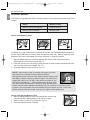
Delete One
AWB
!
Press OK Play AVI
AWB
005/042
Once a file is 005/042
deleted, it cannot be recovered.
005/042
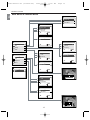
MAIN MENU
JPEG
005/042
DELETE
Delete
Delete One
Thumbnail
Delete All
Brightness
Main Menu
Exit
005/042
005/042
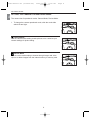
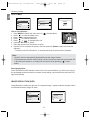
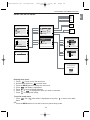
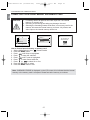
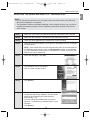
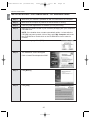
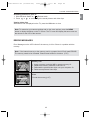
1. In the (
) Review mode, press
or
until the picture or
DELETE ONE
video clip that you want to delete is displayed on the LCD.
THIS FILE?
2. Press the MENU button to display the Main Menu in Review
No
mode.
Yes
1600
1600
1600
3. When Delete is highlighted,
press
to enter
the Delete
submenu.
A
A
A
4. When Delete One is highlighted, press
to enter its submenu.
5. The next screen will read “THIS FILE?” Press
or
to highlight No or Yes.
AWB
AWB
AWB
6. Press OK to select.
005/042
005/042
005/042
• If No is selected, no change will be made, and you will return to the Main Menu.
• If Yes is selected, the LCD shows “deleting …” for a few seconds, then the selected file
will be deleted and the next picture or video clip will be displayed.
1600
1600
A
A
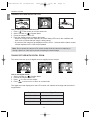
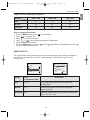
Delete All
AWB
!
Press OK Play AVI
005/042
Once the files005/042
are deleted, it cannot be recovered.
MAIN MENU
JPEG
005/042
AWB
005/042
DELETE
Delete
Delete One
Thumbnail
Delete All
Brightness
Main Menu
Exit
005/042
005/042
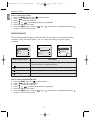
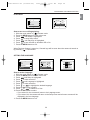
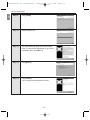
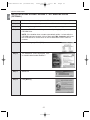
1. Press the MENU button to enter Main Menu in Review mode.
DELETE ALL
2. When Delete is highlighted, press
to enter the Delete
ALL FILES?
submenu.
No
3. Press
until Delete All is highlighted.
Yes
4. Press
to enter its submenu.
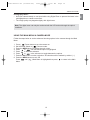
5. The next screen will read “ALL FILES?” Press
or
to
highlight No or Yes.
6. Press OK to select.
• If No is selected, no change will be made, and you will return to the Main Menu.
• If Yes is selected, all the stored files will be deleted. The LCD shows “deleting …” for a
few seconds, then shows “No Files”. Slide the Mode switch to (
) Camera mode to
take pictures or video clips.
22