1
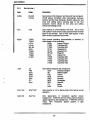
3.3
3.4
3.5
3.6
3.7
3.8
3.9
3.10
Scrolling and Flipping
3.3.1
Scrolling and Page Size
3.3.2
No Scroll
3.3.3
Customizing Scrolling
3.3.3.1 Defining a Scrolling Region
3.3.3.2 Locking Lines
3.3.4
Flipping from Page to Page
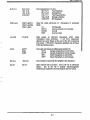
Entering and Editing Data
3.4.1
Write-Protecting Data
3.4.2
Moving the Cursor
3.4.2.1 Cursor Keys
3.4.2.2 Moving the Cursor using an Escape Sequence
3.4.2.3 Locating the Cursor with an Escape Sequence
3.4.2.4 Entering Data at the Hidden Cursor
3.4.3
Editing Data
3.4.3. 1 Defining the Editing Mode
3.4.3.2 Edit Keys
Clearing Data
Entering Function Commands
3.6.1
Using the FUNCT Key
3.6.2
Using the Function Keys
3.6.2.1 Programming the Function Keys
3.6.3
Executing a Function Key from the Host
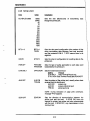
Sending
3.7.1
Programming Delimiters
3.7.2
Programming the SEND Key
Printing
Programming the Editing Keys
Setting the Time
3-10
3-10
3-13
3-14
3-14
3-16
3-18
3-19
3-19
3-20
3-20
3-24
3-25
3-26
3-26
3-26
3-27
3-30
3-31
3-31
3-32
3-32
3-34
3-34
3-36
3-37
3-38
3-39
3-42
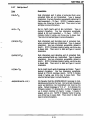
SECTION IV - EMULATING OTHER TERMINALS
4.1
Enhanced Emulation
4.2
ADDS
4.2.1
Viewpoint A1 and A2
4.3
Ampex
4.3.1
210
4.4
Hazeltine
4.3.1
1500
4.5
TeleVideo
4.5.1
910
4.5.2
920
4.5.3
924/914
4.5.4
925
4.5.5
950
4.6
Wyse
4.6.1
WY-50
4-1
4-4
4-4
4-4
4-4
4-7
4-7
4-7
4-7
4-8
4-8
4-12
4-14
4-17
4-17
SECTION V - TROUBLESHOOTING
5.1
Maintenance
5.2
Troubleshooting
5.2.1
Printing Test
5-1
5-1
5-3
i-2