1
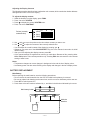
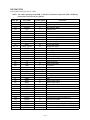
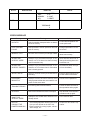
STEP
OPERATION
KEY CHECK 3
DISPLAY
KEY & TIME
1 RANDOM
2 AUTO
3 TIME
1
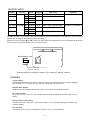
Buzzer
Check
16 17 18 19
OK
TEST
1 DISP
2 MEMORY
3 KEY
BUZZER
ESC
Interface
Check
No display
ESC, 1, 2, 3.......
4
5
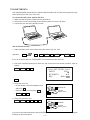
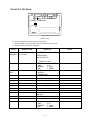
TEST
1 DISP
2 MEMORY
3 KEY
I/F
7N9
1
2
Contrast up :
or SHIFT +
Contrast down :
or SHIFT +
Cursor keys
4
5
6
7
1
2
3
4
5
6
7
1
2
3
4
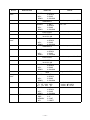
BUZZER
I/F
CONT
RESET
BEEP
ALARM 1
ALARM 2
BUZZER
I/F
CONT
RESET
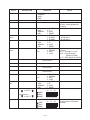
TRANS
RECEIVE
ASCII
LOOP
No display
EXECUTING !!
4
CONTRAST 6
ADJ.
.....
EXECUTING !!
3
ESC
NOTE
EXECUTING !!
To push the key sequentially that
key code is being appeared in
the display.
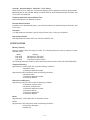
1 : Key input sound
2 : Sound alarm 1
3 : Sound alarm 2
The parameter can be changed
as follows;
Key "5" : Bit length 7 or 8 bit
Key "6" : Parity bit N(Non),
E(Even) or O(Odd)
Key "7" : BPS 9(9600) or 4(4800)
Send the code "H"
Display the received charactor.
Send the ASCII code
Loop back check
I/F
1 TRANS
2 RECEIVE
7N9
3 ASCII
4 LOOP
TEST
4 BUZZER
1 DISP
5 I/F
2 MEMORY
6 CONT
3 KEY
7 RESET
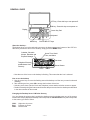
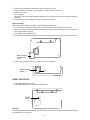
//////////// CONTRAST ////////////
<O
B
G>
(ORG)
(BLU)
(GRN)
//////////// CONTRAST ////////////
<O
B
G>
(ORG)
(BLU)
(GRN)
— 13 —
Contrast adjustment
Adjust the color using cursor keys
until the primary colors appear
accurately.