1
TO SAVE THE DATA
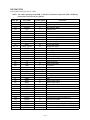
CSF-4450/4650/4950 can transfer the customer's data to another CSF unit with memory protection only
when replacing the LCD or the outer case.
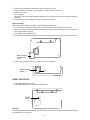
To connect the CSF Unit to another CSF Unit
1. Make sure that the power of both units are switched off.
2. Remove the covers from the data communications jacks on the two CSF Units.
3. Connect the two units using the SB-62 cable.
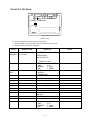
How to transfer the data
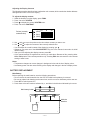
1. Under calculator mode, set the date of the slave unit to Feb. 3rd, 1901.
Operation :
ON
OK
1
DATE
2
DATE
3
DATE
M+
If you do not set the date, the "PASSWORD" is not transferred to the slave unit.
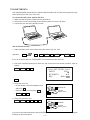
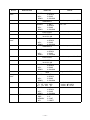
2. Check the hardware parameters of both unit, and if both units have another condition, reset as
follows;
MENU
FUNC
2
3
//////////// SET UP PAR. ////////////
PARITY
BIT LENGTH
BPS
E/O/N
N
7/8
4800 / 9600
OK
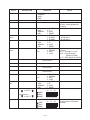
3. Set up the slave unit.
• On the desktop, select the telephone icon
RECEIVE OK!
and press OK .
DATA
• Select the home icon and press OK .
•
FUNC
2
TO STOP
PRESS [ ESC ]
2
4. Set up the customer's unit.
MENU
FUNC
2
1
3
OK
SENDING!
DATA
TO STOP
PRESS [ ESC ]
If you can not succeed to transfer the data, press ESC key on both units and try to transfer the data again
following the procedure above.
—9—