1
Overview and Updates
Procedure 3
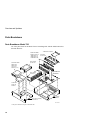
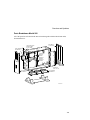
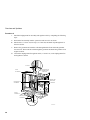
1. Install the Model 700 system module.
_________________________ Caution ___________________________
Use the nylon washers saved previously when you install the new system
module. Place the two washers on the two most centered screws. Failure to
use nylon washers will result in an inoperable system.
____________________________________________________________
2.
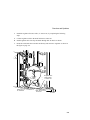
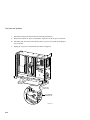
Reassemble the system to its original configuration by performing the reverse of
procedure 2.
Procedure 4
1. Power up the system and verify that the system powers up correctly.
2.
Complete the assembly of the system enclosure.
3.
Run all extended power up self−tests.
3.
Install the new OSF/1 Version 2.1 or later, or VMS Version 6.1 kit or later (if not
already done) and restore all of the customer's files.
4.
Package the old system module for return to Digital. Use the packaging from the new
system module.
2-5