1
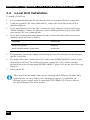
November 2009
ACU6001A
ACU6022A
ACU6201A
ACU6222A
THE SERVSWITCH™ FAMILY
Welcome to the ServSwitch™ Family!
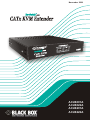
Thank you for purchasing a BLACK BOX® ServSwitch™ Brand CATx KVM Extender
model! We appreciate your business, and we think you’ll appreciate the many ways that your
enhanced keyboard/video/mouse system will save you money, time, and effort.
That’s because our ServSwitch family is all about breaking away from the traditional,
expensive model of computer management. You know, the one-size-fits-all-even-if-it-doesn’t
model that says, “One computer gets one user station, no more, no less.” Why not a single
user station (monitor, keyboard, and mouse) for multiple computers—even computers of
different platforms? Why not a pair of user stations, each of which can control multiple
computers? Why not multiple user stations for the same computer?
With our ServSwitch products, there’s no reason why not. We carry a broad line of robust
solutions for all these applications. Do you have just two PCs, and need an economical
alternative to keeping two monitors, keyboards, and mice on your desk? Or do you need to
share dozens of computers, including a mix of IBM® PC, RS/6000®, Apple® Macintosh®,
Sun Microsystems®, and SGI™ compatibles among multiple users with different access
levels? Does your switch have to sit solidly on a worktable and use regular everyday cables?
Or does it have to be mounted in an equipment rack and use convenient many-to-one cables?
No matter how large or small your setup is, no matter how simple or how complex, we’re
confident we have a ServSwitch system that’s just right for you.
The ServSwitch™ family from Black Box—the one-stop answer for all your KVM-switching
needs!
This manual will tell you all about your new ServSwitch™ Brand CATx KVM Extender,
including how to install, operate, and troubleshoot it. For an introduction to the Extender, see
Chapter 2. The Extender product codes covered in this manual are:
ACU6001A
ACU6022A
ACU6201A
ACU6222A
User Guide Revision: 2.0 (November 2009)
1
SERVSWITCH™ BRAND CATX KVM EXTENDER FAMILY
Copyrights and Trademarks
©2008/9. All rights reserved. This information may not be reproduced in any manner without
the prior written consent of the manufacturer.
Information in this document is subject to change without notice and the manufacturer shall
not be liable for any direct, indirect, special, incidental or consequential damages in
connection with the use of this material.
All trademark and trade names mentioned in this document are acknowledged to be the
property of their respective owners.
Disclaimer
While every precaution has been taken in the preparation of this manual, the manufacturer
assumes no responsibility for errors or omissions. Neither does the manufacturer assume any
liability for damages resulting from the use of the information contained herein. The
manufacturer reserves the right to change the specifications, functions, or circuitry of the
product without notice.
The manufacturer cannot accept liability for damage due to misuse of the product or due to
any other circumstances outside the manufacturer’s control (whether environmental or
installation related). The manufacturer shall not be responsible for any loss, damage, or injury
arising directly, indirectly, or consequently from the use of this product.
Cautions and Notes
The following symbols are used in this guide:
CAUTION. This indicates an important operating instruction
that should be followed to avoid any potential damage to
hardware or property, loss of data, or personal injury.
NOTE. This indicates important information to help you make the best use of
this product.
2
FCC/CDC STATEMENTS
FEDERAL COMMUNICATIONS COMMISSION
AND CANADIAN DEPARTMENT OF COMMUNICATIONS
RADIO-FREQUENCY INTERFERENCE STATEMENTS
This equipment generates, uses, and can radiate radio-frequency energy, and if not installed
and used properly, that is, in strict accordance with the manufacturer’s instructions, may
cause interference to radio communication. It has been tested and found to comply with the
limits for a Class A computing device in accordance with the specifications in Subpart B of
Part 15 of FCC rules, which are designed to provide reasonable protection against such
interference when the equipment is operated in a commercial environment. Operation of this
equipment in a residential area is likely to cause interference, in which case the user at his
own expense will be required to take whatever measures may be necessary to correct the
interference.
Changes or modifications not expressly approved by the party responsible for compliance
could void the user’s authority to operate the equipment.
Shielded cables should be used with this equipment to maintain compliance with radio
frequency energy emission regulations and ensure a suitably high level of immunity to
electromagnetic disturbances.
This digital apparatus does not exceed the Class A limits for radio noise emission from digital
apparatus set out in the Radio Interference Regulation of the Canadian Department of
Communications.
Le présent appareil numérique n’émet pas de bruits radioélectriques dépassant les limites
applicables aux appareils numériques de la classe A prescrites dans le Règlement sur le
brouillage radioélectrique publié par le Ministère des Communications du Canada.
3
SERVSWITCH™ BRAND CATX KVM EXTENDER FAMILY
EUROPEAN UNION COMPLIANCE STATEMENT
WARNING!
This is a Class A product. In a domestic environment, this product may cause
radio interference, in which case the user might be required to take adequate
remedial measures.
This product complies with the following harmonized standards for Information Technology
Equipment: EN55022:2006 (Class A), EN55024:1998 + A1:2001 + A2:2003.
To maintain compliance the use of correctly installed shielded (STP/FTP) interconnection
cable is advised. Only use CPU cables and power supplies provided (or recommended) for
use with this product.
When used in environments that have high levels of electromagnetic interference or excessive
power ground noise, you may experience disturbances to video and/or data transmission. If
this is the case, please refer to the Troubleshooting section of the User Guide for further
information, or contact Technical Support. In electrically noisy environments, the use of
shielded (STP/FTP) rather than unshielded (UTP) interconnection cable is recommended.
4
NOM STATEMENT
NORMAS OFICIALES MEXICANAS (NOM)
ELECTRICAL SAFETY STATEMENT
INSTRUCCIONES DE SEGURIDAD
1.
Todas las instrucciones de seguridad y operación deberán ser leídas antes de que el
aparato eléctrico sea operado.
2.
Las instrucciones de seguridad y operación deberán ser guardadas para referencia futura.
3.
Todas las advertencias en el aparato eléctrico y en sus instrucciones de operación deben
ser respetadas.
4.
Todas las instrucciones de operación y uso deben ser seguidas.
5.
El aparato eléctrico no deberá ser usado cerca del agua—por ejemplo, cerca de la tina de
baño, lavabo, sótano mojado o cerca de una alberca, etc..
6.
El aparato eléctrico debe ser usado únicamente con carritos o pedestals que sean
recomendados por el fabricante.
7.
El aparato eléctrico debe ser montado a la pared o al techo sólo como sea recomendado
por el fabricante.
8.
Servicio—El usuario no debe intentar dar servicio al equipo eléctrico más allá a lo
descrito en las instrucciones de operación. Todo otro servicio deberá ser referido a
personal de servicio calificado.
9.
El aparato eléctrico debe ser situado de tal manera que su posición no interfiera su uso.
La colocación del aparato eléctrico sobre una cama, sofá, alfombra o superficie similar
puede bloquea la ventilación, no se debe colocar en libreros o gabinetes que impidan el
flujo de aire por los orificios de ventilación.
10. El equipo eléctrico deber ser situado fuera del alcance de fuentes de calor como
radiadores, registros de calor, estufas u otros aparatos (incluyendo amplificadores) que
producen calor.
11. El aparato eléctrico deberá ser connectado a una fuente de poder sólo del tipo descrito en
el instructivo de operación, o como se indique en el aparato.
12. Precaución debe ser tomada de tal manera que la tierra fisica y la polarización del equipo
no sea eliminada.
13. Los cables de la fuente de poder deben ser guiados de tal manera que no sean pisados ni
pellizcados por objetos colocados sobre o contra ellos, poniendo particular atención a los
contactos y receptáculos donde salen del aparato.
5
SERVSWITCH™ BRAND CATX KVM EXTENDER FAMILY
14. El equipo eléctrico debe ser limpiado únicamente de acuerdo a las recomendaciones del
fabricante.
15. En caso de existir, una antena externa deberá ser localizada lejos de las lineas de energia.
16. El cable de corriente deberá ser desconectado del cuando el equipo no sea usado por un
largo periodo de tiempo.
17. Cuidado debe ser tomado de tal manera que objectos liquidos no sean derramados sobre
la cubierta u orificios de ventilación.
18. Servicio por personal calificado deberá ser provisto cuando:
A: El cable de poder o el contacto ha sido dañado; u
B: Objectos han caído o líquido ha sido derramado dentro del aparato; o
C: El aparato ha sido expuesto a la lluvia; o
D: El aparato parece no operar normalmente o muestra un cambio en su desempeño; o
E: El aparato ha sido tirado o su cubierta ha sido dañada.
6
SAFETY PRECAUTIONS AND INSTALLATION GUIDELINES
Safety Precautions and Installation Guidelines
To ensure reliable and safe long-term operation please note the following installation
guidelines:
•
Do not use to link between buildings.
•
Only use in dry, indoor environments.
•
If the building has 3-phase AC power, try to ensure that equipment connected to the
Local and Remote Units is on the same phase.
•
Try not to route the CATx interconnection cable alongside power cables.
•
The use of shielded CATx cable is recommended to maintain compliance.
•
Ensure that the system connected to the Local Unit is connected to power ground.
•
Ensure that the monitor connected to the Remote Unit is connected to power ground.
•
The Remote Unit and any power supplies can get warm. Do not situate them in an
enclosed space without any airflow.
•
Do not place the power supply directly on top of the Remote Unit.
•
This product is not suitable for use in isolated medical environments.
To safeguard against personal injury and avoid possible
damage to equipment or property, please observe the
following:
•
Only use power supplies originally supplied with the
product or manufacturer-approved replacements. Do not
attempt to dismantle or repair any power supply. Do not
use a power supply if it appears to be defective or has a
damaged case.
•
Connect all power supplies to grounded outlets. In each
case, ensure that the ground connection is maintained
from the outlet socket through to the power supply’s AC
power input.
•
Do not attempt to modify or repair this product, or make
a connection from the CATx link interface (RJ45) to any
other products, especially telecommunications or
network equipment.
7
SERVSWITCH™ BRAND CATX KVM EXTENDER FAMILY
Contents
1. Quick Setup
1.1 Command Summary
2. Overview
2.1 2.2 2.3 2.4 2.5 2.6 Introduction
Glossary
Features
Product Range
Compatibility
How to Use This Guide
3. Installation
3.1 3.2 3.3 3.4 Package Contents
Interconnection Cable Requirements
Remote Unit Installation
Local Unit Installation
4. Remote Unit Configuration & Operation
4.1 4.2 4.3 4.4 4.5 Video Configuration Overview
Video Adjustments
Command Mode
Adjusting Video
Other Remote Configuration & Operation Options
5. Troubleshooting & FAQ
5.1 5.2 5.3 5.4 5.5 8
Video
USB
Audio
Serial
General Questions
10 11 12 12 12 14 15 16 17 18 18 19 20 22 25 25 26 27 28 33 37 37 39 40 40 41 CONTENTS
Appendix A: Example Application
42 Appendix B: Rack Mount Options
43 Appendix C: Flash Upgrading
44 Appendix D: Advanced Cabling Issues (Skew)
48 Appendix E: Audio/Serial Ports
51 Appendix F: Calling Black Box
53 Appendix G: Specifications
54 Appendix H: New Features
57 Enhanced Keyboard & Mouse Support (v2.0)
Generic HID Device Support (v2.0)
Private Mode (v2.0)
Enhanced Elo Touch Screen Support/Calibration (v2.3)
58 58 59 61 Appendix H: New Features
9
SERVSWITCH™ BRAND CATX KVM EXTENDER FAMILY
1.
Quick Setup
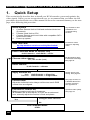
This section briefly describes how to install your KVM extender system and optimize the
video signals. Unless you are an experienced user, we recommend that you follow the full
procedures described in the rest of this manual. Refer to the command summary on the next
page when following this procedure.
.
Install system
1.
2.
3.
4.
Connect Remote Unit to KVM and audio/serial devices
(if present).
Connect Local Unit to CPU.
Connect Remote and Local Units with compatible CATx
Interconnect cable.
Power up system.
View Test Card:
ftp://ftp.blackbox.com/connectivity/ServSwitch/
Any Problems? See
Installation and
Troubleshooting
sections.
Provides a useful
image for adjusting
video.
Enter Command Mode on Remote Unit
<Left Control> + <Left Shift> + <F10>
Choose video channel
<1>, <2> or <0> (both)
All adjustments apply
to selected channel(s).
See page 29.
Reset channel
<Left Control> + <Home>
Apply Assisted EQ
Next:
Previous:
<Left Control> + <Page Up>
<Left Control> + <Page Down>
Correct Skew
Adjust the individual color delays until the test card’s RGB
vertical lines are aligned.
Fine tune LF and HF EQ
Reduce smearing and loss of sharpness.
TFT Users: Set to auto-adjust, or if you are an advanced
user, manually adjust the monitor’s clock and phase.
Yes
Configure other channel?
No
Exit Command Mode
<ESC>
10
Obtain approx. EQ
setting. See page 29.
See page 30 and, for
a detailed discussion
of skew correction,
see Appendix D.
Optimize video quality.
See page 32.
QUICK SETUP
1.1
Command Summary
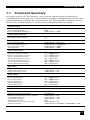
By using a specific ‘hot’ key sequence, you can put the remote console keyboard into a
Command Mode. From this, you can use various keys and key combinations to tune the video
signal and generally configure the extender system. The following table summarizes most of
the ‘hot’ key command sequences used in system configuration and video tuning.
Command Mode
Enter Command Mode
Exit Command Mode & Save
Exit Command Mode Without Save
<Left Control> + <Left Shift> + <F10>
<ESC>
<Left Control> + <ESC>
Video Channel Selection
Select Channel For Adjustment
Select BOTH Video Channels
<1>, <2>
<0>
Assisted EQ
Next Assisted EQ Setting
Previous Assisted EQ Setting
Reset EQ & Delay Values
Reset EQ Values
<Left Control> + <Page Up>
<Left Control> + <Page Down>
<Left Control> + <Home>
<Left Control> + <End>
LF/HF Equalization
Increase LF Equalization (Coarse)
Increase LF Equalization (Fine)
Decrease LF Equalization (Coarse)
Decrease LF Equalization (Fine)
Increase HF Equalization (Coarse)
Increase HF Equalization (Fine)
Decrease HF Equalization (Coarse)
Decrease HF Equalization (Fine)
<L> + <Up Arrow>
<L> + <Right Arrow>
<L> + <Down Arrow>
<L> + <Left Arrow>
<H> + <Up Arrow>
<H> + <Right Arrow>
<H> + <Down Arrow>
<H> + <Left Arrow>
Quick Skew
Toggle RED Delay (19nS)
Toggle GREEN Delay (19nS)
Toggle BLUE Delay (19nS)
<Left Control> + <R>
<Left Control> + <G>
<Left Control> + <B>
Delay (Skew)
Increase RED Delay
Increase GREEN Delay
Increase BLUE Delay
Decrease RED Delay
Decrease GREEN Delay
Decrease BLUE Delay
<R> + <Right Arrow>
<G> + <Right Arrow>
<B> + <Right Arrow>
<R> + <Left Arrow>
<G> + <Left Arrow>
<B> + <Left Arrow>
Reset Commands
Set Extender To Default State
<Left Control> + <F9>
Other Commands
Toggle Remote Unit Private Mode
USB Device Registration (Descriptor Transfer)
Set USB KB Language ID
Disable DDC Emulation
Enable DDC Emulation
Transfer DDC from monitor to Local Unit
Enter Upgrade Mode
<Scroll Lock>
<Left Control> +<F4>
<Left Control> + <F3>
<Left Control> + <F2>
<F2>
<Left Control> + <D>
<Left Control> + <Left Shift> + <Right Shift> + <F9>
11
SERVSWITCH™ BRAND CATX KVM EXTENDER FAMILY
2.
Overview
2.1
Introduction
The ServSwitch™ Brand CATx KVM Extender Series enables high-resolution video, USB
keyboard and mouse/HID, stereo audio, and serial port signals to be communicated up to
1000ft (300m) over Category 5, 5e, 6 or higher (CATx) cable.
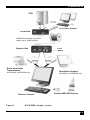
A basic KVM extension system comprises a Local Unit (transmitter) and a Remote Unit
(receiver). The Local Unit connects directly to the computer (or a KVM switch system) using
the supplied cable(s). The user console (USB devices and monitors) attaches to the Remote
Unit. All Local Units in this series have video output ports, allowing a second user console at
the CPU (using further CPU USB ports). The Remote and Local Units communicate video
and data information along the connecting CATx cables (see Figure 1).
Within the product range, models are available with combinations of the following:
•
Audio transmission: bi-directional stereo audio (16-bit digitized).
•
Serial transmission: transparent serial COM port (to 19.2Kbps).
•
Multiple video channels: single and dual heads.
2.2
Glossary
The following terms are used in this guide:
CATx
Any Category 5, 5e, 6 or higher cable.
PSU
Power Supply Unit.
KVM
Keyboard, Video and Mouse.
HID
USB Human Interface Device such as a Keyboard, Mouse, Touch
Screen, Joystick, Barcode Reader etc.
Console
A keyboard, monitor, and mouse, plus optional serial/audio/USB
devices.
Single Head
An extender system that supports one remote monitor
Dual Head
An extender system that supports two remote monitors.
12
OVERVIEW
CPU
Local Video Outputs
Local Unit
KVM/HID extension over CATx
cables up to 1000ft (300m).
Remote Unit
Serial and Audio
Transmission
ACU6022A, ACU6222A only
Remote Console
Figure 1
5V PSU
Dual Video Support
ACU6201A, ACU6222A only
Certain USB HID Devices
KVM/HID extender system
13
SERVSWITCH™ BRAND CATX KVM EXTENDER FAMILY
2.3
Features
Members of the ServSwitch™ Brand CATx KVM Extender Series offer the following
features:
•
Support for USB keyboards, mice and certain other HID devices
•
Support for high video resolution for use with TFT displays:
1600x1200@60Hz over 650ft (200m)
1280x1024@75Hz over 1000ft (300m)
Higher resolutions may be possible at shorter distances.
•
Fully integrated skew compensation allows operation with CATx cables by canceling
color shift and enhancing sharpness.
•
Independent low frequency (LF) and high frequency (HF) cable equalization control
ensures optimum video tuning across different cable types.
•
All control and video tuning carried out using the remote console keyboard with settings
stored in EEPROM memory.
•
Emulated DDC (Display Data Channel) on all video channels
Extender Local Unit emulates a universal monitor; ensures compatibility with multihead graphics cards
•
Transparent DDC
Remote Unit reads DDC table from attached monitors, transfers and stores data in Local
Unit to support non-standard displays.
•
Local Video output on all video channels
Allows dual-access operation when a local USB keyboard and mouse are connected
directly to the CPU (or via a hub)
•
Local and Remote Unit firmware and settings flash upgradeable via USB.
•
Models available with single or dual-head video support (one CATx cable required for
each video channel).
•
Status indicator LEDs on each RJ45 port.
•
Small footprint chassis. Rack mount options available.
•
Protection: Surge protection on each RJ45 port and PSU overvoltage detection.
•
Local Units are normally powered directly by the PC. Connection for optional 5V PSU.
•
Transparent serial port enables any serial device to be extended (up to 19.2K Baud). The
serial port may be used to extend one device (requiring handshaking lines), or up to three
simple serial devices (no handshaking).
(ACU6022A and ACU6222A only)
•
Bi-directional stereo audio (16-bit digitized) support enables high-quality audio
extension.
(ACU6022A and ACU62222A only)
14
OVERVIEW
2.4
Product Range
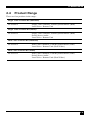
There are four products in the range:
Single Video Channel Kit (Standard)
ACU6001A
Single Video Channel, USB Keyboard/Mouse (HID)
Local Unit + Remote Unit
Single Video Channel Kit (Audio)
ACU6022A
Single Video Channel, USB Keyboard/Mouse (HID)
Serial, Stereo Audio
Local Unit + Remote Unit
Dual Video Channel Kit (Standard)
ACU6201A
Dual Video Channels, USB Keyboard/Mouse (HID)
Local Unit + Remote Unit (Dual Video)
Dual Video Channel Kit (Audio)
ACU6222A
Dual Video Channels, USB Keyboard/Mouse (HID)
Serial, Stereo Audio
Local Unit + Remote Unit (Dual Video)
15
SERVSWITCH™ BRAND CATX KVM EXTENDER FAMILY
2.5
Compatibility
Interface Compatibility
•
USB Devices:
Standard keyboards (including certain models with multimedia keys)
Standard wheel mice (including certain models with tilt wheel)
Composite keyboard/mouse devices (e.g. wireless devices & KVM switches)
PS/2 to USB converters
Hubs
Other keyboard/mouse type devices such as bar code scanners
Several devices of the same type may be attached simultaneously.
Other HID devices which only send to the host, and can operate using the basic
HID drivers built into the operating system. Typical devices include joysticks and
certain touch screens. Additional support is included in the latest firmware revisions
for ELO touch screen calibration. See Appendix H: New FeaturesAppendix H:
New Features, page 57.
Please contact Technical Support for further information regarding operation with
other kinds of HID device not listed above.
•
Audio: Input and output are line-level. Amplified speakers are required. A microphone
may be directly connected to the Remote Unit (optional pre-amplification).
•
Serial: Transparent up to 19.2K Baud (38.4K operation may be possible with some
devices). The following serial signals are extended: TX, RX, RTS, CTS, DTR, and DSR.
In rare cases, a wiring adaptor may be required to transfer RI and DCD.
•
Video: VGA to UXGA. Separate sync, composite sync, or sync-on-green. Maximum
resolution and refresh rates depend on cable length and cable type (see Appendix G:
Specifications, page 54).
Extender Compatibility
Please refer to Have section, page 37. You may also consult Technical Support to confirm
compatibility with other ServSwitch™ Brand extension and switching products.
16
OVERVIEW
2.6
How to Use This Guide
This guide describes the installation and configuration of the ServSwitch™ Brand CATx
KVM Extender Series. Although the connection and operation of the system is relatively
straightforward, you should consider the following before getting started:
Connection & Compatibility
Your Extender Kit contains all the cables required to connect the Local Unit to your PC or
KVM switch. The remote console (keyboard, monitor and mouse) and any audio and serial
equipment connect directly to the Remote Unit.
For information about connection and installation, see Installation, page 18.
Interconnection Cable
You will need CATx (any category 5, 5e, 6 or higher) cable, terminated with RJ45 plugs, to
connect the Local and Remote Units (see Interconnection Cable Requirements, page 19).
Adjusting Video
Video signals become distorted when transmitted over CATx cables. To get the best from
your extender system, it is essential that you adjust the Remote Unit to optimize the video
image quality:
•
For experienced users, there is a Quick Setup section at the start of this guide (see page
10).
•
For the full procedure, see Remote Unit Configuration & Operation, page 25.
•
Refer to Appendix D: Advanced Cabling Issues (Skew), page 48 for a more in depth
discussion of skew correction and advanced cabling issues.
17
SERVSWITCH™ BRAND CATX KVM EXTENDER FAMILY
3.
Installation
For first-time users, we recommend that you carry out a test placement, confined to a single
room, before commencing full installation. This will allow you to identify and solve any
cabling problems, and experiment with the KVM extender system more conveniently.
3.1
Package Contents
You should receive the following items in your extender package. If anything is missing,
please refer to Appendix F to obtain Technical Support.
•
Extender Remote Unit.
•
5V DC universal power supply for Remote Unit.
•
Extender Local Unit.
•
3ft (1.0m) USB/Video CPU combination cable with USB (A/B) connectors and VGA
video (HD15 M-F) connectors.
•
3ft (1.0m) CPU video cable with VGA video (HD15 M-F) connector.
Models: ACU6201A and ACU6222A only.
•
3ft (1.0m) Serial cable (DB9 M-F connectors, 1:1 connections).
Models: ACU6022A and ACU6222A only.
•
3ft (1.0m) Dual stereo audio cable (3.5mm stereo plugs).
Models: ACU6022A and ACU6222A only.
•
IEC AC Power Cord.
•
Quick Start Guide.
18
INSTALLATION
3.2
Interconnection Cable Requirements
To connect the Local and Remote Units you will need CATx (any category 5, 5e, 6 or higher)
cable terminated with RJ45 plugs. Please note that shielded cable is advised to maintain
regulatory EMC compliance.
Interconnect cables must be solid-core type. Stranded patch cable will give poor results over
longer distances. The pairing of the cable and pinning of its connectors should normally be in
accordance with EIA-568B (see page 49).
One CATx cable is required for each video channel.
•
The Primary interconnect cable connects INTERCONNECT Port 1 on the Local and
Remote Units. This carries the main video channel and all data (plus audio/serial).
•
The Secondary CATx cable (connected to INTERCONNECT Port 2) carries the
additional video channel on dual-head units.
In order to send USB, Audio and Serial signals to the PC, the Primary
interconnect must be connected.
The Primary interconnect does not have to be connected in order to use the
keyboard attached to the Remote Unit for video setup.
With some cables, video performance may be improved by using a crossover
patch cable at each end or an alternative RJ45 pin-out (see Appendix D:
Advanced Cabling Issues (Skew), page 48).
19
SERVSWITCH™ BRAND CATX KVM EXTENDER FAMILY
3.3
Remote Unit Installation
To install a Remote Unit:
1.
Switch off all devices.
2.
Connect your USB devices and monitor(s) to the Remote Unit as shown in Figure 2.
These ports may also be attached to the CPU side of a KVM switch in
order to have a remote CPU. However, if you are attempting to use the
extender between cascaded KVM switches this may not work. Please
contact Technical Support to discuss your application.
3.
If appropriate, connect audio equipment and serial devices. Connect the audio cables as
follows:
Remote Unit
Audio Device
Audio Out
Speakers
Audio In (MIC)
Microphone
See Appendix E: Audio/Serial Ports, page 51 for further information.
4.
Connect the Primary CATx cable to the INTERCONNECT (1) socket on the front of the
Remote Unit. If required, connect the Secondary CATx cable to the INTERCONNECT
(2) socket on the front of the Remote Unit (see Figure 3).
5.
Connect the 5V power supply to power the unit.
Only use the power supply originally supplied with this
equipment or a manufacturer approved replacement.
20
INSTALLATION
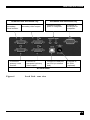
ACU6022A and ACU6222A only
Connect to speakers and
microphone.
Connect to second monitor.
Connect to serial device, such as
a touch screen.
Connect to
primary
monitor.
Connect to
USB
devices.
Connect
supplied 5V
PSU.
ACU6201A, ACU6222A only
All Remote Units
Figure 2
Remote Unit - rear view
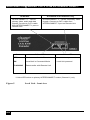
All Remote Units
ACU6201A, ACU6222A only
INTERCONNECT 1 – carries
primary video, audio and data.
INTERCONNECT 2 – carries secondary video
signal.
Status
OFF
ON
FLASHING
Yellow LED*
No data transfer with Local
Unit
Remote Unit in Command
Mode
Data transfer with Local Unit
Green LED
Remote Unit not powered.
Remote Unit powered but no
video found
Remote Unit powered & video
sync found
* Yellow LED active on primary INTERCONNECT socket (Channel 1) only
Figure 3
Remote Unit - front view
21
SERVSWITCH™ BRAND CATX KVM EXTENDER FAMILY
3.4
Local Unit Installation
To install a Local Unit:
1.
It is recommended that the PC and other devices are switched off before connection.
2.
Using the supplied CPU video/USB cable(s), connect the Local Unit to the CPU as
shown in Figure 4.
3.
If you want local access to the CPU, connect the video output(s) on the Local Unit to
suitable monitors. Connect a USB mouse and a USB keyboard directly to other USB
ports on the CPU or a connected hub.
4.
If you have an audio and serial enabled system, connect the audio cables between the
computer and Local Unit as follows:
Computer
Local Unit
Audio Out (green)
Audio In
Audio In/Microphone (pink/blue)
Audio Out
5.
If appropriate, connect the supplied serial cable between the serial port on the computer
and the Local Unit.
6.
For single video units, connect the CATx cable to the INTERCONNECT socket on the
front of the Local Unit. For dual-head systems, connect the CATx cables from the
Remote Unit to the corresponding INTERCONNECT ports (1&2) on the Local Unit (see
Figure 5).
7.
Power up the PC.
The Local Unit normally takes power through the USB port. In video only
applications, or cases where only limited port power is available, an
external power supply may be attached (PSU1006E-R3). Please contact
Technical Support for more details.
22
INSTALLATION
ACU6022A and ACU6222A only
ACU6201A and ACU6222A only
Connect to
secondary
Local monitor.
Connect to
primary Local
monitor.
Connect to computer’s
secondary video output.
Connect to
computer’s primary
video output.
Connect to audio
ports on computer.
Connect to
serial port on
computer.
Connect to USB port
on CPU (or external
hub).
Connect to
5V PSU
(optional).
All Local Units
Figure 4
Local Unit - rear view
23
SERVSWITCH™ BRAND CATX KVM EXTENDER FAMILY
All Models
ACU6201A and ACU6222A only
INTERCONNECT 1 – carries
primary video, audio and data
signals. Connect to CATx cable
from INTERCONNECT 1 port on
Remote Unit.
Status
INTERCONNECT 2 – carries secondary video
signals. Connect to CATx cable from
INTERCONNECT 2 port on Remote Unit.
Yellow LED*
Green LED
OFF
No data transfer with Remote Unit
Local Unit not powered.
ON
Local Unit in Command Mode
Local Unit powered
FLASHING
Data transfer with Remote Unit
* Yellow LED active on primary INTERCONNECT socket (Channel 1) only
Figure 5
24
Local Unit - front view
REMOTE UNIT CONFIGURATION & OPERATION
4.
Remote Unit Configuration &
Operation
CATx cables are specifically designed for networking applications and not for transmitting
analog video. Your CATx KVM extender includes, and requires, advanced technology to
enable its use at high screen resolutions. This section describes how to optimize the video
signal, configure the Extender system and operate the Remote Unit.
For details about flash upgrading and external configuration see Appendix C: Flash
Upgrading & External Configuration, page 44.
For more information about serial/audio port operation, see Appendix E: Audio/Serial
Ports, page 51.
4.1
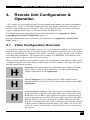
Video Configuration Overview
To get the best out of your extender system it is essential that you configure it correctly and
tune the video signal. Tuning is necessary because of distortions that occur in a video signal
when it is transmitted over lengthy CATx cables. Generally, you only need to carry out this
procedure after installation. The system stores settings in an EEPROM in the Remote Unit
and restores them whenever the unit is powered up.
When you have installed your extender system, run an application that requires a high screen
resolution. Examine the video image on the remote console’s monitor. You may see some of
the following distortion effects:
Smearing: black smearing at the right-hand edge of large horizontal
objects such as title bars and characters. To correct this smearing
requires adjustment of LF equalization.
Loss of Sharpness: Loss of high frequency (HF) signals causes
blurring and lack of detail. To correct this requires adjustment of HF
equalization.
Color Separation or Skew: This arises because of timing differences
in the reception of signals for the individual colors. Each color in the
RGB (Red, Green, Blue) video signal is sent down a separate pair of
wires in the Interconnect cable. On many cables, the twist rates differ
and this leads to each color arriving at a slightly different time and
therefore spreading out on the screen. Skew becomes a major problem
at high screen resolutions and with long CATx cables. To correct for
skew, the ‘faster’ colors must be delayed to arrive at the same time as
the slowest.
25
SERVSWITCH™ BRAND CATX KVM EXTENDER FAMILY
4.2
Video Adjustments
Remote Units feature a number of correction tools to simplify video optimization. This
procedure is straightforward and only needs to be carried out once.
For each video channel, the Remote Unit allows you to optimize independently:
•
Low frequency (LF) equalization
•
High frequency (HF) equalization
•
Red delay
•
Green delay
•
Blue delay
To help automate the procedure, the Remote Unit offers the following unique tools:
•
Assisted EQ
Allows you to ‘step-through’ a table of preset LF and HF EQ values for different cable
lengths.
•
Quick Skew
Insert a standard delay on a specified color (19ns - a typical value suitable for most
applications).
•
Channel 0
Enables you to apply video adjustments to both video channels simultaneously.
To get the best video image, you are recommended to follow the procedures for manual finetuning (see Adjusting Video, page 28).
You may want to read Appendix D: Advanced Cabling Issues (Skew) on
page 48 to understand how to achieve optimum video quality with your
particular CATx interconnection cable.
26
REMOTE UNIT CONFIGURATION & OPERATION
4.3
Command Mode
During normal use, the remote console keyboard functions in the usual manner. However, by
using a specific ‘hot’ key sequence, you can set the keyboard into a Command Mode. From
this, you can use various keys and key combinations to tune the video signal and generally
configure the extender system.
To enter Command Mode:
8.
Ensure that you have installed and powered up the system according to the instructions
in Section 3.
9.
Press the following key combination on the remote keyboard:
<Left Control> + <Left Shift> + <F10>
From Command Mode you can use one or more of the ‘hot’ key sequences shown on page 11
to configure the system. The next section gives a full description of the video optimization
procedure.
To exit Command Mode:
•
Press <Esc> to exit Command Mode and save the configuration settings, or
•
Press <Left Control> + <Esc> to exit Command Mode without saving changes made in
the current session.
The Remote Unit automatically exits Command Mode after 30 sec of
inactivity, saves all settings to EEPROM and returns normal function to
the keyboard.
Status LEDs in Command Mode
In Command Mode, the Remote Unit:
•
Illuminates the yellow channel 1 LED continuously (see Figure 5).
Note. The Yellow LEDs on video channel 2 is not lit.
•
Flashes the status LEDs (Num Lock, Caps Lock, Scroll Lock) on the connected
keyboard to indicate video channel selection (to which adjustments will be applied).
The number of flashes indicates the selected video channel:
Keyboard LED flashes
Video channel
1
Channel 1
2
Channel 2 (dual-head only)
Slow Flashes
Both channels (Channel 0)
27
SERVSWITCH™ BRAND CATX KVM EXTENDER FAMILY
4.4
Adjusting Video
Use the following step-by-step procedure to optimize the video image on the remote console:
1.
If possible, view the online test card at:
ftp://ftp.blackbox.com/connectivity/ServSwitch/
This is an image (see Figure 6) created and used by the manufacturer for video
optimization purposes. It is particularly useful for correcting skew. If you are unable to
view the test card, display some text in a large font on a white background.
You should also open up other application windows to check the clarity
of text in toolbars and icons on the desktop.
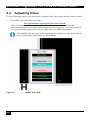
Figure 6
28
Online test card
REMOTE UNIT CONFIGURATION & OPERATION
2.
Enter Command Mode (see Command Mode, page 27) by pressing the following key
combination on the remote console’s keyboard:
<Left Control> + <Left Shift> + <F10>
3.
Select the video channel you want to configure using one of the following keys (not on
the numeric keypad):
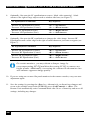
Channel Command
Key
Select Channel 1 For Adjustment
<1>
Select Channel 2 For Adjustment
<2>
Select BOTH Video Channels
<0>
(Channel 0)
Use Channel 0 to tune both video channels simultaneously. This
simplifies the procedure for setting up dual-head installations where a
consistent cable type is used and the adjustments required should be
almost the same.
4.
Reset the selected channel(s) by pressing:
<Left Control> + <Home>
5.
Step through the Assisted EQ settings to find the level that gives the best image.
Assisted EQ Command
Key Sequence
Next Assisted EQ Setting
<Left Control> + <Page Up>
Previous Assisted EQ Setting
<Left Control> + <Page Down>
Assisted EQ steps through a table of preset LF & HF EQ values for
different lengths of cable (in 80ft {25m} increments calibrated from 0 to
1250ft {375m}). Each time you enter Command Mode and start
adjusting Assisted EQ, the unit resets LF and HF values.
After finding the best setting, you will probably want to fine-tune the LF
and HF equalization settings (see steps 8&9). This is best done after
adjusting for any color skew as described below.
29
SERVSWITCH™ BRAND CATX KVM EXTENDER FAMILY
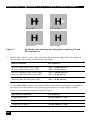
Figure 7
6.
LF too low
LF too high
HF too low
HF too high
Problems with smearing and sharpness requiring LF and
HF adjustment
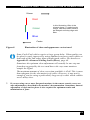
Identify the ‘slowest’ color – the colored line furthest to the right. Delay the signals of
the two other colors using the following commands:
Delay Command
Key Sequence
Increase RED Delay (move right)
Decrease RED Delay (move left)
<R> + <Right Arrow>
<R> + <Left Arrow>
Increase GREEN Delay (move right)
Decrease GREEN Delay (move left)
<G> + <Right Arrow>
<G> + <Left Arrow>
Increase BLUE Delay (move right)
Decrease BLUE Delay (move left)
<B> + <Right Arrow>
<B> + <Left Arrow>
Use the Quick Skew feature to determine which color requires delaying or to quickly set
the delay on a color back to zero. Applying Quick Skew to a color toggles its delay
between zero and 19nS (a typically required value).
30
Quick Skew Command
Key Sequence
Toggle RED Delay
<Left Control> + <R>
Toggle GREEN Delay
<Left Control> + <G>
Toggle BLUE Delay
<Left Control> + <B>
REMOTE UNIT CONFIGURATION & OPERATION
Slower
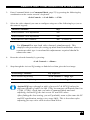
Red
Green
In this illustration, Blue is the
slowest signal. To optimize the
image, Red and Green need to
be delayed until they align with
Blue.
Blue
Faster
Figure 8
Illustration of skew and appearance on test card
Some Cat5e/Cat6 cables require a large green delay. Video quality can
be often be vastly improved by using standard crossover patch cables at
both ends of the link rather than straight patch cables. For details see
Appendix D: Advanced Cabling Issues (Skew), page 48.
Sometimes the optimum skew adjustment will actually be one step out
from that suggested by the test card due to the way some monitors
sample the signal.
The maximum amount of skew correction available is 42nS. This is more
than adequate for the vast majority of cables. However, it may not be
enough if you are using a particularly long run of a cable which exhibits
severe delay skew.
7.
If you are using one or more flat panel monitors in the remote console, carry out
auto-adjustment as described in the monitor’s documentation. Sometimes, manual
adjustment of clock and/or phase is also required for optimum results and
minimization of jitter.
31
SERVSWITCH™ BRAND CATX KVM EXTENDER FAMILY
8.
9.
Optionally, fine-tune the LF equalization to remove ‘black video smearing’ - black
smears to the right of large objects such as window title bars (see Figure 7).
LF Equalization Commands
Key Sequence
Increase LF Equalization (Coarse)
Decrease LF Equalization (Coarse)
<L> + <Up Arrow>
<L> + <Down Arrow>
Increase LF Equalization (Fine)
Decrease LF Equalization (Fine)
<L> + <Right Arrow>
<L> + <Left Arrow>
Optionally, fine-tune the HF equalization to sharpen the video image. Increase HF
Equalization until a white edge to the right of small characters just starts to appear (see
Figure 7).
HF Equalization Commands
Key Sequence
Increase HF Equalization (Coarse)
Decrease HF Equalization (Coarse)
<H> + <Up Arrow>
<H> + <Down Arrow>
Increase HF Equalization (Fine)
Decrease HF Equalization (Fine)
<H> + <Right Arrow>
<H> + <Left Arrow>
On certain monitors, you may obtain a sharper image by
overcompensating HF EQ and then decreasing LF EQ to remove any
bright streaks. Additionally, increasing the contrast on the monitor can
also enhance apparent image quality.
10. If you are using one or more flat panel monitors in the remote consoles, carry out autoadjustment again.
11. Save the settings by pressing the <Esc> key. Alternatively, to discard any changes and
revert to the settings stored in the EEPROM, press <Left Control> + <Esc>. The
Remote Unit automatically exits Command Mode after 30 sec of inactivity and saves all
settings, including any changes.
32
REMOTE UNIT CONFIGURATION & OPERATION
4.5
Other Remote Configuration &
Operation Options
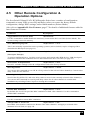
The ServSwitch™ Brand CATx KVM Extender Series have a number of configuration
commands to setup USB, to reset EQ and Delay values, to restore the factory default
configuration, change DDC settings, and to blank monitors (Private Mode).
Also refer to Appendix H: New Features, page 57 for details of additional features added in
later firmware revisions.
Command
Key Sequence
Toggle Remote Unit Private Mode
<Scroll Lock>
Use this command to enable/disable the monitor(s) connected to the Local Unit (Private Mode). The
current setting is stored in memory.
Set USB KB Language ID
<Left Control> + <F3>
This is not normally required but some operating systems (such as Solaris) require a language ID to
determine the KB layout (see page 35).
USB Device Registration
<Left Control> + <F4>
(Descriptor Transfer)
To support multimedia keys, joysticks, touch screens, and certain other HID devices, USB descriptors
need to be read from the connected devices and transferred to the Local Unit (see page 35).
Set Extender To Default State
<Left Control> + <F9>
Sets ALL extender settings (video & configuration) back to the factory defaults.
Reset EQ Values
<Left Control> + <End>
You can use this command to zero HF & LF EQ values for the selected video channel(s). Current color
delay values are not affected.
Reset EQ & Delay Values
<Left Control> + <Home>
Set all video EQ (HF & LF) and color delay values to zero for the currently selected video channel(s).
You can use this command to reset EQ and delay values for all video channels in a multi-head
installation by selecting Channel 0 prior to issuing this command.
Disable DDC Emulation
<Left Control> + <F2>
By default, the Local Unit provides DDC emulation on both video channels. Use this command to
disable DDC emulation.
Enable DDC Emulation
<F2>
Use this command to restore DDC emulation.
Transfer DDC to Local Unit
<Left Control> + <D>
Read DDC from monitor connected to Remote Unit video channel 1 and apply to selected video
channels in Local Unit (see page 34).
33
SERVSWITCH™ BRAND CATX KVM EXTENDER FAMILY
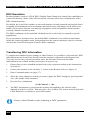
DDC Emulation
Modern graphics cards use VESA DDC (Display Data Channel) to identify the capabilities of
connected monitors. Some cards will not operate correctly unless they communicate with a
DDC-enabled monitor.
By default, the Local Unit emulates a universal monitor (on both channels) and reports that it
is capable of all standard screen resolutions and refresh rates (including several widescreen
modes). This ensures that the vast majority of graphics cards and monitors should operate
correctly with the extender system.
The DDC emulation can be optionally disabled but this would only be required in special
applications.
If you encounter a situation where the default DDC emulation is not sufficient and cannot
obtain the required graphics mode, information from the remote monitor(s) may be read and
stored in the Local Unit using the Transfer DDC command.
Transferring DDC Information
To support non-standard screen settings or other features, it is possible to read and store DDC
information into the Local Unit directly from the monitors connected to the Remote Unit.
You only need to carry out this procedure once; the Extender Units store the DDC
information in non-volatile memory and restore it at power-up.
1.
Ensure that you have installed and powered up the system according to the instructions
in Section 3.
2.
Connect the monitor to the ‘monitor 1’ socket on the Remote Unit (see Figure 2).
3.
Enter Command mode (see page 27).
4.
Select the video channel to which you want to apply the DDC settings by pressing either
<1>, <2> or <0> (both channels).
5.
Press the key combination:
<Left Control> + <D>
6.
The DDC information is read from the monitor and applied to the selected video
channel(s) in the Local Unit. This may take a few seconds. The remote console keyboard
LEDs flash twice to indicate a successful transfer.
Always reboot Windows after adjusting a DDC parameter.
34
REMOTE UNIT CONFIGURATION & OPERATION
Setting USB keyboard Language ID
This is not normally required, but some operating systems (such as Solaris) require a
language ID to determine the KB layout. This command will read the ID from the current KB
(the one used to enter Command mode) and permanently store it.
1.
Enter Command mode (see page 27).
2.
Press the key combination:
<Left Control> + <F3>
The Remote Unit will now exit Command mode whilst the Local Unit re-connects as a
keyboard with the desired ID. During this time you will be unable to use the keyboard and
mouse.
Should any problems arise after issuing the command, simply USB hot-plug the Local Unit.
USB Device Registration (Descriptor Transfer)
By default the Local Unit emulates a standard USB keyboard and mouse (composite device).
Whilst this is sufficient for general KVM use, additional information needs to be transferred
in order to support non-standard (device specific) features and other HID peripherals See Note.
Device registration is required to help support:
•
Keyboards with additional multimedia keys
•
Mice with enhanced functionality See Note
•
Joysticks
•
Touch Screens See Note
•
Certain other HID devices
See Note
See Note
This feature allows the report definition to be read from your HID devices and permanently
stored within the Local Unit (Descriptor Transfer).
In initial firmware releases Device Registration was limited to enabling
support for multimedia keys on the current keyboard. Please refer to
Appendix H: New Features, page 57 for details regarding support in later
firmware releases for a wider range of HID devices.
35
SERVSWITCH™ BRAND CATX KVM EXTENDER FAMILY
To register generic devices:
1.
Enter Command mode (see page 27).
2.
Press the key combination:
<Left Control> + <F4>
The Remote Unit will now exit Command mode whilst the Local Unit re-connects as a device
with the transferred descriptors. During this time you will be unable to use USB devices.
Should any problems arise after issuing the command, simply USB hot-plug the Local Unit.
Each time you issue this command all of the additional HID devices you wish to register must
be connected as details of the previous registration are overwritten. Registration only needs to
be performed once.
USB Device Registration will enable operation with any generic HID
device that only sends data to the host, and does not require a vendor
driver (i.e. it can utilize the operating system’s own HID driver).
If an HID device requires a special driver, or your keyboard has
multimedia keys that also function as normal keys then it is unlikely to be
fully supported by the extender.
Please refer to Appendix H: New Features, page 57 and check with
Technical Support regarding the availability of later firmware releases
supporting a wider range of HID devices.
36
TROUBLESHOOTING & FAQ
5.
Troubleshooting & FAQ
5.1
Video
The image is not sharp, or is badly smeared.
Have you adjusted the video equalization? Follow the instructions on page 26.
Check the Interconnect cable between the Remote and Local Units. Is it of the
recommended type (see page 19)? Is it intact along its entire length and securely
connected at both ends? Is it wired correctly (see page 49)?
Ensure that all video connections throughout the system are attached securely.
Are you using an LCD panel? You need to adjust its clock and/or phase.
Colors appear to be separated and there are colored borders on text and icons.
Have you tuned the video signal and set delays to correct skew? Follow the
instructions on page 26. See Appendix D for advanced cabling information.
Check the Interconnect cable between the Remote and Local Units. Is it of the
recommended type (see page 19)? Is it intact along its entire length and securely
connected at both ends? Is it wired correctly (see page 49)?
You can check whether skew is a problem in your system by viewing the test card
at: ftp://ftp.blackbox.com/connectivity/ServSwitch/.
I can’t get enough color delay to correct skew.
See Appendix D: Advanced Cabling Issues (Skew), page 48.
I can’t get rid of bright ‘ringing’ after characters.
See Appendix D: Advanced Cabling Issues (Skew), page 48.
I only need video extension – not keyboard or mouse - but I can’t get a picture.
Have you powered the Local Unit? The Local Unit gets its power from the CPU
through the USB connection and it will not operate without it. Use an external 5V
PSU as described on page 22.
The maximum resolution is listed as 1600x1200. Can I use 1920x1200 or 1680x1050?
Yes. As this is an analog extender there is no inherent resolution limit. Many users
are running 1920x1200 over shorter distance. With a good low-skew cable the
range could be up to 450ft (150m).
If in doubt – please test it!
37
SERVSWITCH™ BRAND CATX KVM EXTENDER FAMILY
The monitor sometimes goes blank for a second or two.
Check that the interconnect cable is not routed near power lines or other sources of
electrical interference. Use shielded STP/FTP cable instead of UTP cable ensuring
that the shield connection is maintained between the Extender units.
If this is a persistent problem, contact Technical Support.
The PC won’t boot into the correct graphics mode.
Check that DDC Emulation is enabled (see page 34). If you are using a nonstandard resolution, transfer the monitor’s DDC information to the Local Unit (see
page 34).
Jitter is evident on video.
Adjust the clock and/or phase on your flat-panel. Contact Technical Support if this
fails to improve the situation.
Are you testing a system using a coiled drum of CATx cable? Try uncoiling the
cable. If this solves the video jitter, you should not have a problem after full
installation.
The image is not stable and is blanking regularly.
Re-power the Remote Unit.
Can the extender be used with RGB video?
Yes.
Can the extender be used with Analog HD video?
Yes, with the aid of a suitable wiring adaptor.
There is a slight color change when I increase delays to correct skew.
With certain monitors, there may be a slight color change when you increase the
color delay. This is due to a contrast change on that particular color and may easily
be compensated for by adjusting the monitor’s color balance.
38
TROUBLESHOOTING & FAQ
5.2
USB
Does the extender internally convert to PS/2 when handling keyboard and mouse?
No. This is a pure USB (emulation) solution. Converting to PS/2 would restrict the
possibilities of supporting other kinds of USB device.
Will the extender work with USB KVM switches?
The extender will operate with any USB KVM switch that is capable of supporting
both a mouse and keyboard composite device on its keyboard console port. Some
low-end switches only support a single keyboard device on this port in which case
there will be no mouse functionality when attaching the extender.
Is the extender a USB 1.1 or USB 2.0 device?
The extender operates as a full-speed composite USB device (12 Mb/s); this is
compatible with any USB 1.1 or 2.0 host. There may be some low-end KVM
equipment on the market that does not fully support composite devices and can only
handle low-speed devices. We will monitor the compatibility situation.
What USB devices are supported?
In the initial firmware release the following HID devices are supported:
Standard keyboards
Multimedia keys on some keyboards
Standard mice (including wheel)
USB – PS/2 converters
Composite KB/Mouse devices
Hubs
Other keyboard/mouse compatible devices (such as bar code scanners)
In later firmware releases support has been added for certain other HID devices
such as touch screens and joysticks. Please refer to the section regarding USB
Device Registration (see page 35) and Appendix H: New Features, page 57.
Note: Mass storage devices (virtual media) cannot be supported.
May hubs be connected to the Remote Unit?
Yes. A maximum of four external hubs may be connected. Each port supports a
maximum of two hub layers.
How many devices may be connected to the Remote Unit?
Currently, a maximum of seven USB devices are supported. Note that a hub is a
USB device, and so a keyboard with an integral hub counts as two devices.
Each USB device may also have multiple HID interfaces. A keyboard with
multimedia keys usually has two USB interfaces. The extender currently supports a
maximum of five HID device interfaces.
39
SERVSWITCH™ BRAND CATX KVM EXTENDER FAMILY
How many keyboards and mice may be attached?
You may attach multiple devices. This is useful for connecting additional
peripherals, such as bar code scanners, which act as a standard keyboard or mouse.
I am having problems using the extender on a Sun system.
Please ensure the latest version of Solaris (with all patches) is installed.
5.3
Audio
The audio is very quiet.
The audio I/O is line-level and requires amplified speakers and connection to
devices providing line-level I/O.
The audio is loud but distorted.
Check that the audio input is not greater than line level (4V peak-to-peak). The
KVM extender accepts line-level audio input only.
The microphone output is barely audible.
See Appendix E: Audio/Serial Ports, page 51.
5.4
Serial
My serial device does not function.
The extender supports serial devices at data rates not exceeding 19.2K Baud
(although 38.4K operation might be possible with certain equipment).
Check the type of flow control used by the device and CPU. The extender supports
RTS, CTS, DTR, and DSR. Some systems may require a wiring adapter to transfer
RI and DCD.
Attach the device directly to the serial port on the PC and test whether the problem
is a PC or extender problem.
Some serial devices cannot be hot-plugged. Try connecting the device to a powered
Remote Unit prior to booting the system.
40
TROUBLESHOOTING & FAQ
5.5
General Questions
Is it possible to use a cable longer than 1000ft (300m)?
It might be possible to use a cable of up to 1650ft (500m) at lower resolutions.
However, we do not recommend this and cannot guarantee that it will work.
Can the extender be daisy chained?
In certain circumstances, it is possible to cascade extenders, though we do not
recommend doing so. Careful consideration needs to be given to extender setup,
and the electrical environment. If you plan to cascade extenders, please contact
Technical Support.
Which interconnection cable is best?
The extender will operate with either shielded (STP/FTP) or unshielded (UTP)
CATx cable. However, correctly installed shielded cable is preferred, especially in
electrically noisy environments, because it resists interference more strongly, limits
ground potential differences, and reduces emissions. To benefit from shielded cable
the shield connection must be maintained from end to end through any intervening
patch cables, panels and RJ45 connectors.
Please note that shielded cable is advised in order to maintain regulatory EMC
compliance.
Can the extender system be used between buildings?
No. Ground loops could damage the extender system and attached equipment.
Can multiple Local/Remote Units be used by swapping the interconnection cable?
Local Units provide full keyboard and mouse emulation, so it is possible to swap or
switch the local-remote interconnection to create a KVM matrix-switch system.
You will need to be careful if you have used USB Device Registration! Please call
Technical Support prior to deploying such a system.
Can the extender be connected into our network?
Absolutely not. Regardless of the cable similarities, the data signals and voltages
used by the extender are different from those used by Ethernet and other types of
networks. Connecting the extender to a LAN hub, switch, repeater, or other
network device, or exposing it to the signal levels present on network data lines
may damage the extender and other devices.
41
SERVSWITCH™ BRAND CATX KVM EXTENDER FAMILY
Appendix A: Example Application
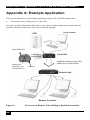
This section illustrates a non-standard application using CATx KVM Extender units:
•
Two remote users sharing access to the CPU.
For more specific information about this, or any other complex applications, please discuss
suitable extension architecture with your Technical Support.
Local Console
CPU
Local Video out
Local unit
connections
Local Unit
KVM/HID extension over CATx
cables up to 1000ft (300m).
Video loop:
Channel 1 out
to Channel 2 in
Video in
Remote Unit
Remote Consoles
Figure 9
42
Two users at Remote Unit utilizing a dual-head extender
APPENDIX B: RACK MOUNT OPTIONS
Appendix B: Rack Mount Options
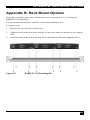
Up to three extender units, in any combination, can be mounted in a 19” rack using the
RMK19U-X3 mounting kit.
The kit contains one rack plate and M3 countersunk mounting screws.
To mount a unit:
1.
Remove the feet from the extender unit.
2.
Align the holes on the base plate with the vacant screw holes on the base of the extender
unit.
3.
Fasten the base of the unit to the plate of the mounting kit using the supplied screws.
Figure 10
RMK19U-X3 Mounting Kit
43
SERVSWITCH™ BRAND CATX KVM EXTENDER FAMILY
Appendix C: Flash Upgrading
& External Configuration
The extender’s firmware is fully flash upgradeable. Please consult Appendix H: New
FeaturesAppendix H: New Features, page 57 which describes additional functionality
introduced in the latest firmware releases.
The firmware may be upgraded via USB. In addition, the current extender configuration
(video settings) can be saved and restored.
Firmware upgrade files should be downloaded online. Please consult Technical support for
details on how to obtain them. Full release notes are included with these files.
On entering Upgrade Mode the extender detaches itself from the USB and re-enumerates as a
removable disk drive allowing upgrades to be made.
Preparation
The Local and Remote Units must both be connected and powered even if you only wish to
upgrade one of them.
Connect a mouse & monitor directly to the CPU as the remote KB & Mouse will not function
in Upgrade Mode. Alternatively, connect the Local Unit to a laptop.
Entering Upgrade Mode
1.
2.
From the REMOTE KB enter Command Mode
Now enter <Left Control> + <Left Shift> + <Right Shift> + <F9>
The yellow LED on both the Local & Remote Units will light to indicate Upgrade Mode has
been entered.
Your PC should indicate a flash drive called EXTENDER is attached. Under many operating
systems a window showing the contents will pop up. If the drive contents window does not
appear, then you will need to manually open the drive folder.
44
APPENDIX C: FLASH UPGRADING
Operating Upgrade Mode
When in Upgrade Mode you must use a KB/mouse attached directly to the PC.
You will see four virtual files listed:
BOOT
Delete this file to return to normal extender operation.
LOC_xx
This shows the firmware version in the Local Unit. If the version is
reported as ‘LOC_BAD’ the upgrade was not successful – try again
REM_xx
This shows the firmware version in the Remote Unit. If the version is
reported as ‘REM_BAD’ the upgrade was not successful – try again.
CONFIG
This file contains the current extender configuration. You may save this
file and use it setup another extender by dragging it onto the file window
and overwriting it.
Upgrading a Local Unit
Drag the local firmware file provided onto the window. After a few seconds the window
display should refresh and the new firmware version displayed by file ‘LOC_xx’
If the window does not refresh (will not on some OS), and the dragged upgrade file is still
shown, then you may need to re-power the Local Unit (by disconnecting the USB cable) and
view the drive folder again.
If the ‘LOC_xx’ file displays as ‘LOC_BAD’ the upgrade was not successful. Try again or
call technical support.
If the upgrade was successful and you only want to upgrade the Local Unit, delete the file
BOOT. The extender drive will disconnect itself and normal extender operation will resume.
Note: If the upgrade was not successful, you will not be able return to normal operation and
the extender will remain in Upgrade Mode.
45
SERVSWITCH™ BRAND CATX KVM EXTENDER FAMILY
Upgrading a Remote Unit
You need to drag each of the EIGHT the firmware files provided onto the window. Simply
highlight them all and drag in one operation. After approx 50 seconds the window display
should refresh and the new firmware version displayed by file ‘REM_xx’
If the window does not refresh (will not on some OS), and the dragged upgrade files are still
shown, then you may need to re-power the Local Unit (by disconnecting the USB cable) and
view the drive folder again.
If the ‘REM_xx’ file displays as ‘REM_BAD’ the upgrade was not successful. Try again or
call technical support.
If you have finished upgrading both units delete the file BOOT. The extender drive will
disconnect itself and normal extender operation will resume.
Note: If the upgrade was not successful you will not be able return to normal operation and
the extender will remain in Upgrade Mode.
Important Notes
1.
This upgrade feature is not guaranteed to work correctly with all operating systems.
It was designed for Windows but has successfully been tested on Mac OS X and
some Linux distributions.
2.
The feature functions best if write caching is switched off for flash drives. This
done by default on XP SP2, Vista and OS X. If write caching is not disabled then
file writes or deletes may take up to 45 seconds to complete. For example, under
Windows 2000 or Linux if you delete the BOOT file to return to normal operation,
it may take 30 seconds before the file is actually deleted and the EXTENDER drive
reported as removed.
3.
Do not attempt to drag any other kinds of file onto the Extender drive. It is a virtual
storage device.
Consult Technical Support if you have any issues regarding upgrading.
46
APPENDIX C: FLASH UPGRADING
Upgrading Tips
If you have a number of installed units to upgrade you may not need to move them in order to
upgrade.
Example: To upgrade a number of Local Units installed in a rack you may find it much
faster to bring a Remote Unit & USB KB into the same room as the Local Units. To upgrade
each Local Unit in turn simply connect a patch cable from the Remote to the Local Unit and
then enter the Upgrade Mode entry sequence on the remote KB. Now, with the aid of a flash
drive (or upgrade file located on a shared drive), you may simply upgrade the Local Unit (by
dragging the file on to the extender drive) and then delete the BOOT file before moving on to
the next unit.
Example: To upgrade a number of Remote Units you may find it much faster to use a
patch cable to connect (in turn) each Remote Unit to a nearby notebook which has a Local
Unit connected.
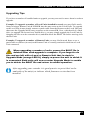
When upgrading a number of units, ensure the BOOT file is
deleted after each upgrade is complete. If you forget to do
this and are left with a Local or Remote Unit that is stuck in
Upgrade Mode (orange LED lit), simply re-power the unit to which it
is connected. Both units will now re-enter Upgrade Mode to enable
you to delete the BOOT file and return to normal operation.
After upgrading your extender it is good practice to put a label on the
underside of the unit(s) to indicate which firmware version has been
installed.
47
SERVSWITCH™ BRAND CATX KVM EXTENDER FAMILY
Appendix D: Advanced Cabling Issues (Skew)
The suggestions made in this Appendix should only be investigated if you cannot obtain
satisfactory image quality after configuring the Remote Unit (as described in Section 4). The
techniques described here are usually only necessary when you are operating at the highest
screen resolution (1600x1200) with long Interconnect cables.
Dealing with Severe Skew
The CATx KVM extender provides a maximum skew compensation of 42nS. This is more
than adequate for most cables. However, it may not be enough if a particularly long cable is
used that exhibits severe delay skew. In this case, some of the procedures described below
should be considered. In extreme cases you should consider an alternative CATx cable as
recommended by Technical Support.
Green Delay
Introducing delays in the video signals inevitably may cause some distortion. For example, it
may result in pixels being sampled twice on TFT screens.
The human eye is extremely sensitive to green distortion. To obtain optimal video
performance it is best to ensure that no green delay is required. You can visually check the
relative pair delays by viewing the test card (without any delays applied). The two color bars
on the left require delaying, but the color bar on the right requires zero delay (slowest) and is
the reference. Ideally, green should be the reference signal.
If your system requires a large delay on the green signal, try using a
crossover patch cable at each end of the link (instead of straight patch cables
to connect to wall outlets). In many cases, the crossover should transfer the
delay requirement to the blue signal rather than green. The human eye is
much less sensitive to blue distortion and so video quality can be improved.
Check the result using the test card and adjust the delays accordingly. The
main cable should be wired according to EIA-568B as shown below.
48
APPENDIX D: ADVANCED CABLING ISSUES (SKEW)
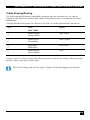
Cable Pinning/Pairing
The following table illustrates which RJ45 connector pins the extenders use for various
signals. It also details the standard EIA-568B wiring scheme that is recommended for most
installations.
Looking into the RJ45 socket on a Remote Unit, Pin 1 is on the right and Pin 8 on the left.
Pin
Color
(EIA-568B)
Signal
1
2
White/Orange
Orange/White
Blue Video
3
6
White/Green
Green/White
Green Video
4
5
Blue/White
White/Blue
Red Video
7
8
White/Brown
Brown/White
Data
Using a crossover cable (at each end) will put the green video on the orange colored pair and
the blue video on the green colored pair.
EIA-568A wiring can also be used. Contact Technical Support for details.
49
SERVSWITCH™ BRAND CATX KVM EXTENDER FAMILY
Optimizing Pairs (General Solution)
Measure pair lengths with a LAN cabling tester (TDR) or view pairs by stripping back a
small piece of cable and viewing how tightly pairs are twisted. The most tightly twisted pair
is the slowest (longest) and the loosest pair the fastest (shortest). You can also check the
relative delays using the test card as described on page 28.
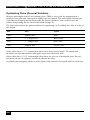
The table below shows the general solution for optimizing CATx cabling for video in order of
pair length.
Pins
Pair
Signal
7&8
Shortest Pair
Data
1&2
rd
Blue Video
nd
3 Longest Pair
4&5
2 Longest Pair
Red Video
3&6
Longest Pair
Green Video
Some cables have a ‘3+1’ construction where three pairs closely match. The fourth pair
should be used for data and the other pairs sorted as in the above table.
Other cables have a ‘2+2’ construction where there are two sets of dissimilar pairs. Put red
and green on one set (tightest) and blue & data on the other.
A suitable pair-swapping scheme is easily made using custom wired patch cables at each end.
50
APPENDIX E: AUDIO/SERIAL PORTS
Appendix E: Audio/Serial Ports
Operation & Multi-Port Configuration
This appendix describes audio & serial interface operation for those models that have this
feature:
•
ACU6022A
•
ACU6222A
These extender products contain daughter boards that allow bi-directional stereo audio and a
full-duplex serial data link to be sent across the CATx interconnection cable in addition to
data and video.
Serial Interface - Set Up and Operation
No setting up or user adjustments are required. Please note that on dual access Local Units,
the serial link is always active.
The Remote Unit’s serial port is wired as DTE - the same as that on a PC. To connect a serial
printer or other DTE (rather than DCE device) to the Remote Unit, you will need a NullModem crossover cable between the Remote Unit and the printer. Select Xon/Xoff software
flow control on the printer and PC.
A serial touch screen may be plugged directly into the Remote Unit.
Serial Interface – Handling Multiple Serial Devices
The extender’s serial interface transmits/receives six signals (3 signals in each direction).
Normally, four of these signals are used for hardware handshaking (in addition to TX & RX).
However, because each handshaking line can support signals up to 19,200 Baud it is possible
to configure the serial interface to handle up to three simple 2-wire (Tx/Rx only) serial links.
To do this, you will need to construct a custom breakout cable. Please contact Technical
Support for further information.
51
SERVSWITCH™ BRAND CATX KVM EXTENDER FAMILY
Audio Interface - Set Up and Operation
The audio interface is line-level and is designed to take the output from a sound card (or other
line-level) source and be connected to a set of powered speakers at the other end of the link.
Stereo audio may be transmitted either way across the link (simultaneously).
No setup is required unless a microphone is connected to the Remote Unit.
Connect the extender as follows:
•
Take the line-level output from your sound card (green connector) and connect to ‘Line
In’ on the Local Unit.
•
Connect ‘Line Out’ on the Remote Unit to a set of powered speakers.
Audio Interface – Using a Microphone
A microphone may be plugged into the ‘Line In’ connector on the Remote Unit.
There are two ways of setting up a microphone:
•
The Local Unit’s ‘Line Out’ connection should normally be wired to the microphone
input (Pink) on your sound card. The sound card should then be set up to provide
additional amplification (+17dB). This is the preferred connection method.
•
Alternatively, the Remote Unit itself can provide microphone amplification. To set this,
open up the Remote Unit and locate the jumper labeled ‘MIC’ on the daughter board.
Connect this jumper across the pins. The Local Unit’s ‘Line Out’ connection should then
be wired to ‘Line In’ (Blue) on your sound card.
If your microphone is already amplified, follow the second method, but DO NOT install the
amplification jumper in the Remote Unit.
52
APPENDIX F: CALLING BLACK BOX
Appendix F: Calling Black Box
If you determine that your CATx KVM Extender is malfunctioning, do not attempt to alter or
repair it. It contains no user-serviceable parts. Contact Black Box Technical Support at 724746-5500.
Before you do, make a record of the history of the problem. We will be able to provide more
efficient and accurate assistance if you have a complete description, including:
•
The firmware-revision level printed on the bottom of the Extender (very important,
especially for keyboard and mouse problems); The KVM extender’s firmware revision
level:
Version Number Format: xxSyy/zz
xx is the hardware revision number
yy is the firmware revision number
zz is the auxiliary revision number.
•
The nature and duration of the problem.
•
When the problem occurs.
•
The components involved in the problem—that is, what type of computers, what type of
keyboard, brand of mouse, make and model of monitor, type and make of CATx cable,
etc.
•
Any particular application that, when used, appears to create the problem or make it
worse.
•
The results of any testing you’ve already done.
To solve some problems, it might be necessary to upgrade the Extender’s firmware. If this
turns out to be the case for your difficulty, our Technical Support technicians will arrange for
you to receive the new firmware and will tell you how to install it.
Shipping and Packaging
If you need to transport or ship your CATx KVM Extender:
•
Package it carefully. We recommend that you use the original container.
•
If you are shipping it for repair, please include the Remote Unit’s external power supply.
If you are returning it, please include everything you received with it. Before you ship
the Extender back to Black Box for repair or return, contact us to get a Return
Authorization (RA) number.
53
SERVSWITCH™ BRAND CATX KVM EXTENDER FAMILY
Appendix G: Specifications
Video
Maximum Resolution
1600x1200@60Hz over 650ft (200m)
1280x1024@75Hz over 1000ft (300m)
Operation at higher resolutions/refresh rates is possible
at shorter distances
Video Compatibility
Analog VGA to UXGA, RGB
VESA DDC
Emulated DDC for each video channel
Local Unit reports as universal monitor capable of all
standard resolutions and refresh rates.
DDC information may be disabled, or read directly from
remote monitors.
Video I/O
0.7V P-P
Skew Compensation
15-stage. 42nS Max. 2.8nS per step
Compensation available on each color
Video Compensation
Separate LF & HF Equalizers
Video Coupling
DC
Sync I/O
Separate/Composite TTL Level
Sync on green
Sync Polarity is preserved
Video Input Connectors
HD15 (Male)
Video Output Connectors
HD15 (Female)
USB
Emulation Compatibility
Standard HID Keyboards & Mice, Hubs
Certain additional HID devices may be supported with
newer revision firmware. See Appendix H: New
Features.
Local Unit USB Connector
USB B Socket
Remote Unit USB Connectors
4 x USB A Socket
54
APPENDIX G: SPECIFICATIONS
Serial Interface
Max Baud Rate Supported
19.2K Baud
Serial Data Format
Transparent
Signals Transferred
TX, RX, RTS, CTS, DTR, DSR
Local Unit Connector
DB9 Female (DCE)
Remote Unit Connector
DB9 Male (DTE)
Audio Interface
Description
Bi-directional stereo audio link
Transmission method
Digitized virtually CD quality audio (16-bit, 38.4kHz)
Signal levels
Line level (4 Volts Pk-Pk maximum)
Input Impedance
47kΩ
Local Unit Connectors
2 x 3.5mm stereo jack socket
(Line In & Line Out)
Remote Unit Connectors
2 x 3.5mm stereo jack socket
(Line/Mic In & Line Out)
Microphone Support
Microphone may be connected to Remote Unit
Pull-up resistor provides bias for condenser microphone
Option to set microphone amplification to +17dB
Power Requirements
Local Unit
5V at up to 275mA supplied through USB interface.
Connector for optional 5V PSU
2.1mm DC Jack, center positive
Overvoltage Protection: 6.0V
Remote Unit
5V DC. Remote Unit itself requires up to 1.2A.
Remainder is available to USB devices (1.1A fused).
2.1mm DC jack, center positive
Overvoltage Protection: 6.0V
Remote Unit Power Supply
5V DC, 3A (18W) Regulated
(certified to all relevant safety standards)
Universal IEC Input
2.1mm DC jack, center positive
55
SERVSWITCH™ BRAND CATX KVM EXTENDER FAMILY
Size and Shipping Weight
ACU6001A
Local Unit: 4.9”x4.5”x1.2” (124x113x30mm)
Remote Unit: 5.7”x5.9”x1.2” (144x151x30mm)
Shipping Weight: 4.4lb (2.0kg)
ACU6201A
Local Unit: 4.9”x4.5”x1.7” (124x113x44mm) (1U)
Remote Unit: 5.7”x5.9”x1.2” (144x151x30mm)
Shipping Weight: 4.9lb (2.2kg)
ACU6022A
Local Unit: 4.9”x4.5”x1.7” (124x113x44mm) (1U)
Remote Unit: 5.7”x5.9”x1.7” (144x151x44mm) (1U)
Shipping Weight: 4.9lb (2.2kg)
ACU6222A
Local Unit: 5.7”x4.5”x1.7” (145 x113x44mm) (1U)
Remote Unit: 5.7”x5.9”x1.7” (144x151x44mm) (1U)
Shipping Weight: 5.3lb (2.4kg)
Environmental
Operating Temperature
32 to 104°F (0 to 40 °C)
Storage Temperature
-22 to 149°F (-30 to 65 °C)
Relative Humidity
5-90% non-condensing
Chassis Construction
Fully shielded. Black painted steel
56
APPENDIX H: NEW FEATURES
Appendix H: New Features
This section describes new features added in the later firmware releases.
The label on the base of each Local or Remote Unit shows which firmware version has been
factory installed (see Appendix F: Calling Black Box, page 53).
Firmware Version
Feature Added
V2.0 (S20 - Jan 2009)
Enhanced Keyboard & Mouse Support
Generic HID Device Support
Private Mode
V2.3 (S23 - Nov 2009)
Enhanced ELO Touch Screen Support
(including Calibration)
Due to the large number of changes, v2.x firmware is not totally compatible
with earlier v1.x firmware. In particular, the mouse will not function if a v2.x
Remote Unit is connected to a v1.x Local Unit. To avoid such issues please
ensure that both local and remote have compatible firmware versions
installed.
Firmware with a higher revision number (later date) will normally include
all the new features added to earlier versions.
57
SERVSWITCH™ BRAND CATX KVM EXTENDER FAMILY
Enhanced Keyboard & Mouse Support (v2.0)
In previous releases only basic USB keyboards and mice were supported. In v2.0 the HID
parser has been extended to handle newer laser mice and combination wireless KB/Mouse
devices that often use ‘non-standard’ report formats.
Support has also been added for mouse pan/tilt (horizontal scrolling) for those operating
systems that support it within their native HID drivers (e.g. Vista).
Generic HID Device Support (v2.0)
Previously only KB and mouse type devices (including bar code scanners) were supported.
Additional keys on multi-media keyboards could be handled through a Remote Unit
command: <Left Control> + <F4>.
In this firmware release a wider range of generic HID devices is supported subject to certain
restrictions.
Firmware v2.0 now supports almost any HID device which only sends data to the CPU,
and does not require a vendor driver (i.e. it uses the native HID drivers of the operating
system).
Supported generic devices include additional keys on multi-media keyboards, basic joysticks,
and some touch screens (basic mode) and card readers.
Up to four generic devices (in addition to the KB & mouse) may be connected.
1.
Connect all the generic HID devices (e.g. a joystick, or KB with multimedia keys)
you wish to register to the Remote Unit.
2.
Enter Command Mode: <Left Control> + <Left Shift> + <F10>.
3.
Register the devices by requesting USB Descriptor transfer: <Left Control> +
<F4> (See page 35).
The Remote Unit will now read the USB descriptors from the generic devices and copy them
to the Local Unit. After a few seconds the Local Unit will then re-enumerate as a composite
device with several HID interfaces. The registration process is only required once because the
descriptor data is permanently stored within the Local Unit, and the Remote Unit has logged
the VID/PID of all registered devices.
Registered devices may be disconnected and re-connected to the Remote Unit without the
need to register again.
Note: Each time a registration is requested (<Left Control> + <F4>), all previous registration
data is overwritten; so you must ensure that all devices to be registered are connected. If you
need to restore the extender to its default state with only basic KB/Mouse emulation, simply
request a registration without connecting any generic devices (or, issue the system reset
command: <Left Control> + <F9>.
58
APPENDIX H: NEW FEATURES
You do not normally need to register keyboard or mouse type devices. If however, you are
having problems getting a KB/Mouse to work, you could try registering it in case it has
descriptors which are ‘non-standard’.
USB devices connected to the Remote Unit cannot be associated with any particular
vendor driver.
Private Mode (v2.0)
In previous releases the only Private Mode option was to blank the monitors connected to the
Local Unit. Firmware v2.0 enhances Private Mode operation as follows:
Remote Private Mode
•
•
•
•
•
•
In this mode monitors connected to the Local Unit are blanked.
It is not possible to disable the local KB/Mouse because they are connected directly
to the CPU.
To enable Remote Private Mode enter Command Mode (<Left Control> + <Left
Shift> + <F10>), and then press <Scroll Lock>.
All monitors are now blanked, and the yellow LED on the Remote Unit will now
flash at double speed (as an indication).
To exit Remote Private Mode, issue the same command sequence again.
The current Remote Private Mode state is stored in EEPROM, and is restored on
power-up.
Local Private Mode
•
•
•
•
•
•
In this mode all remote HID devices are disabled, and (optionally) all monitors
connected to the Remote Unit are blanked.
The Local Private Mode feature is inhibited by default and has to be explicitly
enabled (as described below).
If Local Private Mode is allowed, the remote Console enable/disable state is
toggled by pressing Caps Lock or Scroll Lock, eight times within two seconds
on any keyboard connected directly to the CPU.
The Remote Unit is now disabled, all three KB LEDs on the remote KB are lit, and
the yellow LED on the Local Unit will now flash at double speed (as an indication).
To exit Local Private Mode, issue the same command sequence again.
The current Local Private Mode state is stored in EEPROM, and is restored on
power-up.
59
SERVSWITCH™ BRAND CATX KVM EXTENDER FAMILY
Remote Monitor Blanking in Local Private Mode
A further remote command has been added to control whether the remote monitors are
blanked in Local Private Mode. The default setting is to blank them.
To toggle the remote monitor blank state:
1. Enter Command Mode
2. Press <Left Control> + <Scroll Lock> to toggle the state
3. The setting is saved in EEPROM, and the unit will quit Command Mode.
Local Private Mode Inhibit
This feature is inhibited by default. To enable/disable this feature:
1. Enter Command Mode
2. Enable: Press <Left Control> + <F7> , or, Disable: Press <F7>
3. The setting is saved in EEPROM, and the unit will quit Command Mode.
Note: Local Private Mode is inhibited by default because it operates by sensing a sequence
of KB Indicator changes. To prevent any possible conflict with 3rd party equipment (e.g.
KVM switches) that may toggle the LEDs too often, this feature is disabled unless the user
specifically requires it.
60
APPENDIX H: NEW FEATURES
Enhanced Elo Touch Screen Support/Calibration (v2.3)
In Firmware v2.0 Generic HID device support was added. This allowed touch screens (which
could operate using OS native HID support) to be used through the extender in a basic mode.
However, the extender cannot utilise any vendor driver supplied with a touch screen for
calibration/enhanced options etc. Operation in basic mode may not be suitable for all
applications.
We have found that many ELO Touch screens require calibration to scale reports to the full
screen area, and also correct X or Y-axis reversal. For example, you might touch the upper
right-hand corner and the cursor will move to the lower right-hand corner, or the cursor may
not move exactly to the location you touch.
Calibration and axis reversal is normally sorted out in the calibration sequence via the vendor
driver. When operating through the extender the vendor calibration routine is not available
and so the following command has been added to effect basic calibration.
You first need to register the ELO Touch Screen with the extender system:
1.
2.
3.
4.
Connect the ELO monitor and a keyboard to the Remote Unit
Enter Command Mode: <Left Control> + <Left Shift> + <F10>
Enter the Device Registration command <Left Control> + <F4>
The extender will now re-enumerate and allow basic touch screen operation
Note: See Generic HID Device Support (above) for further information regarding
generic HID device support.
The cursor should now move as you touch the Elo monitor. However, the direction of
movement may be reversed, and the cursor might not travel over the entire screen area.
Calibration
You now need to calibrate the touch screen:
1.
2.
3.
4.
Enter Command Mode: <Left Control> + <Left Shift> + <F10>
Enter the ELO Calibration command: <Left Control> + <F5>
The KB LEDs will flash twice and then stay lit.
Touch the ELO screen once right in the UPPER LEFT-HAND CORNER See Note
(do this within 10 seconds).
5. The KB LEDs will clear.
6. After a second the KB LEDs will flash twice and stay lit.
7. Touch the ELO screen once right in the LOWER RIGHT-HAND CORNER See Note
(do this within 10 seconds).
8. The KB LEDs will clear and then flash twice after a second if the calibration was
successful.
9. The extender will now quit Command Mode.
10. The touch screen is now calibrated and any reversed axes are automatically
adjusted.
61
SERVSWITCH™ BRAND CATX KVM EXTENDER FAMILY
•
•
•
•
You only need to perform the above operation once. The settings are saved in
EEPROM.
If you want to connect further touch screens then all touch screens MUST be the
same model.
You should re-calibrate whenever you register additional (or replacement) generic
HID devices.
If there were any problems during calibration the extender will quit Command
Mode and resume normal operation after the time-out period.
Ultimate calibration accuracy depends on how tightly into the screen corners you
touch.
62
NOTES
NOTES
Customer Support Information:
Order toll-free in the U.S.: Call 877-877-BBOX (outside U.S. call 724-746-5500)
For FREE Technical Support 24 hours a day, 7 days a week, call 724-746-5500 or fax 724-746-0746
Mailing address: Black Box Corporation, 1000 Park Dr., Lawrence, PA 15055-1018
World-Wide Web: www.blackbox.com • Email: [email protected]
© Copyright 2009. Black Box Corporation. All rights reserved.