1
Winmate E430M2 Series PDA
User Guide
Contents
Chapter 1: Safety Information
Exposure to Radio Use ........................................................................................ 3
RF Exposure Information ...................................................................................... 3
Battery Safety Information ..................................................................................... 4
Electrostatic Discharge ......................................................................................... 4
Driving ................................................................................................................... 4
Chapter 2: About Winmate E430M2 Series
About E430M2 ..................................................................................................... 5
Features ............................................................................................................... 5
Getting started....................................................................................................... 6
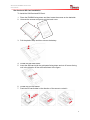
Sim Card and SD Card Installation .................................................................. 7
Battery Installation ........................................................................................... 8
Battery Charging ............................................................................................. 8
Turning On and Off the Device .............................................................................. 9
Turning the E430M2 On .................................................................................. 9
Turning the E430M2 Off ................................................................................ 10
Resetting to Factory Defaults .............................................................................. 10
Chapter 3: Using Android 2.3.4 Operating System
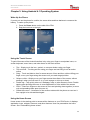
Wake Up the Phone ........................................................................................... 11
Using the Touch Screen ..................................................................................... 11
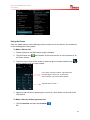
Using the Home Screen ..................................................................................... 11
Personalizing Home Screen .......................................................................... 12
View other parts of the Home Screen ............................................................ 13
Status and Notification Icons ............................................................................... 15
Using the Menu ................................................................................................... 16
Using the On-Screen Keyboard .......................................................................... 16
Enter Text by Typing ..................................................................................... 16
Editing Text ................................................................................................... 17
Display Setting .................................................................................................... 18
Audio Profile Setting ........................................................................................... 19
Sounds Setting .............................................................................................. 19
Adjust Volume ............................................................................................... 19
Language & Keyboard Setting ............................................................................ 19
1