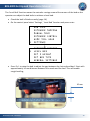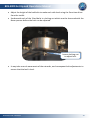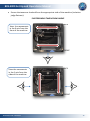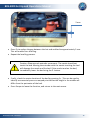
1
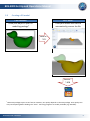
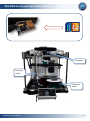
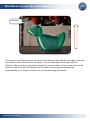
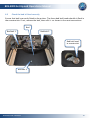
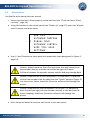
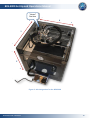
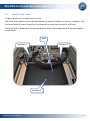
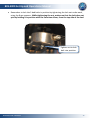
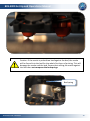
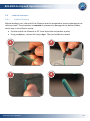
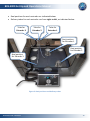
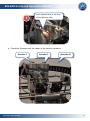
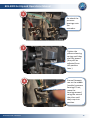
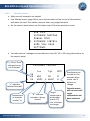
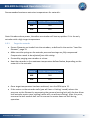
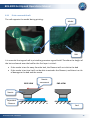
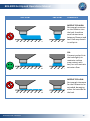
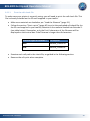
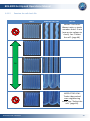
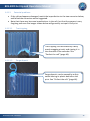
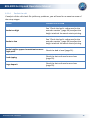
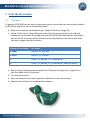
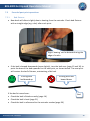
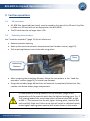
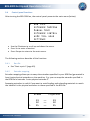
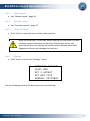
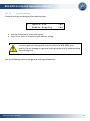
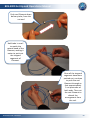
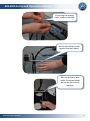
BFB-3000 Set Up and Operations Manual [Version 3.0] Document No: D100253 BFB-3000 Set Up and Operations Manual 1 Introduction Thank you for purchasing your BFB-3000. Before first use, the BFB-3000 needs careful setting up. The list below illustrates some of the essential operations which must be carried out before operation: Remove existing prints Check the bed is clear of any build material Check the bed is fitted correctly Power up Manual move Check the hot-end nozzles are clean from plastic debris Check the bed is level Check the bed is referenced to the extruder nozzles Load the extruders Start a print Print a successful raft Print the first model Failure to carry out all of the set-up procedures contained in this document will damage the machine. This document has been designed to illustrate the essential procedures and get you up and running as quickly as possible. Please take time to understand how the process works and complete each procedure in the order set out in this manual. Setting up can take from 20-60 minutes depending on the skill level of the operator. Support is available by raising a ticket at www.bitsfrombytes.com We welcome any feedback you may have, and wish you well in your 3D printing! Document No: D100253 2 BFB-3000 Set Up and Operations Manual 2 Table of Contents 1 Introduction ................................................................................................................... 2 2 Table of Contents ........................................................................................................... 3 3 Manual symbols ............................................................................................................. 5 4 How this manual works .................................................................................................. 6 5 Process overview – how the BFB-3000 works ................................................................ 7 6 5.1 BFB-3000 ................................................................................................................... 7 5.2 Tool kit ....................................................................................................................... 8 5.3 Creating a 3D model .................................................................................................. 9 Initial set-up ................................................................................................................. 12 6.1 Remove existing prints ............................................................................................ 12 6.2 Check the bed is clear of any build material ............................................................ 13 6.3 Check the bed is fitted correctly .............................................................................. 14 6.3.1 Remove the bed ............................................................................................. 15 6.3.2 Fit the bed ...................................................................................................... 16 6.4 Power up ................................................................................................................. 17 6.5 Manual move ........................................................................................................... 18 6.6 Check the hot-end nozzles are clean from plastic debris ......................................... 20 6.7 Check the bed is level .............................................................................................. 21 6.8 Check the bed is referenced to the extruder nozzles ............................................... 28 6.9 Load the extruders................................................................................................... 31 6.9.1 Load the filament ........................................................................................... 31 6.9.2 Extruder control ............................................................................................. 37 6.9.3 Purge the extruder ......................................................................................... 38 6.10 Start a print .......................................................................................................... 40 6.11 Print a successful raft............................................................................................ 41 6.11.1 Print the raft check file ................................................................................... 43 6.11.2 Examine the raft check file ............................................................................. 44 6.11.3 Potential problems ......................................................................................... 45 6.11.4 Perfect the raft ............................................................................................... 46 Document No: D100253 3 BFB-3000 Set Up and Operations Manual 7 Print the first model ..................................................................................................... 47 7.1 Test print ................................................................................................................. 47 7.2 Essential post-print operations ................................................................................ 48 7.2.1 Bed flatness .................................................................................................... 48 7.2.2 Empty material waste bin ............................................................................... 49 8 Further printing ............................................................................................................ 50 9 Further operations ....................................................................................................... 51 9.1 SD card notes ........................................................................................................... 51 9.2 Reloading the extruders .......................................................................................... 51 9.3 Notes on materials .................................................................................................. 52 9.3.1 Properties ....................................................................................................... 52 9.3.2 Soluble support structure ............................................................................... 52 9.3.3 Storage ........................................................................................................... 52 9.4 Control panel functions ........................................................................................... 53 9.4.1 Run file ........................................................................................................... 53 9.4.2 Extruder mapping ........................................................................................... 53 9.4.3 Manual move ................................................................................................. 55 9.4.4 Extruder control ............................................................................................. 55 9.4.5 Home tool head .............................................................................................. 55 9.4.6 Settings........................................................................................................... 55 9.4.7 Set Z height .................................................................................................... 56 9.5 Maintenance operations.......................................................................................... 60 9.5.1 Updating your printer ..................................................................................... 60 9.5.2 Adjusting the nozzle wipe ............................................................................... 60 9.5.3 Fine adjustment to level the nozzles .............................................................. 62 9.5.4 Handling a ground-out filament ..................................................................... 64 9.5.5 Handling snapped filament in the delivery tube ............................................. 66 9.6 Troubleshooting ...................................................................................................... 73 9.7 Troubleshooting ...................................................................................................... 73 9.8 Specifications ........................................................................................................... 73 Document No: D100253 4 BFB-3000 Set Up and Operations Manual 3 Manual symbols CAUTION: notes to prevent damage to the machine. DANGER: notes to prevent injury to the operator. Document No: D100253 5 BFB-3000 Set Up and Operations Manual 4 How this manual works How the BFB-3000 3D printing process works Initial setup of the BFB-3000 machine and testing First print Links for further printing Document No: D100253 6 BFB-3000 Set Up and Operations Manual 5 Process overview – how the BFB-3000 works Before reading this section, please ensure that the unpacking instructions have been completed. 5.1 BFB-3000 Extruders Nozzle wipe box Bed Filament reel holders Control box Document No: D100253 7 BFB-3000 Set Up and Operations Manual 5.2 Tool kit Model removal tool Side cutters Hex drivers 1.5mm Allen Wrench Ø0.5mm drill bit Document No: D100253 Ø3mm drill bit SD card Pliers 8mm spanner 8 BFB-3000 Set Up and Operations Manual 5.3 Creating a 3D model CAD software BFB “Axon” Draw your object in your 3D modelling package1 Load your model into Axon to automatically process the file. Save as… *.STL Save as… *.BFB 1 Most CAD packages export to STL format. However, STL quality depends on the CAD package. Poor quality STLs may need repairing before loading into “Axon”. STL fixing programs are readily available (e.g. NetFabb). Document No: D100253 9 BFB-3000 Set Up and Operations Manual Extruders Delivery tubes Filament reels Document No: D100253 10 BFB-3000 Set Up and Operations Manual Hot-end The extruders pull filament from the reel via the delivery tubes and drive through a hot-end to produce a thin molten filament of plastic. The extruder draws each layer with this filament. After each layer is produced the bed increments down so that a new layer can be drawn on top of the last, building up the 3D model. A second (optional) extruder automatically prints support filament for printing overhanging-features. Document No: D100253 11 BFB-3000 Set Up and Operations Manual 6 Initial set-up Follow all the steps in this section to ensure that the printer is correctly setup before printing. 6.1 Remove existing prints We do test prints on each BFB-3000 as part of our quality control. We leave these on the print bed to show that the printer has been checked, and to demonstrate some basic prints. Remove any previous prints with the model removal tool. Slide the edge between the bed and the first layer to remove the entire print. If the model is difficult to remove from the bed in situ, you can take the whole bed out of the machine to make the removal process easier (refer to “Remove the bed”, page 15). Document No: D100253 12 BFB-3000 Set Up and Operations Manual 6.2 Check the bed is clear of any build material Clean: no build material debris Ensure that all build material is completely removed from the bed. Use the model removal tool to remove any stuck-fast tracks. It is normal for prints to leave marks on the bed, and for the model removal tool to lightly scratch the surface of the bed. This will not affect the printer’s operation. However, take care to avoid gouging the surface with the material removal tool – the bed must be flat. Document No: D100253 13 BFB-3000 Set Up and Operations Manual 6.3 Check the bed is fitted correctly Ensure that bed is correctly fitted to the printer. The three bed bolt heads should sit flush in the countersinks. If not, remove the bed, then refit it - as shown in the next two sections. Bed Bed bolt 1 Bed bolt 2 Bed bolt head in countersink Bed bolt 3 Document No: D100253 14 BFB-3000 Set Up and Operations Manual 6.3.1 Remove the bed Tip: removal is easier if the bed is near the bottom of the machine. If it is too high, you can manually lower the z-axis (see “Manual move”, page 18). 1 1 2 Document No: D100253 15 BFB-3000 Set Up and Operations Manual 6.3.2 Fit the bed Tip: fitting is easier if the bed is near the bottom of the machine. If it is too high, you can manually lower the z-axis (see “Manual move”, page 18). Check all bolt heads are fitted correctly (see “Check the bed is fitted correctly”, page 14). 2 2 3 Document No: D100253 16 BFB-3000 Set Up and Operations Manual 6.4 Power up Connect the power supply from the control panel into the power socket shown in Figure 1. Turn the supply on. Turn the control box on using the power switch shown in Figure 1. +Z, -Z, Escape buttons Screen +Y, -Y, -X, +X/Enter buttons buttons Power switch Power indicator SD card Power socket SD card indicator Figure 1: Control panel Table 1: Buttons used for navigation Button Screen Navigation +Y Up -Y Down +X Enter Esc Escape +Z Extruder selection up (see ‘Extruder control’, page 36) -Z Extruder selection down (in ‘Extruder control’, page 36) Document No: D100253 17 BFB-3000 Set Up and Operations Manual 6.5 Manual move Get familiar with moving the axes around: Ensure that the bed is fitted properly to the machine (see “Check the bed is fitted correctly”, page 14). Using the buttons on the control panel (see “Power up”, page 17) select the ‘Manual move’ function and press enter: > RUN FILE EXTRUDER MAPPING MANUAL MOVE EXTRUDER CONTROL HOME TOOL HEAD SETTINGS Use X, Y and Z buttons to move each axis respectively (axes designated in Figure 2, page 19). Caution: Always move the Z axis first to ensure that bed is away from the extruder nozzles, and does not collide during an X/Y move. Collisions between the extruder nozzles and the bed may damage both. Caution: Observe each X/Y axis movement. In these axes, it is possible to drive the extruders too far away from the “Home” position (Figure 2) into the printer frame. Avoid this. Excessive collisions will damage the printer. Caution: Observe each Z axis movement. In this axis, it is possible to drive the bed too high (into the extruder nozzles) or too low (into the motor coupling). Avoid this. Excessive collisions will damage the printer. Press Escape to leave the function, and return to the main menu. Document No: D100253 18 BFB-3000 Set Up and Operations Manual “Home” Position + X + Y - - Z + Figure 2: Axis designation for the BFB-3000 Document No: D100253 19 BFB-3000 Set Up and Operations Manual 6.6 Check the hot-end nozzles are clean from plastic debris Ensure that the metal nozzle tips are clean from any plastic debris. All tips should be clearly visible. Nozzle tip clearly visible, and free of any plastic debris If not: Lower the bed to make access to the nozzles easy. Position the extruders in approximately the middle of the machine (see “Manual move”, page 18), to make access to the nozzles easy. Pull away any light plastic debris away from the nozzle tip using the pliers. If plastic debris is stubborn, you may need to heat the extruder to make the plastic soft enough to remove. To heat the extruder up, please refer to “Extruder control” (page 36). Caution: When heating up nozzles to remove plastic debris, do not touch the nozzle tips with your fingers. Extruders will burn if touched when hot. Document No: D100253 20 BFB-3000 Set Up and Operations Manual 6.7 Check the bed is level To get a good print, the bed must be level. We make every effort to level the bed before the machine leaves our factory. However, the bed may move in transit, therefore it is essential to check that the bed is still level. The print bed is mounted on three sprung bolts which allow adjustment of the bed height in three places. Bed Bed bolt 1 Bed bolt 2 Bed bolt 3 Document No: D100253 21 BFB-3000 Set Up and Operations Manual The ‘Level Bed’ function moves the extruder carriage around the corners of the bed so the operator can adjust the bed bolts to achieve a level bed. Check the bed is fitted correctly (page 14). On the control panel select ‘Settings’, ‘Level Bed’ function and press enter: > > RUN FILE EXTRUDER MAPPING MANUAL MOVE EXTRUDER CONTROL HOME TOOL HEAD SETTINGS EXTRUDER OFFSETS LEVEL BED SET Z HEIGHT SET BED TYPE GENERAL SETTINGS Press Z+/- to raise the bed to adjust the gap between the hot end and bed. Start with approximately 10 mm distance between the nozzle and the bed. This will enable rough levelling. 10 mm Document No: D100253 22 BFB-3000 Set Up and Operations Manual Press the X+ and X- buttons to automatically move the carriage around the corners of the print bed (view on-screen instructions for more movement options). During each movement along the side of the bed, observe from the side of the machine any change in distance between the bed and extruder’s hot-end as it moves along. Adjust bed bolts to make extruders move parallel to the bed. Figure 3: Levelling bed along the Y axis, viewed from the side Figure 4: Levelling the bed along the X axis, viewed from the front Document No: D100253 23 BFB-3000 Set Up and Operations Manual Adjust the height of the bed bolts to make each side level using the 3mm hex driver from the toolkit. Underneath each of the 3 bed bolts is a locking nut which must be loosened with the 8mm spanner before the bolt can be adjusted. Loosen locking nut to adjust bolt. It may take several movements of the extruder, and consequent bolt adjustments to ensure that the bed is level. Document No: D100253 24 BFB-3000 Set Up and Operations Manual Ensure that axes are checked from the appropriate side of the machine (to better judge flatness): PHOTOGRAPHS TAKEN FROM ABOVE View the movements in the X axis from the front of the machine. BACK FRONT View the movements in the Y axis from the sides of the machine. BACK FRONT Document No: D100253 25 BFB-3000 Set Up and Operations Manual 2 mm Press Z+ to reduce the gap between the hot end and bed to approximately 2 mm. This will enable finer levelling. Repeat the levelling process. Caution: Observe each extruder movement. The nozzle should not touch the bed. Moving the extruder with the nozzle touching the bed will damage the nozzle and the bed. If the nozzle touches the bed, immediately lower the bed using the Z- button. Finally, check the centre location of the bed by pressing Y+. This can be used to identify an excessively worn or warped print bed as the height in the middle will differ from the perimeter of the bed. Press Escape to leave the function, and return to the main menu. Document No: D100253 26 BFB-3000 Set Up and Operations Manual Remember to lock the 3 bed bolts in position by tightening the lock nut under each, using the 8mm spanner. Whilst tightening the nut, make sure that the bolt does not spin by holding it in position with the 3mm hex driver, from the top side of the bed. Tighten nut to lock bolt into position. Document No: D100253 27 BFB-3000 Set Up and Operations Manual 6.8 Check the bed is referenced to the extruder nozzles After levelling the bed, the nozzles must be set to the correct height, to ensure that the first printed layer sticks properly (if the nozzle is too high the filament will not stick to the bed, if the nozzle is too low the bed may block the nozzle). Use the ‘Set Z Height’ function to accurately adjust the height of the nozzle for the first layer. Check the bed is fitted correctly (page 14) Check the hot-end nozzles are clean (page 20). Check the bed is level (page 21). On the control panel select ‘Settings’, ‘Set Z Height’ function and press enter: > > RUN FILE EXTRUDER MAPPING MANUAL MOVE EXTRUDER CONTROL HOME TOOL HEAD SETTINGS EXTRUDER OFFSETS LEVEL BED SET Z HEIGHT SET BED TYPE GENERAL SETTINGS Observe the gap between the nozzle and bed from the front of the machine. Press and hold the Z+/- buttons to move the bed. Start with a gap between the bed and the nozzle. Move the bed towards the nozzle. Observe the bed as it approaches the nozzle. Stop raising the bed as soon as the nozzle touches the surface of the bed. If the bed goes too far, simply move the bed back and repeat the approach. The bed should just touch the nozzle, without any compression in the bed springs: Document No: D100253 28 BFB-3000 Set Up and Operations Manual Caution: If the nozzle is pushed too hard against the bed, the nozzle will be forced into the bed for the whole first layer of printing. This will damage the nozzle and the bed. Ensure that setting the nozzle against the bed does not compress the bed springs. Bed spring Document No: D100253 29 BFB-3000 Set Up and Operations Manual Pressing Enter (X+) will save the setting to the printer’s memory which is retained when the power is turned off. The Z offset value will be applied each time the printer is homed. Pressing Escape will exit the function without saving the value. Document No: D100253 30 BFB-3000 Set Up and Operations Manual 6.9 Load the extruders 6.9.1 Load the filament Before loading a reel, the end of the filament must be prepared to prevent damage to the delivery tubes. This procedure is essential to prevent any damage to the delivery tubes, which may in turn block a nozzle. Cut the end of the filament at 45° from both sides to produce a point. Using sandpaper, remove all sharp edges. The tip should feel smooth. 1 2 3 4 Document No: D100253 31 BFB-3000 Set Up and Operations Manual Reel positions for each extruder are indicated below: Delivery tubes for each extruder run from right to left, as indicated below: Tube for Extruder 3 Tube for Extruder 2 Tube for Extruder 1 Reel position for Extruder 1 Reel position for Extruder 2 Reel position for Extruder 3 Figure 5: Reel positions and delivery tubes Document No: D100253 32 BFB-3000 Set Up and Operations Manual Load the type of materials into their reel positions according to the number of extruders in the BFB-3000: Number of extruders in the BFB-3000 Material for Extruder 1 Material for Extruder 2 1 ABS or PLA 2 ABS PLA 3 ABS PLA Example for this section: BFB-3000 with two extruders. Material for Extruder 3 Not needed in first print ABS PLA After positioning the reels: 1 Insert the filaments into the appropriate delivery tubes (identified in Figure 5, page 32) Document No: D100253 2 Feed filaments up to extruders 33 BFB-3000 Set Up and Operations Manual 3 Push filament out of the end of the delivery tube Check the filaments exit the tubes at the correct extruders: Extruder 1 Document No: D100253 Extruder 2 (Extruder 3) 34 BFB-3000 Set Up and Operations Manual Remove the pressure bearings (below) on the extruders 4 Use the 4mm hex driver from the toolkit Pressure bearing assembly 5 Document No: D100253 Use pliers to push the filaments into the white tube for each extruder, as far as it will go (approximately 10 cm) 35 BFB-3000 Set Up and Operations Manual 6 Re-attach the pressure bearings onto the extruders. 7 Tighten the pressure bearing springs until they are fully bound. (they will be adjusted from this position later.) 8 Document No: D100253 Ensure filaments run on the middle (smaller) pressure bearings. If not, move the bearings around using the nose of the pliers until they snap into position. 36 BFB-3000 Set Up and Operations Manual 6.9.2 Extruder control Make sure all extruders are loaded. Use ‘Manual move’ (page 18) to move the extruders to the centre of the machine, and lower the bed. This makes it easy to clean any purged material. On the control panel select the ‘Extruder control’ function and press enter: RUN FILE EXTRUDER MAPPING MANUAL MOVE EXTRUDER CONTROL HOME TOOL HEAD SETTINGS > ‘Extruder control’ manages one extruder at a time (E1, E2 or E3) using the buttons on the control panel. E1, E2 or E3 are selected using the Z buttons EXTRUDER CONTROL Cur E3 E2 > E1 Tgt 25C 0C 259C * 260C RPM 0 0 “>” indicates selected extruder Temperature at extruder nozzle (°C) Document No: D100253 “*” indicates extruder is being heated. Target temperature at extruder nozzle (°C). Use Y buttons to change. Revolutions per minute for the extruder drive screw. Use X buttons to change. Extruder motor will not turn until target temperature has been achieved. 37 BFB-3000 Set Up and Operations Manual Recommended maximum extrusion temperatures for materials: Material Extrusion temperature (°C) ABS 260 PLA 195 Note: Extruders share power, therefore an extruder will heat up quicker if it is the only extruder with a high target temperature. 6.9.3 Purge the extruder Ensure filaments are loaded into the extruders, as defined in the section “Load the filament”, page 31. Make sure the springs on the extruder pressure bearings are fully compressed. Compression needs to be adjusted from this setting. Proceed by purging one extruder at a time: Heat the extruder to the maximum temperature defined below, depending on the material in the extruder: Material Extrusion temperature (°C) ABS 260 PLA 195 Once target temperature has been achieved, turn the RPM up to 15. If the motor on the extruder stalls (you will hear a ‘clicking’ sound) release the pressure on the filament by unscrewing the pressure bearing bolt with the hex driver until extruder motor stops stalling (motor will run without clicking). After this point, unscrew the bolt another half turn to ensure the motor does not stall during operation. Document No: D100253 38 BFB-3000 Set Up and Operations Manual Pressure bearing bolt 4mm hex driver from toolkit Observe the end of the nozzle. A thin bead of molten plastic should come out of the nozzle. Depending on how far the filament was loaded into the extruder, this could take several minutes. Thin filament of plastic Allow material to purge for a few seconds before reducing the RPM to 0. Repeat for each extruder. Turn the machine off to allow the nozzles to cool. As the extruders cool, clean the nozzles (see “Check the hot-end nozzles are clean”, page 20). Dispose of all waste filament from the nozzle. Document No: D100253 39 BFB-3000 Set Up and Operations Manual 6.10 Start a print Make sure all items below have been checked. This is essential to guarantee that the print works. Check the bed is clear of any build material (page 13) Check the bed is fitted correctly (page 12) Check the hot-end nozzles are clean from plastic debris (page 20) Check the bed is level (page 21) Check the bed is referenced to the extruder nozzles (page 28) Load the extruders (page 31) After the machine is setup correctly you will need to run two test files, documented in the following sections. When asked to print a file you will need to follow the procedure below: Insert the SD card into the BFB-3000 control box. Turn the control box on. Select “Run file”, and press Enter: The first 8 characters of the filename will be displayed here. If the filename is longer than 8 characters only the first 6 characters of the filename will be displayed on the control box. > RUN FILE EXTRUDER MAPPING MANUAL MOVE EXTRUDER CONTROL HOME TOOL HEAD SETTINGS Current file: FILENAME.BFB File 3 of 3 The most recently saved file will appear first. Use the Y buttons to scroll through the BFB files saved in the root of the SD card. Press Enter to confirm, and start the print. Document No: D100253 40 BFB-3000 Set Up and Operations Manual 6.11 Print a successful raft The raft supports the model during printing: Model Raft It is essential that a good raft is printed to guarantee a good build. Therefore the height of the hot-end nozzle over the bed for the first layer is critical: If the nozzle is too far away from the bed, the filament will not stick to the bed If the nozzle is too low it will not be able to extruder the filament, and there is a risk of damage to the bed and the nozzle. SIDE VIEW Nozzle movement END VIEW Nozzle Deposited Filament Bed Document No: D100253 41 BFB-3000 Set Up and Operations Manual SIDE VIEW END VIEW COMMENTS NOZZLE TOO HIGH: Not enough pressure on the filament into the bed, therefore small contact area between filament and bed. Raft may detach in mid print. OK: Filament pushed into the bed slightly to maximise surface area contact with bed, but still maintain extrusion flow. NOZZLE TOO LOW: Not enough clearance for the filament to be extruded, damaging either the extruder or the bed. Document No: D100253 42 BFB-3000 Set Up and Operations Manual 6.11.1 Print the raft check file To make sure your printer is correctly setup, you will need to print the raft check file. This file is already included on the SD card supplied in your toolkit. Make sure materials are loaded as per “Load the filament” (page 31). Follow the section “Start a print” (page 40) to print the preloaded raft check file (on the SD card supplied in your toolkit) relevant to the material loaded into Extruder 1 (see table below). Remember, only the first 6 characters of the filename will be displayed on the control box if the filename is longer than 8 characters. Material type in Extruder 1 File to print ABS RaftABS_CheckFile PLA RaftPLA_CheckFile Examine each raft pad in the check file, as guided in the following section. Remove the raft print when complete. Document No: D100253 43 BFB-3000 Set Up and Operations Manual 6.11.2 Examine the raft check file RAFT MAGNIFICATION NOTES NOZZLE TOO HIGH: Wavey tracks, or tracks narrower than 1.2 mm (use vernier calipers to check). See “Perfect the raft” (page 46). OK NOZZLE TOO LOW: Tracks sides pushed over neighbouring tracks. See “Perfect the raft” (page 46). Document No: D100253 44 BFB-3000 Set Up and Operations Manual 6.11.3 Potential problems If the raft pad appears damaged, match the imperfection to the two scenarios below, and follow the corrective action suggested. Note that there may be some imperfections in the raft, but that the process is very forgiving and even the images shown below will generally not spoil a full print. 6.11.3.1 Track ripping Track ripping: can be caused by a dirty nozzle snagging a track, and ripping it in the direction of the extruder. See “Perfect the raft” (page 46). 6.11.3.2 Purge deposit Purge deposit: can be caused by a dirty nozzle leaving its plastic behind on the print. See “Perfect the raft” (page 46). Document No: D100253 45 BFB-3000 Set Up and Operations Manual 6.11.4 Perfect the raft If analysis of the raft check file yields any problems, you will need to re-examine some of the setup stages: ERROR CORRECTIVE ACTION Nozzle too high See “Check the bed is referenced to the extruder nozzles” (page 28) to adjust the height at which the nozzle starts printing. Nozzle to low See “Check the bed is referenced to the extruder nozzles” (page 28) to adjust the height at which the nozzle starts printing. Nozzle heights appear inconsistent across a single print Check the bed is level (page 21). Track ripping Check the hot-end nozzles are clean (page 20). Purge deposit Check the hot-end nozzles are clean (page 20). Document No: D100253 46 BFB-3000 Set Up and Operations Manual 7 Print the first model 7.1 Test print To get your BFB-3000 printer up and running as quickly as possible, we have already loaded a .BFB file of a duck for you to immediately make. Make sure materials are loaded as per “Load the filament” (page 31). Follow “Start a print” (page 40) to print the Duck file using the file on the SD card relevant to the number of extruders on your BFB-3000 (see table below). Remember, only the first 6 characters of the filename will be displayed on the control box if the filename is longer than 8 characters. Number of extruders File name 1 (ABS) Duck1A_E1_ABS.bfb 1 (PLA) Duck1P_E1_PLA.bfb 2 Duck2_E1_ABSraft_E2_PLAbuild.bfb 3 Duck2_E1_ABSraft_E2_PLAbuild.bfb (same as above) After printing, follow procedure detailed in “Remove existing prints” (page 12) to take the model out of the printer. Turn the machine off. Carry out essential post-print operations (detailed in the next section). Remove the raft from the model with sandpaper. Document No: D100253 47 BFB-3000 Set Up and Operations Manual 7.2 7.2.1 Essential post-print operations Bed flatness New beds will distort slightly due to heating from the extruder. Check bed flatness with a straight edge (e.g. ruler) after each print: Slight ‘bowing’ can be detected using the edge of a ruler. If the bed is bowed downwards (even slightly), turn the bed over (page 15 and 16) to point the bow of the bed upwards for the next print, as shown below. The next print will restore the bed’s flatness, maintaining a flat bed. Printing with bed bowed up Printing with bed bowed down If the bed is turned over: Check the bed is fitted correctly (page 14) Check the bed is level (page 21) Check the bed is referenced to the extruder nozzles (page 28) Document No: D100253 Bed 48 BFB-3000 Set Up and Operations Manual 7.2.2 Empty material waste bin After each print you will need to empty the nozzle wipe box Lower the bed (see “Manual move”, page 18) to access the nozzle wipe box. Remove the waste box from the machine and dispose of the plastic deposits. Re-install the waste box back into the machine, ready for your next print. Document No: D100253 49 BFB-3000 Set Up and Operations Manual 8 Further printing Now your printer is set up, you will need to visit our website at www.bitsfrombytes.com to: Download and install Axon software (illustrated in page 9). Check for free updates - we issue updates regularly to continually improve printing performance. Document No: D100253 50 BFB-3000 Set Up and Operations Manual 9 Further operations 9.1 SD card notes All .BFB files (exported from Axon) must be saved to the root of the SD card. Any files in folders on SD card will not be displayed on the BFB-3000. The SD card must be no larger than 2 Gb. 9.2 Reloading the extruders See “Load the extruders” (page 31) for all references: Remove pressure bearing. Heat up the nozzle to extrusion temperature (see Extruder control, page 37). Pull remaining filament out of extruder using pliers. Pliers Remaining filament After removing the remaining filament, follow the instructions in the “Load the extruders” section (page 31) to load a new filament. Purge the extruder (page 38) until the old material is completely flushed out. See caution note below about purge temperature: If a new material is being loaded in to the extruder, purge at the temperature of the material which has the highest melting point. E.g. if PLA is being loaded into an extruder which previously had ABS, purge at 260 °C. This ensures that the old, higher melting point, material will melt and fully flush out. Failure to do this will result in a blocked nozzle, as the higher melting point material will remain frozen in the nozzle. Document No: D100253 51 BFB-3000 Set Up and Operations Manual 9.3 Notes on materials 9.3.1 Properties Material Properties ABS High toughness. Non-degradable. Do not print area larger than 100 mm square – ABS has relatively high shrinkage on cooling, and some geometries for larger prints are prone to warping. PLA Similar strength to ABS. Biodegradable above 60 °C. 9.3.2 Soluble support structure For overhanging model features, Axon automatically generates support material. To make this support material easy to remove from the finished model it is possible to use different materials for the build and the support. This is configured in Axon. By using ABS build and PLA support, PLA support can be dissolved by: Leaving the model in an ultra-sonic tank with a small amount of caustic soda. Time and concentration depends on the volume of the material needed to dissolve. Leave the model in water at 80 °C for over 48 hours. 9.3.3 Storage All polymers degrade with time. The following conditions ensure the filament remains high quality: Do not unpack until filament is needed. Store in a cool place: 2 °C - 15 °C. Keep away from UV light (e.g. sunlight). If machine is to left unused for an extended period of time, repack filament with silica-gel sachet to maintain dryness (if present). Use within 12 months of receipt. Document No: D100253 52 BFB-3000 Set Up and Operations Manual 9.4 Control panel functions After turning the BFB-3000 on, the control panel presents the main menu (below). > RUN FILE EXTRUDER MAPPING MANUAL MOVE EXTRUDER CONTROL HOME TOOL HEAD SETTINGS Use the Z buttons to scroll up and down the menu. Press X+ to enter a function. Press Escape to return to the main menu. The following sections describe all the functions. 9.4.1 Run file See “Start a print” (page 40). 9.4.2 Extruder mapping Extruder mapping allows you to swap the extruders specified in your BFB files (generated in Axon) onto physical extruders on the machine. E.g. you can map the extruder specified in the BFB file as extruder 1 onto physical extruder 2. Swapping extruders is useful if you want to avoid loading and unloading materials to match the material in the physical extruders to those specified in the BFB file. Gcode > Document No: D100253 E3 E2 E1 Physical ---- E3 E2 E1 53 BFB-3000 Set Up and Operations Manual Use the Y buttons to change the mapping. Press X+ to save, or Escape to quit without saving. Axon builds the BFB file using Gcodes. The file is readable with any text viewing program. Some basic Gcode knowledge is required in order to identify which extruder is used for a particular purpose i.e. raft, model or support material. It is also a requirement to identify which material the Gcode extruders are running by observing the temperatures in use. E.g. if the Gcode file contains M104 S260 and M204 S195, this indicates the Gcode file expects extruder 1 to contain ABS and extruder 2 to contain PLA. If your physical printer is indeed loaded like this, you cannot simply remap (swap) the extruders due to the material difference. This would cause the printer incorrectly operate extruder 1 at 195C when it is physically loaded with ABS (requiring 230 - 260C). What follows is the simplest usage scenario. Your machine is loaded with different coloured PLA in extruders 1 and 2. You have a Gcode file that only uses extruder 1 PLA. You can remap Gcode extruder 1 onto physical extruder 2. This will result in the print solely using physical extruder 2. (Physical extruder 1 will be unused.) Remapping extruders is achieved by going to Settings -> Extruder Mapping. Identify what each extruder is used for in the Gcode, determine which physical extruder you want them to map to. Pressing X+/- will change Gcode extruder 1 mapping. Pressing Y+/- moves the menu cursor between Gcode extruder 1&2. It is not possible to select Gcode extruder 3 as this is automatically set to the remaining physical extruder. There are a few things to note: When extruder remapping is enabled, the user is prompted about this prior to selecting a print file because the remapping can result in unexpected behaviour if the user is unaware of the active remapping function. The remapping configuration settings are not stored persistently as this is deemed undesirable. When the printer power is turned on the remapping reverts to 1:1 direct mapping. (The aforementioned pre-print remapping prompt is not shown when the mapping is 1:1) Please ensure the Gcode file allows enough room between the left of the print and the printer framework. I.e. attempting to print the test raft Gcode file with a double extruder RapMan will cause the extruder carriage to hit the framework when it attempts to position physical extruder 2 into the far left corners of the print bed as the raft Gcode file instructs. Document No: D100253 54 BFB-3000 Set Up and Operations Manual 9.4.3 Manual move See “Manual move”, page 18. 9.4.4 Extruder control See “Extruder control”, page 37. 9.4.5 Home tool head Push ‘Enter’ to move all axes to their home position. Make sure the bed is in position before homing the tool head. The bed contains a sensor necessary for homing. Without the sensor, the machine will drive the bed frame into the waste disposal stand-offs. Repeated collisions will damage the machine. 9.4.6 Settings Push ‘Enter’ to enter the “Settings” menu: > EXTRUDER OFFSETS LEVEL BED SET Z HEIGHT SET BED TYPE GENERAL SETTINGS See the following sections for descriptions on each setting. Document No: D100253 55 BFB-3000 Set Up and Operations Manual 9.4.6.1 Extruder offsets Extruder offsets defines the position of extruders 2 and 3 in the BFB-3000, relative to extruder 1. Settings here should only be changed after performing a nozzle calibration print. Visit our website to download the calibration procedure and determine the offsets values. > Extruder Extruder Extruder Extruder 2 2 3 3 X Y X Y -44.30 0.00 -88.60 0.00 Use the Z buttons to select the extruders. Use the Y buttons to alter the values. Press X+ to save, or Escape to quit without saving. Incorrect values will severely affect print quality. 9.4.6.2 Level bed See “Check the bed is level”, page 21. 9.4.7 Set Z height See “Check the bed is referenced to the extruder nozzles”, page 28. Document No: D100253 56 BFB-3000 Set Up and Operations Manual 9.4.7.1 Set bed type The bed design in the machine dictates how the machine operates. > V2 Black composite V1 Clear perspex Use the Z buttons to select the bed type. Press X+ to save, or Escape to quit without saving. If the wrong bed is selected, the machine will be unable to home its zaxis and will damage itself. Document No: D100253 57 BFB-3000 Set Up and Operations Manual 9.4.7.2 General settings General settings are designed for advanced use. > Ignore G92 Enable Hopping Yes Yes Use the Z buttons to select the option. Press X+ to save, or Escape to quit without saving. Incorrect general settings will severely affect the BFB-3000 print quality. Do not change any general settings without fully understanding each setting first. See the following sections for general setting explanations. Document No: D100253 58 BFB-3000 Set Up and Operations Manual 9.4.7.2.1 Ignore G92 The “ignore G92” setting is required because of the previous method of managing extruder offsets which involves using the Gcode G92 command. The user was required to determine the extruder 2 offset value through printing the calibration print. The calculated offset value was then entered into Axon. During Gcode generation, Axon inserts a G92 offset command to offset the carriage by the user calculated offset amount. Therefore all Axon generated Gcode files that utilise two extruders contain G92 commands to apply the extruder 2 offsets. A drawback of this approach is that the Gcode file is printer dependent because the Gcode file contains the unique extruder offsets for the printer that was calibrated. In order to make the Gcode files portable between printers, the extruder offsets are entered directly into the printer memory with firmware V4.1.0 onwards. This achieves moving the extruder offsets from the Gcode file and into the printer. When the printer utilises extruder 2, it reads the offsets from memory. When the extruder offsets are loaded from memory, the Axon generated G92 commands in the Gcode file must be ignored by the printer. Otherwise the Axon generated G92 extruder offsets will be applied in addition to the printer memory extruder offsets, resulting in print failure. Typically the desired functionality will be to ignore the Axon generated G92 offsets so the printer memory extruder offsets are applied solely. However an advanced user may want to use G92 to produce an offset for a number of reasons, in which case the “ignore G92” option is provided. 9.4.7.2.2 Hopping By default this setting is enabled on the BfB 3000 and disabled on the RapMan. The setting is accessed via Settings Menu -> General Settings. Hop causes the bed to lower 1mm during a non-extruding move, and raise 1mm when the destination position has been reached. This reduces the chance of the extruder hot end hitting part of the model and causing an XY shift. It also reduces the chance of the extruder hot end knocking over a small delicate pillar shape for example. Document No: D100253 59 BFB-3000 Set Up and Operations Manual 9.5 9.5.1 Maintenance operations Updating your printer Visit our website at www.bitsfrombytes.com to check for free upgrades. This may include: Firmware (the software inside the control box) Hardware (mechanical improvements) 9.5.2 Adjusting the nozzle wipe The nozzle wipe should sit slightly higher than the height of the nozzle tip, so that when the nozzle is moved over the wipe, the wipe brushes over the nozzle tip. Use ‘Manual move’ (page 55) to position the nozzle over the nozzle wipe box. Nozzle wipe box Nozzle Nozzle wipe Document No: D100253 60 BFB-3000 Set Up and Operations Manual To adjust the height of the nozzle wipe, remove the nozzle wipe box and loosen the M3 nuts and bolts on the back of the wipe using the 2.5mm hex driver supplied in the toolkit. Use the reference holes to gauge the adjustment, and ensure that the nozzle wipe is horizontal. Reference holes M3 nuts Retighten the M3 nuts, replace the nozzle wipe box and re-check nozzle wipe position. Document No: D100253 61 BFB-3000 Set Up and Operations Manual 9.5.3 Fine adjustment to level the nozzles Nozzles must be level for a reliable print. If one nozzle is lower than the other, it may damage the print. To evaluate if the nozzles are level: Make sure the bed is flat (see “Bed flatness", page 48) Check the bed is level (page 21) Check the hot-end nozzles are clean from plastic debris (page 20). It is common to mistake dirty nozzles as not being level – especially if the polymer in the extruder is transparent. Using “Manual move” (page 18) drive the bed up to the nozzles. If the nozzles are not level with respect to the flat and level bed, proceed as follows: The remainder of this procedure will level the nozzles by sanding the tips down. This is a permanent change - ensure that it is necessary by thoroughly checking all the preceding steps before continuing, as the process cannot be reversed. Make sure that the nozzle has plastic loaded into the tip. This reduces the burring on the inside surface of the orifice. Wind the flat bed up to the nozzles. Ensure that the bed is completely flat, otherwise the nozzles will be permanently set non-level. Position a sheet of sandpaper in between the bed and the nozzle, with the grit pointing up at the nozzle. Move the sandpaper back and forth, flat against the bed, slowly moving the bed up to grind away the lower nozzle tip. Document No: D100253 62 BFB-3000 Set Up and Operations Manual The ø 0.5 mm nozzle orifice only has 1.0 mm thickness. Remove as little material as possible to achieve level nozzles. Do not remove more than 1.0 mm, otherwise the orifice will begin to widen, and the nozzle will be permanently damaged. When all nozzles are level, stop sanding. Manually turn the ø 0.5 mm drill bit (supplied in the toolkit) 2 revolutions to remove any burrs in the orifice from the sanding process. You will need to use “Extruder control” (page 37) to melt the plastic inside the nozzle to insert the drill bit. Ø 0.5 mm drill bit Caution: When heating up nozzles to melt plastic, do not touch the nozzle tips with your fingers. Extruders will burn if touched when hot. Make sure the ø 0.5 mm drill bit is turned straight, otherwise this may widen the orifice and damage print quality. Purge the extruder (page 38). Document No: D100253 63 BFB-3000 Set Up and Operations Manual 9.5.4 Handling a ground-out filament If a pressure bearing is poorly assembled, or the nozzle suffers from a blockage (e.g. printing too close to the bed), the back of the filament may be ground out by the extruder drive shaft. The drive shaft will then be unable to push the filament down into the nozzle, preventing the extruder from extruding. This is normally indicated by a fast build-up of plastic dust around the pressure bearing. If the nozzle is not extruding, a build up of plastic dust can indicate a ground out filament. Remove pressure bearing Document No: D100253 64 BFB-3000 Set Up and Operations Manual Cut filament using side cutters Heat extruder to melt plastic using “Extruder control”, page 37. Remove loaded section using pliers Examine the removed filament to confirm the cause: Ground-out section Normal drive shaft teeth marks Reload the filament, as per “Load the extruders” (page 31) taking care to prepare the tip of the filament as specified. Document No: D100253 65 BFB-3000 Set Up and Operations Manual 9.5.5 Handling snapped filament in the delivery tube If filament snaps in more than one place in the delivery tube, the tube needs to be flushed of any trapped broken sections before the filament can be reloaded. Broken section of filament Remove all readilyavailable sections of filament Also remove filament from extruder end, as per “Handling a ground-out filament”, page 64. Document No: D100253 66 BFB-3000 Set Up and Operations Manual Unclip delivery tube from back panel at all points Pull out delivery tube full out of bottom bracket Bring delivery tube up to top of the machine Document No: D100253 67 BFB-3000 Set Up and Operations Manual Pull delivery tube out of the energy chain from extruder end completely removing it from the machine Energy chain Prepare an end of filament from the reel – rounding the edges as per standard filament loading procedure (page 31) This will be used to push any trapped segments out of the delivery tube, and support the tube when re-threading back into the machine Document No: D100253 68 BFB-3000 Set Up and Operations Manual Push reel filament down delivery tube, from the nut end Hold tube in a coil to match the natural bend of the filament, making it easier to push out the trapped segments of filament. Once all the trapped segments have been pushed out, continue to push the reel filament through so that approximately 5 cm protrudes at both ends. Then cut the reel filament to detach the arrangement from the reel. Document No: D100253 69 BFB-3000 Set Up and Operations Manual Tape up on non-nut end of the tube so that the filament cannot move in the tube. Insert the taped end back down inside the energy chain from the extruder end Push the tube all the way back down the energy chain. You may need to move the extruders around to massage the tube through. Document No: D100253 70 BFB-3000 Set Up and Operations Manual On exiting the energy chain, remove the tape Re-clip the delivery tube against the back panel Run the delivery tube under the second steel bar at the back of the machine. Document No: D100253 71 BFB-3000 Set Up and Operations Manual Remove the support filament from the delivery tube Position the nut-end of the tube so that the nut sits comfortably on the extruder body Finally, reload filament, as “Load the filament”, page 31 Document No: D100253 72 BFB-3000 Set Up and Operations Manual 9.6 Troubleshooting Please visit our website at www.bitsfrombytes.com to use our troubleshooting guides. 9.7 Troubleshooting Please visit our website at www.bitsfrombytes.com to raise a support ticket. 9.8 Specifications Please visit our website at www.bitsfrombytes.com to view specification sheets on the BFB-3000. Document No: D100253 73